
Canon PIXMA TR7120
4.2Editor score
Automatic duplex printing
Multi-page document feeder
Dual-band wireless connectivity
A printer with double sided scanning can dramatically reduce paper handling by capturing both sides of a document in one pass. The most useful models combine a duplex automatic document feeder with dependable copying, printing, wireless connectivity, and enough speed for a busy home office, hybrid workplace, or small business.
We compared all-in-one inkjets, monochrome laser models, and cartridge-free printers based on the functions confirmed in their product information. Important distinctions include whether the scanner supports single-pass double-sided scanning, whether automatic duplex printing is supported, feeder capacity, output speed, display size, and connection options.
Each pick reveals a different use case, from a compact color model to a high-volume laser system. Ratings and specifications reflect the supplied product information, while availability and prices can change, so readers should confirm current details and cartridge or toner compatibility before purchasing.
4.2Editor score
4.2Editor score

4.2Editor score
As an Amazon Associate we earn from qualifying purchases.
The comparison highlights the most important distinctions among these ten printers, particularly true double-sided ADF scanning versus automatic duplex printing alone. It also covers color capability, output speed, document handling, connectivity, and the controls available for everyday office workflows.



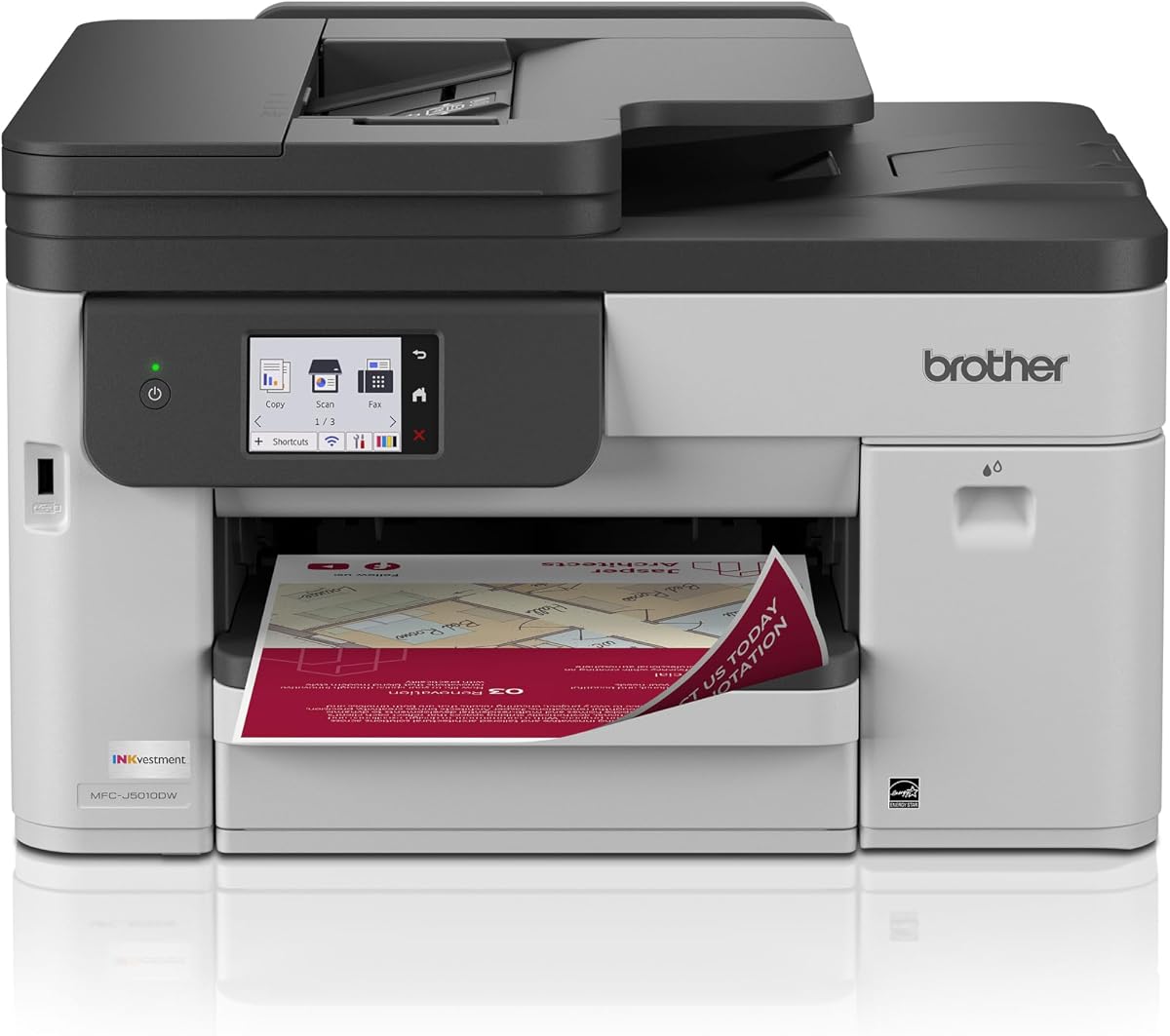
The Brother INKvestment 5010 is the most complete recommendation for someone who specifically wants double-sided scanning rather than merely automatic two-sided printing. It earns a 4.2 rating and combines a 50-page single-pass duplex ADF, flatbed scanning, color printing, copying, and faxing. Its 2.7-inch color touchscreen also gives it a more polished office workflow than many compact alternatives.
We may earn a commission when you buy through this link, at no additional cost to you.
The 50-page ADF is especially valuable for multi-page records because both sides of each sheet can be captured without manually turning pages. The machine also supports automatic duplex printing on paper up to 8.5 by 14 inches. A 250-sheet tray, output rated at up to 28 pages per minute in black and 26 pages per minute in color, and Brother's PerfectPrint Auto Detection System make it suitable for regular office documents, reports, and presentations.
Connectivity is versatile, with Wi-Fi Direct, wireless networking, Ethernet, USB, cloud applications, and the Brother Mobile Connect app. Those options make it easier to share the printer across computers or operate it from a mobile device. The trade-off is that this is an inkjet, so very large monochrome workloads may be better suited to a laser model. Inkjet output can also take longer to dry for immediate handling in some situations.
The INKvestment 5010 is best for a small business, home office, or shared workspace that needs genuine duplex scanning alongside color output. It is less compelling for a laser-only office focused exclusively on high-volume black documents, but for broad functionality it offers the strongest balance of confirmed features in this roundup.
The 50-page single-pass duplex ADF captures both sides of a document in one operation. That is a major productivity advantage over manual or basic reversing feeders, particularly when filing records, copying forms, or digitizing two-sided paperwork.
Wi-Fi Direct, network Wi-Fi, Ethernet, USB, cloud access, and the Brother Mobile Connect app cover both fixed and mobile workflows. The color touchscreen gives direct access to scanning and popular cloud services without requiring the user to navigate a computer for every task.
We may earn a commission when you buy through this link, at no additional cost to you.
The HP OfficeJet Pro 9125 is a strong office-focused choice with a 4.0 rating and confirmed auto two-sided scanning. It handles printing, scanning, copying, and faxing in one color inkjet, making it a versatile choice for people who need a complete document workflow rather than a basic printer with a flatbed scanner.
We may earn a commission when you buy through this link, at no additional cost to you.
Automatic two-sided printing and scanning are central to its appeal, while the automatic document feeder reduces the need to place every sheet on the scanner glass. It prints at up to 22 pages per minute in black and 18 pages per minute in color, and the 250-sheet input tray supports continuous office jobs. A 2.7-inch color touchscreen provides a phone-like interface for settings and job controls.
Dual-band Wi-Fi, the HP app, and HP AI-assisted page formatting make the printer convenient for web pages, email content, and mixed office documents. HP Wolf Pro Security adds network protection. One important limitation is that the printer is designed to work only with cartridges containing original HP chips or circuitry, and periodic firmware updates maintain those restrictions.
Choose the OfficeJet Pro 9125 when you want an approachable color all-in-one with confirmed duplex scanning, wireless access, fax, and a moderate paper capacity. It is particularly suitable for a home office or small business that values automatic document handling more than laser-level monochrome speed.
Confirmed automatic two-sided printing and scanning reduce manual intervention for common documents. The result is a more efficient routine for contracts, forms, presentations, and other materials that are printed or handled on both sides.
Dual-band Wi-Fi is designed to maintain reliable connections, while the HP app supports printing, scanning, copying, and faxing from a smartphone. HP AI formatting can help remove unwanted page content and improve the layout of web pages and emails.
We may earn a commission when you buy through this link, at no additional cost to you.
The Brother MFC-L2900DW is the premium pick for organizations that need a high-speed monochrome workflow with genuine double-sided scanning. Its 4.2 rating is supported by a professional feature set: a 50-page ADF, single-pass two-sided scanning, automatic duplex printing, and output speeds up to 36 pages per minute.
We may earn a commission when you buy through this link, at no additional cost to you.
A 3.5-inch color touchscreen is larger than the displays on many similarly compact business printers and makes on-device navigation more practical. The machine offers direct access to Google Drive, Dropbox, and OneNote, alongside dual-band wireless, Ethernet, USB, mobile printing, and scanning through Brother Mobile Connect. That range of connections supports a fixed office, a shared network, and mobile workflows.
The energy-efficient fuser design is stated to reduce electricity consumption by 22%, improve warm-up time from sleep, and support automatic duplex printing. These features matter for a business that leaves the printer available throughout the day but does not want it wasting energy unnecessarily. The main limitation is that the printer is designed for monochrome documents rather than color presentations, brochures, or photographs.
The MFC-L2900DW is the right recommendation for a busy small business, legal or administrative office, or high-volume home workspace that regularly scans two-sided records. Its combination of speed, a duplex ADF, touchscreen controls, and cloud access makes it a particularly complete monochrome system.
With print output reaching 36 pages per minute and a 50-page ADF, this model is suited to recurring batches of contracts, forms, reports, and internal documents. The fast monochrome engine is more appropriate for volume than most of the inkjet alternatives here.
Single-pass two-sided scanning improves document processing by reading both sides without manual page reversal. Direct touchscreen access to major cloud services shortens the route from a physical document to a stored digital file.
We may earn a commission when you buy through this link, at no additional cost to you.
The Canon PIXMA TR7120 is the best budget-oriented recommendation in the group, with a 4.2 rating and a versatile set of home and hybrid-work features. It supports color printing, copying, scanning, automatic two-sided printing, and a 250-sheet input tray, making it a capable all-in-one for everyday documents and photos.
We may earn a commission when you buy through this link, at no additional cost to you.
Its automatic duplex printing can reduce paper use and improve the appearance of multipage reports, while the auto document feeder helps with copying and scanning batches of pages. Dual-band Wi-Fi provides both 2.4GHz and 5GHz connectivity, and Canon PRINT, Apple AirPrint, and Mopria Print Service support convenient mobile printing. A 1.42-inch monochrome OLED display provides quick access to ink status and settings.
The critical distinction for this roundup is that the supplied information confirms duplex printing but does not explicitly confirm automatic double-sided ADF scanning. Users who need the scanner to capture both sides automatically should verify that detail with the manufacturer or retailer. The printer also uses a two-cartridge hybrid ink system rather than individual color tanks, which keeps the design simple but offers less granular ink management.
The TR7120 is an attractive option for a home office, hybrid worker, or student who needs automatic two-sided printing and a feeder without paying for a large business laser system. It is less suited to anyone whose primary requirement is explicitly confirmed double-sided scanning, but it remains a well-rounded budget all-in-one.
Automatic two-sided printing is valuable for reports, worksheets, notes, and other multipage documents. The 250-sheet input tray also reduces the frequency with which a busy home user needs to add plain paper.
The compact enclosure is designed to fit into a home workspace without eliminating wireless access or document-handling features. Canon PRINT, AirPrint, and Mopria support make it straightforward to print from compatible phones, tablets, and computers.
We may earn a commission when you buy through this link, at no additional cost to you.
The HP OfficeJet Pro 9135 stands out for office users who want double-sided scanning and abundant paper capacity. It has a 3.9 rating and includes automatic duplex printing, copying, faxing, an automatic document feeder, and a single-pass two-sided scanning function in a color inkjet all-in-one.
We may earn a commission when you buy through this link, at no additional cost to you.
Two 250-sheet input trays are among the most generous paper configurations in this list. They allow different media to remain loaded at the same time, reducing the need to swap paper when switching between regular documents and photo paper. The printer reaches up to 25 pages per minute in black and 20 pages per minute in color, placing it between the OfficeJet Pro 9125 and the faster monochrome laser models.
Its 4.3-inch color touchscreen is the largest display among the products reviewed. That makes on-device operation, job selection, and settings changes more approachable, especially for a shared machine. Dual-band Wi-Fi, HP app support, HP AI formatting, and HP Wolf Pro Security round out the digital workflow, while the enclosure uses more than 40 percent recycled plastic content.
As with the HP OfficeJet Pro 9125, this model is intended to work only with original HP chips or circuitry, and firmware updates maintain that compatibility system. The 3.9 rating is also lower than most products here, so the best approach is to consider the strong duplex and paper features alongside the experiences reflected in that rating. It is best for an office that values a large touchscreen and dual trays over maximum monochrome speed.
Each 250-sheet tray expands capacity and allows separate media configurations to remain ready. That is useful for offices that print a mix of standard documents, presentations, and photographs without repeatedly reloading the printer.
The single-pass duplex ADF handles two-sided document batches without manual page turning. At up to 25 pages per minute in black, the printer provides respectable output speed for a color office inkjet.
We may earn a commission when you buy through this link, at no additional cost to you.
The Brother DCP-L2640DW is a compact monochrome laser printer, scanner, and copier for offices that produce mostly black-and-white documents. Its 4.1 rating reflects a balanced combination of fast output, a 50-page ADF, flexible connectivity, and support for Brother Mobile Connect.
We may earn a commission when you buy through this link, at no additional cost to you.
Print speeds reach 36 pages per minute, while scan speeds are listed at up to 23.6 pages per minute in black and 7.9 pages per minute in color. The scanner is therefore capable of producing color scans even though the printer's output is monochrome. Dual-band wireless, Ethernet, and USB provide several ways to connect, while the Brother Mobile Connect app supports remote printing, scanning, management, and toner tracking.
Its primary limitation is that the supplied information does not explicitly identify the 50-page feeder as a double-sided or single-pass duplex ADF, even though the product title includes the word duplex. It also lacks a fax function and does not provide color printing. Buyers whose main goal is confirmed two-sided scanning should not infer that capability solely from the broad product description.
The DCP-L2640DW is a strong recommendation for a compact home office or small business focused on fast monochrome reports, records, and copies. It is particularly useful when a user needs scanning and mobile access but does not require color output, faxing, or the larger touchscreen interface of the MFC-L2900DW.
A 36-page-per-minute monochrome engine is well suited to internal reports, invoices, forms, and archival documents. Laser output also fits users who prefer a predictable monochrome workflow for routine office work.
The device combines a printer, scanner, and copier in a relatively compact footprint. Dual-band wireless, Ethernet, USB, and the Brother Mobile Connect app support both shared-office and mobile use.
We may earn a commission when you buy through this link, at no additional cost to you.
The Canon PIXMA TS6520 is a compact color all-in-one for users who want automatic duplex printing in a small workspace. It has a 4.2 rating and combines printing, scanning, and copying with a two-cartridge hybrid ink system, wireless connectivity, and a compact white enclosure.
We may earn a commission when you buy through this link, at no additional cost to you.
Automatic two-sided printing is confirmed and can reduce paper consumption for longer documents. The integrated flatbed scanner handles standard scanning and copying tasks, while the 1.42-inch monochrome OLED display shows ink levels, status, and basic settings. Dual-band Wi-Fi, Canon PRINT, Apple AirPrint, and Mopria Print Service provide convenient wireless and mobile printing options.
This printer is not the strongest choice for a heavy two-sided document workflow. Unlike several higher-ranked models, the supplied information does not mention an automatic document feeder, and it does not explicitly confirm double-sided scanning. A flatbed scanner is useful for one page at a time or for unusual originals, but it is less efficient for multi-page batches than a duplex ADF.
The TS6520 is best for a home user, student, or compact hybrid office that mainly needs reliable color documents, photos, ordinary scans, and automatic two-sided printing. Those who routinely digitize two-sided paperwork should consider a model with a confirmed duplex feeder instead.
The hybrid ink system is designed to produce sharp text and vivid color for documents, graphics, and photos. Its compact housing makes it suitable for desks and home offices where a larger office all-in-one would be inconvenient.
Setup is positioned for easy use from a smartphone or computer, while dual-band wireless supports stable network access. Canon PRINT, AirPrint, and Mopria give users several familiar ways to submit print jobs.
We may earn a commission when you buy through this link, at no additional cost to you.
The Epson EcoTank ET-4800 is built around high-volume, cartridge-free color printing rather than duplex document handling. It has a 3.8 rating, refillable high-capacity ink tanks, sharp text and photo output, and a built-in high-resolution flatbed scanner with a color display for copying and navigation.
We may earn a commission when you buy through this link, at no additional cost to you.
EcoFit ink bottles make the tanks straightforward to refill, while the cartridge-free system can reduce the recurring waste associated with replacing small individual cartridges. Epson's Micro Piezo Heat-Free printing technology is designed to deliver clear text and impressive color graphics across common paper types, making the printer useful for a mixture of schoolwork, household documents, and photos.
The supplied information does not confirm automatic duplex printing or double-sided scanning. The scanner is a flatbed, so multi-page two-sided digitization would not have the same convenience as a model with a duplex ADF. This makes the ET-4800 less aligned with the specific keyword than the top recommendations, even though its ink system may appeal to users who print frequently in color.
The ET-4800 is best for households, students, photographers, or small offices that value economical high-volume color output and dislike frequent cartridge changes. If double-sided scanning is a non-negotiable requirement, choose a model whose product information explicitly confirms a duplex feeder.
The high-capacity EcoTank design shifts ink replenishment from small cartridge replacements to larger EcoFit bottles. This model is well suited to users who produce enough color pages to make cartridge-free operation a meaningful convenience.
The integrated high-resolution scanner supports standard copying and scanning tasks, including unusual page sizes or fragile originals. Its capabilities are more suited to individual documents than to high-volume two-sided batches.
We may earn a commission when you buy through this link, at no additional cost to you.
The Epson EcoTank ET-4950 combines refillable high-capacity ink tanks with a genuinely productive office feature set. It has a 4.1 rating and supports wireless color printing, automatic duplex printing, copying, scanning, faxing, and a 50-page-class workflow through its automatic document feeder. The supplied information explicitly identifies automatic duplex printing and scanning.
We may earn a commission when you buy through this link, at no additional cost to you.
The 250-sheet paper tray, auto document feeder, and 2.4-inch color display give the printer the feel of a compact office system. It also has a 2.4-inch color display for straightforward navigation and supports mobile printing. Output is rated at up to 18 pages per minute in black and 9 pages per minute in color, so it is better suited to mixed office work than to exceptionally fast color production.
The EcoTank system includes enough ink for a stated high initial page yield, and keyed EcoFit bottles simplify refilling while helping prevent mix-ups. That approach reduces the need to manage tiny cartridges and can lower cartridge waste. The trade-off is a larger physical design and a system that may be unnecessary for someone printing only a small number of pages.
The ET-4950 is an attractive recommendation for color users who want automatic duplex handling without conventional cartridge management. It suits a home office, small business, or shared family workspace that prints reports and graphics regularly and also needs faxing. Among EcoTank models here, it is the stronger fit for double-sided work.
Automatic duplex printing and scanning reduce the effort involved with two-sided documents. The automatic document feeder further improves productivity by supporting multi-page batches without manual glass placement.
Large, keyed EcoFit refill bottles make replenishment simpler and reduce the frequency of cartridge replacements. The system is best suited to regular color printing where the initial high page yield can be put to work.
We may earn a commission when you buy through this link, at no additional cost to you.
The Canon PIXMA TR8620a is a versatile home-office all-in-one with printing, copying, scanning, faxing, an automatic document feeder, and automatic two-sided printing. Its 4.0 rating reflects a balanced feature set, while the distinctive voice-assisted ink monitoring gives it an appeal for compatible smart-home users.
We may earn a commission when you buy through this link, at no additional cost to you.
Paper capacity totals 200 sheets through a 100-sheet cassette and 100-sheet rear feed. Print speed is listed at 15 pages per minute in black and 10 pages per minute in color, which is adequate for regular documents but slower than the highest-speed models in the guide. A 1,000-page duty cycle and a one-year warranty are also stated in the supplied information.
Automatic two-sided printing is confirmed, but the product information does not explicitly state that the automatic document feeder performs single-pass double-sided scanning. This distinction remains important for buyers searching specifically for a double-sided scanner. The Alexa integration can notify the user when ink is running low and may support smart reorder actions, while AirPrint and Android compatibility broaden device access.
The TR8620a is best for a home office that wants automatic duplex printing, faxing, an ADF, photo printing, and voice-assisted supply monitoring in one device. For large offices or users whose primary requirement is verified double-sided scanning, one of the models with an explicitly duplex ADF is the more defensible choice.
Printing, copying, scanning, and faxing cover the essential functions of many home offices. The automatic document feeder supports batch handling, while automatic duplex printing improves multipage document efficiency.
Compatible Alexa functionality can alert the user when ink levels become low and may facilitate a smart reorder. This is particularly useful for households that prefer automated supply monitoring over periodically checking ink gauges.
We may earn a commission when you buy through this link, at no additional cost to you.
The most important decision is whether you need automatic double-sided scanning, automatic duplex printing, or both. Beyond that distinction, document volume, color needs, connectivity, paper capacity, and operating costs should guide the selection.
Double-sided scanning means the scanner captures the front and back of a document in one operation. This requires a duplex automatic document feeder, and ideally a single-pass design that reads both sides simultaneously without turning the pages. The Brother INKvestment 5010, Brother MFC-L2900DW, HP OfficeJet Pro 9125, HP OfficeJet Pro 9135, and Epson EcoTank ET-4950 have this capability explicitly identified in the supplied information. Automatic duplex printing is a separate feature and does not prove that the scanner can read both sides by itself.
Monochrome laser models are generally the most logical option for offices producing many black-and-white pages. The Brother MFC-L2900DW and DCP-L2640DW both reach up to 36 pages per minute, while their toner-based operation suits predictable, high-volume text output. Color inkjets provide more flexibility for photographs, graphics, brochures, and presentations, but they usually deliver lower color speeds. The Epson ET-4950 manages up to 18 pages per minute in black and 9 in color, making it more appropriate for mixed office tasks than high-volume production.
ADF capacity determines how many pages can be copied or scanned before the user must reload the tray. A 50-page feeder, found on the Brother INKvestment 5010, MFC-L2900DW, and DCP-L2640DW, is useful for recurring multi-page jobs. The HP OfficeJet Pro 9135 also emphasizes batch productivity with its single-pass duplex feeder and two large input trays. A flatbed scanner remains important for fragile, oversized, or unusual originals, but it requires more individual handling than an ADF.
Paper capacity affects how often a printer needs refilling during a busy day. The HP OfficeJet Pro 9135 has two 250-sheet input trays, while the Brother INKvestment 5010 and Canon TR7120 have 250-sheet trays. The Epson ET-4950 also provides a 250-sheet tray, and the Canon TR8620a uses a combined 200-sheet arrangement. Large trays are useful for offices, but a compact model may be more appropriate when desk space is limited.
A color printer is necessary for photographs, charts, marketing materials, and projects where color carries meaning. The Canon PIXMA TR7120, HP OfficeJet Pro 9125, HP OfficeJet Pro 9135, and Epson EcoTank ET-4950 combine color output with productive duplex features. Monochrome laser machines excel at text-heavy workflows and usually provide faster black output. A monochrome printer can also scan in color, but it cannot reproduce color in printed documents.
Most modern users benefit from both network and direct wireless access. Dual-band Wi-Fi appears on the HP OfficeJet Pro models, Canon PIXMA models, and several Brother devices, while Ethernet and USB support fixed office connections. A touchscreen can make an all-in-one easier to operate, particularly for scanning, copying, and cloud jobs. The Brother MFC-L2900DW has a 3.5-inch color display, the HP OfficeJet Pro 9135 has a 4.3-inch touchscreen, and the Canon PIXMA models use smaller 1.42-inch OLED displays.
The practical cost of a printer includes more than its purchase price. Cartridge inkjets may require more frequent replacements, especially for heavy color use, while EcoTank systems reduce the need for tiny cartridges through refillable tanks. Laser printers use toner cartridges, which fit high-volume monochrome workflows well but can be less economical for occasional color. Brother recommends its own genuine LC506 ink for the INKvestment 5010, and both HP OfficeJet Pro models are restricted to cartridges with original HP chips or circuitry.
A useful all-in-one may also need faxing, cloud access, mobile operation, security features, or specialized paper support. The Brother INKvestment 5010 combines scanning with cloud services and a 2.7-inch touchscreen. Both HP OfficeJet Pro models add fax, HP app controls, AI-assisted page formatting, and HP Wolf Pro Security. The MFC-L2900DW offers direct access to Google Drive, Dropbox, and OneNote. These extras can matter more than a minor specification difference for a busy office.
Begin by placing the printer on a level, stable surface with enough clearance around the paper trays and output area. Load the appropriate media, select the paper type in the printer or application settings, and install the specified genuine ink or toner before attempting a test page. For wireless models, complete the manufacturer's setup process through the app or touchscreen and confirm that the computer can see the printer over the intended network.
To use the duplex scanner, place the document face up in the ADF, align the guides, and select the appropriate duplex or two-sided option on the touchscreen or in the scanning application. Use the flatbed for fragile sheets, photographs, or pages that do not feed cleanly. Review the preview when available, select the destination or file format, and avoid touching originals while the feeder is moving.
For routine care, keep the scanner glass and white document guide clean, remove paper debris from the feeder, and use the correct paper type to reduce jams. Update the printer software and firmware as directed, especially for cartridge compatibility or security improvements. Replace ink, toner, and maintenance components with the supplies specified by the manufacturer, and leave the machine in a covered, dust-free location when it will remain idle.
Duplex printing places ink on both sides of a sheet, while double-sided scanning uses the ADF to capture both sides as digital images. A printer can offer one feature without the other, so confirm both functions separately. For this roundup, a model is only treated as having confirmed double-sided scanning when that capability appears in its supplied product information.
A single-pass duplex ADF reads the front and back of each sheet at the same time. It avoids the mechanical reversal used by some older feeders and is usually faster for multi-page two-sided documents. The Brother INKvestment 5010 and MFC-L2900DW, along with the HP OfficeJet Pro 9135, are identified as having single-pass or related single-pass duplex scanning.
Neither is universally better. Laser models generally offer faster monochrome output and are well suited to high-volume text, while inkjets provide more flexible color printing and photo handling. The best choice depends on document volume, color needs, operating costs, and whether the scanner has a confirmed duplex feeder.
A flatbed scanner can capture both sides, but the operator usually has to turn each sheet over and scan it again. A duplex ADF is much more convenient for multi-page documents because it handles both sides without manual intervention. You may also need to combine the two scans in software afterward when using a flatbed-only model.
The Canon PIXMA TR7120 offers a good balance of compact size, automatic duplex printing, a 250-sheet tray, an ADF, and dual-band wireless connectivity. If your priority is explicitly confirmed double-sided scanning rather than only duplex printing, the Brother INKvestment 5010 provides a more suitable combination of features.
A touchscreen is convenient but not essential. Most scanning functions can be initiated from a computer or mobile app, although a larger display makes job selection, destination settings, and cloud workflows easier. The Brother MFC-L2900DW and HP OfficeJet Pro 9135 offer particularly large touchscreens for this reason.
EcoTank models can suit offices that print frequently in color because refillable tanks reduce the need for small cartridge replacements. The Epson ET-4950 adds an automatic document feeder, duplex printing and scanning, a 250-sheet tray, and faxing. Users should still compare print speed and paper capacity with the demands of their workload.
Confirm that the automatic document feeder supports double-sided scanning, preferably in a single pass. Also check ADF capacity, output speed, color needs, paper tray size, connection methods, display quality, and the required ink or toner. Genuine supply restrictions are particularly important for the HP OfficeJet Pro 9125 and 9135, which require cartridges with original HP chips or circuitry.
The Brother INKvestment 5010 is the strongest all-around choice because it combines confirmed single-pass duplex scanning, automatic duplex printing, a 50-page ADF, color output, a 250-sheet tray, and a capable touchscreen. The Canon PIXMA TR7120 is the budget-focused alternative for users who mainly need automatic two-sided printing and a compact color all-in-one, while the Brother MFC-L2900DW is the premium monochrome option for high-volume offices.
Before buying, prioritize the feature that matches your actual workflow. Choose a confirmed duplex ADF for recurring two-sided document processing, a flatbed or automatic duplex printer for lighter use, monochrome laser for fast text-heavy output, and color inkjet for photos and presentations. Feeders, connectivity, paper capacity, display size, and genuine supply requirements can then narrow the field further.
Ratings, specifications, product availability, and prices can change over time, and retailer listings may contain different package contents or updated model information. Confirm the current product details, double-sided scanning function, and supply compatibility before placing an order so the chosen model fits your workspace and document routine.