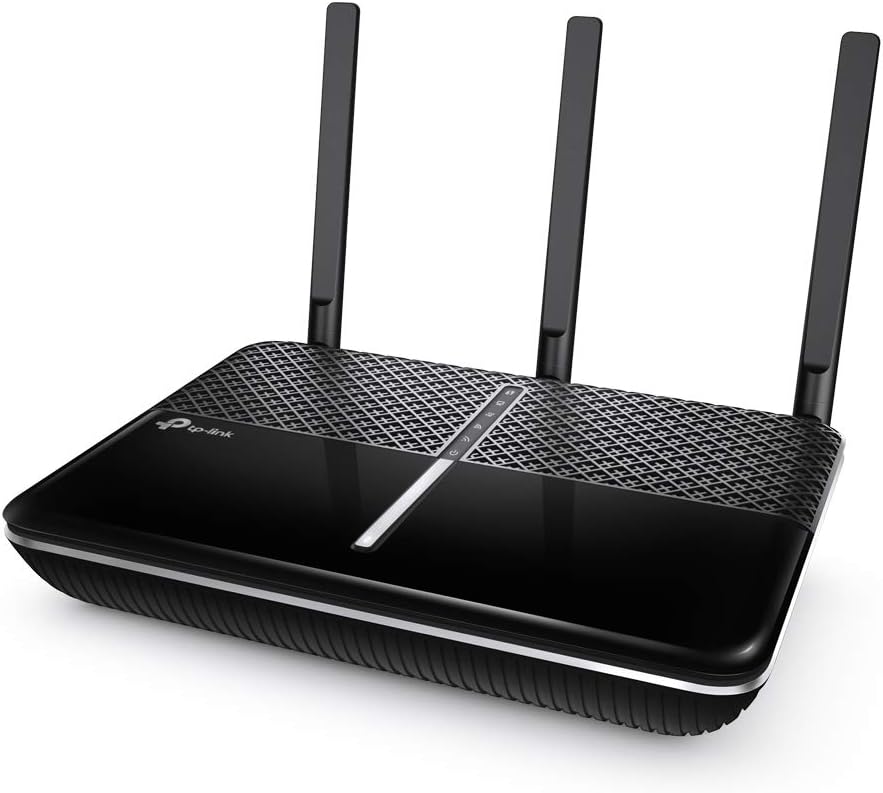
TP-Link Archer A10
4.5Editor score
1733 Mbps 5 GHz band
800 Mbps 2.4 GHz band
MU-MIMO and Smart Connect
Our AC2600 WiFi Router guide compares ten routers for speed, range, features, device capacity, and value, helping you choose the right model with confidence.
An AC2600 WiFi Router combines dual-band wireless performance with a practical balance of speed, coverage, and affordability. A good model should handle everyday streaming, gaming, video calls, and smart-home connections while providing reliable Gigabit Ethernet and manageable security settings for the whole household.
This guide compares ten routers based on the supplied specifications, including wireless bands, processor capabilities, MU-MIMO support, coverage claims, wired ports, advanced features, and customer ratings. The list includes four explicitly AC2600-class models as well as newer WiFi 6, WiFi 6E, and WiFi 7 alternatives that can be more appropriate for modern homes.
Each recommendation highlights the product's most useful strengths, along with limitations that may matter to particular buyers. The first three entries receive the Best Budget, Editor's Choice, and Best Premium distinctions, while the remaining reviews provide a deeper look at the full field. Product availability and pricing change over time.
4.5Editor score

4.3Editor score
4.4Editor score
This side-by-side comparison highlights the principal differences in wireless generation, theoretical throughput, coverage, processor design, and wired connectivity. It includes traditional AC2600 routers alongside newer standards for buyers who want stronger future-facing performance.


The TP-Link Archer A10 is a dual-band AC2600 router rated 4.5 out of 5, making it the strongest budget-oriented recommendation in this guide. Its headline performance is 1733 Mbps on the 5 GHz band and 800 Mbps on 2.4 GHz, while MU-MIMO, Smart Connect, and Airtime Fairness help the network serve multiple users more efficiently.
We may earn a commission when you buy through this link, at no additional cost to you.
Coverage is supported by three external antennas and one internal antenna, with beamforming intended to focus the wireless signal toward connected clients. This configuration is particularly useful in homes where several rooms share a single access point. Gigabit Ethernet provides a fast wired path for computers, televisions, and game consoles, while a VPN server allows supported remote access to the home network.
The main limitation is that the Archer A10 uses WiFi 5 and offers only two bands. It cannot match the 6 GHz capacity or newer efficiency of the Archer AXE75, and it will not gain the benefits of WiFi 6, WiFi 6E, or WiFi 7. However, those newer technologies are not required for every household, especially when the goal is dependable dual-band performance without a premium feature set.
This is the most broadly sensible choice for buyers searching specifically for an AC2600 router on a budget. It combines a strong customer rating, four-stream MU-MIMO, beamforming, Smart Connect, and remote access in a straightforward package. Households with compatible newer clients and an interest in future expansion should compare it with the AXE75 instead.
The 1733 Mbps 5 GHz band is well suited to high-demand devices such as laptops, smart televisions, and game consoles, while the 800 Mbps 2.4 GHz band can handle phones, speakers, and routine browsing. Smart Connect helps distribute clients between the two bands without requiring manual configuration for every device.
The Tether app and phone interface are designed to streamline initial setup and ongoing adjustments. The router also supports an open or PPTP VPN server, giving compatible users a way to reach home-network resources remotely.
We may earn a commission when you buy through this link, at no additional cost to you.
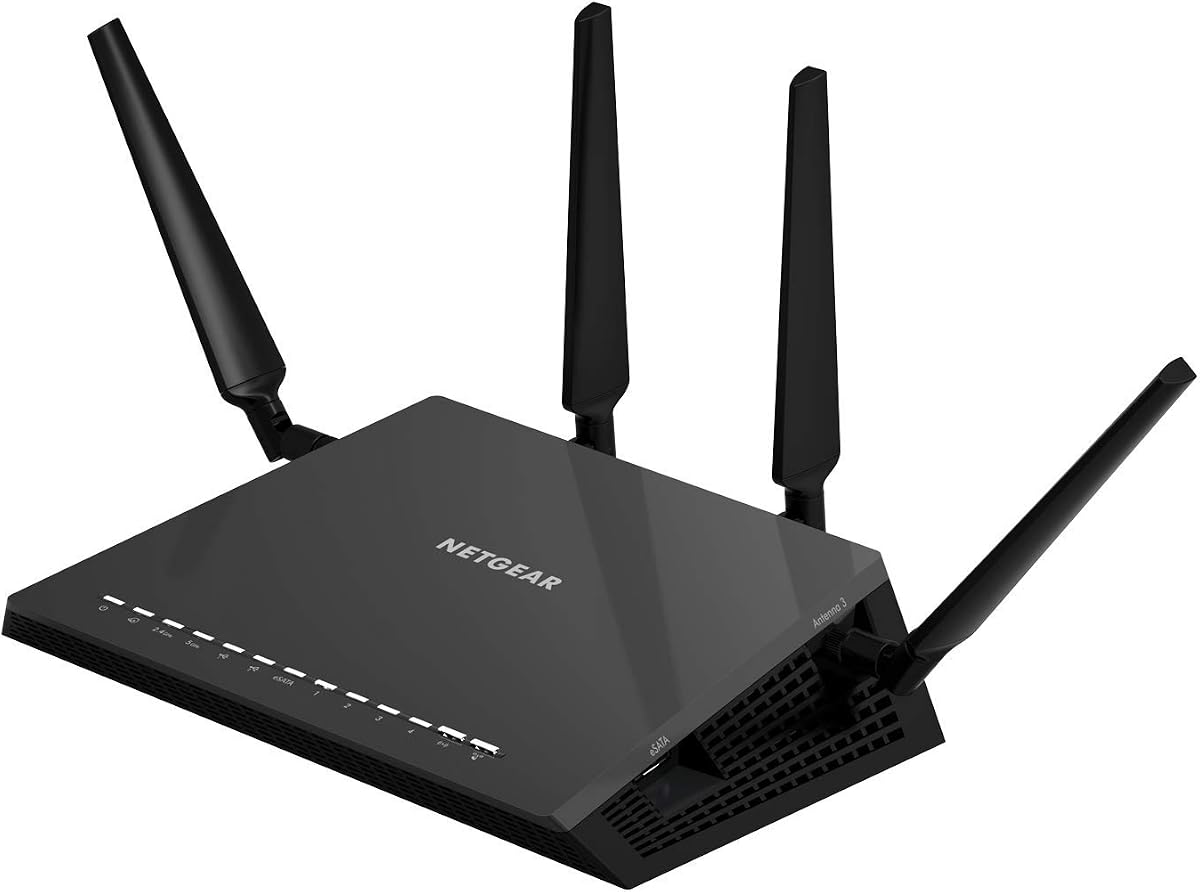
The NETGEAR Nighthawk X4S R7800 carries a 4.4 rating and is the premium traditional AC2600 choice in this roundup. Its four-stream 4×4 configuration on both the 2.4 GHz and 5 GHz bands distinguishes it from many routers that use fewer spatial streams. The result is a router aimed at busy homes with a substantial collection of connected clients.
We may earn a commission when you buy through this link, at no additional cost to you.
NETGEAR recommends the R7800 for up to 45 devices across as much as 2500 square feet. A 1.7 GHz dual-core processor supports the networking workload, while beamforming, MU-MIMO, and Dynamic QoS help manage simultaneous activity. Four Gigabit Ethernet ports accommodate computers, consoles, streaming players, and other wired devices without reducing the stated wireless capacity.
Its distinguishing premium feature is external storage connectivity. The two USB 3.0 ports and one eSATA port can be used to share a storage drive or printer, while the supplied information also describes personal cloud storage for remote access. That makes the R7800 useful for buyers who want more than a basic access point, although it remains an older WiFi 5 design.
Choose the R7800 when high device count, strong radio hardware, and wired peripheral sharing matter more than access to the newest wireless band. It is less compelling for buyers who want WiFi 6E or WiFi 7 and can accept fewer USB features, but within the AC2600 category its combination of processing, connectivity, and stated capacity makes it the most feature-rich option here.
Four antennas and 4×4 operation on both bands provide more transmit and receive paths than a conventional three-stream AC2600 router. That design is particularly relevant when phones, televisions, computers, speakers, and other smart-home products are expected to be active at the same time.
Four Gigabit Ethernet ports make it easy to preserve wired performance for stationary devices. USB 3.0 and eSATA expand the router beyond basic networking by allowing compatible storage devices and printers to be shared across the local network.
We may earn a commission when you buy through this link, at no additional cost to you.
The D-Link DIR-2640 is an AC2600 dual-band router with a 4.1 rating. It combines 1733 Mbps-class 5 GHz performance with an 800 Mbps 2.4 GHz band, while MU-MIMO and Smart Connect help the network accommodate multiple devices. Its defining feature is mesh support, which gives buyers a potential route to expanding coverage later.
We may earn a commission when you buy through this link, at no additional cost to you.
A dual-core processor supports wireless and wired activity, and four Gigabit Ethernet ports provide connections for Android boxes, smart televisions, game consoles, and computers. Enhanced parental controls allow users to create individual profiles, assign devices to them, and control when and how those devices access the internet. Setup and management are handled through the D-Link WiFi app for Android and iOS.
The DIR-2640 does not stand out as strongly as the R7800 for high-end processing, external ports, or stated device capacity. Its 4.1 rating is also lower than those of the three leading picks, and the available specifications provide fewer details about antenna arrangement and advanced traffic-management tools. Those factors make it more of a practical middle ground than a performance leader.
This router is a sensible target for a household that values straightforward app management, parental profiles, and the option to create a mesh network without starting with a full multi-unit system. Buy it when a balanced AC2600 design and expansion potential are more important than cutting-edge wireless standards.
The mesh designation makes the DIR-2640 more flexible than a standalone router for buyers who may later need to address dead zones. Users should confirm compatibility and setup requirements for additional mesh equipment before planning an expanded system.
Profile-based parental controls can organize access by household member or shared device. This is useful for separating children's schedules, entertainment systems, and everyday browsing without maintaining completely separate configurations for every device.
We may earn a commission when you buy through this link, at no additional cost to you.
The NETGEAR Nighthawk R7450 has a 4.3 rating and provides the familiar AC2600 combination of 800 Mbps on 2.4 GHz and 1733 Mbps on 5 GHz. It is designed for buyers who want recognized performance features without moving to a newer wireless standard, and its MU-MIMO support allows data to stream to several devices simultaneously.
We may earn a commission when you buy through this link, at no additional cost to you.
Advanced QoS is a notable addition because it can prioritize demanding traffic for activities such as gaming and streaming. A dual-core processor is intended to improve wireless, wired, and WAN-to-LAN performance, while three amplifiers and external antennas support range. These features focus on maintaining service quality when a home network becomes busy.
Compared with the R7800, the R7450 has a more compact feature proposition. The supplied information does not list four-stream radios, a large device recommendation, USB storage support, or eSATA. It also remains on WiFi 5, so users with recent laptops and phones may receive more benefit from a WiFi 6 router in the same general buying context.
The R7450 is a good match for gamers, streamers, and families that prioritize traffic management in a conventional AC2600 router. It offers a strong 4.3 rating and useful processing hardware without adding the more specialized storage features of the R7800. Those wanting newer standards and more expandable capacity should look toward the AXE75 or RS90.
Advanced QoS can direct attention toward latency-sensitive or bandwidth-intensive applications. This makes the R7450 appealing for a home where gaming, streaming, and routine browsing occur at the same time and the router needs to manage congestion intelligently.
Three amplifiers and external antennas help strengthen the router's reach through a home. Although this is not a mesh system, those components can improve the experience in layouts where one central access point is expected to serve multiple rooms.
We may earn a commission when you buy through this link, at no additional cost to you.
The ASUS Blue Cave is an AC2600 dual-band Gigabit router with a 3.9 rating. It uses Intel WiFi technology and 802.11ac 4×4 technology, targeting homes that want strong combined throughput along with an unusually security-focused management environment. Maximum listed wireless performance reaches 2600 Mbps across the two bands.
We may earn a commission when you buy through this link, at no additional cost to you.
AiProtection, powered by Trend Micro, is the most notable differentiator. The supplied description says it blocks external threats and helps protect connected devices, while advanced parental controls allow users to view, manage, and schedule family internet and app use from a mobile device. The router also supports Alexa integration and is compatible with the ASUS router app and AiMesh ecosystem.
Its main drawback is the lower customer rating compared with the other models. It also falls behind newer alternatives on standard generation and lacks a stated high device-capacity recommendation. MU-MIMO is present, but compatible client devices are required, so its real-world benefit depends on the phones, laptops, and other equipment used in the home.
Buy the Blue Cave when network protection, parental scheduling, and future mesh expansion are priorities. It is not the strongest choice for a household seeking the highest possible multi-device throughput, but its security tools and Intel-based radio design provide a distinct reason to consider it among dual-band AC2600 routers.
AiProtection gives the Blue Cave a clear advantage for buyers who place a high value on network-level threat blocking. Its parental controls add another layer of household management, allowing usage policies to be reviewed and scheduled through a mobile device.
AiMesh compatibility means the router can participate in a broader mesh arrangement when suitable ASUS mesh equipment is added. This makes it useful for buyers who want a capable central router now but may need additional access points for a larger or more complex home later.
We may earn a commission when you buy through this link, at no additional cost to you.
The TP-Link Archer AXE75 is this roundup's Editor's Choice and a particularly compelling answer for anyone beginning an AC2600 router search in November 2026. Although it is not limited to the older AC2600 class, its tri-band WiFi 6E platform provides a newer and potentially more flexible foundation than a conventional dual-band model.
We may earn a commission when you buy through this link, at no additional cost to you.
The router combines 2402 Mbps on 6 GHz, 2402 Mbps on 5 GHz, and 574 Mbps on 2.4 GHz for up to 5400 Mbps aggregate throughput. True tri-band operation and OFDMA increase simultaneous transmission capacity, while a 1.0 GHz dual-core processor and 512 MB of memory support demanding multi-device networks. These specifications are a substantial step beyond the maximum 2600 Mbps offered by the traditional models in this list.
EasyMesh compatibility allows additional compatible routers, extenders, or wireless powerline adapters to be added for wider coverage. TP-Link HomeShield supplies network security, IoT device identification, parental controls, quality of service, and reporting, with a set of features available without a subscription. The Archer AXE75 also supports VPN server and client functions using OpenVPN, PPTP, and L2TP.
This is the recommendation for users with compatible WiFi 6E devices who want more headroom than an AC2600 router can provide. It is also a strong choice for future-proofing because the 6 GHz band can reduce congestion and offer more available channels. The principal limitation is that older clients cannot use the 6 GHz band, so the full benefit depends on the devices in the home.
The dedicated 6 GHz spectrum gives compatible devices access to additional bandwidth with less competition from the crowded 2.4 GHz and 5 GHz bands. That separation can improve responsiveness for modern phones, laptops, and other WiFi 6E clients, although legacy equipment will continue to use the older bands.
OFDMA, true tri-band operation, 512 MB of memory, and a dual-core processor are designed to handle many simultaneous clients more efficiently. The platform is therefore a better long-term fit for households adding cameras, displays, speakers, appliances, and frequent video calls than a basic dual-band router.
EasyMesh compatibility creates a straightforward path for addressing dead zones with additional compatible equipment. The router can be the starting point for a broader mesh system without committing to an entire multi-router ecosystem on the first day.
We may earn a commission when you buy through this link, at no additional cost to you.
The NETGEAR Nighthawk RS90 is a dual-band WiFi 7 router with a 4.3 rating and up to 3.6 Gbps aggregate wireless throughput. It is designed to manage streaming, calls, games, and smart-home equipment in busy homes, with a stated recommendation for up to 50 devices across as much as 2000 square feet.
We may earn a commission when you buy through this link, at no additional cost to you.
MU-MIMO and OFDMA allow multiple devices to send and receive data at the same time. A particularly useful wired feature is the 2.5 Gig WAN port, which can take advantage of compatible multi-gig internet plans. Four 1 Gig Ethernet LAN ports serve computers, televisions, game consoles, and storage devices. The router pairs with an existing modem or gateway over Ethernet and does not require coax.
The Nighthawk app provides guided setup, WiFi management, speed tests, device pausing, and guest-network controls. Security features are enabled out of the box, with automatic firmware updates and Advanced Router Protection. NETGEAR Armor is offered through a separate trial and subscription, so buyers should distinguish between the included protections and optional paid service.
Choose the RS90 when a current WiFi 7 device, a multi-gig plan, or a large collection of connected clients is central to the buying decision. It offers more current technology than an AC2600 model, but older equipment will not gain WiFi 7 benefits. The trade-off is future-facing performance rather than maximum compatibility with every legacy feature.
The 2.5 Gig WAN port is the standout wired feature for households with a compatible high-speed internet service. It provides a direct path for a modem or gateway connection while the four Gigabit LAN ports continue to support conventional wired devices.
MU-MIMO and OFDMA are particularly relevant to the RS90's stated support for up to 50 devices. These technologies allow wireless resources to be shared among multiple clients more efficiently than older approaches when many devices are active.
We may earn a commission when you buy through this link, at no additional cost to you.
The NETGEAR R6700AX is a dual-band WiFi 6 router rated 4.2 out of 5. It combines up to 1.8 Gbps across 2.4 GHz and 5 GHz, with a stated coverage target of 1500 square feet and support for up to 20 connected devices. That makes it a practical option for apartments, smaller homes, and buyers who want newer efficiency without a tri-band design.
We may earn a commission when you buy through this link, at no additional cost to you.
WiFi 6 is backward compatible with WiFi 5 and earlier equipment, so users do not need to replace every connected device. MU-MIMO and OFDMA improve simultaneous communication, while four Gigabit Ethernet LAN ports provide wired connections and a separate Gigabit WAN port connects the router to a modem or gateway. The Nighthawk app handles setup, speed tests, pausing, and guest networks.
WPA3 encryption, automatic firmware updates, and a guest network are enabled as part of the security approach. Unlike some premium router ecosystems, the core protections do not require a subscription. NETGEAR Armor is available as a separate trial and subscription, which should be evaluated independently from the router's standard security features.
The R6700AX is best for buyers who want a current wireless standard in a relatively simple dual-band package. It may not provide enough aggregate capacity for a very busy household seeking WiFi 6E or WiFi 7, and walls and interference can reduce its stated range. Even so, it offers a modern and balanced alternative to an aging AC2600 router.
WiFi 6 improves efficiency in crowded wireless environments while remaining compatible with existing WiFi 5 clients. For an apartment or small home with around 20 connected devices, the R6700AX offers a sensible blend of current technology and manageable coverage.
WPA3, automatic firmware updates, and a guest network provide a solid baseline without requiring a paid service. Optional NETGEAR Armor can be considered separately for users who want additional subscription-based protection.
We may earn a commission when you buy through this link, at no additional cost to you.
The NETGEAR Nighthawk Pro Gaming XR500 is a renewed AC2600 router rated 4.3 out of 5. It is tailored to competitive gaming through advanced Quality of Service, geo-filtering, four Gigabit Ethernet ports, and a 1.7 GHz dual-core processor. The stated wireless speed reaches 2.6 Gbps across the dual bands.
We may earn a commission when you buy through this link, at no additional cost to you.
Its gaming-oriented QoS can place selected traffic in a dedicated lane, helping it avoid congestion and reducing lag spikes and jitter. Geo-filtering is intended to connect users with closer servers and players, which can lower network travel time. The four wired ports allow a game console or gaming computer to use a direct Gigabit Ethernet connection.
The renewed status is the most important qualification. Buyers should review the condition, included accessories, warranty information, and return terms carefully. It also uses WiFi 5 and does not offer a 6 GHz band, so it is not the strongest option for households whose priority is access to the latest client standards.
This router is most appropriate for a gamer who values traffic control and wired connectivity over the newest wireless generation. Its AC2600 performance, dedicated gaming features, and four-port design remain meaningful in the right setup. For a general household or a buyer seeking a long-term platform, the Archer AXE75 or R6700AX may be easier to justify.
Advanced QoS isolates selected gaming activity from other congestion, aiming to reduce spikes, jumps, and jitter. This gives the XR500 a clear purpose for competitive users whose sessions are sensitive to variations in latency.
Geo-filtering can help users connect with nearby game servers and players. Four Gigabit Ethernet ports also give desktop systems and consoles a fast wired option, which can be more consistent than relying entirely on a crowded wireless channel.
We may earn a commission when you buy through this link, at no additional cost to you.
The TP-Link Archer C2600 is a classic dual-band AC2600 router with a 3.8 rating. Its four-stream WiFi configuration and MU-MIMO support are designed to improve performance for multiple users, while the 1.4 GHz dual-core processor helps the router manage traffic during busy periods.
We may earn a commission when you buy through this link, at no additional cost to you.
Four dual-band antennas with high-power amplifiers are intended to strengthen the wireless signal, and beamforming directs a more focused signal toward individual clients. The router includes four Gigabit Ethernet ports for high-speed wired connections, along with parental controls and time limits for family management.
Its older WiFi 5 platform and lower rating place it behind the other traditional AC2600 choices in this guide. The available specification does not mention Smart Connect, advanced QoS, mesh support, USB storage, or the 6 GHz band. It therefore offers a direct and familiar feature set, but fewer options for expansion or fine-grained traffic management.
The Archer C2600 is best for buyers who specifically want a four-stream dual-band router with MU-MIMO, beamforming, and several wired ports. It can be a functional choice for a moderately busy home, but the lower rating and limited future-facing features make it more compelling as a straightforward AC2600 purchase than as the strongest long-term router recommendation.
MU-MIMO allows the router to communicate with multiple clients simultaneously, while the four-stream radios provide additional transmission and reception paths. Together, these features are intended to preserve performance as more household devices connect.
Four amplified dual-band antennas and beamforming work together to improve reach and signal direction. Parental controls add scheduling options, making the router suitable for homes where internet access needs to be organized for younger users.
We may earn a commission when you buy through this link, at no additional cost to you.
Choosing an AC2600 router involves balancing the wireless standard, radio configuration, home size, device count, wired requirements, and management features. The label describes a class of performance, but the details determine how well a particular model will work in your environment.
Traditional AC2600 routers use dual-band WiFi 5, usually combining an 800 Mbps 2.4 GHz band with a 1733 Mbps 5 GHz band. That remains useful for many homes, but newer routers can provide better efficiency and additional capacity. The Archer AXE75 adds a 6 GHz band through WiFi 6E, while the Nighthawk RS90 uses WiFi 7 across dual bands. Choose a newer standard when several compatible modern devices share the network.
Antenna count, amplifiers, beamforming, and internal radio design all influence coverage, but room layout matters just as much. Walls, floors, appliances, and neighboring networks can reduce the stated range. A model with a 2500-square-foot claim may work well in an open layout and struggle in a compact home with several masonry barriers. Mesh support in the DIR-2640 and Blue Cave, or EasyMesh support in the AXE75, can provide a path to wider coverage.
The number of devices matters less by itself than how often they communicate and what they demand. A family streaming in 4K, joining video calls, playing games, and operating cameras needs more network capacity and efficient scheduling than a home with a few laptops and phones. MU-MIMO, OFDMA, Smart Connect, QoS, Airtime Fairness, and a capable processor can all help. The R7800 is recommended for 45 devices, the RS90 for 50, and the R6700AX for 20.
A dual-core processor provides a useful indication that the router is designed to handle more than basic forwarding. The R7800 and XR500 use a 1.7 GHz dual-core processor, the DIR-2640 has a dual-core design, and the Archer C2600 uses a 1.4 GHz dual-core processor. The AXE75 combines a 1.0 GHz dual-core CPU with 512 MB of memory, a combination designed for its more advanced tri-band platform. Processor speed should be considered alongside radio design, not as a substitute for it.
Four Gigabit Ethernet ports are common among the strongest choices, allowing desktop computers, game consoles, smart televisions, and streaming devices to bypass WiFi. The RS90 adds a 2.5 Gig WAN port for compatible multi-gig service. The R7800 goes further with two USB 3.0 ports and an eSATA port for sharing printers and storage or creating personal cloud storage. Check the specific port mix rather than assuming every Gigabit router offers the same wired flexibility.
A good router should make basic protection easy to enable. The Blue Cave emphasizes AiProtection and Trend Micro-powered threat blocking, the R6700AX includes WPA3, automatic firmware updates, and a guest network without requiring a subscription for those core features, and the AXE75 includes HomeShield tools such as security scans, IoT identification, parental controls, and reports. Optional services such as NETGEAR Armor should be considered separately from protections included with the hardware.
App-based setup is standard across most of this field, with TP-Link Tether, D-Link WiFi, ASUS Router, and NETGEAR Nighthawk all offering mobile management. The best interface is one that makes routine changes easy without burying important controls. Consider mesh or extender compatibility for dead zones, VPN support for remote access, and the availability of automatic updates. Also review how a manufacturer handles security, subscriptions, and long-term firmware support.
Begin by positioning the router in a central, open location rather than beside a television, inside a cabinet, or at the end of an internet connection. Connect the modem or gateway to the router's WAN or Internet port and connect a computer by Ethernet if possible. Use the manufacturer's app or web interface to complete the initial setup, update the firmware, set a strong administrator password, and create separate names for the 2.4 GHz and 5 GHz networks if you want manual control over band selection.
After the network is online, configure the wireless security mode, enable the guest network, and set parental controls or device schedules according to your household's needs. Use Smart Connect, QoS, MU-MIMO, or OFDMA where available, but avoid unnecessary changes that make troubleshooting difficult. A short internet speed test can help determine whether the connection is limited by the service, the router, WiFi conditions, or the client device.
Care for the router by keeping it ventilated and away from direct heat, dust, and crowded cable connections. Check for firmware updates periodically, review connected devices, and replace default credentials if they are ever exposed. When expanding coverage, use compatible mesh equipment or access points and place each additional unit where it can receive a strong signal. If problems develop, restart the modem and router, then reconnect one device at a time before resetting the network.
An AC2600 router remains capable of handling everyday browsing, HD and 4K streaming, video calls, online gaming, and many smart-home devices. Its dual-band maximum of roughly 2600 Mbps is a combined theoretical figure, so real speeds depend on the internet plan, client devices, distance, and interference. A WiFi 6, WiFi 6E, or WiFi 7 model is generally more future-facing, particularly when many newer devices use the network simultaneously.
The 2.4 GHz band generally travels farther and passes through walls more effectively, making it useful for smart-home devices and coverage in distant rooms. The 5 GHz band offers greater bandwidth and is usually better for high-speed streaming, gaming, video calls, and large downloads, although its shorter range makes it more affected by walls and congestion. Smart Connect can assign devices automatically, while manual band control gives experienced users more control.
MU-MIMO is highly useful in a busy home because it allows a router to communicate with multiple wireless clients simultaneously instead of servicing many devices one at a time. It can improve efficiency and reduce the impact of concurrent traffic when supported clients are present. The DIR-2640, R7450, Blue Cave, and Archer C2600 include MU-MIMO, although the Blue Cave requires compatible client devices for the stated benefit.
A newer router is generally better when most of your active devices support WiFi 6E or WiFi 7. The Archer AXE75 adds a dedicated 6 GHz band, improved multi-device efficiency, and EasyMesh expansion, while the RS90 provides WiFi 7 and a 2.5 Gig WAN port. An AC2600 router can still be perfectly serviceable, particularly with older clients or when the main goal is a straightforward dual-band network.
There is no single universal limit because traffic intensity matters as much as device count. The R7800 is specifically recommended for up to 45 devices, while the R6700AX is listed for up to 20 connected devices in a smaller-home profile. Lightweight sensors may coexist more easily than multiple devices streaming video, making MU-MIMO, processor capacity, and band congestion important considerations.
USB ports are useful if you want to share a printer or storage drive across the network, access files from connected devices, or create a personal cloud. The R7800 is the standout in this group with two USB 3.0 ports and one eSATA port. If you only need basic internet service and have no shared-storage plans, a router without those ports may be a simpler choice.
A mesh system or additional access points can help when walls, floors, or the router's location leave poorly covered rooms. The Archer AXE75, DIR-2640, and ASUS Blue Cave support mesh-oriented expansion, although compatibility and configuration requirements should be confirmed before purchase. For smaller homes, a well-positioned dual-band router with four amplified antennas may provide sufficient coverage without extra equipment.
Place the router in an open central location, connect the modem through the WAN port, and update its firmware before making extensive configuration changes. Use a secure WiFi password, enable WPA3 or the strongest compatible security option, and create a separate guest network for visitors. Keep 5 GHz clients on the faster band and 2.4 GHz devices on the longer-range band, or let Smart Connect handle the assignment.
The TP-Link Archer A10 is the strongest value-focused AC2600 pick, combining a 4.5 rating with 2600 Mbps of dual-band throughput, MU-MIMO, beamforming, Smart Connect, and VPN support. The NETGEAR R7800 is the premium traditional option because of its four-stream radios, recommended capacity for 45 devices, four Gigabit Ethernet ports, and USB 3.0 and eSATA connectivity.
The TP-Link Archer AXE75 stands out as the overall modern choice, adding tri-band WiFi 6E, 6 GHz capacity, strong processing hardware, OFDMA, and EasyMesh expansion. When choosing for your home, prioritize the standard supported by your clients, the number of active devices, the physical layout, and the wired features you genuinely need rather than selecting solely from a maximum speed number.
Before making a final purchase, confirm the router's compatibility with your modem, internet service, and planned accessories. Review current product availability, warranty terms, security features, and pricing at the time of purchase, since both prices and manufacturer offers can change. The right AC2600-class router is the one that provides stable service for your devices and room layout without paying for capabilities you will never use.