
Bingfu 3dBi Dual-Band Pair
4.6Editor score
Two RP-SMA antennas
2.4GHz and 5GHz support
Broad device compatibility
Discover the best Antenna for Router options in this expert guide comparing bands, gain, connectors, outdoor durability, placement, and Wi-Fi 6E support.
A router antenna can materially affect wireless range, stability, and connection quality, especially when internal antennas are poorly positioned or obstructed. The right replacement depends on supported frequency bands, connector type, antenna gain, intended environment, and whether the device operates as a router, access point, camera, or mobile hotspot.
This guide compares ten antennas using their stated specifications, supported applications, connector designs, mounting options, and customer ratings. It covers indoor and outdoor models, dual-band and tri-band options, Wi-Fi 6E antennas, router-replacement antennas, camera accessories, and a purpose-built NETGEAR mobile hotspot upgrade.
Each review explains the product's strongest use case and important limitations. The top picks include the Eifagur outdoor antenna for strong range, the compact Bingfu dual-band pair for value, and the Eightwood dual-band model for flexible placement. Product prices can change, so check the latest listing before purchasing.
4.6Editor score

4.7Editor score

4.5Editor score
The table below compares all ten antennas across their most important distinctions, including radio bands, gain, connector style, and practical placement or environmental features.


The Bingfu Dual-Band 3dBi Pair is a compact and economical way to add or replace external router antennas. It holds a 4.6 customer rating and stands out for a two-pack configuration, omnidirectional 3dBi elements, and support for 2.4GHz plus 5GHz or 5.8GHz frequencies. It also supports Bluetooth-oriented use cases.
We may earn a commission when you buy through this link, at no additional cost to you.
Its broad compatibility is the main advantage. The listed applications include wireless routers, access points, hotspots, modems, USB adapters, desktop and laptop network cards, Mini PCI Express cards, security cameras, DVR recorders, backup cameras, and wireless extenders. The two-pack can suit a router with multiple antenna positions or provide a spare for another compatible device.
The primary trade-off is its modest 3dBi gain. It is not presented as an outdoor long-range solution, and the fixed RP-SMA male connectors do not provide the placement freedom of a long extension cable. Buyers must also distinguish RP-SMA male from the similarly named SMA male connector; the product specification explicitly notes that its connector has a center hole and no pin.
This is a sensible choice for replacing a missing router antenna, improving a desktop or USB adapter's reception, or creating a matched pair for a compatible multi-antenna system. Check the existing connector threads and center-pin arrangement before ordering, and confirm that the device accepts removable external antennas.
Two antennas provide a practical advantage for equipment designed to use multiple external elements. A matched pair can support MIMO behavior when both units are installed and positioned correctly, although the router's own antenna configuration remains decisive.
The listed device range extends well beyond networking routers to cameras, surveillance recorders, vehicle camera systems, FPV equipment, and wireless video accessories. That makes the pair a flexible option for compatible electronics throughout the home.
We may earn a commission when you buy through this link, at no additional cost to you.
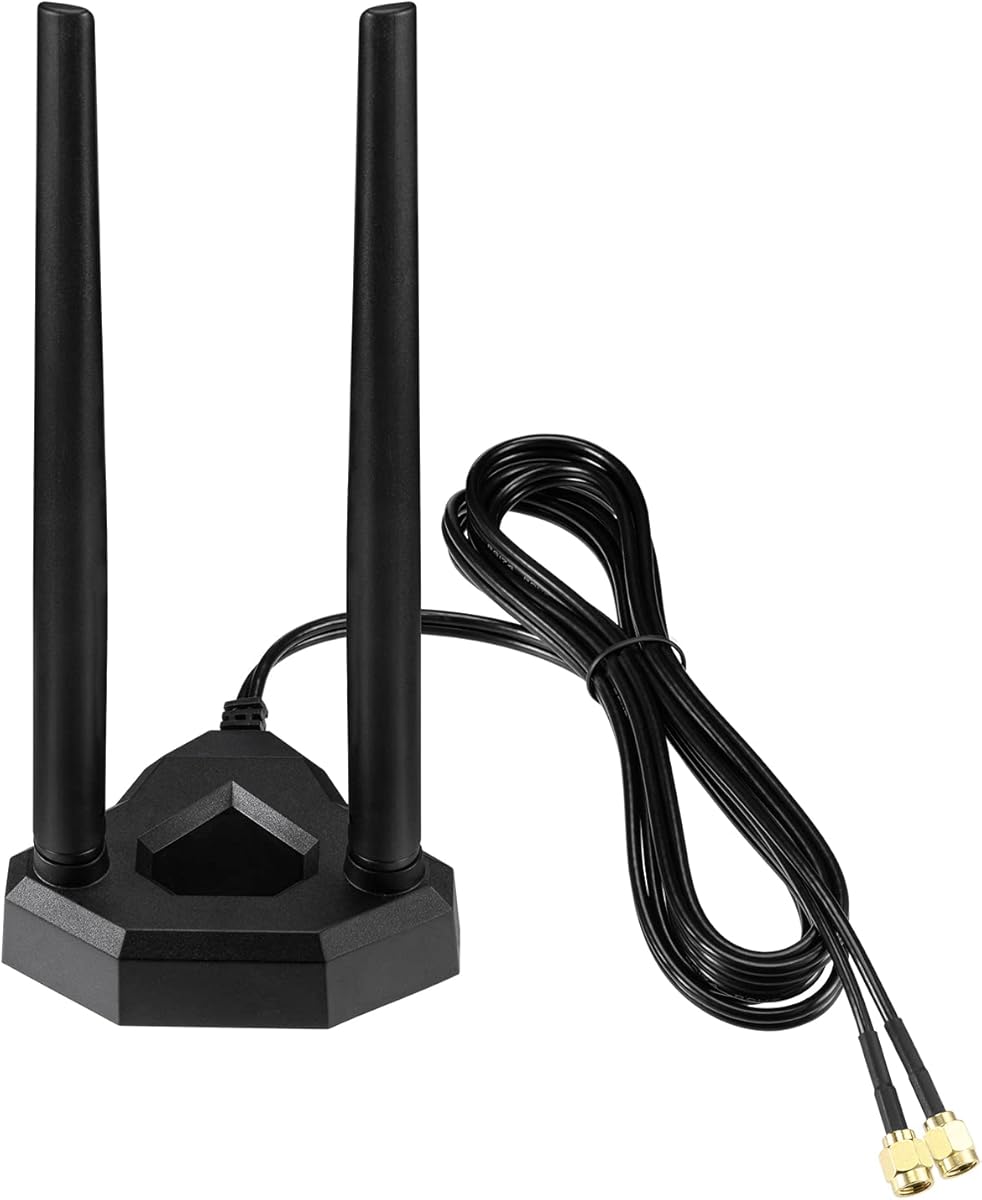
The Eightwood Dual-Band Antenna is a well-rounded indoor replacement with a 4.5 rating. It uses an omnidirectional dual-band design for 2.4GHz and 5.8GHz, supports 802.11 b/g/n/ac/ax and Wi-Fi 6, and provides a six-and-a-half-foot extension cable. A strong magnetic base makes placement away from the router's enclosure straightforward.
We may earn a commission when you buy through this link, at no additional cost to you.
Placement is where this antenna distinguishes itself. Moving an antenna can help it receive a clearer signal, especially when the router sits near metal, inside a cabinet, or behind other electronics. The magnetic base attaches to a suitable steel surface, while the long cord allows the user to test vertical, horizontal, and angled positions without changing the router's location.
It supports wireless routers, PCI and PCIe cards, Wi-Fi motherboards, USB adapters, access points, hotspots, range extenders, and security cameras. The product description also identifies Bluetooth headphones, headsets, wireless controllers, and Bluetooth network cards as possible applications. It does not cover the 6GHz band, so it is not a match for a device that specifically needs Wi-Fi 6E antenna hardware.
Choose this model when an indoor antenna needs both extension and easy repositioning. It offers a balanced combination of modern standard support, useful compatibility, and flexible mounting, while still requiring the buyer to confirm the router's RP-SMA connector configuration before installation.
The long cable is most useful when it allows the antenna to reach a higher, clearer position. Test several locations and adjust the two elements at different angles, as the manufacturer recommends, to find a stable signal.
Compatibility with routers, network cards, motherboards, USB adapters, extenders, cameras, and common Bluetooth equipment makes this a general-purpose upgrade. The exact port must still match before the antenna can be attached.
We may earn a commission when you buy through this link, at no additional cost to you.
The Eightwood Wi-Fi 6E Tri-Band Antenna adds 6GHz support to a flexible antenna design and carries a 4.4 rating. It covers 2.4GHz, 5GHz, and 6GHz, supports Wi-Fi 6 and Wi-Fi 6E protocols, and uses RP-SMA male connectors attached to a six-and-a-half-foot cable with a magnetic base.
We may earn a commission when you buy through this link, at no additional cost to you.
Its defining feature is 6GHz capability. Devices operating on that band can benefit from the additional spectrum described in the product information, including greater bandwidth and reduced interference compared with crowded lower bands. The antenna is positioned for routers, access points, PCI and PCIe cards, USB network adapters, range extenders, and security IP cameras.
The package includes one antenna rather than a pair, so buyers who need a matched multi-antenna arrangement should account for that limitation. The compatibility warning is also important: the connector has internal threads and no center pin, meaning it requires an RP-SMA female port with external threads and a center pin.
This antenna makes the most sense for a Wi-Fi 6E router or compatible card with the correct connector and a mounting location where the cable can reach. It is less relevant to a 2.4GHz-only or 5GHz-only system, and the additional radio support cannot improve a device that does not itself operate on 6GHz.
A tri-band antenna ensures that all three supported frequencies are covered by one physical unit. It is especially relevant when the host device offers 6GHz Wi-Fi and the goal is to improve antenna placement or replace a weak original element.
RP-SMA male and SMA male are often confused because their names are similar. Verify that the equipment uses an RP-SMA female port with external threads and a center pin before purchasing this antenna.
We may earn a commission when you buy through this link, at no additional cost to you.
The Eifagur Outdoor 7dBi is designed for installations where the antenna needs to sit away from the router and remain exposed to the surrounding signal. It has a 3.6 rating, 7dBi stated omnidirectional gain, 2.4GHz and 5GHz or 5.8GHz coverage, and an RP-SMA male connection.
We may earn a commission when you buy through this link, at no additional cost to you.
A three-meter RG174 cable and included wall-mount bracket provide more installation flexibility than a short desktop pigtail. The listed compatibility covers routers, hotspots, access points, range extenders, PCI and PCIe cards, USB adapters, security cameras, DVR systems, vehicle cameras, FPV equipment, and industrial connectivity products.
The lower customer rating warrants more attention than the others in this list. It reflects a more specialized product with fewer general-purpose conveniences, while specification claims do not guarantee a particular result in every environment. A higher-gain antenna can also be more sensitive to placement and nearby interference, so mounting it thoughtfully matters.
This antenna is most appropriate for a compatible router or camera installed near a wall, pole, exterior window, or outdoor enclosure. The included screws and bracket simplify the physical installation, but the RP-SMA male connector must match the host equipment, and the cable should be routed with care.
The three-meter lead gives installers room to separate the antenna from the host device, and the supplied bracket supports a more permanent placement. Position the antenna in an open area rather than directly behind a wall or enclosure.
The compatibility list includes security cameras, surveillance recorders, vehicle backup cameras, and FPV products alongside conventional network hardware. This broad support is useful for mixed outdoor wireless installations.
We may earn a commission when you buy through this link, at no additional cost to you.
The Superbat Wi-Fi 6E Tri-Band is a modern antenna for compatible routers and computers that need 2.4GHz, 5GHz, and 6GHz coverage. It carries a 4.3 rating and combines an omnidirectional RP-SMA male antenna with a six-foot extension cable and magnetic base.
We may earn a commission when you buy through this link, at no additional cost to you.
Its 6GHz support makes it relevant to Wi-Fi 6E equipment, while the product information identifies applications including routers, hotspots, PCI and PCIe Wi-Fi cards, desktop and notebook computers, USB wireless adapters, built-in Wi-Fi and Bluetooth motherboards, FPV equipment, and security cameras.
The magnetic base simplifies attachment to a metal surface, while the extension cable permits the antenna to be moved away from a crowded computer case or router position. Compared with a fixed stub, this can make it easier to find an open signal path. However, the supplied specifications do not state a numeric gain figure, so buyers cannot compare its directional characteristics by a stated dBi value.
Choose this antenna when the connected equipment supports Wi-Fi 6E, uses an RP-SMA male connection, and benefits from repositioning. It may be less compelling for a device limited to older bands, but it remains a straightforward tri-band option for modern mixed-frequency installations.
Supporting all three major Wi-Fi bands makes the antenna suitable for routers and adapters that operate across 2.4GHz, 5GHz, and 6GHz. The host device's own radio capabilities remain the determining factor.
The magnetic base and six-foot lead let users place the antenna on a nearby metal surface without a separate bracket. Testing different positions can reveal whether enclosure placement is limiting reception.
We may earn a commission when you buy through this link, at no additional cost to you.
The Eightwood 6dBi Dual-Band combines a relatively substantial gain figure with the placement flexibility of a long cable and magnetic base. It has a 4.5 rating, supports 2.4GHz, 5GHz, and 5.8GHz, uses dual RP-SMA male connectors, and supports current common standards through Wi-Fi 6.
We may earn a commission when you buy through this link, at no additional cost to you.
Its two antenna elements can be adjusted independently. The guidance is to try different angles, including one vertical and one horizontal, and to align the antenna's orientation with the router or access point. That flexibility makes the model useful when a standard fixed antenna cannot find a clear line of signal.
Compatibility includes wireless routers, hotspots, PCI and PCIe cards, desktop and notebook USB adapters, WLAN access points, wireless range extenders, security cameras, vehicle and trailer cameras, and FPV equipment. The stated 50-ohm impedance and vertical polarization are relevant details for users matching this antenna to compatible equipment.
This is a good indoor option for users who want more than a tiny desktop stub but do not need 6GHz support. The lack of a 6GHz band makes it unsuitable for Wi-Fi 6E-specific antenna needs, yet the adjustable elements, 6dBi claim, and magnetic placement remain appealing for conventional dual-band systems.
Because the elements are adjustable, begin with one vertical and one horizontal, then test other angles. Moving the base and rotating the elements can produce a more noticeable improvement than simply leaving both attached at one angle.
The 6dBi stated gain makes this model more substantial than a basic 3dBi stub. High placement and an unobstructed orientation are still necessary to obtain a useful result.
We may earn a commission when you buy through this link, at no additional cost to you.
The Eifagur 9dBi Outdoor Antenna is the strongest choice in this group for long-range, outdoor-oriented use. It has the highest customer rating at 4.7 and a stated 9dBi dual-band design covering 2.4GHz and 5GHz or 5.8GHz. The product is presented as suitable for routers, access points, security cameras, RV cameras, and other outdoor wireless systems.
We may earn a commission when you buy through this link, at no additional cost to you.
Its high-gain construction is intended to improve signal strength and extend coverage between compatible devices. Outdoor readiness makes it more relevant than a short indoor stub when the router or access point sits in a garage, utility area, exterior wall, RV setup, or another space where the internal antenna is poorly situated.
The specification list is less detailed than those of several competing products. It does not state a connector type, cable length, mounting hardware, or exact operating range, so a buyer should inspect the listing and verify the physical interface before ordering. It also does not cover 6GHz, making it a dual-band rather than a complete Wi-Fi 6E solution.
Despite those omissions, the 4.7 rating and clear outdoor positioning make this a compelling recommendation for compatible equipment that needs greater reach. Confirm the connector and mounting requirements, position the antenna in an unobstructed location, and use the same router or camera system to assess the practical improvement.
An outdoor antenna is most useful when the original internal radio is surrounded by walls, cabinetry, vehicles, or other obstructions. Exterior placement gives the radio a clearer view of the intended coverage area.
The 9dBi stated gain and long-range positioning suit access points and cameras separated from a router or monitoring location. Actual range still depends on the environment, device transmit power, obstructions, and interference.
We may earn a commission when you buy through this link, at no additional cost to you.
The TRENDnet TEW-A057 is a comprehensive outdoor antenna kit rather than a simple replacement stub. It includes a pair of 7-inch omnidirectional antennas, supports 2.4GHz, 5GHz, and 6GHz, and carries a 4.5 rating. Its connectors are N-Type female, making it a specialist option for routers and access points with that interface.
We may earn a commission when you buy through this link, at no additional cost to you.
The kit provides clearly differentiated peak gains: 3dBi at 2.4GHz, 6.2dBi at 5GHz, and 7dBi at 6GHz. That level of band-specific information is useful for buyers who want to understand the antenna's intended performance across a tri-band network. It also supports 6GHz for Wi-Fi 7 and legacy 2.4GHz and 5GHz transmissions.
Outdoor construction is backed by an operating temperature range of -40 to 70 degrees Celsius, or -40 to 158 degrees Fahrenheit. The product is also described as NDAA and TAA compliant for use in the United States and Canada. One important limitation is its N-Type female connector, which excludes equipment requiring RP-SMA.
This is the premium pick for installers with N-Type-equipped tri-band routers or access points who need a matched outdoor set. It offers broader frequency coverage, two antennas, and detailed construction specifications. Verify connector type and local procurement requirements before installation.
The package includes two matching outdoor antennas, making it easier to equip a compatible dual-antenna router or access point. A coordinated set can also simplify installation planning across outdoor and indoor equipment.
Separate peak-gain figures for 2.4GHz, 5GHz, and 6GHz help buyers evaluate the antenna more precisely. The higher gains on the upper bands complement the additional capacity associated with modern tri-band and Wi-Fi 7 equipment.
We may earn a commission when you buy through this link, at no additional cost to you.
The NETGEAR 6000451 is a specialized antenna for NETGEAR mobile hotspot routers rather than a conventional Wi-Fi router replacement. It supports the M5 MR5200 and M6 MR6150 and MR6550 models and has a 3.9 rating. Its purpose is to improve reception where cellular coverage is weak inside buildings, vehicles, or remote locations.
We may earn a commission when you buy through this link, at no additional cost to you.
Unlike antennas that cover standard Wi-Fi bands, this model spans mobile broadband frequencies from 600 to 5925MHz. The package includes two TS-9 converters, two SMA connectors, clips, and two suction cups for laptop attachment. A slim profile and tool-free installation make it convenient to position temporarily.
The compatibility limitation is significant. This antenna is made for specific NETGEAR mobile hotspots and for use in the United States and Canada, so it is not a general solution for ordinary routers, access points, or cameras. Its 3.9 rating is also lower than the ratings of the other products in this comparison.
Choose it only when you own one of the named M5 or M6 hotspots and need stronger cellular reception. For a standard Wi-Fi router, choose a dual-band or tri-band antenna with the correct connector instead. Its included adapters and simple setup are advantages precisely within its narrow intended market.
The antenna is intended for weak 4G and 5G reception rather than ordinary Wi-Fi range. Positioning it near a window or outside a building may provide a clearer path to the cellular network.
Included TS-9 converters and SMA connectors provide the pieces needed for the named hotspot models, while suction cups and clips support convenient placement. Confirm the exact router model before buying.
We may earn a commission when you buy through this link, at no additional cost to you.
The 2.4GHz 6dBi Indoor Kit is designed for adding external antennas to routers that do not originally support removable elements. It has a 4.5 rating and includes two 6dBi omnidirectional antennas plus two 20-centimeter U.FL or IPEX-to-RP-SMA pigtail cables. The router-side connectors are gold plated.
We may earn a commission when you buy through this link, at no additional cost to you.
This set offers a useful retrofit path for compatible devices with exposed U.FL or IPEX connections. The pigtails can connect those internal points to external 6dBi antennas, making it possible to move the radio elements beyond the router's enclosure. The RP-SMA female end works with most indoor access points and routers that use a removable RP-SMA male antenna.
The major limitation is the 2.4GHz-only design. It cannot improve the 5GHz or 6GHz radio path, and it is not appropriate for modern tri-band setups. Installation may also require opening the router, disconnecting internal antenna leads, and routing the included cables, so it is better suited to technically comfortable users than plug-and-play buyers.
This kit is most useful for an older or single-band 2.4GHz router housed in a poor location. It can be a practical way to relocate antennas without replacing the entire device, provided the internal antenna connectors and radio design are compatible and the enclosure can be modified safely.
Many basic routers have internal antenna cables that cannot be reached from outside. The U.FL or IPEX pigtails allow compatible units to use the included external elements, although the router must be opened during installation.
Two identical 6dBi antennas provide a matched pair for a compatible system. Maintaining consistent antenna specifications can be preferable to mixing unrelated elements, particularly in equipment designed around multiple radios.
We may earn a commission when you buy through this link, at no additional cost to you.
The most suitable router antenna is one that matches the device's radio bands and connector, fits the installation environment, and can be placed where it receives a clear signal. Gain, cable length, mounting style, and intended device type should be considered together.
Start by identifying every radio band used by the router or access point. A 2.4GHz-only antenna will not improve a 5GHz or 6GHz connection, while a tri-band unit may be unnecessary for a simpler network. Modern systems may use 2.4GHz for range and crowded lower-band applications, 5GHz for throughput, and 6GHz for additional capacity and lower congestion. The antenna should cover the bands the host device actually operates on, including all channels within those bands.
Connector compatibility is the most important physical check. RP-SMA male, RP-SMA female, SMA male, SMA female, N-Type, TS-9, and U.FL are not interchangeable. Thread direction and the presence or absence of a center pin can prevent a physical fit or damage the port. For example, an RP-SMA male antenna has internal threads and no center pin, so it requires an RP-SMA female port with external threads and a center pin. If the router has fixed internal cables, a U.FL or IPEX pigtail may be needed instead.
Gain describes how an antenna concentrates radio energy in a particular direction, not the speed of the internet connection. An omnidirectional antenna radiates around its axis and is convenient for general coverage, while higher-gain directional designs can concentrate energy toward a specific area. A larger dBi number is not automatically better indoors, where reflections and obstructions can make placement more important than maximum gain. Choose the gain and pattern that suit the distance, orientation, and number of users in the coverage area.
An indoor antenna works best in a protected space where it can remain unobstructed and safely connected. An outdoor antenna should be built for exposure to weather, temperature changes, and UV, and may include a mounting bracket or sealed cable route. Outdoor-rated construction is especially relevant for exterior cameras, access points in garages or sheds, and equipment placed near building edges. The TRENDnet kit, for example, provides a stated operating range of -40 to 70 degrees Celsius.
A longer extension cable lets the antenna move away from a router enclosure, cabinet, desk, or nearby metal obstruction. Magnetic bases are convenient for testing temporary positions, while wall brackets and screws suit more permanent outdoor mounting. Cable length is useful only if the signal remains strong over the run and the cable can be routed without sharp bends or damage. A six-foot lead is often adequate for indoor placement, while a three-meter lead offers greater reach for exterior installations.
Not every router accepts external antennas, and multi-antenna systems may require specific element types, matched pairs, or placement patterns. A single-antenna device can work with one external element, while a MIMO router may benefit from two properly installed antennas. Desktop PCs, USB adapters, PCIe cards, cameras, mobile hotspots, and ordinary routers all have different interfaces. A purpose-built mobile hotspot antenna should not be selected for a standard Wi-Fi router merely because it uses a similar-looking connector.
Some tri-band antennas publish one broad claim, while others specify separate gain values for each frequency. Band-specific figures are useful when the lower and upper bands have very different antenna sizes and radiation patterns. The TRENDnet TEW-A057 lists 3dBi at 2.4GHz, 6.2dBi at 5GHz, and 7dBi at 6GHz. Such detail can help buyers choose a technically suitable option, but it should still be considered alongside placement, connector compatibility, and the router's radio design.
A router antenna, camera antenna, Wi-Fi card antenna, and cellular hotspot antenna are not automatically interchangeable. Some products are optimized for camera links, surveillance systems, FPV video, vehicle backup cameras, or Bluetooth peripherals. The best option is the one whose stated applications include the exact device being upgraded and whose connector matches that device. For broad indoor use, an adjustable dual-band antenna may be more practical than a specialized high-gain outdoor unit.
Before installation, disconnect the router or other host device from power and confirm the replacement connector. Compare the antenna's connector type, threading, and center-pin arrangement with the existing port. If the device uses internal U.FL or IPEX leads, plan the route carefully and avoid opening equipment unless you are comfortable doing so.
Attach the antenna by hand, then position it as high and as clear of obstructions as practical. For adjustable models, test different angles and try one element vertically and another horizontally. Secure magnetic bases to suitable metal surfaces, and use included brackets for more permanent outdoor installations. Route cables away from sharp edges, pinch points, moisture, and unnecessarily long paths.
Power the system back on and compare connection quality in the locations that matter. Watch for stable links, reduced dropouts, and improved coverage rather than expecting a particular internet speed. If results are limited, move the antenna, change its angle, or test a different router location. Clean outdoor units periodically, keep cable entries sealed, and avoid mounting hardware where water can collect or vegetation can obstruct the antenna.
The best router antenna depends on the device's supported bands, connector, and location. A dual-band magnetic model is useful for indoor placement, while a high-gain outdoor antenna suits separated equipment and obstructed router locations. Confirm compatibility before choosing any replacement.
A higher-gain antenna can improve signal strength and coverage, but it does not guarantee a faster internet connection. Actual speed also depends on the router, client devices, ISP service, interference, congestion, and how the antenna is positioned. Better reception may support more stable throughput in some installations.
A tri-band Wi-Fi 6E antenna can usually connect physically to compatible 2.4GHz and 5GHz equipment if the connector matches, but it cannot create 6GHz capability in a router that lacks a 6GHz radio. It will not add Wi-Fi 6E support to older hardware.
RP-SMA and SMA use different thread arrangements, and the center-pin configuration also differs. An RP-SMA male connector has internal threads and no center pin, while an RP-SMA female connector has external threads and a center pin. Buying the wrong gender or type can prevent installation.
Place the antenna high, open, and away from metal objects, dense walls, and electronics that can obstruct or reflect radio signals. A longer extension cable is helpful when the router enclosure is in a poor position. Testing several locations and antenna angles is the most reliable way to find the strongest result.
No. Outdoor high-gain antennas work best in clear line-of-sight installations and can be affected by nearby obstructions. A smaller indoor antenna with flexible placement may outperform a larger model in a cluttered home. Choose the design that matches the distance, environment, and mounting conditions.
A tri-band antenna can cover 2.4GHz, 5GHz, and 6GHz, allowing one physical unit to serve all three bands. The host device must support those bands and must use the correct connector. The antenna can improve reception and placement, but it cannot override the router's internal radio limitations.
It depends on the router design. Some devices have one external antenna, while others use two elements for multiple radios or MIMO. A two-antenna kit is appropriate only if the host has matching connections and the manufacturer supports that configuration. Otherwise, one correctly matched antenna may be sufficient.
The Eifagur 9dBi Outdoor Antenna stands out for long-range outdoor use and the highest customer rating in the group. The Bingfu 3dBi two-pack offers an affordable way to replace or pair compatible antennas, while the TRENDnet TEW-A057 provides the most complete tri-band outdoor kit for equipment with N-Type female connectors.
Prioritize the connector and frequency bands before considering gain or design. Once compatibility is confirmed, choose the antenna that matches the environment: a magnetic or adjustable model for indoor placement, a longer outdoor model with mounting hardware for exterior equipment, and a tri-band design when the host actively supports 6GHz.
Finally, expect antenna improvements to depend heavily on placement. Test clear positions, adjust the orientation, and avoid obstructed or poorly mounted installations. Check the latest product listing and current price before ordering, as both specifications and seller offers can change over time.