
22Pcs 3D Printer Nozzle Cleaning Kit, 1.5mm Clog Poke
5.0Editor score
1.5mm clog-poke tool
Twenty 0.4mm needles
Wire brush included
This guide compares the best printer nozzle cleaning kits for inkjet and 3D printers, covering compatibility, included tools, ease of use, and maintenance
Printer nozzle cleaning kits help remove blockages, dried ink, and filament residue from the components that control print quality. The right choice depends on whether you maintain a traditional inkjet printer or an FDM 3D printer, because these machines use very different cleaning methods and tools.
We compared all ten products by examining their intended printer type, cleaning components, stated compatibility, included accessories, ease of use, and practical maintenance coverage. The list includes fluid-based inkjet cleaning kits, precision needle sets, brush-and-poke combinations, a broader 3D printer toolkit, and an anti-stick nozzle coating.
Each pick highlights a different reason to buy, from broad inkjet support to compact 3D printer maintenance and prevention of buildup. Ratings and product details reflect the supplied listings, while prices and availability can change, so readers should confirm current listing information before making a purchase.
5.0Editor score

4.8Editor score

4.4Editor score
The comparison separates inkjet cleaning fluids from 3D printer maintenance tools, then evaluates each kit by its core accessories, printer coverage, precision, and preventive maintenance value.




This inkjet-focused kit carries a 4.1 rating and is designed for owners of Epson, HP, Brother, Canon, and other popular inkjet models. Its defining feature is a 100ml supply of cleaning fluid paired with a large 20ml syringe and several attachments, giving users more control over where the solution is directed.
We may earn a commission when you buy through this link, at no additional cost to you.
The kit targets common symptoms such as streaks, discoloration, missing colors, blank pages, and low-quality output. Its ionized cleaning solution is described as safe for printer components, while the syringe-and-adapter approach makes it more suitable for owners who want to address printhead buildup directly rather than relying only on a printer's built-in cleaning cycle.
The principal trade-off is that liquid printhead maintenance requires care. The right adapter matters, the printer should be powered down during cleaning, and repeated cleaning should not be performed too frequently. It is also a general compatibility product rather than a kit tied exclusively to one model family, so users should verify fit and consult the supplied guidance.
This is a practical choice for inkjet owners experiencing recurring streaks, missing colors, or blank pages across several supported brands. It also serves as preventative maintenance for a printer used infrequently, provided the user follows the instructions carefully and runs an appropriate printhead or power-cleaning cycle afterward.
The included fluid is intended to loosen dried ink and residue that can contribute to poor ink flow. Directed application with the large syringe makes it possible to work on the affected area rather than flooding the entire printer.
Compatibility extends across Epson EcoTank and WorkForce models, HP SmartTank and OfficeJet families, Canon Pixma, Brother MFC, DTF, and sublimation applications. Buyers should still check the exact printer model and adapter requirements before use.
We may earn a commission when you buy through this link, at no additional cost to you.
This 22-piece 3D printer maintenance kit has a 4.5 rating and combines twenty 0.4mm needles with a copper wire brush and tweezers. Rather than addressing only the visible tip of a nozzle, it offers several ways to remove debris from different parts of the hotend assembly.
We may earn a commission when you buy through this link, at no additional cost to you.
The needles are designed to penetrate narrow nozzle passages and clear stubborn clogs, while the copper brush can scrub residue from nozzles and nearby components. Tweezers give the user finer control over small fragments that may be difficult to remove with a brush or pin alone.
Heat is an important part of the stated procedure. The nozzle should be brought to 200°C or above to soften debris before gentle insertion and removal of the cleaning pin. That requirement makes the kit less convenient for a completely cold maintenance session, and it places responsibility on the user to avoid burns.
This product suits FDM printer owners who want a compact set of mechanical tools without buying a full maintenance station. It is particularly useful when a nozzle is partially clogged, residue has accumulated around the tip, or small debris must be lifted from confined areas.
Using needles, a copper brush, and tweezers together is more adaptable than relying on one tool. Each item addresses a different type of buildup, from internal passage obstructions to surface residue and loose particles.
Warming the nozzle can soften material before the needle is inserted. The process should be performed gradually and carefully because a heated nozzle and heated surroundings can cause burns.
We may earn a commission when you buy through this link, at no additional cost to you.
With a 4.8 rating, the YOOPAI kit offers one of the strongest combinations of handling, reach, and organized storage in the roundup. It includes a handled cleaning tool, ten stainless steel needles in a storage box, and a copper wire brush for removing residue from nozzles and heat sinks.
We may earn a commission when you buy through this link, at no additional cost to you.
The 150mm handled tool has a 1.5mm tip shaped to match the end of a 1.75mm nozzle. Its soft rubber handle is designed for a steadier grip, and the additional needles span 0.2mm to 0.5mm so users can select an appropriate diameter for a particular passage or hard-to-reach area.
The kit is not limited to a short list of machines. Stated compatibility includes Bambu Lab A, X, and P series; several Creality K-series models; and the Ender-3 V3 family, along with other 1.75mm filament printers. It is less directly relevant to users who need a larger cleaning tool for a different nozzle system.
This is an excellent general maintenance pick for 3D printer owners who want better control and storage. The long handled tool is especially useful for reaching a nozzle without dismantling it, while the extra needles and brush cover both internal and external cleaning tasks.
The ergonomic rubber handle gives the user more control than a loose needle alone. Its shaped arrow tip and long length help it reach a compatible nozzle while reducing the need for disassembly.
The stored needles cover a 0.2mm to 0.5mm range. Selecting the correct diameter matters because forcing an oversized needle into a passage can damage the nozzle or heater assembly.
We may earn a commission when you buy through this link, at no additional cost to you.
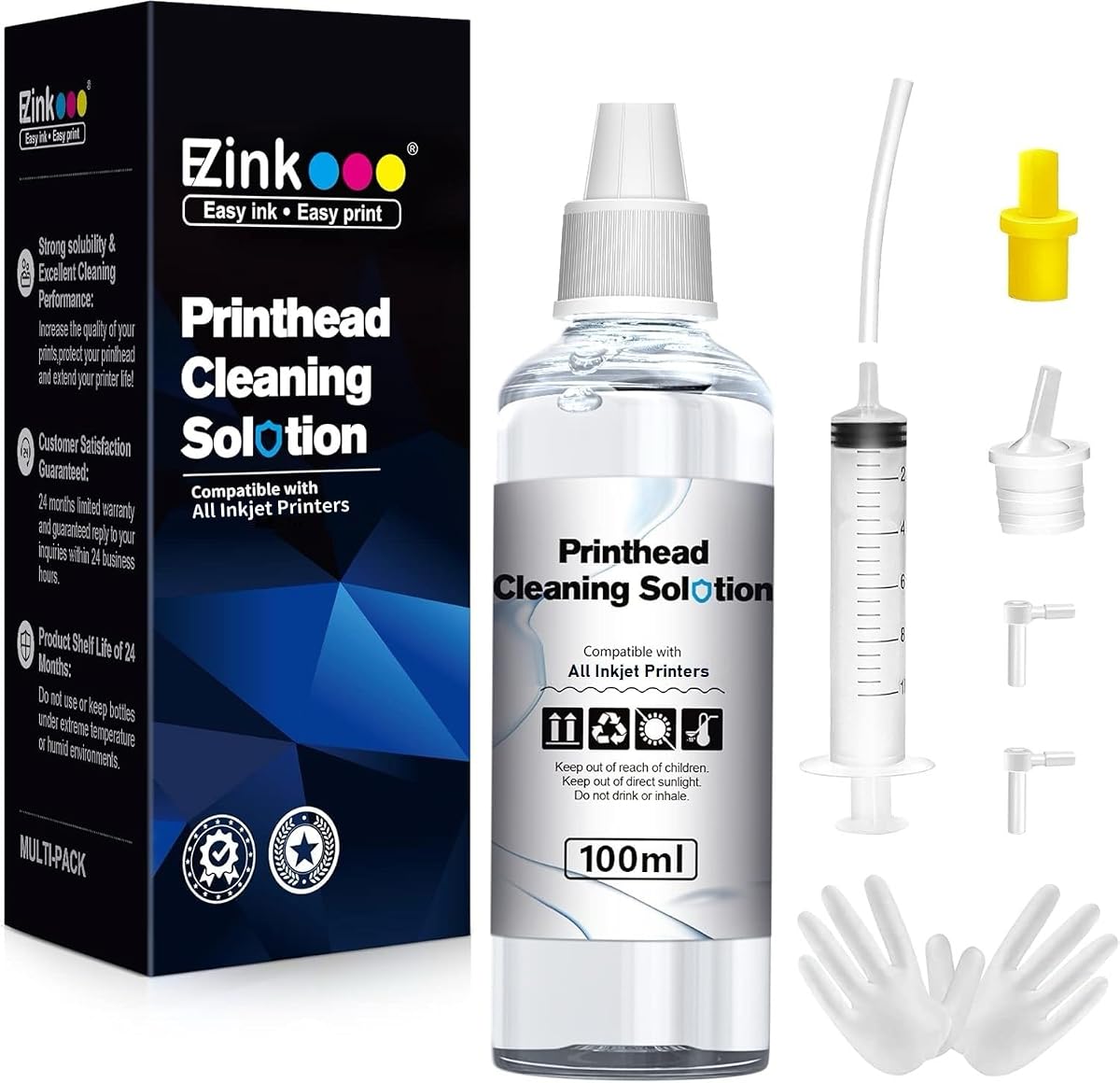
The E-Z Ink kit has a 4.2 rating and is built around 100ml of printhead cleaning fluid, a syringe, silicone hose, gloves, and instructions. Its strongest selling point is the unusually detailed list of compatible Epson, HP, Brother, and Canon models.
We may earn a commission when you buy through this link, at no additional cost to you.
This specificity helps buyers narrow down whether the kit suits their printer before ordering. The fluid contains enzymes described as effective against dry ink and soluble impurities, while the hose and syringe allow controlled delivery to the printhead area. The included gloves and instructions make the kit feel more complete for a do-it-yourself maintenance job.
Compatibility claims should still be verified against the exact printer model, particularly with older or less common variants. The listing also warns that the printer must be unplugged before cleaning and advises against cleaning too often, even when a blockage is severe. Those cautions are sensible because excessive liquid cleaning can create new problems.
This is a strong choice for a user who has found a listed model and wants a full fluid-cleaning set. The extensive model coverage makes it easier to find a relevant option, while the included protective equipment and guidance help organize the process.
Long lists of compatible printers are more useful than broad brand claims when an inkjet kit must connect to a specific printhead area. Always confirm the precise model number rather than assuming every printer in a series is identical.
The combination of cleaning solution, syringe, silicone hose, gloves, and instructions gives users the basic components needed for a controlled cleaning procedure. Storage and disposal of leftover fluid should follow the instructions and local disposal guidance.
We may earn a commission when you buy through this link, at no additional cost to you.
This 40-piece kit has a 4.8 rating and emphasizes quantity, organization, and consistent needle sizing. Forty 0.4mm stainless steel needles are divided into two storage bottles, with twenty needles in each container.
We may earn a commission when you buy through this link, at no additional cost to you.
The primary use is clearing small nozzle passages, but the listing also notes that the needles can reach hard-to-access areas such as feed gears and throttle holes. Their combination of flexibility and sturdiness is intended to support repeated use without making the cleaning process excessively rigid.
Its simplicity is also a limitation. Every needle is 0.4mm, so the kit is less versatile for unusual nozzle sizes, and it does not include a copper brush, tweezers, or a larger clog-poke tool. The required heating step is another consideration: the nozzle should reach 200°C or above to soften debris before cleaning.
This is a good pick for workshops, schools, or dedicated makers who expect frequent cleaning and want many needles available without constantly handling a single loose pin. The two-bottle format also makes the collection easier to organize and reduces the chance of losing small components.
A large number of identical needles is useful in busy environments where tools are handled frequently. Keeping each bottle capped also helps organize the collection on a workbench.
The slender needles can reach small openings in feed systems and other confined spaces. Users should apply gentle force and avoid forcing a needle against a component that was not designed to be pierced.
We may earn a commission when you buy through this link, at no additional cost to you.
The Spaceink kit has a 4.4 rating and provides 200ml of printhead cleaning fluid in two 100ml bottles. It is aimed at owners of Epson, HP, Canon, Brother, EcoTank, Lexmark, Kodak, and Samsung inkjet printers, including those using factory inks, dyes, sublimation inks, and thermal-transfer inks.
We may earn a commission when you buy through this link, at no additional cost to you.
Its accessories are notably extensive: a 20ml syringe, silicone tube, four large rubber stoppers, four cotton swabs, gloves, dry and wet wipes, and an instruction manual. This creates a more complete maintenance station than a simple fluid-and-syringe set and provides several ways to apply or clean around the printhead.
The fluid is described as containing enzymes that dissolve dried ink and soluble impurities, aiming to improve ink flow and reduce symptoms such as stripes, blurred output, incomplete patterns, and poor text. The larger total volume is useful for periodic care or a multi-printer household, though it also creates a greater need to store fluid safely and avoid spills.
Choose this kit when you want generous fluid volume and a broad accessory set for routine inkjet maintenance. It is a sensible option for compatible printers that produce recurring buildup and for users who understand how to apply the solution using the proper attachment.
Two bottles provide a larger reserve than many compact cleaning kits. That makes the set more suitable for periodic use, provided it is kept sealed, stored as directed, and kept away from children and pets.
The stated coverage includes dye, sublimation, and thermal-transfer inks. Compatibility should still be checked against the printer model and any manufacturer recommendations for printhead cleaning.
We may earn a commission when you buy through this link, at no additional cost to you.
This 34-piece toolkit has a 4.6 rating and is much broader than a dedicated nozzle cleaning set. It combines nozzle care with print removal, finishing, cutting, and general 3D printer maintenance, making it most suitable for users who want one bench-side toolkit.
We may earn a commission when you buy through this link, at no additional cost to you.
Its nozzle-cleaning section includes five cleaning needle diameters from 0.2mm through 0.4mm, two replacement MK8 brass nozzles, metal and nylon brushes, and tweezers. The wider kit also adds scrapers, a wire cutter, an engraving knife, five files, replacement blades, and a small wrench, all stored in a black canvas bag.
The advantage is convenience for owners who need more than unclogging tools. A clogged nozzle, a stuck print, and a rough edge can all be addressed without assembling several unrelated sets. The trade-off is that some included tools have little to do with nozzle cleaning, so buyers seeking a compact repair kit may find the assortment unnecessarily large.
This is a good choice for a new or heavily used 3D printing setup that needs general maintenance coverage. Existing owners who already have scrapers, files, and knives can focus on the needle sizes, brushes, tweezers, and replacement nozzles, which form the most relevant part of this kit for nozzle care.
The toolkit includes tools for removing prints, filing edges, cutting wire, and cleaning several printer surfaces. It can consolidate a cluttered maintenance area for users who regularly handle physical print finishing tasks.
The five needle sizes offer better fit selection than a set containing only 0.4mm pins. Two MK8 brass nozzles add replacement options for common 1.75mm PLA and ABS systems.
We may earn a commission when you buy through this link, at no additional cost to you.
This 22-piece kit holds the highest listed rating in the group at 5.0. Its strongest feature is a 1.5mm clog-poke tool designed to push out stuck filament, supplemented by twenty 0.4mm cleaning needles and a wire brush for more delicate work.
We may earn a commission when you buy through this link, at no additional cost to you.
The larger poke tool addresses the practical problem of a filament jam that cannot be cleared with a fine needle. Its stated use is straightforward: insert the tool and remove debris without taking the printer apart. The fine needles handle small particles and residue around 0.4mm nozzle passages, while the brush scrubs the nozzle tip and heater block.
The kit remains focused on 0.4mm needles, so it is less suitable for unusual nozzle diameters. The clog-poke tool should not be interpreted as safe for every obstruction; the user must understand the machine and avoid excessive force. As with other mechanical cleaning approaches, heating the nozzle softens residue and improves the working conditions.
This is an attractive pick for an FDM owner who wants a straightforward, compact answer to common filament clogs. Its combination of a larger poke tool, precision needles, and a brush covers several maintenance tasks without including unrelated accessories.
The 1.5mm clog-poke tool is intended for pushing out stuck filament when a fine cleaning needle is too small. Confirm that the passage and surrounding parts can tolerate the tool before inserting it.
A poke tool, needle set, and wire brush cover internal clearing, fine debris removal, and external scrubbing. That focused mix makes the kit easy to keep near a printer.
We may earn a commission when you buy through this link, at no additional cost to you.
The 5APLUSREPRAP kit has a 4.7 rating and includes twenty 0.4mm stainless steel cleaning needles. Each tool is 70mm overall, with a 30mm shank and a 40mm working section, giving it enough length to access a nozzle or small internal passage.
We may earn a commission when you buy through this link, at no additional cost to you.
The handled, smooth-surface design is intended to make the needles easier to grip and control. They can remove residue from blocked nozzles, throats, and feed gears, which makes the set useful beyond the visible nozzle tip. The listed nozzle compatibility includes V6, MK8, MK10, and Volcano-style nozzles.
The main limitation is that all twenty needles measure 0.4mm. That makes the kit dependable for common 0.4mm systems but less adaptable to printers with smaller passages. It also provides no brush for external residue and no larger tool for pushing out a substantial jam.
Choose this set for a maker who primarily uses a common 0.4mm FDM printer and values a simple, durable needle. The listed support for MakerBot, RepRap, Creality CR-10, Ender 3, Prusa i3, Anet A8, and E3D-associated hardware gives it broad relevance among established printer ecosystems.
A 70mm needle can reach deeper into a compatible nozzle or throat than a short pin. The user should still move the tool gently and avoid forcing it past an obstruction.
The guidance suggests heating the nozzle to the printing temperature of the material in use, including approximately 200–220°C for ABS and 180–200°C for PLA. This softens residue before the needle is used.
We may earn a commission when you buy through this link, at no additional cost to you.
The Slice Engineering kit has a 4.4 rating and takes a preventive approach to nozzle care. Instead of relying only on needles or scraping away residue, its brush-on anti-stick coating is designed to keep molten plastic from adhering to the nozzle exterior.
We may earn a commission when you buy through this link, at no additional cost to you.
This matters because debris hanging from a nozzle can spoil first layers and contribute to buildup associated with clogs. The coating is stated to work with any nozzle shape or size, including brass, hardened steel, ruby-tip, V6, MK8, Bambu, Prusa, Voron, and Slice Mosquito hotends. It is also compatible with common filaments such as PLA, PETG, ABS, Nylon, TPU, and PC.
Its use is straightforward: cool the nozzle, wipe it clean, apply a thin layer with the included applicator, allow it to dry for 60 seconds, and resume printing. The nozzle should be cool during application, and users should reapply the coating when sticking begins again. It does not replace a needle for an already obstructed passage.
This is a premium pick for users who want to reduce recurring buildup rather than wait for a jam. It pairs especially well with a separate needle and unclogging tool, creating a preventive and corrective maintenance workflow for active printers.
A clean-release barrier can reduce the amount of plastic that adheres to the nozzle between jobs. That may lower the frequency of scraping and help protect the quality of early printed layers.
The stated 300°C rating and support for multiple filament families make the coating useful across varied setups. The nozzle must still be cooled before the applicator is used.
We may earn a commission when you buy through this link, at no additional cost to you.
The first decision is whether you own an inkjet printer or a 3D printer, because their cleaning kits use fundamentally different tools, fluids, and safety procedures. After narrowing the category, compatibility and the nature of the blockage should guide the remaining choice.
Start by identifying the machine you actually own. Do not choose a 3D nozzle kit for an inkjet printer, or a liquid printhead kit for an FDM machine.
Use the full model number and nozzle size before buying, especially if the listing includes long compatibility lists.
Match the tool to the debris: needles for passages, brushes for surfaces, and fluid for dried ink.
Favor components that directly address your recurring maintenance tasks rather than paying for unrelated tools.
Clear instructions and controlled application matter as much as the number of included pieces.
For recurring problems, combine regular preventive care with the right tool for clearing existing blockages.
Good storage prevents lost needles, spills, and unnecessary searching for a missing adapter.
Prioritize repeatable coverage of your actual maintenance needs over a large but irrelevant component count.
Begin by identifying the correct cleaning system for your printer. For an inkjet, switch off and unplug the printer, review the model compatibility, and use the supplied fluid only as directed. For a 3D printer, remove filament according to the machine's procedure, heat the nozzle to the appropriate temperature, and allow the machine to reach a safe state for maintenance.
Use the least aggressive tool that can address the blockage. In a 3D printer, warm the nozzle to soften debris, insert a correctly sized needle gently, and avoid forcing it. Use the brush for external residue and the larger clog-poke tool only when the passage is appropriate. For an inkjet, apply the fluid through the supplied syringe, hose, and adapter without overfilling or forcing liquid where it does not belong.
After cleaning, reassemble or reconnect everything, wipe away excess fluid, and dispose of or store the remaining cleaner according to its instructions. Run an appropriate printhead or power-cleaning cycle for an inkjet and test filament flow on a 3D printer. Store needles in their container, keep liquid sealed, and inspect tools for bends or damage before the next use.
A fluid-based inkjet printhead cleaning kit may help when streaks, missing colors, blank pages, or poor text are caused by dried ink and a restricted printhead. It will not solve every printing problem because low ink, empty cartridges, driver issues, a damaged cable, or a physically damaged printhead can produce similar symptoms. Run the printer's built-in cleaning cycle and check consumables before using stronger cleaning methods.
Use a needle that is appropriate for the nozzle passage rather than selecting the largest tool available. Many common FDM systems use 0.4mm nozzles, making 0.4mm needles a frequent choice, while smaller passages may require a finer needle. The needle should enter without force, and a larger clog-poke tool should only be used when the manufacturer or tool instructions support it.
Heating is usually recommended because it softens filament and residue, allowing a needle or brush to remove material more effectively. The correct temperature depends on the filament in use, with the supplied guidance commonly suggesting around 180–200°C for PLA and 200–220°C for ABS. Exercise caution because the heated nozzle and nearby surfaces can cause burns.
No. Only use a cleaning fluid that explicitly supports your printer model or family, and follow the instructions included with the kit and printer manufacturer. Some printers use sealed or permanently attached printheads that are not designed for user fluid cleaning. Turn off and unplug the printer during cleaning, avoid overfilling, and never combine cleaning products unless the instructions specifically permit it.
A mechanical 3D printer cleaning kit cannot flush ink from an inkjet printhead because the designs, access points, and residues are entirely different. Inkjet printers require a fluid-based printhead cleaning solution, while 3D printer kits are intended for filament, heat, and physical debris around a hotend. Using the wrong method can damage components or spread residue.
There is no universal interval because usage, filament, temperature, and printer condition all affect buildup. Inspect the nozzle during routine maintenance and clean it when residue is visible, extrusion becomes inconsistent, or the first layer starts picking up debris. Preventative habits such as proper nozzle temperature, filament storage, and occasional anti-stick treatment can reduce how often mechanical cleaning is needed.
No. An anti-stick coating is intended to reduce future buildup and help material release cleanly, but it does not physically clear an existing obstruction. It works best as part of a maintenance routine alongside a correctly sized needle, brush, and unclogging tool. The nozzle should be cool and clean before the coating is applied according to the product instructions.
Stop repeating aggressive cleaning if the printhead or nozzle remains blocked. Check ink levels, cartridge seating, drivers, filament condition, and temperature settings, and run the manufacturer's built-in cleaning or calibration procedure. For inkjets, a severely damaged printhead may need professional service or replacement, while a 3D printer nozzle can sometimes be removed, cleaned more thoroughly, or replaced.
The strongest all-around 3D printer pick is the YOOPAI kit because it combines a comfortable handled tool, several needle sizes, organized storage, and a copper brush. For a lower-cost mechanical solution, the 22Pcs kit with a 1.5mm clog-poke tool is appealing, while the Slice Engineering coating is the leading choice for preventing buildup before it causes recurring first-layer problems.
Inkjet owners should look beyond broad brand labels and compare fluid volume, adapter coverage, model-specific compatibility, and included safety supplies. The E-Z Ink and Spaceink sets offer especially complete fluid packages, while the broad Epson, HP, and Brother kit offers a 20ml syringe and multiple attachments. Choose the approach that matches the symptom rather than attempting to use a mechanical tool on dried ink or fluid on a 3D hotend.
Ratings provide a useful snapshot of customer feedback, but the final decision should come from printer type, model compatibility, and the maintenance problems you actually experience. Confirm the included parts and safety steps before ordering, and check current listing details and prices at the time of purchase because both can change.