
Apple MacBook Pro 14-inch M5
4.7Editor score
M5 ten-core processor
Ten-core unified GPU
16GB unified memory
Liquid Retina XDR display
A laptop for Adobe Premiere Pro must balance more than raw processing power. Video editors need capable processors, dedicated graphics, sufficient memory, fast storage, and a display that can represent their work accurately, while portability, thermals, battery life, and connectivity determine how comfortably the system performs away from a desk.
This guide compares ten products relevant to Premiere Pro workflows, including Dell Precision mobile workstations, an Apple MacBook Pro, an MSI creator laptop, an HP general-purpose notebook, and a shortcut reference accessory. The comparison emphasizes processor capability, graphics memory, RAM, SSD capacity, displays, ports, and the practical compromises associated with each form factor.
The first three recommendations represent the strongest balance for different needs: a capable everyday creator laptop, a polished high-end portable system, and a serious mobile workstation. Every featured product receives an individual review below, while availability, configuration details, and prices can change, so readers should confirm the current listing before purchasing.
4.7Editor score
4.7Editor score

4.5Editor score
As an Amazon Associate we earn from qualifying purchases.
The table below places every featured product side by side, with special attention to the processor, graphics, memory, storage, display, and workstation features that influence Premiere Pro performance and overall usability.




The Dell Precision 3581 is a renewed 15.6-inch workstation that combines a 14-core Intel Core i7-13800H processor with 32GB of DDR5 memory and a dedicated NVIDIA GeForce RTX A500. No customer rating is listed in the supplied product data, but its hardware profile makes it a credible option for Premiere Pro users who want workstation positioning without moving to the largest mobile chassis.
We may earn a commission when you buy through this link, at no additional cost to you.
Its most useful strengths are the processor's high core count and the generous system memory. The 14-core processor provides a substantial foundation for timeline playback, background rendering, media decoding, and multitasking, while 32GB of DDR5 makes the system more comfortable when Premiere Pro is open alongside a browser, cloud-storage tools, communication apps, and multiple audio or graphics utilities. The one-terabyte PCIe NVMe SSD also offers fast startup and enough room for locally cached media.
The principal limitation is the RTX A500's 4GB of graphics memory. That dedicated GPU can give Premiere Pro hardware-accelerated workflows and is more appropriate for editing than relying solely on integrated graphics, but demanding effects, high-resolution footage, and complex GPU-heavy timelines may encounter pressure when the available video memory is limited. The 1920-by-1080 non-touch screen is also less ideal than a higher-resolution or wider-gamut creator display for detailed color and framing work.
This Precision is a sensible pick for students, freelancers, and working editors who need capable CPU performance, 32GB of RAM, fast storage, and a dedicated professional graphics option in a relatively conventional 15-inch design. It is less suited to buyers who require a high-resolution display, extensive GPU memory, or maximum battery life. Confirm the exact renewed condition and included warranty terms before making the final purchasing decision.
With 32GB of DDR5 memory, the Precision 3581 leaves more room for active editing sessions than many compact laptops. Although actual smoothness depends on codec, resolution, effects, and project structure, the installed capacity is a meaningful advantage for multi-application workflows.
The RTX A500 provides a dedicated graphics path and 4GB of GDDR6 memory. This makes it more purposeful for Premiere Pro than a system relying only on integrated graphics, although the memory limit should be considered for advanced GPU effects.
We may earn a commission when you buy through this link, at no additional cost to you.
The Dell Precision 7680 i9 pairs an Intel Core i9-13950HX processor with 32GB of DDR5 CAMM memory, a one-terabyte PCIe NVMe SSD, and a 16-inch FHD+ display. Its 4.4 rating reflects strong buyer satisfaction, and its flagship Precision design targets demanding professional workloads rather than basic office tasks.
We may earn a commission when you buy through this link, at no additional cost to you.
The Core i9-13950HX is the headline component, offering up to 5.5GHz and a substantial core count for rendering, exports, effects, and multitasking. CAMM memory is designed to overcome the performance and physical limitations associated with conventional SODIMM modules, while the 32GB allocation supports a productive Premiere Pro environment. Fast NVMe storage further reduces pauses when opening projects, importing assets, and working with media stored locally.
Its listed graphics are integrated Intel UHD rather than a discrete GPU, which is the key reason it does not win every workload. Premiere Pro can perform demanding jobs on capable integrated graphics, but sustained GPU-heavy editing may benefit from more specialized hardware and additional graphics memory. The 1920-by-1200 anti-glare screen is crisp for office work, although its FHD+ resolution is modest for a machine positioned as a high-end creator workstation.
The 7680 is best suited to editors who prioritize CPU performance, RAM, storage, professional connectivity, and workstation support over maximum portability. It can serve as a powerful primary editing machine for complex timelines and can drive up to three external 4K displays at 60Hz without a docking station according to the supplied information. Buyers should verify the final graphics configuration because the listing does not include a dedicated GPU.
The combination of a high-end Core i9, 32GB of CAMM memory, and fast NVMe storage is well suited to editing, previews, audio review, and client communication running at the same time. This provides more operational headroom than a lightly configured general-purpose laptop.
HDMI, USB-C, Thunderbolt, Ethernet, and multiple USB-A ports make this system practical for an editing desk with reference monitors, external storage, input devices, and network equipment. Its support for three external 4K displays is particularly useful for timeline, program monitor, and scope layouts.
We may earn a commission when you buy through this link, at no additional cost to you.
The Dell Precision 7780 is the most specialized Premiere Pro candidate in this group, combining a Core i9-13950HX processor, 128GB of RAM, a one-terabyte NVMe SSD, and an NVIDIA RTX 3500 Ada GPU with 12GB of VRAM. Its 17.3-inch FHD panel is large, although the resolution does not take full advantage of that physical area.
We may earn a commission when you buy through this link, at no additional cost to you.
The RTX 3500 Ada is the defining feature for editors who need more graphics memory than mainstream creator laptops provide. TwelveGB of dedicated VRAM can help with demanding effects, complex compositing, high-resolution footage, and GPU-accelerated tasks when supported by Premiere Pro and the relevant plug-ins. The 128GB of RAM is unusually generous, making the system well equipped for large projects and extensive multitasking without relying on virtual memory as frequently.
This configuration naturally carries compromises. A 17.3-inch mobile workstation is large and heavier than a compact creator laptop or a MacBook Pro, and the FHD resolution means users may still need an external higher-resolution display for exact framing, detailed scopes, or comfortable color-critical work. No customer rating is supplied, so prospective buyers cannot use the listing's rating history as an additional confidence signal.
The 7780 is the most appropriate recommendation in this roundup for a professional editor or advanced creator who consistently works with demanding media and wants workstation graphics, abundant memory, and ISV-certified performance. It is less attractive for light editing, frequent air travel, or buyers who want an efficient display without adding an external monitor. Its capabilities justify the size for a power-user editing environment.
The RTX 3500 Ada's 12GB of VRAM gives this laptop a clear advantage in GPU-intensive editing situations. The extra headroom can be particularly useful when working with complex effects, layered compositions, high-resolution timelines, or applications that keep substantial graphics data in memory.
With 128GB of installed RAM, the 7780 is built for creators who routinely keep large media libraries, caches, and multiple applications open. It also offers an unusually high ceiling for future workloads compared with most creator laptops.
We may earn a commission when you buy through this link, at no additional cost to you.
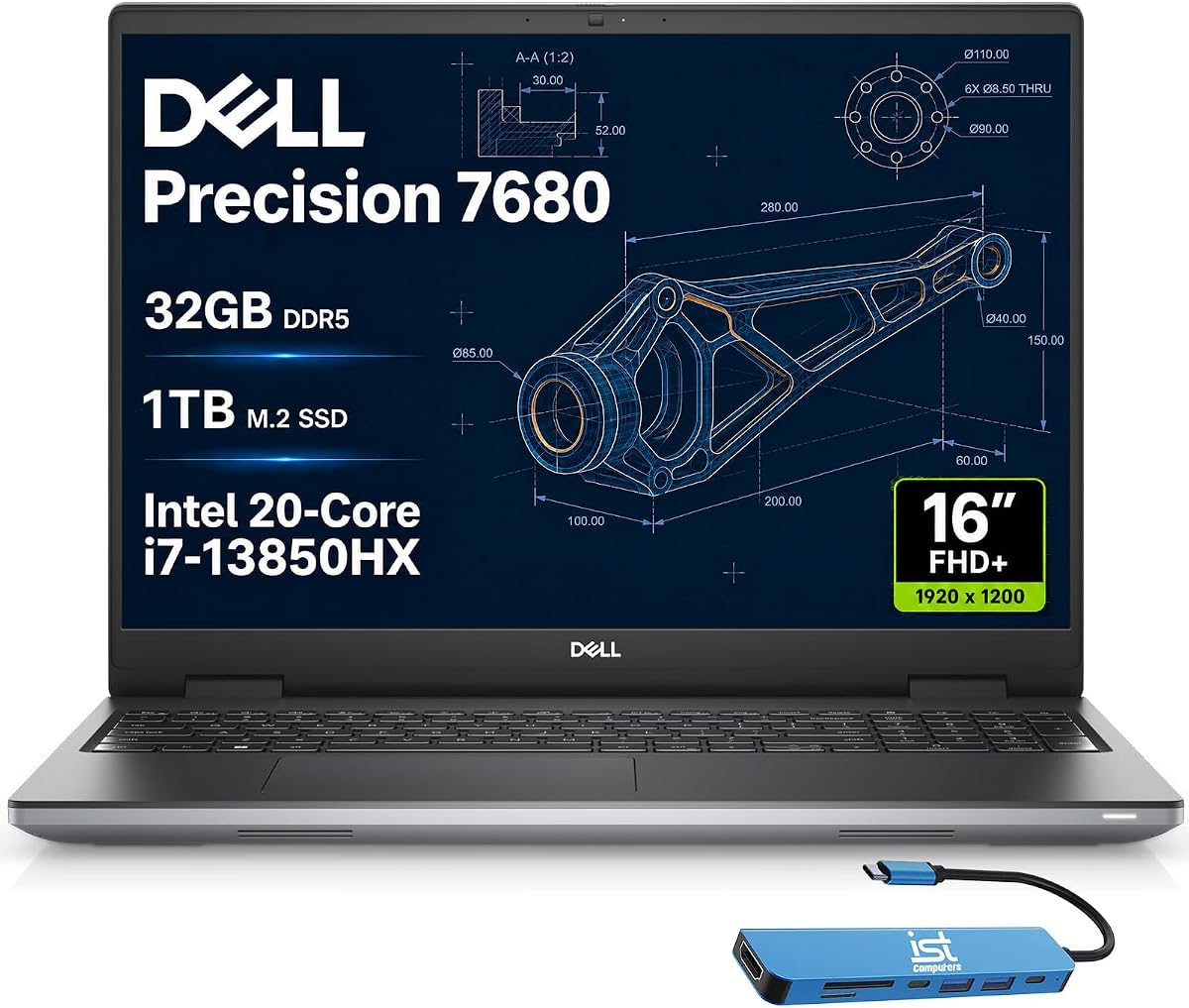
The Core i7-13850HX version of the Dell Precision 7680 brings a 20-core processor, 32GB of DDR5 CAMM memory, and a one-terabyte NVMe SSD to a 16-inch workstation design. Its 4.3 rating indicates generally favorable customer feedback, and the overall specification is well matched to editors who want substantial CPU and memory capacity.
We may earn a commission when you buy through this link, at no additional cost to you.
The processor can reach up to 5.3GHz, giving the laptop strong headroom for timeline interaction, effects, background tasks, and exports. CAMM memory improves bandwidth and allows a thin profile compared with some alternative memory designs, while 32GB is a comfortable amount for Premiere Pro and associated tools. The supplied connectivity includes two Thunderbolt 4 ports, USB-C, two USB-A, HDMI, Ethernet, Wi-Fi 6E, and Bluetooth.
As with the i9 model, the principal compromise is that this listing specifies integrated Intel UHD graphics instead of a discrete workstation GPU. That reduces its appeal for users who regularly depend on GPU-specific acceleration, advanced third-party effects, or large frame buffers. The 1920-by-1200 anti-glare display is suitable for routine editing, but a higher-resolution external monitor would improve precision for detailed work.
This configuration makes the most sense for a professional who wants high core count, fast memory, expansive connectivity, and workstation-class build characteristics without moving to the Core i9 tier. It is a compelling option for office-based editors, technical creators, and students tackling demanding projects on a defined budget. Confirm the exact configuration and warranty terms before ordering.
Twenty processor cores provide substantial capacity for parallel editing tasks and background operations. That can improve responsiveness when a timeline combines complex effects with media decoding, preview rendering, and other demanding software running simultaneously.
Thunderbolt 4 and USB-C provide useful routes for external displays, high-speed accessories, and storage, while HDMI and USB-A cover common peripherals. Ethernet and Wi-Fi 6E add flexibility for studios and shared workspaces.
We may earn a commission when you buy through this link, at no additional cost to you.
The RTX 1000 configuration of the Dell Precision 7680 adds dedicated graphics and a two-terabyte SSD to a workstation built around the 20-core Core i7-13850HX and 64GB of RAM. It is one of the most versatile configurations listed here because it addresses CPU, graphics, memory, and storage limitations simultaneously.
We may earn a commission when you buy through this link, at no additional cost to you.
The RTX 1000 provides 6GB of VRAM, placing it above the Precision 3580's 4GB allocation and below the Precision 7780's 12GB. That middle position can be useful for creators who want hardware-accelerated editing without carrying the largest workstation. The 64GB RAM configuration is especially strong for extensive projects and multitasking, and the two-terabyte NVMe drive provides abundant room for footage, caches, project files, and applications.
The 16-inch FHD+ display remains the most obvious visual compromise. A larger screen can help with timeline visibility, but FHD+ offers fewer pixels than higher-resolution creator panels and may make detailed grading or pixel inspection more demanding. The system also has no listed rating, so there is no customer-score signal to compare against the rated Precision 7680 configurations.
Pro Support Plus is a meaningful differentiator for a business-critical editing machine. The supplied information describes around-the-clock access to Dell-certified experts, advanced remote diagnostics, and onsite technician service after diagnosis. Buyers should evaluate this model when reliability and support matter as much as performance, while travelers who prioritize a compact body should consider a smaller 14-inch alternative.
The two-terabyte SSD leaves room to maintain a local editing library rather than relying entirely on external storage or cloud transfers. Fast NVMe performance also helps reduce loading delays when applications and project media are accessed locally.
The listed Pro Support Plus coverage can reduce downtime when hardware issues arise. For an editor who relies on a laptop as the primary production system, access to advanced diagnostics and onsite service may be more valuable than small differences in everyday performance.
We may earn a commission when you buy through this link, at no additional cost to you.
The renewed Dell Precision 5550 combines a 15.6-inch FHD display, a Core i7-10850H processor running at 2.7GHz, 32GB of RAM, and a one-terabyte SSD with Windows 11 Pro 64-bit. Its 4.5 rating is strong, and the core configuration remains relevant for editors seeking workstation characteristics and ample memory without moving to a newer flagship model.
We may earn a commission when you buy through this link, at no additional cost to you.
The standout element is 32GB of system memory. That capacity provides a comfortable margin for Premiere Pro, browser-based tools, messaging applications, audio utilities, and other background processes. A one-terabyte solid-state drive also gives users enough room to keep an active project and a meaningful portion of its media on the machine, which can improve workflow compared with a smaller and slower storage configuration.
The six-core processor is the main age-related limitation. Although it can still handle ordinary editing, export, and playback duties, it offers less parallel headroom than the 14-core, 20-core, or 22-core processors in the other Dell configurations. The supplied listing also does not identify the discrete graphics model or graphics memory, so buyers must verify those details because they can materially affect Premiere Pro performance.
This laptop is best suited to budget-conscious editors who prioritize RAM, storage, a familiar workstation platform, and a 15.6-inch footprint. Its renewed status may make it appealing to buyers comfortable with refurbished hardware, but checking the condition grading, battery health, warranty, included accessories, and return terms is essential. It is a practical secondary production machine or mainstream editing choice rather than a heavy-effects powerhouse.
Although the processor generation is not new, 32GB of RAM continues to be one of the most valuable editing specifications. It gives a Premiere Pro user room to keep more applications open and reduces the likelihood that system memory will be the first major constraint.
A renewed workstation can deliver substantial hardware value when its cosmetic and technical condition matches the seller's grading. Buyers should review the listing photographs, ask about battery condition, confirm the warranty, and test the machine promptly after delivery.
We may earn a commission when you buy through this link, at no additional cost to you.
The HP 17 is a general-purpose laptop that includes an AMD Ryzen 5 7520U processor, 8GB of DDR5 memory, a 256GB SSD, and a 17.3-inch FHD anti-glare display. Its 5.0 customer rating is the highest listed, although ratings alone do not establish suitability for every editing workflow.
We may earn a commission when you buy through this link, at no additional cost to you.
The large display offers useful workspace for a Premiere Pro timeline, and the Ryzen 5 processor provides eight threads that can support routine editing, playback, and exports. Windows 11 Pro adds business-oriented management and security features, while Wi-Fi 6 and Bluetooth 5.3 cover modern wireless needs. The listing also mentions a mouse and tablet stand as included accessories, which can make the package more convenient for a basic mobile editing setup.
The hardware limitations are significant for anyone handling professional media. EightGB of RAM is the first concern because Premiere Pro plus Creative Cloud applications, browser tabs, and media processing can quickly exhaust that allocation. A 256GB SSD also leaves limited room after installing the operating system, Adobe applications, project files, and media. The processor is suitable for learning and lighter projects, but it lacks the multi-core headroom and specialized graphics emphasis of the workstation models.
The HP 17 is best for students, new editors, or users handling smaller projects on a constrained budget. Upgrading memory and storage, when the hardware permits, would make it more practical. It is not the strongest recommendation for high-resolution source material, intensive effects, or a professional production schedule. Its 5.0 rating suggests good customer satisfaction with the listed configuration, but the resource ceiling should guide the buying decision.
The large screen and Windows 11 Pro environment make this laptop approachable for someone learning timeline organization, trimming, audio editing, titles, and basic color workflows. It is better viewed as an entry point than a high-end production workstation.
A 256GB drive will fill quickly with software, caches, and source footage. Editors using this model should plan a disciplined project structure and consider external SSD storage for larger media libraries.
We may earn a commission when you buy through this link, at no additional cost to you.
The 14.2-inch MacBook Pro with Apple M5 combines a 10-core CPU, a 10-core GPU, 16GB of unified memory, and a one-terabyte SSD. Its 4.7 rating and emphasis on professional creative work make it one of the strongest premium options for Adobe Premiere Pro users who prioritize display quality, portability, and consistent behavior.
We may earn a commission when you buy through this link, at no additional cost to you.
The Liquid Retina XDR panel reaches up to 1,600 nits of peak brightness and up to 1,000 nits of sustained brightness, according to the supplied information. Those figures make it well suited to HDR viewing and detailed creative work. The M5's unified-memory architecture allows the CPU and GPU to access a shared memory pool, while the listed 16GB allocation gives Premiere Pro a useful base for editing, though it is not as generous as the higher-memory Dell configurations.
The system is particularly compelling for editors who work away from a permanent desk. Apple states that the MacBook Pro delivers the same performance on battery as when plugged in, while the three Thunderbolt 4 ports, MagSafe 3, SDXC slot, HDMI port, and headphone jack provide a strong selection of connections. One limitation is that the listed configuration supports up to two external displays, which may constrain some large editing-room arrangements.
This MacBook Pro is ideal for creators already invested in the macOS and Adobe ecosystem who value a superb screen, efficient portable design, and strong integration with creative applications. It is less suitable for users who need 32GB or more of memory, several simultaneous external displays, or the workstation expandability of a Dell Precision. For those needs, the Precision 7680 and 7780 offer more conventional room to grow.
The high-brightness XDR display offers excellent headroom for HDR material and detailed visual evaluation. It is particularly valuable for editors who work on compact laptops but still want a screen with serious color and contrast capabilities.
The combination of efficient Apple silicon and stated equivalent performance on battery and AC power helps maintain predictable results between a studio and a location shoot. That consistency is important when preview rendering and export times interrupt the creative process.
We may earn a commission when you buy through this link, at no additional cost to you.
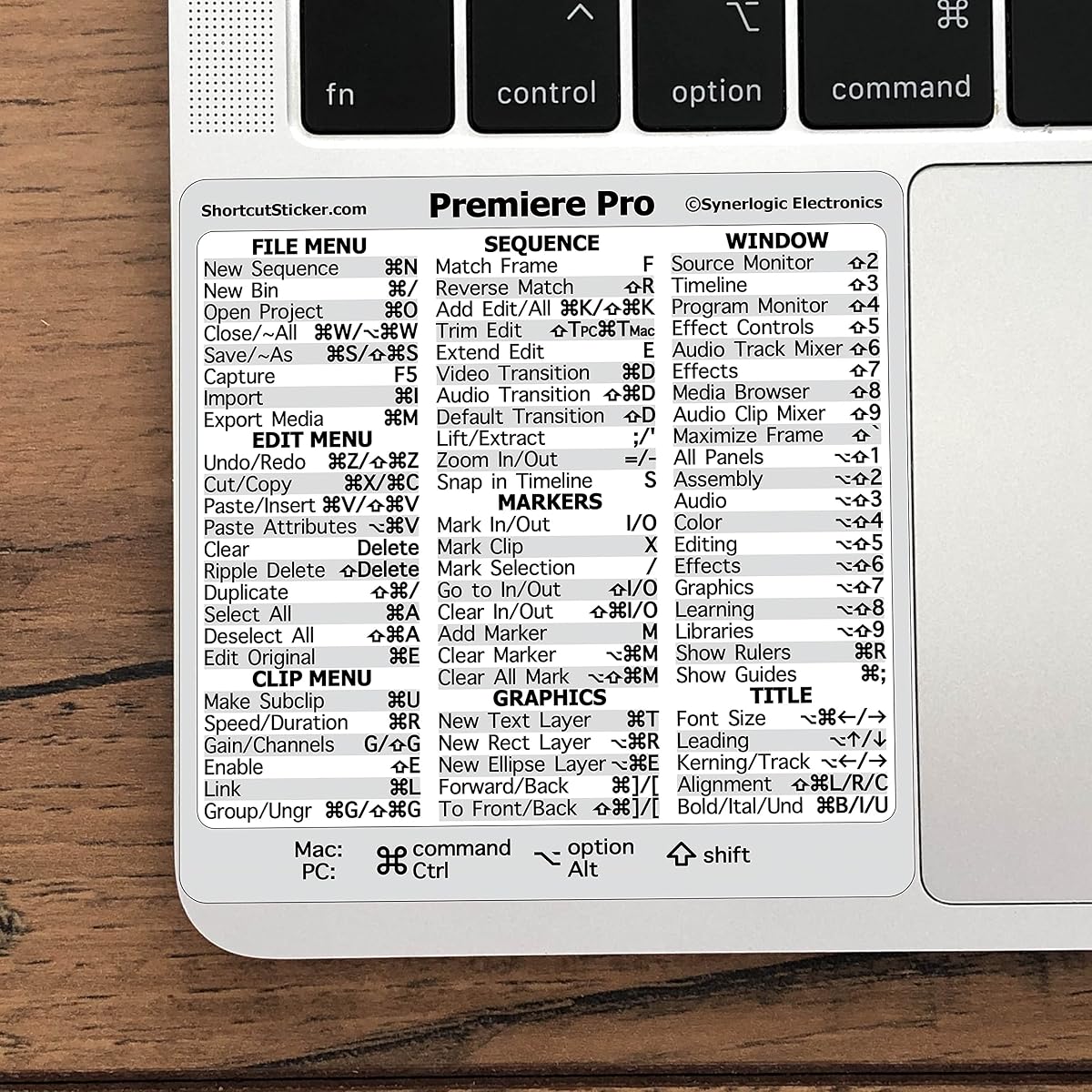
The Synerlogic Premiere Pro Shortcut Sticker is not a laptop, but it is directly relevant to the keyword because it improves how efficiently a Premiere Pro user operates an existing keyboard. It places essential application shortcuts where they can be consulted without leaving the editing interface, and it supports both Mac and Windows PCs.
We may earn a commission when you buy through this link, at no additional cost to you.
Its main benefit is workflow discovery. New editors can learn essential commands faster without repeatedly searching through menus, while experienced editors can use the sticker as a quick reminder for less frequently used functions. The adhesive uses durable vinyl and is designed to resemble an original keyboard reference rather than a large poster that obscures surrounding keys.
It is important to set realistic expectations. A sticker cannot improve rendering speed, extend battery life, or make an underpowered laptop capable of handling large projects. Its usefulness also depends on finding a position that matches the user's keyboard layout and does not interfere with frequently used keys. Keyboard shortcuts can differ between operating systems or application versions, so the reference should complement rather than replace current in-app help.
This accessory is best for editors who want to shorten the learning curve, keep common commands visible, or share a useful tool with students and new team members. It works with any suitable laptop, making it a low-commitment productivity upgrade. Buyers seeking a complete editing solution should still choose a computer with adequate processing, graphics, memory, and storage, while this sticker helps them work more effectively once that computer is ready.
Keeping essential commands visible reduces the time spent searching through Premiere Pro menus. That can produce small but meaningful gains across an entire edit because repeated actions compound over a full production day.
Cross-platform support makes the sticker convenient for hybrid teams and users who switch between Mac and Windows systems. It can also serve as a familiar onboarding aid for editors learning Premiere Pro.
We may earn a commission when you buy through this link, at no additional cost to you.
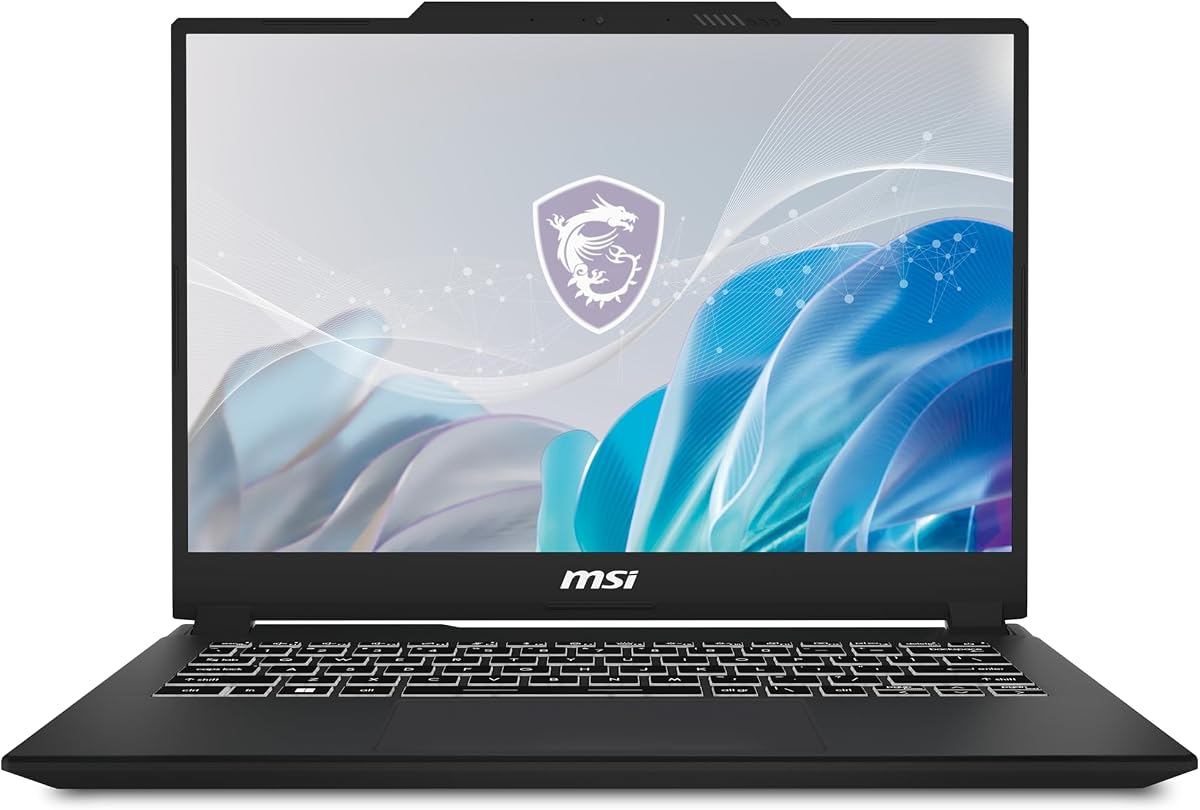
The MSI Creator M14 combines a 13th-generation Intel Core i7-13620H processor, NVIDIA GeForce RTX 4050 graphics, 16GB of DDR5 memory, and a one-terabyte NVMe SSD. Its 4.7 rating and creator-oriented specification make it a compelling general-purpose choice for Premiere Pro work in a compact 14-inch form.
We may earn a commission when you buy through this link, at no additional cost to you.
Its 2.8K display is one of the strongest features for mobile editors because it provides substantially more workspace than a standard FHD panel. The RTX 4050 adds dedicated graphics and supports the Ada architecture's ray-tracing capabilities. Together with the Core i7 processor and fast SSD, the configuration is well suited to editing, playback, and effect-heavy timelines while remaining more compact than the 16- and 17-inch Precision workstations.
The 16GB memory allocation is adequate for many professional projects but can become restrictive when a large media workload and several applications are open simultaneously. The RTX 4050 also has a more limited graphics-memory pool than the higher-tier workstation GPUs, so buyers should match the system to project complexity rather than assume every effect-heavy workflow will behave like a mobile workstation. The display runs at 60Hz according to the supplied information, which is fine for editing but not aimed at high-refresh gaming.
The Creator M14 is best for freelancers, students, and mobile creators who want more color-critical screen resolution and dedicated graphics without carrying a large workstation. It also suits users who edit primarily at 1080p or moderate higher resolutions and maintain organized storage habits. It offers an excellent balance for everyday Premiere Pro production, while the Precision 7780 and RTX 1000-equipped 7680 remain stronger for unusually demanding workloads.
A 2.8K panel provides finer detail and more room for timeline controls than an FHD laptop screen. Combined with a 14-inch chassis, it offers a practical balance for editors who need detail without moving to a bulky mobile workstation.
The RTX 4050 gives the Creator M14 a dedicated graphics path for supported Premiere Pro and plug-in workloads. It is a meaningful step above integrated graphics for many editing tasks, although serious GPU-heavy projects may need more graphics memory.
We may earn a commission when you buy through this link, at no additional cost to you.
Choosing a Premiere Pro laptop means balancing decode and export performance, graphics capability, memory, storage, display quality, portability, and support. The best configuration depends on the footage you edit, the effects you use, and how frequently the computer must travel.
The processor coordinates timeline interaction, decoding, playback, effects, exports, and background tasks. A modern Core i7 or Core i9, Ryzen 7-class processor, or current Apple silicon chip can support professional Premiere Pro workflows, while the number of cores becomes increasingly valuable when effects, transcoding, and exports run alongside a busy editing session. The Dell Precision 3581 provides 14 cores, the Core i7 Precision 7680 provides 20, and both i9 Precision 7680 and 7780 configurations provide 22 cores based on the supplied data.
Choose a processor with enough parallel capability for your workload. Faster single-core behavior helps interface responsiveness, while additional cores benefit background rendering and multitasking.
Premiere Pro can use supported GPU acceleration for effects, playback, decoding, and certain processing tasks. A dedicated GPU is preferable to integrated graphics when the timeline becomes complex, especially with third-party effects, transforms, color tools, or high-resolution media. The available systems range from the RTX A500 with 4GB of GDDR6 to the RTX 3500 Ada with 12GB, while the RTX 1000 configuration offers 6GB.
Prioritize enough graphics memory for your real projects, not merely a recent GPU badge. The RTX 7780-class configuration has the strongest dedicated memory, while the MSI RTX 4050 offers a more portable creator-focused compromise.
RAM affects how comfortably Premiere Pro, Adobe companion applications, web browsers, communication tools, and background utilities operate together. A 32GB allocation is a sensible target for many professional editors because it provides room for large projects and multitasking. The list includes 32GB machines, 64GB and 128GB workstation configurations, and a 16GB MSI Creator M14. The HP's 8GB allocation is the most constrained and is better suited to smaller editing tasks.
Treat 16GB as the practical minimum for a modern editing setup and 32GB as a more comfortable working target. If possible, verify whether the laptop's memory can be expanded before committing to a large media workflow.
Fast NVMe storage improves application loading, project opening, file access, and cache operations. Capacity matters just as much because operating systems, Adobe applications, caches, and project media can consume space quickly. The featured Dell workstations range from one to two terabytes, the MSI and MacBook Pro include one-terabyte SSDs, and the HP provides only 256GB. Media-heavy editors should budget room for caches and keep original footage on reliable external storage.
For active editing, choose at least one terabyte when possible and use a fast NVMe drive. Use organized project folders, separate caches where appropriate, and maintain free space rather than allowing the system drive to fill completely.
An editing display should provide enough resolution to arrange Premiere Pro's panels without constant zooming and enough color performance to judge the image. The MSI Creator M14 stands out with a 2.8K panel, while the Apple MacBook Pro offers a high-brightness Liquid Retina XDR display. Most Dell Precision configurations use FHD or FHD+ screens, which remain functional but may benefit from an external monitor for detailed color-critical work. A larger physical screen is not automatically a higher-resolution screen.
For mobile work, prioritize resolution and brightness. For a stationary desk, consider whether an external display or calibrated reference monitor will provide a better viewing experience than the built-in panel.
A workstation-class laptop can be powerful but difficult to carry between a home office, client site, and edit suite. The 14-inch MSI Creator M14 and MacBook Pro are the most compact choices in the roundup, while the 17.3-inch Precision 7780 offers more screen area at the cost of bulk. Apple states that the MacBook Pro maintains the same performance on battery as when plugged in, and the HP listing claims up to nine hours of battery life. Real results depend on workload, display settings, and battery condition.
Decide whether the laptop is primarily a portable editing machine or a desk replacement. For frequent travel, prioritize manageable size, reliable battery behavior, and charging access; for permanent studio use, screen size and workstation cooling may matter more.
Premiere Pro editors often need external storage, reference displays, control surfaces, audio interfaces, network connections, and card readers. The Dell Precision 7680 models offer Thunderbolt 4, USB-C, USB-A, HDMI, Ethernet, Wi-Fi 6E, and Bluetooth, with support for up to three external 4K displays at 60Hz according to the supplied description. The MacBook Pro includes three Thunderbolt 4 ports, MagSafe 3, an SDXC slot, HDMI, and a headphone jack, but supports up to two external displays in the listed configuration.
Map the ports you actually use before purchasing. Thunderbolt and USB-C are particularly valuable for fast storage and displays, while SD media readers can simplify footage ingestion when a camera uses that format.
Professional support can be valuable when a machine is essential to production. The RTX 1000-equipped Precision 7680 includes listed Pro Support Plus coverage, while the i7 and i9 Precision 7680 configurations include a three-year warranty associated with an SSD upgrade. Renewed products such as the Precision 3581 and 5550 may offer stronger acquisition value, but condition and warranty terms require more careful review. Check display blemishes, battery wear, storage health, included accessories, return window, and repair coverage.
For professional use, reliable support and clear warranty terms can outweigh a small specification difference. For renewed equipment, inspect the unit promptly and keep the original packaging until its condition has been verified.
Begin by installing current Adobe applications, updating the operating system and graphics driver, and checking Adobe Premiere Pro's current requirements for the chosen workflow. Create a structured folder for each project, separate source media from proxies and exports, and avoid filling the internal drive. On systems with 8GB or 16GB of memory, close unnecessary applications before importing a large batch and consider approved memory upgrades or additional storage where supported.
During editing, use proxy media when the workflow and source formats make it useful, save versions regularly, and let the system complete background exports before moving the laptop. Keep vents clear and use a stable surface rather than a soft bed or lap, particularly on the Dell Precision models, whose sustained workstation workloads can generate considerable heat. Do not place the system in an enclosed bag while it is actively rendering or charging.
For a renewed computer, inspect the display, keyboard, ports, battery report, storage health, and installed software as soon as it arrives. For any machine, calibrate the display when accurate visual decisions matter, use a surge-protected power source where appropriate, and maintain current backups of critical project files. The Synerlogic shortcut sticker can support faster command discovery, but it should supplement—not replace—Premiere Pro's current built-in help.
A dedicated GPU is strongly preferable for demanding timelines, effects, high-resolution footage, and third-party plug-ins. It provides more graphics memory and dedicated processing resources than integrated graphics. The MSI Creator M14 and the Dell Precision models with RTX A500, RTX 1000, or RTX 3500 Ada graphics are better positioned for intensive work than systems relying only on integrated graphics.
At least 16GB is a practical starting point for modern editing, while 32GB provides a more comfortable environment for large projects and multitasking. The 64GB and 128GB Dell Precision configurations offer additional headroom for particularly demanding work. If memory cannot be upgraded, users should close unnecessary applications and keep active project caches and media under control.
A 4K display is not essential for every Premiere Pro project, but higher resolution gives finer detail, more timeline space, and a larger visible workspace. The MSI Creator M14's 2.8K panel is more detailed than the FHD and FHD+ screens on most Dell models, while the MacBook Pro prioritizes high brightness and XDR performance. Color accuracy and calibration remain important regardless of resolution.
The Dell systems are better suited to sustained workstation workloads, very large memory configurations, extensive connectivity, and professional support. The MSI Creator M14 is smaller, has a higher-resolution display, and offers a more balanced creator design for mobile use. A 32GB RTX 1000-equipped Precision 7680 is especially comprehensive, while a high-end MacBook Pro provides an alternative premium ecosystem.
Yes, provided its processor, graphics, memory, storage, and condition meet the intended project requirements. The renewed Dell Precision 5550 includes 32GB of RAM and a one-terabyte SSD, making it suitable for many mainstream editing tasks, but its older six-core processor is less future-facing than newer alternatives. Verify the graphics configuration and inspect the unit carefully after delivery.
The Dell Precision 7780 with the NVIDIA RTX 3500 Ada has the largest dedicated graphics-memory allocation in this roundup at 12GB. The RTX 1000-equipped Precision 7680 provides 6GB, while the RTX A500-equipped Precision 3581 provides 4GB. Graphics memory matters most for advanced effects, high-resolution timelines, and GPU-heavy third-party plug-ins.
No, it does not increase rendering speed or change the computer's capabilities. It improves workflow efficiency by keeping important commands visible, helping users perform common operations with fewer interruptions. The sticker works with both Mac and Windows computers and can be particularly helpful for new editors building muscle memory.
Choose a larger workstation if you regularly handle high-resolution media, intensive effects, large caches, several external monitors, or production deadlines that demand sustained performance. Choose a portable creator laptop if you travel frequently and need a capable display in a smaller chassis. The HP 17 and MSI Creator M14 are more compact options, while the Dell Precision 3581, 7680, and 7780 prioritize workstation features.
The MSI Creator M14 is the most balanced recommendation for many editors because it combines dedicated RTX 4050 graphics, a high-resolution 2.8K display, 16GB of DDR5 memory, and a compact 14-inch design. The MacBook Pro 14-inch M5 stands out for its exceptional XDR display, efficient portability, and consistent battery operation, while the renewed Dell Precision 5550 offers a workstation-oriented path with 32GB of memory and fast storage at a more acquisition-conscious level.
For heavier work, prioritize graphics memory and system memory over portability. The Precision 7780 offers 12GB of dedicated VRAM and 128GB of RAM, while the RTX 1000-equipped Precision 7680 combines 6GB of graphics memory, 64GB of RAM, a two-terabyte SSD, and listed enterprise support. Professionals should also consider an external high-resolution display, reliable backups, and current Adobe compatibility requirements.
Product availability, configurations, warranty terms, and prices can change, so check the current listing before buying. Compare the exact processor, graphics, memory, storage, display, and included accessories rather than relying on the product family name alone. The right Adobe Premiere Pro laptop is the one that comfortably handles your real projects while fitting the way and where you edit.