
MSI MAG Z790 Tomahawk WiFi
4.1Editor score
LGA 1700 processor support
Sixteen-plus-one-plus-one power design
DDR5 memory support
PCIe 5.0 graphics slot
WiFi 6E and 2.5Gb LAN
This expert guide compares 10 products for Motherboard for Intel i9 14900K, evaluating socket support, VRM, memory, storage, networking, expansion, and cooling.
A motherboard for the Intel Core i9-14900K must combine the correct LGA 1700 socket with a robust power-delivery system, capable memory support, and enough connectivity for a modern gaming or content-creation PC. The best board balances these essentials with practical expansion options, effective cooling, and features that make installation and everyday maintenance easier.
This guide compares the supplied motherboards alongside the two Intel processors in the product list, explaining which options are directly compatible with the Core i9-14900K and which serve as references for CPU upgrades. Comparisons focus on chipset, socket, VRM design, memory type, M.2 support, networking, expansion, cooling, and practical motherboard size.
Each numbered review reveals what the product offers and any important limitation. The top three recommendations are among the motherboards most directly suited to the target processor, while clearly flagging models that require a different socket. Product details and ratings may change over time, so readers should confirm current specifications, BIOS support, case clearance, and prices before purchasing.
4.1Editor score
4.5Editor score

4.4Editor score
The table below places all ten listed products on the same practical dimensions. Socket and chipset compatibility are decisive for the Core i9-14900K, while VRM, memory, storage, networking, and expansion help distinguish the boards that can serve a high-end build.


The Intel Core i9-14900K is the processor at the center of this search rather than a motherboard, but its requirements determine which boards are valid choices. It carries a 4.2 rating and combines 24 cores with 32 threads, using eight performance cores and 16 efficiency cores. Its up-to-6.0 GHz maximum clock is intended to support demanding games, fast multitasking, and processor-heavy creative workloads.
We may earn a commission when you buy through this link, at no additional cost to you.
Socket compatibility is the most important fact. The processor uses LGA 1700 and can operate with compatible Intel 600-series motherboards after a potential BIOS update or with 700-series chipset boards. Its support for both DDR4 and DDR5 platforms means buyers can choose memory according to board availability and their complete-system budget rather than accepting only one memory standard.
The integrated Intel UHD Graphics 770 gives the processor a basic display option, although a serious gaming system built around this chip will generally use a discrete graphics card. The processor itself does not provide motherboard features such as M.2 slots, networking, VRM cooling, or rear-panel ports. Those functions must be evaluated on the board selected for the build.
Buyers should therefore use the Core i9-14900K to shortlist an LGA 1700 motherboard with a sufficiently capable power-delivery system. The ASUS TUF Gaming Z790-Plus WiFi, GIGABYTE Z790 AORUS Elite AX, MSI MAG Z790 Tomahawk WiFi, MSI PRO Z790-A WiFi II, MSI PRO B760-P WiFi DDR4, and ASRock B760M Pro-A/D4 WiFi all identify support for 14th Gen processors. This CPU is best viewed as the performance anchor around which those boards are compared.
An attractive board is only suitable if it accepts the processor's LGA 1700 package and provides the required chipset support. Confirming processor support and any necessary BIOS update before buying prevents a costly platform mismatch.
Because the processor supports both DDR4 and DDR5 platforms, compatible Z790 and B760 boards can fit different memory ecosystems. Match the selected motherboard's DIMM type and supported specifications to the memory kit you intend to install.
We may earn a commission when you buy through this link, at no additional cost to you.
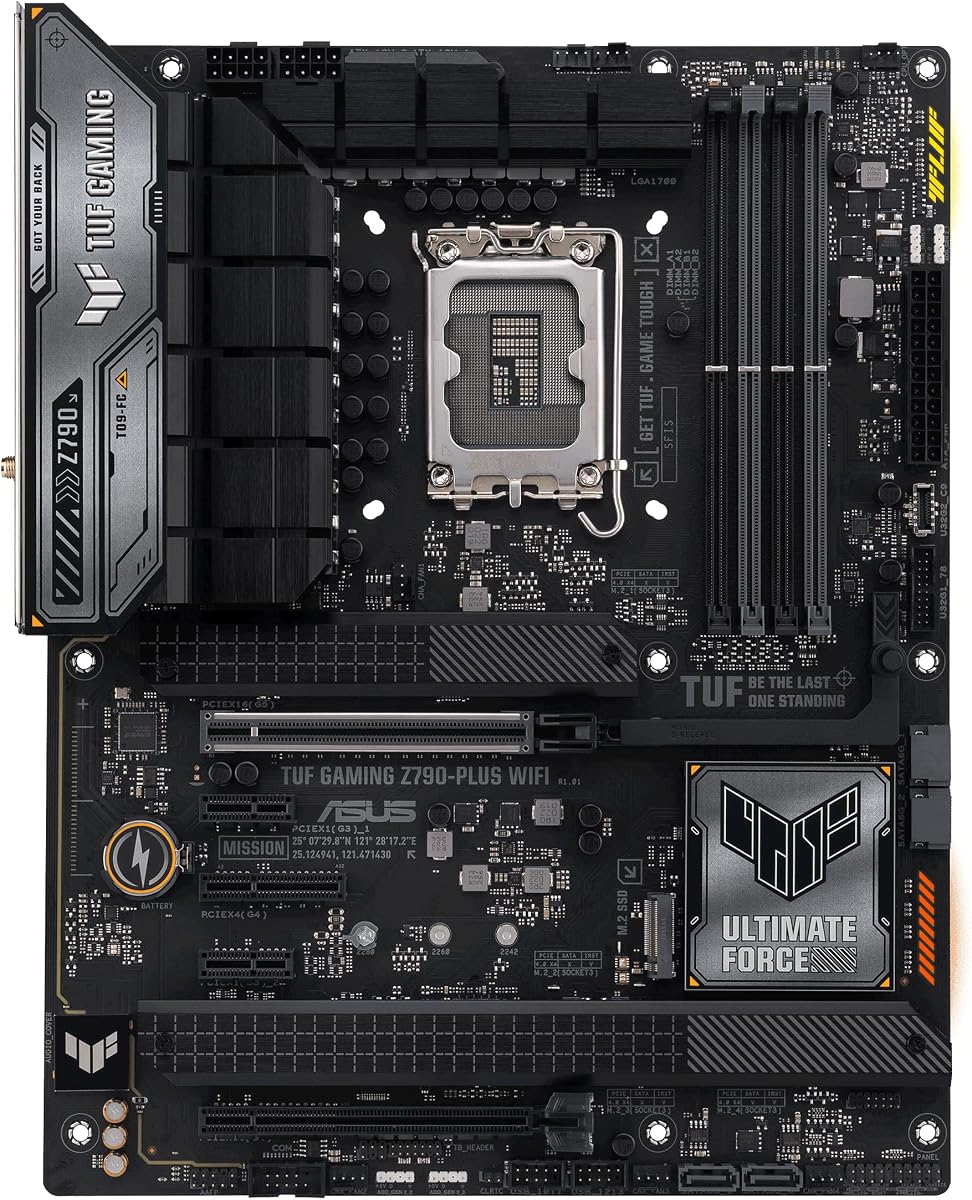
The ASUS TUF Gaming Z790-Plus WiFi is the most complete all-around recommendation for the Core i9-14900K, combining a 4.5 rating with direct LGA 1700 support for 12th, 13th, and 14th Gen Intel processors. Its ATX format, DDR5 support, four M.2 slots, and PCIe 5.0 capabilities give a new high-end build room for a fast graphics card, substantial NVMe storage, and current accessories.
We may earn a commission when you buy through this link, at no additional cost to you.
Power delivery is a major strength for a processor with eight performance cores. The board uses a 16+1 DrMOS arrangement with ProCool sockets, military-grade TUF components, and Digi+ VRM. Cooling is handled through a VRM heatsink, a fanless PCH heatsink, an M.2 heatsink, hybrid fan headers, and Fan Xpert 4, covering several of the areas that matter most during sustained workloads.
Networking and connectivity are also well covered. The board includes WiFi 6 through an Intel AX201 module, Intel I225-V 2.5Gb LAN, TUF LANGuard, and TurboLAN technology. Storage and peripheral options include four M.2/NVMe positions, a front-panel USB 3.2 Gen 2 Type-C header, USB Gen 2×2 Type-C, and a Thunderbolt 4 header, reducing the need for add-in cards.
The main qualifications are practical rather than performance-related: buyers need an ATX-capable chassis, and those uninterested in lighting can ignore the Aura RGB feature. For most builders, however, its balance of power, cooling, expansion, storage, networking, and direct processor support makes it the strongest general-purpose motherboard in this list.
The 16+1 DrMOS power solution and substantial cooling components make this board a sensible foundation for the Core i9-14900K. A capable VRM is especially relevant when paired with a processor built around eight performance cores and high boost clocks.
Four M.2 slots, wired 2.5Gb networking, WiFi 6, front USB-C, and Thunderbolt 4 give the board an unusually broad set of native connections. This can simplify a clean build and leave PCIe slots available for graphics and other expansion.
We may earn a commission when you buy through this link, at no additional cost to you.
The GIGABYTE Z790 AORUS Elite AX earns a 4.4 rating and offers direct support for Intel Core 14th, 13th, and 12th Gen processors. It is a strong budget-oriented recommendation because it combines a Z790 chipset, DDR5 support, a 16+1+2 digital VRM, four M.2 slots, and PCIe 5.0 without requiring a larger specialized form factor.
We may earn a commission when you buy through this link, at no additional cost to you.
The board's power design uses 70A power stages in a twin 16+1+2 arrangement. That specification is particularly relevant when matching the board to the Core i9-14900K, whose eight performance cores can create substantial power and heat demands. Thermal features include M.2 Thermal Guard III, fully covered MOSFET heatsinks, PCIe Ultra Durable Armor, and a six-layer PCB.
Storage is handled by four PCIe 4.0 x4 M.2 positions, while USB 3.2 Gen 2×2 Type-C provides modern peripheral connectivity. The listed title also identifies WiFi 6E, 2.5GbE, Q-Flash, EZ-Latch, and RGB Fusion. Q-Flash can be useful for firmware updates, and EZ-Latch is intended to make component installation more approachable.
Buyers should note that this is a DDR5 board and therefore cannot use DDR4 memory. Its ATX format also demands a compatible chassis. Even with those constraints, the combination of processor support, power delivery, cooling, storage, and networking makes it a well-balanced way to build around the Core i9-14900K.
A 16+1+2 design using 70A power stages gives the board a credible foundation for the Core i9-14900K. Covered MOSFET heatsinks and M.2 Thermal Guard III help manage heat in the areas most likely to require it.
Four Gen4 M.2 positions support a substantial NVMe storage plan. Q-Flash and EZ-Latch add practical tools for firmware handling and component installation, making the board approachable for builders who want useful utilities without a more elaborate feature set.
We may earn a commission when you buy through this link, at no additional cost to you.
The MSI MAG Z790 Tomahawk WiFi is the premium-focused recommendation in this comparison, pairing a 4.1 rating with explicit support for 12th, 13th, and 14th Gen Intel processors. It uses LGA 1700 and is therefore directly suited to the Core i9-14900K, while its ATX format offers room for multiple graphics, storage, and expansion devices.
We may earn a commission when you buy through this link, at no additional cost to you.
Its power system centers on a 16+1+1 Duet Rail design, dual 8-pin CPU power connectors, Core Boost, and Memory Boost. The board supports DDR5 memory at speeds up to 7200-plus in overclocked configurations. For gaming, it includes a PCIe 5.0 slot, Lightning Gen 4 x4 M.2 support, and USB 3.2 Gen 2×2 connectivity.
Thermal management is handled by an extended heatsink design and M.2 Shield Frozr. The board also includes 2.5Gbps LAN, WiFi 6E, Bluetooth 5.3, HDMI, and DisplayPort. These features make it a credible high-end foundation where fast networking, modern storage, and a powerful CPU deserve first-class board support.
Its 4.1 rating is lower than those of several competing Z790 boards, and the board only accepts DDR5 memory. Those points deserve consideration, but the direct processor fit, robust power section, PCIe 5.0 expansion, and extensive connectivity justify its place as the premium option for builders who favor a broad gaming-oriented feature set.
The combination of a PCIe 5.0 slot, dual eight-pin CPU power connectors, and a 16+1+1 power design is well suited to a high-end Core i9 configuration. It gives demanding CPUs and graphics hardware native platform support without requiring add-in cards.
DDR5 support extends to listed overclocked speeds of 7200-plus, while WiFi 6E, Bluetooth 5.3, and 2.5Gbps LAN cover modern connected workflows. These features are particularly useful in a gaming system intended for fast downloads, streaming, and low-latency networking.
We may earn a commission when you buy through this link, at no additional cost to you.
The ASUS ROG Strix Z890-E is an impressive ATX motherboard with a 4.4 rating, an extensive 18+2+1+2-stage power system, seven M.2 connectors, WiFi 7, and DDR5 support. It is designed for Intel Core Ultra Series 2 processors on the LGA 1851 socket and is intended for advanced AI PCs and high-end enthusiast builds.
We may earn a commission when you buy through this link, at no additional cost to you.
Its feature set includes NPU Boost, ASUS AI Advisor, AI Overclocking, AI Cooling II, and AI Networking II. The board also offers DIMM Fit, DIMM Flex, and AEMP III for memory configuration. A robust power system uses ProCool II connectors, MicroFine alloy chokes, and premium metallic capacitors to support demanding processor configurations.
These features make the board attractive when planning around Intel Core Ultra Series 2 rather than the Core i9-14900K. Its high-end networking, numerous storage positions, and AI-oriented tools can benefit a creator who intends to use the latest supported platform. The extensive physical design also requires an appropriate ATX chassis and careful planning for cooling and cable routing.
The decisive limitation is socket incompatibility. The LGA 1851 board does not accept the LGA 1700 Core i9-14900K, so it should not be purchased for the exact build discussed in this guide. It earns a place in the comparison as a clearly labeled future-platform alternative, not as a compatible recommendation for the target processor.
Seven M.2 connectors give this board exceptional flexibility for high-capacity NVMe configurations. That makes it appealing for content creators or enthusiasts who expect storage demands to grow across a system upgrade cycle.
AI Overclocking, AI Cooling II, AI Networking II, and DIMM Fit utilities are designed to simplify configuration. These features distinguish the newer platform, although they apply only when paired with a compatible LGA 1851 processor.
We may earn a commission when you buy through this link, at no additional cost to you.
The MSI PRO Z790-A WiFi II is a balanced LGA 1700 motherboard rated 4.4 and explicitly supports Intel Core 14th, 13th, and 12th Gen processors. Its ATX design, 80A SPS power stages, DDR5 support, PCIe 5.0 graphics slot, four Gen4 M.2 positions, and integrated networking make it suitable for a Core i9-14900K workstation or gaming build.
We may earn a commission when you buy through this link, at no additional cost to you.
Power delivery centers on a 16 Duet Rail Power System with 80A SPS components and MSI Core Boost. Cooling includes 7W/mK MOSFET thermal pads, an extended VRM heatsink, a chipset heatsink, M.2 Shield Frozr, and a dedicated pump-fan header. The six-layer server-grade PCB uses two-ounce thickened copper to support the board's physical design.
Memory and expansion are well specified. Four DDR5 DIMM slots use isolated Memory Boost circuitry and support listed overclocked speeds of 7800-plus in a one-DIMM, one-rank configuration. The primary PCIe x16 slot supports PCIe 5.0 at 128GB per second and includes Steel Armor, while four M.2 Gen4 x4 slots provide 64Gbps storage connections.
Networking includes a WiFi 6E module, Bluetooth 5.3, and a 2.5Gbps LAN controller. Rear connectivity adds USB 20Gbps Type-C, HDMI 2.1, DisplayPort 1.4, and 7.1-channel USB audio with Audio Boost 5 and S/PDIF output. It is a compelling recommendation when a versatile work-focused board is wanted, although its M.2 count is more modest than the ASUS ROG model.
The 80A SPS stages, seven-layer PCB, extended heatsink, and thermal pads provide a solid foundation for sustained processor loads. A dedicated pump-fan header also gives builders a convenient option for a more advanced cooling setup.
HDMI 2.1, DisplayPort 1.4, WiFi 6E, Bluetooth 5.3, and 2.5Gbps LAN make the board convenient for mixed productivity and entertainment systems. The primary PCIe 5.0 slot is ready for a modern discrete graphics card in a Core i9-14900K build.
We may earn a commission when you buy through this link, at no additional cost to you.
The Intel Core i9-12900KF is another processor rather than a motherboard, but its 4.6 rating and LGA 1700 platform make it a useful comparison point for builders considering Intel's 600- and 700-series chipset options. It offers 16 cores split evenly between eight performance and eight efficiency cores, with a maximum clock of up to 5.2 GHz.
We may earn a commission when you buy through this link, at no additional cost to you.
Its compatibility information is broad: the processor can run on Intel 600-series and 700-series chipset-based motherboards. This means many of the LGA 1700 boards featured in this guide can be used with it. Buyers who select this chip should still verify the motherboard model's explicit processor-generation support and confirm whether a BIOS update is necessary.
Unlike the target Core i9-14900K, this processor has no integrated graphics and therefore requires a discrete graphics card. It also uses a 125W-class processor design and provides 30MB of L3 cache. Its Intel 7 architecture and performance hybrid design are positioned around gaming and simultaneous multitasking rather than the newest AI-focused platform features.
This chip is best viewed as a previous-generation alternative that can still make excellent use of a well-chosen Z790 board. It does not answer the request for a motherboard, and it does not offer the Core i9-14900K's 24 cores and 32 threads, but its higher rating and established socket compatibility make it relevant when comparing upgrade paths.
Support for both 600-series and 700-series motherboards gives the Core i9-12900KF flexibility within the LGA 1700 ecosystem. It can be a practical option for a system where the goal is strong gaming performance without moving to the newest processor generation.
A discrete graphics card is required because this processor lacks integrated graphics. That additional component should be considered when comparing complete-system cost and intended gaming performance.
We may earn a commission when you buy through this link, at no additional cost to you.
The MSI PRO B760-P WiFi DDR4 carries a strong 4.6 rating and offers an alternative route to building a Core i9-14900K system with familiar DDR4 memory. Its LGA 1700 socket is listed as supporting 12th, 13th, and 14th Gen processors, making it one of the most highly rated directly relevant motherboards in the list.
We may earn a commission when you buy through this link, at no additional cost to you.
The board uses a 12+1 Duet Rail Power System with P-PAK components, 8-pin and 4-pin CPU power connectors, Core Boost, and Memory Boost. DDR4 memory runs in dual-channel configurations with listed overclocked speeds up to 5333-plus. Unlike the premium Z790 recommendations, it does not include PCIe 5.0 expansion, but it remains a functional ATX platform for a modern graphics card and peripherals.
Thermal engineering includes an extended heatsink, MOSFET thermal pads rated at 7W/mK, additional choke thermal pads, and M.2 Shield Frozr. The six-layer PCB uses two-ounce thickened copper and server-grade material. Connectivity includes 2.5Gbps LAN, WiFi 6E, Bluetooth 5.3, HDMI, DisplayPort, and USB 3.2 Gen2.
The tradeoff is hierarchy: B760 is a less capable chipset than Z790, and the board has no listed PCIe 5.0 slot. Buyers who want the newest platform expansion, maximum memory bandwidth, or more premium power infrastructure should examine a Z790 option. Those who already own DDR4 memory and want a highly rated, capable LGA 1700 board will find this model practical.
DDR4 support can simplify a transition because compatible existing memory may be reusable. The board supports dual-channel DDR4 configurations and listed overclocked speeds up to 5333-plus, subject to compatible kits and CPU memory support.
The B760 chipset means no listed PCIe 5.0 slot, but 2.5Gbps LAN, WiFi 6E, Bluetooth 5.3, and modern USB keep the platform practical. A discrete GPU can use the main PCIe slot even without PCIe 5.0.
We may earn a commission when you buy through this link, at no additional cost to you.
The ASRock B760M Pro-A/D4 WiFi has a perfect 5.0 rating and stands out as the most compact option in the comparison. Its Micro-ATX form factor measures 9.6 inches by 9.6 inches, making it useful for compact and standard cases, but buyers should verify chassis support before ordering.
We may earn a commission when you buy through this link, at no additional cost to you.
The LGA 1700 board supports 14th, 13th, and 12th Gen Intel processors, so it is physically and functionally relevant to the Core i9-14900K. Its 7+1+1 Dr.MOS design handles power delivery for VCore and integrated graphics, while four DDR4 DIMM slots support dual-channel configurations and overclocked speeds up to 5333-plus with Intel XMP 2.0.
Expansion includes two PCIe 4.0 x16 slots and one PCIe 4.0 x1 slot. Storage is handled by two Hyper M.2 positions supporting PCIe Gen4 x4 NVMe SSDs, including one with a dedicated heatsink, plus four SATA3 ports. Networking combines Dragon 2.5G LAN with a Killer 802.11axe WiFi 6E module and Bluetooth 5.3.
Display and peripheral connections include HDMI 2.1 and DisplayPort 1.4 for compatible processors, a rear USB 3.2 Gen1 Type-C port, additional USB Type-A connections, and six USB 2.0 ports. The principal trade-offs are limited M.2 expansion and the smaller board footprint. Within those constraints, its 5.0 rating, compactness, and direct processor support make it an attractive specialized option.
The 9.6-inch-square Micro-ATX design can make a powerful Core i9 system easier to fit in a smaller chassis. It retains dual Gen4 M.2 storage, 2.5Gb LAN, WiFi 6E, Bluetooth 5.3, and two full-length PCIe slots despite its reduced footprint.
Micro-ATX cases vary in motherboard support, expansion-slot clearance, and cooler height. Because the board measures 9.6 inches by 9.6 inches, confirming case dimensions and included mounting hardware is essential.
We may earn a commission when you buy through this link, at no additional cost to you.
The ASUS ProArt Z890-CREATOR WIFI is a creator-oriented motherboard rated 4.4 and built for Intel Core Ultra Series 2 processors. Its LGA 1851 socket, DDR5 support, PCIe 5.0 expansion, five M.2 slots, Thunderbolt 5, and high-speed networking make it a compelling alternative for creators who want a modern platform rather than a Core i9-14900K system.
We may earn a commission when you buy through this link, at no additional cost to you.
The board's connectivity is particularly notable. It includes dual Thunderbolt 5 and Thunderbolt 4 ports, 10Gb and 2.5Gb Ethernet, WiFi 7, two PCIe 5.0 graphics connections, one additional PCIe 5.0 slot, four PCIe 4.0 M.2 slots, and a front-panel USB 20Gbps header. These features suit workflows involving fast storage, high-resolution displays, and demanding data movement.
A 16+2+1+2 teamed power-stage design uses ProCool II connectors, high-quality alloy chokes, and durable capacitors. Software features include AI Overclocking, AI Cooling II, AI Networking II, ASUS AI Advisor, and NPU Boost. The ProArt Creator Hub adds color-management tools that work with Pantone utilities, while ASUS Control Center Express offers USB management, software blacklisting, and registry controls.
Installation conveniences include PCIe Slot Q-Release Slim with SafeSlot, M.2 Q-Release, M.2 Q-Slide, M.2 Q-Latch, Q-Antenna, BIOS FlashBack, and Q-Connector. Nevertheless, its LGA 1851 socket makes it incompatible with the LGA 1700 Core i9-14900K. It belongs in the guide as a premium creator-platform reference rather than a direct motherboard match.
Dual Thunderbolt 5, Thunderbolt 4, 10Gb Ethernet, and multiple PCIe 5.0 slots provide a strong foundation for demanding creative workflows. These interfaces can simplify workflows involving fast external storage, displays, and networked data.
M.2 Q-Latch, M.2 Q-Slide, Q-Release mechanisms, BIOS FlashBack, and Q-Connector help simplify component installation and maintenance. These tools are particularly valuable in a creator system expected to receive regular storage or peripheral upgrades.
We may earn a commission when you buy through this link, at no additional cost to you.
The right motherboard for the Core i9-14900K depends first on socket and chipset compatibility, followed by power delivery, memory, expansion, connectivity, and physical fit. Reviewing these factors before ordering helps prevent an expensive mismatch and produces a more balanced system.
The Core i9-14900K uses the LGA 1700 socket, so every compatible board must explicitly support that package. LGA 1851 boards in the list, including the ASUS ROG Strix Z890-E and ASUS ProArt Z890-CREATOR WIFI, are designed for Intel Core Ultra Series 2 processors and cannot accept the 14900K. For a 600-series board, confirm that BIOS support is available and determine whether an update is required before installation.
A Core i9 processor with eight performance cores can place meaningful demands on a motherboard's power-delivery system. Look beyond phase counts alone and consider the current rating of the power stages, CPU power connectors, heatsink coverage, thermal pads, and the overall board layout. The ASUS TUF, MSI MAG Tomahawk, GIGABYTE AORUS Elite AX, and MSI PRO Z790-A WiFi II all provide substantial power designs appropriate to the processor class.
The Core i9-14900K can be paired with either DDR4 or DDR5 platforms, but each motherboard supports only one memory type. DDR5 boards such as the ASUS TUF, MSI MAG Tomahawk, MSI PRO Z790-A WiFi II, and GIGABYTE AORUS Elite AX require DDR5 kits. The MSI PRO B760-P WiFi DDR4 and ASRock B760M Pro-A/D4 WiFi use DDR4. Also compare listed memory speeds, DIMM count, and whether the desired configuration is a dual-channel arrangement.
Count the M.2 slots needed for the operating system, applications, games, and working media rather than selecting only by headline slot count. The ASUS ROG Strix Z890-E leads the supplied list with seven M.2 connectors, followed by the ASUS ProArt with five. The ASUS TUF, GIGABYTE AORUS Elite AX, and MSI PRO Z790-A WiFi II each provide four, while the compact ASRock board provides two. PCIe slot availability, lane generation, and physical slot spacing should also be checked.
A high-end gaming build will usually need a discrete graphics card, so the primary PCIe slot should support the intended GPU. The MSI MAG Tomahawk and MSI PRO Z790-A WiFi II provide PCIe 5.0 x16, while several other boards use PCIe 4.0. Rear USB-C, audio, display outputs, and legacy ports can determine whether additional adapters or expansion cards are necessary.
All of the featured motherboard networking combinations include wired and wireless options, but they are not identical. The MSI PRO B760-P, ASRock B760M Pro-A, MSI MAG Tomahawk, and MSI PRO Z790-A WiFi II list WiFi 6E. The GIGABYTE AORUS Elite AX also identifies WiFi 6E. The ASUS ROG Strix Z890-E and ASUS ProArt use WiFi 7, while the ASUS TUF lists WiFi 6. For a general home build, WiFi 6E is often sufficient, whereas creator workflows may benefit from faster multi-gigabit Ethernet.
ATX provides a generous balance of expansion and reasonable case compatibility, while the ASRock B760M Pro-A/D4 WiFi uses a compact 9.6-inch-square Micro-ATX layout. A smaller board can make powerful systems easier to fit, but it provides fewer storage positions and may restrict slot spacing. Check chassis form-factor support, mounting-hole alignment, I/O clearance, cooler height, and graphics-card length before buying.
Z790 boards in this list provide more of the platform's highest-end connectivity, including PCIe 5.0 support on several models, while B760 boards serve more mainstream configurations. The exact benefit depends on the board because chipset names do not define every connector or power feature. Compare the complete specifications instead of assuming one chipset tier automatically makes every board better.
Begin by verifying the processor support list, required BIOS version, memory type, case form factor, and graphics-card dimensions. Install the CPU and matching cooler according to the motherboard and processor instructions, connect the CPU power cables, and confirm that the selected memory kit matches the board's DDR4 or DDR5 slots. Updating the BIOS may be necessary on some 600-series combinations, so check this before final assembly.
After the operating system is installed, update the motherboard firmware and device drivers, enable the intended XMP memory profile if it has been validated with the chosen kit, and confirm that all storage devices appear correctly. Use the board's monitoring or control software to review temperatures, fan behavior, networking, and storage status. Avoid changing power or memory settings before establishing a stable baseline.
Good care means keeping the chassis dust-free, ensuring CPU and chassis airflow paths remain unobstructed, and checking that storage heatsinks and VRM cooling are properly installed. Update firmware deliberately, use surge protection for a system with valuable components, and back up important data. When upgrading processors or memory, revisit BIOS support and compatibility rather than assuming every LGA 1700 combination works without an update.
The Intel Core i9-14900K uses the LGA 1700 socket. A motherboard must explicitly support 14th Gen processors to be considered compatible. Some Intel 600-series boards can work with a BIOS update, while the LGA 1851 boards in this guide are not compatible with the 14900K.
No. The ASUS ROG Strix Z890-E and ASUS ProArt Z890-CREATOR WIFI use LGA 1851 and support Intel Core Ultra Series 2 processors. The Core i9-14900K requires an LGA 1700 motherboard, so choosing a Z790 or compatible B760 model is essential.
The processor can support either memory standard, but the motherboard determines the choice. The MSI PRO B760-P WiFi DDR4 and ASRock B760M Pro-A/D4 WiFi use DDR4, while most of the Z790 recommendations use DDR5. DDR4 may suit a builder reusing existing memory, whereas DDR5 is the higher-end path among the listed boards.
Power-delivery quality is an important consideration because the processor has eight performance cores and can sustain substantial power demands under heavy workloads. Boards with extensive high-current power stages, large VRM heatsinks, and multiple CPU power connectors are especially appropriate. A capable cooler and unrestricted case airflow should accompany the motherboard.
A compatible B760 board can support the processor, and the MSI PRO B760-P WiFi DDR4 and ASRock B760M Pro-A/D4 WiFi both identify 14th Gen support. The trade-off is platform feature level: these boards do not offer the same PCIe 5.0 expansion found on several Z790 recommendations.
Most of the listed motherboards include wireless networking. The ASUS TUF lists WiFi 6, while the GIGABYTE AORUS Elite AX, MSI MAG Tomahawk, MSI PRO Z790-A WiFi II, MSI PRO B760-P, and ASRock board list WiFi 6E. The two LGA 1851 ASUS models list WiFi 7. A compatible router and network configuration are still required.
The ASRock B760M Pro-A/D4 WiFi is the compact choice because it uses a 9.6-inch-square Micro-ATX form factor and directly supports 14th Gen processors. It includes dual Gen4 M.2 storage, 2.5Gb LAN, WiFi 6E, and two full-length PCIe slots, but buyers must confirm that the selected case supports Micro-ATX boards and the intended graphics card.
The supplied range extends from two M.2 slots on the ASRock B760M Pro-A/D4 WiFi to seven on the ASUS ROG Strix Z890-E. However, slot count alone does not determine compatibility. Check whether the board uses M.2 positions for PCIe storage, whether a heatsink is included, and whether planned drives fit within the board's available space and thermal design.
The ASUS TUF Gaming Z790-Plus WiFi is the most balanced overall choice because it combines direct 14th Gen support, a 16+1 DrMOS power system, extensive cooling, four M.2 slots, PCIe 5.0, modern networking, and front USB-C and Thunderbolt 4 connectivity. The MSI MAG Z790 Tomahawk WiFi stands out as a feature-rich premium gaming option, while the GIGABYTE Z790 AORUS Elite AX delivers strong core hardware at a more budget-conscious level.
Prioritize socket compatibility first, followed by the VRM, thermal design, and memory type. A board cannot be made suitable through added components if it lacks the proper socket. After that, count storage drives and expansion cards, inspect rear and front connectivity, determine whether wired or wireless networking matters, and confirm that the board fits the chassis. Existing DDR4 ownership may also make the MSI PRO B760-P WiFi DDR4 a sensible choice.
Product specifications, ratings, availability, and prices change over time, so verify the current listing and manufacturer support information before ordering. For the Core i9-14900K specifically, check the board's explicit 14th Gen support and whether a BIOS update is required. A careful compatibility check at purchase is the best protection against an expensive mismatch.