
Blank Crystal Transparent Keycaps
4.4Editor score
Twenty blank XDA keycaps
Crystal-clear PC construction
Includes a keycap puller
Compatible with MX switches
Our clear keycaps guide compares ten transparent PC sets by profile, key count, layout support, light diffusion, build feel, and compatibility for gaming use.
Clear keycaps create a luminous, minimalist look that lets RGB lighting become the focus of a mechanical keyboard. A good set should combine transparent or translucent PC construction with a comfortable profile, reliable MX-switch fit, and enough key sizes to support the layout you actually use.
We compared the ten featured sets using their listed specifications, ratings, profile designs, key counts, material details, lighting characteristics, and stated compatibility. The list covers complete kits, compact alternatives, blank accent packs, and sets distinguished by Cherry, MDA, ASA, SA, XDA, or OEM-inspired shaping.
Each review explains the product's strongest benefits, practical limitations, and best-fit buyer, while the comparison table makes layouts easier to scan. Product ratings and availability can change over time, and current prices should always be checked before making a purchase.
4.4Editor score

4.6Editor score

4.5Editor score
The table below compares all ten clear keycap sets by material, profile, key count, layout support, and defining visual feature, making it easier to identify the right match for your mechanical keyboard.


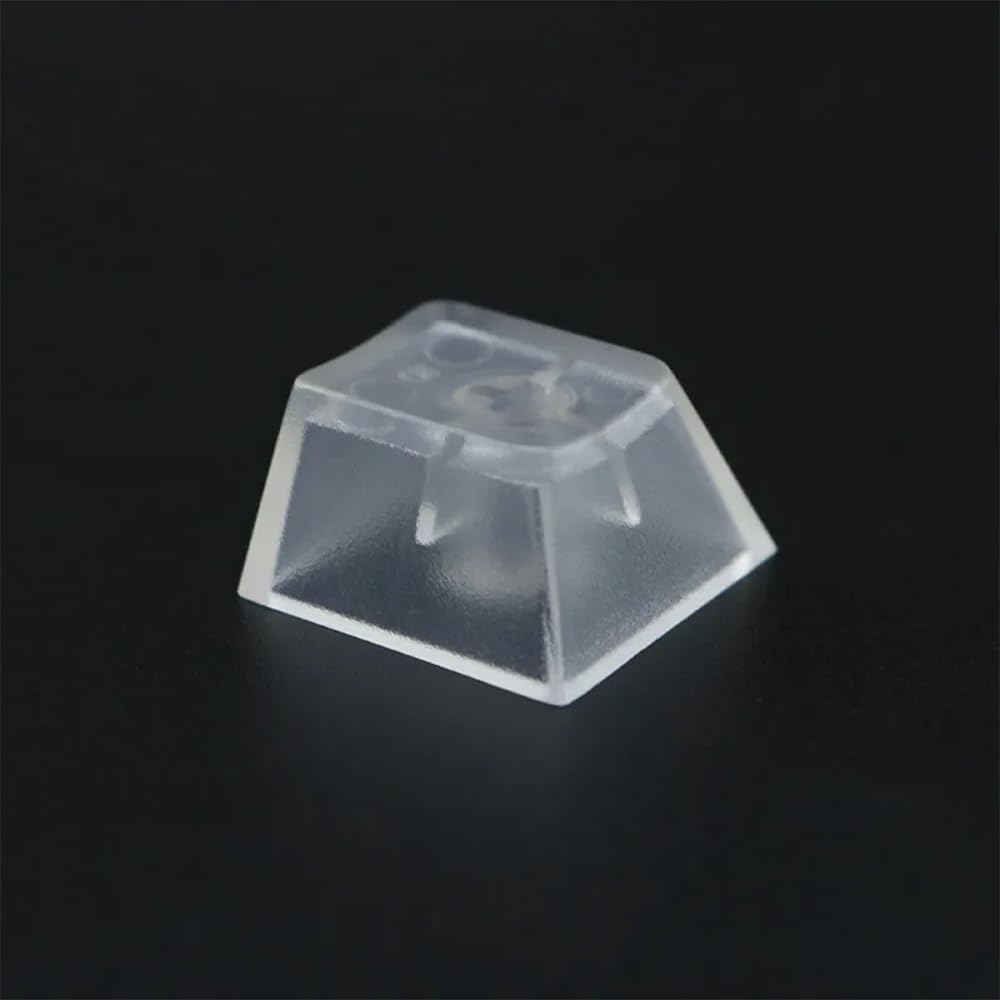


This 20-piece set is a focused way to introduce clear keycaps without replacing an entire keyboard. Its listed 4.4 rating reflects a generally positive reception, while the defining feature is a fully transparent PC construction that allows backlighting to shine through. Every cap is blank, giving it a clean appearance that suits RGB-lit builds, display keyboards, and minimalist setups.
We may earn a commission when you buy through this link, at no additional cost to you.
The 1U XDA profile is flat and broad, making the set especially useful for adding highlights to larger keys or replacing selected caps on compatible mechanical keyboards. The product information emphasizes resistance to deformation and wear, while the included puller helps with installation. Compatibility extends across Cherry MX, Gateron MX, Kailh MX, and other MX-style switches, so it can complement many mainstream boards.
Its main limitation is obvious: this is a 20-key accent set rather than a complete replacement kit. The blank surface also means the keys are primarily visual markers rather than labeled modifiers. That may be perfect for a deliberately minimal build, but it is less useful for someone who wants a full set of transparent caps with readable legends. The XDA shape is also a specific fit preference rather than a universal solution for every key size.
This is the best choice for budget-conscious builders who want to highlight important keys, replace selected worn caps, or create a coordinated clear-and-colored combination. It is especially suitable for programmers and gamers who appreciate the look of a fully illuminated blank key. For those needs, its limited scope becomes a strength: it adds impact without requiring a full visual overhaul.
The blank caps turn each selected key into a bright focal point. Placing them around frequently used commands, navigation areas, or accent keys can create a deliberate lighting pattern while leaving the rest of the keyboard's color scheme intact.
Because the set uses clear PC rather than opaque caps, RGB and monochrome backlighting can pass through the plastic. The result is cleaner illumination than a solid-colored replacement, particularly on boards with vivid or layered lighting effects.
We may earn a commission when you buy through this link, at no additional cost to you.
The HITIME XVX set is our editor's choice because it balances appearance, shape, and practical coverage. Its listed 4.6 rating sits among the strongest in this group. Rather than using a uniformly transparent or uniformly opaque surface, the set combines a matte upper layer with transparent sides to create a layered, softly diffused lighting effect.
We may earn a commission when you buy through this link, at no additional cost to you.
High-quality PC is used to provide a smooth surface while resisting wear, yellowing, and unwanted shine. The Cherry profile follows a familiar ergonomic curve, which should make the set approachable for many mechanical-keyboard users. At 119 keys, it is designed for full-size, 75%, and smaller boards, and the cross-shaped underside is intended to work with a broad range of MX-style switches.
The hybrid design is the central trade-off. Some buyers want an entirely crystal-clear appearance with maximum light transmission, while others may feel that the matte top reduces the glasslike quality they expected. It is also only a keycap set; no keyboard is included. Users should also verify whether their board uses non-MX stems or requires an unusual spacebar size before buying.
The HITIME set is a strong all-around recommendation for gamers, office users, and keyboard enthusiasts who want a refined clear set rather than a basic transparent replacement. It is particularly attractive for users who value diffused RGB lighting, a well-known Cherry shape, and broad layout compatibility in one package. The included 18-month warranty adds additional confidence.
The combination of a matte top and transparent sidewalls creates a multi-dimensional glow. It can soften harsh color transitions and give an RGB keyboard a more polished, dimensional appearance than a basic clear cap.
The traditional Cherry curve offers a practical alternative to tall or aggressively sculpted designs. That makes the set easier to consider for people who already know how Cherry-profile caps feel and want to focus on changing the visual treatment.
We may earn a commission when you buy through this link, at no additional cost to you.
The dagaladoo set offers a softer, rounder alternative to conventional angular clear keycaps. Its 4.4 rating reflects a solid overall reception, and the defining design is the MDA profile. Rounded keycaps create a gentler appearance while offering a larger contact area between the fingertip and the top of each key.
We may earn a commission when you buy through this link, at no additional cost to you.
Advanced PC material is used to resist friction, wear, and tearing, while the translucent construction is designed to transmit light for a clean shine-through effect. The 115-key configuration covers full-size, 75%, and smaller boards and works with MX-style switches. According to the product information, the flatter, rounded form may also reduce accidental neighboring-key presses, making the set appealing for regular typing.
The most important caveat concerns legends. The listing specifically warns that RGB lighting from a north-facing keyboard may make characters harder to see clearly. This effect will vary with the switch, lighting direction, legend arrangement, and ambient brightness. The set also uses a somewhat rounded aesthetic that may not appeal to buyers who want a sharp, low-profile industrial look.
This is a compelling pick for people who want a playful or approachable clear set and prefer a broad fingertip contact area. It works well for general productivity, casual gaming, and decorative builds where softer curves suit the overall design. Checking the board's lighting orientation before purchasing is the most practical precaution.
The MDA shape gives the keyboard a friendly, jelly-like character. It is a noticeable departure from the angular silhouettes commonly associated with gaming equipment and works well when the aim is a comfortable, decorative appearance.
The stated use of advanced PC targets resistance to friction and everyday wear. While no material can eliminate all signs of use, the formulation is intended to preserve the smooth surface and translucent appearance during regular use.
We may earn a commission when you buy through this link, at no additional cost to you.
The OHY Jelly set is the premium pick because it combines fully transparent PC, a sculpted SA profile, and extensive 128-key coverage. Its listed 4.5 rating supports a positive overall impression, but the more persuasive features are the layout range and carefully described lighting behavior.
We may earn a commission when you buy through this link, at no additional cost to you.
The crystal-clear polycarbonate is designed to allow RGB lighting to shine through with crisp, uniform brightness. At the same time, the SA-inspired arched profile is shaped to follow the fingers during long typing or gaming sessions. The listing emphasizes a precise, wobble-free fit for MX-compatible switches and describes the construction as resistant to scratching, abrasion, and yellowing.
Compatibility is extensive, with the 128 keys intended to cover common 61-, 68-, 84-, 87-, 98-, 100-, and 104-key layouts. The set includes a metal puller, making installation more convenient. The trade-off is its size: a 128-key bundle can be unnecessarily elaborate for a very compact board. SA-style caps are also taller than Cherry-profile alternatives, so users sensitive to that height should consider the difference.
This is the best fit for an enthusiast who wants one clear set to serve several keyboard sizes and wants a sculpted, substantial feel. It is especially suitable for RGB-heavy builds where even illumination and crystal-clear sides are priorities. Buyers choosing only for a compact 60% board may prefer a smaller kit, but the extensive coverage makes this one of the most versatile options in the roundup.
The inclusion of supplementary modifiers and multiple key sizes reduces the need to source individual replacements later. That makes the 128-key arrangement useful for owners who may move between compact, tenkeyless, and full-size mechanical keyboards.
The arched SA-style shape gives fingertips a more pronounced sense of contour than a flat or low-profile cap. It can feel more substantial during extended use, although users who prefer shallow travel may find the taller design less appealing.
We may earn a commission when you buy through this link, at no additional cost to you.
Womier's Jelly Ceramic set brings a distinctive interpretation of clear keycaps, combining thick translucent PC with a bright, ceramic-inspired finish. The listed 4.2 rating is still positive, though it sits slightly below the highest-rated products in the group. Its defining appeal is the combination of a dreamy shine-through effect with the stated ceramic-style texture.
We may earn a commission when you buy through this link, at no additional cost to you.
The MDA profile is rounded and described as wrapping around the fingers, while thick, high-quality PC provides the material foundation for the translucent design. The product information also notes crisp UV-printed legends intended to maintain readability over time. A 115-key set supports full-size, 60%, 65%, 75%, and 100% layouts and is listed as compatible with several well-known MX-style keyboard brands.
The semi-clear finish is not as optically pure as a fully transparent cap, so buyers expecting glasslike clarity should understand that the appearance remains intentionally softened. The playful design may also be less suitable for a serious industrial workstation. Legends can lose contrast when vivid RGB shines through a light-colored cap, especially under bright lighting.
This set is best for builders who like cute, rounded accessories and want a substantial translucent plastic look rather than the coldest possible clear finish. It works well as a gift for younger keyboard enthusiasts and for gaming setups that favor a cheerful style. The broad layout coverage adds practical value to the distinctive presentation.
The bright, slightly translucent finish gives the set a clean, almost glazed appearance. It is a gentler visual treatment than a fully transparent option and can pair well with pastel, white, or monochromatic desk setups.
The MDA profile's curved top and rounded silhouette create a softer impression than conventional squared keycaps. It suits users who prioritize aesthetics and a wrapped fingertip feel, particularly when RGB adds color beneath the plastic.
We may earn a commission when you buy through this link, at no additional cost to you.
The Ice Clear set combines one of the roundup's strongest ratings with a practical 126-key configuration. Its 4.6 rating indicates broad satisfaction, and the product is built around a crystal-clear PC construction intended to produce brilliant, even RGB illumination without distracting distortion.
We may earn a commission when you buy through this link, at no additional cost to you.
Its sculpted ASA profile is described as aligning naturally with the fingertips and reducing fatigue during extended work or gaming. The caps are also engineered for a snug fit on MX-compatible switches, with the aim of providing stable, consistent presses. The 126-key set covers 61-, 68-, 84-, 87-, 98-, 100-, and 104-key layouts, making it suitable for many board sizes.
The set includes a puller, so the basic installation accessory is provided. As with other sculpted profiles, the height is a consideration for users accustomed to flat or low-profile caps. A 126-key bundle is comprehensive but still not quite the expansive 128-key coverage offered by the OHY set, and no keyboard itself is included.
This is an excellent all-rounder for users who want a visibly clear set, a shaped profile, and broad layout support without moving to the most sculpted design in the roundup. It works particularly well for RGB gaming setups where even illumination matters. It is also a sound choice for office users who want the visual appeal of transparent caps without leaving their fingers on an extremely tall profile.
The crystal-clear design is intended to preserve the brightness and color of the underlying lights. On an RGB keyboard, that can create a floating, luminous effect in which the switch lighting becomes the main visual feature.
A snug connection between the cap and switch is valuable on a desk that sees frequent use. The listing emphasizes precise, wobble-free installation as a way to support stable feedback during both typing and gaming.
We may earn a commission when you buy through this link, at no additional cost to you.
This blank 20-piece set offers a gentler alternative to fully transparent keycaps. Its 4.6 rating is among the highest listed, and its frosted translucent ABS material creates a smooth, softened appearance that still allows brighter backlight to pass through.
We may earn a commission when you buy through this link, at no additional cost to you.
The OEM R4 profile gives the caps a familiar mechanical-keyboard shape without legends or printed decoration. That makes them effective for highlighting particular positions, replacing easily worn keys, or introducing a coherent visual accent to a custom board. The listing states that the frosted ABS resists color fading, while compatibility covers Cherry MX, Gateron MX, Kailh MX, and other MX-style switches.
The limited 20-key count is the primary restriction. It cannot replace a full keyboard, and the frosted treatment intentionally softens the light rather than delivering the sharpest crystal-clear look. The blank design also removes any built-in way to label the functions of the replaced keys, so it is more of an aesthetic and usability tool than a standard full set.
This is an appealing pick for minimalist builders, programmers, and gamers who want a small number of accent keys rather than a total redesign. Its high rating and smooth finish make it particularly convincing for subtly illuminated setups. Buyers seeking maximum transparency or comprehensive layout coverage should look beyond this accent-focused package.
The translucent ABS surface disperses backlight rather than presenting the sharpest possible view of the switch. This can reduce visual glare and create a more understated illuminated effect on a busy desk.
Without printed legends, the caps can be assigned to different functions or color zones without creating a visual mismatch. They are particularly useful for highlighting navigation, macro, escape, or other frequently accessed keys.
We may earn a commission when you buy through this link, at no additional cost to you.
The second dagaladoo entry uses the familiar Cherry profile for a more conventional alternative to the rounded MDA set. Its 4.1 rating is the lowest in this roundup, but it still reflects a generally positive reception and the product retains several useful features for clear-keycap buyers.
We may earn a commission when you buy through this link, at no additional cost to you.
Advanced PC construction is intended to resist friction and wear, while the translucent finish promotes high light transmission and a minimalist appearance. The Cherry height is described as ergonomic and suitable for backlit or non-backlit mechanical keyboards. A 115-key configuration supports full-size, 75%, and smaller layouts and works with MX-style switches.
The 115-key count is adequate for common arrangements but can be less accommodating for unusual layouts or boards requiring specific additional sizes. Its translucent construction may also show the underlying switch more clearly than a frosted option, which can be either a benefit or a drawback depending on the desired finish. As always, the set should be checked against the exact key sizes and stem type of the target keyboard.
This set is best for buyers who know they enjoy Cherry-profile caps and want to try a translucent full set without moving to a tall sculpted profile. It suits general gaming, office work, and customization projects, particularly for users who value a minimalist appearance and straightforward MX compatibility. The lower rating is worth considering, but the listed design remains coherent and useful.
Cherry-profile caps are common on mechanical keyboards, so many users can transition to this translucent set without relearning their muscle memory. The lower sculpted height can also make it a comfortable choice for extended typing.
The clear, restrained treatment keeps attention on the keyboard's lighting and layout. For builds with a clean desk aesthetic, the translucent finish can offer a noticeable change without the visual weight of a heavily printed keyset.
We may earn a commission when you buy through this link, at no additional cost to you.
The OHY Forged Carbon-Look set is the most unconventional entry in the roundup, combining frosted clear PC with an embedded forged-carbon aesthetic. Its 4.3 rating reflects a positive reception, and the product's strongest draw is the crystal-wrapped carbon texture that gives an otherwise transparent set a more technical appearance.
We may earn a commission when you buy through this link, at no additional cost to you.
The product information describes the texture as more than decoration, noting that it increases finger friction for users who may have sweaty hands. Silver characters are printed on the sides rather than across the tops, preserving a clean frosted surface and potentially reducing the visibility of character wear. The set uses high-toughness PC and is presented as resistant to scratching, clouding, and yellowing.
The 119-key kit is specifically oriented toward 87% and smaller layouts, with a standard cross-axis base described as fitting mainstream Cherry MX, Gateron, and Kailh switches. It is therefore less suitable for a full-size board that needs a dedicated navigation cluster or other larger modifiers. Side-printed legends also demand a different viewing angle and may be less convenient for users accustomed to reading top-printed characters.
This is a compelling option for fans of cyberpunk, industrial, or minimalist desk setups. The textured surface adds visual and tactile character that ordinary clear caps do not provide, while the side-printed legends preserve a streamlined top surface. It is best suited to compact and tenkeyless keyboards where the full kit can be used effectively.
Unlike a printed carbon pattern, the described texture is embedded in the frosted PC base. That gives the clear material a layered appearance while preserving the shine-through concept that makes transparent keycaps appealing.
Keeping characters on the sides protects the uncluttered upper surface from becoming visually busy. It can produce a very streamlined board, although buyers should be comfortable reading legends from an angle rather than directly above each key.
We may earn a commission when you buy through this link, at no additional cost to you.
This 114-key set delivers a straightforward clear PC look with minimalist white characters and an ergonomic Cherry profile. Its 4.3 rating indicates a solid reception, and the product's defining qualities are its clean appearance, stated material thickness, and compatibility with common 60%, 65%, and 75% MX-switch keyboards.
We may earn a commission when you buy through this link, at no additional cost to you.
The translucent PC is described as ice-like and approximately 1.5 millimeters thick. According to the product information, the material offers resistance to friction and abrasion, supporting comfortable everyday use. The Cherry profile is intended to feel natural during typing, while the included mix of key sizes allows the set to cover most common compact and seventy-five-percent arrangements.
The 114-key total is smaller than the leading 119-, 126-, and 128-key sets, so it may not cover a full-size keyboard or every unusual modifier configuration. Because the characters are white and the plastic is transparent, strong lighting beneath the keys can reduce contrast. The listing does not provide the same extensive layout inventory offered by several larger kits.
This set is best for a clean, understated upgrade on a mainstream compact mechanical keyboard. It is a particularly good fit for users who want a recognizable Cherry profile and straightforward clear design without paying for elaborate styling. Prospective buyers should compare the required key sizes with the set's 114-key inventory before placing an order.
The minimalist white characters maintain a coordinated appearance against the clear plastic. They can be especially effective with cool-toned or white lighting, where the entire board reads as a single, uncluttered design.
The stated thickness of approximately 1.5 millimeters gives the set a more substantial construction cue than the dimensions of a very thin cap. It is presented as wear-resistant, which is useful for a component handled during every work or gaming session.
We may earn a commission when you buy through this link, at no additional cost to you.
Choosing clear keycaps involves balancing visual style, profile comfort, layout coverage, lighting behavior, and switch compatibility. The following factors help narrow the field before you compare individual sets.
Profile determines key height, surface angle, and how the caps feel under your fingers. Cherry profiles are relatively familiar and versatile, while MDA caps have a more rounded look. ASA and SA-style options are more sculpted, providing a pronounced contour that some users appreciate and others find too tall. XDA and OEM-inspired options are flatter, with XDA creating a uniform field of level keys. Match the profile to your existing habits rather than judging only by appearance, and consider whether your wrists and fingers are comfortable with a more pronounced arch.
Key count is only a quick starting point because sets can contain different combinations of modifiers and sizes. A 114-key set may suit common 60%, 65%, and 75% keyboards, while 119-, 126-, and 128-key kits can support more layouts, including tenkeyless and full-size boards. Check the required spacebar, navigation, arrow, and function-key sizes against the product information. Some complete-looking kits omit rare modifiers, so the number of keys should never replace a layout-by-layout comparison.
Fully clear caps transmit the most light and can look like floating illuminated surfaces. Translucent, jelly, or frosted caps soften the light and disguise more of the switch beneath. Hybrid designs combine a matte top with transparent sides to create a layered glow. The best choice depends on whether you want dramatic RGB visibility or a restrained, polished appearance. Consider your lighting brightness as well, because the same legend can look crisp under one effect and washed out under another.
Most listed sets use the standard cross-shaped MX mount, making them compatible with common Cherry MX, Gateron, Kailh, and other MX-style switches. Low-profile switches, optical switches, and some proprietary mechanisms use different mounts and may not accept ordinary keycaps. Even among MX-style keyboards, unusual stabilizer sizes can require a separate spacebar. Confirm both the switch type and the key sizes before installation to avoid discovering mismatches halfway through the process.
Transparent material exposes the switch and RGB lighting beneath, which can reduce the contrast of light-colored legends. Some listings specifically warn that north-facing RGB may make characters difficult to see. Dark, side-printed, or higher-contrast legends can reduce this problem, but they also alter the minimalist appearance. A set with a matte top may improve readability compared with one that is completely clear. Think about whether you type from a fixed position or view the keyboard at different angles before selecting the legend style.
PC and ABS differ in tactile character, optical clarity, and resistance to everyday marks. The featured products describe wear resistance, reduced yellowing, scratch resistance, or reduced shine, but the degree of long-term protection depends on handling and environment. A textured surface can disguise small marks better than a flawless clear finish, while a darker, more opaque set can make grime less noticeable. Clean, dry hands and careful removal are still the best way to preserve any transparent keycap set.
Clear keycaps range from nearly invisible glass to bright jelly, frosted white, or textured carbon look. Blank sets emphasize pure illumination and allow easy accent placement. Printed sets add practical legends and a more finished appearance. Rounded caps create a friendly look, sculpted caps look technical, and side-printed designs resemble futuristic or industrial equipment. View the product image in the context of your keyboard case, switches, lighting, and desk accessories, since clear plastic can pick up or reflect surrounding colors.
A keycap puller is useful for lifting caps without forcing them against the switch, and most of the complete sets in this roundup include one. Metal pullers may feel more robust, while plastic pullers can still work when used carefully. Always remove caps from the middle of a row or another less vulnerable area, then work outward to avoid placing unnecessary strain on a stabilizer or nearby key. A good puller is convenient, but careful technique matters more than the tool's material.
Before installation, confirm that your keyboard uses compatible MX-style switches and compare the set's key inventory with the caps you plan to remove. Turn the keyboard off and disconnect it if it is wired. If it is wireless, switch it off and allow any stored lighting to discharge before beginning, then use the supplied puller to lift a central keycap gently.
Install the replacement caps by aligning the cross-shaped underside with the switch stem and pressing evenly from opposite sides. Do not force a keycap on if it does not align, and take extra care with the spacebar because it also sits over stabilizer wires. Work from the center toward the edges, check the legend orientation, and confirm that every cap sits level and that each keypress feels stable.
For care, remove the keycaps before washing them, use mild soap and lukewarm water for washable pieces, and let them dry completely before reinstalling. Avoid abrasive pads, harsh cleaners, and prolonged heat. Wipe installed caps with a soft, lint-free cloth, keep oily or sugary substances away from the keyboard, and revisit any loose or discolored key after extended use to keep the layout secure and visually consistent.
Visibility depends on the keycap's transparency, legend color, and the direction of the lighting. Fully clear caps can expose the switch beneath and make pale legends less distinct under bright RGB. Matte-topped, frosted, side-printed, or darker-legend alternatives may improve readability. You can also lower the lighting brightness or use a more focused effect, but matching the keycap finish to your board's north- or south-facing illumination is the most important step.
They generally work with keyboards that use standard cross-shaped MX-style switches, including many Cherry MX, Gateron, and Kailh models. They may not fit low-profile, optical, or other proprietary switches. You should also verify the spacebar width and any unusual modifier sizes, because a compatible mount alone does not guarantee complete layout coverage. Comparing the board with the product's stated key sizes is the safest approach.
Quality varies by material and formulation, so no clear keycap set is completely immune to age-related discoloration. The featured PC sets are marketed with varying degrees of yellowing or wear resistance, which can help preserve the original appearance. Heat, ultraviolet exposure, hand oils, and harsh cleaning products may accelerate aging. Gentle cleaning, careful handling, and keeping the caps away from direct sunlight can extend their visual lifespan.
Yes. Fully transparent caps maximize light transmission and reveal more of the switch underneath, creating a brighter floating effect. Frosted caps diffuse the light, soften the appearance, and can disguise small marks. Semi-clear jelly styles fall between those extremes, while hybrid designs use different materials on the top and sides. Your preference for dramatic illumination versus a subtle finish should guide the choice.
Mixing is possible when the profiles, stem mounts, and key sizes are consistent. For example, a flat blank accent set can complement a colored Cherry-profile board, while a fully clear complete set can be paired with colored novelty caps. Mixing significantly different profiles can create uneven finger heights and visual inconsistencies, so it is best to keep the same profile whenever possible.
These profiles differ in height, angle, and surface shape. Cherry caps are moderately sculpted and widely familiar, MDA caps are more rounded, ASA and SA designs are more strongly contoured, and XDA caps are flat and uniform. OEM-inspired caps generally follow a lower sculpted form. The most important issue is comfort: choose the shape you are likely to use for long periods rather than selecting solely on appearance.
Turn off the keyboard, insert the keycap puller beneath a central cap, and lift gently while supporting the surrounding area. Remove keys from the center outward and avoid pulling from a heavily used edge that could twist a stabilizer. If a cap feels tight, gently rock it from both sides rather than pulling from one corner. The goal is to release the cross mount without levering against the switch housing.
They can be used on the same keyboard only if every required size is present. A larger key count usually provides more modifier options, but it does not guarantee that a particular unusual key is included. Check spacebar length, Enter shape, arrow-key sizes, function rows, and navigation clusters. Some larger sets include extra compact modifiers, making them more adaptable across several layouts.
The best overall choice in this roundup is the HITIME XVX set, which pairs a polished hybrid-transparent construction, a familiar Cherry profile, broad layout coverage, and a strong listed rating. The OHY 128-key set is the premium option for buyers who want extensive key coverage, crystal-clear illumination, and a deeply sculpted SA-style feel. The Blank Crystal set is the best budget pick when the goal is a focused accent upgrade rather than a complete visual overhaul.
For all other builds, prioritize the profile before the finish. A beautiful clear cap is less satisfying if its shape feels uncomfortable or its key inventory does not match the board. Consider light direction, legend contrast, switch compatibility, and stabilizer size alongside the desired appearance. Partial sets are excellent for accents, while a complete kit is more convenient for a coordinated transformation.
Ratings, layouts, and product availability can change, and current prices should be checked before ordering. Comparing the latest listing with your keyboard's exact dimensions will help ensure that the selected clear keycaps fit properly and deliver the lighting effect and typing experience you want.