
VIVO Rustic Vintage Brown 43 in Corner Desk Converter
4.6Editor score
Roomy 43.3-inch surface
33-pound lift capacity
Corner and regular desk fit
A standing desk for a cubicle must fit a shared workspace without crowding neighboring stations. The best models provide enough surface area for essential equipment, move smoothly between sitting and standing positions, and remain stable over a typical workday. Size, structure, and desk compatibility matter as much as the advertised height range.
This guide compares ten risers and desks using the supplied specifications, including work-surface dimensions, weight capacities, lift mechanisms, keyboard trays, corner designs, and features such as monitor mounting or storage. The selection includes compact, full-size, corner, electric, and dual-monitor configurations suited to different cubicle layouts and equipment needs.
Each review explains who the product is most likely to suit, along with practical advantages and limitations. Ratings reflect the supplied product data and do not represent hands-on testing. Availability, configurations, and prices can change, so shoppers should confirm the latest listing details and measure their existing work area before buying.
4.6Editor score

4.6Editor score

4.2Editor score
As an Amazon Associate we earn from qualifying purchases.
The comparison below highlights the major differences among desktop risers, corner converters, a monitor-mounted workstation, and a full electric standing desk. It focuses on footprint, capacity, lift range, display support, and the features most relevant to a shared cubicle.




The VIVO 32 in Standing Desk Riser is a compact desktop converter designed to add sit-stand movement without replacing an entire cubicle desk. It carries a supplied rating of 4.6, and its defining strengths are a manageable footprint, a broad 4.9-to-19.7-inch lift range, and a keyboard tray that moves with the desktop. Those qualities make it a practical choice for a standard workstation used by one person.
We may earn a commission when you buy through this link, at no additional cost to you.
The 31.5-by-15.8-inch top provides room for a laptop and monitor arrangement while remaining narrower than the larger corner converters. A high-grade steel frame supports up to 26 pounds, which is suitable for common office displays, a laptop, and light peripherals. The pneumatic spring lift assist and touch height-locking mechanism are intended to make frequent changes smooth and uncomplicated.
The principal compromise is the 26-pound desktop limit, which is lower than the 33-pound capacity offered by several larger models. Its surface is also more compact, so users carrying several monitors, a laptop, documents, and other accessories may feel constrained. Nevertheless, the riser supports a laptop-monitor setup and keeps the work surface uncluttered in a tight cubicle.
This is our top overall recommendation for shoppers who want a balanced standing option without an oversized footprint. It suits office professionals, remote workers, and students with a compact desk, especially when the goal is to alternate postures throughout the day. Measure the desktop and available clearance before placing it on the work surface.
The riser rises straight upward, which can feel more predictable in a confined cubicle than a mechanism that changes the workstation's horizontal position. Its pneumatic spring assist supports smooth transitions, while the locking control lets the user select a comfortable height.
The 26-pound capacity accommodates common office equipment, but buyers should total the weight of displays, a laptop, dock, and accessories. Keep frequently used items within reach while reserving room for the rising keyboard tray.
We may earn a commission when you buy through this link, at no additional cost to you.
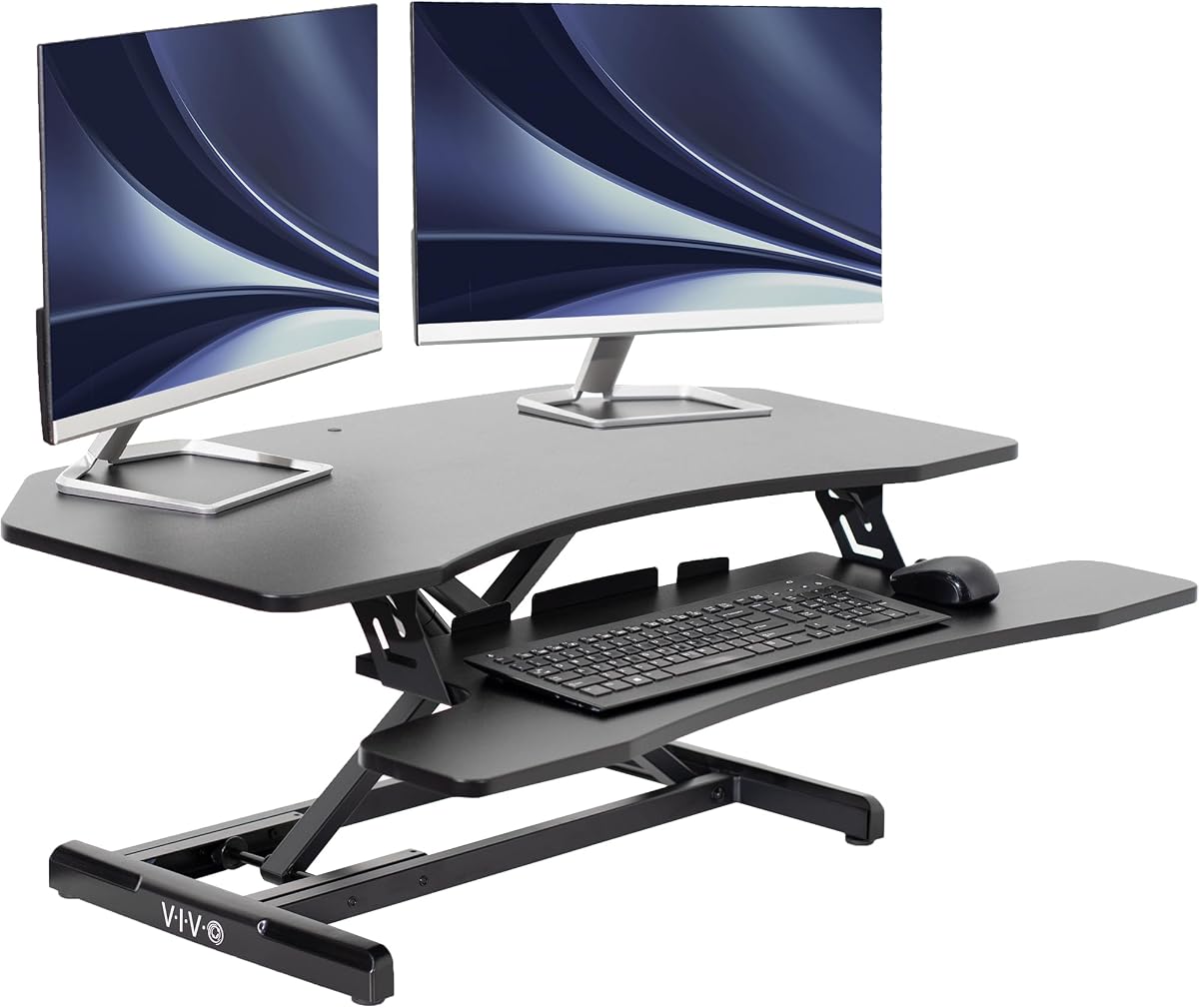
The VIVO Rustic Vintage Brown 43 in Corner Desk Converter is the most expansive option in this guide. It has a supplied rating of 4.6 and combines a generous 43.3-by-28.3-inch surface with dual pneumatic springs and a 33-pound desktop capacity. Its larger work area makes it especially appealing for users with multiple displays, a laptop, paperwork, or a crowded collection of office accessories.
We may earn a commission when you buy through this link, at no additional cost to you.
The converter is designed for corner desks but can also be placed on a regular desk, making it more adaptable than a strictly corner-only design. Its 28.2-by-10.6-inch keyboard tray rises in sync with the top, allowing the keyboard and mouse area to travel with the display surface. The touch locking mechanism provides a 6-to-17-inch adjustment range.
Its size is the main trade-off. A broad footprint may be difficult to use in a narrow cubicle or when a neighboring colleague's belongings are close by. The 17-inch upper height is lower than the 20-inch range of several competitors, so users who want a higher standing surface may find this model less accommodating. Minimal assembly reduces setup friction.
We recommend this model for spacious cubicles, corner workstations, and users who prioritize usable surface area over a compact profile. It is a particularly strong option for a dual-monitor-and-laptop arrangement. Before purchasing, verify the cubicle dimensions, neighboring obstructions, and the clearance needed for the keyboard tray to move.
At 43.3 by 28.3 inches, the desktop gives monitors, a laptop, writing materials, and small accessories more breathing room. The result is better suited to multi-device work than a converter designed primarily for a single screen.
The triangular corner form can make efficient use of an otherwise awkward station, but the footprint still needs careful measurement. Its ability to work on a regular desk gives users an alternative if the office layout changes.
We may earn a commission when you buy through this link, at no additional cost to you.
The VIVO Black 36 in Standing Desk Converter combines a full-size surface with a supplied rating of 4.6 and a three-year manufacturer warranty. Its approximately 35.8-by-22-inch desktop accommodates single- or dual-monitor and laptop setups, while a wide keyboard tray creates a more complete workstation when the converter is raised.
We may earn a commission when you buy through this link, at no additional cost to you.
Dual pneumatic spring force assists the movement, and the touch locking mechanism allows selection of a comfortable height within a 6.7-to-16.9-inch range. The steel riser supports up to 33 pounds, giving it more equipment capacity than the smaller VIVO model in first place. The broad keyboard tray measures 25.2 by 10.6 inches and travels with the desktop.
Its limitations are dimensional rather than functional. The 36-inch-class format needs more space than a compact converter, and the upper lift height is lower than several 20-inch-range products. It is therefore better suited to a cubicle with a medium-size desk than a very narrow workstation. The minimal assembly process also means attaching the keyboard tray and feet before use.
This is a well-rounded recommendation for users who need more capacity and typing space than the compact VIVO 32-inch model offers. It works well for dual-monitor work, though users seeking a higher standing position should compare the available clearance carefully. The included warranty and tech support add reassurance for a frequently adjusted office tool.
A 33-pound desktop capacity leaves room for common monitor, laptop, and peripheral combinations. Buyers should still include docks, charging bricks, and other accessories when checking the practical load.
The keyboard tray rises in sync with the desktop rather than remaining behind it. This creates a more coherent standing position and keeps the keyboard and mouse within a practical reach.
We may earn a commission when you buy through this link, at no additional cost to you.
The Aconcept 32 in Black Corner Riser is a ready-to-use option for cubicles with corner or L-shaped desks. It has a supplied rating of 4.1 and emphasizes straightforward setup: users can place it on an existing desk and begin organizing the workstation without attaching components. Its triangular shape can be oriented toward either a left or right corner.
We may earn a commission when you buy through this link, at no additional cost to you.
The desktop measures 32 by 20 inches and supports up to 33 pounds, making it suitable for a laptop or two monitors. A durable pneumatic spring drives straight vertical movement across a 5.5-to-20-inch range. The broad upper reach allows users to settle at a relatively high standing position, although the precise comfortable height will depend on the user's stature and desk clearance.
The main limitations relate to the supplied rating and the use of a single pneumatic spring rather than a dual-spring system. Some users may also find that a 32-by-20-inch triangular surface offers less usable rectangular space than similarly sized conventional desks. The product is also wide enough that careful cubicle measurement is essential.
This model is best for a corner cubicle where quick installation and a high adjustment range matter most. It is a good fit for employees who alternate between two monitors and a laptop, as well as users who want to orient the triangular surface toward whichever wall corner is available.
The pre-assembled format reduces setup time and removes the need for basic tools. It is particularly convenient in shared offices where installation time should be kept brief.
The triangular shape can fit left or right corners, which is helpful when the cubicle layout is not symmetrical. The broad 20-inch upper lift point also accommodates users seeking a higher posture.
We may earn a commission when you buy through this link, at no additional cost to you.
The VIVO Black 38 in Corner Riser DESK-V037MC offers a 37-by-19-inch desktop designed for corner workspaces. Its supplied rating is 4.4, and the product is aimed at users who need enough area for dual monitors, a laptop, and additional supplies. A 33-pound desktop rating provides enough capacity for typical office configurations.
We may earn a commission when you buy through this link, at no additional cost to you.
A particularly useful feature is the 36.6-by-11.3-inch keyboard tray, which raises in sync with the top and can hold both a keyboard and mouse. The durable pneumatic spring produces quick vertical transitions, while the adjustment range extends from 4.7 to 16 inches. The design requires little assembly beyond placing the converter and attaching the keyboard tray.
The maximum height of 16 inches is the main concern for taller users or anyone who prefers a high standing position. The long tray also requires adequate horizontal space, and the broad footprint may feel crowded in a small cubicle. Because the desktop is narrower than it is long, usable space also depends on the triangular shape and the user's seating position.
This model is a good fit for a spacious corner cubicle, particularly for users with two displays and a wide keyboard. It works best when the available surface is long and shallow. Shoppers who need a higher standing range should consider alternatives that extend closer to 20 inches.
The wide keyboard tray allows the mouse to sit beside the keyboard without crowding the main surface. Because the tray moves upward, the changing position keeps the controls closer to a natural working arrangement.
The 33-pound rating and generous surface accommodate a dual-monitor and laptop arrangement. Users should keep the load within the stated limit and distribute heavier equipment for stability.
We may earn a commission when you buy through this link, at no additional cost to you.
The VIVO Black 38 in Corner Riser DESK-V000KL stands out for its broad 4.3-to-20-inch height range. It has a supplied rating of 4.6, a 37.5-by-18-inch desktop, and a 33-pound load capacity. The wide adjustment range gives users more opportunity to find a standing height that suits their body and the height of the underlying cubicle desk.
We may earn a commission when you buy through this link, at no additional cost to you.
Its 37-by-12-inch keyboard tray rises in sync with the surface, creating a coordinated movement for the keyboard and mouse. A durable pneumatic spring and touch locking mechanism support quick changes. The steel frame is designed to resist scratches and provide steady support for displays, laptops, and office supplies.
The trade-off is the elongated 37.5-by-18-inch surface, which may be less versatile than a deeper rectangular converter. The keyboard tray also needs enough room beneath the raised desktop. As with other corner models, the design is most effective when placed diagonally in a corner rather than forced into a very shallow rectangular workspace.
This is a strong recommendation for users who prioritize a high upper position and broad vertical range within a corner cubicle. It offers more standing-height latitude than the other VIVO 38-inch corner model in the list. Measure both the desktop and the keyboard tray's operating space before ordering.
The four-point adjustment span accommodates lower seated transitions and relatively high standing positions. This range gives users more control than converters that peak near 16 inches.
The wide tray keeps the keyboard and mouse rising with the displays. That synchronized movement can reduce the awkward reach that occurs when a fixed keyboard remains behind an elevated screen.
We may earn a commission when you buy through this link, at no additional cost to you.
The Omhuzsyo 24 in Standing Desk Converter is designed for very tight workspaces. It has a supplied rating of 4.2, a compact 24-by-13.3-inch top, and a stated thickness of 0.59 inches. Those dimensions make it one of the most space-conscious options for small home offices, dorm rooms, and compact cubicles.
We may earn a commission when you buy through this link, at no additional cost to you.
The reinforced steel X-frame supports up to 22 pounds and includes anti-slip pads intended to reduce movement at full height. A side handle controls manual raising and lowering across a 2-to-15-inch range. The product requires no assembly, so it can be placed on an existing desk and used immediately.
Its limitations are the 24-inch surface and 22-pound capacity. A single monitor and laptop are more realistic than a demanding multi-screen or docked setup. The manual side-handle design also differs from the pneumatic spring systems used by many other risers, so the user must initiate each movement and hold the handle during adjustment.
This model is best for a small cubicle, a laptop-based user, or anyone who values portability and minimal desk consumption over expansive work area. Its low starting point can also be useful for shorter users. Confirm that the cubicle offers enough clearance for the frame to rise without striking partitions, shelves, or lighting.
The narrow desktop and low-profile frame preserve more of the underlying desk than a full-size converter. This makes the riser useful where every inch of work surface affects productivity.
Squeezing the side handle raises and lowers the frame through a two-to-15-inch range. The mechanism offers direct control, while the anti-slip feet help maintain a stable base at the selected height.
We may earn a commission when you buy through this link, at no additional cost to you.
The Mount-It! Standing Desk Converter is built around an integrated dual-monitor mount. It has a supplied rating of 4.4 and supports two screens up to 32 inches, with each display rated for up to 22 pounds. Compatibility with 75-by-75 and 100-by-100 VESA patterns makes it suitable for many common office monitors.
We may earn a commission when you buy through this link, at no additional cost to you.
Its upper platform measures 23.6 by 15.7 inches, keeping the overall footprint relatively controlled. A 26.7-by-11.8-inch keyboard and mouse tray includes a soft gel wrist pad, while integrated cable management helps prevent wires from spreading across the work area. The smooth gas-spring lift operates from 5.7 to 17.1 inches.
The primary limitation is that the upper platform is smaller than the full desktops offered by conventional converters. Its strength is display support rather than general-purpose surface area, so users with paperwork or numerous accessories may need another storage solution. Monitor arms and display compatibility also require additional consideration before installation.
This converter is an excellent fit for a cubicle occupied by dual-monitor users who want screens to rise with the workstation. It is particularly useful when desk space is limited but monitor positioning matters. Check both displays' VESA patterns, combined weight, and available clearance around the cubicle walls.
The integrated monitor arms allow both screens to move with the platform, helping maintain a consistent viewing arrangement. They also free up some of the limited top surface by lifting displays above it.
Integrated cable management keeps cords from dominating the compact work area. The padded keyboard tray adds comfort for extended typing sessions in either sitting or standing position.
We may earn a commission when you buy through this link, at no additional cost to you.
The Aconcept 32 in White Corner Riser provides a 32-by-20-inch surface in a neutral white finish. Its supplied rating is 4.1, and the product is designed for corner or L-shaped work areas. Like the black Aconcept model, it can be oriented toward a left or right corner and supports a laptop or two-monitor setup.
We may earn a commission when you buy through this link, at no additional cost to you.
A durable pneumatic spring provides straight vertical movement from 4.5 to 20 inches, offering a broad range of seated and standing positions. The steel frame resists scratches and supports up to 33 pounds. Setup requires no assembly, making the converter convenient for offices where users need to transition quickly to a new workstation.
The differences from the black model are chiefly color, minimum lift height, and the corresponding listing details. Users should not assume every desk arrangement accommodates the triangular footprint. The single-spring system may also feel different from a dual-spring lift, and the 20-inch maximum height requires adequate overhead clearance.
This is a practical choice for a corner cubicle with a bright or neutral visual scheme. It works especially well for users who want a high adjustment ceiling and no installation. Confirm the desk dimensions, operating clearance, and equipment weight before purchase.
The 20-inch upper reach gives users more latitude to raise the workstation than converters limited to 16 or 17 inches. It is useful for users who naturally stand with their arms bent more sharply.
The white surface can coordinate with lighter desks and brighten a compact station. Appearance should remain secondary to checking the converter's footprint and clearance in the actual cubicle.
We may earn a commission when you buy through this link, at no additional cost to you.
The HUANUO Electric Standing Desk is a full furniture solution rather than a portable riser placed on an existing cubicle desk. It has a supplied rating of 4.6, a 48-inch desktop, two drawers, an open storage cubby, and an electric adjustment system. It can create a more permanent standing workstation in a cubicle that can accommodate a complete desk.
We may earn a commission when you buy through this link, at no additional cost to you.
The height range extends from 28.3 to 46.5 inches, giving users a substantially higher standing surface than the desktop converters in this guide. Four preset controls simplify movement between frequently used positions. An extended 2.6-inch rear platform edge supports C-clamp monitor mounts, and the desk also includes two hooks for convenient storage.
The primary limitation is space. A full 48-inch desktop is substantially larger than a converter and may not fit the footprint of a tightly partitioned cubicle. Electric height adjustment also requires a suitable power connection and leaves less flexibility for moving the workstation between desks. The listed title refers to a 32-by-21-inch configuration, while the supplied feature description identifies a 48-inch desktop, so buyers should verify the exact dimensions in the selected listing.
This desk is best for a larger cubicle, a home office, or a dedicated workstation that will remain in one location. It is less suitable for a shared desk where a compact riser is needed. Its electric presets, storage, and high standing range reward users who plan to use the standing position consistently.
Four preset buttons remove the need to repeatedly locate a manual control. Users can move between their preferred sitting and standing positions with a straightforward button selection.
Two drawers and an open cubby help keep the large desktop organized. A C-clamp-compatible rear edge allows displays to be positioned more effectively and potentially frees desk area.
We may earn a commission when you buy through this link, at no additional cost to you.
Choosing a standing desk for a cubicle requires balancing usable surface area with limited space, stable lift performance, and the equipment you need to support. The following factors are more informative than the broadest height specification alone.
Begin by measuring the existing desk's width, depth, usable length, and the vertical clearance beneath partitions, shelves, or overhead storage. A converter's stated dimensions describe the upper surface, but its base, feet, rising keyboard tray, and movement path also need room. Corner units may sound compact yet occupy a large diagonal footprint. Users should compare the product with the actual free area rather than relying on the nominal screen size in the title.
Desktop capacity is the maximum combined load, so add the weight of every monitor, laptop, dock, monitor arm, lamp, and other permanently placed device. A 22-pound limit may suit a light single-screen setup, while 33-pound models offer more margin for dual displays. Do not confuse the desktop rating with the monitor-arm rating on products that include integrated supports, and check each limit separately.
A wide range helps users find a comfortable standing height, but the best setting depends on the original desk height, the user's proportions, and available clearance. Converters with a low minimum can also serve shorter users during seated use. A high maximum may be useful, but it is not automatically more comfortable if the user must hunch their shoulders to type.
Rectangular risers are straightforward for a single centered user, while triangular corner converters can make better use of a corner partition. Some corner products also work on regular desks, providing more flexibility. Compare the width of the front edge with the user's keyboard-and-mouse space, and consider whether a rear-mounted laptop or monitor will leave enough usable surface.
Pneumatic spring and gas-spring mechanisms support smoother transitions and can accommodate different loads, while manual handles offer direct control at a smaller size. A one-click or touch-locking system is convenient for frequent changes. If movement is difficult, noisy, or abrupt at a particular height, the mechanism may not suit the user's build or equipment weight.
Screens should sit at a comfortable viewing height without blocking the keyboard. A synchronized keyboard tray helps maintain reach, while an integrated monitor mount can consolidate cables and reclaim surface area. If attaching a monitor arm, verify the VESA pattern, arm weight limit, rear clearance, and whether the riser includes mounting hardware.
A larger desktop can hold a laptop, monitor, documents, and writing supplies, but a generous surface is less useful if it cannot fit in the cubicle. Drawers, open cubbies, hooks, and under-desk organization can make a full desk more practical. Riser users may need a separate storage solution for files, chargers, and personal items.
Some converters arrive almost ready to use, while others require attaching a keyboard tray and feet. A permanent electric desk is easier to adjust once installed but harder to relocate. Consider who will unpack, assemble, move, or maintain the product, and whether the cubicle's rules permit replacing or adding desk equipment.
Place the converter on a level, stable existing desk and confirm that its feet or base do not overhang the edge. Attach any keyboard tray, feet, or monitor hardware according to the supplied instructions. Arrange heavier items near the center of the desktop, keep frequently used accessories within reach, and check that the rising mechanism has clear space above and below.
Sit at the workstation in its lowest comfortable position and establish your normal keyboard, mouse, and display alignment. Add equipment gradually, particularly if the model uses a spring or gas lift. When transitioning, release any locking control only when the load is stable, move at a controlled pace, and avoid extending the arms or leaning beyond the desk's footprint. Lock the mechanism at the selected height before resuming work.
For maintenance, wipe the desktop and frame with a soft, slightly damp cloth and remove dust from hinges, feet, and moving joints. Do not flood the lift mechanism or use harsh chemicals on coated surfaces. Check fasteners and spring behavior periodically, avoid exceeding the stated load, and unplug an electric desk before cleaning or servicing it. Replace damaged components according to the manufacturer's guidance.
It can if the cubicle has enough clearance for the entire moving assembly, not merely the stated desktop dimensions. Measure the desk, partitions, overhead items, and the path required by the keyboard tray. Compact risers are usually easier to accommodate than full-size corner converters or complete electric desks.
Stability depends on the model's load rating, the weight of the displays, and whether separate monitor arms are used. Several options support a 33-pound desktop load and dual-monitor arrangements. Keep the combined equipment within the stated limits and distribute weight evenly across the surface.
The best range lets the user reach a standing position with relaxed shoulders and a comfortable elbow angle. The underlying desk height and available overhead clearance also matter. A broad range can accommodate different users, but the final setting should feel natural rather than simply reaching the maximum height.
A corner converter is useful when the cubicle walls create an L-shaped or diagonal usable area. Some models can also sit on a regular desk, which adds flexibility. Compare the converter's diagonal footprint with the available corner and make sure the user can reach the keyboard and mouse comfortably.
Assembly requirements vary by model. The Aconcept and Omhuzsyo products are described as ready to use, while several VIVO risers require attaching a keyboard tray and possibly feet. The Mount-It! product requires quick assembly for its integrated monitor system. Buyers should review the included components before ordering.
Yes, and many models are specifically designed for laptop-and-monitor combinations. A laptop stand can raise the screen closer to eye level, while a separate keyboard and mouse improve the standing typing position. Check the desktop dimensions, total weight, and available depth before adding a stand and peripherals.
A riser is placed on top of an existing desk and raises only the upper workstation. A full electric standing desk moves the entire desktop and usually offers a much greater standing height because the legs elevate from floor level. Rizers are easier to retrofit, while electric desks require more floor space and power.
Use the product on a level surface, attach required feet, keep the load within the desktop capacity, and distribute equipment across the surface. Models with anti-slip pads or a reinforced frame can further improve stability. Tightening loose hardware and checking for an uneven desk may also help.
The VIVO 32 in Standing Desk Riser is the strongest all-around choice for a typical cubicle because it combines a modest footprint, broad lift range, and enough capacity for common laptop-and-monitor arrangements. The 43-inch VIVO corner converter leads for expansive work areas, while the Omhuzsyo 24-inch model serves compact stations where conserving desk space matters most.
Prioritize fit before features. Measure the desk and overhead clearance, calculate the total equipment weight, and identify whether the cubicle has a usable corner. Then compare the lift range, keyboard-tray movement, display support, storage, and assembly process. A model that fits the environment comfortably is more valuable than one with a longer specification list but an impractical footprint.
Ratings, configurations, availability, and prices can change over time, so check the current listing before making a final decision. Also verify the selected variant's dimensions because titles and available configurations may not always describe every surface size. The right standing desk is the one that supports your equipment, fits your cubicle, and makes regular posture changes practical.