
SSK Dual Bay M.2 Cloner
4.4Editor score
Compact dual-bay design
One-button offline cloning
Ten-gigabit USB connectivity
SSD cloner hardware provides a convenient way to copy an existing drive to a replacement or backup without reinstalling every application and file. The right unit should match your drive protocols, support the capacities you plan to use, and make the transfer process clear enough for both technical professionals and careful beginners.
We compared the included products by examining drive compatibility, cloning methods, USB interfaces, standalone operation, thermal design, physical layout, and extra features such as S.M.A.R.T. monitoring. The list includes dedicated duplicators, dual-bay M.2 docks, and a versatile triple-bay model, plus one mounting accessory that occupies a different part of the category.
Each review explains where a product stands out, what constraints to consider, and which users may benefit most. Ratings reflect the supplied customer feedback, while specifications come from the listed product information. Product availability and selling prices can change, so confirm the current listing and compatibility details before purchasing.
4.4Editor score

4.5Editor score

4.2Editor score
As an Amazon Associate we earn from qualifying purchases.
The comparison below highlights the major differences in drive support, cloning performance, connectivity, cooling, and intended workflow. It includes nine cloning or docking products and one mounting accessory that is relevant when planning a physical SSD installation.




The ICY BOX TripleBay is the most versatile dedicated cloner in this guide, earning a 4.5 rating for its ability to work with M.2 PCIe NVMe SSDs, 2.5-inch SATA SSDs, 3.5-inch SATA hard drives, and 2.5-inch hard drives. Its three independent bays set it apart from compact dual-bay docks and make it a strong choice for technicians or computer builders maintaining several storage formats.
We may earn a commission when you buy through this link, at no additional cost to you.
One-touch offline cloning is the central advantage. A user can perform a migration without installing cloning software or relying on the destination computer for commands. The product information specifically describes NVMe-to-NVMe and SATA-to-NVMe flexibility, although cross-protocol behavior should always be verified against the current manual before a critical job. The dock also supports Windows and macOS, broadens its practical appeal, and can connect to PCs, laptops, and game consoles.
The three-bay arrangement adds flexibility because multiple drives may be connected and accessed at once. USB 3.2 Gen 2 supplies a theoretical 10Gbps connection, while the included USB-C to USB-C and USB-C to USB-A cable makes it easier to use different host systems. This is a more substantial unit than a basic adapter, so buyers who only need to clone one small M.2 drive may find it unnecessary. Cable and enclosure performance can also prevent the host connection from reaching its maximum rating.
This is a strong recommendation for system builders, IT teams, and experienced computer owners who periodically move between NVMe and SATA storage. The combination of tool-free access, standalone operation, broad media support, and three bays makes it more adaptable than most competitors. It is the strongest all-around choice when the goal is to handle mixed drive inventories rather than optimize for one specific M.2 format.
The ability to move among M.2 NVMe, 2.5-inch SATA, and 3.5-inch SATA devices removes much of the need to own separate adapters. It is particularly useful for technicians supporting older and newer systems from one compact workstation.
Offline operation means the hardware handles the copy without a computer issuing each step. This can make drive upgrades and disaster-preparation workflows more repeatable.
We may earn a commission when you buy through this link, at no additional cost to you.
The SSK Dual Bay M.2 Cloner combines a compact SSD dock with standalone duplication and carries a 4.4 customer rating. It supports both NVMe and SATA M.2 drives, making it a flexible option for users who maintain laptops, compact desktops, and handheld gaming systems without needing a full-size hard drive dock.
We may earn a commission when you buy through this link, at no additional cost to you.
The RTL9210CDP controller supports a 10Gbps USB 3.2 Gen 2 connection and UASP for regular external storage use. Its one-key cloning function duplicates one M.2 drive to another without a computer, but the same-protocol limitation is important: NVMe-to-NVMe and SATA-to-SATA are supported, while a mixed NVMe-to-SATA copy is not. S.M.A.R.T. health checking and adaptive TRIM add useful maintenance features for a unit intended to be more than a simple adapter.
Thermal design is handled through an open-frame construction that promotes airflow. The trade-off is that the exposed layout may leave SSDs warmer during sustained work, and the manufacturer specifically advises allowing drives to cool before handling them. With only two M.2 positions, the product cannot accommodate a 2.5-inch or 3.5-inch drive. Those limitations are reasonable for the intended niche but should be accepted before purchase.
This is an excellent pick for a focused M.2 cloning setup, particularly for a technician or enthusiast who wants a small offline duplicator and external dock in one device. It offers the essential cloning path, broad host connectivity, and health features without the complexity or footprint of a three-bay mixed-media station. It is also a sensible starting point for a first standalone SSD duplicator.
The source and target should use the same protocol. Keeping NVMe-to-NVMe and SATA-to-SATA workflows separate reduces uncertainty and makes the one-button process easier to deploy consistently.
The open frame gives SSDs more exposed surface area for cooling. Users should still avoid blocking the dock during long transfers and follow the advice to let hot drives cool before removal.
We may earn a commission when you buy through this link, at no additional cost to you.
The SUITOK STK07 Pro is a dual-bay M.2 cloner designed for both offline duplication and conventional external storage use. Its 4.4 rating reflects a feature set aimed at users with varied devices, including Windows, macOS, and Linux systems, Steam Deck, ROG Ally, ASUS Gaming Handheld, and PS5 expansion configurations.
We may earn a commission when you buy through this link, at no additional cost to you.
Compatibility is one of its defining strengths. The listed specifications cover M.2 NVMe drives using PCIe Gen 3 or Gen 4, SATA M.2 SSDs, and lengths from 2230 through 22110. A three-step process handles cloning without a connected PC, while a USB 3.2 Gen 2 connection supports 10Gbps transfers. The product can also appear as a two-drive external enclosure with a combined capacity of up to 16TB when suitable drives are installed.
Sector-level 1:1 cloning is intended to reproduce partitions, encrypted volumes, and hidden recovery sectors, which is useful where preserving a complete system image matters. The included ventilation channels and tool-free trays help manage extended clone sessions and speed drive changes. The stated estimate of roughly 30 minutes for a 1TB drive should be treated as a product claim rather than a guarantee, since protocol, file layout, thermal conditions, and source-drive speed can affect results.
This dock is best for users who want a compact all-in-one M.2 tool across computers and gaming handhelds. Buyers should confirm protocol matching, target capacity, and operating-system support before beginning an important clone. With that attention, it provides a useful combination of duplication, external storage, broad form-factor support, and portable deployment.
Compatibility with gaming handhelds and expansion-oriented devices broadens the practical use of the dock. It can assist with game-library, save-file, and system-data migrations when the host supports the required connection.
Between duplication jobs, the two bays can function as external storage. This dual purpose makes the unit more valuable than a disposable single-purpose adapter.
We may earn a commission when you buy through this link, at no additional cost to you.
The Rosewill RS-N2-CL is a compact dual-bay NVMe duplicator with a 4.6 rating. It targets users who work primarily with M-Key PCIe SSDs and want a faster host interface than the 10Gbps docks elsewhere in this list. The USB 3.2 Gen 2×2 connection is listed at up to 20Gbps, making it well suited to fast external file access and high-throughput workflows.
We may earn a commission when you buy through this link, at no additional cost to you.
A single button starts offline cloning, allowing the hardware to copy a drive without a host computer. S.M.A.R.T. monitoring and TRIM optimization are included for drive health and efficient operation. The enclosure accepts both M-Key and B+M-Key NVMe SSDs, but the product is not presented as a SATA M.2 cloning solution. That narrower protocol focus is the main factor to weigh against broader dual-bay alternatives.
The bundle includes a 20Gbps USB-C cable, a 10Gbps USB-A cable, and a power adapter. It is a more complete connectivity package than many small enclosures, which helps reduce the chance that a user discovers the host port or cable cannot support the intended workflow. The 20Gbps rating still depends on the computer, port, and drive itself; slower SATA SSDs and older host controllers will remain bottlenecks.
The RS-N2-CL is a compelling option for NVMe-focused technicians, content professionals, and high-performance desktop owners. It is less suitable for mixed SATA and NVMe cloning or users who need to duplicate 2.5-inch and 3.5-inch hard drives. For an exclusively PCIe workflow, however, its speed, straightforward controls, and included accessories make it a strong contender.
The 20Gbps interface can shorten transfers of large media, project archives, and game libraries when the entire chain supports that speed. A faster enclosure still cannot make a slower source SSD or SATA host deliver data more quickly.
Users who only copy PCIe M.2 drives can focus on a streamlined tool without paying for SATA compatibility they will never use. The trade-off is reduced flexibility when maintaining a mixed drive inventory.
We may earn a commission when you buy through this link, at no additional cost to you.
The StarTech 1:1 M.2 NVMe SSD Duplicator stands apart with a stated duplication rate of up to 90GBpm. Its 4.2 rating is lower than several alternatives, but the supplied specifications position it as a performance-focused standalone tool for backups, hardware upgrades, system imaging, IT support, and repetitive drive deployment.
We may earn a commission when you buy through this link, at no additional cost to you.
The hardware performs sector-by-sector duplication without a computer, works with any file format, and copies the entire source drive. Top-loading placement is simple and accommodates PCIe M-Key drives, including models fitted with heat sinks. FourKn sector-size support is useful for specialized storage, and the target must be equal to or larger than the source. Drivers and software are not required, reducing deployment friction.
Status information is unusually visible: LEDs indicate power, progress, and SMART status, while an audible buzzer marks completion. Active and passive cooling help sustain performance during large jobs. The 20Gbps USB 3.2 Gen 2×2 connection also makes the unit useful as a conventional external drive dock, though that host-facing speed is separate from the claimed 90GBpm internal duplication rate.
This is the premium choice for organizations that repeatedly clone NVMe media and prioritize throughput above maximum bay count. A single-drive top-loading design is simpler than a dual-bay slide-in model and reduces the number of drives that can be worked on simultaneously. Buyers should still compare advertised copy rates with real-world expectations, since source speed, thermal behavior, and workload conditions can influence completion times.
The listed 90GBpm capability is particularly relevant to technicians producing many drive images. Actual performance will depend on the installed SSDs and the amount of data being copied.
Progress lights, SMART status, and an audible completion signal make it easier to manage unattended jobs. The audible alert is especially helpful when the unit is positioned away from the primary workstation.
We may earn a commission when you buy through this link, at no additional cost to you.
The UGREEN 20Gbps Cloner is a dual-bay enclosure made for M-Key and B+M-Key NVMe SSDs. It has a 4.4 rating and is especially relevant to Mac mini owners or other users who want a polished external NVMe setup with standalone duplication. Each bay can accommodate an eight-terabyte drive according to the listed specifications.
We may earn a commission when you buy through this link, at no additional cost to you.
One-click offline cloning handles the source-to-target copy without a connected computer. The source must be inserted first, and the target must have equal or greater capacity. Unlike broader M.2 cloners, this model does not support SATA interfaces, making it a focused solution for PCIe storage. The JMS586U controller supports UASP, TRIM, and a listed 20Gbps transmission rate when the host and cable support it.
Its open, tool-free aluminum construction encourages heat dissipation and makes drive swaps straightforward. S.M.A.R.T. functionality provides drive-health information, while LEDs show cloning progress. Anti-slip pads help keep the enclosure stable. These physical details make it suitable for a clean desktop setup, although an open frame may be less protective during transport than a fully enclosed metal case.
The UGREEN is a good fit for Mac-focused users and NVMe owners who value construction, style, and fast host transfers. It is less appropriate for a mixed SATA and NVMe cloning workflow because protocol support is limited. For compatible drives, however, it offers an attractive combination of capacity, compactness, monitoring, and offline duplication.
The aluminum body, stable base, and open layout suit an enclosure that will remain connected near a computer. Fast host transfers make it useful for everyday external storage as well as cloning.
S.M.A.R.T. monitoring adds information beyond simple file transfer, while status LEDs help users determine whether a copy is active or complete. Both features are valuable for routine maintenance.
We may earn a commission when you buy through this link, at no additional cost to you.
The Quad Cooling M.2 Dock is a compact dual-bay duplicator with a 4.3 rating. It combines standalone 1:1 cloning, 10Gbps USB 3.2 Gen 2 connectivity, support for M-Key and B+M-Key drives, and an emphasis on airflow. Its small footprint and low listed weight make it appealing for mobile technicians and compact workspaces.
We may earn a commission when you buy through this link, at no additional cost to you.
The thermal design includes an anodized aluminum body, front heat-dissipating stripes, triple-sided ventilation, and vertical airflow paths. Those features are intended to reduce throttling during sustained copying. A dedicated Type-C DC input provides more consistent power than relying solely on a host port, while LED progress bars and ambient lighting communicate operating status.
The dock supports M.2 lengths from 2230 to 22110 and can handle NVMe-to-NVMe or SATA-to-SATA cloning. Cross-protocol copying is not supported, which is an important distinction from the ICY BOX model. When connected to a computer, it can provide simultaneous read and write access to two disks, but the specifications state that when different protocol drives are connected together, only one will be recognized.
This product is best for users who need a portable, thermally conscious NVMe or SATA M.2 cloning tool and do not expect to mix protocols in one copy. The included data cable, power cord, and manual create a ready-to-use package. Its main limitation is the recognition rule for mixed protocol drives, which should shape expectations for external storage workflows.
Multiple ventilation routes help preserve drive performance during extended transfers. Users should still follow safe shutdown practices and avoid enclosing the dock while it is operating.
Its compact dimensions and low listed weight simplify transport between client locations. Dedicated power and a two-in-one data cable support a setup that does not rely entirely on a nearby outlet.
We may earn a commission when you buy through this link, at no additional cost to you.
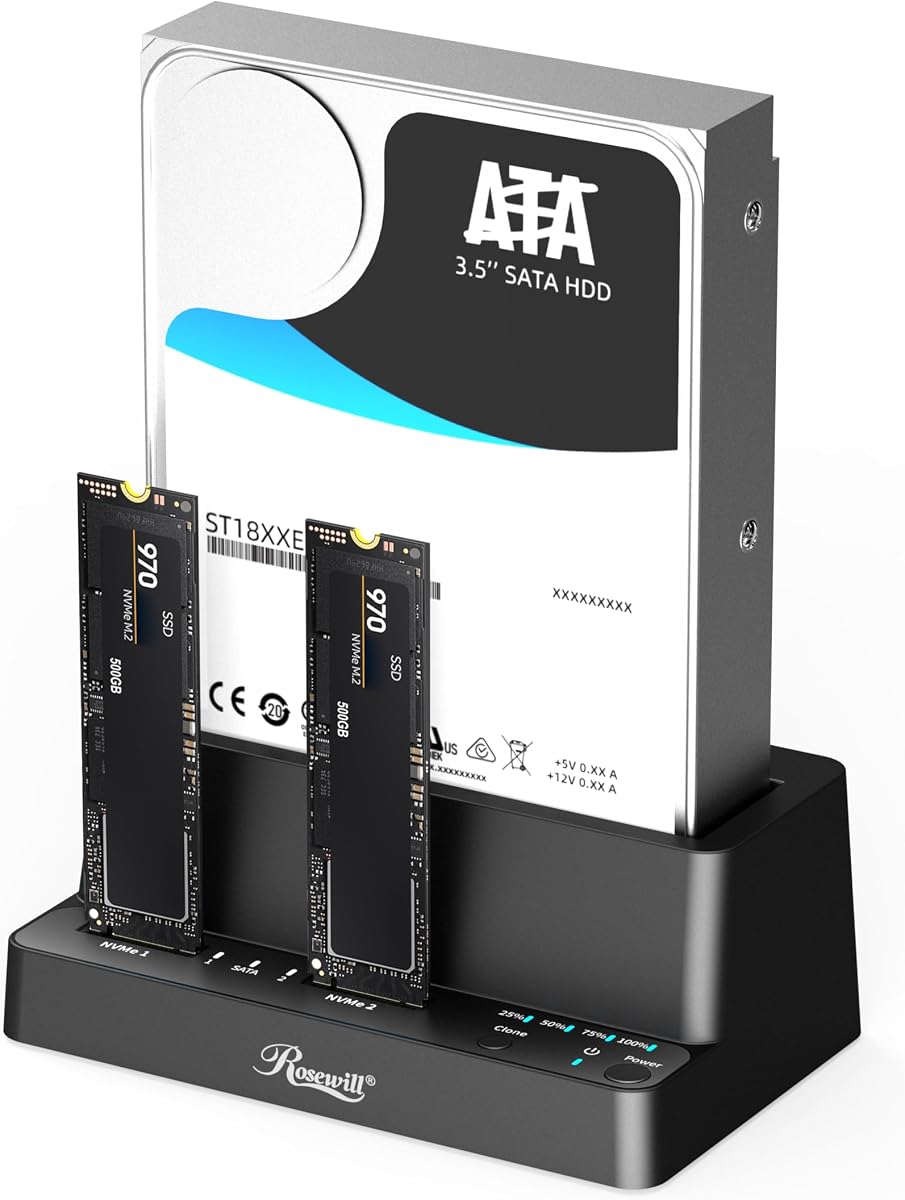
The Rosewill RS-N2S-CL is a three-bay docking station and offline duplicator with a 4.5 rating. It supports M.2 NVMe and SATA SSDs as well as 2.5-inch and 3.5-inch HDDs, giving it a similar breadth of media support to the leading ICY BOX option while offering a slightly different overall design.
We may earn a commission when you buy through this link, at no additional cost to you.
Offline cloning removes the need for a host computer during duplication, while the same unit serves as a reader and docking station for normal file access. USB 3.2 Gen 2×1 provides up to 10Gbps, which is ample for many external workflows but does not reach the 20Gbps ceiling of the Rosewill RS-N2-CL. A single connection may serve the selected bay or shared multi-drive function depending on operating-system and hardware behavior.
Tool-free installation makes it convenient to replace drives without reaching for screws or a special tray key. The three-bay design is valuable when comparing source media, preparing backups, or keeping several drives connected. As with any shared-interface dock, real transfer speed is constrained by the slowest participating device, and a 3.5-inch hard drive will not approach the throughput of a modern NVMe SSD.
This is a balanced choice for a user who wants to clone and access several kinds of drives but does not need the higher interface bandwidth of the 20Gbps models. It is particularly useful for data recovery, legacy-system support, and system-building workflows involving both SSDs and hard disks.
Supporting both NVMe and SATA media allows the dock to bridge newer SSD systems and older hard-drive setups. This broadens its usefulness for migrations involving mixed hardware generations.
The reader and docking functions give the hardware a role in daily file access and drive preparation. It can remain useful even when no immediate cloning task is underway.
We may earn a commission when you buy through this link, at no additional cost to you.
The 20Gbps Universal M.2 Cloner has the highest customer rating in this group at 4.7. It is a dual-bay enclosure that supports NVMe and SATA M.2 SSDs, works with Windows, Mac OS, and Linux, and provides standalone drive-to-drive cloning through a single button. It is designed for users who want broad compatibility in a portable format.
We may earn a commission when you buy through this link, at no additional cost to you.
The listed cloning performance reaches up to 16Gbps, with a claimed ability to copy a 1TB SSD in under 12 minutes. In regular external enclosure mode, the USB interface is listed at up to 10Gbps. These are different figures for different tasks, so buyers should interpret the 20Gbps in the product name as a broad performance reference rather than assume every operation runs at that rate.
Tool-free insertion, real-time progress LEDs, and a completion alert simplify the workflow. For cloning, the target should be equal to or larger than the source, and the same protocol is recommended for NVMe-to-NVMe or SATA-to-SATA copies. The included USB 3.2 Type-C cable carries data and power, supporting a portable setup. A single USB-C cable can also limit convenience with older systems that lack the appropriate port.
This is a strong all-purpose M.2 option for users who move between operating systems and need both NVMe and SATA support. Its strong rating and clear status feedback make it appealing for routine migrations, although the advertised clone and external speeds should be judged against the capabilities of the installed drives and host system.
Supporting both NVMe and SATA M.2 drives makes the dock useful across a broader range of computers. Same-protocol matching is still recommended during cloning to reduce uncertainty.
Onboard LEDs show cloning status and alert the user when the process is finished. These cues reduce the need to keep a computer nearby during standalone operation.
We may earn a commission when you buy through this link, at no additional cost to you.
The SSD Metal Mounting Bracket Kit is not a duplicator, but it is relevant to this guide because it addresses where cloned or upgraded drives may be installed. It has a 4.4 rating and converts two 2.5-inch HDD or SSD positions into a standard 3.5-inch drive-bay footprint. This makes it especially useful in older desktop cases with large bays and limited smaller-drive mounting points.
We may earn a commission when you buy through this link, at no additional cost to you.
The kit includes a screwdriver, eighteen screws, a fourteen-pin to dual fifteen-pin SATA power cable, a fifteen-pin to dual fifteen-pin power cable, and two SATA data cables. That collection of parts covers the basic task of fitting and connecting two compact drives. Precise mounting holes are designed to keep the installation orderly and reduce movement inside the case.
Data transfers are listed at up to 6Gbps, with backward compatibility for SATA I and SATA II. The practical performance of any installed drive will usually be lower than this interface ceiling, especially with conventional SATA SSDs or hard disks. Because the product performs no copying, it should be considered a physical installation accessory rather than an alternative to a standalone or USB-based cloner.
Choose this kit when the priority is mounting two 2.5-inch drives inside a desktop that uses 3.5-inch bays. It is especially helpful after cloning a system drive or adding a second storage device, but it offers no sector-level duplication function. Users seeking a one-button migration should use one of the dedicated cloners in this guide and treat the bracket as a complementary physical solution.
The bracket allows compact SSDs to occupy standard larger drive positions. This can make internal upgrades neater and easier in cases designed around 3.5-inch bays.
The included cables, screws, and power adapters help complete an internal installation after data has been copied elsewhere. It has no standalone mode, cloning button, or drive-health dashboard.
We may earn a commission when you buy through this link, at no additional cost to you.
A useful SSD cloning device should support the exact protocols and physical formats of your drives, provide a dependable copy workflow, and remain cool during extended transfers. Interface speed, storage features, accessories, and intended deployment environment should be considered alongside clone capacity.
NVMe and SATA M.2 drives may look similar but use different interfaces and protocols. Many compact cloners support both for ordinary external access, while some restrict offline copying to matching protocols. The ICY BOX is notable for broader cross-type flexibility, whereas the Rosewill RS-N2-CL and UGREEN unit are designed specifically around NVMe duplication. Check both drive support and the exact source-to-target combinations allowed by the manufacturer.
Prioritize a model that supports your current and planned drive inventory. Matching protocols are generally the safest and clearest offline workflow.
M.2 lengths such as 2230, 2242, 2260, 2280, and 22110 refer to different physical sizes. Supporting all of them provides flexibility, while a device designed for one standard length may be sufficient for a particular laptop. Larger 2.5-inch and 3.5-inch SATA drives require a full-size dock rather than a dual-M.2 enclosure. The included bracket is useful for physically mounting 2.5-inch drives but does not copy them.
Match the bay design to your actual media, including length, connector type, and any installed heat spreader.
A standalone cloner performs the copy without depending on a host computer for instructions. This is valuable for OS migrations, disaster recovery, repeated IT imaging, and situations where the destination computer cannot boot. Most products in the guide use a one-touch or one-button workflow, while the bracket has no duplication capability. Standalone operation should not be confused with USB access speed: one describes control of the copy, and the other describes data transfer over the host connection.
Choose offline cloning when reliability and independence from the host matter more than a graphical workflow.
A 10Gbps USB 3.2 Gen 2 connection is the prevailing standard among the listed docks, while several products advertise USB 3.2 Gen 2×2 at up to 20Gbps. Faster host bandwidth can improve large file transfers when both the computer and drive support it. It does not override the speed of a SATA SSD or hard drive, and some USB-C or USB-A ports cannot negotiate the full advertised rate.
Treat interface speed as an upper limit and confirm that the host port, included cable, operating system, and installed drives can all sustain it.
The target generally must have equal or greater capacity than the source because the duplicate must contain the source's full data and partition layout. Using a much larger target does not automatically make the source usable at its full nominal capacity without considering partitioning and file-system behavior. The StarTech explicitly states the equal-or-larger target rule, and the UGREEN and universal M.2 models also emphasize this requirement.
Always compare usable capacity, not just the printed capacity, and avoid assuming a clone will automatically expand every partition for immediate use.
NVMe SSDs can become hot during sustained copying, particularly in open-frame or compact designs. Aluminum construction, ventilation channels, heat-dissipating surfaces, and active cooling can help reduce thermal throttling. Dedicated power input is another consideration because a single host connection may not provide enough power for two drives performing sustained work. Open designs promote airflow but offer less physical protection during transport.
Look for active airflow and stable power, especially for large SSDs or repeated jobs. Allow hot drives to cool before removing them.
Most dedicated cloners also work as external enclosures, allowing the inserted drive to be accessed by a computer. Dual-bay designs may support concurrent access, although some products recognize only one drive when different protocols are connected at the same time. Features such as UASP, TRIM, S.M.A.R.T. monitoring, and drive-health indicators make a device more useful between cloning jobs rather than only during a single migration.
Prioritize units that add useful health and everyday access features if you expect to keep the hardware in regular service.
Progress LEDs, status lights, audible completion alerts, and S.M.A.R.T. indicators help users understand whether a job is progressing normally. A complete cable and power package also reduces setup friction. The SSK, Rosewill, and universal M.2 products are relatively compact, while three-bay models need more desk area. Think about where the device will live, whether it will travel, and whether multiple drives need to remain connected at once.
Select the accessories and feedback features that reduce guesswork during unattended or repetitive work, but avoid paying for extra bays that will remain unused.
Before cloning, back up irreplaceable data, identify the source and target drives, and verify that both use a supported protocol and physical format. Confirm that the target has enough capacity, read the included instructions, and ensure the cloner has the required power. If the source contains important system information, use the hardware's data-protection features and avoid making the target your only backup.
Install the source and target according to the manufacturer's orientation instructions, then connect the cloner to power. If the procedure calls for a host connection during setup, complete that stage before starting the copy. For offline models, press the designated clone button and observe the status lights. Do not remove either SSD while the device is copying, and do not interrupt power unless the instructions specifically explain how to stop or cancel the operation.
After the copy completes, let the drives cool, safely eject or disconnect them, and verify important files, folders, and boot-related partitions. Test the destination system before performing a destructive change to the original drive. Keep the enclosure ventilated, use the specified cables, clean the contacts gently, and store it in a dry location. Periodically check firmware, manual updates, and drive health information supplied by the manufacturer.
It depends on the cloner. The ICY BOX product information describes flexibility including SATA-to-NVMe cloning, but many other units support only same-protocol copies, such as NVMe-to-NVMe or SATA-to-SATA. A mixed copy can also create boot or partition complications because the protocols and system structures differ. Check the exact model manual before attempting a mixed migration.
No. An offline or standalone cloner is designed to perform the duplication using its own controls and power. Some products may request a host connection for initial setup, configuration, or drive initialization, so read the instructions carefully. The central benefit is that the destination computer does not need to remain running while the copy takes place.
Usually not. The target must have equal or greater usable capacity so the complete source image can fit. Several products in this guide explicitly state that requirement. A larger target may contain unused space, and users may need to extend or create partitions after cloning before the new drive can use the entire available area.
No. The advertised interface rate is a theoretical maximum for the connection. The host port, cable, controller, drive protocol, file sizes, and operating system all affect actual performance. A SATA SSD is generally limited by its own protocol, while an NVMe drive and compatible computer may benefit from the higher host bandwidth.
A proper sector-level copy is designed to reproduce the source drive's partitions, files, and system structures, including installed applications. Compatibility still depends on the target platform, firmware, storage mode, and any encryption or special boot configuration. Keep the original drive intact until the cloned system has been booted, checked, and backed up.
Sustained sequential transfers can generate enough heat to raise the temperature of a compact SSD. Faster SSDs, high-capacity drives, poorly ventilated enclosures, and long copy sessions increase the risk. The listed products use open frames, aluminum bodies, ventilation channels, or active cooling to improve airflow, and users should avoid blocking those paths.
Several dual-bay models in this guide explicitly support 2230, 2242, 2260, 2280, and 22110 lengths. The 22110 format is particularly useful with some handheld gaming systems. Always confirm the exact dimensions and key type of your drive, because a connector alone does not establish full mechanical compatibility.
A cloner copies data from one drive to another, either while connected to a computer or as a standalone device. A mounting bracket only secures a drive inside a computer case and provides the necessary physical adaptation for the bay. The included 2.5-to-3.5-inch bracket is therefore useful after or alongside a cloning project, but it cannot perform the copy.
The ICY BOX TripleBay is the most versatile overall option because it combines three bays, offline cloning, and support for M.2, 2.5-inch, and 3.5-inch media. The SSK Dual Bay is a focused, compact M.2 option, while the StarTech duplicator stands out for its premium throughput and professional status feedback.
Compatibility should come before interface speed. Confirm the source and target protocols, physical drive dimensions, target capacity, operating system, and required power before choosing a model. NVMe-only users may prefer the Rosewill RS-N2-CL or UGREEN for their faster 20Gbps host connections, while mixed-media technicians will get more flexibility from a three-bay dock.
Finally, review the current listing, manual, warranty information, and included accessories before purchasing, because specifications and availability can change. Avoid using a newly cloned drive as the only copy of important data, and always test the destination system before retiring the original.