
10-Port 2.5G PoE++ Switch
4.6Editor score
Eight 2.5G access ports
Two 10G uplink slots
Ninety-watt PoE++ support
Our Layer 3 Network Switch guide compares ten managed models for routing, VLANs, PoE, port speed, uplinks, management features, and installation needs.
A Layer 3 network switch combines local Ethernet switching with routing functions that let one device move traffic intelligently between VLANs. The right model can improve network organization, reduce unnecessary router load, support demanding devices, and provide a clearer foundation for a growing home or business infrastructure.
We compared ten switches based on their documented port configurations, supported Layer 3 functions, management options, uplink capacity, PoE availability, physical design, and intended installation environment. The list covers compact desktop models, fanless business switches, rack-mounted aggregation options, and feature-rich enterprise units suitable for demanding networks.
Each selection highlights a different reason to consider it, from high-speed 10G networking and flexible 2.5G access to PoE++ delivery and integrated routing. Ratings and specifications reflect the supplied product information, while prices and availability can change, so readers should verify current details before making a final purchase.
4.6Editor score

4.7Editor score

4.7Editor score
The comparison table highlights the major differences among the ten switches, including access-port speed, uplink options, PoE capability, management depth, and physical form factor. These factors help reveal which model best fits a compact installation, a power-heavy access network, or a high-capacity rack environment.

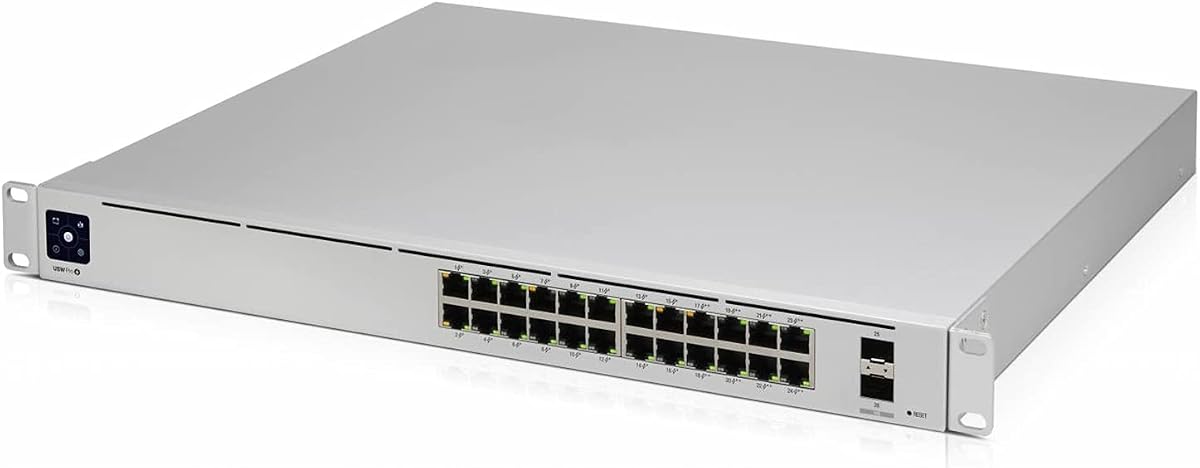



The Ubiquiti USW-Pro-24-PoE stands out as a balanced Layer 3 network switch for organizations that want a substantial number of wired connections without separating access switching from routing functions. It carries a 4.7 rating and its defining feature is a 24-port PoE-oriented design, which makes it particularly useful where access points, cameras, VoIP equipment, or other powered endpoints need both data and electrical delivery over the same cabling.
We may earn a commission when you buy through this link, at no additional cost to you.
The strongest part of the proposition is the combination of a 24-port footprint with Layer 3 operation. Rather than forcing every inter-VLAN path through a separate consumer router, an appropriately configured Layer 3 switch can perform that traffic movement closer to the devices that need it. This is especially relevant in offices with multiple departments, studios, warehouses, and distributed buildings where VLAN segmentation is more than an aesthetic preference.
The main trade-off is that PoE capability is only valuable when the deployment includes compatible powered devices. Organizations whose endpoints all receive power locally may find the non-PoE USW-Pro-24 more economical and equally capable of handling core switching duties. Buyers should also confirm that the UniFi management environment matches the rest of their network and that the intended licensing, controller, and configuration approach fits their operational preferences.
For network administrators seeking a capable, established 24-port option with integrated PoE and Layer 3 features, this is a strong overall recommendation. It is especially convincing for small businesses, advanced home labs, and branch offices that need one centralized switching device for many connected endpoints.
Layer 3 routing allows the switch to move traffic between VLANs while PoE simplifies the connection of powered network devices. Combining both functions can reduce equipment duplication and make a structured network easier to maintain.
A 24-port design provides room for numerous computers, phones, cameras, and access points in one enclosure. That density makes the unit appealing to installers who prefer consolidated rack equipment over several smaller switches.
We may earn a commission when you buy through this link, at no additional cost to you.
The MokerLink 8-Port 10G Managed Ethernet Switch is built for installations that want fast access ports and unusually broad administrative control in a relatively compact package. Its 4.3 rating reflects a generally favorable reception, while its feature set is particularly compelling for developers, technical users, small businesses, and home-lab operators who understand the difference between basic switching and full Layer 3 management.
We may earn a commission when you buy through this link, at no additional cost to you.
Every one of the eight copper ports can adapt across 10G, 5G, 2.5G, 1G, and 100M rates. That flexibility is valuable when the network contains a mixture of modern workstations, network storage, Wi-Fi equipment, and older 1G clients. Wire-speed forwarding and auto-flip support also make the switch more accommodating across mixed device ecosystems.
The management capabilities extend well beyond VLAN creation. Documented features include IPv4 and IPv6 routes, ARP, loopback interfaces, ACLs, QoS, jumbo frames, DHCP, multicast controls, and spanning-tree protocols. Security features include AAA, 802.1X, MAC-based authentication, DHCP snooping, dynamic ARP inspection, IP source guard, port security, protected ports, and storm control, offering a much deeper toolkit than an unmanaged switch.
This is a strong recommendation for a user who values multigigabit flexibility and explicit network controls. The trade-off is operational complexity: the long list of protocols and security mechanisms will matter most to someone prepared to configure and monitor the switch carefully.
Adaptive 10G, 5G, 2.5G, 1G, and 100M support lets administrators connect mixed generations of equipment without dedicated speed-specific hardware. This makes the switch useful as both an access layer and a compact aggregation point.
Routing, VLANs, authentication, monitoring, and traffic-control features make this more than a basic managed switch. Operators can select advanced controls as the network evolves, while web and CLI access provide alternative management paths.
We may earn a commission when you buy through this link, at no additional cost to you.
The Ubiquiti USW-Pro-24 without PoE is a straightforward answer for a large access layer where every port does not need to deliver power. It holds a 4.4 rating and supports Layer 3 switching while providing 24 Gigabit RJ45 connections for computers, printers, phones, and other conventional wired peripherals.
We may earn a commission when you buy through this link, at no additional cost to you.
A built-in power supply simplifies the physical installation by keeping the main power component within the switch rather than requiring a separate large supply arrangement. The chassis is designed for rack mounting, which helps organize wiring and gives an office or server cabinet a cleaner appearance. Its ability to support optical fiber media also creates a path for longer-distance or higher-bandwidth network segments.
The obvious limitation is the absence of PoE. This is not a weakness when endpoints are powered locally or PoE is supplied by a separate access switch, but it makes the model less convenient for a unified installation centered on Wi-Fi access points, IP cameras, or other powered network hardware. The supplied information does not detail every interface or management protocol, so buyers should verify their complete requirements before finalizing a purchase.
For organizations needing a generous number of Gigabit ports and Layer 3 functionality without paying for unused PoE circuitry, the USW-Pro-24 is a logical choice. It is particularly appropriate for offices with conventional desktops, managed phones, printers, and room for separate PoE equipment.
The model focuses network capacity on Layer 3 switching and access ports rather than power delivery. That focus can simplify both budgeting and cable planning when powered endpoint hardware is not present.
Rack mounting and a built-in power supply support cleaner, more centralized deployments. Optical fiber media support also gives network designers additional options for extending connectivity.
We may earn a commission when you buy through this link, at no additional cost to you.
The 10-Port 2.5G PoE++ Switch delivers an unusually capable combination of multigigabit access, high-speed uplinks, and substantial power delivery. Its 4.6 rating places it among the strongest options in the roundup, and its Layer 3 management functions make it much more than a simple plug-and-play network box.
We may earn a commission when you buy through this link, at no additional cost to you.
Eight RJ45 ports operate at 2.5G, while two SFP+ slots provide 10G uplink opportunities. The stated 80Gbps switching capacity gives the device considerable headroom for a high-speed home lab, studio, technical office, or small aggregation environment. Its ability to connect network storage, 2.5G servers, and modern wireless equipment is particularly relevant as local network demands continue to increase.
PoE availability is another major strength. Ports 1 through 4 can deliver up to 90W each under IEEE 802.3bt, ports 5 through 8 can provide up to 30W each, and the total PoE budget is 275W. A watchdog can restart frozen powered devices. The tradeoff is that this hardware needs adequate power and cooling, including an enterprise-grade fan, which may be less attractive in a quiet room.
This switch is best recommended to users who want 2.5G access, 10G uplinks, advanced routing, and serious PoE capability in one unit. For power-heavy access points, cameras, and other endpoints, the combination can simplify infrastructure considerably.
The eight 2.5G ports serve modern wired clients without demanding 10G cabling for every connection. Dual 10G SFP+ uplinks provide a clear path toward faster switches, servers, or storage infrastructure.
A 275W budget and 90W delivery on selected ports support demanding Wi-Fi and surveillance equipment. The PoE watchdog adds operational resilience by restarting devices that stop responding.
We may earn a commission when you buy through this link, at no additional cost to you.
The MikroTik CRS312-4C+8XG-RM is a compact one-rack-unit option aimed at administrators who want high-speed connectivity in a space-efficient chassis. Its 4.3 rating and support for 10G and Ethernet standards make it relevant to small aggregation points, compact server rooms, and professional networks where every rack position matters.
We may earn a commission when you buy through this link, at no additional cost to you.
The model combines 10G capability with Ethernet connectivity across 100M, 1G, and 10G standards. That makes it adaptable to a network that may include both legacy endpoints and modern high-bandwidth equipment. Its Layer 3 designation adds routing capability beyond basic Layer 2 switching, allowing it to take on more responsibility within a segmented network.
The supplied product information is relatively concise, describing optimal performance, quality materials, and ease of use without breaking out the full management protocol list. Buyers should therefore verify the exact port mapping, supported routing features, transceiver requirements, and power arrangement for their deployment. Those checks are especially important when the switch will bridge existing and new network segments.
For a technically inclined buyer seeking a compact, high-speed managed rack switch, this MikroTik is a convincing candidate. It is especially attractive when mixed port speeds and one-unit rack density matter more than integrated PoE or a touch-oriented management interface.
The one-rack-unit chassis provides useful density for environments with limited cabinet space. Support for 10G alongside standard Ethernet speeds allows it to sit near both modern infrastructure and established client networks.
Managed routing expands the switch beyond simple endpoint aggregation. Administrators can use it where traffic segmentation and controlled inter-VLAN movement are required within a compact installation.
We may earn a commission when you buy through this link, at no additional cost to you.
The MikroTik CRS317-1G-16S+RM is designed around fiber-rich connectivity rather than a large bank of fixed copper access ports. It carries a 4.4 rating, supports managed Layer 3 operation, and provides sixteen SFP+ slots in a one-rack-unit grey enclosure, making it a natural fit for aggregation cabinets and optical network backbones.
We may earn a commission when you buy through this link, at no additional cost to you.
Its defining strength is the concentration of sixteen high-speed slots into one rack unit. SFP+ connections can accommodate appropriate fiber or copper modules, allowing administrators to tailor link types to the environment. IEEE 802.1Q VLAN support provides the foundation for separating traffic across multiple logical networks, while Layer 3 management extends the device beyond basic switching.
This is not the simplest option for a room full of ordinary computers because it lacks a comparable set of directly usable RJ45 access ports and does not indicate integrated PoE. Compatible modules, cabling, and configuration knowledge are therefore required. The RJ45 console port and DC input provide useful management and power connections for rack installation.
For network builders with substantial fiber requirements, the CRS317 can be an efficient aggregation switch. It is best suited to administrators who want many high-speed interfaces, structured VLANs, and Layer 3 control in a compact rack footprint.
A large number of high-speed slots lets one device serve as a central connection point for multiple optical links. This is useful in campus, building, and distributed aggregation environments.
IEEE 802.1Q support and managed Layer 3 features provide the tools needed to separate departments, services, or traffic classes. The device becomes more useful as the network architecture matures.
We may earn a commission when you buy through this link, at no additional cost to you.
The Ubiquiti UniFi Switch Pro 48 is built for environments where the number of wired endpoints matters more than having a small number of extremely fast access ports. It includes 48 Gigabit RJ45 connections, four 10G SFP+ uplinks, Layer 2 and Layer 3 features, and a 1.3-inch touchscreen in one rack-oriented platform.
We may earn a commission when you buy through this link, at no additional cost to you.
The 48-port layout makes it an attractive central switch for large offices, educational spaces, studios, and network racks with many conventional devices. Four SFP+ ports provide room for high-capacity connections to another switch, a server, storage, or an upstream aggregation layer. UniFi SmartPower RPS DC input support is also listed, offering a path for redundant power arrangements within compatible systems.
The main caution is its 3.7 rating, which is the lowest among these ten products. That figure does not erase the evident value of its port density, but it suggests buyers should examine current customer feedback and compatibility details carefully. The model has no PoE specification in the supplied information, making the USW-Pro-24-PoE or another powered model a better match where endpoints need integrated power.
For administrators who need dozens of Gigabit connections and prefer a high-density UniFi switch with touchscreen monitoring, the Pro 48 remains a logical choice. Its strongest case is a large access layer where the four 10G uplinks can support a broader network backbone.
A 48-port access layer reduces the number of separate switch chassis required for a large office or institution. Consolidation can simplify cabling and create room for future expansion.
Four SFP+ ports provide high-speed links beyond the standard access tier, while the small touchscreen allows quick local inspection. SmartPower RPS support adds flexibility for compatible redundant power setups.
We may earn a commission when you buy through this link, at no additional cost to you.
The 8-Port 10G SFP+ Switch delivers dense high-speed connectivity in a quiet, compact design. It has a 4.7 rating, eight native 10Gbps SFP+ ports, and a stated 160Gbps switching capacity, positioning it well for NAS systems, high-speed workstations, Wi-Fi 7 access points, and creative production networks.
We may earn a commission when you buy through this link, at no additional cost to you.
Its routing capabilities extend beyond static paths. Documented protocols include Static Routing, RIP v1 and v2, and OSPFv2, enabling internal inter-VLAN routing and reducing the burden placed on a primary router. A web interface and console port provide two management paths, while ERPS is available for rapid loop recovery. DAI and ACLs add protection against internal spoofing and unwanted traffic.
The fanless metal chassis is a notable practical advantage in quiet offices, bedrooms, studios, and other noise-sensitive locations. Its compact dimensions also support desktop or wall-mounted placement. However, the port rate design requires attention: a switchable global mode offers 10G/1G by default or 10G/2.5G, and changing the mode for one port affects all eight. Every connected module must match the selected mode to avoid disconnection.
This model is a strong recommendation for a small but performance-intensive network with several optical or DAC links. It is less convenient for ordinary desktops because users need compatible transceivers, but for a NAS-heavy or workstation-focused environment, its combination of speed, routing, and silent operation is compelling.
A full set of 10G SFP+ ports eliminates the need to spread high-speed links across several compact devices. That makes the switch suitable for storage, editing, advanced access-point, and home-lab backbones.
OSPFv2 and RIP support provide alternatives to relying exclusively on fixed static routes. Internal inter-VLAN routing can keep traffic close to the devices and reduce pressure on the primary gateway.
We may earn a commission when you buy through this link, at no additional cost to you.
The Ubiquiti Pro Max 16 is a compact managed platform for networks that want to move beyond 1G access without dedicating every connection to 10G. Its 4.5 rating and 16-port mix of 2.5G and 1G interfaces make it a practical middle ground for modern offices, creative spaces, and home labs.
We may earn a commission when you buy through this link, at no additional cost to you.
Multigigabit access is increasingly relevant for tasks such as large file transfers, high-resolution media, local storage access, and connections to fast access points. Sixteen ports offer meaningful density in a relatively compact enclosure, allowing an administrator to centralize a substantial number of devices without deploying several larger switches.
The supplied product information is limited to the model name, so it does not specify PoE availability, uplink details, routing protocol support, cooling, or physical mounting options. Those omissions make careful verification essential, particularly for buyers who expect the same feature set as the USW-Pro-Max-16-PoE. Users should confirm that its Layer 3 and management functions align with their intended UniFi environment.
For a buyer seeking dense 2.5G-capable access in a manageable form factor, the Pro Max 16 is an appealing option. Its rating and strong port count support its reputation as a flexible modern-access switch, provided the buyer confirms the remaining technical details before ordering.
Mixing 2.5G and 1G ports provides an efficient upgrade path for networks where only selected endpoints need more than Gigabit throughput. Sixteen connections create useful density in a compact platform.
Managed operation gives administrators control over how traffic is organized and forwarded. That makes the switch appropriate for structured networks rather than only simple shared-Ethernet installations.
We may earn a commission when you buy through this link, at no additional cost to you.
The Ubiquiti USW-Pro-Max-16-PoE is a premium-focused choice for networks that want multigigabit access, substantial PoE, and 10G uplinks in a quiet, flexible enclosure. Its 4.7 rating reflects strong customer reception, while the combination of four 2.5G PoE++ ports, twelve 1G PoE+ ports, two 10G SFP+ ports, and 180W total PoE gives it broad practical capability.
We may earn a commission when you buy through this link, at no additional cost to you.
The four higher-speed PoE++ ports are the most distinctive feature. They can serve equipment that benefits from both 2.5G connectivity and greater power delivery, while the remaining 1G PoE+ ports support conventional powered endpoints. Two 10G SFP+ ports provide a modern uplink path toward faster switches, storage, or aggregation equipment, helping prevent the access tier from becoming the bottleneck.
Etherlighting adds an operational convenience by indicating port location, link or speed status, and native VLAN or network information through illuminated ports. Desktop, wall, and rack mounting options allow the unit to fit different spaces, and a fanless cooling system keeps operation silent. The 180W budget is less generous than the 275W offered by the 10-Port 2.5G PoE++ Switch, so very dense high-power deployments should calculate demand carefully.
This is a particularly strong premium recommendation for offices, studios, and advanced home networks that need a balance of 2.5G, PoE, 10G, and quiet operation. It offers the flexibility of a mixed-speed design without requiring a separate powered and unpowered access layer.
Four 2.5G PoE++ ports accommodate demanding powered clients, while twelve 1G PoE+ ports cover standard deployments. This mixed layout focuses bandwidth and power where they are most useful.
Fanless cooling makes the switch appropriate for noise-sensitive workspaces, and multiple mounting options simplify deployment. Etherlighting provides local port and network status without requiring constant software inspection.
We may earn a commission when you buy through this link, at no additional cost to you.
Choosing a Layer 3 network switch means balancing routing requirements, client speeds, power delivery, management preferences, uplinks, and the physical environment. The most capable specification sheet is not automatically the most suitable switch; the best unit is the one that fits the network without creating unnecessary complexity.
Begin by counting the devices that need wired Ethernet and estimating the speed each one actually requires. A standard 24-port Gigabit switch can support many ordinary offices, while 2.5G access is valuable for NAS devices, fast workstations, high-resolution media workflows, and modern Wi-Fi infrastructure. Ten-gigabit access ports suit specialized high-performance systems rather than the average endpoint. Choosing too few ports creates future expansion pressure, while choosing too many leaves budget and rack space underused.
Choose a port count that reflects present clients plus reasonable growth, and favor multigigabit ports when several devices may need more than 1G.
Layer 3 switching can route between VLANs, but the useful depth of that capability varies. Basic static routing may suit a small network with a stable topology, while OSPF can help larger environments exchange routes dynamically. IPv4 and IPv6 support matter when the network serves both address families, and features such as ARP, loopback interfaces, DHCP, and inter-VLAN routing determine how much work the switch can absorb from a separate gateway.
Match routing protocols to network complexity, and confirm both IPv4 and IPv6 requirements before choosing a model.
PoE is essential when the switch must power access points, cameras, VoIP phones, lighting, or other network devices. A simple PoE+ budget may be sufficient for conventional access points, while PoE++ can support more demanding hardware. The total power budget matters as much as the per-port maximum because many devices may draw power simultaneously. Buyers should calculate the intended load and leave some headroom rather than operating continuously at the documented limit.
Choose the lowest standard that supports every powered endpoint, and verify both per-port output and the total switch budget.
Access ports are only as effective as the links carrying traffic toward the rest of the network. One or two 10G SFP+ uplinks can prevent aggregation bottlenecks, while eight SFP+ ports may support a fiber-rich backbone. Copper multigigabit uplinks can simplify smaller installations, but module-based uplinks offer more cabling choices. The upstream switch, router, server, and storage system must support the selected speed for the uplink to deliver meaningful benefits.
Ensure the uplink capacity exceeds the likely aggregate access demand, and verify that compatible transceivers or cables are available.
A managed switch should make the network easier to observe, segment, and maintain. Useful capabilities include VLAN management, ACLs, QoS, link monitoring, traffic statistics, configuration backup, firmware upgrades, and remote administration through web, CLI, SSH, or SNMP. Security options such as 802.1X, port security, DHCP snooping, dynamic ARP inspection, storm control, and source-guard features can reduce common internal risks, especially in business environments.
Prioritize controls you will actually use, and ensure the interface is comfortable for the administrator who will maintain the network.
A switch may live in a server rack, wiring cabinet, office shelf, wall, or studio. Rack-mount hardware and ears support centralized deployment, while desktop or wall mounting offers flexibility in smaller spaces. Cooling matters when a unit runs continuously or carries heavy traffic. Fanless metal chassis are quiet and efficient, while active fans can provide aggressive cooling under sustained full loads. Buyers should also consider physical depth, mounting hardware, indicator visibility, and cable-management space.
Match the enclosure and cooling method to the location, prioritizing quietness for offices and reliable heat management for dense installations.
A switch can be technically capable but still awkward to administer if its platform does not fit the user's skills or existing equipment. UniFi models may suit users already invested in that ecosystem, while MikroTik and other platforms can appeal to buyers seeking granular command-line control. Web interfaces can simplify routine work, whereas console access and configuration files improve recovery and advanced administration. Verify compatibility with existing controllers, software, workflows, and documentation before buying.
Choose a platform that supports repeatable management rather than one that merely exposes the most feature labels.
A switch should have enough bandwidth, ports, and power headroom for the network it may support in a few years. Configuration backup and upload, firmware upgrade support, logs, diagnostics, and remote monitoring make maintenance easier after installation. Optical or module-based uplinks can offer a clearer upgrade path than a switch with only fixed 1G connections. Also consider replacement logistics: a compact unit is easier to move, while a high-density rack model is better suited to permanent infrastructure.
Plan for expansion and maintenance together, ensuring the switch can grow without requiring a complete network redesign.
Before installing the switch, document the existing routers, VLANs, subnet assignments, IP address ranges, uplink devices, and powered endpoints. Confirm that the chosen power supply and mounting hardware meet local electrical and rack requirements. Keep the unit away from heat sources and obstructions, and use the supplied rack ears or mounting options when appropriate for a permanent installation.
Begin with a conservative configuration. Connect the switch to the upstream gateway or aggregation switch, establish management access, and verify basic communication before moving traffic. Create VLANs according to the network plan, assign the intended access ports, and configure routing only after local switching has been tested. Document every interface, route, and policy so the setup can be reproduced after an upgrade or replacement.
For PoE models, calculate connected loads and confirm the budget before adding every access point or camera. After deployment, review link status, port utilization, routing tables, logs, and any reported errors. Save a configuration backup, establish a firmware update routine, and periodically test the recovery process. Keep the chassis clean, preserve airflow around vents, and avoid stacking equipment in a way that restricts cooling.
A Layer 3 network switch combines Ethernet switching with network-layer routing. It can move frames within VLANs and route traffic between VLANs using IP information. This can reduce the need for every inter-VLAN transfer to pass through a separate router. The practical benefit is often better organization, scalable segmentation, and more efficient internal traffic flow.
A Layer 3 switch is not automatically better or worse than a router; each has a different role. A Layer 3 switch is especially useful for high-volume local routing between many VLANs and directly connected devices. A router remains essential for connecting the organization to external networks and handling broader gateway responsibilities. Many professional deployments use both.
A small home network with only a few devices may not need a dedicated Layer 3 switch. It becomes more useful when you create multiple VLANs, run a NAS, operate advanced access points, or want local routing for traffic between wired and wireless segments. The feature is also attractive to home-lab users who want to learn routing protocols and build a more structured network.
The terms identify different power-delivery levels under IEEE standards. PoE++ provides the highest per-port output and is appropriate for devices with greater power demands, such as some advanced access points or cameras. PoE+ serves many conventional powered endpoints. The correct choice also depends on the switch's total PoE budget and whether each connected device accepts the standard the switch provides.
Count every current wired endpoint and include appropriate headroom for expansion. A 16-port switch may suit a modest office or lab, while a 24-port model is convenient for a larger access layer. A 48-port switch can consolidate many conventional Gigabit clients but may be unnecessary for a small installation. Also consider whether several ports are reserved for uplinks, management, or future devices.
Choose 2.5G for modern local access where devices need more than Gigabit performance but not full 10G. Choose 10G for servers, high-end storage, aggregation links, and demanding workstation paths. SFP+ gives network builders flexibility over fiber, DAC, or compatible copper modules, but it also requires module planning. Match the switch to the devices and uplinks that will actually use each speed.
Many managed Layer 3 switches provide a web interface for configuration and status monitoring. Several products in this roundup also support console or CLI access, which is valuable for detailed troubleshooting and automated workflows. The best choice depends on the administrator's preferences and existing platform. Confirm all required management protocols and features before purchasing.
They can improve effective performance when the previous design routes all inter-VLAN traffic through a slower device or creates unnecessary bottlenecks. Layer 3 switching handles local traffic close to the endpoints and supports higher-capacity uplinks. It does not make a slow endpoint or insufficient internet connection faster, and it requires correct VLAN, route, and security configuration to deliver the expected benefits.
The Ubiquiti USW-Pro-24-PoE is the most balanced overall selection for buyers seeking a 24-port managed switch with Layer 3 features and convenient integrated power. The 10-Port 2.5G PoE++ Switch stands out for its combination of multigigabit access, two 10G uplinks, and high-output PoE, while the Ubiquiti USW-Pro-Max-16-PoE offers a refined mix of 2.5G, PoE++, 10G uplinks, and silent fanless operation.
Port count alone should not drive the decision. Start with client speed, VLAN structure, routing requirements, uplink capacity, and powered devices, then account for cooling, management platform, and physical installation. Compact SFP+ designs suit fiber-rich backbones, 24-port models serve conventional access layers, and mixed 2.5G systems offer a practical path for modern networks.
Finally, confirm current specifications, accessory requirements, management compatibility, and availability before ordering. Ratings and product configurations provide useful guidance, but network requirements and prices can change. Comparing the final configuration against your own device inventory, cabling plan, and power budget will lead to the most reliable purchase.