
10Gtek X540-10G-2T
4.1Editor score
Intel X540 controller
Dual 10GbE RJ45 ports
PCIe x8 and x16 support
Server-oriented operating systems
Our 10GB Ethernet Card guide compares ten PCIe, RJ45, SFP+, and USB-C adapters for speed, compatibility, ports, cabling, and system fit in 2026.
A 10GB Ethernet card can transform a desktop or server by adding a fast wired connection for large file transfers, NAS access, media editing, backups, and network gaming. The right model depends on your PCIe slot, cable, router or switch, operating system, case size, and whether you need RJ45, SFP+, or USB connectivity.
This guide compares ten 10GB Ethernet Card options across link speeds, port count, controller features, operating-system support, physical interfaces, included brackets, and installation requirements. The selection includes single-port and dual-port PCIe cards, a fiber-capable SFP+ adapter, a Synology-specific card, and a USB-C model for systems without a convenient expansion slot.
Each review explains the most useful qualities and practical limitations of its featured card. Rankings reflect the supplied product information, including stated capabilities, compatibility details, and customer ratings, rather than personal testing. Product availability, driver behavior, and pricing can change, so confirm the current specifications and cost before buying.
4.1Editor score

4.2Editor score

4.6Editor score
This side-by-side comparison highlights each adapter's connection style, port configuration, link-speed support, PCIe or USB interface, and most important compatibility consideration, helping buyers match the card to their network and chassis.




The TP-Link TX401 is a single-port PCIe adapter built around 10GBase-T, giving compatible desktops a straightforward path to 10Gbps networking. Its 4.2 rating reflects a generally capable product, and the standout feature is its support for 10, 5, 2.5, 1Gbps, and 100Mbps links. That range lets the card work with both current multi-gig equipment and older network hardware.
We may earn a commission when you buy through this link, at no additional cost to you.
Its strongest practical advantage is the included 1.5-meter CAT6A cable. A proper high-speed cable removes an avoidable installation variable, while the automatic negotiation process should simplify connections to routers, switches, and computers with different capabilities. Built-in Quality of Service is another useful feature for users who want gaming or other priority traffic to receive preferential treatment when congestion occurs.
The TX401 is not as flexible as a dual-port card, and a buyer with only one network connection may find that limitation unimportant. It supports Windows 10 through 7, several listed Windows Server releases, and Linux, which covers many desktop and workstation environments. The adapter also includes standard and low-profile brackets, making it more adaptable than a card that offers only one mounting option.
This is a strong general recommendation for a desktop user seeking one dependable 10GbE connection without moving to fiber. Choose it when your computer has a suitable PCIe slot, you want a conventional RJ45 port, and your network equipment supports multi-gig rates. The included cable, broad speed support, QoS, and included brackets create an unusually balanced installation package.
Automatic negotiation across five supported rates makes the TX401 practical for mixed-speed networks. A 2.5Gbps NAS, 1Gbps switch, or newer 10Gbps router can all be used without assuming that every endpoint offers the same maximum link rate.
The supplied CAT6A cable is designed for the card's stated 10Gbps target and helps users avoid purchasing an unsuitable cable separately. It is particularly useful for a first-time 10GbE installation where cabling quality is not yet settled.
We may earn a commission when you buy through this link, at no additional cost to you.
The VIMIN 10G Dual RJ45 combines two 10Gbps copper Ethernet ports with an Intel X540-T2 controller. Its 4.5 rating is the second-highest among the listed products, making it an appealing choice for buyers seeking more than one physical network connection. The dual-port format is useful for separating networks, connecting to two systems, or taking advantage of independent link aggregation where supported by the complete network configuration.
We may earn a commission when you buy through this link, at no additional cost to you.
The card supports Windows and Windows Server, Linux, and VMware, giving it a broader operational profile than a model aimed only at one platform. It works with both PCIe x8 and x16 slots, and the supplied standard and slim brackets allow installation in servers or devices of different heights. A heat sink and gold-finger interface are intended to support temperature control and dependable connections under load.
Its most important limitation appears in the supplied compatibility note: 2.5Gbps and 5Gbps are not supported. A network device operating at either of those rates will see the card limited to 1Gbps. That restriction matters for users whose router or switch is multi-gig but not 10GbE, and it is the main reason not to choose this model for every type of mixed-speed network.
The VIMIN is best for a server, workstation, or advanced desktop that genuinely benefits from two 10GbE RJ45 connections and has compatible 10G networking hardware. It is also a sensible budget-oriented option for users who prefer established server features over a single-port design. Verify that all connected equipment supports 10Gbps before installation.
Two RJ45 ports provide more connection options than a single-port card. Depending on the operating system, switch, and configuration, they may be used for multiple network paths, separate traffic domains, or redundant connections.
The X540-T2 controller, heat sink, slim bracket, and broad operating-system list position this card closer to a server accessory than a basic desktop upgrade. These features matter most in systems where sustained network activity and flexible installation are priorities.
We may earn a commission when you buy through this link, at no additional cost to you.
The Asus NADACA0140 is a straightforward PCIe network card for users who want to move beyond gigabit Ethernet. It provides one RJ45 port capable of 10Gbps and carries a 4.1 customer rating. Its support for 10, 5, 2.5, 1Gbps, and 100Mbps makes it one of the more broadly compatible multi-gig options in the group.
We may earn a commission when you buy through this link, at no additional cost to you.
Built-in Quality of Service allows selected data packets and applications to receive priority, which can help maintain a smoother experience during busy periods. The card works with standard copper network cables and supports Windows 10, 8.1, 8, and 7 as well as listed Linux kernels. This makes it a practical option for upgrading a compatible desktop without changing its network cable type.
There is only one port, so the card cannot directly provide two independent RJ45 connections. The listed Linux compatibility is tied to specific kernel versions, which means buyers running a current or specialized distribution should check support before purchasing. The product information does not identify the included bracket arrangements, so physical fit should also be confirmed against the desktop case.
The Asus NADACA0140 suits a single-workstation connection where broad rate negotiation and QoS are the priorities. It is especially relevant for users who want one high-speed wired link but do not need fiber, USB, or multiple ports. Confirm the PCIe slot, operating system, and case clearance, then use a cable suitable for the intended link speed.
The five supported rates let the adapter work with older 100Mbps or 1Gbps networks while still offering a path to 10Gbps. Automatic negotiation reduces the need to manually configure each connection for a different device.
Quality of Service can give selected packets or streams priority over less important traffic. For gaming, media, or interactive workloads, this may be useful on a shared or congested network.
We may earn a commission when you buy through this link, at no additional cost to you.
The 10Gtek X540-10G-2T is a dual-port PCIe card built around an original Intel X540 controller. Its 4.1 rating and server-focused feature set make it particularly interesting for labs, homelabs, and older enterprise workstations. Both network connections use copper RJ45, allowing a high-speed network to be created without requiring fiber transceivers.
We may earn a commission when you buy through this link, at no additional cost to you.
The card supports Windows Server versions, Windows 7 through 10, Linux, ESX, and ESXi, plus storage protocols including iSCSI, FCoE, and NFS. It works in PCIe x8 and x16 slots, includes a low-profile bracket, and can use Category 6A cabling for runs up to 100 meters. Category 6 is also listed for shorter runs of up to 55 meters.
There are two meaningful cautions. The card does not support hot-swapping, and Windows 11 users are advised to obtain installation guidance beforehand. The supplied information also does not describe a separate multi-speed auto-negotiation range, so buyers should not assume behavior beyond the stated 10GbE positioning. These factors matter most in managed server environments.
The 10Gtek is a good match for a server or homelab that wants two 10GbE connections and values the Intel X540 platform. Its low-profile bracket, storage-protocol support, and three-year warranty add useful value. For a hot-swappable or Windows 11-focused system, verify requirements carefully or consider an adapter with more explicit modern support.
Support for iSCSI, FCoE, and NFS makes the card relevant to storage-oriented networks. Users planning a NAS, virtualization host, or high-throughput file server can consider protocols that extend beyond ordinary web traffic.
Category 6A can carry the stated 10GbE link over distances up to 100 meters, while Category 6 is listed for up to 55 meters. Those limits should guide cable selection in racks and offices.
We may earn a commission when you buy through this link, at no additional cost to you.
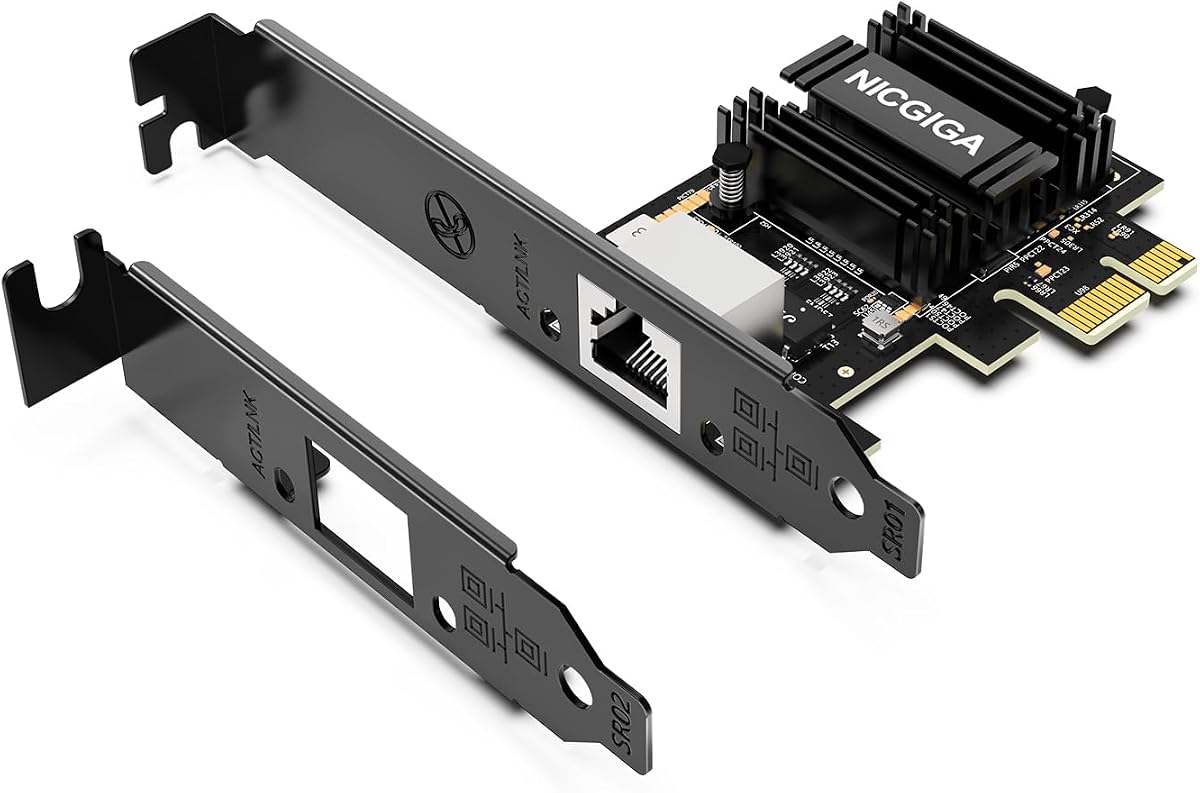
The NICGIGA RTL8127 stands out for using a compact PCIe 4.0 x1 interface while providing a full 10GbE RJ45 connection. Its 4.3 rating reflects a well-regarded product, and the x1 design offers unusual slot flexibility for ITX builds, Mini PCs, compact workstations, and desktop systems where conserving expansion lanes matters.
We may earn a commission when you buy through this link, at no additional cost to you.
The card automatically negotiates across 10Gbps, 5Gbps, 2.5Gbps, 1Gbps, and 100Mbps. It can fit PCIe x1, x4, x8, and x16 slots without occupying a graphics card's lanes. Wake-on-LAN is supported, and the supplied information notes use for NAS storage, home labs, gaming, and 4K video editing. Both full-height and low-profile brackets are included.
The Realtek controller is presented as power-efficient and cooler than older 10GbE chips, but users should still ensure adequate airflow around the card. Native plug-and-play support is specified for Linux distributions using kernel 6.x or later. Older 5.x kernels require installation through the official Realtek source code, which adds a setup step for some Linux users.
The NICGIGA is an excellent option for a compact system that cannot accommodate a conventional full-width server card. It also serves well in a desktop that needs only one high-speed connection and broad multi-gig support. Choose it when a PCIe x1 interface, modern driver support, and lower heat are more important than having two physical ports.
A PCIe 4.0 x1 interface can use a small physical slot while retaining 10GbE capability. This makes the card useful in compact builds where a larger card could obstruct cooling, storage, or graphics components.
Native Linux support is listed for kernel 6.x and above, while kernel 5.x systems can use Realtek's official source code. Windows 11 and 10 users also benefit from broad modern operating-system coverage.
We may earn a commission when you buy through this link, at no additional cost to you.
The VunLink RTL8127AT is a single-port 10GbE adapter designed for desktops, servers, NAS systems, workstations, and home labs. It has a 4.3 rating and uses the Realtek RTL8127 controller. Like several other modern entries in this guide, it combines a compact PCIe 4.0 x1 interface with automatic negotiation through 10, 5, 2.5, 1Gbps, and 100Mbps.
We may earn a commission when you buy through this link, at no additional cost to you.
The product supports Windows 10 and 11, Windows Server, and mainstream Linux operating systems. It can be installed in PCIe x1, x4, x8, and x16 slots, which provides flexibility across workstation and compact-PC layouts. Standard and low-profile brackets are both supplied, and the lower-power controller is designed to reduce heat compared with traditional 10GbE solutions.
Driver installation may be required depending on the exact operating system and version, and compatibility with specific NAS platforms, virtualization environments, and Linux distributions can vary. Its single RJ45 port is the main constraint compared with dual-port alternatives. Actual link speed also depends on the connected router, switch, computer, and cabling rather than the card alone.
The VunLink is a strong general-purpose choice for a builder who wants broad operating-system coverage and multi-gig flexibility in a compact card. It suits a modern Windows workstation, a Linux server, or a NAS-related desktop where a single 10GbE path is sufficient. Checking the target operating system and network hardware before purchase will prevent avoidable compatibility surprises.
The stated use cases span file transfers, cloud storage, media editing, gaming, and server access. Its broad rate negotiation makes it adaptable to different routers, switches, and NAS systems rather than limiting it to one fixed network tier.
The RTL8127AT controller is designed for lower power consumption and reduced heat output. That focus makes the card more appealing to compact workstations and systems where sustained 10GbE operation should not create unnecessary thermal stress.
We may earn a commission when you buy through this link, at no additional cost to you.
The Asus XG-C100F is the list's dedicated SFP+ option, offering a 10Gbps connection that can use fiber optics or a compatible direct-attach copper cable. Its 4.3 rating makes it a credible choice for users who need longer-distance network links, structured cabling, or the flexibility to choose their own SFP+ hardware.
We may earn a commission when you buy through this link, at no additional cost to you.
The SFP+ cage is a major functional difference from the RJ45 cards. Fiber connections can carry data much farther than traditional copper cabling, which is valuable in larger offices, studios, or campus-style environments. The card also supports direct-attach copper for shorter connections. An aluminum heatsink helps manage heat during high-performance tasks, while built-in QoS can prioritize important streams or games.
The trade-off is that users must have compatible SFP+ modules, switches, and cabling. The supplied information does not state that a transceiver or cable is included, so those components may need to be purchased separately. The adapter also uses a PCIe x4 interface rather than the narrower x1 design of the newest Realtek alternatives, which can make physical fit more restrictive in compact systems.
The Asus XG-C100F is recommended for installations where the distance or flexibility of fiber justifies the extra networking components. It is less convenient for a simple desktop connecting directly to a 10GbE router over copper. Buyers should confirm SFP+ compatibility, module requirements, chassis clearance, and operating-system support before committing to this specialized design.
Fiber optic support allows 10Gbps traffic to travel much farther than standard copper media. This makes the adapter useful in installations where the network cabinet, server room, or workstation is separated by a substantial distance.
The SFP+ cage accepts compatible fiber equipment or direct-attach copper. Buyers can therefore choose media according to distance and infrastructure instead of being restricted to a permanent internal RJ45 port.
We may earn a commission when you buy through this link, at no additional cost to you.
The Synology E10G30-T2 is a purpose-built dual-port 10GbE adapter for compatible Synology systems. It carries the highest customer rating in the group at 4.6, and its specialization is the main reason it stands apart from universal PCIe cards. The two RJ45 ports are intended to accelerate high-performance storage applications and expand network capacity in supported Synology platforms.
We may earn a commission when you buy through this link, at no additional cost to you.
Each port automatically negotiates between 10Gbps and 1Gbps, giving users a practical fallback when connected equipment cannot operate at the maximum rate. The product is backed by a five-year warranty and is designed specifically for Synology environments rather than serving as a general-purpose desktop adapter. That focus can provide greater confidence when the system is used for storage-heavy workloads.
Compatibility is narrow by design. Buyers must consult Synology's hardware compatibility information and use DSM 7.1.1-42962 Update 5 or a later qualified release. It would be inappropriate to recommend this card for an arbitrary PC or server merely because it has a PCIe connector. Its premium positioning depends on platform-specific fit, official ecosystem support, and integration with the intended Synology product.
The Synology E10G30-T2 is the ideal choice for a compatible Synology system that needs more high-speed storage networking. Its dual ports and high customer rating make it especially attractive for users moving large files between a NAS, workstation, and 10GbE-equipped clients. Confirm the exact system model, DSM version, switch, and cable arrangement before purchasing.
Two 10GbE ports are intended to support high-performance storage applications. This can improve the experience for large backups, synchronized files, media libraries, and multi-user access when the rest of the network can sustain 10Gbps.
Purpose-built Synology design, a defined DSM requirement, and a five-year warranty give the adapter a more focused support proposition. Compatibility must still be confirmed for the exact Synology model rather than assumed from the connector type.
We may earn a commission when you buy through this link, at no additional cost to you.
The TRENDnet TEG-10GECTX combines one 10GbE RJ45 port with support for 10, 5, 2.5, 1Gbps, and 100Mbps. Its 4.1 rating reflects a dependable general-purpose option, while the PCIe 3.0 x4 interface fits many modern desktop and server systems. The card is especially notable for its stated NDAA and TAA compliance in the United States and Canada.
We may earn a commission when you buy through this link, at no additional cost to you.
The adapter includes standard and low-profile brackets, LED indicators, and three years of manufacturer protection. It supports 2.5GBASE-T under IEEE 802.3bz, with the supplied information stating that 2.5G and 5G speeds can run over standard Cat5e cable for distances up to 100 meters. Compatibility includes Windows, Windows Server, and a broad list of Windows 10, 8.1, and Server releases.
The single-port arrangement is simpler but offers fewer physical connection choices than dual-port models. The x4 interface may also be less convenient in a compact system than a PCIe x1 card. Furthermore, government compliance is relevant only to particular institutional procurement contexts and does not by itself improve everyday desktop performance.
The TRENDnet is well suited to offices, workstations, and institutional systems that need a conventional multi-gig RJ45 adapter. It is a compelling option when 2.5G or 5G compatibility matters, or where procurement standards are required. Ensure the host has a suitable PCIe slot, install the correct bracket, and use networking equipment capable of the intended rate.
Support for 2.5G and 5G over standard Cat5e up to 100 meters can simplify upgrades in buildings with established cabling. A compatible adapter may deliver a meaningful speed increase without requiring new cable throughout the facility.
The stated NDAA and TAA compliance can matter for United States and Canadian government customers. Buyers in those categories should still review the relevant procurement requirements and confirm the complete network design.
We may earn a commission when you buy through this link, at no additional cost to you.
The Cable Matters USB-C to 10Gb Ethernet adapter serves a different use case from the internal PCIe cards in this guide. It adds wired networking to laptops, tablets, and other USB-C systems without opening a desktop or using an expansion slot. Its 3.9 rating is the lowest listed, but that does not make it a poor choice for users whose devices lack a practical PCIe option.
We may earn a commission when you buy through this link, at no additional cost to you.
The Realtek RTL8159 controller supports automatic negotiation across 10G, 5G, 2.5G, 1G, and 100M. The adapter works with USB-C, USB4, and Thunderbolt 3, 4, and 5 devices, including common Mac, Dell, Surface, and iPad models. It is also described as plug-and-play on current macOS and Windows, although some older systems may benefit from a current Realtek driver.
Actual performance is constrained by the USB connection and host platform. The supplied data notes that 10GbE is a theoretical link rate, typical Windows throughput is around 7Gbps depending on setup, and macOS may report a 5Gb link with roughly 5Gbps typical throughput. Best results require USB 3.2 Gen 2×2 or a faster host connection. It does not support Android or Xbox One S.
Choose the Cable Matters adapter for a mobile workstation, travel kit, or computer whose internal expansion options are limited. It is less suitable when a PCIe slot is available and maximum independent networking performance is the priority. Check the USB-C port capabilities, operating system, connected network equipment, and cable requirements before relying on it for sustained 10Gbps workloads.
The adapter is especially useful for laptops and compact devices that cannot accept an internal PCIe card. It provides a conventional RJ45 port through the host's USB-C connection, making it simple to carry between locations.
An aluminum housing, integrated thermal silicone, and a heat sink address the heat concerns associated with 10GbE USB adapters. The design is still best paired with a host port capable of sustaining the intended data rate.
We may earn a commission when you buy through this link, at no additional cost to you.
Choosing a 10GB Ethernet Card requires matching the adapter's physical interface, controller, supported link rates, and software support to your computer, case, operating system, cabling, and network equipment. The advertised maximum is only one part of the decision.
Most desktop 10GB Ethernet cards use a PCIe connector, but their physical size and lane requirements differ. The TX401 and several compact models use a small x1 interface that can fit x1, x4, x8, or x16 slots, while other cards use x4, x8, or x16 layouts. Check whether the system has an available PCIe slot, whether the card will fit beside the graphics card or storage drives, and whether the operating system provides a usable slot for the intended lane width.
RJ45 cards work with familiar copper Ethernet cables and are usually the simplest choice for a local desktop. An SFP+ card such as the Asus XG-C100F supports fiber and compatible direct-attach copper media, which can be useful for longer distances but may require separate modules. A USB-C adapter is portable and works without an internal slot, although the host's USB standard can limit real-world throughput.
A single-port card is sufficient when the computer needs one independent network connection. Dual-port models may support separate networks, multiple links, or link aggregation, depending on the controller, driver, switch, and operating-system configuration. They are especially relevant to servers, advanced homelabs, and workstations, but they are not automatically faster for ordinary file transfers that use only one connection.
A card advertised at 10Gbps may also support 5, 2.5, 1Gbps, and 100Mbps, but not every model does. Multi-gig auto-negotiation is valuable when a router, switch, or NAS offers only a lower rate. The VIMIN card explicitly lacks 2.5G and 5G support, whereas the TP-Link, Asus NADACA0140, NICGIGA, VunLink, TRENDnet, and Cable Matters options list broader rate ranges.
The controller determines supported speeds, features, operating systems, and sometimes the availability of newer drivers. Intel X540-based cards are positioned for server and storage workloads, while newer Realtek RTL8127 designs emphasize compactness, efficiency, and modern multi-gig support. USB RTL8159 products depend heavily on the host platform and driver. Check current manufacturer or operating-system documentation before choosing a card for a specialized distribution.
A 10Gbps link needs suitable copper cabling. The TX401 includes a 1.5-meter CAT6A cable, while the 10Gtek lists Category 6A up to 100 meters and Category 6 up to 55 meters. The TRENDnet supports 2.5G and 5G over standard Cat5e up to 100 meters. For longer distances, an SFP+ fiber solution may be more appropriate. Existing wall cabling should be checked rather than assumed capable of 10Gbps.
General-purpose cards may support Windows, Windows Server, Linux, VMware, or ESXi, but each combination should be checked. NAS users need to verify the NAS platform, virtualization users should confirm hypervisor compatibility, and Synology owners should consult the official hardware list and required DSM release. Workload matters too: storage networks, media editing, large backups, and competitive gaming benefit differently from basic browsing.
Sustained 10Gbps transfers generate more heat than low-speed networking, and compact cases may have limited airflow. The Asus XG-C100F uses an aluminum heatsink, while the VIMIN and newer Realtek cards describe heat-management features intended to preserve stability. Check whether full-height or low-profile brackets are included and whether replacing a bracket is practical for your case.
Before installation, power the computer down completely, disconnect the power cable, and note the route the network cable will take. Confirm that the adapter matches the PCIe slot, that the correct bracket is attached, and that the connected switch, router, or NAS can operate at the desired rate. Keep the card away from high-temperature components and leave enough room for airflow around its heatsink.
Install the card in the appropriate PCIe slot, secure the bracket, and reconnect the case power before reinstalling the cover. Connect a category-appropriate Ethernet cable to the RJ45 port or compatible SFP+ arrangement. After booting, install any required operating-system driver, confirm that the adapter appears in the system's network settings, and allow automatic speed negotiation to complete.
To verify performance, compare the negotiated link rate with the card and switch settings, then test with a large file transfer or a suitable network benchmark. Do not expect every internet service to improve: network speed and internet download speed are different. Keep the card seated firmly, avoid repeated connector strain, use proper network cables, and check the manufacturer's support materials if Windows, Linux, virtualization, or NAS drivers cause problems.
For a sustained 10Gbps link, the switch, router, and connected computer should support 10GbE on the relevant port. A multi-gig switch can let the card negotiate a lower rate, but it will not create a 10Gbps connection if the rest of the path cannot support it. Check every endpoint, the switch configuration, and the cabling.
A 10GbE card offers a higher maximum link rate, while a 2.5GbE card is designed for lower-cost multi-gig networks. A 10GbE-capable card often supports 2.5Gbps as a fallback, but some models do not. Buyers should not assume every 10GbE product supports every intermediate speed, as the VIMIN model explicitly demonstrates.
Most laptops do not have a user-accessible PCIe slot, so an internal 10GbE card is usually impractical. A USB-C 10GbE adapter is the portable alternative, but performance depends on the USB-C connection. Thunderbolt and USB4 systems may perform differently from a system with USB 3.2 Gen 2×2, so host capabilities should be checked.
It can remove local-network bottlenecks, but it cannot increase the internet speed delivered by the same connection. Faster local transfers, NAS access, media workflows, and traffic between computers can benefit. A user with a slower internet plan may see little difference when downloading the same file from the same web service.
The TX401 includes a CAT6A cable intended for its stated 10Gbps performance, and the 10Gtek supports Category 6A runs up to 100 meters. Existing cables must be rated appropriately and free of installation faults. A cable meeting a lower category may reduce the negotiated rate, depending on its length and the equipment involved.
Most of the PCIe options in this guide list Linux support, but the required kernel versions differ. The NICGIGA offers native support for kernel 6.x and later and provides an official-driver path for 5.x, while the 10Gtek lists Windows, Linux, ESX, and ESXi. Confirm the exact kernel, distribution, and virtualization platform before installation.
It can reduce local-network latency and congestion when the router, switch, and game server support 10GbE. The TP-Link TX401 and Asus XG-C100F also mention QoS features for prioritizing games or important streams. Internet routing still depends on the provider and the rest of the network path.
The Asus XG-C100F supports compatible direct-attach copper connections through its SFP+ cage, but those are not ordinary RJ45 patch leads. A regular Ethernet cable requires an RJ45 port, such as those on the TP-Link, VIMIN, Asus NADACA0140, and other copper-based cards. Confirm the physical connector and media standard before purchase.
The TP-Link TX401 is the strongest general choice because it combines 10GBase-T, five-speed negotiation, QoS, two brackets, and an included CAT6A cable. The VIMIN card stands out for two 10GbE ports and server flexibility, while the Synology E10G30-T2 is the premium option for owners of compatible Synology storage systems.
Prioritize the entire connection path rather than the card's headline number. Confirm PCIe or USB fit, operating-system drivers, supported link rates, network hardware, and the correct cable. Compact systems may favor the PCIe x1 Realtek options, long cable runs may justify SFP+, and NAS or hypervisor users should verify platform-specific support before installing.
Product specifications, availability, and prices can change, so check the current listing before purchase. The selection offers options for conventional desktops, servers, compact PCs, Synology systems, and portable USB-C devices, making a careful match between the adapter and the intended network environment the most important final step.