
PXN X8 Arcade Stick
4.7Editor score
Keyboard-style directional controls
Mechanical blue-switch buttons
Broad console compatibility
This Fight Stick for Console Fighting Games guide compares ten arcade sticks for compatibility, controls, customization, portability, and competitive play.
A fight stick replaces a traditional gamepad with a joystick, large face buttons, and an arcade-style layout that can make directional inputs and repeated punches easier to execute. The best unit should also fit your console, support your preferred games, match your preferred control style, and provide a durable connection.
This guide compares ten fight sticks using the supplied specifications, including platform compatibility, button and joystick options, remapping features, connectivity, portability, and customization. It covers licensed premium sticks, universal models, wireless designs, leverless controllers, and a keyboard-style directional arcade controller.
Each entry highlights the strongest use case and any practical limitations so readers can choose according to console, game library, and preferred layout. Product ratings and specifications reflect the available listing information, while current prices and availability can change without notice.
4.7Editor score

4.6Editor score

4.2Editor score
The comparison below places all ten arcade sticks side by side, emphasizing control layout, platform support, connection method, customization, and portability. These distinctions matter because the most appropriate fight stick depends heavily on which console you use and whether you prefer a traditional lever, leverless buttons, or directional keyboard controls.




The 8Bitdo Arcade Stick is a versatile traditional fight stick for players who want a modern connection setup without abandoning a familiar joystick-and-button layout. It carries a 4.6 rating and supports both Nintendo Switch and Windows, making it particularly appealing to players who move between handheld and PC ecosystems. Its standout qualities include three connection methods, software-based customization, and a mounting plate that accepts Sanwa arcade parts.
We may earn a commission when you buy through this link, at no additional cost to you.
Connectivity is one of the clearest reasons to consider this model. Bluetooth allows cable-free play on compatible systems, while the included 2.4G receiver provides a dedicated wireless path and can be stored in a hidden compartment. Wired USB-C remains available when low latency, consistent power, or a simple connection is preferred. That range of options is unusual for a traditional arcade stick and makes the device adaptable to different play environments.
Customization goes beyond simply changing the visible layout. The dynamic button layout can alter mapping function and appearance according to the selected mode, while software support allows button mapping and macro creation. The universal mounting plate supports Sanwa arcade sticks and buttons, giving experienced players a way to personalize the feel rather than accepting the factory configuration permanently.
The main limitation is platform scope: the supplied specification lists Switch and Windows but does not indicate current PlayStation or Xbox compatibility. Players who need one stick to cover every console may prefer a more universal design. Even so, the 8Bitdo Arcade Stick is an excellent recommendation for Switch and PC players who value wireless freedom, remapping, and a conventional joystick-based experience.
Bluetooth, the included 2.4G receiver, and wired USB-C let you choose the connection style that suits the session. The receiver storage compartment also reduces the chance of leaving a small wireless dongle behind.
Button mapping, macros, and a dynamic layout can adapt the stick to different games or control arrangements. The universal mounting plate adds another layer of personalization for players familiar with Sanwa parts.
We may earn a commission when you buy through this link, at no additional cost to you.
The MAYFLASH F300 is a traditional joystick-based fight stick built around exceptional platform coverage. Its 4.5 rating reflects a well-established option for Switch, Switch 2, older and newer PlayStation systems, Xbox consoles, PC, macOS, Steam Deck, and Android. It is a sensible choice for anyone who wants one arcade controller to cover a large portion of a modern gaming setup.
We may earn a commission when you buy through this link, at no additional cost to you.
The F300 supports Sanwa Denshi buttons and joysticks, making it friendly to players who want to tune the stick's action and directional feel. On PC, both XInput and DInput are supported, which helps when moving between games that handle controllers differently. Turbo functions with multiple speed settings add a configurable option, although experienced competitive players may adjust or ignore this feature depending on their rules and preferences.
Compatibility with the current PlayStation 5 requires a MAYFLASH Magic-S Ultimate adapter or MagicBoots-S5 Converter rather than being built into the base unit. That distinction matters when comparing convenience with universality. The same principle applies to some Xbox configurations, where listing details may require a compatible wired Xbox controller. Buyers should verify the exact connection procedure for every console and game they intend to use.
The F300 is recommended for players who prioritize a traditional joystick layout, broad system support, and the ability to customize internal components. It is less convenient for someone who wants effortless native PS5 support or complete wireless freedom, but few conventional sticks cover as many platforms in a single product.
Support extends across Nintendo, PlayStation, Xbox, PC, macOS, Steam Deck, and Android. Additional adapters may be needed for certain current-generation console arrangements, so compatibility should be confirmed before purchase.
Sanwa Denshi button and joystick compatibility lets players refine the response of a conventional arcade layout. PC users also gain XInput and DInput support for broader game compatibility.
We may earn a commission when you buy through this link, at no additional cost to you.
The HORI PlayStation 5 Fighting Stick Alpha is an officially licensed arcade controller for players focused on PS5, PS4, or PC fighting games. Its 4.6 rating and tournament-grade positioning make it a strong candidate for competitive console players who value recognizable controls and straightforward platform support. The stick includes HORI's Hayabusa buttons and joystick rather than relying on generic arcade components.
We may earn a commission when you buy through this link, at no additional cost to you.
Opening the unit for easy customization and maintenance is a practical advantage. Players can maintain the controls, replace parts as needed, and personalize the controller with replaceable top-panel artwork. That makes the Alpha feel more like a durable competition tool than a static controller with a fixed appearance. It also avoids the need for an unofficial conversion arrangement when connecting to a supported PlayStation.
The trade-off is platform concentration. Unlike the MAYFLASH models, this controller is not presented as a solution for Xbox or Nintendo systems. It also falls into the premium construction tier, so buyers should consider whether the licensed ecosystem integration, Hayabusa components, and customizable design justify that positioning for their own setup.
This Alpha is recommended for PlayStation-focused players who want an official fight stick, tournament-oriented hardware, and a maintainable design. It is less suitable for a household seeking one universal arcade stick across every console, but it concentrates on doing the PlayStation experience well.
Sony licensing and direct PS5 compatibility remove much of the uncertainty associated with third-party arcade sticks. The same unit also supports PS4 and PC, giving players a useful range of fighting-game platforms.
The opening top design supports routine maintenance and component changes. Replaceable artwork also allows the controller's appearance to change without replacing the entire unit.
We may earn a commission when you buy through this link, at no additional cost to you.
The Nacon Daija Arcade Fight Stick is a premium, officially licensed PlayStation controller developed with input from professional gamers. Its 4.2 rating is the lowest among the ten products, but the specification set is unusually deep. It supports PS4, PS5, and PC, with configurable mapping through the Daija software and dedicated features designed for demanding fighting-game sessions.
We may earn a commission when you buy through this link, at no additional cost to you.
The strongest premium feature is the pair of interchangeable joystick heads. Players can select the head that feels best for their control style rather than being limited to one fixed option. A textured palm rest supports stability and comfort, while the button lock function helps prevent accidental inputs during intense matches. The customizable front plate and three included design directions add visual flexibility as well.
The included equipment is comprehensive: a three-meter detachable USB-A to USB-C cable, two joystick heads, and tools for customization. A 3.5 millimeter audio connection provides a route for a compatible competition headset, while the full button-mapping software on PC and Mac can save game-specific profiles. That makes the Daija particularly compelling for players who want a dedicated setup rather than a generic arcade stick.
Its desktop-oriented construction may be less convenient for travel, and the lower listing rating suggests not every buyer is equally satisfied. Even so, the Daija is a strong premium recommendation for PlayStation or PC players who prioritize interchangeable directional control, locking, software profiles, and a refined full-size design.
Two interchangeable joystick heads let players compare feel and select the one that best matches their execution. This is a meaningful premium feature for traditional-stick users who value precise directional input.
Configurable software profiles make it easier to retain control layouts for different games. The locking function guards against unintended presses without removing the normal action buttons from play.
We may earn a commission when you buy through this link, at no additional cost to you.
The MAYFLASH F700 combines a traditional arcade layout with Bluetooth, 2.4GHz wireless, and wired connectivity. Its 4.6 rating and extensive platform list make it a compelling choice for fighting-game players who regularly move between PlayStation, Nintendo, PC, Apple devices, Android, and supported compact or specialty platforms.
We may earn a commission when you buy through this link, at no additional cost to you.
The F700 is explicitly designed around fighting games such as Street Fighter 6, Tekken 8, and Mortal Kombat 1. Its listing states that it should not be used for other game types, which makes the positioning unusually focused. Sanwa Denshi button and joystick compatibility opens the door to internal customization, while turbo settings offer another configurable input option.
Wireless use on Switch 2 requires updating the controller to the latest firmware, according to the supplied details. The included 2.4GHz receiver has a hidden storage compartment, reducing the risk of losing the dongle. Wired headset support can carry background music and online chat on PS5, PS4, and PC when using XInput, a useful feature for online sessions.
The decisive limitation is Xbox compatibility: the F700 does not support Xbox Series S/X or Xbox One, and the listing directs Xbox Series X/S buyers toward the F700X instead. It is best recommended for PlayStation, Nintendo, PC, and other supported fighting-game platforms, especially when wireless connectivity is a priority.
Players can choose Bluetooth, 2.4GHz, or wired USB depending on the console and their preference for mobility or a stable connection. The receiver's built-in storage helps keep travel setup organized.
The broad support list covers modern Nintendo, PlayStation, PC, mobile, and compact platforms. It deliberately excludes Xbox and emphasizes fighting games, making platform verification especially important.
We may earn a commission when you buy through this link, at no additional cost to you.
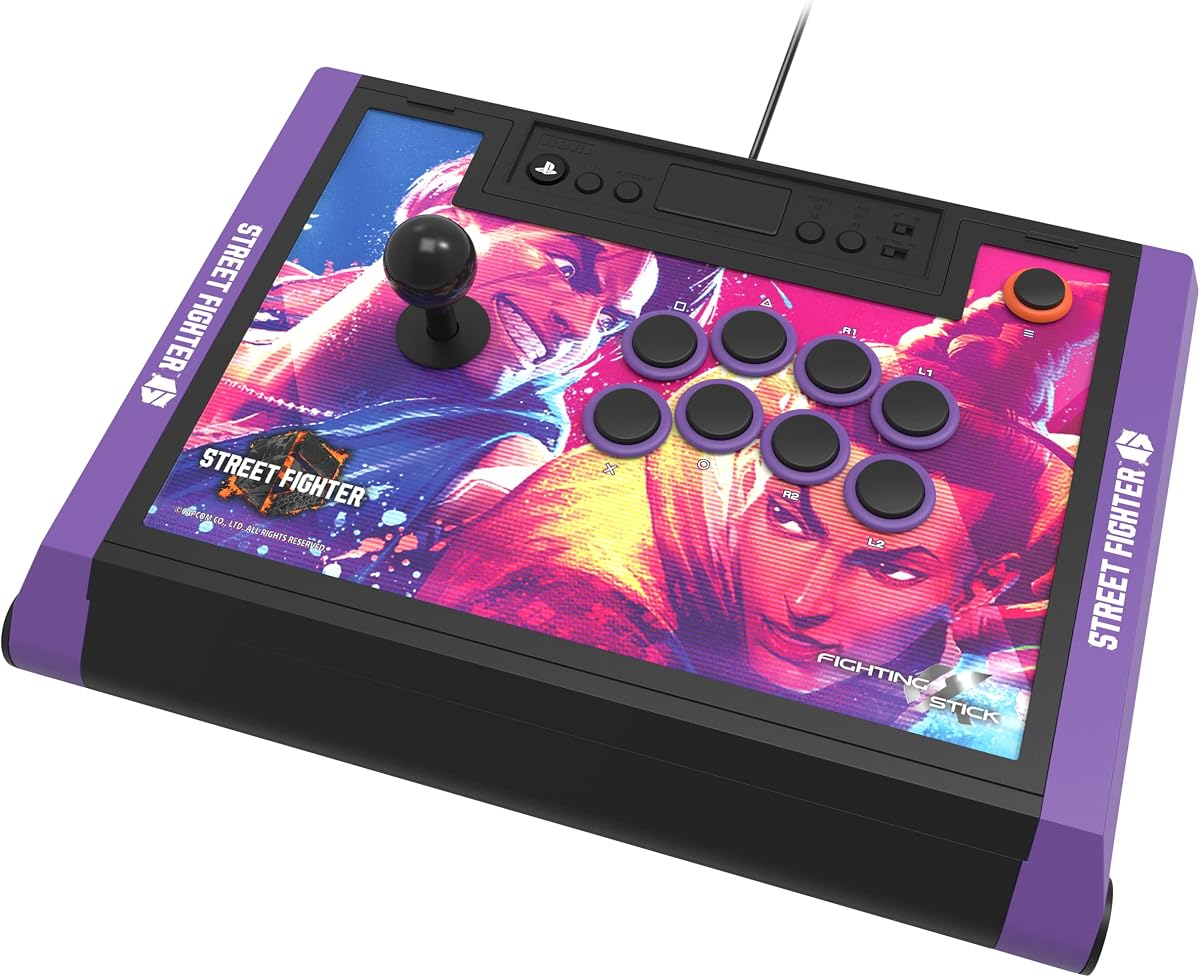
The HORI PlayStation 5 Fighting Stick Alpha Street Fighter 6 Edition is a themed version of HORI's tournament-oriented Alpha platform. It carries a 4.5 rating and supports PS5, PS4, and PC. Official licensing from Sony and Capcom makes it especially relevant to Street Fighter players who want their arcade hardware to match the game's visual identity.
We may earn a commission when you buy through this link, at no additional cost to you.
The most noticeable feature is its personalization system. The listing includes a link to 18 downloadable high-resolution images featuring Street Fighter 6 characters for the top panel, allowing the controller to be updated as the player's preferred character changes. That turns appearance customization into an ongoing feature rather than a single factory choice.
HORI's proprietary Hayabusa buttons and joystick supply the core control components. The unit opens for customization and maintenance, allowing players to work on the internal controls without replacing the full chassis. As with the standard Alpha, the emphasis is on a durable, focused PlayStation arcade setup rather than universal console use.
This edition is recommended for Street Fighter 6 fans who primarily play on PlayStation or PC and value licensed artwork. It offers less appeal for players who want a neutral-looking stick or need support for Xbox and Nintendo consoles in the same device.
Eighteen downloadable Street Fighter 6 character images provide more than the standard one-panel treatment. Players can refresh the top panel whenever their preferred character changes.
Hayabusa controls, direct PS5 support, and an opening chassis create a competition-oriented package. Official Sony and Capcom licensing adds confidence for fans of the platform and game.
We may earn a commission when you buy through this link, at no additional cost to you.
The Qanba Sapphire S1 Juri Edition is a leverless arcade controller built around an eight-button fighting-game layout. It supports PS5, PS4, and PC and carries a 4.6 rating. Rather than reproducing an arcade cabinet's joystick, it uses directional inputs as part of a compact leverless design, making it a distinct option for players who prefer rapid button execution.
We may earn a commission when you buy through this link, at no additional cost to you.
Its most technical feature is the set of 18 adjustable throw-distance buttons compatible with Cherry MX switch series. These allow action buttons and micro-switches to be installed or replaced according to personal preference, giving leverless players more control over the feel of individual inputs. A button-map profile switch also supports remapping and saving multiple configuration files.
Portability receives unusual attention for an arcade controller. The detachable memory-foam wrist rest is designed for extended play, the shoulder strap simplifies transport, and a built-in compartment stores accessories. A 3.5 millimeter headphone jack adds audio convenience. These details make the S1 appealing for competitive players who attend events or move between locations.
The main caveat is that a leverless layout is not interchangeable with the experience of a traditional joystick. Players who depend on levered directional control may find it unsuitable. For PS5, PS4, or PC players who enjoy leverless designs, however, the adjustable controls, saved profiles, and travel-oriented accessories form a compelling package.
The 18 throw-distance buttons accept Cherry MX-compatible switches, allowing action-button feel to be adjusted and maintained. This level of internal control is a major reason to consider the S1 seriously.
The detachable foam wrist rest, shoulder strap, and accessory compartment address comfort and portability. These features are particularly helpful for tournament players moving between venues.
We may earn a commission when you buy through this link, at no additional cost to you.
The MAYFLASH F500 Bundle combines a traditional arcade fight stick with the MagicBoots-S5 adapter for PS5 and PS4 use. Its 3.8 rating is the lowest in this roundup, but the platform coverage remains extensive. The stick supports PS5, PS4, PS3, Switch, Switch 2, Xbox Series X/S, Xbox One, Xbox 360, Windows, macOS, Steam Deck, Raspberry Pi, and Android.
We may earn a commission when you buy through this link, at no additional cost to you.
Using the included Magic Boots eliminates the need to keep an original PS4 or PS5 controller plugged into the fight stick. This makes console recognition more convenient for PlayStation players. On Xbox 360 and Xbox One, however, the supplied information specifies that a wired Microsoft Xbox 360 or Xbox One controller is required, so those platforms involve a different connection arrangement.
The F500 supports PC operating modes through XInput and DInput and includes turbo functions with adjustable speed settings. It also supports headset output for background music and online chat on PS4 and Xbox One or Xbox One S. Those features make it more adaptable than a basic stick, although it does not offer the wireless options or extensive remapping software found on some newer models.
This bundle is most appropriate for a player who wants broad traditional-stick compatibility and already understands the included PlayStation adapter. The lower rating is worth considering, but it does not erase the value of the platform list. Buyers should confirm the exact Xbox arrangement and individual game requirements before ordering.
The included Magic Boots adapter allows the fight stick to be recognized on PS5 and PS4 without an original controller remaining connected. That removes a common source of setup friction.
The platform list spans current and older PlayStation, Xbox, and Nintendo systems, along with PC and handheld computing platforms. Xbox 360 and Xbox One use a separately wired controller, while Xbox Series support is listed without the same accessory requirement.
We may earn a commission when you buy through this link, at no additional cost to you.
The HORI PlayStation 5 Fighting Stick Alpha TEKKEN 8 Edition combines official PlayStation support with a focused Tekken theme. It holds a 4.6 rating and works with PS5, PS4, and PC. For players whose primary fighting game is TEKKEN 8, it offers a recognizable licensed design without giving up the core functionality of a maintainable tournament arcade stick.
We may earn a commission when you buy through this link, at no additional cost to you.
TEKKEN 8 top-panel artwork comes as the factory design, and additional artwork can be downloaded for printing. That provides a modest but meaningful level of visual personalization. The unit opens for easy customization and maintenance, allowing players to access the controls and maintain them over time rather than treating the top panel as a permanent sealed surface.
The control package uses HORI's proprietary Hayabusa buttons and Hayabusa joystick. These components are the foundation of the Alpha platform and preserve a traditional arcade-stick experience. Official licensing by Sony and Bandai Namco Entertainment confirms the product's intended connection with the supported console ecosystem and game theme.
This edition is recommended for TEKKEN-focused PS5, PS4, or PC players who value both official console integration and themed presentation. It is less compelling for players seeking broad multi-console compatibility, but for the stated audience it combines tournament positioning, recognizable controls, and downloadable visual options.
The standard TEKKEN 8 top-panel art establishes the theme immediately, while downloadable alternatives add variety. Players can refresh the appearance without changing the underlying controller.
Hayabusa buttons and joystick provide the primary interaction, while Sony licensing simplifies PlayStation use. The opening chassis keeps routine maintenance and customization accessible.
We may earn a commission when you buy through this link, at no additional cost to you.
The PXN X8 Arcade Stick is the most approachable option in this roundup and the only one that uses keyboard-like directional buttons instead of a traditional joystick. Its 4.7 rating is the highest among the listed products. Compatible with Xbox One, Xbox Series S/X, PC, PS3, PS4, and Switch, it also supports a broad selection of familiar fighting games.
We may earn a commission when you buy through this link, at no additional cost to you.
The directional design is the defining feature. Rather than moving a lever through several arcs, players use a cross of keyboard-style direction buttons. The listing positions this arrangement as easier to launch and maneuver for combos and special moves. It may therefore appeal to newcomers, action-oriented players, and anyone who finds a traditional lever less intuitive, although experienced fighting-game players may still prefer conventional joystick control.
The action buttons use blue-switch mechanical components described as responsive, tactile, and durable. Turbo functions allow programmable combinations, while an auxiliary mode assigns the direction buttons to either digital-pad or left-stick functions. A headphone jack is also included, adding another connection option for compatible audio setups.
The X8 is recommended for budget-conscious players who want an arcade-style controller across several console generations and are comfortable with directional buttons instead of a lever. Its defining trade-off is simple: it offers accessibility and versatility, but it cannot reproduce the feel of a true joystick or leverless action-button layout.
The keyboard-style direction cluster replaces traditional joystick motion. It offers a different way to enter commands and can make precise directional sequences easier for players who prefer button-based input.
Blue-switch mechanical buttons provide the action layer, while programmable turbo functions add additional combinations. Direction buttons can also act as a digital pad or left stick, adding flexibility across different games.
We may earn a commission when you buy through this link, at no additional cost to you.
Choosing a fight stick means balancing console compatibility, control style, customization, and practical needs such as wireless play or portability. The right answer for one player may be a poor fit for another, so confirm the games, system, preferred layout, and any required accessories before purchasing.
Begin with the exact console and games you expect to play. Some sticks are officially licensed for PlayStation, while others support a mixture of Nintendo, PlayStation, Xbox, PC, mobile, and handheld platforms. Pay particular attention to current-generation consoles because some traditional sticks rely on an adapter or a separately connected original controller. A fight stick that physically supports a console is not always ready for every game released on that system.
Traditional fight sticks use a lever for directions and large buttons for attacks. Leverless designs replace the lever with directional buttons and often provide more action-button positions for modern fighting games. Keyboard-style designs such as the PXN X8 use directional buttons as well, but with a different structure. The most suitable choice depends on your control preferences, game-specific layout, and experience with physical inputs.
Action buttons influence how comfortably you can execute repeated commands, so consider the named components and whether they are adjustable or replaceable. The HORI Alpha models use Hayabusa controls, the PXN X8 uses blue-switch mechanical buttons, and the Qanba S1 supports Cherry MX-compatible switches. A model that opens for maintenance can be especially valuable for players who want to replace components over time.
Wired connections offer a simple and consistent setup, while wireless freedom can make couch, desktop, and tournament arrangements more flexible. The 8Bitdo Stick and MAYFLASH F700 support Bluetooth, 2.4GHz, and wired options. Other products may depend on adapters or a console controller for correct recognition. Check not only the connection method but also whether the desired wireless mode works on your specific platform and game.
Remapping can simplify controls or retain a preferred layout across games with different button assignments. The 8Bitdo supports mapping and macros, the Nacon Daija provides PC and Mac software for configurable profiles, and the Qanba S1 can save multiple mapping files. Remapping is particularly useful when one fight stick serves several fighting games or when a layout needs to conform to a specific character.
Parts compatibility determines how far you can personalize a stick. Several models accept Sanwa Denshi buttons and joysticks, while the Qanba S1 uses adjustable buttons compatible with Cherry MX switches. An opening top panel also makes maintenance easier. Players who enjoy tuning response should also check whether replacing parts affects the product's warranty or intended configuration.
A full-size arcade stick can remain anchored to one desk, but mobile players may prefer detachable wrist rests, shoulder straps, and storage compartments. The Qanba S1 stands out for those travel-oriented details. Otherwise, consider desk space, cable reach, palm support, and the amount of wrist movement required by your chosen layout. Comfort is especially important during long sessions because the arm and wrist positions differ from a standard gamepad.
Official Sony, Capcom, and Bandai Namco licensing can matter to dedicated fans, while replaceable artwork and themed faceplates provide cosmetic personalization. Turbo functions, button locks, headset connections, alternate joystick heads, and included tools may influence the choice. These extras should support your normal play style rather than distract from essential compatibility and comfort.
Before the first match, connect the controller using the method required by the console and game. Wired systems should be recognized through the supplied connection, while wireless models may require pairing, a 2.4GHz receiver, or a firmware update. Confirm the correct input mode in the game and perform a short controls test before entering an online match.
Assign the directional and action buttons to match the fighting game and your preferred layout. Use the supplied remapping software when available, save a separate profile for each game, and test short motions, throws, and special moves. Leverless users should adjust the action-button positions gradually, while joystick users should check gate tension and lever movement for excessive play.
Clean the top panel and control surfaces with a soft, dry cloth, and avoid pushing liquid into the buttons or connection ports. Inspect loose screws, worn buttons, and cable damage periodically. Keep dust from accumulating around adjustable components, and follow the manufacturer's guidance before opening the chassis or replacing internal parts.
A traditional fight stick uses a physical joystick lever for directional inputs and large buttons for attacks. A leverless controller removes the lever and uses a bank of directional and action buttons instead. Traditional sticks can feel familiar to arcade-game players, while leverless designs often provide more buttons and customizable layouts for modern fighting games.
Some universal models, including the MAYFLASH F300 and F500 Bundle, list support for several console families and PC. Compatibility may still depend on required adapters, original controllers, input modes, or specific game rules. Always verify the exact console model and game before purchasing rather than relying only on the broadest platform label.
A wireless fight stick can be convenient for console and PC play, provided the selected connection mode is supported by both the controller and game. The 8Bitdo Arcade Stick and MAYFLASH F700 provide both wireless and wired choices. Players who value the simplest always-connected setup may still prefer a wired configuration.
Sanwa-compatible or otherwise adjustable systems make it easier to replace components and tune the stick to your preferences. Models such as the 8Bitdo, MAYFLASH F300, and MAYFLASH F700 accept Sanwa arcade sticks, while the Qanba S1 supports Cherry MX-compatible switch installation. Fixed systems can be simpler, but they usually offer less room for personal adjustment.
Official licensing generally simplifies platform identification and ensures the controller was designed with the supported console in mind. It does not guarantee better performance in every game, because connection method and game compatibility still matter. Licensed HORI and Nacon models are strongest choices for players whose setup centers on PlayStation and PC.
Leverless controllers can be approachable because they present clearly labeled directional and action buttons rather than a lever that moves through different arcs. However, every layout requires practice, and players accustomed to a joystick may prefer a traditional stick. Beginners should consider their game layout and the amount of available action-button space.
Confirm that the exact console and every intended game are supported. Then compare joystick versus leverless controls, connection methods, remapping tools, internal-part compatibility, comfort features, and any required adapters. Reading the current product listing is especially important because platform support and firmware behavior can change over time.
The Nacon Daija includes a button-lock function designed to prevent accidental presses during intense play. Other sticks without a lock may require careful placement or a protective setup, though that is not always practical. Keeping the controller on a stable surface and checking button condition can also reduce unintended inputs.
The PXN X8 stands out as the budget pick because it combines a 4.7 rating, multi-console support, mechanical buttons, and an accessible directional layout. The 8Bitdo Arcade Stick is the editor's choice for Switch and PC players who value three connection methods, remapping, and a conventional joystick. The Nacon Daija takes the premium position with official PlayStation licensing, interchangeable joystick heads, detailed mapping software, and a locking function.
For most traditional-control buyers, platform support should come before every other feature. Check the console, game, required adapter, and connection method first; then narrow the field by joystick or leverless layout, button adjustability, remapping, comfort, and portability. A less expensive stick can be the better choice when its supported platforms match your actual setup, while a premium model makes the most sense when its specific hardware features solve a recurring problem.
Ratings, stock status, and prices can change, and current listings may add or revise compatibility details. Before purchasing, revisit the manufacturer's guidance, verify the game's input requirements, and check the latest available price. That final check helps ensure the selected fight stick remains compatible with the console and games you actually play.