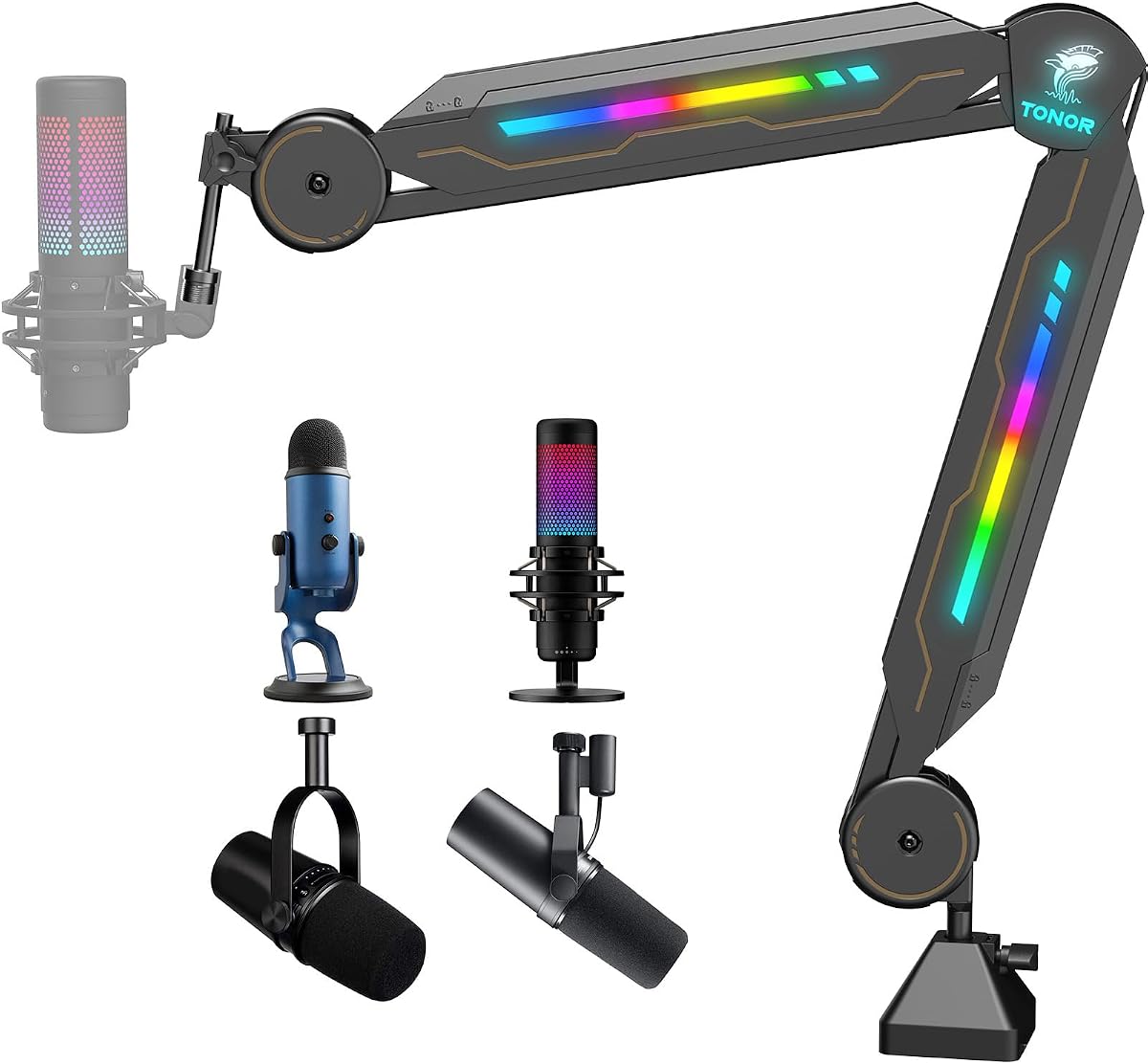
TONOR T90 RGB Boom Arm
4.5Editor score
Eleven ambient lighting modes
360-degree rotation
180-degree arm extension
Hidden cable channel
Five-eighth-inch thread support
This guide compares 10 light up LED mic stand options for kids, gaming, streaming, podcasting, karaoke, and studio use, comparing lighting, stability, and
A light up LED mic stand combines a secure microphone mount with colored illumination, turning a practical recording accessory into part of the visual atmosphere. The right model should hold the intended microphone steadily, place it at a comfortable angle, illuminate the space attractively, and suit the user’s setup.
The products in this guide were compared using their published specifications, construction details, mounting options, lighting controls, weight capacity, and stated microphone compatibility. The list covers floor stands, desk-mounted arms, a children’s karaoke microphone, a USB gaming microphone, and an illuminated PA speaker stand to clarify which type fits each situation.
Each review identifies the product’s strongest contribution, important limitations, and ideal buyer. The selections include adjustable RGB arms, a light-projecting children’s stand, a portable tripod, and options for common gaming microphones, while current availability, features, and pricing should be checked before purchasing.
4.5Editor score

4.9Editor score

4.6Editor score
This side-by-side comparison distinguishes the products by stand format, lighting method, mounting system, and practical use. It includes desktop and floor designs, dedicated children’s karaoke equipment, a full gaming microphone, and a PA speaker stand, making clear that the most suitable illuminated stand depends on the microphone and recording environment.


The InnoGear Mic Stand Tripod Boom Arm Floor Microphone Stand Height Adjustable earns a 4.4 rating and stands out as the most mechanically versatile option in this guide. Its telescoping floor stand, removable boom arm, rotating joints, and broad range of included adapters make it adaptable to performances, rehearsals, streaming sessions, presentations, and mobile recording work.
We may earn a commission when you buy through this link, at no additional cost to you.
Height can be adjusted from 28.1 to 89.8 inches, allowing the stand to serve both seated and standing users. The boom itself extends from 16 to 30 inches and rotates 360 degrees horizontally while tilting up to 180 degrees vertically. Removing the boom converts the product into a straight floor stand, which is particularly useful when an operator needs a compact vocal setup without an overhead arm.
Stability is addressed through thickened steel poles, upgraded supporting structures, and a tripod weighing approximately four pounds. The package includes two clip styles, a metal thread adapter, and a carrying bag into which the disassembled stand fits. The trade-off is that no LED system is built in, so buyers seeking illumination must add their own light or choose a dedicated RGB product from this list.
This is a strong recommendation for someone who prioritizes physical adjustability and broad microphone support over integrated lighting. It suits singers, podcasters using a floor configuration, teachers, streamers needing occasional standing positions, and anyone who wants one stand to fulfill several roles. Those specifically shopping for a light-up model should instead consider the TONOR, YOUSHARES, ARES, or SUNMON arms.
The detachable boom is the defining advantage. Users can preserve the 360-degree rotation and vertical tilt when a low or extended position is needed, then simplify the setup by removing the arm and installing the microphone clip directly.
Breaking the stand into several pieces and placing those pieces in the included 19.5-by-8.3-inch carrying bag makes transportation more practical. The steel construction remains robust without requiring a permanently installed floor position.
We may earn a commission when you buy through this link, at no additional cost to you.
The TONOR T90 RGB Boom Arm has a 4.5 rating and combines a gaming-oriented suspension arm with eleven ambient light modes. Its scissor-like structure creates a recognizable desk silhouette, while the integrated RGB effects give a streaming or gaming room more visual character than a conventional all-metal boom arm.
We may earn a commission when you buy through this link, at no additional cost to you.
The arm supports microphones fitted with a five-eighth-inch screw and can rotate through 360 degrees while stretching through 180 degrees. That range supports common positioning patterns: the microphone can sit beside a monitor, rise above desk equipment, or be drawn inward for close vocal pickup. A large clamp contact area helps resist movement at the edge of a desk.
Lighting control is intentionally simple. A short tap changes the mode, while a three-second long press turns the effects on or off. This makes the controls more approachable than an app-driven system, although the choice of 11 modes is less granular than the extensive customization offered by some competing arms. A cable channel also keeps the microphone lead more orderly beneath the arm.
The TONOR is best for gamers, streamers, and podcasters who want recognizable RGB styling and straightforward physical controls. It is less appropriate for a buyer who wants to synchronize illumination with microphone audio or independently tune a large palette. The stated setup time and included installation guidance make it accessible for a first illuminated desk setup.
The tap-and-hold control scheme reduces the learning curve. Users can cycle among 11 effects or disable them quickly, which is useful when switching between a colorful gaming session and a more conventional recording environment.
The steel arm, broad clamp, and integrated cable channel address three common desk-stand problems: movement, limited edge support, and loose cable. The scissor structure also preserves the microphone’s distance from the desktop while keeping it easy to reposition.
We may earn a commission when you buy through this link, at no additional cost to you.
The Kids Microphone with Stand earns a 4.6 rating and delivers the clearest concert-style lighting concept in the collection. Instead of merely outlining the microphone with an LED strip, it uses a rotatable light ball on the base to project colorful effects across walls and ceilings, creating a convincing stage atmosphere in a living room.
We may earn a commission when you buy through this link, at no additional cost to you.
The adjustable stand extends from 15.75 to 35.43 inches, accommodating toddlers as well as taller children. The supplied audio cable allows an MP3 player or mobile device to supply music for sing-along sessions. The product is also described as usable as a music player for sleepovers, birthday parties, and long car rides, although its core appeal remains interactive karaoke play.
The stated design uses ABS material, smooth edges, and a lightweight handle intended for small hands. Installation follows a manual, and the light and microphone functions run on three AA batteries that are not included. A key limitation is the age and use-case specificity: this is not a conventional studio microphone mount, and buyers needing a five-eighth-inch threaded arm for professional equipment should look elsewhere.
This product is a compelling choice for parents, relatives, or gift buyers looking for an illuminated karaoke activity for children ages three to twelve. Its projected lighting creates a much larger visual effect than a single-color mic, while the adjustable height helps prevent the frustration of a fixed adult-sized stand.
The rotating base light can spread color beyond the tabletop and onto surrounding surfaces. That broader projection creates the visual impression of a small performance venue without requiring separate party lights.
The generous 19.68-inch adjustment range allows the microphone to be placed closer to a child’s mouth at one setting and raised for a group performance at another. Smooth edges and a small-grip handle further support comfortable use.
We may earn a commission when you buy through this link, at no additional cost to you.
The YOUSHARES RGB Mic Arm carries a 4.9 rating, the highest numerical score in this guide, and offers the most elaborate lighting specification. More than 100 modes, remote and app control, adjustable color and brightness, and sound-responsive behavior give users a highly customizable illuminated desktop setup.
We may earn a commission when you buy through this link, at no additional cost to you.
Its strongest feature is the claimed synchronization between microphone sensitivity and the RGB illumination. When the arm is used with the included intelligent microphone function, the lights can flicker and change with detected sound, producing an audiovisual effect suited to gaming, streaming, and recordings. The microphone itself is not included, so compatibility with the included audio cable and intended functions should be checked before buying.
The stand is built from steel, includes integrated cable management, and supports up to four pounds. Two adapters—one-quarter to five-eighth inch and one-quarter to three-eighth inch—cover common gaming and studio microphones. The trade-off is dependence on the mobile app for deeper control, along with a larger feature set that may be unnecessary for simple recording.
This is the leading recommendation for buyers who regard lighting as a major part of their setup. The combination of extensive effects, responsive behavior, remote operation, and flexible adjustment provides the broadest creative control among the desktop options. Users who prefer one-button lighting and a simpler installation should compare it with the TONOR T90.
More than 100 modes give the YOUSHARES a considerable advantage for users who enjoy changing their visual environment. Color and brightness adjustments make it possible to coordinate the arm with a particular game, recording theme, or room color scheme.
The steel frame and four-pound capacity provide a solid foundation for desktop use. Integrated cable management helps keep a streaming station uncluttered, while the supplied adapters cover several popular microphone mounting standards.
We may earn a commission when you buy through this link, at no additional cost to you.
The InnoGear Mic Stand Microphone Stand Floor with Weighted Base for Singing has a 4.3 rating and prioritizes stability over visual effects. Its 4.5-pound round base, non-slip pads, and metal gasket create a stable platform for singers, presenters, acoustic performers, and mobile users who need a dependable straight stand.
We may earn a commission when you buy through this link, at no additional cost to you.
The stand adjusts from 34 to 60 inches and uses a 180-degree rotatable mic clip to control the microphone angle. Its arm is constructed from thickened 1.5-millimeter steel, while the base has a 9.8-inch diameter. These details support the product’s central strength: keeping the microphone in position during movement-intensive performances rather than emphasizing decorative effects.
The design separates into three parts for easier transport and setup. It is listed as compatible with popular USB and dynamic microphones, including models from HyperX, Razer, Blue, Shure, and Fifine, although a shock mount is not included. Its notable limitation is the absence of any built-in lighting, so this product does not satisfy the illuminated portion of the search on its own.
Choose this floor stand when reliable vocal positioning matters more than RGB atmosphere. It is a sensible support for singers who already own a microphone and lighting, rehearsal participants, and performers seeking a less visually complex alternative. Buyers who need illumination should treat it as a sturdy stand that can be paired with a separate light.
The weighted base, enlarged footprint, and rubberized contact points reduce the chance that the stand will shift while a performer moves. The metal gasket further limits unwanted movement where the base meets the upright.
A user-friendly clutch allows the height to be raised or lowered as needed. Combined with the rotating clip, this makes it straightforward to match the microphone to a seated singer, standing vocalist, or instrument position.
We may earn a commission when you buy through this link, at no additional cost to you.
The MAONO DGM20 USB Gaming Microphone has a 4.6 rating and differs from the other picks by including a functional USB microphone rather than only a stand. This makes it a convenient one-product solution for gamers who want both voice capture and RGB desk illumination without selecting a separate microphone and boom arm.
We may earn a commission when you buy through this link, at no additional cost to you.
The microphone uses a cardioid pattern to focus on sound arriving from the front. A one-key noise-cancellation control can be toggled by holding the button for three seconds, while the DGM20 software offers additional adjustment on Windows. Dynamic multicolor, breathing, and static lighting modes provide several visual options, and a gain knob makes real-time input changes straightforward.
For monitoring, the microphone includes a 3.5-millimeter headphone jack for zero-latency listening. A one-click mute function provides quick control during conversations or breaks, and the included two-in-one USB and USB-C cable simplifies connection to compatible PCs, laptops, Macs, PS5 systems, and other USB or USB-C devices. The main limitation is that it is not a freestanding light-up mic stand.
This is the best choice for a beginner who wants one illuminated desktop microphone rather than a full recording rig. Experienced streamers may prefer to choose a separate premium microphone and a more adaptable RGB arm. Its appeal lies in a polished combination of voice features, monitoring, and attractive lighting within a relatively uncomplicated setup.
The RGB modes make the microphone visually engaging while the cardioid pattern and gain control handle voice capture. This combination suits a new gaming setup where buying several separate components would add complexity.
A physical mute control, gain knob, and headphone monitoring jack make important functions available without opening software. These are especially helpful during live play, where changing settings through menus can be distracting.
We may earn a commission when you buy through this link, at no additional cost to you.
The Pyle Universal Microphone Stand pair has a 4.4 rating and is unusual because the package contains two complete floor stands rather than one. Each includes an adjustable mount arm, microphone clip, and base, making the set practical for performers who need matching stands for stereo demonstrations, interviews, duets, or mobile events.
We may earn a commission when you buy through this link, at no additional cost to you.
Both stands adjust from 2.8 to five feet and use standard five-eighth-inch screw-on threading. Their compact metal bases provide stability and balance while remaining lighter and easier to transport than many broad tripod systems. The finish is glossy black, giving the stands a straightforward stage or studio appearance that should blend into most recording environments.
The steel construction is designed to balance support with manageable weight, while the pivot-angle clip allows the microphone to be tilted into a useful position. There is no integrated LED lighting, and the product does not provide the dramatic projections or RGB effects offered by dedicated illuminated models. The pair format is the decisive feature rather than illumination.
Buy this set when a performer or presenter needs two matching universal stands and already has separate lighting. It is less appropriate for a single desktop streaming arrangement because there is no boom arm or desk clamp. The two-stand package, adjustable height, and universal thread make it useful for a broad range of practical performance situations.
A pair provides a ready solution for two singers, an interview involving two microphones, or any setup that benefits from symmetrical microphone height. It avoids the need to search for and coordinate two independent floor stands.
The compact bases and lightweight steel construction support transport between rehearsal spaces, studios, and stages. Standard five-eighth-inch threading makes the clips straightforward to pair with many widely used microphones.
We may earn a commission when you buy through this link, at no additional cost to you.
The ARES WING Aluminum Microphone Boom Arm has a 4.4 rating and centers its illuminated experience around a single integrated control knob. Users can switch among 26 RGB lighting modes and adjust the relevant settings with one hand, reducing the need to move between a remote, app, and separate physical controls.
We may earn a commission when you buy through this link, at no additional cost to you.
Visually, the arm uses an infinity-mirror effect around the joints and an RGB strip along the lower section. These details create a more decorative appearance than a simple straight boom. The reinforced metal structure is rated for loads up to 3.3 pounds, while multi-joint positioning and a 360-degree swivel base allow precise placement over a desk.
A standard three-eighth-inch thread and five-eighth-inch adapter support many popular microphones. Installation is described as a tool-free, three-step process, with both clamp and screw mounting offered. The arm also folds for a cleaner desk when not in use, and the manufacturer states that movement is designed to be quiet and smooth without shaking.
The ARES is best for a creator who wants dramatic lighting and convenient one-hand controls without installing a mobile application. It offers fewer lighting modes than the YOUSHARES and no stated sound-reactive behavior, but its physical design is elegant and the installation process is particularly approachable. It is a strong choice for gaming rooms, home studios, and streaming desks.
Combining the lighting control with a volume knob keeps frequently used adjustments in one accessible place. It provides a more direct alternative to navigating phone menus during a recording or gaming session.
The multi-joint arm, swiveling base, and foldable construction make it easy to move the microphone into a close vocal position and then reclaim desk space. Clamp and screw mounting options let the owner choose based on desk construction and stability needs.
We may earn a commission when you buy through this link, at no additional cost to you.
The LED Speaker Stand RGB DJ PA Tripod is designed for a different environment from desktop microphone arms. It combines a standard 35-millimeter speaker pole with RGB illumination built into the tripod legs, creating a stage effect for mobile DJs, karaoke events, house parties, and other settings where the floor itself needs to look energized.
We may earn a commission when you buy through this link, at no additional cost to you.
The included remote control provides static colors, strobe, fade, and pulse modes. This makes lighting changes possible without approaching the stand, which is helpful during a live event. The tripod also has a telescoping shaft, non-slip rubber feet, and locking safety pins intended to keep mounted equipment secure during active performances.
Unlike the microphone arms in this guide, the platform is designed to accept most standard PA speakers, monitors, and lighting bars rather than a studio microphone thread. The product’s published specifications leave its maximum weight capacity and exact height range incomplete, so buyers should confirm those details with the seller before placing valuable equipment on it.
This tripod is best for a mobile DJ or event operator who wants functional stage support and atmospheric lighting in one footprint. It can also work as an independent lighting fixture to reduce visual clutter. It is not the appropriate choice for a podcast desk, children’s karaoke corner, or a close-range vocal recording where a microphone holder and precise positioning are required.
Integrating LEDs into the legs spreads color through a larger area than a desktop-mounted microphone arm. The result complements stage lighting and helps define the performance area without requiring a separate illuminated fixture.
The collapsible design folds down for transport between engagements. A telescoping shaft, rubber feet, and locking pins support repeated setup, although the incomplete load-capacity specification should be resolved before use.
We may earn a commission when you buy through this link, at no additional cost to you.
The SUNMON Boom Arm with RGB Light has a 4.3 rating and offers flowing color effects with app-based control. The design is aimed at gaming and content-creation desks, with compatibility called out for the HyperX QuadCast, Blue Yeti, Shure MV7, Rode microphones, and other common models.
We may earn a commission when you buy through this link, at no additional cost to you.
Users can adjust the light color, mode, and brightness through a phone connection and the required mobile app. Seven flowing color modes create a moving visual effect rather than a static glow. The arm is listed at 16.9 inches on one side, supports a weight capacity of three pounds, and includes an extension tube that adds 6.3 inches of height for use above a monitor.
Mounting compatibility is handled with a one-quarter-inch thread plus three-eighth-inch and five-eighth-inch adapters. The package includes the arm, a desk base, a Type-C cable, both adapters, and the extension tube. The requirement for an app and the seven-mode selection are the main limitations when compared with the YOUSHARES, which offers a larger stated mode count and sound-responsive behavior.
The SUNMON is a good choice for a gamer or streamer who wants a coordinated RGB microphone arm with more movement and color adjustment than a basic one-button design. It is less attractive for users who want immediate physical lighting controls or no app dependency. The extension tube is particularly useful when the microphone must sit higher than a monitor.
The moving light presentation gives the arm a more animated look than a fixed-color strip. Adjustable color, mode, and brightness settings allow the visual effect to be tailored to a game, stream theme, or room environment.
The included six-point-three-inch extension tube helps place the microphone above a monitor or in another elevated position. This is valuable on crowded desks where a standard arm would sit awkwardly behind display equipment.
We may earn a commission when you buy through this link, at no additional cost to you.
The most important choice is whether the product is a stand, an arm, a complete microphone, or a stage accessory. From there, buyers should compare mounting compatibility, lighting control, structural stability, adjustability, and the type of recording environment the equipment will serve.
A floor stand is the most natural choice for singers, presenters, live performers, and anyone who needs to move around without carrying a desk arm. These products generally provide greater height adjustment and use a weighted or tripod base. A desk boom arm is more appropriate for gaming, streaming, and podcasting because it suspends the microphone over a workstation, reduces desk clutter, and makes quiet voice positioning easier.
Choose the format that matches the equipment already in use rather than selecting solely for illumination. A stand with a 35-millimeter pole cannot replace a microphone arm with a threaded connection, while a desk arm will not provide the mobility of a complete floor tripod. Children’s karaoke products and complete USB gaming microphones are also specialized categories with different functions from conventional microphone supports.
Check the microphone’s mounting thread before selecting an arm or clip. Common desktop microphones use five-eighth-inch or three-eighth-inch connections, and many universal products include adapters to bridge these sizes. The InnoGear boom floor stand also supports two clip styles and includes a metal adapter, while the YOUSHARES, ARES, and SUNMON arms each provide multiple thread adapters.
Do not assume a stated example microphone guarantees every yoke, pivot, or adapter will fit perfectly. Check the connector type, whether the microphone uses a removable mount, and whether a shock mount must be removed. Larger broadcast microphones may also require a threaded connection rather than the smaller screw used by many USB gaming models. Confirming fit before ordering prevents the most common compatibility mistake.
Lighting quality depends on more than whether a product glows. Consider color count, animated effects, brightness control, and how the settings are adjusted. The TONOR uses eleven modes with tap-and-hold controls, the ARES offers 26 modes and a physical knob, and the SUNMON provides seven flowing modes through a mobile app. The YOUSHARES goes further with more than 100 modes, remote operation, app control, and sound-responsive illumination.
App control allows greater personalization but adds setup and creates a dependency on a phone. Physical controls are faster and more reliable during a live session. A remote offers a middle ground, while sound-reactive lighting creates a more dynamic presentation but may not suit every recording style. Choose the interface that you will actually use rather than paying attention only to the number of advertised modes.
A microphone stand should hold its load without sagging, drifting, or tipping. Compare stated capacity with the weight of the microphone, shock mount, adapter, and any attached accessories. The TONOR lists a two-kilogram capacity, the ARES supports 3.3 pounds, the SUNMON supports three pounds, and the YOUSHARES supports up to four pounds. The INNOGEAR floor options rely on heavy bases and steel poles for stability.
Load capacity is only one part of stability. A wide base, non-slip feet, secure locks, and rigid joints all affect performance. Desk clamps need sufficient contact area and must be attached to a suitable edge, while floor stands need enough footprint for the performer’s movements. Be cautious with any product whose exact capacity is not clearly published.
Useful adjustability includes more than overall height. Look for horizontal rotation, vertical tilt, boom extension, pivot-angle control, and the ability to place the microphone close to the mouth. The InnoGear floor boom offers 360-degree horizontal rotation and up to 180 degrees of vertical adjustment, while the TONOR scissor arm similarly provides broad movement. The ARES uses multiple joints and a swivel base for close positioning.
For live performers, rapid height changes and strong locking mechanisms may matter more than compact storage. For desktop creators, quiet movement, foldability, and a long extension tube can be more valuable. The SUNMON’s added 6.3-inch extension is useful above a monitor, while the InnoGear floor stand’s removable boom can make a single product serve both straight and boom configurations.
Desktop arms commonly attach with a clamp, while some include a screw-mount alternative. The ARES supports both clamp and screw mounting, and the other illuminated desktop products use desk bases or clamps suited to typical workstation edges. Check the dimensions of the desk, the thickness it can support, and the space beneath the desktop before purchasing a clamp-style product.
Consider whether the arm will conflict with a monitor, keyboard, desk mat, or power strip. A long boom may need a reinforced edge or a dedicated mounting point. Low-profile clamps may not fit thicker desks, while screw installations require a suitable surface and may be less convenient to rearrange. Confirm the included hardware and installation method before assembly.
Cable management can make an illuminated arm look much cleaner. The YOUSHARES includes a built-in cable management system, the TONOR uses a dedicated cable channel, and the InnoGear floor boom includes a carrying bag for transport. Clean cable routing also prevents a dangling lead from pulling against the microphone connection or interfering with arm movement.
The ARES goes further by combining lighting and volume adjustment in one physical knob. For a complete microphone, the MAONO offers gain, mute, and monitoring controls directly on the body. Consider these controls in the context of your workflow: accessible physical buttons can be more useful during live recording than features that require attention on a phone screen.
Desktop RGB arms are generally easier to move than floor tripods, but they still need to be disconnected and reinstalled at another location. The InnoGear floor boom breaks into several pieces and includes a bag for storage, while the PA tripod collapses for transport. Portable products should pack without leaving loose hardware or exposed adapters.
Check how the lighting receives power and whether required accessories are included. The children’s karaoke microphone operates on three AA batteries that are not supplied, while several RGB desktop arms include a cable. The SUNMON includes a Type-C cable, and the YOUSHARES includes a USB to Type-C data cable. Confirm connector type, included accessories, and power requirements before ordering.
Begin by assembling the stand on a level surface and checking every locking knob, hinge, safety pin, clamp, and adapter. Attach the appropriate clip or thread adapter to the microphone, then turn the mount by hand only until secure. Over-tightening small microphone threads can damage the connector, so the mounting hardware should hold the microphone without excessive force.
Position the microphone at mouth level and slightly off-axis when a directional cardioid microphone is being used. On a desk arm, tighten the clamp securely and confirm that the boom remains stable when lightly moved. After selecting the desired lighting mode, test the controls at normal recording brightness and use a cable channel or clip to keep the lead away from moving joints.
Before moving the equipment, power off any lighting, disconnect the microphone cable, and release the height locks. Lift floor stands by the structural pole rather than pulling on the microphone or adjustment knobs. Wipe metal and plastic surfaces with a soft, dry or lightly damp cloth, avoid spraying cleaner directly onto switches or LEDs, and inspect threaded connections and clamp pads for looseness during regular use.
Usually, lighting does not directly improve microphone performance. The arm’s mechanical stability, positioning range, and thread compatibility have a greater effect on the recording experience. RGB lighting mainly improves the visual presentation of a gaming or streaming setup. Audio quality depends more on the microphone, its placement, room treatment, and connection method.
It depends on the arm’s adapters and the microphone’s mounting system. The YOUSHARES, ARES, and SUNMON listings specifically mention popular models such as the Blue Yeti and several Shure microphones, while the InnoGear products also list broad compatibility. Verify the exact model, remove any conflicting yoke or adapter if necessary, and confirm the thread size before mounting.
A floor stand supports a microphone on a vertical pole with a weighted or tripod base and is commonly used for singing, presentations, and live performance. A boom arm clamps to a desk and positions the microphone over a workspace, making it more convenient for streaming, podcasting, and gaming. The floor option offers mobility; the boom arm typically saves desk space.
They usually require installing an app and pairing the light through a phone or Bluetooth connection, then selecting the desired color and mode. Physical controls such as those on the TONOR or ARES are faster for live use. App-based systems offer more customization, so the best choice depends on how much control you need and whether you want to manage lighting from a phone.
Only if both the thread and weight capacity match the microphone and its mounting hardware. Check the listed capacity against the complete assembly, including a shock mount if used. Large broadcast microphones may also require a five-eighth-inch thread, an appropriate yoke, and a sturdy arm or floor base. Do not rely on a generic compatibility claim alone.
LED lighting does not normally interfere with microphone pickup, but powered electronics can occasionally introduce electrical noise in less careful setups. Keep power connections separate from balanced audio cables where practical, use shielded cabling, and test the recording with the lights on. If a problem appears, turning off the lighting helps confirm whether the lighting power supply is contributing.
Not in most cases. The RGB DJ PA Tripod uses a standard 35-millimeter mounting pole designed for compatible PA speakers, monitors, and lighting bars. A conventional vocal microphone normally requires a five-eighth-inch or three-eighth-inch threaded clip. It is best viewed as an illuminated stage accessory rather than a general microphone stand.
Disconnect power and remove the microphone before cleaning. Use a soft, dry or lightly damp cloth to wipe the arm, base, and exterior, and avoid spraying liquid directly onto joints, controls, ports, or LEDs. For a children’s product, also check the smooth handle and base for damage. Tighten any loosened knobs and confirm the mount remains stable before reuse.
The YOUSHARES RGB Mic Arm is the most feature-rich choice, with extensive lighting modes, sound-responsive effects, remote and app control, strong steel construction, and useful adapters. The TONOR T90 offers a distinctive scissor design and simpler physical lighting controls, while the children’s light-ball stand creates a memorable karaoke experience with projected colors and child-friendly adjustments.
Prioritize the product category before the lighting itself. Choose a floor model for live vocals, a boom arm for a streaming desk, a complete USB microphone for a simple gaming setup, or an illuminated PA tripod for stage equipment. Within that category, verify thread compatibility, load capacity, mounting method, cable routing, and the size of the recording space.
Features, availability, and pricing can change, so confirm the current listing and included accessories before buying. The manufacturer’s specifications, warranty information, installation guidance, and recent customer feedback are also useful final checks when selecting a light-up LED mic stand for long-term use.