
Prebuilt Desktop Computer i7 Tower
5.0Editor score
Quad-core i7 processor
16GB full-capacity RAM
Fast 256GB M.2 SSD
Windows 11 Home preinstalled
WiFi 6 and Bluetooth 5.3
Our Prebuilt Computer Desks guide compares 10 ready-to-use towers for gaming, productivity, home offices, upgrades, connectivity, storage, and value.
A prebuilt computer desk can be the simplest route to a capable home-office, study, or gaming setup without the assembly, cable management, and troubleshooting involved in building a PC from parts. The right tower should fit your workload, fit your space, and include the connectivity and expansion potential you actually need.
We compared these ten systems by processor, memory, storage, graphics, networking, ports, cooling, operating system, and intended use. The list covers everyday office towers, compact business systems, entry-level gaming builds, and higher-performance configurations for demanding games and multitasking.
Each pick reveals where it excels and where compromises may affect your workflow. Ratings and product details can change over time, and retailers frequently adjust configurations, so verify the current listing, included accessories, and specifications before making a purchase.
5.0Editor score

4.0Editor score

4.4Editor score
This side-by-side comparison highlights each prebuilt desktop's core processor, graphics, memory, storage, connectivity, and practical advantages, helping you match a tower to your work, gaming, and space requirements.


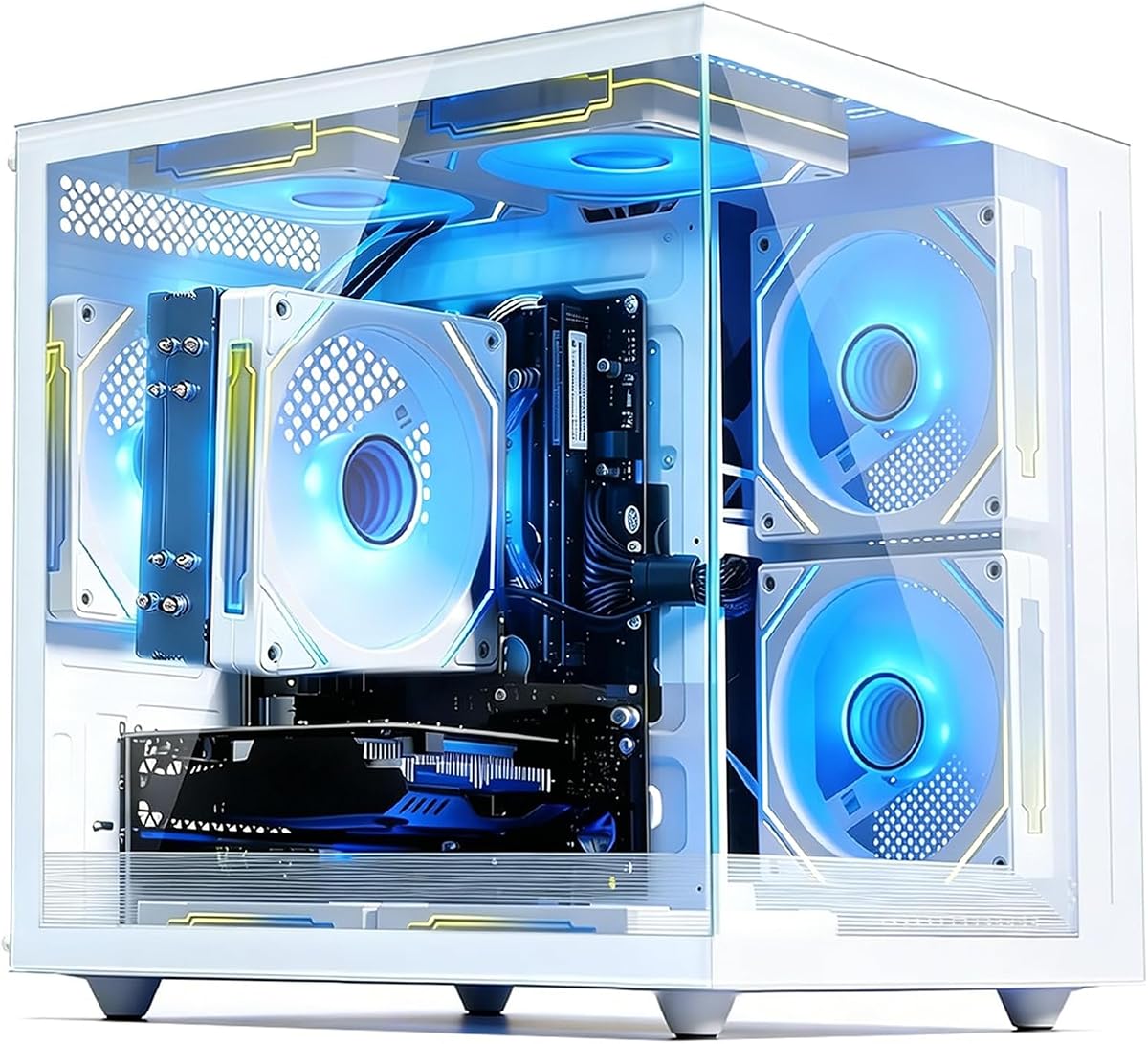
This prebuilt tower combines a quad-core i7 processor rated up to 3.9GHz with 16GB of RAM, Windows 11 Home, and a compact 256GB M.2 solid-state drive. Its 5.0 rating reflects an exceptionally well-received listing, and the specifications are oriented toward document work, browser use, video meetings, and multi-application productivity rather than demanding gaming.
We may earn a commission when you buy through this link, at no additional cost to you.
The strongest feature is its balance of practical components. Sixteen gigabytes of RAM gives office applications, messaging tools, and numerous browser tabs enough headroom for routine multitasking. The M.2 drive supports quick boot and file access, while four case fans help move air through the tower during extended use. Its 400W power supply supplies stable power for the listed configuration.
The major limitation is explicitly stated: this computer has integrated CPU graphics and no dedicated GPU. That makes it a poor match for modern 3D gaming, intensive rendering, or GPU-accelerated professional tasks. Its 256GB drive also leaves less room for a large game library, extensive media collection, or demanding creative projects, although a typical tower may offer paths for expansion.
This is our Best Budget pick because it prioritizes the features many users need in an affordable ready-to-use office computer: adequate memory, fast storage, current wireless support, and no assembly required. It is best for students, remote workers, families handling everyday tasks, and anyone who wants a straightforward desktop without paying for gaming graphics they will never use.
The i7 processor and 16GB of RAM form a capable foundation for office applications, online learning, calls, and everyday multitasking. Its integrated graphics are appropriate for standard displays, while the preinstalled operating system removes much of the setup involved with a custom build.
The classic tower shell leaves more physical room than a compact mini desktop, and four RGB-equipped fans support internal airflow. WiFi 6 and Bluetooth 5.3 provide modern wireless options, although buyers needing serious graphics or extensive storage should plan an upgrade.
We may earn a commission when you buy through this link, at no additional cost to you.
This tower pairs the six-core Ryzen 5 5600GT, operating at a 3.6GHz base clock, with integrated Radeon graphics and a DDR4-based B350 platform. Its 4.8 rating reflects strong buyer reception, and the configuration is presented as a versatile option for browsing, streaming, learning, document creation, and routine home or office work.
We may earn a commission when you buy through this link, at no additional cost to you.
Connectivity is a defining strength. Intel WiFi 6 and Bluetooth make the tower convenient for a flexible desk, while RJ-45 Ethernet provides a stable wired alternative. The front panel includes two USB ports and headphone and microphone connections. At the rear, users gain HDMI and VGA for display flexibility, four USB ports, legacy PS/2 connectors, Ethernet, and three audio jacks.
The absence of a discrete graphics card means it should not be approached as a serious modern gaming machine, even though it carries a gaming-oriented product label. It is better suited to everyday titles, streaming, and productive applications that do not demand dedicated 3D graphics. Buyers should also verify the installed memory capacity because the supplied specifications identify the DDR4 platform without stating the total RAM.
This desktop is a strong alternative for users who want a capable six-core processor and unusually broad port selection without assembling a PC. Its 600W 80 PLUS Bronze power supply provides useful headroom for reasonable future upgrades. It works particularly well for a shared family computer, a student station, or an office desktop that must connect older peripherals as well as modern displays.
HDMI and VGA support both current and legacy displays, while the generous selection of USB and audio connections makes the system adaptable to existing office equipment. This is a practical advantage in environments where replacing every peripheral at once would be inconvenient.
The six-core Ryzen processor provides a useful balance of responsiveness for browsing, online learning, streaming, and office software. The 600W Bronze power supply is a sensible foundation, though the system remains best suited to general-purpose rather than GPU-intensive gaming.
We may earn a commission when you buy through this link, at no additional cost to you.
This is the most ambitious gaming configuration in the roundup, combining an eight-core, 16-thread Intel Core i7-11700F with an NVIDIA GeForce RTX 5050 carrying 8GB of GDDR6 memory. Its 4.0 rating is positive but trails several alternatives, so buyers should assess the total specification rather than relying on the score alone.
We may earn a commission when you buy through this link, at no additional cost to you.
The dedicated GPU is the defining feature. Ray tracing and DLSS 4 support give the system advantages in modern games, especially at 1080p, while 32GB of DDR4 RAM supports gaming, streaming, content creation, and several background applications at once. A 1TB NVMe drive provides room for Windows, applications, project files, and a substantial collection of games with quick loading times.
Cooling is another major strength. A liquid CPU cooler and nine ARGB case fans are designed to promote airflow and maintain stable performance during extended sessions. The system also includes Windows 11, WiFi 6, Bluetooth 5.4, an RGB gaming keyboard, and a mouse, making it a more complete ready-to-game package than most entries in the list.
We selected it as the Editor's Choice because the combination of dedicated graphics, ample memory, fast storage, and extensive cooling is unusually well-rounded for a prebuilt gaming desktop. It is best for a buyer who wants to game, stream, and multitask without immediately assembling a custom system. Check the current component and accessory listings carefully, as prebuilt configurations can vary between production batches.
The RTX 5050 8GB is the key reason to favor this tower over an integrated-graphics office desktop. It adds hardware ray tracing and DLSS 4 support, making modern titles more manageable while preserving a clear upgrade path for future gaming workloads.
Thirty-two gigabytes of DDR4 memory and a 1TB NVMe drive make the tower well prepared for streaming and heavy multitasking. Nine ARGB fans and a liquid CPU cooler support sustained operation, while the included peripherals reduce the number of additional purchases required.
We may earn a commission when you buy through this link, at no additional cost to you.
This prebuilt desktop combines an eight-core, 16-thread Ryzen 7 4700LE with 16GB of 3200MHz DDR4 memory and a Radeon RX 580 8GB. Its 4.2 rating and dedicated graphics position it as a practical 1080p gaming system for popular esports titles and many mainstream games.
We may earn a commission when you buy through this link, at no additional cost to you.
The Ryzen 7 processor is more substantial than the quad-core alternatives in this guide. It handles school assignments, office applications, browser tabs, voice chat, and game-launching software with room to spare. The RX 580 supplies 8GB of dedicated graphics memory, which gives it a clearer advantage over systems relying entirely on integrated graphics.
The RX 580 is nevertheless an older graphics design, so buyers should not expect the feature set or efficiency of a current RTX card. It may require reduced settings or lower resolutions to maintain desirable frame rates in demanding titles. The 512GB SSD handles applications and several games effectively, but a larger model would be preferable for extensive libraries.
This tower works well for a first gaming PC, a student who also needs to complete schoolwork, or a family that wants one system for entertainment and productivity. The A520M-A PRO motherboard and WiFi 6 support make it a straightforward everyday platform. It is a sensible choice when dedicated gaming graphics matter but newer GPU technology is not essential.
The Ryzen 7 4700LE provides useful headroom for simultaneous gaming, voice communication, browsing, and productivity tasks. Its 16 threads also make the system more adaptable when the desktop must serve as a general household or student computer.
The Radeon RX 580 8GB offers a clear step up from integrated graphics for esports and many mainstream titles. It is not a solution for ray tracing or the newest graphics features, but it remains well matched to 1080p play when settings are adjusted appropriately.
We may earn a commission when you buy through this link, at no additional cost to you.
This renewed Dell OptiPlex bundle includes a desktop, 24-inch HDMI monitor, keyboard, mouse, headset, WiFi, and Windows 11 Pro. The Core i7 processor runs at 3.40GHz, while 16GB of RAM and a 512GB SSD support everyday office tasks, browsing, media, and lighter gaming.
We may earn a commission when you buy through this link, at no additional cost to you.
The complete bundle is the main appeal. A new PC buyer does not need to source a display or basic peripherals separately, and the front RGB panel adds visual character to an otherwise business-oriented OptiPlex design. The lighting can be adjusted using a remote controller to change colors, patterns, and speed.
The graphics card is the clearest constraint. A GeForce GT 1030 with 2GB of GDDR5 memory can handle selected older or lighter games, and the supplied information mentions titles such as Counter-Strike: Global Offensive, Dota 2, and GTA V at medium settings. It should not be treated as a high-settings modern gaming solution. The 3.6 rating also makes clear that this renewed offering has a less universally positive reception than the other systems.
The refurbishing process reportedly includes functionality testing, basic cleaning, inspection, and repackaging, along with a minimum 90-day warranty. The system may arrive in a generic box. This bundle is most attractive to buyers who value a complete setup, a business-oriented operating system, and a Dell chassis more than top-tier gaming capability.
Including a 24-inch monitor, keyboard, mouse, and headset makes the package especially convenient for a first workstation. It also reduces cable shopping and compatibility guesswork, although buyers should check that the included peripherals meet their exact ergonomic and display needs.
The OptiPlex foundation, Windows 11 Pro, and RGB accent lighting produce a useful office-and-entertainment combination. The GT 1030 limits modern gaming potential, so the system is better viewed as a complete general-purpose desktop with occasional casual gaming support.
We may earn a commission when you buy through this link, at no additional cost to you.
This system combines a six-core, 12-thread Ryzen 5 5500 with the NVIDIA GeForce RTX 3060 Ti 8GB, 16GB of DDR4 RAM, and a 1TB PCIe NVMe drive. Its 4.8 rating makes it one of the strongest-reviewed systems here, while the graphics card provides a compelling reason to consider this prebuilt for higher-resolution gaming.
We may earn a commission when you buy through this link, at no additional cost to you.
The RTX 3060 Ti is suited to 1080p gaming at high settings and 1440p gaming with appropriately adjusted settings. DLSS support can improve frame rates while maintaining image quality, and the 8GB graphics memory is a meaningful step above the older RX 580 and entry-level GT 1030. The Ryzen 5 processor also handles streaming and content creation competently when paired with the dedicated GPU.
The dual-chamber mid-tower uses tempered-glass panels and six adjustable RGB fans, along with an RGB CPU cooler. A 600W 80 PLUS Bronze power supply supports stable delivery, and the case includes dust filters and deliberate airflow paths. One detail deserves attention: the manufacturer recommends connecting the display cable to the lower GPU outputs for optimal graphics performance.
This is an attractive choice for a 1440p gamer who values a tidy, visually interesting case and a substantial graphics card without commissioning a custom build. Sixteen gigabytes of RAM is adequate for gaming and normal multitasking, although heavy streaming, editing, or many background applications may justify more memory. Windows 11 Home, WiFi 6, Bluetooth 5.0, and multiple display outputs are also welcome.
The RTX 3060 Ti 8GB is the centerpiece for buyers interested in 1440p play, DLSS, and current graphics features. It offers substantially more gaming headroom than the GT 1030 and RX 550 alternatives without moving into the configuration level of the RTX 5050 system.
The dual-chamber enclosure seeks to preserve component access while reducing the desk footprint. Six adjustable RGB fans, dust filters, and a 600W power supply support stable operation, and HDMI plus multiple DisplayPorts allow a multi-monitor arrangement.
We may earn a commission when you buy through this link, at no additional cost to you.
This tower uses a fourth-generation Intel Core i5-7400 quad-core processor with speeds between 3.0GHz and 3.5GHz, paired with 16GB of RAM and a 512GB SSD. Windows 11 Home, WiFi 6, and Bluetooth 5.3 provide a ready-made software and connectivity foundation, although its 3.4 rating signals meaningful limitations.
We may earn a commission when you buy through this link, at no additional cost to you.
The most useful element is the RX550 dedicated graphics card. It is not a modern gaming GPU, but it can provide better multimedia and display performance than integrated graphics and is suitable for light gaming. The 512GB SSD offers more capacity than several competing towers and improves application loading, file access, and startup behavior compared with a traditional hard drive.
The older i5-7400 is the main weakness. Four cores and an older architecture provide adequate performance for browsing, office applications, video calls, streaming, and study, but they are less prepared for demanding software, heavy multitasking, and modern CPU-heavy games. A 400W supply and three case fans cover the listed configuration, though buyers planning a major graphics upgrade should verify case and power-supply details.
This system makes sense for a student, home user, or office worker who wants dedicated graphics, 16GB of memory, and a generous SSD without selecting a higher-tier gaming tower. It should be approached as a light-gaming and everyday-computing machine, not a system for demanding 3D titles or intensive content creation.
The RX550 adds a separate graphics option for HD video, casual games, and displays that perform better with a dedicated card. Its capabilities remain modest, so it is best viewed as an upgrade over integrated graphics rather than a serious gaming solution.
Sixteen gigabytes of memory, a 512GB SSD, and preinstalled Windows 11 cover routine productivity, browsing, and streaming well. The older processor architecture may age less gracefully, so buyers with intensive software needs should consider a newer platform.
We may earn a commission when you buy through this link, at no additional cost to you.
This desktop combines the eight-core, 16-thread Ryzen 7 4700LE with Radeon RX 6500 XT 4GB graphics, 16GB of 3200MHz DDR4 memory, and a 512GB SSD. Its 4.4 rating indicates a well-received balance of processing power and gaming hardware for users focused on 1080p esports and mainstream titles.
We may earn a commission when you buy through this link, at no additional cost to you.
The processor is a major strength. Eight cores and 16 threads create comfortable headroom for voice chat, browser tabs, school applications, and simultaneous game clients, making the tower more versatile than many entry-level prebuilts. The RX 6500 XT adds current dedicated graphics capabilities, including support for features absent from older and more basic cards, while 16GB of fast memory keeps multitasking responsive.
The graphics card's 4GB of memory and narrower bus can constrain some settings in demanding modern games, so it is not equivalent to the RTX 3060 Ti or RTX 5050 alternatives. The 512GB SSD may also become crowded once several large games, streaming tools, and personal media are installed. These limits are manageable for a focused 1080p setup but worth considering for a large library.
This system is an excellent compromise for competitive gamers who want a strong CPU, modern dedicated graphics, and 16GB of memory without moving to the highest configuration in the roundup. It also works well for students and remote workers who need more multitasking capacity than a basic office tower. The included WiFi 6 support adds convenient wireless access.
The RX 6500 XT is designed around efficient 1080p gaming, including fast-moving esports titles such as Fortnite, Valorant, and Apex Legends. Detailed settings and resolution may need adjustment in demanding games, but the card is more versatile than the older RX 580.
Eight CPU cores and 16 threads help when games, voice communications, browsers, and productivity applications run together. The 16GB memory capacity is a sensible middle ground, while the 512GB drive keeps everyday files and several applications readily accessible.
We may earn a commission when you buy through this link, at no additional cost to you.
This prebuilt tower pairs a seventh-generation quad-core processor with 16GB of DDR4 RAM, a 256GB SSD, and an RX550 4GB graphics card. Its 3.1 rating is the lowest in the group, but the distinctive RGB design, eight cooling fans, and dedicated graphics give it a clear visual and functional identity.
We may earn a commission when you buy through this link, at no additional cost to you.
The system is aimed at daily office work, browsing, media playback, online learning, and light gaming. Sixteen gigabytes of RAM gives it enough memory for multiple browser tabs and common productivity applications. The 256GB solid-state drive supports quick boot and program loading, but it is the most limited storage capacity among the prebuilt systems here.
Eight RGB cooling fans are visually prominent and assist with internal heat dissipation. Dual tempered-glass panels allow the components to remain visible, which may appeal to buyers who want a gaming-style appearance even if their workload is mostly productivity. The 400W power supply and RX550 card are acceptable for the intended lighter usage, but neither suggests a platform for demanding modern games.
This tower is best for a home or student setup that values appearance, plug-and-play operation, and enough memory for daily multitasking over maximum gaming capability. Its low rating warrants checking recent customer feedback and verifying the exact CPU, included accessories, and operating system arrangement. WiFi 6 support and multiple expansion ports improve its readiness for common peripherals.
Eight switchable RGB fans create the most noticeable design feature in the roundup, while also assisting heat dissipation. The tempered-glass panels let users see the illuminated interior, making the tower appealing as a display piece in a bedroom, dorm, or home office.
The seventh-generation quad-core chip, 16GB of RAM, and SSD cover routine productivity and media use effectively. The 256GB drive and entry-level RX550 make the system less appropriate for a large game collection or demanding graphics workloads.
We may earn a commission when you buy through this link, at no additional cost to you.
This Dell Pro tower is built around a 14th-generation Intel Core i3-14100, 16GB of DDR5 memory, and a 512GB PCIe solid-state drive. Windows 11 Pro comes preinstalled, and its 4.4 rating reflects a strong combination of modern components, compact dimensions, and business-oriented features.
We may earn a commission when you buy through this link, at no additional cost to you.
Its physical design is particularly useful for constrained workspaces. The enclosure measures 12.76 inches high, 6.06 inches wide, and 11.53 inches deep, while weighing 9.17 pounds. That footprint is easier to accommodate than a full-size gaming tower, yet the system still provides eight USB ports, Gigabit Ethernet, an audio jack, DisplayPort 1.4, and HDMI 2.1.
The integrated Intel UHD Graphics 730 is sufficient for multiple high-resolution displays and standard office applications, but it cannot replace the RX 580, RX 6500 XT, or RTX cards for gaming. Likewise, the 512GB drive is useful for work files and applications but may need expansion for large media libraries. These trade-offs are appropriate for a professional office configuration rather than a gaming build.
Business tools distinguish this desktop. Windows 11 Pro provides BitLocker data protection and Remote Desktop access, while a Kensington lock slot and padlock loop allow physical security in shared offices. MediaTek WiFi 6 and Bluetooth support modern wireless peripherals, and an integrated media card reader simplifies file transfers. This is our Best Premium pick for offices, remote professionals, and small businesses that prioritize manageability over gaming.
Windows 11 Pro adds remote access, encryption, and business-oriented management features that extend beyond a standard home installation. The built-in Kensington slot, padlock loop, and media card reader are especially useful for shared offices and regular transfers from cameras or portable storage.
The small chassis is easier to place beneath or beside a desk than a conventional gaming tower. Eight USB ports, dual display outputs, WiFi 6, Bluetooth, and Gigabit Ethernet provide a well-rounded connection package for office accessories and multiple monitors.
We may earn a commission when you buy through this link, at no additional cost to you.
A good prebuilt computer should match your workload rather than simply include the largest headline specification. Processor, graphics, memory, storage, connectivity, enclosure size, and operating-system needs should be weighed together before purchase.
The processor affects general responsiveness, application loading, multitasking, and the demands placed on a graphics card. Quad-core models such as the i7-7400, i5-7400, and i7 configuration in the Dell bundle can handle routine office tasks, browsing, calls, and lighter applications. Six-core Ryzen 5 processors provide additional headroom for modern multitasking, while eight-core Ryzen 7 and Core i7 systems are better suited to gaming, streaming, content creation, and heavier productivity software.
Choose a processor with enough cores and clock speed for your heaviest applications. Avoid paying for a faster chip that will never be used if your work is limited to browsing, documents, and video calls, but do not choose an older platform when advanced software or sustained multitasking is part of your routine.
Integrated graphics are suitable for office applications, web video, streaming, and standard monitor use. They are also appropriate when a dedicated card would remain idle. Dedicated graphics, such as the RX 550, RX 580, RX 6500 XT, GT 1030, RTX 3060 Ti, and RTX 5050, provide a substantial advantage for 3D games, image editing, rendering, and other graphics-accelerated work.
Match the card to the resolution and titles you expect to play. Entry-level cards are best for light games, while newer RTX models provide ray tracing and upscaling features. If gaming is not a priority, integrated graphics can reduce cost, power use, and physical size.
RAM determines how comfortably multiple applications and browser tabs can remain active at once. The guide includes systems with 16GB and 32GB of memory, both of which are more appropriate for modern Windows use than a minimal configuration. The 32GB i7 RTX 5050 desktop offers the greatest headroom for gaming, streaming, and creative multitasking.
Sixteen gigabytes is a practical baseline for office work, study, and most gaming systems. Check whether memory is included at the advertised capacity, especially when a listing emphasizes a DDR4 platform but does not state the total. Avoid assuming that a prebuilt's free memory slots are populated beyond the listed configuration.
A solid-state drive improves startup time, application loading, and access to active files compared with a mechanical hard drive. Capacities in this roundup range from 256GB to 1TB. The 1TB models are the most convenient for large game libraries, creative projects, and extensive media, while 256GB systems require regular file management and may quickly need a secondary drive.
Prioritize at least 512GB when possible, especially if Windows, communication tools, creative applications, and games will be installed. Confirm the drive type when performance matters: NVMe and PCIe SSDs generally provide faster transfers than less advanced SATA configurations.
A full-size tower may provide better airflow and expansion room, but it takes up considerably more floor or shelf space than a compact business desktop. The Dell Pro measures just 11.53 inches deep, while several gaming systems use mid-towers with tempered-glass panels and multiple fans. Consider the location of the power outlets, cable routing, and whether the case can sit beneath a desk.
Choose a compact chassis when physical footprint matters more than visual styling or extensive expansion. Choose a larger tower if you anticipate adding graphics, storage, memory, or cooling. The supplied specifications do not describe every slot and connector, so verify compatibility before ordering a major upgrade.
A useful desktop should support your displays and peripherals without requiring unmentioned adapters. HDMI is common among modern systems, while VGA adds compatibility with older monitors. DisplayPort is useful for high-refresh displays and multi-monitor arrangements. USB, audio, Ethernet, WiFi, and Bluetooth determine how easily the tower connects to printers, cameras, storage devices, headsets, and network equipment.
Count the displays and peripherals you already own before ordering. Check whether cables are included, because a computer with suitable ports may still require separate display leads. For an office, eight USB ports and both DisplayPort and HDMI are particularly valuable; for a gaming setup, low-latency display support and clean cable management may matter more.
Cooling affects sustained performance, noise, and component longevity. Systems with several case fans and a liquid CPU cooler, such as the i7 RTX 5050 desktop, are designed for longer gaming sessions. Simpler office towers can use a smaller cooling arrangement because their processors and graphics workloads are less intensive. A 600W power supply generally provides more upgrade headroom than a 400W unit.
Do not judge cooling only by fan count. Case layout, fan placement, heat pipes, CPU cooler design, and the selected graphics card all affect results. For future expansion, verify power-supply capacity, connector types, motherboard support, memory slots, storage connectors, and chassis clearance.
Windows 11 Home is well suited to personal productivity, study, entertainment, and gaming, while Windows 11 Pro adds tools relevant to business environments, including BitLocker and Remote Desktop. A renewed system may arrive with its own included accessories and warranty conditions, so status and package contents deserve careful attention.
Choose the operating system according to how the computer will be used rather than treating Pro as automatically better. Families and students may receive all the functionality they need from Home, while remote professionals and small offices can benefit from Pro's security and management capabilities.
Before moving a tower into its permanent position, inspect the box and chassis for shipping damage, confirm that all listed cables and accessories are present, and check that vents are clear. Place the computer on a hard, level surface with several inches of clearance around intake and exhaust openings. Avoid storing it in an enclosed cabinet unless adequate airflow is maintained.
Connect the power cable, monitor, keyboard, mouse, and network equipment, then follow the operating system's initial setup steps. Install current operating-system and driver updates, connect to a trusted network, and confirm that storage, displays, audio, WiFi, and Bluetooth all work. Create a recovery or backup plan and avoid deleting unfamiliar recovery partitions without guidance.
For long-term care, clean exterior vents with soft, dry materials and keep the system away from dust, moisture, direct heat, and unstable surfaces. Schedule data backups independently of the prebuilt configuration, since a preinstalled system may change over time. Monitor temperatures and storage space during demanding work, and power the system down normally when performing internal upgrades.
A prebuilt computer desk is a ready-to-use desktop tower supplied with an assembled operating system, processor, memory, storage, and other components. A custom desktop is assembled from separately selected parts, usually offering more immediate control over exact components and upgrade choices. Prebuilts are convenient for beginners, while custom systems can be easier to tailor for specialized performance.
Yes, a prebuilt gaming PC can be an accessible entry point because it arrives assembled and usually includes Windows, connectivity, and basic peripherals on selected models. It removes the need to research compatibility and assemble components. The buyer should still check the graphics card, memory, storage, cooling, included accessories, and warranty before placing the order.
Sixteen gigabytes is enough for many modern games, especially when the graphics card handles the heaviest workload. Thirty-two gigabytes provides more headroom for streaming, video editing, many browser tabs, and other simultaneous applications. The i7 RTX 5050 system in this guide includes 32GB, making it a stronger choice for heavy multitasking.
Many prebuilt towers support storage upgrades, but compatibility depends on the case, motherboard, and available connectors. A system with a 256GB or 512GB drive may benefit from an additional SSD or larger replacement drive. Confirm the drive interface, connector type, mounting space, and operating-system installation requirements before buying an upgrade.
Neither family is universally better. Performance depends on the specific generation, core count, clock speeds, cooling, and intended application. The Ryzen 7 models here provide eight cores and 16 threads, while the i7 systems vary from four cores in the Dell bundle to eight cores in the RTX 5050 tower. Compare exact specifications rather than relying only on the processor brand.
The RX 550, GT 1030, and RX 580 can handle selected lighter or older games, but their performance varies substantially. The RX 6500 XT is a stronger option for 1080p esports, while the RTX 3060 Ti and RTX 5050 target more demanding settings and modern graphics features. Always check game benchmarks, system requirements, and your desired resolution.
Windows 11 Pro can be preferable when you need Remote Desktop, BitLocker, or business-oriented management capabilities. It is particularly relevant to small offices and remote professional workflows. A home user focused on browsing, documents, entertainment, and gaming may not need every Pro feature and may find the Home edition sufficient.
Verify the exact processor, total memory, storage type and capacity, graphics model, operating system, wireless support, display outputs, included peripherals, power-supply rating, dimensions, and warranty. Retailers can alter component bundles over time, so the current product page is the final source for what you will receive. Also check return terms and how the system is packaged or refurbished.
The Prebuilt Desktop Computer i7 Tower is the strongest budget-oriented choice for productivity, offering 16GB of RAM, fast M.2 storage, modern wireless connectivity, and a 5.0 rating. The i7 RTX 5050 desktop takes the lead for serious gaming and complete setup, while the Dell Pro 2026 tower is the premium business option with Windows 11 Pro, DDR5 memory, a compact chassis, and strong connectivity.
Prioritize the component that performs your hardest work. Office users can focus on memory, storage, and wireless access; students need balanced power for coursework and entertainment; gamers should devote attention to the graphics card and processor; and remote professionals may prefer the compact design, security features, and remote-access tools of Windows 11 Pro.
Before ordering, compare the current listing with the configuration discussed in this guide and check whether the retailer has changed any components, accessories, or warranty terms. Ratings, product bundles, and prices can change, so reviewing the latest details and current cost can prevent an unsuitable purchase.