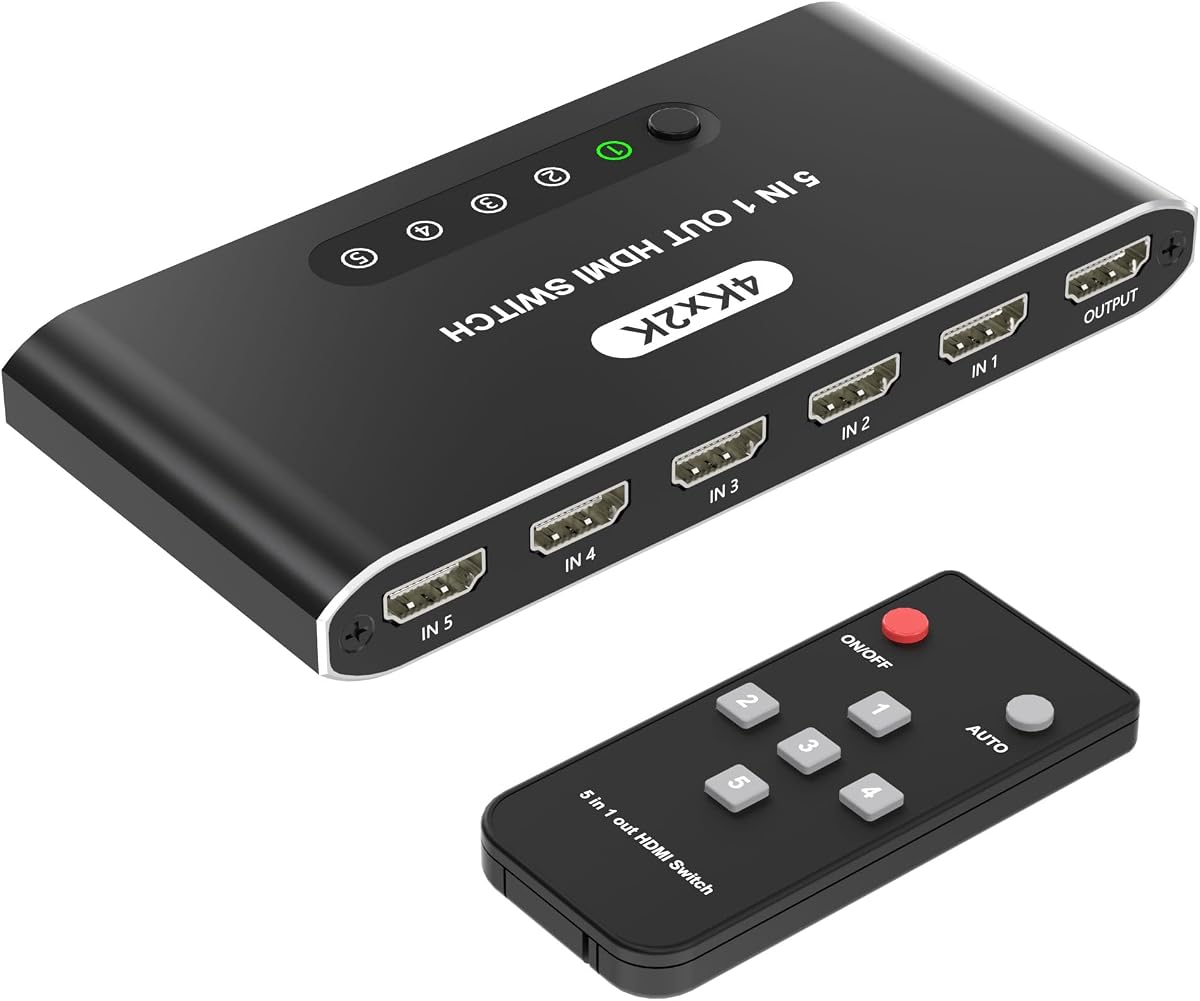
5 Port HDMI Switch with Remote
4.6Editor score
Automatic source detection
4K at 30Hz
USB-powered operation
Explore ten leading 5 Port HDMI Switch models compared for 4K or 8K performance, switching options, gaming features, compatibility, and setup ease.
A 5 Port HDMI Switch gives you one convenient display connection for several consoles, streaming devices, computers, Blu-ray players, and other HDMI sources. The right model should make source changes effortless while preserving the resolution, refresh rate, HDR support, and audio features your equipment needs.
We compared ten switches using their stated specifications and listed capabilities, including maximum resolution, bandwidth, switching methods, remote controls, power requirements, and device compatibility. The guide covers options for 4K television setups, high-refresh gaming displays, 8K-ready systems, and simpler home entertainment installations.
Each pick highlights a different practical advantage, from budget-friendly 4K switching to premium 8K bandwidth and automatic source detection. Ratings, specifications, and package contents can change, and pricing also moves over time, so confirm the latest details and compatibility requirements before purchasing.
4.6Editor score

4.7Editor score

4.6Editor score
This side-by-side comparison shows the core resolution, bandwidth, switching, and compatibility details for all ten switches, making it easier to identify the model that matches your display, source devices, and preferred control method.


The HBAVLINK HDMI Switch 5 in 1 Out 4K 60Hz combines a strong feature set with one of the highest customer ratings in this guide, at 4.7. It supports up to 4K at 60Hz, 1080p at 120Hz, HDR10, 3D vision, HDMI 2.0 bandwidth, Dolby Atmos, and Dolby Vision, making it a versatile choice for modern televisions and mixed entertainment systems.
We may earn a commission when you buy through this link, at no additional cost to you.
Its main attraction is the combination of intelligent automatic switching, a physical button, an included IR remote, and an input memory function. The memory retains the last selected source after a power cycle, while automatic detection can reduce the need to change inputs manually. Five status indicators help identify the active source, and the compact aluminum enclosure is practical for an entertainment center.
There are a few trade-offs. The remote requires two AAA batteries that are not included, and the stated switching time of two to three seconds may feel less immediate than a one-click selection. It also lacks the extreme 8K bandwidth, 4K at 120Hz capability, and 4K at 240Hz with DSC found on premium HDMI 2.1 models.
Overall, this is the strongest general-purpose option for readers who want 4K at 60Hz, flexible switching, and broad compatibility without moving to a specialist 8K model. It is especially suitable for homes using a PS5, Xbox, streaming stick, Blu-ray player, and another source through a single television input.
Automatic switching, manual control, and the included remote cover different usage patterns. The memory function also makes it convenient for a setup where the same source is normally used after the system is turned back on.
Support for 4K at 60Hz, HDR10, Dolby Vision, Dolby Atmos, and 3D gives the switch a broad feature set for televisions, projectors, movie players, and game consoles.
We may earn a commission when you buy through this link, at no additional cost to you.
The UGREEN HDMI Switch 5 in 1 Out 4K@60Hz is a well-equipped 4K option with a 4.3 rating. It combines an 18Gbps data rate with support for 4K at 60Hz, HDR, VRR, 3D, and CEC, while also allowing backward-compatible modes including 4K at 30Hz, 2560 by 1440 at 120Hz, and 1920 by 1080 at 240Hz.
We may earn a commission when you buy through this link, at no additional cost to you.
The included remote has a stated range of up to 33 feet, and a button on the unit provides a second way to change sources. Five LED indicators show the active port. For cable flexibility, the listed specifications permit 3-meter, or 9-foot, input and output cables when operating at 4K at 60Hz, and the USB power connection is intended to support stable transmission.
This is not an automatic switch, so users must select sources with the remote or manual button. It also does not support ARC or eARC, and neither an HDMI cable nor a power adapter is included. Its HDMI 2.0 bandwidth also falls short of the 48Gbps offered by the premium models in the list.
The switch is a good match for gamers who value VRR, high-refresh compatibility, and dependable 4K at 60Hz in a compact package. It is also appropriate for mixed home entertainment setups because it can connect game systems, streaming devices, Blu-ray players, computers, projectors, and televisions through one display connection.
VRR support can help compatible gaming systems maintain smoother motion, while 3D and dynamic HDR support broaden the switch's appeal beyond ordinary television use.
The remote and front-panel switching option make it easy to change among five connected sources without repeatedly reaching behind the television. LED indicators remove the need to guess which port is active.
We may earn a commission when you buy through this link, at no additional cost to you.
The acer 5 in 1 Out HDMI Switch 4K@60Hz HDMI 2.0 has a 4.1 rating and focuses on dependable 4K switching for entertainment, gaming, and presentation setups. It supports HDMI 2.0 and HDMI 1.4, HDCP 2.3, HDR, 3D, and up to 18Gbps of bandwidth.
We may earn a commission when you buy through this link, at no additional cost to you.
Its remote uses a wide-range fisheye IR receiver, while physical buttons offer direct, one-touch selection. Five LED indicators identify the active port. The metallic-like body, gold-plated connectors, and underside heat-dissipation vents are designed to support stable operation and easier integration with game consoles, streaming devices, laptops, and Blu-ray players.
Automatic switching is not supported, and the included USB-A to USB-C power cable must be connected to a suitable power source for full performance. A power adapter, HDMI cables, and remote-control batteries are not included. Total input and output cable length should remain within 10 feet for 4K at 60Hz.
This switch suits readers who want an uncomplicated remote-controlled solution for a television or projector. It is less compelling for high-end 8K displays or installations that need automatic source detection, but its broad device support and straightforward controls suit a practical multi-console home theater.
The ability to combine consoles, a laptop, a player, and a streaming stick behind one television input reduces cable clutter while preserving simple source selection.
Front-panel buttons provide quick manual access, while the IR remote makes switching possible from across a room. Status LEDs clearly show which of the five sources is selected.
We may earn a commission when you buy through this link, at no additional cost to you.
This HDMI 2.1 Switch 5 in 1 Out 8K 60Hz 4K 120Hz combines a 4.3 rating with a broad collection of high-end signal and control features. It supports up to 8K at 60Hz, 4K at 120Hz, and 2K at 240Hz through a stated 48Gbps bandwidth, with HDMI 2.1 cables required for the highest 8K performance.
We may earn a commission when you buy through this link, at no additional cost to you.
The switch offers remote, manual, and automatic source detection. Its listed gaming features include VRR, ALLM, and QFT, while the product information also describes HDR10+ and Dolby Vision support. A 26-foot remote range is stated, and a manual-mode toggle can help prevent unintended changes during competitive gaming or presentations.
The package includes the switch, remote, instructions, power adapter, USB cable, and an anti-slip mat. Two AAA batteries for the remote must be purchased separately. The advertised 8K and 4K at 120Hz modes also depend on the source, television, cables, and other parts of the display chain being capable of those formats.
This is an attractive option for a premium living room or gaming installation that may upgrade to 8K later. It is less necessary for a 1080p television or a basic 4K setup, but the automatic mode, high refresh rates, and extensive HDMI 2.1 feature set make it a strong all-around performance switch.
Support for 4K at 120Hz, 2K at 240Hz, VRR, ALLM, and QFT makes this switch appropriate for modern gaming displays and compatible high-performance source devices.
Automatic detection handles routine source changes, the remote provides seated control, and manual mode offers a way to keep the selected input stable when accidental switching would be disruptive.
We may earn a commission when you buy through this link, at no additional cost to you.
The Kinivo 550BN has a 4.4 rating and offers a balanced combination of 4K at 60Hz, gaming support, and home theater features. It supports HDR10, Dolby Vision, Dolby Atmos, VRR, ALLM, HDCP 2.2, and backward-compatible 2K at 120Hz and 1080p modes.
We may earn a commission when you buy through this link, at no additional cost to you.
Users can change sources with the included IR remote or the physical switch button, while automatic switching is also offered for compatible devices. The product information specifically notes that Apple TV, Xbox One, PS5, PS4, and Roku may not support that automatic method, so manual selection remains an important backup.
Its 24K gold-plated connectors and aluminum alloy shell are designed for durable connections and heat dissipation. At 18Gbps, the switch operates within HDMI 2.0-class bandwidth rather than the 48Gbps maximum offered by premium HDMI 2.1 models, and its highest stated standard is 4K at 60Hz.
This is a persuasive choice for a television-centered setup that mixes movies, streaming, and games. The combination of Dolby Vision, Atmos, VRR, and a five-year-style product identity—backed by a listed two-year warranty and lifetime U.S.-based support—makes it a practical, feature-rich choice without requiring an 8K display.
Dolby Vision, Dolby Atmos, HDR10, and 3D-oriented compatibility make the 550BN useful for connecting a broad collection of media devices to one display.
The remote and physical button are dependable methods of control, while automatic switching is useful for source devices that support it. Checking compatibility avoids surprises with certain consoles and streaming platforms.
We may earn a commission when you buy through this link, at no additional cost to you.
The UGREEN 8K@60Hz HDMI Switch 5 in 1 Out offers 8K at 60Hz, HDR10+, VRR, and a 40Gbps data rate, earning a 4.2 rating. It also supports backward-compatible 4K at 60Hz and 1080p at 240Hz, along with HDMI 2.0 and HDMI 1.4, 3D, Dynamic HDR 10+, Dolby Atmos, and HDCP 2.3.
We may earn a commission when you buy through this link, at no additional cost to you.
An included remote and a button on the unit provide two ways to select among five inputs. Five LED indicators identify the selected source, while the aluminum housing is suitable for a compact entertainment setup. The package includes the switch, a power adapter, a remote, and a user manual.
Automatic switching is not supported, and the switch does not provide ARC pass-through. For the stated 8K at 60Hz mode, the input cable should be within 1 meter and the output cable within 2 meters. As with any high-bandwidth installation, actual resolution and refresh performance ultimately depend on the source device, display, graphics hardware, and cables.
This UGREEN model is a solid choice for a home theater that already has an 8K television or for a buyer preparing a setup for future display upgrades. It is less compelling for automatic-switching priorities, but its strong high-resolution support and remote control make it practical for a five-source entertainment system.
Eight-knee, 60Hz output and 40Gbps bandwidth offer headroom for next-generation televisions. The source equipment and complete cable chain must also support the target format.
VRR, HDR10+, Dolby Atmos, and high-refresh backward compatibility make the switch useful across modern consoles, PCs, and media devices rather than limiting it to basic television use.
We may earn a commission when you buy through this link, at no additional cost to you.
The OREI 8K@60Hz 4K@120Hz HDMI 2.1 Switch has a 4.6 rating and the most extensive bandwidth specification in the group, with support for 48Gbps FRL, 8K at 60Hz, 4K at 120Hz, and 4K at 240Hz using Display Stream Compression. It is the premium choice for high-end gaming and home theater systems.
We may earn a commission when you buy through this link, at no additional cost to you.
The switch includes VRR, ALLM, QMS, QFT, and SBTM for compatible gaming equipment. Video support includes HDR10+, Dolby Vision, and HLG, while its audio formats include Dolby Atmos, Dolby TrueHD, DTS:X, and LPCM. Five HDMI sources can be changed with the included IR remote, front-panel controls, or automatic switching.
The 4K at 240Hz mode is not universal. A DSC-compatible source and display are required, and actual results depend on the GPU, drivers, cable, and EDID information. The other advanced modes similarly require compatible equipment, so the OREI's specifications describe capability rather than guarantee every format in every installation.
Buyers should choose this model when they have—or reasonably expect to use—a television, projector, or monitor that can benefit from HDMI 2.1 bandwidth. For those seeking maximum refresh capability and extensive gaming and audio compatibility, it is the most technically ambitious option among the ten switches reviewed.
The stated 48Gbps FRL capability provides room for 8K and very high refresh-rate modes. This advantage is most meaningful when every connected component supports the intended standard.
VRR, ALLM, QMS, QFT, SBTM, HDR10+, Dolby Vision, HLG, Dolby Atmos, Dolby TrueHD, DTS:X, and LPCM create an unusually complete feature set for a five-input switch.
We may earn a commission when you buy through this link, at no additional cost to you.
4.1Editor scoreThe 4K HDMI Switch 5 in 1 Out offers a straightforward way to connect five sources to one display, with a 4.1 rating. Its maximum stated resolution is 4K at 30Hz, and it also supports HDR, 3D, 1080p, 720p, HDCP, and HDMI 1.4-style connections.
We may earn a commission when you buy through this link, at no additional cost to you.
Automatic, manual, and IR remote switching provide three ways to change sources. The stated cable limits allow input cables up to 5 meters and an output cable up to 25 meters. Its metal construction is designed for heat dissipation, and the plug-and-play format means no software is required.
The primary limitation is resolution. A 4K television may accept the switch, but a game console, laptop, or streaming device that defaults to 4K at 60Hz may require compatible settings to operate at the switch's stated 4K at 30Hz limit. It therefore offers less headroom than most 4K alternatives in this guide.
This model makes sense for older displays, secondary televisions, basic media rooms, or users who value automatic source detection more than high refresh rates. It can reduce cable clutter and simplify everyday source changes, but gamers and new 4K display owners should verify resolution and refresh-rate needs before buying.
Automatic detection suits frequently active devices, the remote provides seated convenience, and manual control offers a straightforward fallback when automatic behavior is not desired.
No drivers or software are required, and the stated input and output cable allowances provide flexibility for entertainment centers and projector installations.
The 5 Port HDMI Switch with Remote provides an approachable way to consolidate five HDMI sources, and its 4.6 rating reflects a well-received feature set. It supports 4K at 30Hz, 1080p at 60Hz, 3D, HD content with HDCP 2.2, and automatic detection of the active source.
We may earn a commission when you buy through this link, at no additional cost to you.
The included compact remote comes with a battery, while a USB power cable is supplied for operation. Five LED indicators show which input is active. Installation requires no drivers, and the stated AWG26 HDMI cable length can reach up to 5 meters for the connected input and output runs.
Its main limitation is the 30Hz ceiling for 4K video. That may be acceptable for many streaming and standard-definition viewing habits, but it is less appropriate for a modern gaming television or a system where smooth motion and high refresh rates are priorities. The feature set is focused on convenience rather than premium bandwidth.
For readers building a straightforward entertainment setup with a PS5, Xbox, Fire Stick, Roku device, Blu-ray player, or laptop, this is a budget-minded and convenient choice. The remote, automatic switching, USB power, and included remote battery remove several common setup inconveniences, making it especially approachable for first-time switch owners.
The switch detects and selects the active source automatically, reducing the need to press a remote or walk to the entertainment center whenever a different device starts.
A USB power cable and remote-control battery are included, and the plug-and-play design requires no drivers. The remaining items are the switch, remote, power cable, and user manual.
We may earn a commission when you buy through this link, at no additional cost to you.
The BlueRigger 4K HDMI Switch 5 in 1 Out, also identified as the HD545, has a 4.4 rating and combines 4K at 60Hz with a broad set of home entertainment features. It supports 2K at 120Hz, HDR10+, HDCP 2.3, 3D, and an 18Gbps high-speed transmission rate.
We may earn a commission when you buy through this link, at no additional cost to you.
A remote and the physical switch control allow manual source selection among five connected devices. Nickel-plated connectors and an advanced chipset are designed to promote stable, lossless audio and video transmission. The switch is compatible with HDTVs, projectors, multiple console generations, Apple TV, set-top boxes, DVD and Blu-ray players, Roku, and other HDMI-equipped devices.
Automatic source switching is not listed, so users must select inputs manually. Its 18Gbps bandwidth also rules out the 48Gbps and 4K at 240Hz DSC capability of the OREI premium model. The included power adapter should be connected for optimal performance.
This is a balanced recommendation for readers who want 4K at 60Hz and solid media compatibility without paying for the highest HDMI 2.1 specification. It works particularly well in a mixed household setup and is backed by a listed two-year warranty with lifetime U.S.-based customer support.
Up to 4K at 60Hz and 2K at 120Hz cover common modern display modes, while 18Gbps provides a practical foundation for HDR10+ entertainment.
Compatibility with current and older game systems, streaming platforms, players, projectors, and televisions makes the switch easy to integrate into an existing household collection.
We may earn a commission when you buy through this link, at no additional cost to you.
The right HDMI switch depends on your display, source devices, gaming ambitions, and preferred switching method. Resolution, bandwidth, automatic behavior, power requirements, and included accessories all influence the result, so match the model to your setup rather than comparing headline resolutions alone.
Start with the highest resolution and refresh rate you expect from your television, projector, or monitor. Basic models may stop at 4K at 30Hz, while many current 4K-oriented switches support 4K at 60Hz. Premium HDMI 2.1 models add 8K at 60Hz, 4K at 120Hz, or even 4K at 240Hz with DSC. These are capability ceilings, not guarantees: the source device, graphics card, display, cable, and selected mode must all support the same format.
Bandwidth indicates how much data the switch can pass between source and display. The 18Gbps models in this list align with 4K at 60Hz and 2K at 120Hz use cases. The 40Gbps UGREEN 8K model and 48Gbps options support higher HDMI 2.1 modes. Higher bandwidth gives more room for high refresh rates, deep color, and modern gaming features, but only when the connected equipment and cables are equally capable.
Remote-controlled switching is convenient from a sofa or desk, while a front-panel button provides a quick manual alternative. Automatic detection can make a multi-source system feel more seamless, although it does not work identically with every console or streaming device. Products that support manual mode as well as automatic mode provide the most adaptable arrangement. Users who need a fixed input for gaming or presentations may intentionally prefer manual selection to avoid accidental changes.
A switch for a modern gaming display should be considered for VRR, ALLM, and support for high refresh modes. HDR10, HDR10+, Dolby Vision, and HLG can improve the feature set for movie and gaming displays, while Dolby Atmos, Dolby TrueHD, DTS:X, and LPCM matter for home theater audio. These features only have an effect when the connected source, display, and content support the corresponding format.
Cable guidance varies considerably among these switches. Some models limit input and output cables to approximately 3 meters for 4K at 60Hz, one supports longer stated runs at lower resolutions, and the 8K models have tighter length recommendations. Short, certified cables are generally the most dependable approach for high bandwidth. Positioning the switch close to the display and keeping input cable runs controlled can also improve installation stability.
Some switches use USB power, while others include a dedicated power adapter. A unit that must remain connected to a suitable supply can be less convenient if that cable is missing or inconveniently routed. Remote batteries, HDMI cables, and wall adapters are sometimes excluded, so read the package list carefully. A complete package can make installation faster, although the switch itself is generally the only essential item once suitable cables and power are already available.
HDMI switching can complicate audio routing, particularly when using a television's built-in speakers or an ARC-connected sound system. Some listed models support CEC, while the UGREEN 4K and 8K switches explicitly do not support ARC or eARC pass-through. If you rely on a television to return sound through an audio system, confirm the exact behavior before purchase. Dedicated soundbars and AVRs connected separately may offer a clearer route for home theater users.
Every switch should be checked against the devices you already own. Consoles, laptops, streaming sticks, Blu-ray players, projectors, capture cards, and VR headsets may all use different signal limits. A broad compatibility list is a useful starting point, but the important test is whether the source and display share a supported resolution, refresh rate, color format, HDR mode, and bandwidth requirement. Keeping a labeled cable for each input can also make the setup easier to maintain.
Position the switch near the display and the connected source devices, then connect each source to one of the five numbered HDMI inputs. Run an appropriate HDMI cable from the switch's output to the television, projector, or monitor. Connect the specified power source if the model uses USB power or includes a power adapter, and allow the display to recognize the new connection before selecting an input.
Use the front-panel button, remote control, or automatic detection to choose a source. Confirm that the correct LED is illuminated and that the display recognizes the selected device. If the picture is missing, first try a different source and input, confirm that the display is on the correct HDMI input, and reseat the power connection. High-resolution modes may require the shorter cable lengths and source settings described in the product instructions.
Keep the enclosure ventilated and avoid placing it on a soft surface that can trap heat. Do not repeatedly unplug cables while a high-bandwidth signal is active, and keep the remote pointed toward the switch's IR receiver. Clean the exterior with a dry, soft cloth rather than abrasive cleaners, and check the power, cables, remote, and active indicators periodically.
A 5 Port HDMI Switch accepts five source devices and sends the selected source to one display output. An HDMI splitter generally takes one source and distributes that signal to multiple displays. These products in this guide are switches, not one-to-five splitters, so they are designed for choosing among consoles, streaming devices, and other sources.
A properly matched switch should pass the supported signal without an obvious quality reduction. However, the switch's bandwidth, source settings, display capabilities, and cable quality determine the maximum resolution and refresh rate. Using a 4K at 30Hz switch with equipment set to 4K at 60Hz can cause compatibility problems, so check every part of the signal chain.
No. Automatic switching depends on the behavior of each source device, and several product descriptions specifically warn that some consoles and streaming platforms do not support it consistently. The remote and physical button remain useful fallbacks. Choose a model that offers manual control even if automatic detection is one of its main selling points.
Usually, the switch can connect to a soundbar or receiver that has an HDMI input, with the receiver or soundbar sending the picture to the display. If you expect the television to send audio back to a soundbar through ARC or eARC, verify that the chosen switch supports that function. Some switches explicitly exclude ARC or eARC pass-through.
Yes, for the switch's highest 8K capabilities. The product specifications state that 8K performance requires HDMI 2.1 cables, and high-refresh 4K modes can also place demands on the complete cable and equipment chain. Suitable cables do not alone guarantee a mode; the source device, television, graphics hardware, and switch must all be compatible.
Not consistently. Some packages include a power adapter but omit HDMI cables, while other products include neither a power adapter nor remote batteries. The budget model with automatic switching includes a USB power cable and a remote battery, whereas the HBAVLINK package lists a power adapter but not its two required AAA batteries. Check the package contents before ordering.
The switch may have a lower maximum refresh rate, or the source and display may not negotiate a higher mode through the selected cable. Lower the source's output setting to match the switch's capability, try a shorter certified cable, and verify that the television and source support the desired mode. Automatic switching and manual switching should not change the underlying bandwidth limit.
It is worth considering for compatible modern gaming PCs, consoles, and high-refresh monitors. The benefit includes smoother motion and access to features such as VRR when the entire setup supports them. For standard television viewing or a 60Hz display, a 4K at 60Hz model is generally more practical, while 8K at 240Hz-class specifications offer little benefit without compatible hardware.
The HBAVLINK 5-in-1 model stands out as the best overall option because it combines 4K at 60Hz, automatic and manual switching, an input memory function, and broad media support. The OREI 8K HDMI 2.1 Switch is the premium selection for 48Gbps bandwidth and advanced gaming capabilities, while the USB-powered 5 Port HDMI Switch with Remote is a convenient budget choice for simpler 4K viewing.
Prioritize the features your setup will actually use. Match the switch's maximum resolution and refresh rate to the weakest device in the signal path, confirm whether automatic switching works with your sources, and check the required cable lengths. Remote controls, dedicated power, included accessories, ARC behavior, and HDR or audio support can influence the decision as much as headline resolution.
Before purchasing, recheck the current product listing, package contents, ratings, and specifications because components and software support can evolve. Also compare current prices when the time is right, but treat them as one factor alongside compatibility and long-term usefulness.