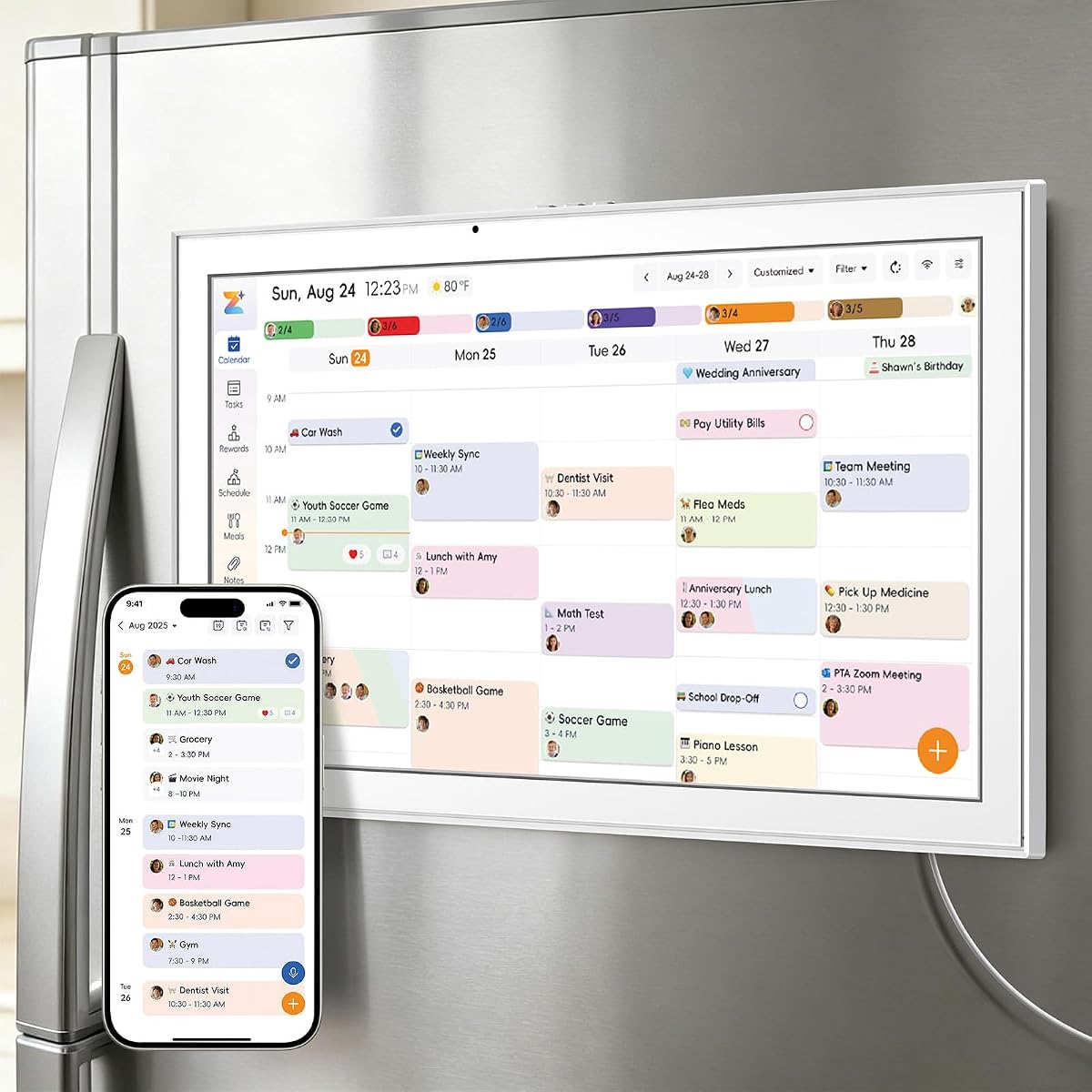
Magnetic Mount Smart Digital Calendar 15.6 Inch
4.4Editor score
Compact 15.6-inch display
Magnetic fridge mounting
Eight household management tools
Photo synchronization and reminders
A smart screen for the fridge can transform a busy kitchen into a shared hub for schedules, meals, reminders, photos, and household organization. The most useful models combine a readable touchscreen, reliable calendar syncing, flexible mounting options, and everyday features that reduce the need to check several phones or paper lists.
This guide compares ten relevant products, including magnetic digital calendars, wall-mounted family displays, refrigerator screen protectors, and a connected leak detector with a refrigerator hygrometer. We evaluated the supplied specifications against display size, mounting flexibility, organization features, compatibility, protection, and monitoring capabilities rather than relying on personal testing claims.
Each review explains the product's strongest benefits, practical limitations, and ideal user, while the comparison table highlights the differences quickly. Ratings and specifications reflect the available listing information, and product features, availability, and prices can change, so readers should confirm current details before purchasing.
4.4Editor score

4.5Editor score

4.4Editor score
As an Amazon Associate we earn from qualifying purchases.
The list spans full smart calendars, multi-mode displays, precision-cut refrigerator screen protectors, and a specialized temperature-and-leak monitor, so the best choice depends on whether the priority is organization, display protection, or food-safety awareness.


The Magnetic Mount Smart Digital Calendar 15.6 Inch for Fridge is a compact all-in-one display with a 4.4 rating. Its principal appeal is the combination of a relatively modest screen footprint and a broad set of family and office tools, making it a practical option for refrigerator doors where every inch of space matters.
We may earn a commission when you buy through this link, at no additional cost to you.
The device combines smart chore assignment, color-coded tasks, task rewards, weekly meal menus, shopping lists, habit tracking, a digital photo frame, calendar synchronization, to-do lists, alarms, and smart-home control. Google, Outlook, and iCloud support make it useful for households that already organize schedules through mainstream cloud services, while photo syncing and included storage support add value beyond basic calendar functions.
Its main limitation is screen size. A 15.6-inch panel is less suitable for reading several dense schedules at once or displaying detailed recipe instructions from across a large kitchen. The listing also does not identify the precise inventory-management capabilities seen in more specialized family command centers, so buyers should not assume that every refrigerator-tracking function is included.
This is a strong pick for renters, smaller kitchens, and anyone who wants a smart calendar directly on a refrigerator without committing the space required by a large wall display. It is especially attractive when a compact surface-mounted hub and broad organizational features matter more than maximum viewing size.
The 15.6-inch format gives family schedules, reminders, and photos a dedicated home without dominating the refrigerator door. It can also serve as an office hub when the kitchen is not the most convenient location.
Chores, meal plans, habits, photos, calendars, to-dos, alarms, and smart-home control are consolidated into one interface. That breadth makes the display more versatile than a conventional wall calendar.
We may earn a commission when you buy through this link, at no additional cost to you.
The EVERBLOG HomeCal 21.5" Digital Family Calendar with Smart Fridge Management is the most complete smart screen for fridge use in this guide, earning a 4.5 rating. Its large FHD touchscreen and dedicated family command-center software address the widest range of shared household tasks, while the refrigerator-specific inventory tools distinguish it from a general digital wall calendar.
We may earn a commission when you buy through this link, at no additional cost to you.
The device can organize calendars, meal plans, grocery lists, chores, reminders, food inventories, and family photos. Google Calendar, Apple iCloud, Outlook, Yahoo, Cozi, and TeamSnap are among the supported services, with real-time updates and color-coded family members. Its AI fridge function tracks quantities, storage locations, and expiration dates, accepts additions through the app, supports food photos and receipt scanning, and can generate recipes from available ingredients.
Meals can be shown with images, ingredient lists, instructions, and video tutorials, while a screensaver mode displays family photos and videos. A built-in app center provides access to services such as Netflix, Disney+, YouTube, and Spotify, and four speakers support music. These extras add versatility, but they also make setup and network planning more important than with a simple calendar screen.
The HomeCal is best for busy families that want one visible command center for schedules, meals, groceries, chores, and refrigerator contents. It requires room for a 21.5-inch panel and a reliable power connection, but for households committed to centralized planning, it offers the most coherent package in the list.
Inventory records can include quantity, storage location, and expiration date. AI Quick Entry, food photos, and receipt scanning offer multiple ways to update what is available without manually creating every entry from scratch.
Shared calendars, unlimited family members, multiple reminders, interactive chore charts, meal plans, lists, and remote app updates create a central reference point. This reduces repeated questions and gives children a visible place to manage responsibilities.
We may earn a commission when you buy through this link, at no additional cost to you.
The 21.5 Inch Magnetic Fridge Smart Digital Calendar, White, has a 4.4 rating and stands out for its ability to move among refrigerator, wall, and desktop placements. That flexibility makes it a practical display for families that may move, remodel, or simply want the option to place information where it is most visible.
We may earn a commission when you buy through this link, at no additional cost to you.
The touchscreen synchronizes with Google, iCloud, and Outlook calendars, while the broader family hub includes chore assignment, task rewards, meal planning, shopping lists, habit tracking, to-do lists, alarms, smart-home control, and digital-photo functions. The built-in magnets allow direct attachment to a refrigerator, and an adjustable stand supports horizontal desktop use or vertical wall mounting. Automatic sleep is also included for nighttime operation.
The product is much more than a calendar but does not present itself as a dedicated inventory screen. Its information is therefore more useful for scheduling, planning, and shared reminders than for tracking the exact quantity and expiration status of individual food items. Buyers who want true refrigerator management may prefer the HomeCal, while those who value installation flexibility may favor this model.
This display is a strong all-round choice for larger households seeking a large calendar with multiple mounting options and no recurring subscription. It suits users who want one screen to alternate between a family planner, photo frame, and occasional office dashboard.
Built-in magnets, an adjustable stand, and wall-mount support make the display adaptable to different kitchens and offices. Portrait and wall positioning can keep information visible without dedicating a countertop appliance to the task.
The listing states that the app, cloud storage, and synchronization are free and that no subscription is required. A one-year warranty and round-the-clock customer support add reassurance for a device intended for daily use.
We may earn a commission when you buy through this link, at no additional cost to you.
The BoxWave ClearTouch Crystal two-pack is designed specifically for the Samsung Bespoke Family Hub+ Smart Refrigerator display. It has a 4.3 rating and is not a standalone smart screen; instead, it is an accessory for owners who want to preserve the visibility and condition of a compatible built-in refrigerator screen.
We may earn a commission when you buy through this link, at no additional cost to you.
The clear film offers up to 99% visual clarity and creates a smooth, glass-like viewing surface. Its thermoplastic construction is intended to help shield against everyday scratches, dust, and minor impacts. Because the material is precision-cut to the screen dimensions, ports and display functions remain accessible when installed correctly.
The glueless adhesive system is designed for residue-free removal, and the package includes an applicator card and microfiber cloth. The listing notes that low-tack adhesive can take up to 48 hours to settle along the edges, while early air bubbles may clear with regular use. Those installation details are worth considering before applying the film.
This protector is best for Bespoke Family Hub+ owners whose priority is preserving color-rich display clarity while adding a sacrificial barrier. It does not create a smart calendar, provide refrigerator management, or include the appliance itself, so it belongs on an existing compatible refrigerator rather than in a search for a new display.
The clear Crystal film is intended for users who value the original appearance of the refrigerator display. Its high transparency and smooth finish help maintain a clean viewing experience while reducing exposure to scratches and dust.
The included applicator and cloth support a controlled installation. Allow the adhesive up to the stated settling period, and do not treat a newly installed bubble around the perimeter as a failure when it can clear during normal use.
We may earn a commission when you buy through this link, at no additional cost to you.
The Digital Calendar Wall Touch Screen-Smart Electronic Photo Frame 15.6 carries a 4.8 rating, the highest numerical rating in the list. It combines scheduling, household coordination, photo display, and meal-planning assistance in one screen, although the product data contains an important sizing inconsistency that buyers should verify.
We may earn a commission when you buy through this link, at no additional cost to you.
The listing calls the product 15.6 inches in its title but also describes a 10-inch size design. Before ordering for a refrigerator, buyers should confirm the actual panel and overall dimensions. Functionally, the display supports multiple family phone accounts with two-way synchronization, so changes made on the device can appear in family apps and app-based events can appear on the screen.
Its chore system links tasks to a star-based reward structure intended to help children build responsibility. The AI catering function creates meal plans based on height, weight, and goals, including low-calorie, low-glycemic, and high-protein options. Those goals should be treated as organizational prompts rather than professional nutrition advice, and users should apply their own dietary judgment.
This model is appealing for households that want two-way calendar updates, a visible reward chart, and dietary-planning features in a movable display. It is best for users who can confirm the dimensions and prefer a calendar that works across the kitchen, living room, and other household spaces.
Events added by different family members can appear in real time, and changes made directly on the display are pushed back to connected apps. This creates a more collaborative arrangement than a one-way calendar mirror.
Customizable chores and star rewards encourage children to take ownership of routine tasks. Personalized meal-plan options add another planning layer, although health goals and dietary restrictions should still be reviewed carefully.
We may earn a commission when you buy through this link, at no additional cost to you.
The 24 Inch Magnetic Fridge&Wall Mount Smart Digital Calendar, White, is the largest standalone calendar in the guide and carries a 4.4 rating. It combines a spacious 24-inch touchscreen with direct refrigerator attachment and wall mounting, making it an attractive command center for households that want information readable from across the kitchen.
We may earn a commission when you buy through this link, at no additional cost to you.
The organization suite covers calendar synchronization, chores, rewards, meal plans, shopping lists, habit tracking, to-do lists, alarms, and smart-home control. Google, iCloud, and Outlook calendars are supported, and the device can switch to a rotating digital-photo display. It also includes 32GB of storage and photo synchronization, giving it more local media capacity than the smaller model in the list.
Rotation between portrait and landscape layouts adds flexibility, but a 24-inch panel cannot be treated as a compact refrigerator accessory. Users need to account for door size, wall space, viewing distance, cable routing, and power access. Like the other general family hubs, it emphasizes planning and reminders rather than item-level refrigerator inventory tracking.
This is the best choice for buyers who prioritize a large, highly visible panel and have enough space to use it well. It suits open kitchens, busy family command centers, and households that want a calendar, reminder board, and photo display in one substantial device.
The 24-inch canvas makes multiple family schedules, reminders, and photo memories easier to scan from farther away. It is particularly useful when several people need to check the same information throughout the day.
Portrait orientation can suit calendars and vertical lists, while landscape mode offers more room for schedules, recipes, and photos. The rotating format makes the display useful beyond a single fixed dashboard.
We may earn a commission when you buy through this link, at no additional cost to you.
The BoxWave ClearTouch Anti-Glare two-pack is made for the Samsung Family Hub Refrigerator with AKG Speaker and has a 3.6 rating. It is a specialized screen accessory rather than a new display, and its main purpose is to make a built-in refrigerator screen more comfortable under bright household or natural lighting.
We may earn a commission when you buy through this link, at no additional cost to you.
The matte film disperses reflected light, and the listing states that it reduces ultraviolet rays by 90%. Its smooth, paper-like texture offers a more tactile feel than a bare glossy screen while resisting fingerprints. The protectors are precision-cut for the intended display, keeping screen functionality and surrounding contours accessible.
This option is a compromise for buyers who prioritize glare control over maximum visual brilliance. A matte finish can make images and saturated colors look less crisp than they would through a clear protector, so users who watch detailed photos or colorful recipes may prefer a crystal film. The 3.6 rating is also the lowest among the calendar and protector entries shown.
The anti-glare pack is best for households with bright kitchen lighting, strong natural light, or frequent screen use in a reflective space. It is less appropriate for someone seeking a new smart calendar, and compatibility should be confirmed before purchase.
The anti-glare surface spreads light rather than returning a sharp reflection into the viewer's eyes. It can improve comfort around overhead fixtures and sunny kitchen areas where a glossy panel is distracting.
Two films provide a spare for future wear or allow one to be kept on hand if the installed protector is damaged. The package also includes installation accessories.
We may earn a commission when you buy through this link, at no additional cost to you.
The BoxWave ClearTouch Anti-Glare two-pack is designed for the Samsung Bespoke Family Hub+ Smart Refrigerator and has a 4.1 rating. It offers a different solution to the smart-screen category by protecting an existing refrigerator display rather than adding a separate calendar or command center.
We may earn a commission when you buy through this link, at no additional cost to you.
Its matte anti-glare surface disperses reflected light and is stated to reduce ultraviolet rays by 90%. The smooth, paper-like construction is intended to make touch interaction comfortable and reduce the visibility of fingerprints. Precision cutting ensures that the display area, contours, and cutouts remain accessible after installation.
Buyers must accept the typical trade-off associated with matte films: they are easier to view in direct light but may not reproduce the same vibrancy or sharpness as a transparent screen. Glueless adhesive is designed to leave no sticky residue when the protector is removed. The two-pack gives users a replacement or spare, and the listing includes installation accessories.
This protector is best for Bespoke Family Hub+ owners who experience distracting reflections or frequent fingerprint marks on the built-in screen. It is the wrong choice for adding calendar functionality, but it is a targeted maintenance accessory for preserving and improving the usability of an existing refrigerator display.
By dispersing reflected light, the matte film can make the refrigerator display easier to check in kitchens with strong overhead lighting. The reduced-glare surface is designed for repeated everyday use.
The anti-fingerprint texture helps reduce the visibility of marks left by regular touch interaction. A microfiber-style cleaning routine can preserve the smoother appearance and keep the screen comfortable to use.
We may earn a commission when you buy through this link, at no additional cost to you.
The BoxWave ClearTouch Crystal two-pack for the Samsung Family Hub Refrigerator with AKG Speaker has a 3.4 rating. It provides a high-clarity protective layer for an existing refrigerator screen, emphasizing image visibility and resistance to everyday scratches, dust, and minor impacts.
We may earn a commission when you buy through this link, at no additional cost to you.
The film is described as offering up to 99% visual clarity and creating a smooth, glass-like surface. It is precision-cut for the Family Hub display so screen access remains intact. The glueless adhesive is intended to apply smoothly and remove without leaving residue, while the package contains an applicator card and microfiber cloth.
The main choice is between visual clarity and glare resistance. Compared with the anti-glare versions in the list, this clear film should retain more of the screen's original sharpness and vibrancy, but it may show fingerprints more readily. The listing also notes that low-tack adhesive can take up to 48 hours to settle and that initial bubbles may clear with regular use.
This protector is a sensible choice for Family Hub owners who care most about preserving the visual quality of photos, interfaces, and recipe content. It is not a smart calendar, does not include the refrigerator, and should only be purchased after confirming the precise model compatibility.
The transparent Crystal finish is well suited to users who display recipes, calendars, family images, or other visually detailed content. Its smooth surface helps preserve the look and feel of the underlying refrigerator screen.
Dust should be removed before placement, and the included applicator can help keep the film aligned. Giving the adhesive time to settle around the edges supports a cleaner final installation.
We may earn a commission when you buy through this link, at no additional cost to you.
The GoveeLife Upgraded Smart Water Leak Detector 1s with Refrigerator Hygrometer belongs in this guide as a complementary refrigerator-monitoring tool, not as a visual display. It monitors temperature, humidity, and water leaks through connected probes, making it relevant to anyone building a safer and more proactive smart kitchen.
We may earn a commission when you buy through this link, at no additional cost to you.
The device provides real-time WiFi monitoring with app push notifications and email alerts when readings move outside the safe range. Anti-false-alarm filtering is designed to disregard brief door openings while still identifying more meaningful food-safety risks. Two probes on 40-inch cables allow measurements in multiple locations, and a built-in LCD presents current readings locally.
The detector has an IP67 waterproof rating, can be used in damp or hidden locations, and is advertised with a five-year battery life. A separate 4.9-foot cable expands the reach to areas behind appliances or inside sump pits. These are monitoring advantages, but the product does not display calendars, recipes, photos, or household reminders, so it cannot replace a smart screen.
The GoveeLife detector is best for refrigerator owners who want remote leak, temperature, and humidity awareness alongside a separate kitchen display. Buyers should confirm app and smart-home compatibility, position the probes carefully, and establish sensible alert thresholds for the way their household uses the refrigerator.
Temperature and humidity readings can be checked from the app, while alerts provide notice when conditions move outside the selected safe range. The local LCD offers a quick reference without requiring an app.
The dual probe arrangement and extended cable can reach concealed spaces that a conventional surface thermometer cannot. This makes the detector useful for monitoring difficult access points around the refrigerator and other damp areas.
We may earn a commission when you buy through this link, at no additional cost to you.
The right smart screen for fridge depends on whether you need a complete organizational dashboard, a dedicated refrigerator display accessory, or connected environmental monitoring. Screen size, placement, software, compatibility, and protection should be evaluated together before making a selection.
Screen size determines how much information can remain visible without scrolling. A compact 15.6-inch model is easier to place on a refrigerator door and may be adequate for short schedules, while 21.5-inch and 24-inch screens are better for dense calendars, meal plans, recipes, and large family lists. Buyers should consider both the stated screen size and the total dimensions of the unit, especially when attaching it to a refrigerator with limited door space.
A magnetic mount provides the simplest way to place a calendar directly on a refrigerator, while wall mounting offers a higher, more permanent position. Adjustable stands add flexibility by supporting countertop or desktop use. The mounting arrangement should fit the household's routine: a screen near the cooking area is easier to consult during meals, whereas a wall-mounted unit may be better for general family visibility.
A useful smart calendar should synchronize with the services already used by family members. Google Calendar, iCloud, and Outlook appear across several options, while the HomeCal also lists Yahoo, Cozi, and TeamSnap. Two-way synchronization is especially convenient when changes made on the screen should return to connected phone apps.
The strongest family screens go beyond calendar entries. Chore charts, reward systems, meal plans, grocery lists, to-do lists, habit tracking, alarms, and smart-home controls can consolidate activities that otherwise live across separate apps. Buyers should distinguish between genuinely useful daily functions and features they are unlikely to use, because a broader feature set can also increase setup and learning demands.
A smart calendar and a smart refrigerator inventory system solve different problems. The HomeCal specifically tracks quantities, storage locations, expiration dates, food photographs, and receipt-based additions, then can generate recipes from selected ingredients. Other digital calendars may support meal planning without maintaining a detailed inventory of what is already inside the refrigerator.
Screen protectors are model-specific and should never be assumed to fit every refrigerator display. The listed BoxWave options distinguish between the Samsung Family Hub with AKG Speaker and the Samsung Bespoke Family Hub+. For an add-on calendar, verify the dimensions of the refrigerator door, the strength and condition of the magnetic surface, and whether a cable can reach a suitable outlet.
Several digital calendars state that the app, cloud storage, synchronization, and core features do not require a monthly subscription. This is valuable for a device intended to remain in daily use. Buyers should still review the listing's terms and warranty details, and confirm whether particular AI, media, or optional services carry separate requirements.
If you already own a compatible refrigerator screen, a clear or anti-glare protector may be more relevant than another standalone calendar. Clear films favor vibrancy and sharpness, while matte anti-glare films are easier to view under strong reflections. For leak, humidity, and temperature monitoring, a dedicated connected sensor adds a different layer of kitchen awareness.
Begin by choosing the display's permanent position, confirming that the refrigerator surface is clean and suitable for a magnetic attachment or that the wall and stand are secure. Measure the area, plan the power-cable route, and make sure the screen can be viewed comfortably from the places where family members will check it.
Connect the device to WiFi and complete the initial setup, then connect the relevant calendar services. Create family accounts or shared spaces, assign colors, and populate a short list of essentials before adding large photo libraries or elaborate meal plans. For the GoveeLife detector, position the probes where they can reach hidden moisture or temperature-risk areas and set app alerts that account for normal door openings.
For daily care, wipe digital screens with a soft, dry microfiber cloth and avoid applying liquid directly to the display. Update calendars and inventory lists consistently, remove outdated photographs when storage becomes crowded, and review alarms and reminder settings. If a refrigerator protector is installed, allow its adhesive to settle as directed and clean it gently without aggressive scrubbing or sharp tools.
The best type depends on whether you want a shared organizer, a protected built-in refrigerator display, or environmental monitoring. A large digital calendar is most useful for schedules, chores, meal plans, and photos, while a model with inventory tracking is better for managing food quantities and expiration dates. Screen protectors and leak detectors serve narrower but complementary purposes.
Yes, if the calendar includes built-in magnets and the refrigerator surface is suitable for attachment. The 15.6-inch, 21.5-inch, and 24-inch calendar options described in this guide include magnetic mounting features. Users should still check dimensions, weight, surface condition, cable access, and whether a stand or wall mount would be more stable.
The listings for the 15.6-inch, 21.5-inch, and 24-inch calendar models state that no monthly subscription is required, and the HomeCal also states that no subscription is needed. Buyers should still review the current product terms before purchase, particularly for optional AI or media services, because features and policies can change.
Several of the calendar options in this list explicitly support Google Calendar, Apple iCloud, and Outlook synchronization. The HomeCal adds Yahoo, Cozi, and TeamSnap to the listed compatibility. Confirm the precise calendar and account types in the current listing if your household uses additional or specialized scheduling services.
No, the protectors in this guide are designed for particular Samsung refrigerator display models. The ClearTouch Crystal and Anti-Glare options for the Family Hub with AKG Speaker are different from those intended for the Bespoke Family Hub+. Always compare the model identifier and screen dimensions before ordering an accessory.
Choose a clear Crystal film when color vibrancy, sharpness, and a glass-like appearance are your main priorities. Choose an anti-glare matte film when strong kitchen lighting, reflections, or visible fingerprints are a regular problem. The matte option may appear slightly less crisp, while the clear option may show fingerprints more easily.
The HomeCal is the clearest choice in this list for dedicated refrigerator management. Its listed features include quantities, storage locations, expiration dates, food photographs, receipt scanning, and recipe suggestions based on selected ingredients. The other calendar products emphasize schedules and household organization rather than detailed food-inventory tracking.
A separate detector is not necessary for every household, but it can add useful remote temperature, humidity, and leak visibility. The GoveeLife model uses connected probes, app notifications, email alerts, and an LCD. It complements a smart calendar by monitoring conditions rather than displaying household organization tools.
The EVERBLOG HomeCal is the strongest all-around choice because it combines a large touchscreen, extensive family-calendar compatibility, smart refrigerator inventory, meal planning, chores, and photo functions in one coordinated system. The 15.6-inch magnetic model is more space-conscious, while the 24-inch display offers the largest canvas and flexible portrait or landscape mounting.
Before buying, decide whether your primary requirement is a full organizational dashboard, protection for a compatible built-in refrigerator screen, or environmental monitoring. Check dimensions, calendar services, mounting security, power access, storage, and ongoing service terms carefully so that the feature set fits your kitchen rather than simply adding another screen.
Ratings, features, compatibility, availability, and prices can change over time, so review the latest listing before ordering. Once the right model is selected, thoughtful placement, organized shared lists, regular cleaning, and consistent calendar updates will make the device more useful throughout the day.