
Kingston IronKey Vault Privacy 50
4.5Editor score
FIPS 197 XTS-AES encryption
BadUSB attack protection
Passphrase and write-protection modes
Our encrypted USB flash drive guide compares ten secure models for encryption, authentication, durability, compatibility, capacity, and practical everyday data
Encrypted USB flash drives add hardware-controlled protection to portable storage, making them useful for confidential files, sensitive work documents, and data that must travel outside the office. A worthwhile model combines strong encryption, dependable authentication, automatic locking, broad device compatibility, and a durable enclosure that suits how and where it will be used.
This guide compares ten encrypted USB flash drives using the supplied specifications, ratings, capacity, connector design, certification claims, and security features. The list covers PIN-protected, fingerprint-enabled, password-configurable, rugged, write-protectable, and high-capacity options, with particular attention to how each product balances protection, convenience, storage, and everyday usability.
The first three selections represent the strongest overall mix of security credentials, useful controls, and practical appeal, while the remaining reviews explain the trade-offs of each alternative. Ratings and product details reflect the available information and can change over time, and prices also fluctuate, so readers should verify current listings, compatibility, and requirements before purchasing.
4.5Editor score
4.6Editor score

4.1Editor score
The table below compares all ten products by their core security model, storage capacity, physical design, and practical advantages. It is designed to make the differences between validated enterprise options, PIN-protected rugged drives, fingerprint access, and configurable encrypted models easier to understand at a glance.


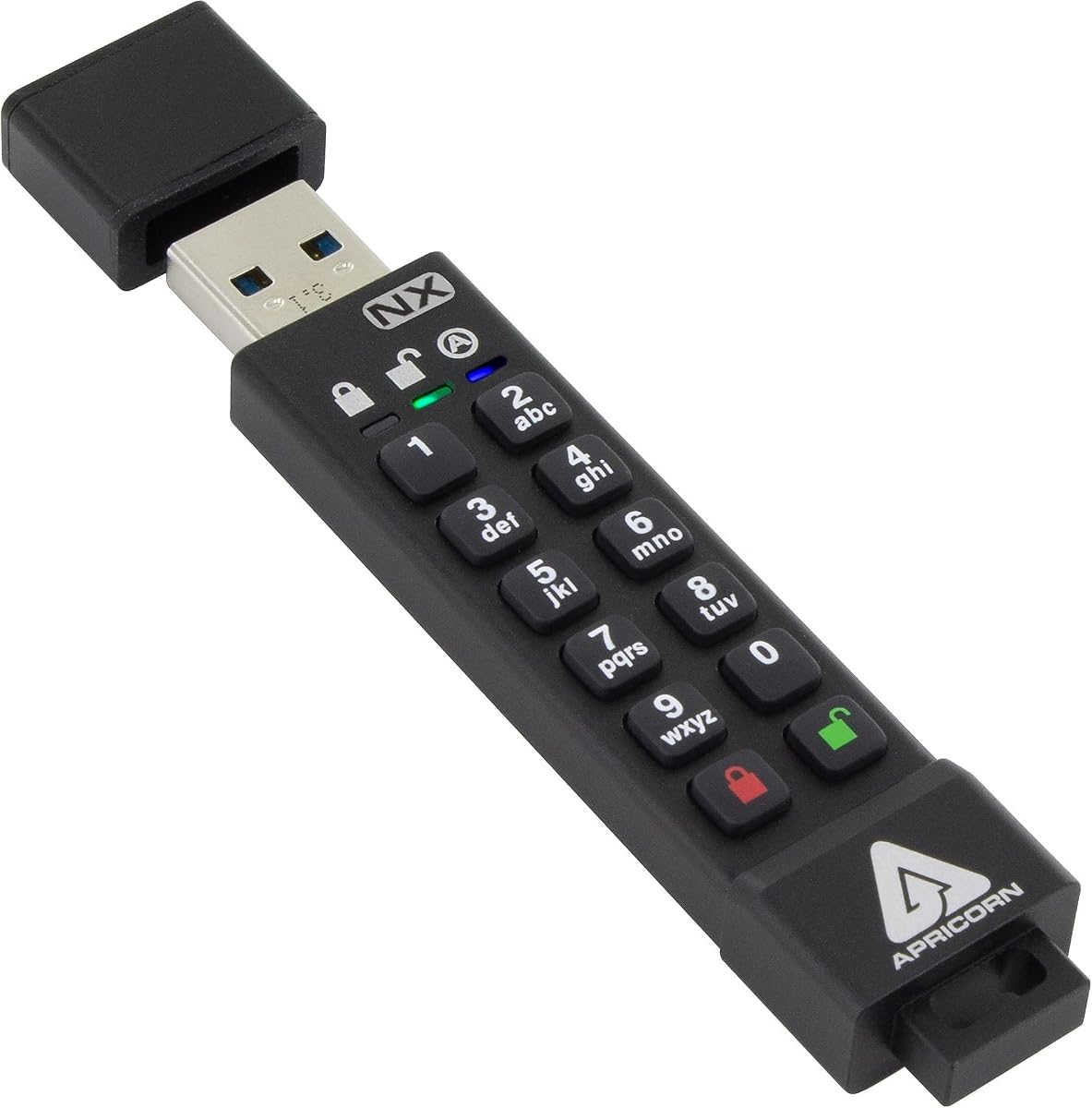
The Apricorn Aegis Secure Key 3 NX combines a 4.6 rating with FIPS 140-2 Level 3 validation, making it the most persuasive all-around choice in this list. Its 256-bit encrypted USB 3.0 design is aimed at buyers who want a recognized security standard rather than relying only on general encryption claims, and the compact eight-gigabyte model can be useful for moving a controlled set of sensitive files.
We may earn a commission when you buy through this link, at no additional cost to you.
Its standout feature is the separation of administrative and user access. That structure can help an organization manage a device for several people while retaining tighter control over settings. Two read-only modes add another layer of operational safety by reducing the chance of accidental changes or deletion, while data recovery PINs provide a planned route for restoring access if the normal credential is lost. Compatibility with Aegis Configurator also makes the drive more relevant to managed workflows.
The main limitation is capacity. Eight gigabytes may be enough for credentials, contracts, legal documents, or a compact working archive, but it is not the most comfortable choice for large media collections or extensive project files. A standard USB-A connection may also be less convenient for a setup built around USB-C-only laptops. Neither issue diminishes the value of the drive for buyers whose priorities are formal validation, controlled access, and careful data handling.
This is the pick for organizations, consultants, and security-conscious individuals who need a trusted validation claim and a generous set of administrative controls. It is especially compelling when a small, clearly defined set of files is more valuable than maximum capacity. Buyers should confirm connector fit and current availability, but the combination of validation, role separation, read-only options, and recovery support makes the Aegis Secure Key 3 NX our leading recommendation.
Separate admin and user modes let the device support controlled access rather than treating every holder as an equal administrator. For business deployment, this can simplify responsibility and reduce the chance that ordinary users change security-sensitive settings.
Two read-only modes help protect files that must remain available without being modified. Data recovery PINs add a controlled recovery layer, making the drive more practical for users who may lose their regular authentication details.
We may earn a commission when you buy through this link, at no additional cost to you.
The Kingston IronKey Vault Privacy 50 pairs a 4.5 rating with 256GB of storage and hardware-based FIPS 197 XTS-AES 256-bit encryption. It is the most substantial high-capacity option in the roundup, designed for buyers who need to move meaningful amounts of sensitive information without relying on a computer to perform the encryption. Its digital-signature-based firmware protection also addresses a different threat from ordinary password guessing.
We may earn a commission when you buy through this link, at no additional cost to you.
The drive's most useful differentiators are its authentication choices. Complex-password and passphrase modes let an organization establish rules appropriate to different users, while the new passphrase option supports longer, more memorable phrases. Dual read-only settings help prevent accidental modification or deletion, and the stated TAA compliance makes the product relevant to government and enterprise procurement environments where particular requirements may matter.
Its premium positioning is visible in the feature set rather than simply in the capacity. Brute-force and BadUSB protection, digitally signed firmware, hardware encryption, multiple password styles, and write protection form a comprehensive package. The trade-off is that this level of control and room can be more than a casual user needs. It may also be impractical to carry constantly if the full 256GB is not needed for the intended workload.
Choose the IronKey Vault Privacy 50 when a high-capacity portable vault, flexible enterprise authentication, and procurement-oriented security features matter more than minimalism. It is well suited to organizations moving datasets between controlled systems, provided users understand how to configure and retain their credentials. For personal users who only need a few protected files, the smaller models in this guide offer a more focused alternative.
A 256GB capacity reduces the need to divide sensitive work across multiple drives. Combined with hardware-based encryption, it suits a user who wants a portable storage medium that can hold a larger body of protected files.
Complex-password and passphrase modes support different access habits and organizational policies. The ability to create longer phrases can improve memorability while helping users avoid the predictable choices associated with short numeric codes.
We may earn a commission when you buy through this link, at no additional cost to you.
The Apricorn Aegis Secure Key 3 NXC earns a 4.4 rating and stands out as the clearest USB-C-oriented recommendation. Its 128GB capacity is more practical than many entry-level secure drives, while FIPS 140-2 Level 3 validation and 256-bit AES-XTS hardware encryption address buyers who take portable-storage protection seriously. It also supports separate admin and user modes for more disciplined access management.
We may earn a commission when you buy through this link, at no additional cost to you.
Software-free authentication and operation simplify the experience on systems where installing a management utility may be inconvenient. The USB 3.2 Type-C connector is a strong match for modern laptops, tablets, and other compatible equipment, avoiding the need to guess whether a USB-A drive will fit. The stated power supply combines the USB port with an internal battery, supporting a hardware-oriented design that does not depend on continuous host-device cooperation.
Type-C is not universally synonymous with a full-size USB-A port. Users working across older desktops, legacy peripherals, or mixed connector environments may need an adapter, and the internal battery adds a component that requires care over long-term storage. The 128GB capacity is also substantially less than the Kingston Vault Privacy 50, though it remains ample for documents, credentials, and focused working sets.
This is the leading choice for a buyer whose current equipment centers on USB-C and who wants validated encryption without routine software installation. It offers a particularly good balance between capacity, connector relevance, and management control. Confirm that every intended host supports the Type-C connector and review the manufacturer's setup requirements before committing to it as a standard-issue drive.
USB 3.2 Type-C makes the drive a natural fit for contemporary systems that lack a full-size USB-A socket. It removes much of the physical guesswork involved with carrying a traditional encrypted drive between modern devices.
Hardware AES-XTS encryption and software-free authentication reduce reliance on the host for core protection. Separate admin and user modes add operational control for organizations that need more than a single shared password.
We may earn a commission when you buy through this link, at no additional cost to you.
The Integral Crypto-197 is the budget-focused member of the list, with a 4.1 rating and a 4GB capacity. Despite its modest storage volume, it brings meaningful protections: FIPS 197 certification, 256-bit AES hardware encryption, automatic locking, and data destruction after six unsuccessful password attempts. It is a practical option for a small collection of highly sensitive files rather than a general-purpose portable library.
We may earn a commission when you buy through this link, at no additional cost to you.
Its physical design is unusually reassuring for a compact drive. A durable dual-layer waterproof enclosure combines a hardened internal case with a rubberized silicone exterior, offering protection against bumps, drops, running water, and immersion. Secure Entry requires an alphanumeric password of eight to sixteen characters, and the optional password hint is designed not to match the password itself, reducing an obvious security mistake.
The auto-lock behavior is another strength. Encryption engages when the drive is removed from a PC or Mac, or when screen protection or computer lock is enabled. No software installation, license, or subscription is required, which makes the Crypto-197 attractive for travelers and occasional users. The compromises are the four-gigabyte capacity and the short upper limit on password length.
Best for students, travelers, and casual users who need a small, tough place for credentials or critical documents, this drive offers more protection than an ordinary flash drive at an accessible position in the category. It is less appropriate for photos, videos, or large archives. For those who need room, the 64GB AES256 model or one of the 128GB options may be a better fit.
The dual-layer waterproof enclosure protects the internal electronics when the drive is carried in a bag or exposed to ordinary wet conditions. The silicone outer layer also improves grip and adds a final barrier against physical damage.
After six unsuccessful access attempts, the drive destroys its data and resets the cryptographic storage. This is a blunt but effective response to persistent guessing and makes the credential requirement more consequential.
We may earn a commission when you buy through this link, at no additional cost to you.
The iStorage datAshur PRO carries a 4.3 rating and a strong set of formal security credentials. It is FIPS 140-2 Level 3 certified, along with NLNCSA DEP-V and NATO Restricted certification, while a seven-to-15-digit PIN provides straightforward access without a lengthy password. The four-gigabyte capacity again limits it to compact collections, but the protection model is well suited to documents that must not be casually exposed.
We may earn a commission when you buy through this link, at no additional cost to you.
Data is encrypted in real time using AES-XTS 256-bit hardware encryption and remains protected whenever the drive is disconnected. Its IP57 rating supports use in dusty or wet conditions, making it appealing for field work and travel. Compatibility extends across Windows, macOS, Linux, Chrome, Android, thin clients, zero clients, embedded systems, Citrix, and VMware, which is one of the broadest device lists among the PIN-focused choices.
The product also cites regulatory relevance for GDPR, CCPA, and HIPAA, though buyers remain responsible for how their data is handled. The PIN format is less flexible than a passphrase and may be easier to shoulder-surf, so users should consider screen privacy and physical access controls. The small storage capacity is the other obvious limitation.
Choose the datAshur PRO for users who prioritize certified protection, rugged construction, and uncomplicated access across a broad mix of devices. It is particularly well matched to field professionals, technical teams, and organizations that need a secure media standard. If the intended files exceed a few gigabytes, a larger model should be preferred.
FIPS 140-2 Level 3 and the listed additional certifications provide a stronger basis for formal purchasing decisions. Real-time AES-XTS encryption means files are protected as they are transferred rather than only after a later encryption step.
The extensive operating-system and platform list reduces the chance of encountering an unsupported destination. That makes the drive useful for IT teams and mobile professionals who move between conventional computers, embedded systems, and virtualized environments.
We may earn a commission when you buy through this link, at no additional cost to you.
This generically named 64GB AES256 hardware USB 3.0 drive receives a 4.2 rating and offers a practical middle ground on capacity. Its independent encryption chip uses AES 256-bit protection, while the compact aluminum-alloy housing is described as small enough to attach to a key ring or carry in a pocket. It does not have the same explicit certification pedigree as several established-brand competitors, but its core controls are easy to appreciate.
We may earn a commission when you buy through this link, at no additional cost to you.
The drive locks automatically if it is not connected within 30 seconds of unlocking or if it is unplugged from a computer. It also resets and wipes its data after ten incorrect password entries. Those two layers of automatic behavior reduce the window in which an unlocked drive remains exposed and establish a firm consequence for persistent guessing.
USB 3.0 supports faster transfer of larger files, and the stated compatibility includes Windows, CentOS 7, Red Hat 7.5, and Windows Server 2012 and 2016. The FAT32 file system is simple and widely recognized, although it imposes familiar file-size and formatting limitations. Unlike some competitors, the supplied specifications do not state FIPS validation, formal compliance, or a long list of supported platforms.
This is a sensible choice for a user who wants more room than a tiny credential drive, automatic locking, and a strong encryption claim without moving to the largest capacity. It is best suited to Windows-centered or clearly listed server environments rather than highly regulated procurement. Buyers needing documented validation should favor one of the FIPS-listed models instead.
The 30-second reconnection rule and unplug-triggered lock help ensure the device does not remain casually open. This is particularly useful when the drive is moved between pockets, drawers, desks, and shared work areas.
The small aluminum-alloy shell supports everyday carry, while 64GB offers enough room for a meaningful document archive. USB 3.0 helps keep transfer time reasonable when moving larger batches of protected files.
We may earn a commission when you buy through this link, at no additional cost to you.
The Lexar JumpDrive F35 PRO is the most distinctive convenience choice in the list, with a 4.1 rating and fingerprint authentication in place of a conventional password. It can save up to ten fingerprints, recognize them in less than a second, and still uses 256-bit AES encryption to protect files. For users who regularly unlock a drive on a shared workstation, avoiding a short or frequently mistyped password can be a meaningful benefit.
We may earn a commission when you buy through this link, at no additional cost to you.
Transfer performance is another attraction. The product is specified at up to 400MB/s read and 300MB/s write over USB 3.2 Gen 1, which is well suited to moving larger collections of business files, media, or project material. Its 128GB capacity offers a good balance for daily portable use without moving up to the 256GB Kingston model.
Biometric access introduces its own practical considerations. The sensor must work reliably and remain clean, and a user still needs to understand what happens if the enrolled fingerprints are unavailable. The supplied data does not mention formal FIPS validation, so this is not the same kind of certified selection as several alternatives. Nor should fingerprint convenience be confused with protection against a determined attacker who has physical possession of the unlocked device.
The F35 PRO is a good fit for a personal or creative workflow that values quick, repeatable access and fast transfers. It may be especially useful where typing a password in view of others is undesirable. For formal regulated procurement, a drive with a stated validation level should take priority over biometric convenience.
Saving multiple fingerprints lets authorized users unlock the drive quickly, while the stated sub-second recognition time supports a more fluid workflow. The encrypted storage still provides the underlying file protection.
Claimed read and write speeds of up to 400MB/s and 300MB/s make the F35 PRO appealing for frequent transfers. The 128GB capacity provides enough room for a working collection rather than only a handful of credentials.
We may earn a commission when you buy through this link, at no additional cost to you.
The iStorage datAshur PRO2 improves on the smaller datAshur PRO concept with 32GB of capacity, an IP68 dust-and-water-resistance rating, and a 4.2 rating. FIPS 140-2 Level 3 certification and AES-XTS 256-bit hardware encryption make it a serious option for buyers who need more room and stronger environmental protection than a standard desktop-oriented flash drive offers.
We may earn a commission when you buy through this link, at no additional cost to you.
A seven-to-15-digit PIN is used to authenticate the user, and the drive then operates like a conventional USB device. No software is required, and all transferred data is encrypted in real time. Compatibility includes Windows, macOS, Linux, Chrome, Android, thin clients, zero clients, embedded systems, Citrix, and VMware, allowing the drive to fit into a wide range of personal and technical workflows.
The stated transfer performance reaches up to 168MB/s read and 116MB/s write over backward-compatible USB 3.2. That is more than adequate for routine document and file movement, although it does not match the headline speed of the Lexar F35 PRO. A numeric PIN may also be less expressive than a passphrase, and users still need to protect against shoulder-surfing or physical observation.
The datAshur PRO2 is best for mobile professionals, field technicians, and travelers who need a certified, rugged medium for a moderate set of sensitive files. It is a particularly compelling option where dust, rain, or occasional immersion could threaten a less protected drive. For larger archives, consider a higher-capacity encrypted model.
The IP68 rating distinguishes this model for demanding travel and field use. It is a better fit than a basic flash drive when dust, rain, cleaning, or accidental submersion could interrupt work.
Hardware encryption, real-time protection, and FIPS validation make the PRO2 suitable for controlled data. Its 32GB capacity is large enough for a focused working set while remaining easier to carry than a larger drive.
We may earn a commission when you buy through this link, at no additional cost to you.
The Kingston IronKey D500S has a 4.6 rating, matching the highest score in the roundup, and brings an unusually flexible set of enterprise controls. Its XTS-AES 256-bit encryption, brute-force protection, BadUSB protection, crypto-erase function, multi-PIN option, and dual hidden partition option make it attractive to buyers who need more granular organization than a single secure volume provides.
We may earn a commission when you buy through this link, at no additional cost to you.
Two hidden partitions can separate working data from another area of the drive, which is useful for managed or compartmentalized use. A rugged zinc casing is intended to resist penetration attempts, and the fully customizable features and attributes offer a way to align the device with organizational behavior. The crypto-erase password provides a deliberate emergency response rather than waiting for an automatic reset threshold.
One qualification is important: the supplied listing describes FIPS 140-3 Level 3 certification as pending, so the claim should be understood precisely rather than treated as identical to the listed FIPS 140-2 Level 3 validation of several rivals. The 16GB capacity is also modest. This drive is therefore better for structured, high-security workflows than for storing a broad personal media collection.
The D500S is a strong recommendation for organizations that value policy features, physical resistance, and flexible partition management. It is also attractive to privacy-conscious professionals who want more control over how secure data is organized. Verify the current certification status and confirm that the partition and PIN features align with your operating procedures before standardizing it across a fleet.
The dual hidden partition option supports a more organized approach than one shared encrypted volume. It can help distinguish categories of information or separate working content from a controlled area.
A zinc casing adds physical resistance, while brute-force and BadUSB protection address common attack methods. The crypto-erase password gives administrators a planned way to invalidate protected access in an emergency.
We may earn a commission when you buy through this link, at no additional cost to you.
The Kingston D300S offers a direct approach to secure portable storage, with a 4.5 rating and AES 256 XTS encryption. Its eight-gigabyte capacity is appropriate for a compact set of sensitive documents, credentials, or key working files. Unlike models whose listings emphasize elaborate administration, the D300S is presented as a straightforward encrypted USB drive for users who want protection without a complex feature checklist.
We may earn a commission when you buy through this link, at no additional cost to you.
AES 256 XTS is a meaningful technical foundation, and the product is backed by the established Kingston brand. The compact format should be easy to carry between work and home, while enough room for selected files makes it more useful than a drive designed solely to hold a single password or certificate.
The supplied information is limited, however. It does not state a formal certification level, authentication method, automatic lock timing, attack-protection behavior, or specific file-system and device compatibility. Those omissions do not negate the stated encryption, but they leave fewer details for a buyer comparing advanced policy features. The 4.5 rating supports general confidence while still making independent verification sensible.
The D300S is best considered a straightforward choice for personal documents, small business transfers, or users who recognize the brand and prefer a simple secure drive. It can also be a reasonable secondary option when eight gigabytes is sufficient. Buyers with regulated requirements should compare the full specifications of a validated model such as the Aegis Secure Key 3 NX or one of the IronKey alternatives.
AES 256 XTS provides the central security feature without requiring the buyer to navigate a long list of administration options. This makes the D300S approachable for straightforward protected storage.
Eight gigabytes is enough for important documents and a compact working set, especially when a larger device would be unnecessary. Users should confirm that the available capacity suits their intended files before purchasing.
We may earn a commission when you buy through this link, at no additional cost to you.
Choosing an encrypted USB flash drive means balancing the sensitivity of your files against capacity, authentication, portability, certification, and the environments in which the device will be used. The most important step is identifying which security claims and physical features your needs actually require.
Choose verified validation when compliance evidence matters. Otherwise, focus on hardware encryption, credible access controls, and protection against repeated password attempts.
Pick the authentication style you can use consistently and protect against observation. Convenience should not come at the expense of a credential that another person could easily copy or guess.
Avoid paying for unused room, but do not choose a capacity so small that routine archiving becomes inconvenient. Confirm both total space and any file-size limitations before formatting or purchasing.
Check the physical connector and operating system together. A secure drive is only convenient if it can be used without an unsuitable adapter or software setup on your most common destinations.
Prefer layered protection over a single password counter. Automatic locking, defined failure limits, and malicious-input defenses work together to reduce both accidental exposure and sustained attacks.
Match the enclosure to the route the drive will take. A compact, sealed option is more valuable for field work than for a desktop that stays in a controlled office.
Use write protection for reference material and hidden partitions for organized workflows. These controls reduce accidental edits, though responsible backup habits remain essential.
Select administrative features only when they support a real workflow. For a managed fleet, they add value; for one user, a straightforward credential model may be easier to maintain.
Initialize the drive on a trusted computer, create a strong credential, and confirm that the encryption and lock features are working as expected before moving important files. For passphrase-capable models, choose a phrase that is long, unique, and memorable enough to use consistently. If the device supports separate admin and user modes or hidden partitions, establish those structures before confidential data is placed inside them.
Treat the drive as a sensitive object. Do not leave it unlocked, plugged into an unattended computer, or stored in a location where others can access it. Use read-only modes when files must remain unchanged, and allow automatic locking to engage when moving the device. When transferring to a shared or less-trusted destination, confirm that the receiving system is suitable and avoid leaving copies behind after the task is complete.
Protect the credential and maintain backups. Never store the password or PIN on the encrypted drive itself, and keep a separate record in a secure location where losing access will not defeat the protection. For models that erase data after failed attempts, treat the reset threshold as a genuine last resort. Keep the enclosure dry, avoid extreme heat, use a protective cap when available, and periodically verify that stored files can be accessed using a maintained backup elsewhere.
A hardware-encrypted drive performs its encryption with dedicated internal hardware rather than relying on the host computer to encrypt individual files. A basic password-protected drive may only prevent casual access through software on the host. Hardware encryption is generally more resistant to removal of the storage media, loss, theft, and unauthorized access from another computer.
It matters most when an organization has formal security, compliance, or procurement requirements. FIPS validation provides documented assurance about a product's cryptographic implementation. For personal files, a strong credential, hardware encryption, automatic locking, and careful handling may be the more immediate practical concerns. Buyers should still verify the exact validation level and status of any model they consider.
Yes, provided the encryption is enabled and the drive is properly locked. Real-time and hardware-based encryption can make the stored data unreadable without the correct credential even if the device is physically recovered. This protection does not replace good password habits, and a drive left permanently unlocked may expose data while it is in the possession of another person.
The response depends on the model. The Integral Crypto-197 destroys its data and resets after six unsuccessful attempts, while the 64GB AES256 model wipes after ten wrong entries. Other products may use configurable or differently stated failure responses. Buyers should check the exact behavior of their chosen drive and retain a separate backup before relying on a device with an irreversible reset.
Neither method is automatically safer in every situation. Biometrics can provide faster, more convenient access, but the sensor can fail and fingerprints can sometimes be copied or observed. A strong PIN or passphrase avoids reliance on a biometric sensor and can be changed without touching the device. The best choice depends on the environment, the sensitivity of the files, and the user's ability to protect the chosen credential.
Not necessarily. The drive may need a compatible physical connector, a supported operating system, and enough available storage for the file system. Some models require no software, while others are designed to work with a management utility or particular device environment. Check the drive's connector and platform list before using it on a shared, restricted, or unusual system.
A few gigabytes may be sufficient for credentials, certificates, and critical documents, while 32GB to 128GB is more suitable for active project archives. A 256GB drive helps users consolidate larger protected collections. Capacity should be matched to the files, expected growth, and any file-size limits imposed by the drive's file system rather than chosen solely on maximum available space.
Yes, because encryption protects data from unauthorized access but does not prevent loss from a failed device, accidental erasure, or a triggered reset. Keep important files in at least one separate protected backup and test that backup periodically. Store the drive's credential separately so that access to the backup does not depend on the only physical copy of the encrypted media.
The Apricorn Aegis Secure Key 3 NX is the strongest overall choice because it combines a 4.6 rating, FIPS 140-2 Level 3 validation, administrative separation, read-only controls, and recovery support. The Kingston IronKey Vault Privacy 50 takes the premium position with 256GB of capacity, flexible password modes, write protection, and stated attack defenses, while the Integral Crypto-197 provides the most accessible route to rugged, password-protected storage.
Prioritize the protections your files actually require. Formal validation is most relevant for regulated or institutional work, PIN and passphrase options suit users who want predictable credential control, and fingerprint access can improve convenience in frequent personal workflows. Capacity, connector type, environmental resistance, and platform compatibility should then be matched to the places and devices where the drive will be used.
Before purchasing, confirm the current specifications, supported systems, certification status, and credential behavior on the product listing. Prices and availability can change, and occasional updates may add or clarify product details. Comparing those current facts against the intended workflow will help ensure that the chosen encrypted USB flash drive provides genuine protection without adding unnecessary friction.
