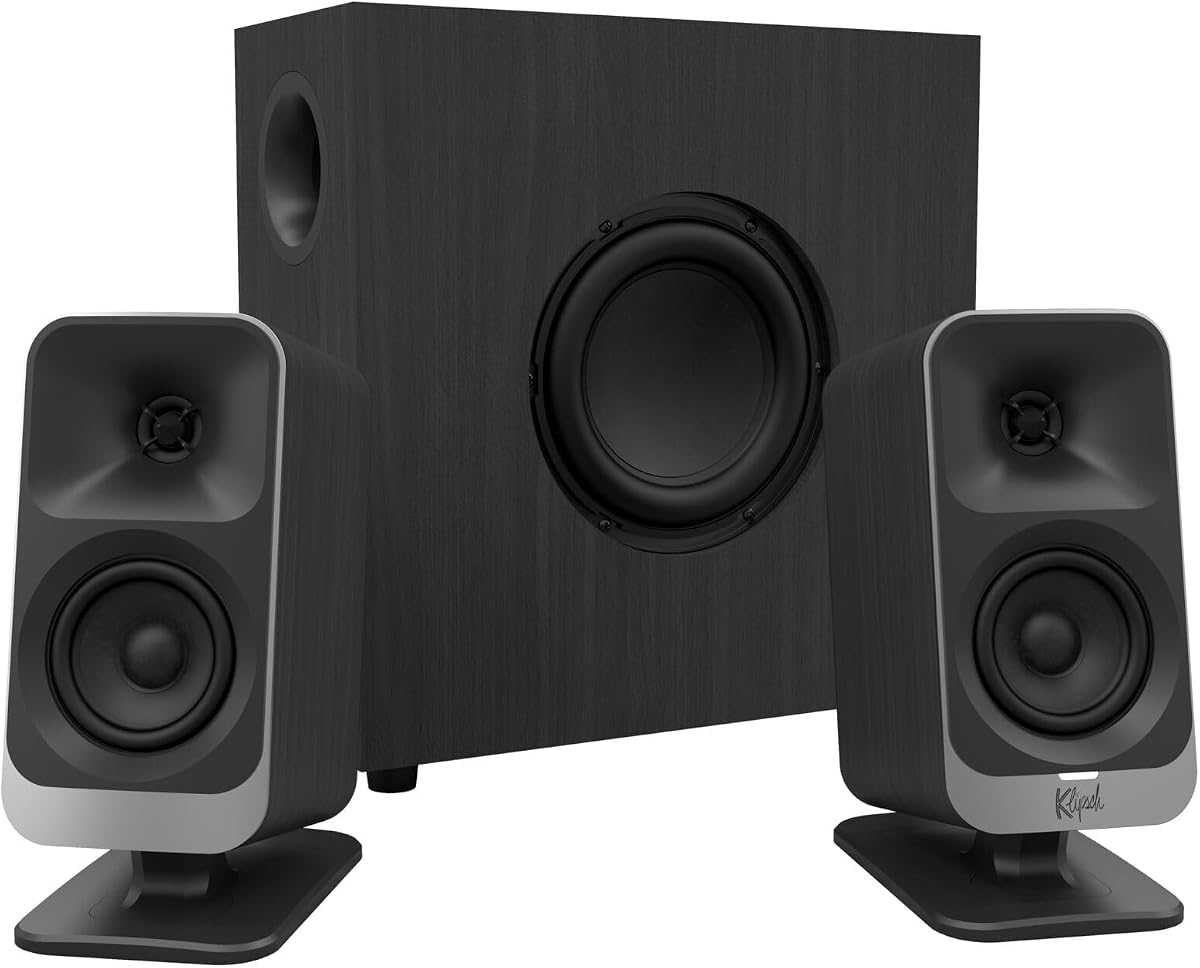
Klipsch ProMedia Lumina 2.1 Computer Gaming System with Subwoofer and RGB Lighting Effects Built-in
4.2Editor score
USB-C, AUX, Bluetooth 5.3
Tiltable satellite stands
Low-profile subwoofer
App-controlled RGB lighting
Explore the best 2.1 Channel Desktop Speakers, comparing sound quality, power, connectivity, bass, controls, and setup for work, gaming, and movies at home.
A 2.1 channel desktop speaker system combines two satellite speakers with a dedicated subwoofer, making it a practical way to add fuller sound to a computer, gaming setup, or compact entertainment area. The best systems balance clear vocals, impactful low frequencies, useful controls, and connections that suit the devices you already use.
This guide compares ten 2.1 channel desktop speaker systems across important considerations such as driver design, power, bass response, connectivity, controls, size, and device compatibility. The list includes compact USB-powered models, conventional multimedia systems, Bluetooth-equipped speakers, and feature-rich premium options for listeners who want more refinement and flexibility.
Each recommendation reflects the supplied specifications, features, customer ratings, and product positioning rather than personal testing. The reviews show which systems stand out for different needs, from efficient everyday listening to powerful gaming, music, movies, and mixed-device use. Prices and availability can change, so confirm current details before purchasing.
4.2Editor score

4.6Editor score
4.4Editor score
The comparison below highlights the major hardware, connectivity, and control differences among all ten systems, helping you identify the model that best matches your room, devices, and listening priorities.


The Klipsch ProMedia 2.1 THX Certified Computer Speaker System is a compelling choice for listeners who want a recognizable hi-fi approach at the desktop. It earns a 4.5 customer rating, and its defining characteristics are efficient horn-loaded satellites, a solid side-firing subwoofer, and a claimed peak output of 200 watts. The result is designed to deliver clarity and impactful low-end without requiring a large floor-standing system.
We may earn a commission when you buy through this link, at no additional cost to you.
Klipsch Micro Tractrix horn technology is the system's most technically distinctive feature. The efficient horn approach is intended to control dispersion and direct more sound toward the listener, helping the two-way satellite speakers preserve detail and impact. Each satellite combines a three-inch midrange driver with its horn-loaded high-frequency section, while the ported six-and-a-half-inch subwoofer handles the low frequencies with its side-firing orientation.
The trade-offs are relatively minor for many buyers but worth understanding. This is an analog system with a convenient 3.5-millimeter input rather than a wireless model, and its design emphasizes performance rather than RGB lighting or app-based customization. The maximum-output figure is also a peak rating, so sustained everyday listening will involve more moderate levels. Even so, the separate subwoofer gain and main volume control make it easy to tailor the balance to different source material and room conditions.
This system is well suited to music listeners, movie viewers, and PC gamers who want more presence and bass than basic computer speakers can provide. It also works well with a television, console, portable music player, or any other device that can feed it a 3.5-millimeter connection. For shoppers who prioritize coherent sound, flexible level control, and established 2.1 performance, the ProMedia 2.1 THX remains an excellent all-around recommendation.
The Micro Tractrix horns are designed to improve efficiency and control dispersion, sending sound toward the listening area. That makes the satellites well suited to close-range desktop listening, where focused detail can help music, dialogue, and game effects feel more immediate.
A 6.5-inch ported subwoofer supplies the low end, while a dedicated gain control on the control pod lets you tune bass relative to the satellites. This is useful for desks in rooms with different acoustics or for balancing music with games and movies.
We may earn a commission when you buy through this link, at no additional cost to you.
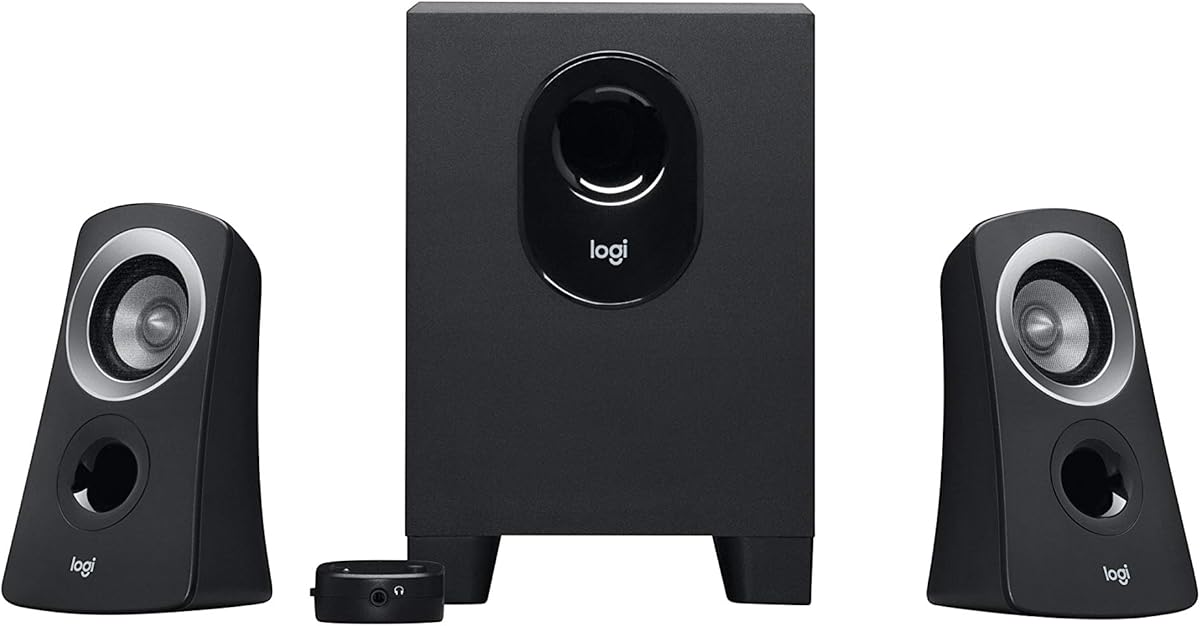
The Logitech Z313 2.1 Multimedia Speaker System with Subwoofer is a straightforward desktop audio solution for people who want a proper subwoofer without a complex feature set. Its 4.4 rating reflects a generally favorable customer reception, and the supplied specifications emphasize a 25-watt RMS output, compact subwoofer, and convenient control pod.
We may earn a commission when you buy through this link, at no additional cost to you.
It occupies a practical middle ground between tiny all-in-one computer speakers and larger entertainment systems. The separate subwoofer adds dedicated low-frequency output, while the satellite speakers handle the main stereo presentation. A wired control pod provides an accessible place to adjust the overall level and control the system without reaching behind the subwoofer or speakers each time.
The main limitation is that the Z313 offers fewer ways to connect than several newer competitors. Its focus is conventional multimedia use rather than Bluetooth streaming, USB-C digital audio, or extensive app-based customization. Its 25-watt RMS rating also means it is best suited to a desktop, small office, or nearby listening area rather than a large room filled with demanding output.
Choose the Z313 if you want an uncomplicated 2.1 system, work primarily with a desktop computer or laptop, and prefer a control pod and compact subwoofer over wireless flexibility. It is a sensible selection for music, casual gaming, videos, and everyday productivity, especially for anyone moving beyond basic speakers without needing an expansive connection list.
The compact subwoofer makes the system easier to place beneath or beside a desk than a large entertainment cabinet speaker. Combined with separate satellites, it still delivers the low-frequency separation that a single compact speaker enclosure often cannot.
The included control pod places frequently used volume and power functions within reach. That convenience matters in a desk setup, especially when the subwoofer is positioned behind furniture or against a wall.
We may earn a commission when you buy through this link, at no additional cost to you.
The Logitech Z623 400 Watt Home 2.1 Speaker System is the strongest all-around recommendation in this group, supported by a 4.6 customer rating. It combines two 35-watt satellites with a 130-watt subwoofer and a stated maximum output of 400 watts peak, or 200 watts RMS. More importantly, those figures accompany a THX-certified design intended for music, movies, and games.
We may earn a commission when you buy through this link, at no additional cost to you.
Its separate subwoofer provides the low-end scale needed for effects-heavy games and action films, while the satellite pair handles stereo detail. The system can accept up to three audio devices through RCA and 3.5-millimeter connections, making it easy to move between a computer, game console, television, disc player, smartphone, tablet, or music player. Compatibility is broad because it works with any source featuring a headphone jack or RCA input.
The main compromise is footprint and connectivity. The subwoofer measures 11.2 by 12 by 10.5 inches, so it demands more space than the most compact systems, and the absence of Bluetooth or USB audio makes it more dependent on wired connections. The 400-watt figure also describes peak rather than continuous output, while the more meaningful continuous rating is 200 watts RMS.
The Z623 is ideal for a home office that doubles as an entertainment center, a larger desk, a television setup, or a gaming station. It gives buyers a recognizable THX-certified package, multiple source options, and the highest rating among the ten products. For most listeners seeking a powerful, flexible 2.1 setup, it is the easiest recommendation to defend.
The THX certification makes the Z623 especially suitable for movies and games where dialogue, effects, and bass need to work together. The system is presented as delivering immersive studio-quality audio rather than simple background desktop sound.
RCA and 3.5-millimeter inputs allow multiple devices to remain connected. That is particularly useful for a desktop computer and game console, since you can switch sources without unplugging the entire speaker system every time.
We may earn a commission when you buy through this link, at no additional cost to you.
The Creative Pebble X Plus is built for users who want their desktop audio to contribute to the appearance of the workspace as much as the sound. It carries a 4.2 rating and combines 2.75-inch satellite drivers, a compact subwoofer, RGB lighting, and a connection list that includes USB, Bluetooth 5.3, and universal 3.5-millimeter AUX input.
We may earn a commission when you buy through this link, at no additional cost to you.
Its standard output is rated at 15 watts RMS and 30 watts peak. Creative also provides an amplified mode that can raise the system to 30 watts RMS and 60 watts peak when it is connected to a 30-watt or higher USB Power Delivery adapter. This option gives the system additional headroom without changing its basic desktop-oriented design. The lighting offers six presets and a spectrum of up to 16.8 million color combinations.
The extra features come with trade-offs. A suitable USB PD adapter is not included for the highest amplification, and users who prefer a restrained workspace may not want illuminated speakers. At 4.2, its customer rating is also lower than the top-rated Logitech models, although that number still indicates generally favorable reception. USB-C digital audio can be convenient, but compatibility depends on the source and required power arrangement.
The Pebble X Plus is a good match for a modern gaming desk, streaming setup, or productivity station where USB-C, Bluetooth, and occasional AUX use are all desirable. It is especially attractive when wired controls, RGB effects, and clear satellite placement matter. Choose it for flexibility and visual appeal rather than traditional hi-fi styling.
USB provides digital audio, Bluetooth 5.3 supports wireless streaming, and the universal AUX input accommodates analog sources. The dual communication ports for a headset and microphone add further utility for calls and gaming.
Six RGB presets and extensive color customization make the system visually engaging. The spherical, matte-black cabinets also use a relatively space-conscious shape that suits compact desktop arrangements.
We may earn a commission when you buy through this link, at no additional cost to you.
The Bluedee 2.1 PC Speakers with Subwoofer offer a modern, flexible approach to desktop audio. The system has a 4.4 rating and an advertised 80-watt peak output. Its most notable strengths are the broad selection of wired and wireless connections, built-in DSP tuning, RGB lighting, and a single control knob that combines several everyday functions.
We may earn a commission when you buy through this link, at no additional cost to you.
Bluetooth 5.4 allows the system to be used wirelessly, while USB, USB-C, and 3.5-millimeter AUX connections cover common desktop sources. The DSP tuning is designed to reduce distortion and harsh high frequencies, producing a more balanced presentation for work, movies, music, and gaming. A dedicated bass unit keeps low frequencies separate from the satellites, helping them remain clearer than they might in a small all-in-one enclosure.
Its all-in-one knob can handle volume, playback, lighting effects, and mode changes, which reduces dependence on software or rear connections. The trade-off is that the specifications do not mention a specific THX certification, detailed driver dimensions, or a separate subwoofer gain control. The system's stated 80-watt peak figure also should not be confused with continuous RMS output.
This is a practical recommendation for a hybrid desk where a computer, phone, or other source may alternate between wired and wireless playback. It suits users who value convenience, modern styling, and simple controls more than a traditional hi-fi control layout. The broad connectivity makes it particularly adaptable for work-from-home use, casual gaming, and everyday media.
The built-in signal processing is intended to smooth the overall output and reduce harshness. It is especially relevant in a shared work environment where prolonged clarity and reduced listening fatigue are more important than maximum volume.
Combining volume, playback, lighting, and mode controls into one knob simplifies daily operation. It is particularly helpful for users who do not want to open computer software for routine speaker adjustments.
We may earn a commission when you buy through this link, at no additional cost to you.
The Cyber Acoustics CA-3090 is a straightforward entry-level 2.1 system for a computer, small office, or secondary listening location. It has a 3.9 customer rating, with 18 watts of peak power and 9 watts RMS. The set includes two satellite speakers with two-inch drivers and a ported four-inch side-firing polycarbonate subwoofer.
We may earn a commission when you buy through this link, at no additional cost to you.
A control pod handles volume and power, while a separate knob on the subwoofer adjusts bass. This separation gives listeners a useful degree of tonal control without adding complexity. The system includes its AC power adapter and user guide, and it carries a one-year manufacturer warranty, which makes it a conventional powered desktop solution rather than one that relies on USB power from the computer.
The main limitation is output. Compared with the larger systems in this roundup, its 18-watt peak rating is modest, and its 3.9 rating is the lowest among the ten products. It is therefore best viewed as an approachable way to add a dedicated subwoofer to a modest workspace, not as a choice for filling a large room or delivering high-impact entertainment audio.
Choose the CA-3090 when your priority is a straightforward subwoofer-equipped system, accessible controls, and a compact footprint. It is suitable for podcasts, office audio, casual games, music, and videos. Users seeking greater power, wireless connectivity, or a more advanced feature set should consider a more capable alternative.
A dedicated bass control on the subwoofer allows the low end to be adjusted independently of the main volume. That is useful when switching between voice-heavy content and music or games with stronger bass effects.
The two-inch satellites and four-inch subwoofer keep the system physically manageable, while the modest power rating aligns with close-range desktop listening. It is better suited to a compact office than a large entertainment room.
We may earn a commission when you buy through this link, at no additional cost to you.
The Creative Pebble Plus is a space-conscious 2.1 system built around USB power and a dedicated subwoofer. It has a 4.3 rating, two elevated two-inch midrange drivers, and a standalone four-inch down-firing ported subwoofer. Its design specifically aims to improve the soundstage at the listening position while avoiding the need for a wall outlet.
We may earn a commission when you buy through this link, at no additional cost to you.
Both satellites angle their drivers upward at 45 degrees, directing sound toward a person seated at a desk. The down-firing subwoofer is designed to deliver bass across the floor, and the combined system can reach up to 8 watts RMS when High Gain Mode is enabled with a 5-volt, 2-amp USB adapter. Volume controls are conveniently located on the front of the speakers.
Because the system is powered entirely by USB and connected to audio through a universal 3.5-millimeter AUX cable, it offers a simpler connection model than wireless or USB-C digital systems. The High Gain Mode requires an adapter that is not included, and the supplied facts do not establish whether the system supports Bluetooth or direct USB audio. Its modest output is intended for desktop-scale listening.
The Pebble Plus is best for laptop and PC users who want more bass than compact all-in-one speakers can provide without adding a large powered subwoofer. It is also a good fit for shared workspaces and small desks where cable simplicity, front-facing controls, and compact dimensions matter most.
The 45-degree elevation helps orient each satellite toward the seated user. This is a useful design choice for nearfield listening because it places the midrange output more directly in the listener's line of sight.
Running the system from USB power removes the need for a nearby wall outlet or power strip. The included AUX connection handles audio, while the subwoofer adds low-frequency output that the small satellites could not reproduce alone.
We may earn a commission when you buy through this link, at no additional cost to you.
The Cyber Acoustics CA-3610 offers more output and a larger subwoofer than the CA-3090 while retaining familiar multimedia-speaker strengths. It has a 4.2 rating and delivers a claimed 62 watts peak and 30 watts RMS. Each angled satellite uses dual two-inch titanium drivers, while the subwoofer uses a five-and-a-quarter-inch down-firing driver with a tuned port.
We may earn a commission when you buy through this link, at no additional cost to you.
That driver arrangement is intended to combine crisp high frequencies, warm midrange, and strong low-end output. The subwoofer's larger size and ported construction make it well suited to music, movies, and games, while the satellites' angled cabinets help direct sound toward the listener. A control pod allows independent adjustment of volume and bass, giving the listener useful tonal flexibility.
Connectivity is conventional but versatile. The 3.5-millimeter AUX input works with PCs, Macs, laptops, tablets, smartphones, and game systems including PlayStation, Xbox, and Nintendo Switch. A headphone jack supports private listening, although the supplied facts do not confirm a microphone port. The system lacks Bluetooth and other wireless options, and its AC power adapter adds a cable to manage.
This is a good selection for a home office or entertainment desk that needs more bass and flexibility than a basic computer-speaker set. It also suits console players using a 3.5-millimeter connection. Buyers who prioritize wireless convenience should look elsewhere, but those who want a dedicated subwoofer, headphone output, and adjustable bass will find a well-balanced package.
The 5.25-inch down-firing subwoofer and tuned port provide more low-frequency scale than smaller 2.1 systems. It is a meaningful upgrade for effects, action sequences, and music playback in a nearby room.
Independent volume and bass controls help accommodate different source material, while the headphone jack provides a private listening option. The satellites can continue operating while a listener uses headphones.
We may earn a commission when you buy through this link, at no additional cost to you.
The Logitech Z407 blends a traditional 2.1 layout with modern wireless conveniences, earning a 4.3 rating. It combines 80 watts peak and 40 watts RMS of output, a 20-watt digitally processed bass section, and a ported down-firing subwoofer. The satellites can be placed vertically or horizontally, making the system easier to integrate into different desk layouts.
We may earn a commission when you buy through this link, at no additional cost to you.
Its standout control is a wireless dial with a stated 30-meter line-of-sight range. The dial can control volume and bass and can be tapped to play or pause, reducing the need to reach the speakers. Digital signal processing is used to produce deep, clear bass, while the separate subwoofer adds low-frequency impact to music, movies, and games.
The system supports up to three connected sources through Bluetooth, micro USB, and 3.5-millimeter input. This flexibility is a major advantage over analog-only models, although the micro USB connection is less contemporary than USB-C. The specifications do not mention THX certification, so buyers seeking a specific home-theater standard should examine the Logitech Z623 instead.
The Z407 is ideal for a desk where convenience and multiple source types matter. It is particularly useful for someone who alternates between a computer, phone, and another 3.5-millimeter device, or who wants to control playback from across the room. Its flexible satellite orientation and wireless dial make it one of the more user-friendly systems in the roundup.
The wireless dial supports volume, bass, and playback functions over a 30-meter line-of-sight range. It reduces desk clutter and makes the system easier to use when the listener is not directly beside the satellites.
The ported, down-firing subwoofer is designed to add strong low-end output while remaining practical for a home or office setup. The satellites can be oriented horizontally or vertically to suit available desk space.
We may earn a commission when you buy through this link, at no additional cost to you.
The Klipsch ProMedia Lumina updates Klipsch's long-running desktop speaker concept for modern workstations. It carries a 4.2 rating and is designed for gamers, content creators, music listeners, and movie fans. Its standout features include a completely redesigned cabinet, tiltable satellite stands, a low-profile subwoofer, RGB lighting, USB-C, AUX, and Bluetooth 5.3 connectivity, and control through the Klipsch Control desktop app.
We may earn a commission when you buy through this link, at no additional cost to you.
The system is built around the idea of integrating audio into a polished workstation rather than simply adding boxy satellite speakers. Cable management helps keep the installation tidy, and the subwoofer is intended to deliver low-end punch while occupying minimal floor space. An adjustable gain knob gives the user direct control over the relationship between bass and the satellites.
The app expands the customization options beyond the physical controls. It provides access to equalization, lighting settings, a night mode, and a music react mode, with three color-changing options for the RGB effects. The trade-off is that some adjustments depend on software, and the supplied information does not provide a specific wattage or RMS rating, making direct output comparisons with the Logitech systems impossible.
The Lumina is the premium recommendation for a buyer who wants a feature-rich, aesthetically integrated desktop system. It is a particularly good fit for a modern gaming or creator desk where USB-C, wireless Bluetooth, RGB lighting, and a tidy cable layout all matter. If those refinements are not priorities, the Z623 offers a simpler and more powerful THX-certified path.
Tiltable stands let the satellites face the listening position, while the redesigned cabinets and low-profile subwoofer reduce the visual bulk associated with traditional 2.1 systems. Cable management further supports a cleaner workstation.
The Klipsch Control app brings equalization, lighting, night mode, and music react mode into a unified interface. This makes the system well suited to users who enjoy tailoring their setup and switching its appearance to match different activities.
We may earn a commission when you buy through this link, at no additional cost to you.
The right desktop 2.1 system depends on room size, source devices, preferred controls, and the importance of bass, wireless convenience, and visual design. Reviewing these factors before shopping can prevent an expensive mismatch between output, connectivity, and available desk space.
Output power is easiest to understand when peak and RMS ratings are kept separate. Peak power describes the maximum short-term level, while RMS gives a better indication of continuous performance. The Logitech Z623 states 400 watts peak and 200 watts RMS, the Cyber Acoustics CA-3610 lists 62 watts peak and 30 watts RMS, and the Creative Pebble X Plus provides 15 watts RMS under standard power. Match the system to the distance between your desk and listening position, remembering that a compact nearfield system can sound disproportionately powerful at close range.
Choose output according to the space and intended use rather than the largest headline number. A compact office or laptop desk needs less power than a large room, while a shared entertainment area benefits from a higher-capable subwoofer and stronger satellite output.
The subwoofer is responsible for the lowest frequencies, and its size often signals how much physical bass the system can produce. The Logitech Z407 uses a 20-watt digitally processed bass section, the Creative systems use compact dedicated woofers, and the Klipsch ProMedia 2.1 THX has a ported six-and-a-half-inch side-firing subwoofer. Separate bass or gain controls, available on several systems, also help balance the low end for different music and media.
For deeper impact, prioritize a larger driver and higher subwoofer output. For a small desk, a compact four-inch or five-inch model may be more practical. Adjustable bass is valuable regardless of size because room placement and source content vary.
The most broadly compatible systems support more than one type of source. The Logitech Z623 accepts RCA and 3.5-millimeter inputs, the Creative Pebble X Plus combines USB, Bluetooth 5.3, and AUX, and the Logitech Z407 supports Bluetooth, micro USB, and 3.5-millimeter audio. The Klipsch ProMedia Lumina offers USB-C, AUX, and Bluetooth 5.3. If you move regularly between a computer, phone, console, and television, multiple inputs can reduce cable swapping.
Prioritize the connection type your primary source already supports. Bluetooth is convenient but adds wireless dependence, while analog AUX is broadly understood. USB-C digital audio can be neat for a modern computer, provided power and source compatibility meet the manufacturer's requirements.
Controls should be easy to reach and cover the functions you use most. The Creative Pebble Plus places volume controls on the front of the satellites, the Cyber Acoustics CA-3090 separates power and volume onto a control pod, and the Logitech Z407 extends operation to a wireless dial with a 30-meter line-of-sight range. App-based control on the Klipsch Lumina offers deeper equalization and lighting adjustments.
Choose physical controls for dependable everyday volume changes, or software controls for a more customizable experience. It is useful to consider what should remain adjustable without opening a menu, especially during games and video calls.
The satellite speakers determine how directly sound reaches your ears. The Creative Pebble Plus raises its two-inch drivers by 45 degrees, while the Cyber Acoustics CA-3610 uses an angled design and the Klipsch Lumina offers tiltable stands. By contrast, the Logitech Z407 satellites can be placed vertically or horizontally. Look for a design that fits the available width, avoids monitor or microphone interference, and directs sound toward the listening position.
Also consider the subwoofer's location. A down-firing model may sit more discreetly beneath a desk, while a side-firing design may be easier to position along a wall. Leave enough room for cables and ventilation, and avoid crowding the subwoofer against solid furniture.
Some systems use an included AC adapter, while USB-powered models draw power from a computer or adapter. The Creative Pebble Plus is powered entirely by USB, and the Pebble X Plus can use a 30-watt or higher USB PD adapter for its highest amplification, though that adapter is not included. Conventional multimedia systems such as the Logitech Z313 and Cyber Acoustics CA-3610 include their own power supplies.
Match the power arrangement to your desk. USB power can reduce wall-cable clutter, but a higher-power adapter may be necessary. If you value a tidy installation, compare cable-management features as well as the number of cables required for audio and power.
Features beyond sound can materially affect daily satisfaction. The Creative Pebble X Plus offers customizable RGB lighting and communication ports, the Logitech Z407 includes a wireless control dial, and the Klipsch Lumina combines app-controlled lighting with night and music-react modes. Some systems prioritize traditional black satellite speakers and physical controls instead. The best choice is the one whose features you will genuinely use rather than those that merely look impressive in a product photograph.
Consider your room, monitor arrangement, and existing decor. A feature-rich RGB system can look striking in a gaming setup, while a more understated design may integrate more easily into an office. Wireless and app features also add convenience, but they should complement the core requirement of clear, enjoyable sound.
Check whether the speaker system supports the exact ports available on your computer, television, game console, or mobile device. The Logitech Z623 works with devices featuring 3.5-millimeter or RCA inputs, while the Cyber Acoustics CA-3610 is also positioned for systems with 3.5-millimeter outputs. Certification can provide another useful distinction: the Klipsch ProMedia 2.1 THX and Logitech Z623 both carry THX certification, which may matter for home entertainment.
Avoid assuming that a USB port automatically supports digital audio, because some USB-powered speakers use USB only for power. Confirm the stated input method, included cables, and power requirements before buying. This simple check prevents the most common connection frustration.
Begin by positioning the satellite speakers near ear level and to the left and right of the monitor. Angle the drivers toward your main listening position, place the subwoofer along a nearby wall or under the desk, and leave adequate space around it. Connect the correct audio and power cables before switching the system on, and confirm that the input selected by the speaker matches the source device.
Start with the source volume low or near the manufacturer's recommended range, then raise the system volume gradually. Use separate bass and subwoofer gain controls to establish a balanced starting point for music, movies, and games. Make smaller adjustments over time, because the most noticeable acoustic problems often come from excessive bass rather than a lack of output.
For daily care, dust the cabinets and control surfaces with a soft, dry cloth, and keep liquids away from the subwoofer and power connections. Do not push the volume to maximum or place the satellites inside a tightly enclosed cabinet. Check cables occasionally for looseness or damage, and consult the included user guide before changing connections or activating higher-power modes.
A 2.0 system uses two full-range satellite speakers, while a 2.1 system adds a dedicated subwoofer for the lowest frequencies. The subwoofer can produce more noticeable bass impact and often lets the satellites concentrate on vocals, instruments, dialogue, and higher-frequency effects. The extra unit also requires additional space and power.
Yes, especially when you want stronger effects and bass than ordinary compact computer speakers provide. Systems with multiple inputs, such as the Logitech Z623, are convenient when both a PC and console are in use. Wireless controls and communication ports can also improve the experience in a gaming setup.
It depends on your priority. A compact model such as the Creative Pebble Plus can add a subwoofer while remaining relatively space-conscious, while the Logitech Z313 also emphasizes a compact subwoofer. If desk space is extremely limited, check the full dimensions of both the satellites and subwoofer before ordering.
Bluetooth offers convenience and reduces the need for an audio cable, while wired connections can be more direct and predictable. The Logitech Z407 and Klipsch ProMedia Lumina include wireless options, but they also provide wired inputs. Choose based on the devices you use and whether you value flexibility or a consistently simple connection.
It changes the relative level of low-frequency output without requiring you to alter the main system volume. That allows you to reduce bass for voice-heavy content or increase it for music and action films. It is also helpful in rooms where placement or nearby furniture naturally emphasizes or reduces low frequencies.
Use RMS as the more useful guide for sustained output and use peak power only as context for maximum short-term levels. The Logitech Z623 states both 400 watts peak and 200 watts RMS, making the distinction easy to see. Room size, driver design, and speaker quality also influence how powerful a system feels.
Most models can work with both when the source has a compatible 3.5-millimeter or other supported output. The Creative Pebble Plus uses USB power and a universal AUX cable, while the Logitech Z407 offers Bluetooth, micro USB, and 3.5-millimeter inputs. Check port types and included accessories before making the final connection.
Place it near a wall or under the desk without blocking its port or driver, then start with the bass at a moderate level. Down-firing models are commonly placed on the floor, while side-firing models benefit from open space beside or behind the satellites. Small position changes can make a noticeable difference in perceived bass impact.
The Logitech Z623 is the strongest all-around choice, combining the highest customer rating with THX certification, multiple wired inputs, and substantial subwoofer output. The Klipsch ProMedia Lumina stands out as the premium option for modern connectivity, app-based customization, RGB lighting, and a polished workstation design. For a simpler purchase, the Logitech Z313 provides a compact subwoofer, a convenient control pod, and an approachable 25-watt RMS configuration.
Prioritize the features that will shape daily use: enough output for your room, a subwoofer that fits your available space, connections compatible with every major source, and controls you can operate easily. Listeners seeking traditional power and home-entertainment credentials may prioritize the Z623, while modern desks may favor the Lumina or Creative Pebble X Plus. Wireless convenience and clean USB-powered operation point toward the Logitech Z407 and Creative Pebble Plus.
Product specifications, availability, and prices can change over time, so check the current listing and included components before purchasing. Also verify the power adapter, cables, ports, and room requirements rather than relying only on the headline output figure. With those checks completed, the right 2.1 channel system can provide more clarity, bass, convenience, and immersion than a basic pair of computer speakers.