
Two-Pack 1-to-3 ARGB Splitters
5.0Editor score
Two one-to-three splitters
Eight male pins included
Pure copper cores
Soft PVC cable jackets
Arrow-marked connections
Compare 10 ARGB Splitter Cables for fan and LED expansion, evaluating connector layouts, branching, cable length, compatibility, materials, and installation.
ARGB splitter cables make it easier to connect multiple addressable RGB fans, LED strips, and compatible CPU coolers through a single 5V 3-pin motherboard header. A useful splitter should provide the required branching, maintain a reliable connection, offer enough cable length for neat routing, and install without soldering or specialist tools.
We compared all ten products by connector configuration, supported devices, branching ratio, included accessories, cable length, installation method, material construction, and stated signal or durability features. The list covers one-to-one extensions, compact one-to-two splitters, one-to-three options, and a higher-capacity one-to-five solution.
Each review highlights the product's most useful characteristics and important limitations, helping you choose according to your fan count, lighting layout, case dimensions, and motherboard connection. Product listings and availability can change over time, so confirm the current specifications and price directly before purchasing.
5.0Editor score

5.0Editor score

4.9Editor score
This side-by-side comparison covers all ten ARGB splitter and extension cables, focusing on branching capacity, connector type, cable length, package quantity, compatibility, and installation features.


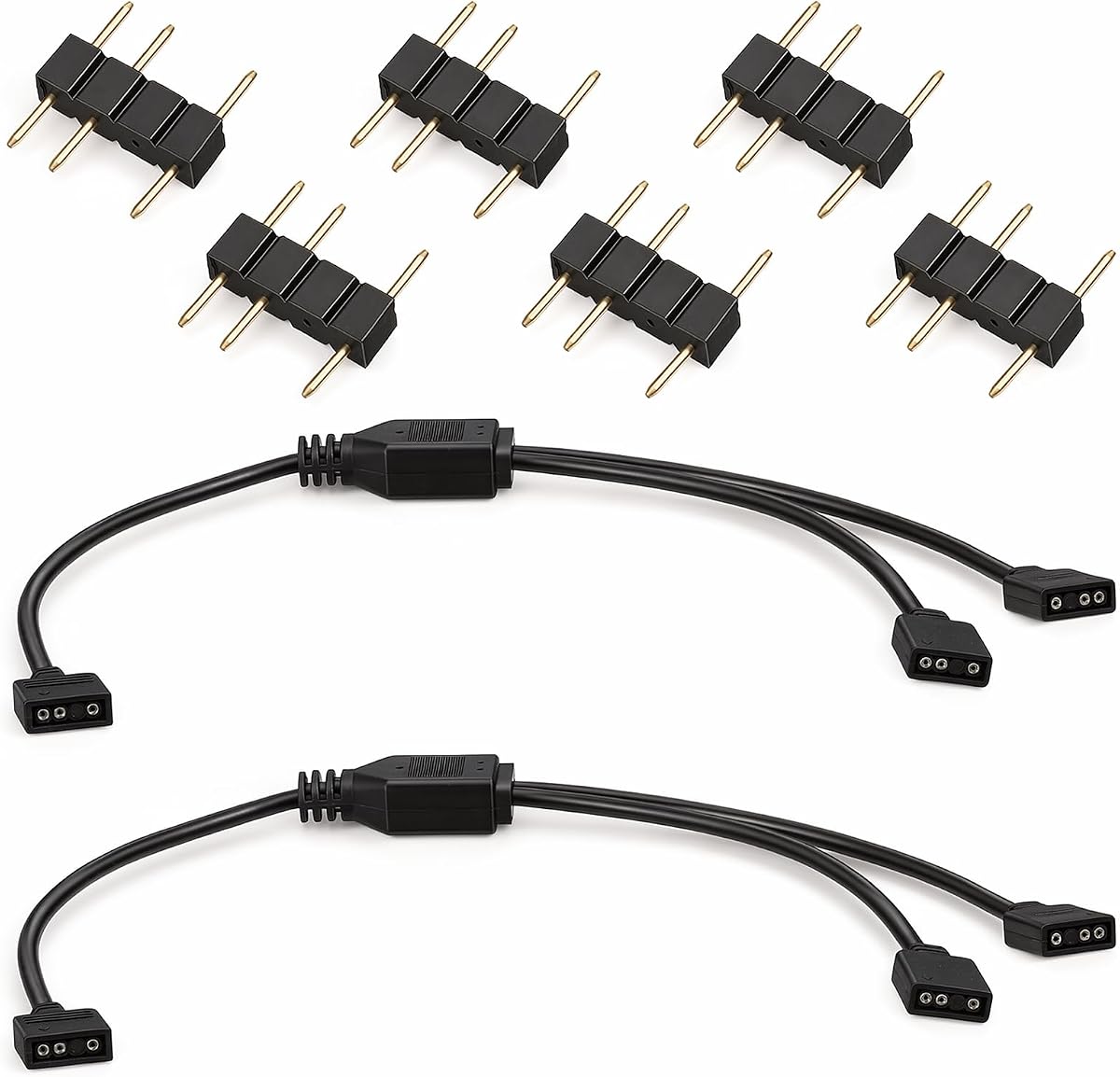

This two-pack of 1-to-3 ARGB splitter cables provides a straightforward way to connect three addressable RGB devices through one motherboard header. It carries a 4.6 customer rating and is designed for 5V 3-pin addressable LED strips, RGB fans, and other compatible components. Each cable measures 11.8 inches, making it suitable for common internal PC layouts.
We may earn a commission when you buy through this link, at no additional cost to you.
The package includes two splitter cables and eight 3-pin male connectors, giving you useful flexibility when one cable is not enough for the entire build. The one-to-three configuration is particularly useful for connecting a group of case fans or combining fans and light strips around one header. Installation requires no soldering or special tools; align the arrow markings and connect the cable to the appropriate 5V ARGB header.
Its primary limitation is incompatibility with 4-pin 12V RGB headers. Although the title and product description clearly identify the cable as a 5V 3-pin addressable RGB accessory, buyers with older or differently configured systems need to check their motherboard specifications carefully. The 4.6 rating also suggests it has not achieved the same level of customer feedback as several higher-rated alternatives.
This product is best for builders who want moderate expansion and value the convenience of receiving two complete splitter assemblies. Choose it when your system uses a standard 5V 3-pin ARGB header and your cable routing can stay within an 11.8-inch reach. It is a practical all-around choice for compatible fans and LED series.
A one-to-three layout can reduce dependence on motherboard headers while keeping several compatible devices on the same addressable RGB connection. The included male connectors help complete both the header and device-side connections.
Arrow markings indicate the intended orientation, reducing the chance of incorrect installation. No soldering is required, making this suitable for builders assembling or expanding a PC lighting layout.
We may earn a commission when you buy through this link, at no additional cost to you.
These white 1-to-2 ARGB splitter cables offer a neat expansion option for compatible PC lighting and fan arrangements. The two-pack has a 4.7 rating, with each 11.8-inch cable designed to connect addressable RGB devices through a motherboard's 5V 3-pin header. Their white appearance is especially relevant for builds with light-colored or visible internal components.
We may earn a commission when you buy through this link, at no additional cost to you.
The soft PVC jackets are described as firmly wrapped around new copper wiring, combining a flexible cable profile with material intended for reliable operation and extended service life. Two splitter cables and six 3-pin male connectors are included. The one-to-two branching is less expansive than the one-to-three and one-to-five options, but it can be well matched to a pair of fans or a small lighting group.
The central trade-off is capacity. If your planned installation includes several devices, two separate one-to-two splitters may be less convenient than a single one-to-three model. The cable also cannot be used with a 4-pin 12V RGB header, so it is limited to 5V addressable RGB systems. Confirming your motherboard header before ordering is essential.
This is a strong fit for a white-themed build or anyone who values subtle cable presentation over maximum branch count. It provides an easy way to connect two compatible lighting devices without soldering, while the two-pack offers some routing flexibility for different areas of the chassis.
The white cable housing blends more naturally with pale components, white fans, and visible desk-case interiors. It adds functionality without drawing as much attention to the wiring as a visually contrasting option might.
A one-to-two layout is convenient for two fans, a short strip group, or one fan paired with one lighting accessory. Two included cables make it easier to create separate synchronized groups.
We may earn a commission when you buy through this link, at no additional cost to you.
The ZCZQC 1-to-2 ARGB extension cable is a compact solution for connecting two compatible devices through one 5V 3-pin header. It holds a 4.7 rating and measures 33.5 centimeters, or 13.19 inches, offering slightly more reach than many of the 11.8-inch competitors. Its stated applications include computer chassis equipment, CPU coolers, and 5V ARGB fans.
We may earn a commission when you buy through this link, at no additional cost to you.
A notable safety-oriented feature is the insulating protective cap placed on each needle interface. The product description says this helps protect the pins from bending and deformation and reduces the chance that an unused energized pin will contact a metal chassis surface. That focus on unused connections is useful in builds where not every branch will be occupied.
Compared with multi-pack options, the package contains only one 1-to-2 cable. It therefore provides less immediate flexibility for creating separate lighting zones, although the slightly longer lead may compensate when the motherboard header and devices are not adjacent. The one-to-two design also offers fewer branches than one-to-three alternatives.
This cable is a sensible option for a basic compatible PC where only one additional branch is needed. Choose it when its longer length suits your chassis better than a shorter model, and when the protective connector design is important to your installation plan. Verify that your components use the standard 5V 3-pin ARGB format.
At 13.19 inches, the cable provides a little more distance than the common 11.8-inch design. That can make routing between a motherboard header and a distant fan or CPU cooler more manageable.
Insulating caps help shield exposed needle interfaces from accidental contact and deformation. This is particularly relevant when one of the two available branches is not connected.
We may earn a commission when you buy through this link, at no additional cost to you.
This Dushochn two-pack provides one of the highest branching capacities in the guide, allowing five compatible devices to be linked through each 5V 3-pin ARGB header. It carries a 4.6 rating and uses 50-centimeter cables, equivalent to 19.6 inches. That combination of five outputs and extra reach makes it suitable for larger lighting arrangements.
We may earn a commission when you buy through this link, at no additional cost to you.
The product is designed for addressable RGB strips, 5V PC fans, and compatible cooling hardware. Durable plastic construction and genuine new copper cores form the basis of the cable, while the installation process only requires plugging the three-pin connectors into compatible components. The package includes two splitter cables and twelve male connectors for a generous set of connection pieces.
Its greater size and branching capacity may be unnecessary for a small system, and longer cables require more careful routing inside the chassis. As with the other products, it does not support 4-pin 12V RGB headers. Its 4.6 rating is slightly below the strongest alternatives, so buyers should consider the complete specification rather than rating alone.
This is the practical choice for an elaborate build in which one header must serve several fans or strips and short leads would be inconvenient. It is less attractive for a two-fan upgrade, but its 19.6-inch length and two-pack arrangement give it clear value for expansive synchronized lighting layouts.
The one-to-five configuration can accommodate several compatible RGB fans without requiring an equal number of motherboard headers. It is well suited to builds that prioritize a synchronized group of case fans.
The 19.6-inch lead gives builders more freedom to position lighting or cooling components. Cable management remains important, but the additional reach can reduce the need for improvised extensions.
We may earn a commission when you buy through this link, at no additional cost to you.
This two-pack of 1-to-3 ARGB splitter cables combines a 5.0 customer rating with a branching layout suited to many common PC configurations. Each 11.8-inch cable connects compatible addressable RGB strips or 5V fans through a motherboard's 5V 3-pin ARGB header, making it relevant to both cooling and decorative lighting installations.
We may earn a commission when you buy through this link, at no additional cost to you.
The package contains two splitter cables and eight 3-pin male connectors. Its one-to-three design offers enough capacity for a group of three devices while avoiding the bulk of a larger one-to-five splitter. Installation is tool-free and does not require soldering. Builders are instructed to match the arrow markings when connecting the cable, providing a clear visual guide for correct orientation.
The important limitation is that it is not compatible with 4-pin 12V RGB connectors. This restriction applies to the motherboard header and should be checked before a purchase. At 11.8 inches, the cable may also be shorter than desired for a particularly large chassis, although the two-pack offers more placement options than a single cable.
This is our Editor's Choice because it balances branch capacity, package quantity, ease of installation, and a top customer rating. It is well suited to builders adding several fans or strips through one header without wanting the maximum size of a five-way splitter.
Three branches can handle a trio of RGB fans or a mixed group of strips and cooling accessories. This makes the cable a useful middle ground between basic one-to-two and larger one-to-five layouts.
Two independent splitters let you organize devices into separate groups while still synchronizing them through compatible motherboard controls. Eight male connectors support the required connection points.
We may earn a commission when you buy through this link, at no additional cost to you.
These 1-to-1 ARGB extension cables are intended for a different job from the multi-way splitters: extending the reach of an existing compatible connection. The two-pack has a 4.5 rating, and each cable measures 11.8 inches. It can link compatible addressable RGB strips or fans to a 5V 3-pin motherboard header when the original lead is too short.
We may earn a commission when you buy through this link, at no additional cost to you.
The package includes two extension cables and four 3-pin male connectors. Installation remains straightforward because the male connector plugs directly into a compatible header and the female side accepts the device connection. Arrow-to-arrow alignment is specified, and no soldering or special tools are required.
The key limitation is that this product does not divide one header into multiple outputs. If you need to connect several fans or strips and your motherboard offers only one ARGB header, a one-to-two or one-to-three splitter is the more appropriate category. This extension is most useful for improving cable reach, not expanding the number of connected devices.
Choose this option when a compatible lighting accessory or fan is installed farther from the motherboard than its supplied cable allows. It is particularly helpful for rear or upper case positions where a short factory lead cannot reach comfortably. Confirm the 5V 3-pin specification before installation.
A one-to-one extension preserves the existing connection topology while adding length. It is ideal when cable reach is the issue and multiple-device expansion is not required.
Including two cables provides more options for routing separate devices through the same general area. Four male connector pieces are also supplied to complete compatible connections.
We may earn a commission when you buy through this link, at no additional cost to you.
This 1-to-2 ARGB splitter cable is a flexible 5.0-rated option for expanding a compatible header or extending a connection to an additional device. The package includes two cables, each 30 centimeters, or approximately 11.8 inches. Its compact one-to-two design is well suited to pairing two fans or connecting a lighting group with an additional compatible accessory.
We may earn a commission when you buy through this link, at no additional cost to you.
The product description emphasizes pure copper cores for power and data transmission, supporting stable lighting effects across connected devices. Standard 3-pin connectors include an arrow indicator for polarity alignment. The female ends connect to devices, while the male connector attaches to the motherboard's 5V 3-pin ARGB header. No soldering or special tools are required.
Its two-branch capacity is the main limitation when compared with one-to-three or one-to-five models. It also cannot be used with 12V 4-pin RGB systems, despite the broad use of the term RGB in its title. The 11.8-inch length is moderate, so unusual case dimensions may require careful planning.
This product is an excellent choice when two branches are sufficient but extra reach is still desirable. The two-pack makes it easy to create more than one synchronized group, and the 5.0 rating gives it one of the strongest customer feedback records in this guide.
The cable can act as a splitter for multiple devices or as an extension when more length is needed. That versatility makes it useful in layouts where the required number of branches is modest.
Pure copper cores are intended to support efficient power delivery and stable data transfer. Consistent data transmission helps maintain synchronized colors and animation effects across connected devices.
We may earn a commission when you buy through this link, at no additional cost to you.
This three-pack is built for builders who want several independent one-to-3 ARGB splitter assemblies. It has a 4.6 customer rating and can connect addressable LED strips or ARGB fans through a single motherboard 5V 3-pin header per cable. Each splitter measures 11.8 inches, with twelve male connectors included across the package.
We may earn a commission when you buy through this link, at no additional cost to you.
The three-cable count gives considerable freedom for organizing a PC lighting layout into separate groups. One splitter might serve case fans, another could serve a CPU heat sink, and a third could serve accent strips, subject to the capabilities of the motherboard's lighting software and hardware. Installation needs no soldering or tools, and the supplied arrow markings help establish correct orientation.
As with most products in this category, the splitter is limited to 5V 3-pin addressable RGB and will not work with a 4-pin 12V RGB header. The 11.8-inch lead may be tight in larger cases or for components positioned far from the board. Buyers should consider whether three separate groups are actually needed before selecting this pack.
This product is best for a multi-zone build that needs several synchronized cable runs. Its generous accessory count and three-pack format reduce the need to buy separate matching splitters for different areas of the chassis.
Each cable can create a separate one-to-three group while retaining access to compatible motherboard controls. This is useful when fans, cooling, and accent lighting are spread throughout the case.
Twelve 3-pin male connectors accompany the three cables. The varied quantities of connectors provide useful support for finishing compatible device-side and header-side connections.
We may earn a commission when you buy through this link, at no additional cost to you.
This two-pack of 1-to-3 ARGB splitters delivers a 5.0 customer rating and a practical branching design for fans and LED strips. Each 30-centimeter cable, approximately 11.8 inches long, can distribute one compatible 5V 3-pin motherboard connection to three devices. Two independent splitters allow two separate groups of synchronized components.
We may earn a commission when you buy through this link, at no additional cost to you.
The package includes eight 3-pin male connectors. Pure copper core wires and a soft PVC outer sheath are highlighted for stable signal transmission, resistance to interference, and everyday durability. Arrow markings provide a straightforward installation cue, while the plug-and-play design eliminates the need for soldering or additional tools.
Its limitations are standard for this category: it supports only 5V 3-pin addressable RGB and cannot be connected to a 4-pin 12V RGB header. A three-way branch is also less accommodating than a five-way splitter for a large number of fans, although most standard builds can work around that limitation by grouping accessories.
This is our Best Budget selection because it combines a top rating with a two-pack, multiple connectors, and a versatile one-to-three format. It is a strong choice for adding a few synchronized fans or strips while keeping the installation simple and the overall component count manageable.
Two complete splitters give you enough hardware to form more than one device group. Eight male connectors supplement the set, reducing the need for additional connector purchases.
A soft PVC jacket supports flexible routing and protection during installation. Copper cores are intended to carry power and data reliably, helping maintain consistent color and animation across connected devices.
We may earn a commission when you buy through this link, at no additional cost to you.
This four-pack of 1-to-3 ARGB splitter cables is the most feature-focused premium option in the guide. It carries a 4.9 rating and includes four splitter cables plus sixteen male connectors. Its stated construction includes gold-plated contacts, oxygen-free copper wiring, and braided sleeves, giving it a more refined specification than the basic PVC-covered alternatives.
We may earn a commission when you buy through this link, at no additional cost to you.
The product is designed for compatible 5V 3-pin ARGB fans, strips, and CPU coolers. Gold-plated contacts and oxygen-free copper wiring are presented as supporting stable data transmission and consistent color effects, while braided sleeves help reduce tangling and electromagnetic interference. A friction-lock connection is also specified for a secure fit during cable management.
As with the other five options in the guide, it cannot be used with 4-pin 12V RGB systems. The four-cable package may also be more than a simple two-fan build needs, and claims involving synchronization depend on the connected hardware and motherboard lighting utilities. Actual feature support should therefore be confirmed for each component in the planned setup.
This is our Best Premium pick for builders who want a large, carefully accessorized set and pay particular attention to connector construction and cable organization. It is especially appropriate for complex custom PC configurations with several fans, cooling hardware, and lighting groups.
Gold-plated contacts and oxygen-free copper wiring are intended to improve connection consistency and signal quality. These materials may be appealing when several lighting groups need to operate reliably within one system.
Four cables and sixteen male pins support the creation of several separate device groups. Braided sleeves improve handling and reduce tangling during the final stages of a complex build.
We may earn a commission when you buy through this link, at no additional cost to you.
The right ARGB splitter depends primarily on your motherboard header, number of connected devices, case dimensions, and cable-management preferences. Compatibility should always be confirmed before considering branch count or extra features.
Every product in this guide is designed for a 5V 3-pin addressable RGB connection. They are not intended for 4-pin 12V RGB headers, which use a different pin arrangement and voltage. A visual resemblance between the two standards does not make them interchangeable, and forcing or improvising a connection can damage a motherboard header, lighting controller, or attached device.
Check the motherboard manual and the existing fan or strip connector before ordering. Look specifically for a 5V 3-pin ARGB header rather than a 4-pin 12V RGB header. Also confirm that the devices you intend to connect support addressable signals, since ordinary fixed-color RGB equipment may not synchronize even when its connector appears similar.
A one-to-one extension increases reach without adding outputs. A one-to-two splitter handles a pair of devices, a one-to-three splitter supports a group of three, and the one-to-five model provides the largest capacity in this guide. Choosing the smallest sufficient layout can make cable routing easier and reduce clutter inside the chassis.
Count the devices that need access to each motherboard header, then add any capacity required for future expansion. If you expect to add fans later, a one-to-three option may offer more flexibility than a one-to-two model. For extensive synchronized lighting, the one-to-five splitter is worth considering.
Most of the listed splitters measure 11.8 inches, while the ZCZQC cable reaches 13.19 inches and the Dushochn one-to-five model extends to 19.6 inches. Measure from the likely motherboard header position to the farthest fan, cooler, or LED strip rather than relying only on case dimensions. Internal drive cages, reservoirs, cable channels, and fan thickness can reduce usable routing space.
Choose a length that reaches without leaving excessive slack in the case. A little extra length can aid routing, but overly long cables may need ties or concealed pathways to prevent tangling. Remember that the listed length may describe the full cable rather than the distance from the header to each branch.
ARGB connectors use directional markings to show the intended orientation. Most products in this guide feature an arrow indicator, and several descriptions explicitly instruct users to connect arrow to arrow. Paying attention to that mark prevents incorrect insertion and helps maintain the correct order of the addressable RGB data connection.
Look for a female connector arrangement that accepts the male lead on your existing device or motherboard header. All of the listed models provide male connector pieces, but the exact quantities vary. Check the package contents before planning a large installation so that you know which connection points are covered.
Package contents range from one splitter and no separately listed male pieces to four splitters and sixteen male connectors. Multiple splitters can help you create separate lighting or cooling groups, while additional male pins provide flexibility when one accessory has a female connector and the motherboard side requires another fitting.
Compare the package with your planned wiring. A two-pack is often useful for organizing fans and accent lighting separately, while a three- or four-pack may be excessive for a modest build. Conversely, a single cable is adequate when one header serves exactly one additional device.
All ten options are intended for 5V addressable RGB, but their construction varies. Several products specify copper cores, one emphasizes pure copper wiring, and the premium four-pack adds oxygen-free copper, gold-plated contacts, braided sleeves, and a friction-lock design. These features may improve handling and support consistent signal and power delivery.
Material claims should be considered alongside compatibility and layout rather than in isolation. A well-routed cable with appropriate connectors and sufficient branch capacity remains the foundation of a useful installation. Premium construction is most relevant when many devices, longer routes, or frequent cable management are expected.
Every product listed is designed for plug-and-play installation without soldering or specialist tools. The male connector fits a compatible 3-pin header, and the female connections accept compatible device leads. Arrow markings make orientation easier to identify, while several products include insulating protective caps or friction-lock mechanisms for added security.
If your existing equipment requires soldering or adapters that are not included, those requirements should be addressed separately. The best splitter is one that connects cleanly to the hardware you already own. Install with the system powered off, route the cables before securing everything, and avoid forcing a connector that does not align.
Before installation, switch off and disconnect the computer's power. Identify a 5V 3-pin ARGB header on the motherboard and verify that every fan, strip, or cooler you plan to attach uses the same addressable standard. Lay out the splitter near its intended position so the main lead can reach the header and each branch has enough space.
Connect the splitter's male plug to the motherboard header, matching the arrow marking on the connector to the corresponding indicator on the board or header. Attach the compatible female device leads to the splitter's female ports. Tighten the connectors by hand, without twisting or applying excessive force, and confirm that the arrows remain aligned.
After wiring, route the branches around fans, drive cages, and other components. Use cable ties or approved channels to prevent strain on the connectors and reduce tangling. Secure the cables before closing the case, then power on the computer and use compatible motherboard lighting utilities to confirm that the connected devices display the expected colors and effects.
ARGB splitter cables are designed for 5V 3-pin addressable RGB connections, while conventional RGB splitter cables commonly support 4-pin 12V RGB. The connectors have different shapes and pin arrangements, so they should not be interchanged. Check your motherboard specifications before purchasing either type.
No. Every splitter in this guide is intended for a 5V 3-pin ARGB motherboard header and is explicitly incompatible with 4-pin 12V RGB systems. Attempting to connect the wrong type could damage the board or lighting equipment. If your case only exposes a 4-pin header, you need a compatible 12V RGB product instead.
It depends on the model. One-to-one cables only extend a connection, one-to-two splitters add two device outputs, one-to-three models provide three outputs, and the Dushochn one-to-five splitter provides five. Count only compatible 5V ARGB devices and make sure the selected arrangement matches the available motherboard header.
No. These products use plug-in 3-pin connectors and are intended for tool-free installation. Match the arrow indicators, insert the male connector into the motherboard header, and attach compatible device cables to the female sockets. Power off the system before making any connections.
Yes, provided every device uses a compatible 5V 3-pin addressable RGB connection. The listed splitters are described for compatible ARGB fans and 5050 or 3528 addressable LED strips. Synchronized patterns and individual zone control still depend on the motherboard software and hardware capabilities.
The arrow indicates the intended orientation of the connector. Match the arrow on the cable with the arrow or marking on the motherboard header or device so that the power and data pins align correctly. Do not rotate the plug to force it into an orientation that does not fit.
That is one of the main reasons to use a splitter. A one-to-two, one-to-three, or one-to-five model can distribute one header to several compatible devices. If you need separate colors or animations for each group, your motherboard's lighting software and controller must provide suitable multi-zone control.
Keep the cables clear of fan blades, sharp edges, hot components, and moving parts. Bundle excess slack with cable ties or a suitable cable-management channel, but avoid bending the connectors sharply. Leave enough service loop to prevent strain when the case is opened and the components remain securely seated.
The 1-to-3 ARGB Splitter 2-Pack is our Editor's Choice because its three-way branching, 11.8-inch length, included connectors, and 5.0 rating suit a wide range of compatible builds. The two-pack one-to-three model is our Best Budget selection, offering the same useful branching structure with a strong customer rating and straightforward installation.
For a premium installation, the four-pack 1-to-3 option stands out with gold-plated contacts, oxygen-free copper wiring, braided sleeves, and a substantial collection of male connectors. Before choosing any model, prioritize the 5V 3-pin header requirement, calculate the number of devices, and confirm that the cable length fits your case and routing plan.
Product listings, specifications, customer ratings, and prices can change, so verify the current details and compatibility information before buying. A well-matched splitter should support your intended fan or LED arrangement without forcing incompatible connections or creating unnecessary cable clutter.