
Novation Launchpad Mini MK3
4.5Editor score
64 RGB launch pads
Ableton Live integration
Three customizable operating modes
Explore the best pad controllers for beat making, comparing pad layouts, velocity response, connectivity, controls, portability, and software for producers.
Pad controllers give beat makers a tactile way to trigger drums, samples, effects, clips, and melodic parts without relying entirely on a mouse or keyboard. A strong pad controller combines responsive surfaces, intuitive layout, reliable connectivity, and controls that suit both quick sketching and deeper studio production.
This guide compares ten options according to pad count, velocity sensitivity, lighting, control options, bank capacity, computer connectivity, wireless support, and DAW integration. It covers traditional drum-oriented units, Ableton Live specialists, portable mobile controllers, and compact hybrid keyboards.
Each review identifies the features that make a controller useful for a particular workflow while also noting practical limitations. Ratings reflect the supplied customer feedback, software and accessory details vary by model, and current prices can change at any time.
4.5Editor score

4.6Editor score

4.7Editor score
The table below compares every pad controller in the guide, emphasizing the pad layout, performance features, physical controls, and connectivity that most directly affect beat-making workflows.




The Akai Professional MPD218 is a conventional MPC-inspired USB pad controller built around 16 thick, velocity-sensitive pads. Its 4.4 rating reflects a generally favorable response to the playing surface, portable construction, and combination of drum triggering and parameter control. It is especially well suited to producers who want the familiar feel of an MPC pad rather than a grid designed primarily for launching Ableton Live clips.
We may earn a commission when you buy through this link, at no additional cost to you.
Three dedicated pad banks expand the playing surface to 48 assignable positions, giving users separate sets for drums, samples, melodic parts, or effects. The 18 fully assignable 360-degree potentiometers provide considerably more tactile control than a minimal eight-pad alternative. Those knobs can operate DAW parameters, virtual effects, and virtual instruments, while note repeat and full-level controls support both repetitive rhythm work and less quantized performance ideas.
The MPD218 relies on a computer connection rather than offering its own large display, internal sound engine, or wireless performance workflow. That makes it less convenient for completely standalone use or quick mobile ideation. Its USB design, however, keeps the setup direct and is suitable for Mac, PC, and compatible iOS applications when the separately sold Camera Connection Kit is used. The included Ableton Live Lite, Drum Synth 500, and MPC Beats software provide useful starting material, although experienced producers may already own equivalent tools.
This is a strong recommendation for a producer who wants traditional finger-drumming, extensive MIDI knob assignments, and a portable MPC-style layout. It is less suitable for someone whose main goal is live clip launching on a large RGB matrix. For studio beat making, though, the MPD218 balances expressive pads, useful controls, and a manageable footprint particularly well.
The 16 thick pads are designed for triggering drums, melodic samples, and effects with a performance-oriented feel. Three easily reached banks make it possible to organize sounds without relying entirely on software menus.
Eighteen assignable knobs provide direct access to effects, instruments, and DAW parameters. This makes the controller useful during sound design, mixing, and live adjustments rather than as a basic note trigger alone.
We may earn a commission when you buy through this link, at no additional cost to you.
The PreSonus ATOM is a 16-pad MIDI controller designed equally for production and live performance. Its 4.3 rating indicates a favorable reception, with particular appeal for users who value pressure sensitivity, adjustable response, and a substantial set of assignable controls. The controller is less dependent on Ableton Live than some alternatives, even though Ableton Live Lite is included.
We may earn a commission when you buy through this link, at no additional cost to you.
Its full-size RGB pads respond to both velocity and pressure, allowing subtle changes in sound intensity rather than simply on-off triggering. Selectable velocity curves and pressure thresholds let users adapt the response to different sounds. Eight pad banks create 128 available pad positions, while 20 assignable buttons and four endless rotary encoders make it possible to map transport operations, note repeat, mixing actions, and application-specific commands.
The main limitation is the absence of a built-in display, which means settings and mappings generally need to be managed within software. The supplied feature list also identifies some functions as application dependent, so not every mode is guaranteed to behave identically across every DAW. Despite that, the ATOM's MIDI keyboard mode, note repeat, full-velocity option, and timeline controls provide a broad foundation for both recording and performance.
The ATOM is most convincing for a creator who wants a large playing surface, deep customization, and expressive pressure response. It suits producers using Studio One, Ableton Live, or other compatible software who want more physical command options than a compact mobile pad provides. Its bundled Studio One Artist, Ableton Live Lite, Studio Magic plug-ins, and MVP Loops content also provide useful tools for exploring production ideas.
Pressure sensitivity allows performers to shape a sound continuously instead of choosing only fixed intensity levels. The adjustable thresholds make this particularly useful for pads controlling pads, sustained textures, and volume-like parameters.
Twenty assignable buttons, four encoders, and eight pad banks create many possible control arrangements. That depth suits producers who enjoy building a custom performance surface for recording, editing, and live use.
We may earn a commission when you buy through this link, at no additional cost to you.
The Akai Professional APC Mini MK2 is a compact 64-pad controller created for creative looping, mixing, home-studio production, and live performance in Ableton Live. Its 4.6 rating makes it one of the strongest-rated products in this guide. The defining feature is the bright 8-by-8 RGB grid, which provides visual feedback for clip launching and can also trigger loops, vocals, melodic samples, and other assigned material.
We may earn a commission when you buy through this link, at no additional cost to you.
Ableton integration is unusually deep for a controller of this size. The pads are pre-mapped for one-to-one Ableton Live control, while nine faders provide mixer access and can also address device parameters in Device mode. Drum mode integrates with Ableton Drum Rack, and Note mode includes a Smart Scale View designed to make melodic playing more visual. This makes the APC Mini MK2 a practical performance controller rather than a generic grid.
Its dependence on Ableton Live is also the main constraint. Although it can function as a MIDI controller in other applications, the most complete experience comes from Ableton. There is no large screen, standalone instrument, or internal sample engine, so a computer and compatible software remain central to the workflow. The included virtual instrument pack and Ableton Live Lite give new users material for exploring the setup.
The APC Mini MK2 is the leading recommendation for an Ableton Live producer who values clip launching, scene control, and a compact physical grid. It also works for performers using sample launchers and other DAWs, provided they are comfortable configuring MIDI mappings. For the specified Ableton Live integration, its combination of visual feedback, faders, and plug-and-play USB power is hard to overlook.
Each RGB pad can display information that helps performers locate clips and scenes. The illuminated grid turns pattern selection into a visual process, reducing the need to watch the computer screen during a live sequence.
Eight assignable faders and a master fader make mixer changes, panning, device control, and macro operation available directly. This broadens the controller's value from clip launching into arrangement and sound shaping.
We may earn a commission when you buy through this link, at no additional cost to you.
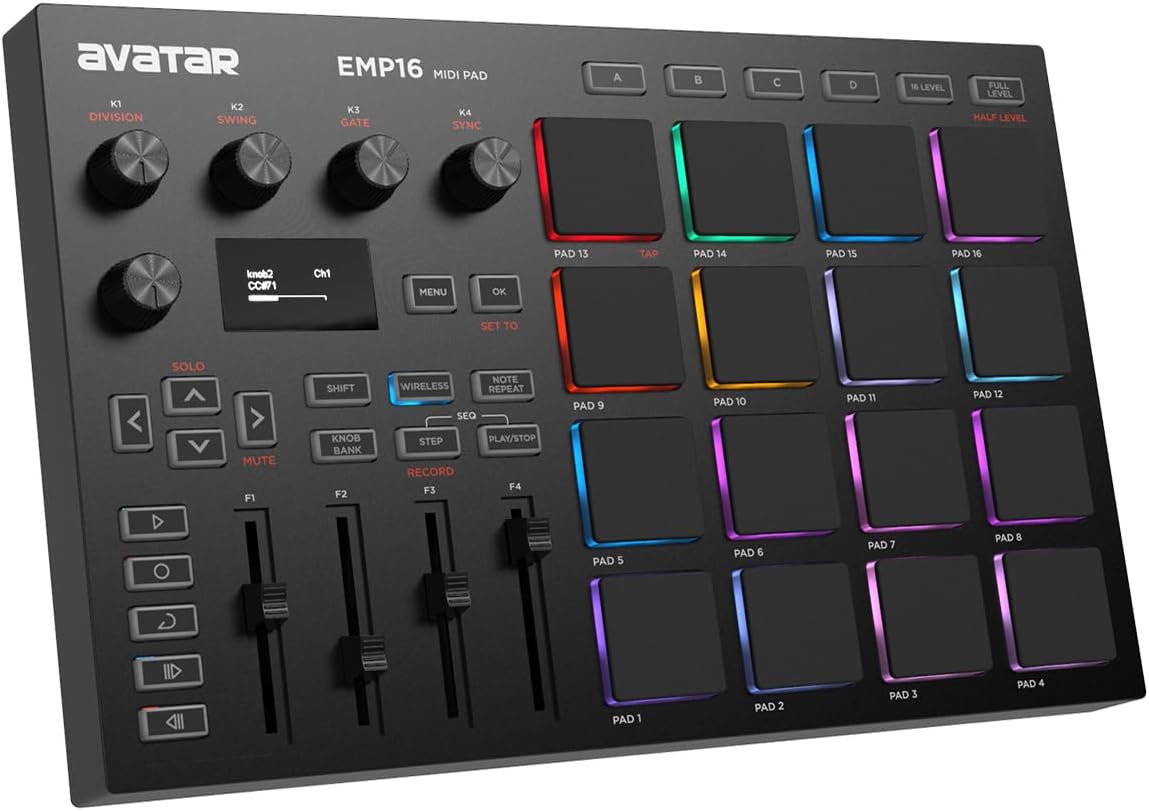
The EMP16 combines 16 RGB illuminated pads with wireless connectivity and a relatively broad set of performance controls. Its 4.2 rating reflects a generally favorable user response, and the product stands apart through Bluetooth 5.0 support, standard MIDI connections, and an OLED display. It is designed for beat makers who want to move between a studio, an iPad or iPhone, an outdoor session, or a band rehearsal without changing hardware.
We may earn a commission when you buy through this link, at no additional cost to you.
Four pad banks provide 64 assignable positions, while four faders, five buttons, and four rotary knobs add another 12 assignable controls across three banks. Features such as note repeat, time division, swing, gate, sequencer operation, clock synchronization, transport functions, and tap tempo cover many needs associated with rhythm programming. An OLED display helps users confirm settings without requiring a separate computer editor.
It can be powered by USB or two AA batteries, which are not included. Bluetooth connectivity works with compatible iPad, iPhone, iPod touch, and Mac devices without requiring a driver or OTG adapter, while USB MIDI covers conventional computer use. The standard MIDI input and output also allow the controller to work with external MIDI equipment. Those connections make it more flexible than a basic USB-only pad controller.
This is a compelling option for a mobile or hybrid producer who values wireless freedom, traditional MIDI routing, and immediate settings feedback. It is less ideal when minimizing desk clutter is the main objective or when a simple, fully integrated Ableton grid is required. Steinberg software offers are available through redemption, so users should review the included code and current compatibility before building a workflow around them.
The OLED display provides a way to inspect settings directly on the controller. That is especially useful when working away from a desk or adjusting timing, swing, and performance options.
USB MIDI, Bluetooth MIDI, and full-size MIDI input and output create several paths into a setup. The controller can therefore serve as a software surface, a mobile input, or a bridge to external MIDI gear.
We may earn a commission when you buy through this link, at no additional cost to you.
This Mini Wireless MIDI Controller is designed for creators who want a small pad surface for beats, samples, effects, and live remixing across computers and mobile devices. Its 4.2 rating indicates a positive reception among users who value portability, wireless operation, and customizable mappings. The supplied 16 RGB pads are velocity-sensitive and include aftertouch for more dynamic control than a simple on-off trigger surface.
We may earn a commission when you buy through this link, at no additional cost to you.
Bluetooth MIDI and USB MIDI provide flexible connectivity, while the built-in rechargeable battery supports up to 15 hours of continuous use. ECO mode extends standby time, making the controller practical for travel and multi-day sessions. Three pad banks expand the surface to 48 assigned positions, and three assignable buttons offer basic access to functions such as mode changes or note repeat.
Customization takes place through PC software or the KuSuite mobile app. Users can remap pads and MIDI commands, adjust velocity curves, and configure lighting. Apple devices use the app from the App Store, while Android and Windows users can install the relevant software using the supplied QR code. This software-based approach adds flexibility, although there is no display on the hardware for viewing every setting.
The controller is best suited to beginners learning beat making, mobile producers, and DJs who want a lightweight remixing tool. Its compact layout prioritizes portability over extensive physical controls, so users who need many knobs, faders, or dedicated transport keys may prefer a larger model. For straightforward pad triggering with wireless freedom, it offers a focused and approachable feature set.
Wireless MIDI removes the need to remain tethered to a laptop. Combined with a rechargeable battery, this makes the controller well suited to mobile sketches, travel sessions, and compact live setups.
KuSuite lets users tailor mappings, velocity behavior, and lighting to their preferred software. The process is especially useful for creators who want the same physical pad layout to perform different roles across multiple DAWs.
We may earn a commission when you buy through this link, at no additional cost to you.
The JP-1 is a compact wireless pad controller that combines 16 RGB velocity-sensitive pads with eight assignable knobs and six customizable buttons. Its 5.0 rating is the highest listed for this group, although the model is newer than many established alternatives, so buyers should consider that its rating reflects a comparatively limited pool of customer feedback. The product is aimed at beat makers, DJs, studio producers, and live performers who want more physical control than a minimal mobile pad.
We may earn a commission when you buy through this link, at no additional cost to you.
The knobs can be assigned to tempo, volume, filters, effects, and other parameters, while the buttons include functions such as Knob Mode, Full Level, and Shift. Note repeat adds rhythmic texture, and RGB backlighting helps users identify pad states or assigned groups. Compatibility is listed across Ableton Live, Logic Pro, FL Studio, Cubase, and other major production software, with Bluetooth and USB MIDI supported.
The rechargeable lithium battery is advertised to deliver up to 20 hours of continuous use, making it suitable for longer studio sessions and live gigs. Plug-and-play operation reduces the need for complicated driver installation. The trade-off is that the controller does not include a screen, so mapping confirmation and parameter visibility generally depend on the connected software.
The JP-1 is a strong pick for a producer who wants wireless freedom alongside a meaningful set of knobs and buttons. It may be less compelling for someone who values a large clip-launch grid or a detailed hardware display, but its pad count and parameter controls create a versatile middle ground. Its combination of portability, broad software support, and tactile adjustability is particularly useful for mobile and live beat making.
The assignable knobs make it possible to shape filters, volume, effects, and tempo without repeatedly reaching for the mouse. They also allow the controller to function as a more complete production surface rather than only a sample trigger.
The advertised battery runtime and Bluetooth MIDI support suit rehearsal, streaming, and mobile workflows. USB operation provides a straightforward alternative when the controller is used beside a computer.
We may earn a commission when you buy through this link, at no additional cost to you.
The Akai Professional MPK Mini IV combines a 25-key mini keyboard, eight MPC-style pads, eight assignable knobs, and a full-color display in one compact USB-C controller. Its 4.6 rating places it among the most well-regarded choices here. It appeals to producers who want to move between chord progression, melodic performance, drum triggering, and software navigation without carrying separate devices.
We may earn a commission when you buy through this link, at no additional cost to you.
The eight MPC pads are velocity- and pressure-sensitive and provide RGB feedback, bringing familiar finger-drumming into the hybrid layout. The 25 mini keys support beat production, piano-style input, synth leads, and sample triggering. Eight 360-degree knobs, a push-and-turn encoder, and the screen give users more direct visibility and control than most compact controllers, while advanced performance tools include arpeggiator, pattern, freeze, mutate, chord, and scale functions.
Its integrated display is a major advantage over screenless competitors, but the eight-pad layout and short mini keys are not ideal for every drummer or pianist. It is a control and composition hub rather than a large finger-drumming surface. USB-C connectivity, full-size MIDI output, and plug-and-play operation for Mac, PC, and mobile setups help offset that limitation.
The MPK Mini IV is the strongest recommendation for a mobile creator who needs both pads and a playable keyboard. It also suits live performers and songwriters who value software navigation, hardware shortcuts, and a broad included sound library. Buyers focused solely on maximum drum-pad area may prefer a dedicated 16-pad or grid controller, while keyboard-and-pad versatility makes this model especially complete.
The keyboard handles melodies and chords while the MPC pads handle drums, samples, and effects. That combination reduces the need to switch between separate input devices during composition.
A full-color screen and push/turn encoder let users inspect settings and navigate software without constantly leaving the hardware. This is particularly useful in compact mobile and streaming setups where desk space is limited.
We may earn a commission when you buy through this link, at no additional cost to you.
The Mini Wireless Pad Controller offers a focused combination of 16 RGB velocity-sensitive pads, aftertouch, Bluetooth MIDI, and USB MIDI. Its 4.7 rating is among the highest in the guide, indicating strong user satisfaction. The design is aimed at beat makers, DJs, beginners, and mobile creators who want more expressive response than a basic button grid without carrying a full production controller.
We may earn a commission when you buy through this link, at no additional cost to you.
Three pad banks expand the layout to 48 assignable positions, while three physical function buttons provide basic operation and mode control. The rechargeable battery supports up to 15 hours of continuous work, and ECO mode extends standby time. This makes the controller practical for travel, outdoor recording, rehearsals, and long studio days where a tethered device would be inconvenient.
The KuSuite app supports customization of pad assignments, MIDI commands, velocity curves, and lighting. It can be downloaded through the App Store for iPhone, iPad, and macOS, while Android and Windows users can scan a QR code for the relevant installer. The controller has no built-in screen, so most configuration feedback appears in software rather than on the hardware.
This is an excellent choice for a beginner or mobile creator who prioritizes portability, expression, and simple wireless operation. It is less suitable for users who need numerous knobs, faders, a large clip grid, or standalone operation. Within its compact category, however, the combination of aftertouch, multiple banks, RGB feedback, and app-based customization makes it a flexible entry point for beat making.
Velocity sensitivity and aftertouch allow users to vary intensity and add modulation while triggering sounds. These features help a small controller feel more dynamic than simple illuminated buttons.
Wireless operation, three banks, and app-based mapping give the controller more versatility than its minimal appearance suggests. It is a practical way to build drum and sample banks for a phone, tablet, or computer.
We may earn a commission when you buy through this link, at no additional cost to you.
The Novation Launchpad Mini MK3 is a 64-pad grid controller with a strong focus on Ableton Live performance. Its 4.5 rating reflects a favorable response to the bright RGB layout, easy clip launching, and slim construction. The controller presents a polished option for producers who want to perform arrangements and scenes visually while keeping their computer screen out of the main workflow.
We may earn a commission when you buy through this link, at no additional cost to you.
Each pad can reflect its corresponding Ableton Live session, making clips and scenes easier to identify. Stop, Solo, and Mute controls provide tactile performance access, while the Ableton integration supports quick launching at the press of a button. The device also includes Novation Components, which provides three Custom Modes for editing mappings and controlling MIDI-compatible functions.
Its pads are designed around performance and launching rather than expressive velocity-sensitive drumming. That distinction makes the Launchpad excellent for scenes and clips but less suitable for a producer whose main requirement is nuanced finger drumming. The software is bus-powered, so there is no separate power adapter, and the slim profile fits easily into a laptop bag, stage rig, or compact studio.
The Launchpad Mini MK3 is a strong recommendation for Ableton Live performers who want reliable visual feedback and tactile scene control. It is less suitable for producers seeking velocity response, aftertouch, or a broad set of knobs and faders. For a polished clip-launching workflow, however, the large grid, focused integration, and custom modes make it a particularly complete performance tool.
RGB feedback mirrors the structure of an Ableton Live session so performers can identify clips and scenes quickly. This reduces visual dependence on the computer and supports smoother transitions during a set.
Three Custom Modes make it possible to tailor the Launchpad beyond its standard behavior. Producers can assign MIDI controls to suit a particular software setup, performance set, or production workflow.
We may earn a commission when you buy through this link, at no additional cost to you.
The Akai Professional LPD8 is an eight-pad USB controller designed for producers who want a small, portable surface for samples, loops, virtual instruments, and effects. Its 4.4 rating indicates a well-regarded product, with particular appeal for users who appreciate MPC styling and a sturdy build. It is less of a full performance grid and more of a compact desktop controller for quick ideas and focused sound selection.
We may earn a commission when you buy through this link, at no additional cost to you.
Eight RGB-backlit MPC pads provide the main triggering surface, while eight assignable Q-Link knobs add tactile control over DAW parameters, software instruments, and effects. Four programmable preset slots allow users to recall different mappings instantly, making it easier to switch between projects, instrument groups, or production roles. Presets are created and managed from the computer.
The LPD8 is powered by USB and works plug-and-play with Mac or PC without a driver installation or external power adapter. Its slim body fits beside a laptop or into a bag, and the listed compatibility includes GarageBand, Logic, Studio One, Cubase, Ableton Live, Pro Tools, FL Studio, Adobe Audition, and other popular applications. The limited number of pads is the clearest constraint.
This controller is a good match for a minimalist producer working in one main DAW, a musician who wants quick sample access, or a traveler who values portability. It is less appropriate for finger-drumming, large clip launching, or wireless mobile creation. For its intended role, the combination of eight pads, eight knobs, and four preset slots creates a simple but functional production tool.
Eight pads keep the controller small, but eight Q-Link knobs preserve meaningful parameter control. This combination suits desktop production where users need to adjust effects and instruments as well as trigger sounds.
Four programmable preset slots provide a practical way to organize different control layouts. A producer can move between sounds, effects, or software tasks without rebuilding the complete mapping each time.
We may earn a commission when you buy through this link, at no additional cost to you.
The right pad controller depends on how you make music, the software you use, and the amount of physical control you need. Evaluate pad response, layout, connectivity, and software integration before choosing a model.
Velocity sensitivity records how hard a pad is struck and translates that movement into MIDI intensity. It gives drum hits, samples, and effects a more natural dynamic range than an on-off controller, which is especially important when a single sound must serve both quiet ghost notes and full-volume accents. Pressure sensitivity and aftertouch provide an additional expressive layer, but they are most useful when the mapped sound or effect responds to continuous pressure.
Choose velocity-sensitive pads for realistic drum programming and nuanced sample triggering. Check whether the controller offers selectable velocity curves or pressure thresholds, because a fixed response may not suit every instrument.
More pads provide room for separate drums, samples, clips, or melodic notes, but they can also make a controller less compact. A traditional layout may offer eight or 16 performance pads, while a square grid can expose 64 clip or scene positions. Consider how the pads are organized physically: beat makers may prioritize comfortable finger placement, whereas live performers may prefer a clear grid that mirrors software arrangement.
Choose the smallest layout that comfortably holds your usual sound set. A 16-pad controller is often versatile for drums and samples, while a 64-pad grid is strongest for clip launching.
Banks allow the same physical pad to perform different jobs without rearranging every mapping. If you switch between drum sets, sampler instruments, effects, and clips, several banks can prevent constant software changes. Custom modes and app-based editors add another layer, allowing controllers to operate as performance surfaces, transport controls, or mixers rather than basic MIDI triggers.
Prioritize controllers with enough banks and a clear editing process. Deep customization is valuable only if you can save, recall, and reliably operate the mappings afterward.
Pads are most effective for triggering sounds or clips, while knobs, encoders, faders, and buttons provide access to continuous parameters and commands. A producer who frequently changes filter cutoff, volume, pan, or effects may benefit from several assignable controls. Clip-launching performers may instead prioritize Solo, Stop, Mute, scene, and transport controls that match their software.
Match physical controls to your daily tasks rather than simply counting them. Dedicated controls are useful when they perform common functions, but less relevant when they duplicate actions already handled by shortcuts.
USB MIDI remains the most common and direct connection for desktop production, while Bluetooth MIDI enables mobile and cable-free use. Some controllers support both, and others include full-size MIDI input or output for linking external gear. Apple mobile workflows may also require appropriate connectivity hardware or an adapter, so compatibility should be confirmed for the exact phone, tablet, computer, and application combination.
Choose USB for a fixed studio setup and Bluetooth for portability. Verify operating-system support, DAW compatibility, and whether wireless MIDI requires additional software or adapters.
A controller that integrates directly with a DAW can save time during setup and make its physical layout more useful. Ableton Live-oriented models may offer one-to-one clip and scene mapping, while general MIDI controllers require users to assign notes and controls manually. Bundled DAWs, virtual instruments, plug-ins, and learning resources can make the package more approachable, although they do not improve the hardware itself.
Check whether the included software matches your chosen DAW and production style. Experienced producers may value raw mapping control more than a large bundle, while beginners may benefit from ready-made sounds and guided setup.
Lighting can reveal clip assignments, pad banks, selected sounds, and performance states without opening a menu. An onboard display goes further by showing parameter values and software information. These features are especially helpful in live performance, but they are not equally important for every workflow. A producer working entirely at a large monitor may value knobs and portability more than an embedded screen.
Choose RGB or multicolor lighting if visual cues improve your workflow. Prioritize a screen when you regularly adjust software parameters without wanting to leave the controller.
A beat controller may live beside a studio computer, travel in a laptop bag, or occupy a small performance surface. USB bus power reduces cable clutter, while wireless operation and a rechargeable battery remove the need for a fixed power source. Physical construction, pad thickness, and the presence of a protective case influence durability, but added bulk can reduce portability. Standalone sound engines are uncommon in this category, so most units still require compatible software.
Consider where the controller will be used most often. A slim wireless model is ideal for travel, while a larger powered grid may be better suited to a permanent studio or stage position.
Begin by connecting the controller to the intended computer or mobile device, launching the DAW, and confirming that MIDI input is recognized. Load a basic drum or sample kit before changing lots of settings. Assign a small group of pads to useful sounds, then test velocity response by playing the same sound at several levels. This establishes a reliable baseline before adding clips, effects, or complex mappings.
Build the layout gradually and save it as a preset or template. Group related sounds, assign banks by function, and use knobs or buttons for parameters that genuinely need adjustment. Learn the transport and performance controls before a live session, especially note repeat, shift functions, and any alternate operating modes. For software with dedicated integration, update the controller software and DAW before transferring custom mappings between computers.
Protect the controller by storing it in a padded case and avoiding pressure on illuminated pads or screens. Keep charging and firmware connections stable, and remove batteries only when the instructions permit. Clean the surface with a soft, dry cloth, avoid moisture around connectors, and inspect cables for damage. Before traveling, confirm that required adapters, mobile accessories, software licenses, and custom mapping files are available.
Yes, MIDI pad controllers are well suited to beat making because they provide a tactile way to trigger drums, samples, loops, clips, and effects. They can make rhythm programming faster and more expressive than repeatedly clicking on-screen controls. The best model for you depends on whether you prioritize finger drumming, live clip launching, wireless mobility, or hands-on parameter control.
Velocity sensitivity is valuable for natural drum programming because it reflects how hard you hit a pad. It can control volume, brightness, filter position, or other mapped parameters, giving one sound more range. For purely visual clip launching, it is less important, but for acoustic-style drums and sampled hits, it becomes one of the most useful performance features.
Most pad controllers in this guide are MIDI input devices and require a computer or mobile application to interpret their messages. They generally do not include a full internal sound engine, sequencer, or sampler. Some can trigger sounds inside mobile apps, but software is still required, so compatibility with your intended platform and application should be checked.
Bluetooth MIDI can be convenient for mobile creation and cable-free performance because it removes a physical connection to the computer. Reliability depends on the device, operating system, application, and wireless environment, so a wired USB connection is often preferable for a fixed stage setup. Test the complete workflow before relying on wireless operation in a critical performance.
An eight-pad controller is compact and suited to quick sample selection or a small fixed sound set. A 16-pad layout more closely follows traditional drum-controller arrangements and often feels better for finger drumming. A 64-pad grid is primarily advantageous for clip and scene launching because it can display and select many arrangement positions at once.
No. Ableton-specific controllers often provide enhanced features when used with Ableton Live, including pre-mapped clip launching and device control. They can still send standard MIDI information to other compatible software, but custom programming may be required to reproduce their full intended workflow. General-purpose controllers are usually easier to map across multiple DAWs.
Two or three banks are often enough for a focused drum kit, one set of melodic samples, and an effects layer. More banks become useful when switching among complete drum kits, instruments, clips, or live scenes. The right number also depends on how quickly you can change banks and whether the controller saves mappings reliably.
Pressure sensitivity offers continuous modulation after the initial strike, which can be valuable for swelling effects, pitch bends, filtering, and expressive live performance. It is not automatically better for every workflow. Velocity-sensitive pads are essential for realistic dynamics, while aftertouch is an optional expressive layer that only matters when mapped sounds or effects respond to it.
The Akai APC Mini MK2 stands out for Ableton Live users who want visual clip launching, RGB feedback, and hands-on fader control. The Novation Launchpad Mini MK3 is a polished alternative for live performers centered on scenes and clips, while the compact Mini Wireless Pad Controller offers an approachable entry point for mobile and cable-free beat making with velocity-sensitive and aftertouch-capable pads.
For traditional studio production, the Akai MPD218 and PreSonus ATOM provide more conventional 16-pad workflows, numerous assignable controls, and a greater emphasis on finger drumming. The EMP16 stands out for wireless flexibility, standard MIDI connections, and an OLED display, while the Akai MPK Mini IV is ideal for creators who also want keys and software navigation. Always prioritize the pad response, DAW integration, and connectivity that match how you actually work.
Before purchasing, confirm that the controller supports your operating system, DAW, and preferred mobile applications, and review whether any required adapter, setup software, or mapping process is included. Bundled content can be helpful, but hardware features matter most. Current prices and availability can change, so compare the final product details and read recent customer feedback before making a purchase.