
MSI B550M PRO-VDH WiFi
4.5Editor score
AM4 processor support
Dual-channel DDR4 support
PCIe 4.0 expansion
Gen4 M.2 connectivity
Flash BIOS button
Our MSI Motherboards guide compares 10 models across socket, memory, expansion, networking, cooling, and connectivity to help you choose.
MSI motherboards cover everything from compact business-oriented boards to enthusiast gaming models with advanced power delivery, high-speed networking, and extensive storage support. A good choice depends on processor compatibility, memory type, case size, expansion needs, and the level of cooling and connectivity your build requires.
This guide compares ten MSI motherboards spanning AMD AM5 and AM4 platforms, Intel LGA 1700 models, ATX and micro-ATX formats, and DDR4 or DDR5 configurations. The evaluation focuses on documented specifications, including socket support, PCIe generation, M.2 connectivity, networking, power delivery, thermal features, and ease-of-use design.
Each review identifies the platform's strongest use case and explains its practical trade-offs. The shortlist ranges from a value-focused AM4 board to feature-dense X870E and B850 enthusiast platforms. Product ratings are included for reference, while current prices and availability can change at any time.
4.5Editor score

5.0Editor score
3.2Editor score
The table below compares all ten boards by platform, form factor, memory support, and key connectivity, making it easier to match a motherboard to an existing processor, case, and storage plan.


The MSI MPG X870E Carbon WiFi is an ATX gaming motherboard for builders seeking a modern AMD Ryzen foundation. It carries a 4.4 rating and supports Ryzen 9000, 8000, and 7000 series processors through the AM5 socket. Its defining combination is DDR5 memory, PCIe 5.0 expansion, Gen5 M.2 storage, USB 40Gbps, Wi-Fi 7, and 5Gbps LAN.
We may earn a commission when you buy through this link, at no additional cost to you.
Thermal design is a major strength. The board uses a heavy plated MOSFET heatsink with a heat pipe, 7W/mK MOSFET thermal pads, extra choke thermal pads, and an onboard M.2 Shield Frozr. Those details matter because high-end processors, power stages, and high-speed NVMe drives all generate heat under sustained workloads. The EZ PCIe Release button also simplifies removing a graphics card by releasing the primary slot retention mechanism.
The main trade-off is platform cost and complexity. This is a DDR5-only board for a builder who wants current-generation connectivity rather than compatibility with an existing DDR4 collection. Buyers should also plan for a suitable AM5 case and confirm that their case can accommodate the board and its installed cooling hardware. The dual-LAN design adds another potential complication if only one network connection is needed.
It is best suited to gamers, creators, and enthusiasts building a new Ryzen 7000-series, 8000-series, or 9000-series system who want fast expansion and storage without moving to the E-ATX flagship tier. The MPG X870E Carbon WiFi delivers a convincing blend of gaming-oriented styling, current I/O, and thoughtful thermal and assembly features, making it a strong high-performance AM5 choice.
The PCIe 5.0 x16 graphics slot and M.2 Gen5 storage support prepare the system for high-bandwidth components. USB 40Gbps further supports modern external storage, docks, and accessories that can benefit from faster transfer rates.
A heat-pipe-equipped MOSFET heatsink, high-conductivity thermal pads, choke cooling, and the M.2 Shield Frozr provide dedicated cooling across power and storage areas. This layered approach is useful in compact or densely equipped gaming cases.
We may earn a commission when you buy through this link, at no additional cost to you.
The MSI MAG X870 Tomahawk WiFi brings current AMD platform features to the established Tomahawk line. It has a 4.3 rating and supports Ryzen 9000, 8000, and 7000 series processors on AM5. DDR5, PCIe 5.0, M.2 Gen5, USB 40Gbps, Wi-Fi 7, Bluetooth 5.4, and 5Gbps LAN place it firmly in the modern enthusiast category.
We may earn a commission when you buy through this link, at no additional cost to you.
Its extended PWM heatsink and enhanced circuit design are intended to help processors sustain their rated performance. The board also uses Audio Boost 5, combining isolated audio with a dedicated high-quality audio processor. That makes it attractive for gaming setups where headset clarity, speaker output, and a cleaner audio signal matter as much as raw platform speed.
The trade-offs are familiar for a high-end DDR5 board. It cannot use existing DDR4 memory, and buyers may find more elaborate onboard displays or premium DIY hardware elsewhere. Although the listed specification does not detail a display output, the product title includes HDMI and DisplayPort support, which is useful for systems that use integrated graphics or a dedicated graphics card with its own video output.
This board is a strong recommendation for gamers who want an X870 platform without moving to an E-ATX flagship design. It suits a new Ryzen build that needs PCIe 5.0, fast storage, modern wireless networking, and 5Gbps Ethernet. The MAG X870 Tomahawk WiFi feels like the balanced option in this MSI lineup: modern, fast, and broadly useful without the flagship's extreme feature density.
The combination of 5Gbps LAN and Wi-Fi 7 provides flexibility for high-speed home networks, large file transfers, and modern wireless standards. Bluetooth 5.4 also supports compatible peripherals and accessories.
Audio Boost 5 uses isolated audio circuitry and a dedicated processor for gaming audio. On the thermal side, the extended PWM heatsink helps dissipate heat around the processor power circuitry during sustained workloads.
We may earn a commission when you buy through this link, at no additional cost to you.
The MSI PRO B760-P WiFi DDR4 is a ProSeries ATX board for 12th, 13th, and 14th generation Intel Core processors, along with Pentium Gold and Celeron processors. Its 4.6 rating is among the strongest in this roundup. The key attraction is support for dual-channel DDR4 memory at speeds up to 5333+MHz when overclocked.
We may earn a commission when you buy through this link, at no additional cost to you.
Power delivery uses a 12+1 Duet Rail design with P-PAK, 8-pin and 4-pin CPU power connectors, Core Boost, and Memory Boost. The board also includes an extended heatsink, 7W/mK MOSFET thermal pads, additional choke thermal pads, and M.2 Shield Frozr. Its six-layer PCB uses thickened 2oz copper and server-grade materials, giving it a more substantial construction story than a basic entry-level board.
The compromise is platform generation. PCIe 4.0 rather than PCIe 5.0 means the primary graphics slot and other expansion cannot take advantage of the newest graphics-card bandwidth. However, PCIe 4.0 remains highly practical for mainstream graphics cards and NVMe drives, while 2.5Gbps LAN, USB 3.2 Gen2, HDMI or DisplayPort output, and Wi-Fi 6E cover everyday needs well.
This is a good choice for a productive Intel build where DDR4 memory, stable wired networking, and a full-size ATX layout matter more than bleeding-edge expansion. It also works for an upgrade centered on retaining compatible LGA 1700 components. With a strong rating and robust power and thermal design, the PRO B760-P WiFi DDR4 stands out as a practical Intel option.
Supporting DDR4 makes this board attractive to builders who already own compatible memory or want to avoid the cost of a new DDR5 platform. Its listed dual-channel speed reaches 5333+MHz in overclocking mode.
The 12+1 Duet Rail system and combined 8-pin and 4-pin CPU connectors provide a robust foundation for supported Intel processors. Core Boost and Memory Boost are included to assist with power delivery and memory operation.
We may earn a commission when you buy through this link, at no additional cost to you.
The MSI MAG B650 Tomahawk WiFi is a mature ATX gaming platform for AMD Ryzen 7000-series processors, with the product title also indicating support for Ryzen 8000 and 9000 series processors. It has a 4.5 rating, DDR5 support up to 6400+MHz when overclocked, PCIe 4.0 expansion, and a Gen4 x4 M.2 slot.
We may earn a commission when you buy through this link, at no additional cost to you.
MSI equips the board with an extended heatsink and M.2 Shield Frozr. Networking includes 2.5Gbps LAN and Intel Wi-Fi 6E, while the title lists Bluetooth 5.3, SATA 6Gb/s, HDMI or DisplayPort, and USB 3.2 Gen2. This combination provides a mature, well-rounded feature set for systems that do not require PCIe 5.0.
The principal limitation is that a PCIe 4.0 x16 slot and Gen4 M.2 storage interface leave performance on the table for buyers specifically seeking the newest generation interfaces. That distinction is less significant for many gaming configurations because mainstream graphics cards and SSDs can perform well without those headline speeds, but it matters for workstations and expansion-heavy systems.
The MAG B650 Tomahawk WiFi remains a sensible choice for an AM5 gaming PC, especially when a builder values a familiar platform, fast DDR5 memory, 2.5Gbps Ethernet, and wireless networking. It is not the best option for maximizing future-facing expansion, but it provides a focused and polished foundation for current and future supported Ryzen processors.
Dual-channel DDR5 support up to 6400+MHz in overclocking mode provides ample bandwidth for modern Ryzen processors. A capable memory kit and correct BIOS settings can help builders take advantage of that headroom.
2.5Gbps LAN is a useful middle ground for systems that transfer large files or use a fast home network. Intel Wi-Fi 6E and Bluetooth 5.3 provide convenient wireless connectivity without requiring additional adapters.
We may earn a commission when you buy through this link, at no additional cost to you.
The MSI MAG X870E Tomahawk MAX WiFi V1 is a standout enthusiast motherboard with a 5.0 rating. It supports Ryzen 9000, 8000, and 7000 series processors, and its 14+2+1 Duet Rail power system uses 80A SPS components. The eight-layer PCB includes thickened 2oz copper and server-grade materials.
We may earn a commission when you buy through this link, at no additional cost to you.
Its specification list is especially attractive for performance builders. Dual-channel DDR5 can reach 8400+MT/s when overclocked, while a PCIe 5.0 x16 slot and Gen5 x4 M.2 connector support current high-speed hardware. USB4 and 5G LAN join Wi-Fi 7 for a strong connectivity package, and Audio Boost 5 provides dedicated audio processing.
Thermal management extends across several components. The board uses an extended heatsink, 7W/mK MOSFET thermal pads, extra choke thermal pads, and the EZ M.2 Shield Frozr II. The EZ DIY suite also includes the EZ M.2 Clip II, EZ PCIe Release, and EZ Antenna, making assembly and routine component changes more approachable.
The main trade-off is that this hardware is intended for builders who want the newest platform capabilities and are willing to use DDR5. The 80A power stages and high memory-speed ceiling also make it more compelling with a strong processor and carefully selected memory. Overall, it is an excellent recommendation for a premium AM5 gaming or creation system that emphasizes power delivery, fast expansion, storage, networking, and thoughtful build assistance.
The 14+2+1 design, 80A SPS components, and dual 8-pin CPU power connectors are designed to support demanding Ryzen processors. DDR5 support up to 8400+MT/s gives overclockers substantial memory bandwidth potential.
EZ PCIe Release reduces the effort involved in removing a large graphics card. The EZ M.2 Clip II, Shield Frozr II, and EZ Antenna streamline storage installation and wireless setup.
We may earn a commission when you buy through this link, at no additional cost to you.
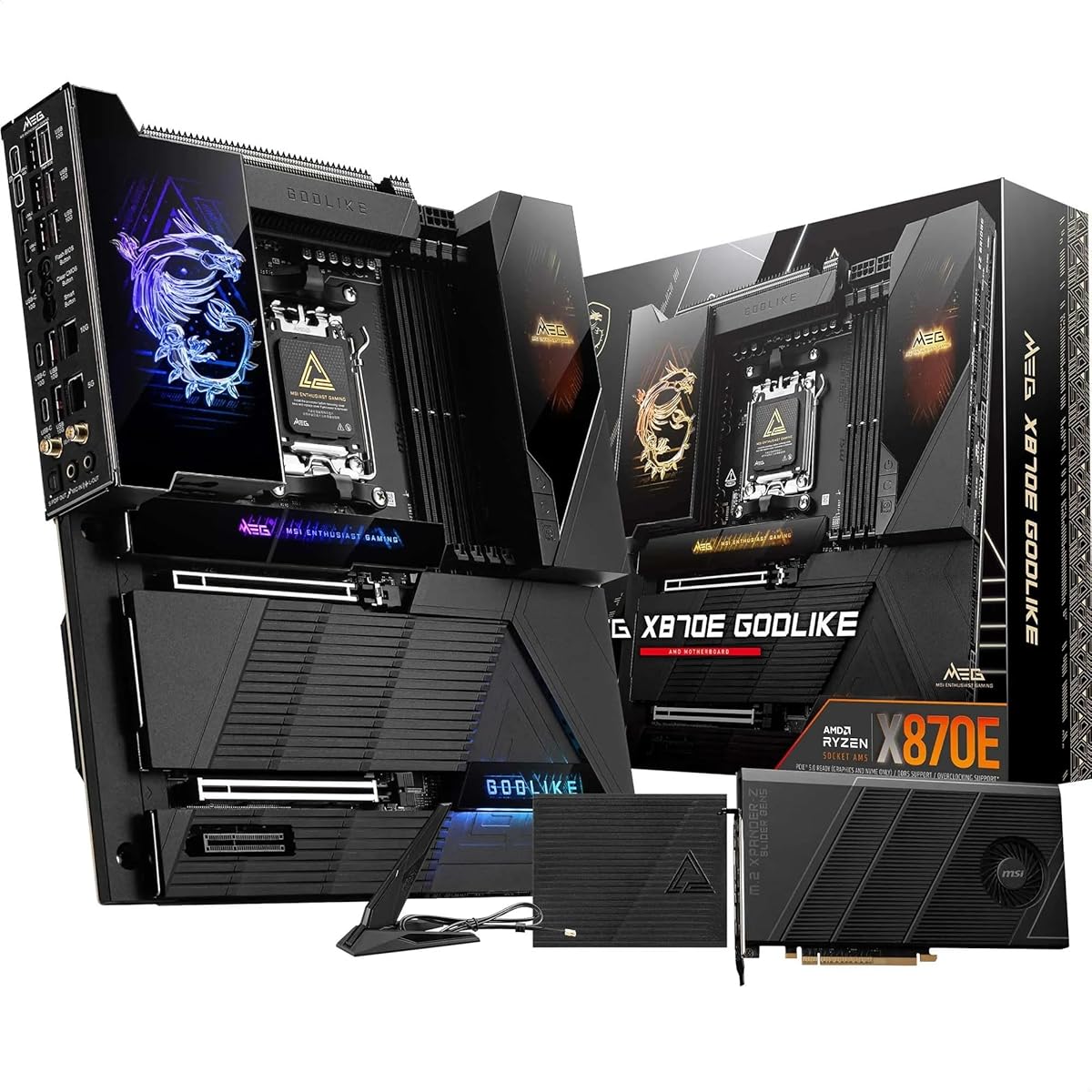
The MSI MEG X870E GODLIKE is MSI's most expansive option in this guide, using an E-ATX layout and a 24-DRPS power design with 110A SPS components. It supports Ryzen 9000, 8000, and 7000 series processors and has four DDR5 DIMM slots rated for up to 9200+MT/s when overclocked. Its 3.2 rating is the lowest here, but it remains a feature-dense flagship platform.
We may earn a commission when you buy through this link, at no additional cost to you.
Storage is the standout area. The board includes two onboard M.2 Gen5 x4 slots and three M.2 Gen4 x4 slots, while the M.2 XPANDER-Z SLIDER Gen5 adds two more Gen5 positions. This produces seven M.2 connectors in total. Double-sided Shield Frozr cooling and the sliding expansion system reflect the board's emphasis on high-end storage configurations and convenient maintenance.
Connectivity is equally ambitious, with full-speed Wi-Fi 7, Bluetooth 5.4, 10Gbps and 5Gbps LAN, and a rear USB4 Type-C port capable of 40Gbps with display output. The Dynamic Dashboard III includes a 3.99-inch LCD for hardware monitoring and personalization. Audio Boost 5 HD supports 7.1-channel USB audio and S/PDIF output.
Buyers must accept a very large board, a complex feature set, and a potentially demanding component list. A premium platform does not automatically mean better results in every workload, and the lower listed rating warrants attention. Even so, the GODLIKE is the clear choice for builders who want maximum storage expansion, robust power delivery, multi-gigabit networking, and flagship conveniences in an E-ATX case.
Seven M.2 connectors provide exceptional room for NVMe storage. The mix of onboard Gen5 and Gen4 slots plus the Gen5 XPANDER-Z slider supports both current high-speed drives and a broad range of storage arrangements.
10Gbps LAN is ideal for builders with suitably fast network infrastructure, while Wi-Fi 7 provides a modern wireless alternative. The 3.99-inch LCD makes hardware monitoring and personalization part of the board itself.
We may earn a commission when you buy through this link, at no additional cost to you.
The MSI PRO B550M-VC WiFi is a compact ProSeries motherboard for AMD AM4 processors. It has a 4.6 rating and supports Ryzen 5000 and 3000 series desktop processors, as well as Ryzen 4000 G-Series desktop processors. The supplied compatibility note excludes Ryzen 5 3400G and Ryzen 3 3200G, so the exact processor model should always be checked before purchase.
We may earn a commission when you buy through this link, at no additional cost to you.
Its dual-channel DDR4 support reaches 4400MHz when overclocked. Expansion includes PCIe 4.0 and a Lightning Gen4 x4 M.2 connector with M.2 Shield Frozr. The board also features 2.5Gbps networking, Wi-Fi 6E, Bluetooth 5.2, SATA 6Gb/s, USB 3.2 Gen2, and HDMI or DisplayPort connectivity, all in a micro-ATX footprint.
Thermal and construction details include 7W/mK MOSFET thermal pads, additional choke thermal pads, Core Boost, a digital PWM controller, and a PCB with thickened 2oz copper. The M.2 Shield Frozr adds useful protection for a compact system, where storage and processor power components may be close to one another.
This board is most attractive to builders who want a smaller AM4 system with modern networking and don't need the newest platform. It can serve a gaming PC, home office, or compact workstation using compatible DDR4 memory. The combination of a favorable rating, 2.5Gbps LAN, wireless support, and a space-saving form factor makes the PRO B550M-VC WiFi an adaptable ProSeries choice.
Despite its compact micro-ATX size, the board includes 2.5Gbps LAN, Wi-Fi 6E, and Bluetooth 5.2. These features avoid the need for separate network adapters in a compact system with limited rear-panel space.
7W/mK MOSFET thermal pads, choke thermal pads, and the M.2 Shield Frozr provide cooling support for important components. The 2oz thickened copper PCB also contributes to the board's structural and thermal foundation.
We may earn a commission when you buy through this link, at no additional cost to you.
The MSI B550M PRO-VDH WiFi is a practical micro-ATX board for AMD AM4 systems. Its 4.5 rating reflects a well-regarded foundation, and the product information notes support for third-generation Ryzen processors and future AMD Ryzen processors with a BIOS update. It supports dual-channel DDR4 memory up to 128GB and memory speeds up to 4400MHz.
We may earn a commission when you buy through this link, at no additional cost to you.
The board includes PCIe 4.0, a Lightning Gen4 M.2 connector with M.2 Shield Frozr, SATA 6Gb/s, and AMD Turbo USB 3.2 Gen2. Display connections cover D-SUB, HDMI, and DisplayPort, while Core Boost combines optimized power-circuit layouts with digital power regulation for more precise and steady current delivery.
Audio Boost and a 7W/mK heatsink thermal pad support the board's gaming and productivity roles. A particularly useful feature is the Flash BIOS button, which lets users update the BIOS without a working processor or memory installed. That can be invaluable during initial setup, processor changes, or system troubleshooting.
This is a good budget-oriented choice for a compact AM4 gaming or general-purpose computer, especially when DDR4 memory and a small case are priorities. It lacks the newest USB and networking generation found in premium boards, but the core essentials remain strong. Its broad display support, Gen4 storage, 128GB memory capacity, and BIOS convenience make it a sensible foundation for an existing AM4 component collection.
Support for up to 128GB of dual-channel DDR4 gives the system room to grow beyond typical entry-level memory configurations. It is particularly useful for content creation, virtual machines, and heavily multitasked desktop workloads.
The Flash BIOS button allows firmware recovery or updating before compatible memory and processor support can be confirmed. This is especially useful when assembling a system around an older or newly released CPU.
We may earn a commission when you buy through this link, at no additional cost to you.
The MSI B850 GAMING PLUS WIFI bundle combines an ATX AM5 motherboard with one 16GB TEAMGROUP T-Force Delta DDR5 module. The board has a 4.6 rating and supports Ryzen 9000 through 7000 series processors. DDR5 memory support is listed up to 8200+MT/s when overclocked, while expansion includes PCIe 5.0 x16 and PCIe 4.0 x16 slots.
We may earn a commission when you buy through this link, at no additional cost to you.
The included TEAMGROUP module operates at 6000MHz, or PC5-48000, with CL38 timings. It is a single 16GB stick, leaving the other DIMM slot open. That arrangement allows the included module to be used immediately while preserving a path to a matched second module later, although mixing kits can require careful memory tuning.
The supplied memory supports Intel XMP 3.0 and AMD EXPO profiles for easier access to its rated 6000MHz speed. Other platform features include M.2 Gen5 storage, Wi-Fi 7, and 5G LAN. Together, these details make the package appealing to someone assembling a new PC without a separate memory purchase.
The trade-off is that a one-module memory configuration does not provide the full dual-channel advantage of a matched two-DIMM kit. A buyer seeking immediate maximum memory bandwidth may prefer to purchase a dual-channel kit instead. For a straightforward first build, though, this bundle reduces the number of components that must be sourced, making the MSI B850 GAMING PLUS WIFI an appealing and highly rated AM5 starting point.
The bundled 16GB DDR5 module means a compatible processor, graphics solution, and basic components are the only major remaining considerations. The open DIMM slot leaves room for a future memory increase.
The included TEAMGROUP T-Force Delta memory can use XMP 3.0 or AMD EXPO to reach its rated 6000MHz setting. This simplifies the process of enabling the intended speed and timings through BIOS.
We may earn a commission when you buy through this link, at no additional cost to you.
The MSI PRO B760M-P DDR4 is a compact Intel board designed for 12th, 13th, and 14th generation Intel Core, Pentium Gold, and Celeron processors on LGA 1700. It has a 4.4 rating and uses dual-channel DDR4 memory, with listed overclocked speeds up to 4800+MHz.
We may earn a commission when you buy through this link, at no additional cost to you.
Core Boost provides a premium layout and digital power design intended to support processors with multiple cores, while Memory Boost is designed to deliver cleaner data signals for performance, stability, and compatibility. Storage and expansion use PCIe 4.0, including a Lightning Gen4 x4 M.2 connector protected by M.2 Shield Frozr. USB 3.2 Gen2 and HDMI or DisplayPort outputs are also listed.
As a micro-ATX board, it can reduce the space needed for a complete system while retaining four full-length expansion slots and multiple storage options. Its primary limitations are the absence of built-in Wi-Fi and the lack of a more advanced 2.5Gbps or 5Gbps network controller. Builders in those areas should plan to add a network or wireless adapter if the case does not already include one.
The PRO B760M-P DDR4 is best for a compact Intel build using existing DDR4 memory and a mainstream processor. It suits home-office systems, general-purpose gaming PCs, and compact workstations that need reliable storage and display connectivity without a flagship board. Its modest feature set is balanced by a straightforward, space-efficient design and support for three major Intel processor generations.
The micro-ATX format preserves multiple PCIe expansion positions and a practical selection of rear I/O in a smaller board. This makes it useful for compact cases that cannot accept a full ATX motherboard.
Dual-channel DDR4 support makes this board convenient for builders with compatible memory already available. Memory Boost is included to assist signal quality, system stability, and compatibility.
We may earn a commission when you buy through this link, at no additional cost to you.
Choosing an MSI motherboard starts with the processor and platform, followed by memory type, case size, storage, expansion, networking, and thermal requirements. Matching these elements prevents expensive incompatibilities and produces a more balanced system.
The socket determines which processors the board can use, while the chipset governs features such as PCIe generation, memory support, networking capabilities, and USB availability. AMD AM5 models in this guide support current Ryzen 7000, 8000, and 9000 series processors as listed, while the AM4 boards target older Ryzen families. Intel LGA 1700 choices support the specified 12th, 13th, and 14th generation Core processors plus compatible Pentium Gold and Celeron models. A modern X870E or B850 board is appropriate for a new high-end AM5 build, whereas AM4 remains sensible when retaining an existing processor and DDR4 memory. Compatibility should be verified using the exact CPU model, motherboard model, and current BIOS support information.
DDR4 and DDR5 are physically and electrically different, so they cannot be mixed or used interchangeably. AM4 and LGA 1700 ProSeries boards in this roundup use DDR4, while the newer AMD boards use DDR5. DDR4 can reduce the cost of a build when compatible modules are already owned, but DDR5 supports higher bandwidth and is required by the newest AM5 platforms. The listed memory ceilings range from 4800+MHz on the PRO B760M-P DDR4 to 9200+MT/s on the MEG X870E GODLIKE. Advertised overclocked speeds depend on the CPU's memory controller, BIOS, and kit. A matched two-DIMM kit generally makes dual-channel operation simpler than combining unrelated modules.
ATX boards provide a balance of expansion, cooling space, and case compatibility, making them the most flexible option in this guide. The MPG X870E Carbon, MAG X870 and X870E Tomahawk boards, MAG B650 Tomahawk, B850 Gaming Plus, and PRO B760-P are ATX. Micro-ATX models reduce the footprint while retaining useful expansion slots, which makes the B550M and B760M boards suitable for smaller cases. The MEG X870E GODLIKE is E-ATX and needs a case that explicitly supports that larger layout. Form factor should be checked against the chassis, number of slots, GPU length, cooler clearance, and available storage mounting points. A smaller board does not guarantee better airflow, so case dimensions and the position of the power supply and drives still matter.
PCIe 5.0 delivers greater theoretical bandwidth than PCIe 4.0, while M.2 Gen5 slots support the newest NVMe SSDs. The MPG X870E Carbon, MAG X870 Tomahawk, MAG X870E Tomahawk MAX, and MEG X870E GODLIKE include PCIe 5.0 expansion, and the flagship also adds multiple M.2 Gen5 positions. The MAG B650 Tomahawk and the Intel boards center on PCIe 4.0, which remains adequate for many mainstream graphics cards and NVMe drives. Buyers should count graphics slots, M.2 connectors, SATA ports, and rear I/O rather than focusing only on the newest generation. A motherboard with fewer high-speed slots may be perfectly balanced if the intended system includes one modern GPU and a small number of fast SSDs.
Power stages, VRM phases, CPU power connectors, and PCB construction help determine how well a board handles sustained processor loads. The MEG X870E GODLIKE uses a 24-DRPS 110A SPS design, while the MAG X870E Tomahawk MAX uses 14+2+1 80A SPS components. The PRO B760-P uses a 12+1 Duet Rail design, and several ProSeries boards use digital PWM systems. Thermal design is equally important: look for extended MOSFET heatsinks, heat pipes where appropriate, high-conductivity thermal pads, choke cooling, and M.2 Shield Frozr covers. The right cooler also depends on processor height and socket clearance. A strong board cannot compensate for inadequate case airflow or a CPU cooler that is too small for the processor.
Wired networking speed depends on the router, switch, and storage devices at the other end of the connection. A 2.5Gbps interface is a practical middle ground, while 5Gbps and 10Gbps options are most useful on compatible networks. The MEG X870E GODLIKE combines 10G and 5G LAN, while newer X870E, X870, and B850 boards offer 5G LAN. Wi-Fi 7 appears on the newest AMD platforms, and Wi-Fi 6E appears on the B650 Tomahawk and several ProSeries boards. The B550M PRO-VDH and B760M-P listing do not include onboard Wi-Fi, so those systems may need an adapter. Bluetooth support is convenient for peripherals but should not be treated as a replacement for a reliable wired gaming connection.
M.2 connectors provide fast NVMe storage without occupying SATA ports, while SATA remains useful for larger hard drives, inexpensive SSDs, and optical devices. The MEG X870E GODLIKE leads this list with seven M.2 connectors, including two onboard Gen5 x4 positions, three Gen4 x4 positions, and two Gen5 positions supplied through the M.2 XPANDER-Z slider. The X870E Carbon, X870 Tomahawk, and X870E Tomahawk MAX also support M.2 Gen5. M.2 Shield Frozr covers provide passive cooling for drives, which is especially helpful in compact cases. Confirm both the physical M.2 count and the available SATA ports because some builds may require more storage connections than the fastest slots alone can provide.
Rear display outputs are important when using a processor with integrated graphics. The PRO B760-P, B760M-P, B550M-VC, and B550M PRO-VDH provide combinations of HDMI, DisplayPort, and D-SUB, while newer AMD boards generally include HDMI or HDMI and DisplayPort according to their titles. Audio features range from MSI Audio Boost to Audio Boost 5 and Audio Boost 5 HD, with the GODLIKE supporting 7.1-channel USB audio and S/PDIF output. USB 40Gbps and USB4 provide high-bandwidth external connections, while USB 3.2 Gen2 is a more conventional high-speed option. Count peripherals and monitor adapters before selecting a board, especially in a compact case with limited rear space.
Before assembly, compare the board with the manual, processor compatibility list, case mounting pattern, and supplied hardware. Install the processor and memory according to the manual's orientation marks, attach the cooler, and confirm that all power connectors are firmly seated. Install storage and graphics hardware before applying the final case panel so cables and large components remain accessible. MSI EZ DIY features such as EZ PCIe Release, EZ M.2 Clip II, and EZ Antenna can reduce assembly effort, but each mechanism should still be used exactly as directed.
After the first boot, enter the BIOS to confirm the detected processor, total memory capacity, and installed storage. If memory is not running at its advertised overclocked speed, enable the appropriate EXPO, XMP 3.0, or documented MSI profile after confirming system stability. Update the BIOS when processor support or stability improvements require it. The Flash BIOS button on the B550M PRO-VDH can be especially useful for firmware recovery, but the correct motherboard and BIOS file must be selected before pressing it.
Care for the motherboard by keeping the board in its anti-static package until installation and avoiding direct contact with connectors, heatsinks, and exposed circuitry. Maintain airflow around the VRM, M.2 drives, and expansion area; check that case fans are configured to move air through those regions. After installation, use monitoring software and BIOS sensors to watch processor temperature, fan speeds, and storage health. Do not repeatedly change memory or voltage settings if stability is uncertain, and save a known-good BIOS profile after the system is configured successfully.
No. Socket compatibility is necessary but does not guarantee that every processor is supported by the board's chipset and BIOS. Check the manufacturer's exact CPU list, especially for newer processors that may require a BIOS update. Also confirm that the processor is not among any explicitly excluded models.
Choose X870E when you want PCIe 5.0 graphics expansion, Gen5 M.2 storage, newer USB connectivity, and a more advanced platform for a new Ryzen build. B650 remains capable for many mainstream systems, especially when existing components or a lower overall platform cost are important. The deciding factors are expansion needs, processor generation, and the features you expect to use.
No. AM5 boards use DDR5, and DDR4 modules are not compatible with them. Conversely, the AM4 boards in this guide require DDR4. Installing the wrong memory type is physically impossible in most cases, but it is still essential to verify platform specifications before purchasing components.
Micro-ATX can be better when case size, airflow, or component budget is the priority, but it usually offers fewer expansion slots. ATX provides more room for multiple graphics cards, additional cards, and wider cooling options. A well-chosen micro-ATX board can support a high-end gaming configuration, provided the case and components are compatible.
It depends on the graphics card, SSDs, and intended upgrade path. PCIe 5.0 can provide additional bandwidth and better prepare a system for future components, but many current gaming setups work well with PCIe 4.0. The practical value of the newest interface should be weighed against motherboard cost and whether the system has other bottlenecks.
The number depends on the model. The MEG X870E GODLIKE supports seven M.2 connectors, while the other boards offer fewer, and SATA availability also varies. Count the drives you actually need, inspect cable-routing space, and ensure that high-speed M.2 drives receive adequate cooling, particularly in compact cases.
It is convenient but not essential if reliable Ethernet is available. Boards with onboard Wi-Fi save the cost and effort of adding an adapter, while boards without it offer a potentially simpler design. For a gaming PC, a wired connection can still be preferable for predictable latency, but current wireless standards are suitable for many everyday uses.
Most boards require an appropriate memory profile or overclocking setting in the BIOS. The B850 bundle supports EXPO or XMP 3.0 for its included 6000MHz module, while other boards may provide documented MSI profiles. Enable the correct option only after confirming that the CPU supports the memory configuration, and test the system for stability afterward.
The MSI MAG X870E Tomahawk MAX WiFi V1 is the strongest all-around recommendation for a new high-performance AMD build, combining a 5.0 rating with an 80A power system, DDR5 support up to 8400+MT/s, PCIe 5.0, M.2 Gen5, and excellent EZ DIY features. The MSI B550M PRO-VDH WiFi represents the budget side of the list with a compact AM4 platform, 128GB memory capacity, Gen4 M.2, and a convenient Flash BIOS button. At the premium extreme, the MEG X870E GODLIKE offers unmatched storage expansion, flagship power delivery, 10G networking, and extensive assembly features.
Prioritize socket and memory compatibility before considering premium extras. A PCIe 5.0 slot, faster wireless standard, or larger power system is useful only when it matches the processor, graphics card, drives, case, and networking equipment. Ensure the form factor fits the chassis, leave room for cooling, and check the exact port layout to avoid discovering an adapter or cable shortage after the main components have been purchased.
Ratings and specifications provide a useful starting point, but current prices and availability change frequently. Review the live product listing before buying, confirm the exact bundle contents, and check current BIOS support for the selected processor. That final verification helps ensure the motherboard, memory, operating system, and components work together as intended.
