
WALI Adjustable Laptop Desk Mount
4.5Editor score
Supports laptops up to 17 inches
C-clamp and grommet mounting
Sixteen-inch height adjustment
Vented 14-by-11-inch tray
A laptop tray desk mount can transform a crowded workstation by lifting your screen, improving viewing angles, and reclaiming usable space below the desktop. The right model should combine stable support, smooth articulation, practical installation, and enough clearance for your device’s ports and cooling system.
We compared all ten options across laptop and monitor compatibility, supported weight, mounting choices, height adjustment, tilt, swivel, rotation, tray design, ventilation, and cable organization. The guide includes adjustable arms, 2-in-1 designs, and an under-desk rotating tray for more specialized setups.
Each review explains the product’s strongest use case, practical limitations, and ideal owner, while the comparison and buying guide help you match hardware to your desk. Product specifications can change, and current prices should always be confirmed on the linked listing.
4.5Editor score

4.6Editor score

4.6Editor score
As an Amazon Associate we earn from qualifying purchases.
This side-by-side comparison shows how the ten mounts differ in device support, installation, articulation, and workspace features, making it easier to identify the right configuration for your desk.
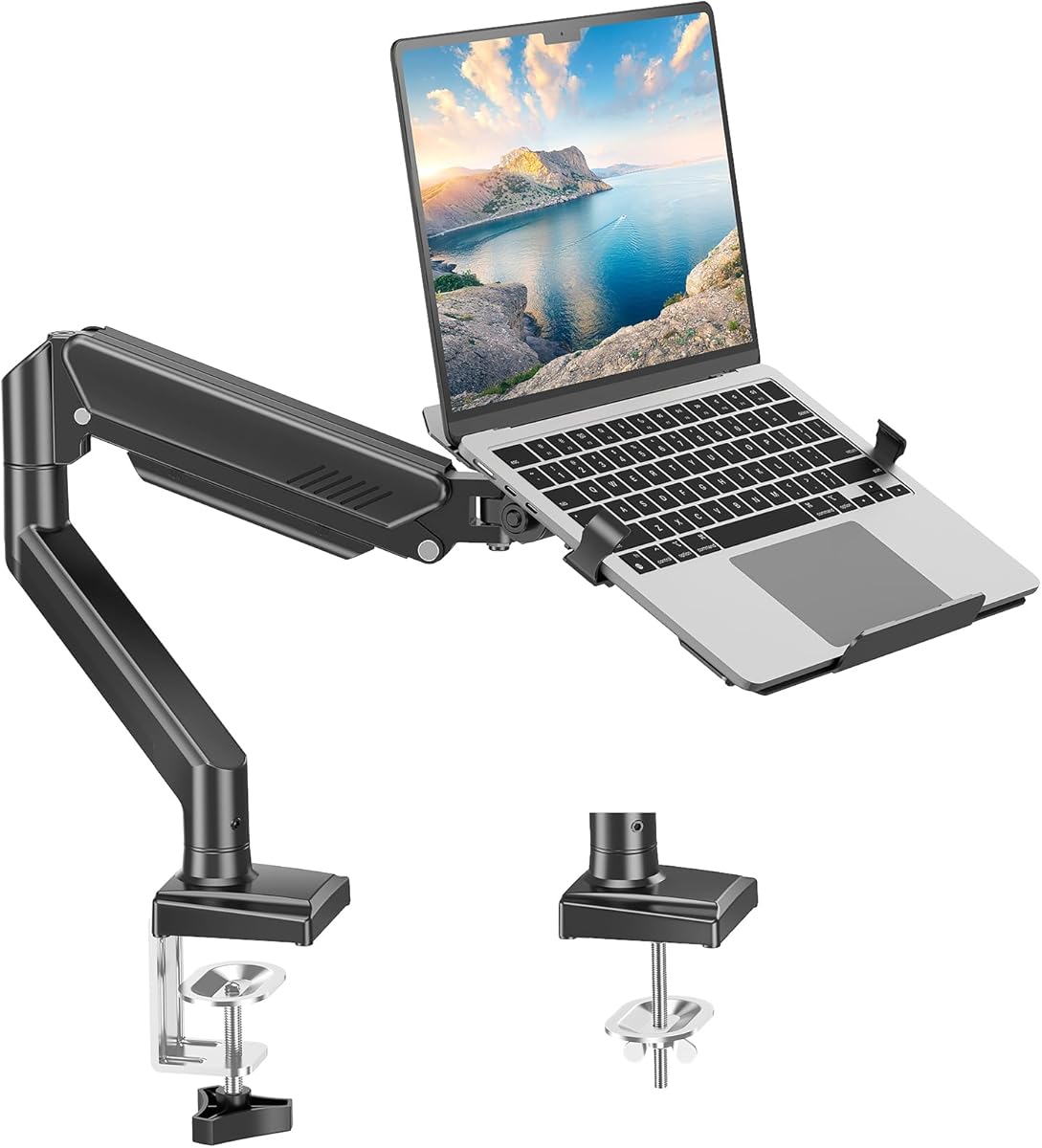


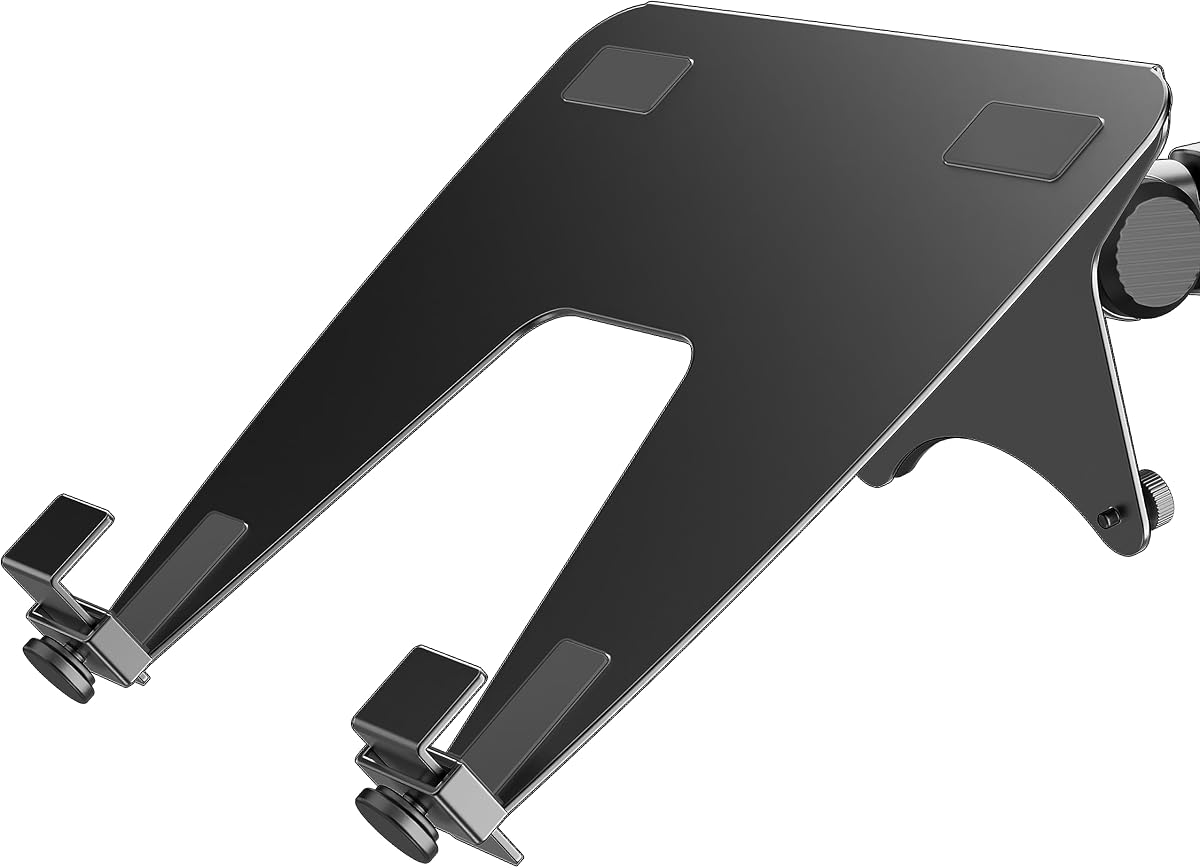
The WALI Adjustable Laptop Desk Mount is a versatile 2-in-1 arm that can hold a notebook up to 17 inches or support a monitor as large as 32 inches when the appropriate VESA-compatible hardware is used. Its detachable mounting plates and broad adjustment range make it a practical choice for users who want to alternate between a laptop-focused and dual-screen workstation.
We may earn a commission when you buy through this link, at no additional cost to you.
The arm extends and retracts, provides 16 inches of height adjustment, and supports plus or minus 15 degrees of tilt, plus or minus 90 degrees of swivel, and 360-degree rotation. A ventilated 14-by-11-inch tray helps release heat, while its raised bottom lip helps keep the notebook from sliding. The stated maximum supported weight is 22 pounds.
Installation flexibility is one of the product’s main strengths. The included C-clamp works with desks from 0.4 to 4 inches thick, while the grommet option accommodates desks from 0.4 to 2.2 inches thick. Those limits make desk thickness one of the most important checks for buyers, particularly those using thick butcher-block or custom surfaces.
This is an appealing selection for budget-conscious home-office users who want a single mount for both a notebook and a compatible monitor. It is less suited to buyers who need a very large mouse surface, a high-capacity gaming laptop, or unrestricted tray rotation in laptop mode. Subject to those limitations, it delivers an unusually capable feature set.
Detaching the laptop plate converts the arm into a conventional monitor support, so the mount can follow you between focused laptop work and a more permanent external-display arrangement without requiring two separate arms.
The combination of extension, swivel, tilt, and height movement allows the screen to be brought closer or repositioned as the user changes posture, which can support a more comfortable line of sight.
We may earn a commission when you buy through this link, at no additional cost to you.
The MOUNT PRO Laptop Arm Mount combines a removable laptop tray with a monitor-capable arm, giving users a flexible way to organize a desk. It supports notebooks up to 17 inches and compatible flat or curved monitors from 13 to 32 inches using 75x75mm or 100x100mm VESA mounting patterns.
We may earn a commission when you buy through this link, at no additional cost to you.
Its articulated arm offers minus 45-degree to plus 90-degree tilt, 180-degree swivel, and 360-degree rotation, along with enough vertical travel to raise the display by as much as 17.3 inches. The manufacturer recommends avoiding a fully vertical orientation while the laptop tray is attached, which is an important safety limitation for users considering dramatic positioning changes.
The tray is ventilated and includes six anti-slip pads plus latches intended to keep the notebook in place. Built-in guides along the arm help route cables, while the detachable tray and mounting plate support different device arrangements. Weight limits range from 4.4 to 22 pounds depending on the configuration, so buyers should check both the screen size and actual device weight.
This mount is well suited to home-office professionals, students, programmers, designers, and gamers who value strong laptop retention and flexible screen positioning. It is less attractive for a user who needs the tray to rotate freely through vertical positions or whose desk lacks a suitable grommet hole and does not meet the clamp thickness range.
Anti-slip pads and small retaining latches add useful protection when the arm is repositioned, helping address one of the recurring concerns with elevated laptop stands.
Guides built into the arm provide a path for power and display cables, making it easier to keep the raised screen area visually organized while preserving space below the desk.
We may earn a commission when you buy through this link, at no additional cost to you.
The VIVO Single Laptop Notebook Desk Mount Stand is a well-rounded adjustable arm that accommodates laptops and notebooks up to 17 inches while supporting weights up to 22 pounds. It also functions as a monitor mount for displays up to 32 inches, including ultrawide models up to 38 inches when their VESA pattern and weight are compatible.
We may earn a commission when you buy through this link, at no additional cost to you.
Its 14-by-11.8-inch ventilated tray is roomier than many laptop-only alternatives. The arm supplies plus or minus 90-degree tilt, 180-degree swivel, full 360-degree rotation, a 17-inch center pole, and up to 16.5 inches of tray extension. That range makes it effective for creating a raised primary display while retaining a separate keyboard and mouse below.
The product includes a heavy-duty C-clamp for surfaces up to 3.4 inches thick and a grommet base for surfaces up to 3 inches thick. Detachable cable clips on the arm and center pole offer a straightforward way to manage cords. Assembly requires the included hardware and instructions, so buyers who prefer completely tool-free installation may want to review the process before ordering.
Overall, this is a strong all-around recommendation because it combines a large tray, extensive movement, useful monitor compatibility, and clean cable management without taking on a highly specialized form factor. It suits most desks with compatible thickness and should especially appeal to users who regularly switch between a laptop and a larger display.
The large ventilated platform leaves space for a separate keyboard and mouse below, which is especially useful for long work sessions that call for a more conventional typing setup.
Support for standard and ultrawide monitors, combined with 360-degree rotation, makes the arm useful beyond a simple fixed laptop riser.
We may earn a commission when you buy through this link, at no additional cost to you.
The HUANUO Adjustable Monitor Arm with Laptop Tray is a 2-in-1 workstation arm for users who want to place a notebook and a compatible monitor on one support. The ventilated tray measures 14 by 12 inches, includes a raised lower edge, and accommodates laptops up to 17 inches, while the monitor side supports 13- to 32-inch displays with standard 75x75mm or 100x100mm VESA patterns.
We may earn a commission when you buy through this link, at no additional cost to you.
The arm offers plus or minus 45-degree tilt, plus or minus 90-degree swivel, 360-degree rotation, and up to 17 inches of height adjustment. Those movements make it possible to bring the display closer for focused work or reposition it when sharing a screen. The stated load limit is 22 pounds, subject to both monitor dimensions and VESA compatibility.
A C-clamp supports wooden desks from 0.39 to 3.07 inches thick, while the grommet option supports wooden surfaces from 0.39 to 2.36 inches thick. Because the manufacturer specifically limits both installation methods to wood, this mount may not suit glass, metal, stone, or some other desktop materials without additional hardware and appropriate verification.
This model is a good fit for a wooden home or office desk where one arm must manage both a raised laptop and a monitor. Users should tighten adjustment screws carefully and periodically because maintaining stable positioning is essential when carrying a heavier display.
The 14-by-12-inch platform provides more usable surface than compact trays, which can help with airflow, stability, and the placement of small accessories.
The same arm can hold the included laptop tray or a VESA-compatible display, allowing the workstation to change with the user’s screen needs.
We may earn a commission when you buy through this link, at no additional cost to you.
The HUANUO Laptop Desk Mount is a compact 2-in-1 arm that can carry a notebook up to 17 inches or, after removing the tray, a VESA-compatible monitor from 15 to 32 inches. The stated weight capacity is 22 pounds, and supported monitor patterns include 75x75mm and 100x100mm.
We may earn a commission when you buy through this link, at no additional cost to you.
Adjustment consists of plus or minus 45-degree tilt and swivel, 360-degree rotation, and a 15-inch pole. The 13.8-by-11.8-inch tray contains 240 ventilation holes, a deliberate design choice intended to improve airflow around the underside of the notebook. Cable clips help route wiring along the arm and pole, and raising the device frees the area below for a keyboard, mouse, or other accessories.
Installation uses either an included C-clamp for wooden desks from 0.39 to 3.07 inches thick or a grommet base for wooden desks from 0.39 to 2.36 inches thick. The product includes labeled hardware and instructions, although the narrower mounting material guidance means that desk construction should be checked before purchase.
This is a compelling option for buyers who want a straightforward arm that handles both notebook and monitor use without a large number of separate components. It may not be the first choice for someone who needs maximum vertical reach, but its cooling-oriented tray, removable display plate, and included cable accessories cover the fundamentals well.
The perforated tray gives the notebook a more open underside, which is useful when the computer is elevated and operating away from the desktop surface.
Keeping the notebook above the desk creates room for full-size input devices, supporting a more ergonomic arrangement when the user does not want to type directly on the elevated computer.
We may earn a commission when you buy through this link, at no additional cost to you.
The HUANUO 2-in-1 Function Laptop Mount is built for flexibility across notebooks and monitors. Its detachable tray supports laptops up to 17 inches, while the arm can be configured for 13- to 34-inch displays with 75x75mm or 100x100mm VESA holes. The maximum stated load is 19.8 pounds.
We may earn a commission when you buy through this link, at no additional cost to you.
The arm provides plus or minus 45-degree tilt, plus or minus 90-degree swivel, 360-degree rotation, up to 18.1 inches of extension, and a maximum height of 17.5 inches. Those figures make it one of the more generously adjustable products in the group, particularly in horizontal reach and vertical placement.
Its 11.8-by-10.4-inch ventilated tray includes six anti-slip pads, a widened bottom guard, and Velcro straps. Those retention features are particularly useful for a raised notebook because they reduce the likelihood of sliding during adjustment. The VESA plate and laptop arm arrive partly assembled, which can simplify the initial setup.
The mount is recommended for users who value screen movement and secure laptop retention, although its 19.8-pound limit should be checked against a large monitor or heavier workstation notebook. Its clamp fits desks from 0.39 to 2.56 inches thick, while the grommet base supports desks up to 2.95 inches thick, giving it a reasonably broad installation scope.
Pads, a bottom guard, and Velcro straps work together to keep the computer stable, an advantage for touch typing and repeated repositioning.
Long extension allows the display to move toward the user or away from the main work surface, which can improve access to notebooks, documents, and peripherals underneath.
We may earn a commission when you buy through this link, at no additional cost to you.
The VIVO Black Clamp-on Rotating Laptop Tray takes a different approach from conventional raised arms. It clamps to the underside of a desk, allowing a laptop to be positioned below the surface and rotated through a full 360 degrees. The tray measures 12.3 by 8.8 inches and supports laptops up to 17 inches, provided their depth does not exceed 11.5 inches.
We may earn a commission when you buy through this link, at no additional cost to you.
Because the tray can pivot around the clamp, it can be brought up for use and rotated underneath when not needed. This creates a useful hidden-storage solution, especially for compact workspaces where a permanent elevated arm would occupy too much visual or physical room. The tray surface sits approximately 3.5 to 4.5 inches below the top of the desk.
There are important clearance and compatibility requirements. The design needs approximately 31 inches of space to complete its circular rotation, the clamp supports desk surfaces up to 2 inches thick, and the product is not compatible with lipped or beveled edges. It also lacks a locking mechanism, meaning the tray remains freely adjustable rather than fixed in a chosen position.
This tray is best for a user who wants the laptop completely out of sight when it is not in use and can provide the required clearance. Its 11-pound capacity is lower than the other adjustable arms in this guide, so heavier performance laptops may not be suitable. For those within the limits, it offers a distinctive and space-saving solution.
Rotating the platform beneath the desktop removes the laptop from the main work area, leaving a cleaner surface for papers, writing, or compact accessories.
The full rotation path is larger than the tray itself, so measuring the available space beneath the desk before installation can prevent an unpleasant surprise.
We may earn a commission when you buy through this link, at no additional cost to you.
The monTEK 2-in-1 Laptop & Monitor Desk Mount combines a durable steel-and-aluminum structure with support for relatively large laptops and conventional displays. The removable tray accommodates 12- to 18-inch notebooks, while the monitor configuration supports 17- to 32-inch screens, including curved models within the stated 19.8-pound or 9-kilogram limit.
We may earn a commission when you buy through this link, at no additional cost to you.
Its arm movement is notably broad, with plus 80-degree to minus 45-degree tilt, plus or minus 90-degree swivel, plus or minus 180-degree rotation, and fully adjustable height. That range provides many ways to orient the device and can help a user bring a laptop screen or external display into a more natural viewing position.
The hollow metal tray is designed to dissipate heat, while extendable scratch-free clamps and a reversible support plate help accommodate different laptop dimensions. Built-in cable management adds another practical element by giving cords a defined path. Installation supports both clamp and grommet configurations, with a clamp range of 0.39 to 3.1 inches and a grommet range of 0.39 to 1.8 inches.
This is the most premium-oriented choice in the guide because of its mixed-material construction, wide laptop compatibility, reversible tray design, and extensive movement. It is best for users who need a flexible arm that can handle larger notebooks and monitors, although heavier screens should be checked carefully against the stated load limit before purchase.
The reversible plate and extendable clamps give the detachable tray more flexibility than a fixed-size laptop platform, while the 18-inch upper limit exceeds most models in the list.
Combining steel and aluminum creates a substantial structure for an elevated screen while keeping the overall product aligned with a modern desktop setup.
We may earn a commission when you buy through this link, at no additional cost to you.
The Suptek Single Laptop Notebook Desk Mount is a compact arm that can hold a notebook or serve as a monitor mount when its detachable tray is removed. It supports 13- to 27-inch flat and curved monitors with 75x75mm or 100x100mm VESA patterns, while the supplied laptop platform measures 400 by 300mm and accommodates notebooks up to 15.6 inches.
We may earn a commission when you buy through this link, at no additional cost to you.
The arm provides 180-degree swivel, 360-degree monitor rotation, plus or minus 90-degree tilt, and 400 millimeters of height adjustment. These controls allow the screen to be raised and repositioned for different viewing situations. The maximum supported weight is 10 kilograms, or approximately 22 pounds, although the smaller laptop tray creates a tighter device-size limit than several competing products.
A vented tray and lower lip are intended to reduce heat buildup and help prevent the notebook from falling. Slots and cable-management features support tidier routing, while the detachable design lets the same arm operate in either laptop or monitor mode. The included C-clamp and grommet base each support desk thicknesses from 10 to 80 millimeters, and the grommet accepts a hole diameter from 10 to 78 millimeters.
This is a straightforward choice for smaller desks, study areas, and users whose primary devices are compact laptops or monitors up to 27 inches. Buyers with larger gaming notebooks should look elsewhere, while those who value simple articulation, detachable functionality, and a manageable footprint will find plenty to appreciate here.
The relatively compact tray and support structure can be easier to accommodate in a confined study area than one of the larger workstation arms.
Removing the notebook platform reveals the monitor-mounting configuration, making it convenient to reuse the arm when a larger display becomes part of the setup.
We may earn a commission when you buy through this link, at no additional cost to you.
The ergounion Laptop Tray for Monitor Arm is a tray-only solution for users who already own a compatible monitor arm or want a separate elevated platform. It attaches to mounts with a 100x100mm VESA pattern and supports notebooks up to 17.3 inches at a stated capacity of 28.6 pounds, the highest load figure among the products reviewed.
We may earn a commission when you buy through this link, at no additional cost to you.
Unlike the complete desk arms in this guide, it does not include its own clamp, grommet base, or articulated support. Instead, it attaches to an existing mounting structure. That makes it particularly useful for upgrading a current monitor arm, while users starting from scratch will need a separate compatible arm and desk mounting solution.
The tray can also be detached and placed directly on the desktop in a fixed 30-degree configuration, creating an inclined typing position. A desk mat is recommended to protect the surface. Its U-shaped hollow center is intended to dissipate heat, while bottom-edge retaining clips hold the notebook without blocking side access to USB, HDMI, and power ports.
This product is best for someone who wants a strong, portable laptop platform or already owns a 100x100mm VESA arm. It is not the simplest recommendation for a first-time buyer because the complete adjustable arm and desk clamp are not included. The combination of a generous stated capacity, a free-standing incline, and full side-port access nevertheless makes it distinctive.
Bottom-edge clips secure the computer without occupying the sides, leaving USB, HDMI, and power connections readily accessible while the laptop is elevated.
The 100x100mm pattern allows the tray to turn an existing compatible monitor mount into a laptop workstation, avoiding the need to replace the whole arm.
We may earn a commission when you buy through this link, at no additional cost to you.
The most useful laptop tray desk mount is one that fits the device, suits the desk, and improves the way the user works. These factors help narrow the field before comparing adjustment, cooling, and cable-management details.
Match the largest device you plan to use, and verify every size and weight specification before ordering.
Measure desk thickness, edge shape, and material before choosing an installation method.
Prioritize enough vertical travel and the specific tilts, swivels, and rotations needed for your working position.
Choose a tray that fits your device while supporting either direct typing or a separate keyboard setup.
Confirm both device weight and retention features so the laptop or monitor remains stable during movement.
Choose an open or ventilated tray, while remembering that computer cooling also depends on internal airflow and operating settings.
Look for built-in clips or channels, then confirm the arm’s routing path matches your desk and cable arrangement.
Choose a complete arm for a fresh setup, or consider a tray-only product when you already own compatible mounting hardware.
Begin by measuring the desk thickness, checking the available space beneath the work surface, and identifying the correct mounting method. Read the included instructions and inventory the hardware before attaching the clamp or grommet base. If using a grommet installation, confirm that the opening diameter falls within the specified range and that the desk material is suitable.
Secure the base firmly, attach the arm, and then install the laptop tray or VESA plate. Loosen adjustment joints only enough to move the device into the intended position. Tighten the relevant screws after each significant change, especially when carrying a larger monitor. Keep the bottom guard, clips, anti-slip pads, or retention straps properly aligned with the notebook.
For everyday care, wipe the tray and arm with a soft, dry or lightly damp cloth and avoid abrasive cleaners. Check the mounting screws periodically, particularly after repositioning the arm. Route cables through the included clips, maintain the ventilation openings, and respect the manufacturer’s weight and rotation instructions to preserve safe operation.
It depends on the tray dimensions, supported weight, and the laptop’s size. Several products accommodate laptops up to 17 inches, while the monTEK mount extends to 18 inches and the ergounion tray reaches 17.3 inches. Gaming laptops can also be heavier than ordinary notebooks, so compare their exact weight with the mount’s stated capacity before ordering.
Usually, you do not. Most complete mounts include a C-clamp that attaches to the desk edge without drilling, while also offering a grommet option for a more integrated installation. Check the compatible desk thickness and material. A few products specifically limit installation to wooden desks, and the under-desk VIVO tray requires a clamp-compatible edge without a lip or bevel.
The available sizes range from 13-inch monitors on some 2-in-1 models to 34 inches on the HUANUO 2-in-1 Function Laptop Mount. Many support 32-inch screens, while the Suptek model tops out at 27 inches. Size alone is not enough: the display must also have a compatible 75x75mm or 100x100mm VESA pattern and remain within the weight limit.
They may be, but compatibility depends on the mounting method and how the desk moves. A clamp base can travel with a compatible desktop, while a grommet base may be better when the desktop is raised and lowered on a frame. The moving arm must not create tension on the cables, and users should verify the desk maker’s guidance before modifying the desktop.
Yes, and that is one of the main reasons to elevate a laptop. Most articulated arms raise the notebook far enough to leave room underneath for a full-size keyboard and mouse. The available clearance depends on the mount’s height range and your sitting or standing position, so adjust the arm after placing your preferred input devices beneath it.
A ventilated tray can improve airflow around the underside of the notebook, especially compared with placing the computer directly on a solid desk. However, the mount cannot control the computer’s internal fans, workload, or ambient temperature. Look for open or perforated designs and leave the manufacturer’s intake and exhaust openings unobstructed.
A C-clamp is usually simpler because it attaches to the desk edge and avoids drilling. A grommet mount can look cleaner and may be preferable when a cable hole already exists. The best option depends on desk thickness, material, edge shape, and whether you expect to move the setup. Compare the product-specific thickness and hole-diameter limits before deciding.
Most 2-in-1 mounts can do so at different times by removing the laptop tray and attaching a compatible VESA plate, but they do not necessarily hold both screens simultaneously. A tray-only product may upgrade an existing monitor arm for laptop use. Verify whether your chosen design is a single-device arm, a removable dual-mode arm, or a dedicated add-on.
The WALI mount stands out as a capable budget choice with broad adjustment and two installation options, while the VIVO Single Laptop Notebook Desk Mount offers the strongest overall balance of a large tray, extensive movement, monitor compatibility, and cable organization. The monTEK 2-in-1 mount is the premium-oriented selection, with mixed-metal construction and support for notebooks up to 18 inches.
Before buying, prioritize the factors that cannot be changed after installation: desk thickness, desk material, grommet availability, device size, weight, and VESA pattern. Once those requirements are satisfied, choose the model whose height range, retention system, ventilation, and cable routing best match your daily workflow. A mount that fits the hardware correctly will be more useful than one with extra features the desk cannot support.
Specifications and current product availability can change, and prices vary between listings. Check the live product page for the latest details, compatibility notes, customer feedback, and current price before making a final purchase.