
X-Sense Smart Wi-Fi Thermometer Hygrometer, 3 Sensors & Base Station
4.5Editor score
Three sensors with base station
Dew point and VPD calculations
Expandable whole-home device network
Long-term historical graph views
Remote temperature monitoring system for home options compared for connectivity, alerts, accuracy, data history, and ease of use.
A remote temperature monitoring system for home can reveal dangerous heat, excess humidity, frozen pipes, and power interruptions even when nobody is nearby. The right monitor should provide dependable readings, timely phone alerts, simple setup, and a display that makes everyday conditions easy to understand.
We compared ten systems across connectivity, measurement accuracy, alert options, battery design, sensor range, data storage, and installation demands. The list includes cellular monitors for locations without reliable internet, Wi-Fi sensors for connected homes, Bluetooth options, and a wireless display that works without an app.
Each recommendation highlights the particular strengths and limitations of the supplied model. Cellular systems offer independence from home internet but involve service after the included period, while Bluetooth sensors are economical and simple but have a shorter range. Product availability and prices can change, so confirm current details before purchasing.
Remote temperature monitoring has evolved from basic thermometers into connected systems that can track conditions continuously, store historical data, and notify several household members. The most useful setup depends less on advanced features than on where the device will live, how quickly alerts must arrive, and whether dependable internet or cellular service is available.
This guide evaluates ten real temperature and humidity monitoring products using the information supplied for each model. Rather than assuming every home has the same requirements, it considers apartments, detached houses, basements, nurseries, RVs, vacation properties, and other spaces where remote awareness can be valuable.
The picks span dedicated cellular units, app-connected Wi-Fi sensors, Bluetooth monitors, and multi-sensor displays. Their specifications differ considerably in wireless range, reporting interval, stored history, power source, and compatibility, so the list should be read as a set of use-case recommendations rather than a single universal winner.
4.5Editor score

4.7Editor score
4.4Editor score
The comparison below highlights the connectivity, sensing capabilities, alert coverage, and practical limitations of all ten systems, helping readers identify the model that best matches their home and monitoring needs.


The Necto Cellular Monitor stands out as the most broadly useful remote temperature monitoring system in this guide, combining a 4.7 rating with connectivity that does not depend on home internet. It monitors temperature, humidity, and power status, while a built-in battery allows it to continue reporting during an outage. That combination makes it especially relevant to detached buildings, rentals, RVs, pet areas, and other locations where Wi-Fi may be unreliable or absent.
We may earn a commission when you buy through this link, at no additional cost to you.
Its alert system is one of the strongest features for a home safety-oriented purchase. Users can define upper and lower temperature and humidity limits, add up to five contacts, and receive text and email notifications when readings cross those thresholds. A separate power-loss alert provides awareness that conditions may soon become unsafe because heating or cooling equipment has stopped. The sensor samples every ten seconds and refreshes the online portal every ten minutes, giving users both timely event detection and a durable historical record.
The rechargeable three-day internal battery is a meaningful advantage over systems that stop reporting as soon as mains power disappears. The product also issues an alert when its battery is low or it disconnects from the network, addressing two common blind spots in remote monitoring. Readings remain stored on the server for one year and can be downloaded in CSV format. The app also supports threshold changes, historical viewing, and device management without requiring advanced technical experience.
There are trade-offs. Cellular monitoring depends on network coverage at the installation site, and the included service eventually requires renewal. The device is designed to plug into a standard wall outlet, so users seeking a purely portable solution may prefer a battery-operated unit. Even with those limitations, this is the strongest all-around choice for readers who want independent connectivity, outage awareness, and temperature and humidity alerts in one package.
The ideal buyer is someone monitoring a location without dependable Wi-Fi or who needs the device to keep operating through a power failure. It is also attractive for landlords, pet owners, and households that want alerts sent directly to several people. For those needs, the combination of cellular independence, outage detection, and comprehensive alert controls justifies its place at the top of the guide.
The built-in cellular connection removes the need to place a router near the sensor or maintain a continuous Wi-Fi link. That makes the monitor practical for cabins, basements, RVs, vehicles, and other remote spaces as long as suitable cellular coverage is available.
Power-failure notifications can warn household members before a temperature-sensitive space becomes unsafe. The rechargeable battery also maintains monitoring during an outage, while low-battery and disconnection notices help identify weaker points in the setup.
We may earn a commission when you buy through this link, at no additional cost to you.
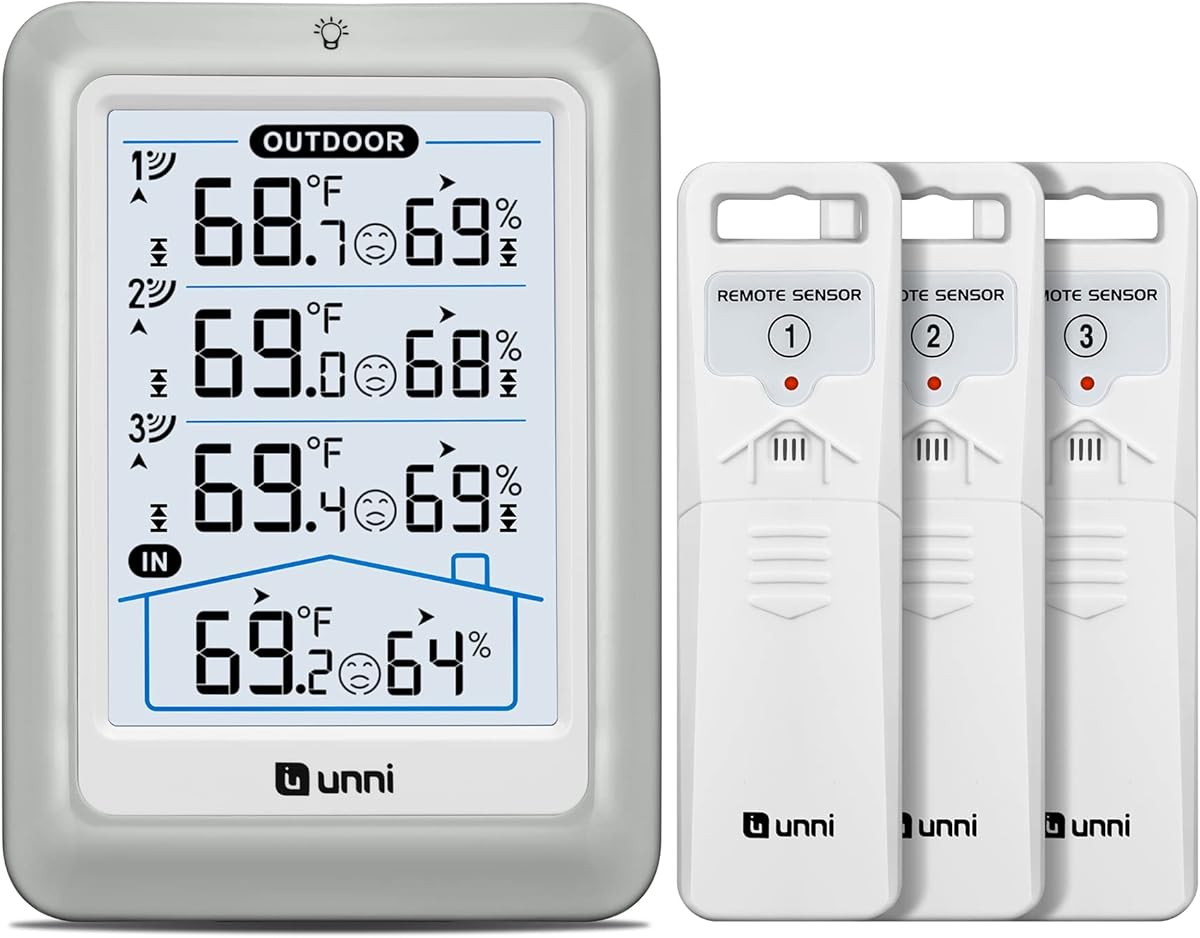
The Unni Indoor Outdoor Thermometer Wireless 4.5 Inch Display Digital Hygrometer offers a practical way to monitor several areas without requiring a cloud account, hub, or cellular plan. Its 4.4 rating reflects a solid combination of three remote sensors, a readable indoor console, and a stated 330-foot transmission distance. It is not a phone-based remote alert system, but it is a strong option for readers who want an immediately visible local reading.
We may earn a commission when you buy through this link, at no additional cost to you.
The product measures indoor and outdoor temperature as well as indoor and outdoor humidity. Its listed indoor temperature range is 14.2 to 122 degrees Fahrenheit, the outdoor range is -40 to 158 degrees Fahrenheit, and the humidity range is 20% to 95%. Accuracy is stated at plus or minus 2 degrees Fahrenheit and plus or minus 5% relative humidity. The system transmits updated information every 30 seconds, allowing one console to present readings from three separate outdoor sensors.
Convenience features include Celsius and Fahrenheit switching, a comfort indicator, outdoor temperature and humidity alerts, daily maximum and minimum records, and a low-battery indicator. The 4.5-inch screen uses large dark characters for readability. It can operate on USB power or batteries, and its three-level adjustable backlight includes an off setting. A tabletop or wall-mountable body gives users flexibility for kitchens, patios, garages, nurseries, and other areas.
The primary limitation is the absence of app-based remote monitoring. Users need to be near the display to view conditions, and the product description does not indicate that readings can be accessed remotely or exported for analysis. The daily maximum and minimum records also reset automatically every 24 hours, limiting historical analysis. A one-year warranty is included, although batteries are excluded.
This monitor is best for households that want a dependable multi-location display at a modest entry point and do not need phone notifications. It is especially useful for tracking conditions near a patio, garage, attic, or outdoor storage area. For buyers who value local readability and multiple sensors more than cloud access, it delivers a focused and economical solution.
Three wireless sensors allow the console to compare conditions around a home rather than presenting a single outdoor location. This is useful for spotting which part of a property is warmest, coldest, or most humid at a given time.
The local display makes this system attractive for users who do not want to depend on a cloud service or phone. Its adjustable backlight, large characters, and wall or tabletop mounting options support quick everyday readings.
We may earn a commission when you buy through this link, at no additional cost to you.
The Govee Indoor Hygrometer Thermometer 3Pack H5075 with Bluetooth App Control is a balanced choice for monitoring several rooms with compact devices. It carries a 4.5 rating, and the three-pack configuration lets users place one sensor in a bedroom, nursery, basement, wine cellar, or another humidity-sensitive space without buying three separate units.
We may earn a commission when you buy through this link, at no additional cost to you.
Each unit has a 3-inch bright LCD that shows current readings, maximum and minimum records, and dry, comfortable, or wet comfort indicators. The stated Swiss-made sensor is accurate to plus or minus 0.54 degrees Fahrenheit for temperature and plus or minus 3% relative humidity. Readings refresh every two seconds, which is quick enough to follow meaningful changes in a compact room.
Bluetooth connectivity reaches 196 feet, or 60 meters, and the Govee Home app provides remote monitoring, preset-range alerts, recent-record viewing, and graphed trends. Twenty days of readings are available online, and data from the previous two years can be exported in CSV format. The app setup is straightforward: download it, select the H5075 model, and pair the device.
Because the connection is Bluetooth rather than Wi-Fi or cellular, access depends on a compatible phone being within range. That is less suitable for continuous checking while the user is away from home, although notifications and stored readings remain valuable in daily use. The product also does not offer the broader whole-home device linking described by some X-Sense systems.
This three-pack is a good fit for families who want inexpensive room-to-room awareness and immediate threshold notifications. It works particularly well for nursery comfort, bedroom humidity, greenhouse conditions, and basement monitoring. Users wanting permanent internet-based remote access should choose a Wi-Fi or cellular alternative instead.
Placing one sensor in each important room makes it easier to identify which space needs attention. Bright displays and simple comfort labels make each unit useful even for household members who do not open the app.
Twenty days of online graphs help reveal daily patterns, while two-year export support provides a way to preserve and analyze readings. This adds value beyond the basic display and threshold alert functions.
We may earn a commission when you buy through this link, at no additional cost to you.
The Frigga 4G Cellular Temperature & Humidity Monitor with Email App Alerts earns its place as a flexible option for properties that may have internet access now but cannot depend on it later. Its 4.2 rating is modest compared with the leaders, yet its dual connectivity, alert choices, seven-day battery, and two-year storage provide a feature-rich monitoring foundation.
We may earn a commission when you buy through this link, at no additional cost to you.
A preinstalled global SIM and two years of cellular service allow the device to operate without Wi-Fi. At home, users can instead connect it to 2.4 GHz or 5 GHz Wi-Fi. This makes the monitor useful for vacation homes, cabins, crawlspaces, basements, warehouses, and RVs, particularly when network conditions vary. Long-pressing the power button initiates the Wi-Fi connection.
Alerts can be delivered through app push notifications, email, and an on-device voice alarm. The system monitors temperature, humidity, power failures, pipe-freeze risks, disconnections, and drops. Its screen refreshes every five seconds in constant-on mode, and readings upload every 10 or 30 minutes. The app allows thresholds to be set and shared access to be granted to family or team members.
The rechargeable battery supports up to seven days of operation, and the device may remain plugged in for longer-term use without adversely affecting battery performance. Records can be retained for up to two years and downloaded as CSV files. These features make it well suited to both portable monitoring and fixed installations.
Users should consider the cellular subscription requirement after the included two-year period and ensure that coverage exists at the intended location. The product also offers fewer display details than some competing devices, although its voice alarm adds useful local awareness. It is best for users who want cellular independence without giving up the convenience of Wi-Fi at home.
The ability to switch between 4G and Wi-Fi makes this monitor more adaptable than a cellular-only unit. Homeowners can use Wi-Fi where available and cellular service at cabins, rentals, or other locations without a dependable router.
Push, email, and voice alarm options make the device useful to people with different habits. Shared app access also allows multiple household members or team members to supervise the same monitored location.
We may earn a commission when you buy through this link, at no additional cost to you.
The X-Sense Wi-Fi Thermometer Hygrometer with LCD, 3 Sensors & Base Station is an excellent choice for a household that wants several remote sensors, accurate readings, and alerts audible in the room. Its 4.5 rating reflects strong performance, while the included base station creates a central hub for sensors around the home.
We may earn a commission when you buy through this link, at no additional cost to you.
Temperature accuracy is stated at plus or minus 0.36 degrees Fahrenheit, or plus or minus 0.2 degrees Celsius, between -4 and 140 degrees Fahrenheit. Relative humidity accuracy is plus or minus 2% between 0% and 99%. These specifications make the system appealing for nurseries, bedrooms, wine storage, plant rooms, basements, and other places where modest environmental variation matters.
The system can notify users by phone when a reading leaves the selected range and can sound an alarm from the base station. Low-battery warnings also appear in the app. Its comfort icons offer a quick interpretation of current conditions, while remote graphs show maximum, minimum, and average temperature and humidity over time. Users can switch between Fahrenheit and Celsius and customize comfort settings.
The base station connects to the X-Sense Home Security App over 2.4 GHz Wi-Fi. It does not support 5 GHz networks, so homes with a combined dual-band router may need to use or create a compatible 2.4 GHz network. Up to 12 users can monitor the indoor environment simultaneously, making shared access unusually convenient for families and landlords.
This is a strong recommendation for users who want audible local warnings as well as remote phone notifications. The tradeoff is dependence on compatible Wi-Fi and a base station that must remain connected. It is less appropriate for off-grid monitoring or users who prefer a cellular-only device.
The tight stated accuracy tolerances are a notable strength for monitoring spaces where small environmental changes may matter. The system can track several areas without forcing users to rely on one sensor location.
Supporting up to 12 simultaneous app users allows relatives, caregivers, or household staff to monitor conditions without duplicate hardware. The base-station alarm adds awareness for people who may not always carry a phone.
We may earn a commission when you buy through this link, at no additional cost to you.
The X-Sense Smart Wi-Fi Thermometer Hygrometer, 3 Sensors & Base Station is the most advanced analytical system in the guide. It has a 4.5 rating and expands beyond basic temperature and humidity readings with dew point and vapor pressure deficit, or VPD. Those measurements are especially relevant to plant care, wine storage, and other environments where moisture behavior matters.
We may earn a commission when you buy through this link, at no additional cost to you.
The stated precision is plus or minus 0.36 degrees Fahrenheit, or plus or minus 0.2 degrees Celsius, for temperature and plus or minus 2% relative humidity. Historical graphs can display temperature, humidity, dew point, and VPD by day, month, or year, and data can be exported to identify patterns. Phone alerts notify users whenever a reading leaves the configured range.
Its network architecture is particularly flexible. One base station can link up to 50 devices, including no more than 10 thermo-hygrometers, with stated wireless coverage up to 1,700 feet, or 500 meters. That makes the system appealing to buyers who want one coordinated monitoring system across a large property or multiple levels rather than three isolated sensors.
Each thermo-hygrometer uses replaceable 1,200 mAh AAA batteries with an expected life of up to one year. Low-battery alerts are sent through the app, and the devices are designed for a five-year lifespan. This approach avoids sealed batteries but requires occasional attention to each sensor.
The system is best for technically engaged users who want detailed environmental data, broad household coverage, and flexible expansion. Those who need only a simple current reading may find the feature set excessive. It also requires suitable Wi-Fi infrastructure and careful sensor placement, but for a whole-home monitoring project, its capabilities are particularly compelling.
Dew point and VPD offer more information than basic relative humidity alone. These readings can help plant growers and wine collectors evaluate moisture conditions and understand how the air is behaving over time.
With room for up to 10 thermo-hygrometers on one base station, the system can grow from a three-sensor starting point into a broader property-wide network. Extended wireless coverage also supports homes with multiple rooms or floors.
We may earn a commission when you buy through this link, at no additional cost to you.
The Govee WiFi Thermometer Hygrometer H5179 with App Notification Alert is a compact and straightforward choice for monitoring one important room. Its 4.3 rating comes alongside Wi-Fi and Bluetooth connectivity, rapid updates, app-based threshold alerts, and a lanyard loop that makes placement easy.
We may earn a commission when you buy through this link, at no additional cost to you.
The sensor uses a Swiss-made sensing component with stated temperature accuracy of plus or minus 0.54 degrees Fahrenheit, or plus or minus 0.3 degrees Celsius, and humidity accuracy of plus or minus 3% relative humidity. A two-second refresh rate keeps the display and app current. The product supports widget functions, allowing users to add readings to a phone home screen for quicker checks.
Users can establish preset temperature and humidity ranges through the Govee Home app. When conditions leave those bounds, an alert is delivered. Data uploads through either Bluetooth or Wi-Fi, with 20 days available for online viewing and up to two years of historical information accessible through graphs and export functions.
Wi-Fi connectivity must use a 2.4 GHz network because 5 GHz is not supported. Some routers combine both bands under one network name, which may require a compatible network separation. The package includes one temperature and humidity gauge, one lanyard loop, and a user manual, with no separate base station.
This model is best for users who want a small connected sensor for a nursery, basement, bedroom, or similar space. It is less suitable for monitoring several rooms because it does not include multiple sensors or a hub. Its appeal lies in simple placement, quick readings, and remote access without a complex setup.
The small format and included lanyard make it convenient to position the unit where conditions need watching without giving it a prominent place on a shelf. It is suited to compact rooms and targeted monitoring rather than whole-home coverage.
Two-second refresh and preset range alerts provide timely awareness of uncomfortable or risky conditions. Widget support reduces the need to open the app for routine readings.
We may earn a commission when you buy through this link, at no additional cost to you.
The Govee WiFi Thermometer Hygrometer H5103 with Electronic Ink Display combines a distinctive electronic ink screen with Wi-Fi monitoring and a long stated battery life. Its 4.2 rating is slightly lower than the Govee models using LCD screens, but the product offers a compelling combination of readable presentation, remote alerts, and reduced charging frequency.
We may earn a commission when you buy through this link, at no additional cost to you.
The screen is designed for easy reading and avoids the visual conventions of a conventional backlit LCD. The device supports Wi-Fi and Bluetooth through the Govee Home app, although it works only with 2.4 GHz Wi-Fi networks. A Swiss-made sensor is stated to be accurate to plus or minus 0.54 degrees Fahrenheit, or plus or minus 0.3 degrees Celsius, and plus or minus 3% relative humidity.
Readings refresh every two seconds. Users can set temperature and humidity ranges, and the app sends an alert when readings fall outside the selected levels. The device can remain connected over Bluetooth or Wi-Fi, making it useful for both local setup and remote supervision.
Battery life is stated at approximately six months, and the monitor can use a replaceable 1.5-volt AA alkaline battery when needed. The app presents 13-day online graphs and supports export of information from the previous two years. This storage arrangement gives a shorter immediate online history than the 20-day Govee options but preserves longer export access.
The best buyer is someone who wants a wall-style or shelf display with minimal charging and simple remote awareness. It is also a sensible choice for wine cellars and basements where checking conditions at a glance is valuable. Users requiring extensive whole-home networking or cellular operation should look elsewhere.
An estimated six-month battery life suits locations where frequent charging would be inconvenient. Replaceable AA batteries also make recovery from a depleted unit straightforward.
The electronic ink display provides a clear, persistent view of conditions. Combined with two-second refreshes and remote threshold alerts, it serves both household members who prefer a local display and users who check their phone.
We may earn a commission when you buy through this link, at no additional cost to you.
The eMylo WiFi Thermometer Hygrometer, Smart Indoor Temperature Humidity Sensor is the strongest choice in this guide for users who want temperature and humidity readings to trigger broader smart-home routines. Its 4.0 rating is the lowest among the listed products, but the compatibility with Smart Life and Tuya makes it especially useful for automation-focused households.
We may earn a commission when you buy through this link, at no additional cost to you.
The sensor connects directly to a 2.4 GHz Wi-Fi network without requiring a separate hub. It can monitor spaces such as a nursery, greenhouse, storage room, or general living area and report readings through the Smart Life or Tuya app. The stated measurement range is 14.2 to 140 degrees Fahrenheit and 0% to 99% relative humidity, with temperature accuracy of plus or minus 1 degree Celsius, or 1.8 degrees Fahrenheit, and humidity accuracy of plus or minus 5%.
Standard app alerts, low-battery reminders, one year of history, and data export do not require a subscription. Optional SMS and phone-call notifications do require a separate paid service, which should be considered before relying on those delivery methods for urgent conditions.
Its standout function is automation. Readings can act as triggers in Tuya scenes, allowing compatible fans, humidifiers, and dehumidifiers to turn on when the room becomes too hot, cold, dry, or humid. Alexa and Google Assistant can also be used for hands-free reading checks, although voice access is limited to viewing readings rather than changing alerts or automations.
This is a good fit for a connected home already using Tuya-compatible devices and automations. It is less attractive for buyers requiring tighter stated accuracy or standalone phone-call notifications. After setup or relocation, approximately 30 minutes of stabilization is recommended before treating readings as fully settled.
The sensor can serve as a trigger for fans, humidifiers, and dehumidifiers in a Tuya scene. This turns it from a passive display into an active part of household comfort control.
Direct Wi-Fi connection removes the need for a dedicated hub, while free alerts and one year of history cover standard monitoring needs. Voice assistants add a convenient way to check current conditions.
We may earn a commission when you buy through this link, at no additional cost to you.
The Govee Indoor Hygrometer Thermometer H5075 with Bluetooth App Control is a straightforward single-sensor option for readers who mainly want local readings, short-range app access, and threshold alerts. Its 4.5 rating shows that the basic model remains competitive with more elaborate systems, particularly when one room is the main monitoring goal.
We may earn a commission when you buy through this link, at no additional cost to you.
The 3-inch bright LCD uses large numbers for easy reading and includes maximum and minimum records plus dry, comfortable, and wet indicators. The Swiss-made sensor is stated to be accurate to plus or minus 0.54 degrees Fahrenheit and plus or minus 3% relative humidity, and it refreshes every two seconds. That level of precision and speed is useful for quickly seeing changes in a bedroom, baby room, wine cellar, basement, greenhouse, or plant nursery.
Bluetooth control operates within a stated range of 164 feet. The Govee app supports remote monitoring within that range, temperature and humidity graphs, and immediate notifications when readings leave preset bounds. Twenty days of curve data are available in the app, and information from the previous two years can be exported as a CSV file.
There is no Wi-Fi connection, so the monitor cannot provide the same kind of continuous remote access from another city or an off-site property. Its range also makes it less appropriate for a large, multi-floor home unless the phone remains nearby. This is a limitation of convenience rather than accuracy, and the product remains effective for local, near-home monitoring.
The single Govee H5075 is best for a first remote thermometer, a nursery, or one humidity-sensitive room. Buyers who need multiple locations should consider the three-pack version, while travelers or owners of remote cabins should choose a Wi-Fi or cellular unit.
A single sensor provides an uncomplicated way to start tracking indoor comfort. The large display and comfort icons make current conditions easy to understand without relying on app analysis.
The app can show readings and send alerts when a nearby phone is within Bluetooth range. This is useful around the home but does not replace a Wi-Fi or cellular system for monitoring while away.
We may earn a commission when you buy through this link, at no additional cost to you.
The right monitor depends on location, connectivity, alert needs, and the type of environmental information that matters most. Reviewing these factors before purchasing helps avoid paying for capabilities that are unnecessary or relying on a connection that will not work where the sensor is installed.
Wi-Fi sensors are convenient for occupied homes with a stable 2.4 GHz network, while cellular monitors are better suited to cabins, basements, rentals, RVs, and other places without dependable internet. Bluetooth devices offer the simplest setup and can be useful for one nearby room, although their range is limited. Some systems support both Wi-Fi and cellular, allowing the user to choose the most appropriate connection as circumstances change.
A single sensor may be sufficient for a nursery, bedroom, basement, or wine cellar, but multiple sensors provide a better view of an entire property. Consider where temperature swings are likely, which areas need humidity control, and whether the display needs to show conditions from outside. Multi-sensor systems may require positioning a base station centrally and confirming adequate wireless coverage between it and each probe.
Push notifications are convenient for many households, while email alerts provide a useful secondary channel. Audible base-station alarms can warn people nearby without requiring a phone, and some cellular monitors also support text messaging. The number of household contacts, notification types, and any service restrictions matter when the sensor protects a space that requires a rapid response.
Accuracy tolerances indicate how closely readings should match a reference. The products here range from plus or minus 0.36 degrees Fahrenheit for temperature to plus or minus 2 degrees Fahrenheit, with humidity claims ranging from plus or minus 2% to plus or minus 5%. Faster refresh rates can make changes easier to observe, although the most important consideration is whether the accuracy is sufficient for the room and the alerts being used.
Some monitors use replaceable batteries, some contain rechargeable cells, and others are designed primarily for continuous wall power. Battery-operated units are easier to place but require occasional maintenance, while rechargeable or plug-in devices can support outage monitoring if their internal battery is designed for that purpose. Check the stated battery duration and whether low-battery or disconnection warnings are available.
Immediate readings answer the question of what conditions are happening now, while historical graphs reveal patterns such as recurring nighttime humidity spikes or poorly insulated rooms. Online storage periods vary from 13 days to two years, and export support differs as well. Users considering long-term analysis should compare both the accessible history and the length of data that can be downloaded.
The easiest setup is not always the most suitable setup. Some devices connect directly to a 2.4 GHz network, while others require a base station or cellular activation. Wall placement, cable routing, outdoor exposure, and the distance to the router can affect performance. For cellular models, check coverage at the exact location before installation because a usable signal is essential to remote access.
Most home users need temperature, humidity, and threshold alerts, but specialized environments may benefit from additional calculations. Dew point and VPD can help plant growers understand moisture stress, while maximum and minimum records assist with diagnosing drafts, hot spots, or seasonal changes. Choose advanced metrics only when they will influence an action; otherwise, a simpler sensor may be easier to maintain.
Begin by choosing a representative location rather than placing every sensor immediately. Basements, attics, garages, nurseries, wine storage areas, and exterior walls can experience conditions that differ sharply from the main living space. If using several sensors, assign each one a clear purpose and place it away from direct sunlight, heating vents, air conditioners, kitchen appliances, windows, and other direct influences.
Connect the device using the method specified in its instructions. Bluetooth units generally need the phone to remain nearby during pairing, while Wi-Fi systems may require a 2.4 GHz network or an included base station. Cellular monitors require suitable coverage and service activation. After connection, set realistic upper and lower limits based on the intended room and verify that alerts reach every responsible contact.
Allow new sensors to stabilize after installation or relocation, particularly when they are moved between environments with different temperatures. Review readings after several hours or a full day, adjust placement or thresholds as needed, and check that the display agrees with a familiar reference when possible. Keep app and firmware software current, replace batteries on schedule, and maintain any service plan required to keep cellular alerts operational.
Yes, if the monitor uses cellular connectivity or Bluetooth. Cellular models can operate in homes, cabins, RVs, and other locations with suitable coverage, while Bluetooth monitors work when a compatible phone is nearby. Their remote-access range differs, so cellular is usually better for checking conditions while away from the property.
A Wi-Fi monitor relies on a compatible home network and is generally convenient for occupied properties. A cellular monitor uses a mobile network and does not need a router, making it better for remote buildings or locations with unreliable internet. Cellular plans may require activation and renewal after an included service period.
It depends on the model. The Necto monitor includes power outage alerts and a rechargeable battery designed to maintain monitoring, while the Frigga system also reports power failures and has a rechargeable battery. Other models may require an accessory or separate power-failure detector if they do not list that function.
One sensor is enough for a single important room, but three or more are more useful for comparing a whole property. Homes often benefit from probes in a basement, attic, garage, nursery, and main living area. Placement should reflect the goal, such as detecting frozen pipes, excess humidity, or uncomfortable temperatures.
Some monitor models connect only to 2.4 GHz networks, which commonly offer broader range and greater compatibility with connected devices. If the router combines 2.4 GHz and 5 GHz under one network name, separating the bands may be necessary. The Frigga model is one option in this guide that supports both 2.4 GHz and 5 GHz Wi-Fi.
No. Push notifications are common across app-connected products, while SMS, phone calls, or extended cellular service may require a paid plan. The eMylo monitor provides standard app alerts without a subscription but makes SMS and calls available through a separate paid service. Check the notification options before choosing a system for urgent conditions.
Place it in the area you want to evaluate and keep it away from direct sunlight, vents, appliances, doors, and exterior walls that can distort readings. Basements and bathrooms often need different thresholds from bedrooms or living rooms. Allow the sensor to stabilize after moving it, and compare its display with a known reference when possible.
Many Wi-Fi and Bluetooth systems offer their standard monitoring, alerts, and history without a subscription. Cellular monitors generally include service for a stated period but then require renewal. Some products also place optional SMS, phone-call, or other enhanced notifications behind a paid plan.
The Necto Cellular Monitor is the strongest all-around recommendation because it combines temperature, humidity, power outage detection, independent cellular connectivity, and multi-contact alerts. The X-Sense Smart Three-Sensor System is ideal for users who want deeper environmental metrics and a scalable whole-home network, while the Unni display is a practical choice for buyers seeking three remote sensors and clear local readings without an app.
Before selecting, prioritize the location and the connection that will work there. A stable 2.4 GHz Wi-Fi network is sufficient for most connected homes, Bluetooth suits nearby single-room monitoring, and cellular coverage is essential for remote properties. Then consider alert delivery, battery behavior, storage, accuracy, and the number of sensors needed to produce useful comparisons.
Finally, check the current product details, included service terms, compatibility requirements, and prices before purchasing. Technology, app support, network standards, and subscription terms can change over time. The most effective monitor is the one that provides reliable readings, reaches the right people promptly, and remains practical to maintain in the space being watched.