
Lenovo Flagship Chromebook
4.2Editor score
14-inch full HD touchscreen
Eight-core Kompanio processor
Lightweight 2.86-pound design
MacBook alternatives range from lightweight Chromebooks built for web-based work to capable Windows notebooks for professional software and an Apple model for users who want macOS without a conventional MacBook. The right choice depends on operating-system preferences, performance needs, portability, display quality, and the kinds of applications you use every day.
We compared all ten products using their stated processors, memory, storage, displays, connectivity, battery claims, convertibility, and included features. The list includes affordable Chromebooks, full Windows laptops, premium Apple hardware, touch displays, pen support, business-oriented connectivity, and several options for buyers who want portability without a large-screen footprint.
Each review explains where the laptop stands out, where compromises appear, and whom it is best suited to serve. Our top selections highlight the strongest balanced Windows laptop, the most attractive lower-cost Chromebook, and the most premium Apple alternative, while the remaining entries provide specialized choices for mobile users, students, and creative workflows. Prices and availability can change.
4.2Editor score

4.4Editor score

4.6Editor score
As an Amazon Associate we earn from qualifying purchases.
The table below places every featured MacBook alternative side by side, with a focus on operating system, processor, memory, storage, and display so readers can quickly identify the model that best matches their budget and workload.


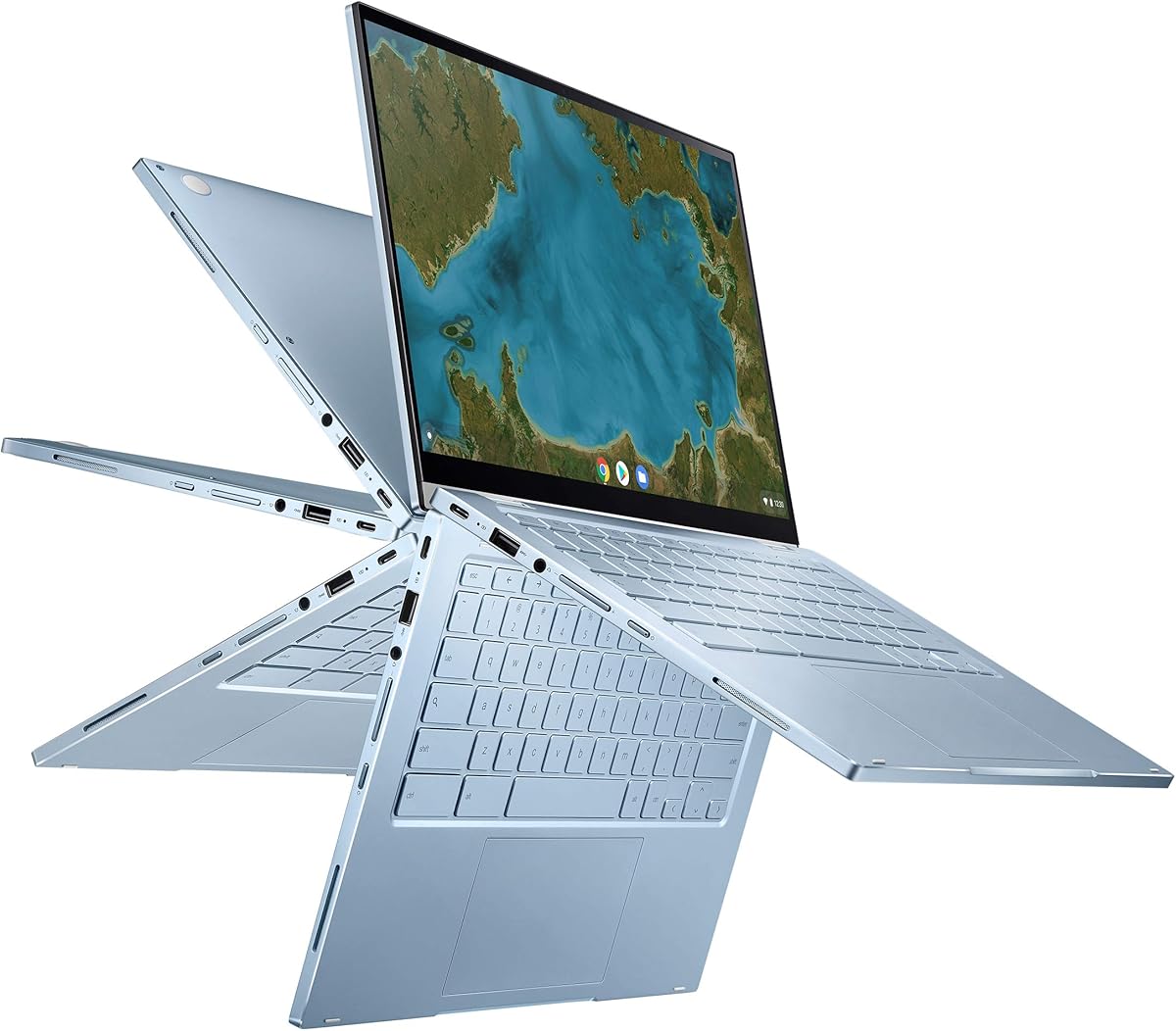


The HP Chromebook 14 x360 Plus is a versatile ChromeOS alternative for buyers who want a laptop that can also become a tablet, tent, or display-oriented device. Its 4.2 rating reflects a generally capable everyday machine, with the strongest attractions being the 360-degree hinge, 14-inch WUXGA touchscreen, modern connectivity, and ability to switch among four physical modes.
We may earn a commission when you buy through this link, at no additional cost to you.
The Intel N150 is designed around routine productivity rather than demanding software. It handles browsing, document editing, video streaming, online classes, and light multitasking with 4GB of LPDDR5 memory. A 128GB UFS drive supports local files and offline content, while ChromeOS cloud backup and Google services work naturally with the system's web-centered design.
The 1920-by-1200 touchscreen offers more usable resolution than a typical budget panel, and narrow bezels help preserve the 14-inch diagonal. A 300-nit anti-glare finish helps control reflections, while Wi-Fi 6, Bluetooth 5.4, USB-C, USB-A, and an audio jack cover everyday needs. The main compromises are the limited memory and modest local storage, which can matter when keeping many applications or large media libraries open.
This is a strong recommendation for students, families, and home users who value flexibility more than high-end laptop power. It also suits anyone who wants a larger touchscreen without moving into a premium full-size Windows machine. For heavier multitasking, advanced creative work, or conventional desktop applications, consider a model with more memory and storage, but for everyday ChromeOS tasks this model makes a persuasive case.
The four-position hinge is more than a novelty: it lets the machine adapt to typing, reading, presentations, streaming, and touchscreen interaction. Buyers who alternate between desk and lap use can change orientation without carrying a separate tablet or relying on a small supporting device.
Wi-Fi 6, Bluetooth 5.4, USB-C, USB-A, and a FHD camera provide a practical foundation for classes, calls, and daily productivity. The 300-nit anti-glare display is also sensible for prolonged reading and shared workspaces.
We may earn a commission when you buy through this link, at no additional cost to you.
The ASUS Chromebook Flip CX1 is a screen-focused ChromeOS alternative for people who want a large full HD convertible with useful memory and broad connectivity. Its 4.3 rating sits slightly above many of the budget models in this guide. The 14-inch 1920-by-1080 NanoEdge touchscreen and four-position hinge make it particularly appealing for media viewing, browsing, and collaborative use.
We may earn a commission when you buy through this link, at no additional cost to you.
Its Intel Celeron N4500 processor is not designed for intensive computing, but 8GB of RAM gives the system more breathing room than many similarly positioned Chromebooks. The 128GB eMMC drive is adequate for cloud-focused use, although users with sizable offline media collections may want external storage. Google applications and the ability to work with Microsoft Office files through Google's online tools strengthen its productivity appeal.
The CX1 weighs 3.59 pounds and has passed the stated US military-grade durability standard. It offers two USB-C ports with display and power-delivery support, two USB-A ports, a microSD reader, and audio connectivity. Its advertised battery life reaches up to 11 hours, although actual results depend on workloads and operating conditions.
Choose the CX1 for students, remote learners, and home users who prioritize a sharp screen, convertible design, and comfortable everyday headroom. It is less appropriate for intensive video editing, large local project files, or software that demands a high-performance CPU. Within the ChromeOS category, however, it delivers one of the more complete feature combinations.
The 1920-by-1080 NanoEdge display gives videos, documents, and websites more detail than many entry-level Chromebook panels. A convertible enclosure lets the same screen support laptop, tent, stand, and tablet layouts, making it adaptable to different spaces.
Two USB-C and two USB-A ports reduce the need for docking accessories, while the microSD reader simplifies file transfers. The inclusion of power delivery and display support on USB-C adds flexibility for peripherals and external monitors.
We may earn a commission when you buy through this link, at no additional cost to you.
The Samsung Galaxy Book4 is the most complete general-purpose MacBook alternative in this group. Its 4.4 rating, full Windows installation, 16GB of memory, and 512GB NVMe drive give it the versatility required for office work, communication, research, media, and a broad selection of desktop applications. It is especially convincing for buyers who want macOS-style portability and polish but need a full Windows environment.
We may earn a commission when you buy through this link, at no additional cost to you.
The Intel Core 7 150U is a ten-core processor with two performance cores, eight efficient cores, and 12 threads. That mix supports responsive multitasking while allowing the laptop to manage background work efficiently. The included 512GB NVMe drive is a meaningful advantage over the smaller eMMC and UFS configurations found among many Chromebooks, giving applications and project files more room.
Its 15.6-inch FHD IPS panel has 300 nits, anti-glare treatment, 100% sRGB color coverage, and narrow bezels. A backlit keyboard, fingerprint reader, numeric keypad, Wi-Fi 6E, Bluetooth 5.1, Ethernet, HDMI, and multiple USB ports make it especially business-friendly. At 3.46 pounds and 0.61 inches thick, it remains portable, though the large display is less convenient than a 13-inch model for travel.
The Galaxy Book4 is our top overall pick because it covers productivity, connectivity, display quality, and local storage without asking buyers to compromise on operating-system flexibility. It is ideal for professionals, students, and families who want one device for school and work. Those who need a touchscreen, tablet mode, or an even smaller chassis should look toward a convertible Chromebook, while users committed to macOS may prefer the MacBook Neo.
The combination of ten processor cores, 16GB of memory, and NVMe storage gives the Galaxy Book4 more flexibility than the ChromeOS alternatives. It can move between browser-heavy work, documents, communication, and conventional Windows software without relying on cloud storage as heavily.
The backlit keyboard, fingerprint reader, numeric keypad, Ethernet connection, and generous port assortment are useful details for frequent office use. Its 100% sRGB IPS display also makes the larger 15.6-inch panel more appropriate for documents and media work.
We may earn a commission when you buy through this link, at no additional cost to you.
The Google Pixelbook Go is built around portability, making it a notable MacBook alternative for travelers and students who carry a computer between classes, meetings, and study locations. Its 4.2 rating is supported by an easy-to-carry design, fast ChromeOS operation, a touch display, and a battery rated for extended use. It weighs barely one kilogram and measures about 13 millimeters thick.
We may earn a commission when you buy through this link, at no additional cost to you.
The eighth-generation Intel Core platform provides a responsive experience for browsing, documents, communication, and streaming. A backlit keyboard improves low-light use, while Hush Keys promise quieter typing. The spacious touchpad and fanless construction also make the device pleasant to use on a lap, and automatic ChromeOS updates help maintain security and system features.
Its main limitation is age. The Pixelbook Go uses an earlier Chromebook platform, so buyers who require the latest application support, modern connectivity, or a more current industrial design may find newer alternatives more appealing. The 4.2 rating indicates that the core experience remains useful, but it is not equipped with the newest processors featured elsewhere in this list.
The Pixelbook Go remains an excellent choice for anyone whose top priorities are weight, battery freedom, and uncomplicated cloud computing. It is less suited to large local media libraries or professional software that requires a current Windows platform. For travel and everyday web work, the portability advantage can outweigh the aging specification.
At barely one kilogram and approximately 13 millimeters thick, the Pixelbook Go is easy to carry for long periods. Its fanless design and grippable shape are particularly useful for commuting, travel, and working in shared spaces.
ChromeOS automatically updates, and the Titan C security chip plus built-in antivirus tools add account and device protection. These features suit users who want a straightforward laptop without managing a traditional desktop operating system.
We may earn a commission when you buy through this link, at no additional cost to you.
The Lenovo Flex 14 combines a full Windows environment, touchscreen, convertible form factor, and included active pen. Its 4.4 rating makes it one of the stronger options in the roundup for users who want traditional laptop flexibility with tablet-style input. The 14-inch 1920-by-1080 display and 360-degree design support work, streaming, drawing, and note-taking.
We may earn a commission when you buy through this link, at no additional cost to you.
Its AMD Ryzen 5 3500U processor and Radeon Vega 8 graphics are suitable for everyday productivity, communication, media consumption, and light photo or video work. With 12GB of DDR4 memory and a 256GB NVMe SSD, it offers more conventional local storage and memory flexibility than the simplest Chromebooks, while supporting a wider range of Windows applications.
The included pen is a meaningful advantage for handwritten notes, annotations, and basic sketching. A physical privacy shutter can close the webcam when it is not in use, addressing a common concern about built-in cameras. USB-C, HDMI, and USB 3.1 connectivity covers core accessories, while the stated battery life reaches up to 10 hours with rapid recharge technology.
This Flex 14 is best for students and creative users who want pen input without buying a separate device. It also makes sense for home users who need familiar Windows software and a touchscreen. Its older processor and Windows 10 platform are the main reasons to consider a current model, but for its stated features, pen support, and flexible chassis, it remains a compelling alternative.
The included active pen makes the touchscreen more practical for handwritten study notes, annotations, and casual drawing. The physical webcam shutter provides a clear, mechanical way to prevent the camera from capturing images when it is not needed.
Unlike ChromeOS, Windows supports a broad range of established desktop applications. The combination of 12GB memory, a 256GB NVMe drive, and a full HD touchscreen makes the Flex 14 adaptable to school, home, and creative tasks.
We may earn a commission when you buy through this link, at no additional cost to you.
The ASUS Chromebook Flip C433 is a compact convertible for buyers who want a large touchscreen without carrying a bulky conventional laptop. It carries a 4.3 rating and stands out for its narrow bezels, 360-degree hinge, backlit keyboard, and ChromeOS simplicity. The 14-inch display is fitted into a body described as comparable in footprint to a 13-inch notebook.
We may earn a commission when you buy through this link, at no additional cost to you.
The Intel Core m3-8100Y processor is designed for responsive everyday computing, particularly in a browser-oriented operating system. Eight gigabytes of LPDDR3 memory allows a reasonable number of tabs and applications to remain open. The 64GB eMMC drive is the more significant limitation, making cloud storage or external media important for anyone with many local files.
Its 1920-by-1080 NanoEdge panel is unusually detailed for a compact Chromebook, and the 16:9 aspect ratio suits video and browsing. The hinge supports laptop, tent, stand, and tablet positions, while two USB-C and one USB-A port provide core peripheral connections. A backlit keyboard improves usability in dim environments.
The C433 is best for mobile users who value a sharp screen, flexible orientation, and quiet everyday productivity more than abundant storage. It can serve as a secondary travel computer or a dedicated writing and browsing device. Buyers who need to install large local project libraries should choose a model with more storage, and those who require desktop software should consider a Windows alternative.
Five-millimeter bezels reduce the visual borders around the 14-inch screen, allowing a useful amount of display space without expanding the chassis to conventional 14-inch dimensions. This makes the Flip C433 easier to fit into smaller bags and workspaces.
The four-way hinge supports typing, reading, presentation, and direct touch interaction. ChromeOS, eight gigabytes of memory, and a backlit keyboard create a simple package for browsing, writing, streaming, and remote learning.
We may earn a commission when you buy through this link, at no additional cost to you.
The Lenovo Flagship Chromebook is our Best Budget pick because it combines a full HD touchscreen, a lightweight body, and a capable eight-core Chromebook processor at a comparatively accessible level. Its 4.2 rating reflects a dependable everyday device for browsing, classes, documents, video calls, and cloud-based productivity rather than demanding professional workloads.
We may earn a commission when you buy through this link, at no additional cost to you.
The MediaTek Kompanio 520 combines four A73 and four A53 cores and is designed to balance performance with battery efficiency. Its 1920-by-1080 IPS touchscreen offers wide viewing angles, an LED backlight, and a natural way to navigate ChromeOS. The 720p webcam includes a privacy shutter and dual-array microphones, making the system well prepared for online learning and calls.
Four gigabytes of RAM can support several ordinary applications and browser tabs, but it is the least generous memory configuration in the roundup. The 64GB eMMC drive similarly emphasizes cloud use over local media storage. Connectivity includes USB-A, USB-C, a microSD reader, a headphone and microphone combination jack, Wi-Fi 6, and Bluetooth 5.1.
This Chromebook is recommended for students, families, and travel-conscious users who want a large, responsive touchscreen without paying for a premium computer. Its 2.86-pound weight and 0.73-inch thickness also make it one of the more portable full-size options. If you regularly work with large files or many simultaneous applications, choose a model with 8GB or more memory and greater storage.
The eight-core Kompanio 520 is well suited to ChromeOS, where browser work, web applications, and cloud services dominate. It provides enough capability for school and home tasks while keeping the overall design focused on affordability and battery-conscious use.
At 2.86 pounds, the Chromebook is light for a 14-inch model. The full HD IPS touchscreen, webcam privacy shutter, integrated microphones, and microSD reader form a practical package for online classes and everyday productivity.
We may earn a commission when you buy through this link, at no additional cost to you.
The Apple MacBook Neo is the premium MacBook alternative in this roundup, offering a compact 13-inch aluminum design, the A18 Pro chip, a Liquid Retina display, and Apple Intelligence. Its 4.6 rating is the highest among the featured products, reflecting a strong combination of design, portability, display quality, and integrated software features.
We may earn a commission when you buy through this link, at no additional cost to you.
The stated battery life reaches up to 16 hours, making it appealing for students and professionals who spend long periods away from a charger. The 13-inch Liquid Retina screen supports one billion colors, which benefits photography, media consumption, and creative workflows. A 1080p FaceTime HD camera, dual-microphone array, and two side-firing speakers support communication and entertainment.
Its eight gigabytes of unified memory and 256GB SSD provide a workable configuration for everyday macOS use, cloud services, productivity applications, and creative projects that do not demand workstation-class resources. The aluminum enclosure uses recycled material and is offered in several colors with a matching keyboard. Apple Intelligence features are presented as integrated tools for writing, summarizing, and everyday tasks.
The MacBook Neo is the premium choice for buyers who want macOS, Apple integration, a refined portable design, and a high-resolution display. It is especially attractive to iPhone users because shared features can move content, messages, and calls between devices. Buyers already committed to the Apple ecosystem will appreciate the integration, while those seeking a large screen, more memory, or broader port selection should inspect the alternatives carefully.
The compact 13-inch format, durable aluminum enclosure, and stated battery life of up to 16 hours create a strong travel and study package. The Liquid Retina display adds vivid color and crisp text without moving into a bulky workstation design.
The A18 Pro chip supports stated AI and Apple Intelligence functions, while macOS integration with iPhone makes it easy to continue messages, calls, and other tasks across devices. The result is particularly cohesive for buyers already invested in Apple's hardware and services.
We may earn a commission when you buy through this link, at no additional cost to you.
The renewed 14-inch MacBook Pro with Apple M1 Max is a high-end MacBook alternative for buyers who prioritize abundant memory and storage over entry cost. Its 4.4 rating reflects a capable professional configuration, while 64GB of RAM and a 2TB SSD distinguish it sharply from most systems in the guide.
We may earn a commission when you buy through this link, at no additional cost to you.
The M1 Max platform is suitable for demanding creative applications, development environments, large project libraries, and multitasking across many professional applications. The 14-inch form factor is more manageable than a larger workstation, and the substantial memory configuration gives users room for virtual machines, large media files, and complex workflows without frequent pressure on system resources.
This is a renewed product, so its condition and warranty pathway differ from a new retail laptop. The listing states that Amazon-qualified suppliers professionally inspect, test, and clean it, that visible cosmetic imperfections should not be apparent at arm's length, and that the battery exceeds 80% of its capacity relative to new. Accessories are compatible and functional but may not be original, and the box may be generic.
The M1 Max is a compelling workstation-style alternative for video professionals, developers, designers, and power users who need more capability than conventional alternatives. The trade-off is condition uncertainty, older model generation, and the absence of original accessories. Buyers should review the refurbishment terms carefully and understand that renewed hardware does not carry the same expectations as a new unit.
Sixty-four gigabytes of unified memory provides substantial working capacity for demanding applications, large datasets, and virtualized environments. It is the configuration's biggest advantage over conventional laptops with 8GB or 16GB of memory.
Professional inspection, testing, and cleaning reduce uncertainty, while the stated battery condition offers a measurable benchmark. Nonetheless, buyers should review cosmetic details, included accessories, return eligibility, and the absence of Apple certification before ordering.
We may earn a commission when you buy through this link, at no additional cost to you.
The renewed Intel MacBook Pro offers a familiar alternative for buyers who want macOS, generous memory and storage, and a large traditional notebook display. Its 3.7 rating is the lowest in the group, so buyers should evaluate the listing carefully, although the stated 16GB of RAM and 512GB storage remain respectable specifications for general productivity.
We may earn a commission when you buy through this link, at no additional cost to you.
The 2.6GHz Intel Core i7 configuration represents an older generation of MacBook Pro hardware. It can support common productivity, browsing, communication, and media tasks, but it does not offer the efficiency, performance characteristics, or specialized capabilities associated with newer Apple Silicon models. The 15-inch form factor is more substantial than the compact options in this guide.
Renewed status introduces an important layer of consideration. Cosmetic wear, battery condition, included accessories, and warranty coverage may differ from a new computer. The limited supplied information in the listing focuses on a 13.3-inch Retina display, so buyers should confirm that the dimensions and condition of the specific listing match their expectations before purchase.
This model makes most sense for a budget-oriented buyer who values the familiar MacBook Pro design, a large screen, and the combination of 16GB memory with 512GB storage. It is less suitable for buyers seeking modern battery efficiency, high-end performance, or the most current macOS experience. The lower rating and older platform should be weighed against the benefits of renewed hardware and the availability of a roomier display.
The large MacBook Pro format provides a generous workspace for documents, media, and multitasking. Its 16GB of memory and 512GB storage make it a more traditional specification combination than the ultra-compact models featured nearby.
The Intel Core i7 generation is dated compared with current Apple Silicon systems. It can remain useful for routine tasks, but buyers should consider modern alternatives when battery life, thermal efficiency, graphics performance, or long-term support are priorities.
We may earn a commission when you buy through this link, at no additional cost to you.
The most useful MacBook alternative depends on how you work. Operating-system compatibility, processor performance, memory, storage, screen quality, portability, connectivity, and battery life should be balanced against one another rather than judged independently.
ChromeOS is optimized for browser-based work, Google applications, web calls, and cloud-centered productivity. It updates automatically, emphasizes security, and is generally well suited to students and users who spend most of their time online. Windows provides broader access to established desktop software, including productivity tools, creative applications, utilities, and specialist business programs. macOS is the natural choice for users invested in Apple services, iPhone integration, or applications built specifically for the Mac ecosystem.
The operating system should be the first filter because it can eliminate otherwise attractive hardware. Confirm that the applications you use every day run natively, through the web, or in a form you are willing to manage. Choose ChromeOS for cloud work, Windows for flexibility, or macOS for Apple integration.
Entry-level Intel N-series and Celeron processors are best for browsing, writing, video calls, and other routine tasks. More capable Core, Core m, Ryzen, Kompanio, and Apple Silicon chips provide additional headroom for complex browsing, multitasking, development, and creative software. Processor specifications alone do not guarantee real-world speed, but they provide a useful indication of the tier each laptop occupies.
For basic study and office use, prioritize efficiency and battery life over maximum clock speed. For professional applications, large files, or many simultaneous tasks, choose a current processor with more cores and stronger integrated graphics. Avoid selecting a high-power chip if your workload never needs it, since portability and thermals also matter.
Memory determines how many applications, browser tabs, and background processes can be handled without slowing down. Four gigabytes is generally adequate for light ChromeOS use, eight gigabytes offers a more comfortable margin, and 16GB or more suits demanding multitasking and professional applications. Unified memory on Apple laptops is shared by the processor and graphics, so its capacity matters for larger creative workloads as well.
Eight gigabytes is a sensible minimum for long-term flexibility, while 16GB is preferable for heavy multitasking, large files, and specialized software. If a model has limited memory, check whether it can be upgraded; many thin Chromebooks and modern laptops cannot. Do not rely on extra storage as a substitute for sufficient memory.
Storage capacity determines how much can remain available offline. A 64GB eMMC drive is workable for cloud-focused Chromebook use, 128GB offers more breathing room, and 256GB or 512GB becomes more relevant when storing applications, media, large project files, or Windows software. The type of drive also matters: eMMC is simple and efficient, UFS is faster, and NVMe SSDs provide the strongest storage performance.
Cloud services can reduce immediate storage pressure, but they do not replace capacity when files must remain local. Consider both the amount of storage and its speed. Buyers wanting extensive media collections, downloaded video, offline coursework, or large creative projects should avoid the smallest configurations unless external storage is part of the plan.
Resolution, brightness, color coverage, anti-glare treatment, and touch support all affect the experience. A 1920-by-1080 panel provides a useful baseline for full HD models, while 1920-by-1200 offers a slightly taller workspace. Larger screens are better for documents and media, whereas smaller panels are more comfortable for travel. A touchscreen is valuable for direct navigation, drawing, and flexible convertible designs.
Choose a full HD or higher-resolution display and consider IPS or equivalent viewing quality if color accuracy matters. For work in bright rooms, examine brightness and anti-glare characteristics. For portability, a 13-inch or 14-inch model generally makes more sense than a large 15.6-inch laptop, unless a permanent desk setup is the primary use case.
Portability depends on more than thickness. Weight, chassis dimensions, charger size, fan noise, and battery endurance all influence how pleasant a computer is to carry. Many devices in this roundup fall near three pounds, while the premium Apple models target a smaller footprint. Battery claims should be treated as maximum or idealized figures because screen brightness, network activity, video playback, and workload can change results substantially.
For students and commuters, prioritize weight and verified battery endurance over a large display. For desk-based work, a larger screen and more ports may be worth the added bulk. Look for a balance that matches your daily carrying pattern, and avoid assuming that the longest advertised runtime will always occur under real-world conditions.
USB-C, USB-A, HDMI, a card reader, an audio jack, and Ethernet can determine how much adapter clutter a laptop requires. USB-C is particularly valuable when it supports power delivery, data transfer, and external displays. Wi-Fi 6 or 6E and Bluetooth 5.1 or later provide current wireless support, though the internal antenna and router determine actual connection quality.
List the peripherals you use before buying. If you regularly connect to an external monitor, wired network, storage drive, or specialized peripheral, verify compatibility. A full-size keyboard, fingerprint reader, privacy shutter, and numeric keypad can also influence productivity more than a small processor-generation difference in some situations.
New, renewed, and customized systems carry different expectations. A new machine generally offers the most predictable condition and support, while a renewed product can provide stronger specifications for less money if its condition is acceptable. Customized or resealed systems may include upgraded components, but warranty terms can differ. For any used system, review battery health, cosmetic condition, included accessories, return policy, and which components are original.
Do not treat a high rating as a substitute for understanding the condition. A premium configuration with limited battery capacity or inconsistent accessories may be less satisfying than a newer model. For long-term ownership, favor current processors, sufficient memory, replaceable components where possible, and a reputable warranty or clear return framework.
Start by signing into the operating system, completing the initial setup, and confirming that system, browser, and application updates are enabled. ChromeOS handles many updates automatically, while Windows users should enable automatic security updates and review optional software carefully. For a renewed or customized system, verify that the stated memory and storage upgrades are visible in the system settings before transferring important files.
For a Chromebook, organize Google Drive and other cloud folders, install only the applications needed for your routine, and keep downloaded media within the available local storage limit. On a Windows laptop, install essential applications from trusted sources, update the graphics driver when appropriate, and use cloud backup or an external drive for irreplaceable documents. On macOS, sign into iCloud if the device is part of an Apple setup, and verify that backups or synced folders are functioning as expected.
Care for the display by using a soft microfiber cloth, avoid placing the lid in a position where a pressure-sensitive screen could be marked, and keep liquids away from the keyboard. Clean vents and ports with compressed air only when the device is shut down. For battery health, avoid prolonged heat, use battery-saving modes when appropriate, and avoid keeping a laptop permanently connected to power if preserving long-term capacity is important. Always save work before folding a convertible display or changing its orientation.
For most buyers who need full application support, the Samsung Galaxy Book4 is the strongest overall option in this guide. It combines an Intel Core 7 processor, 16GB of memory, a 512GB NVMe drive, a full HD IPS display, and extensive connectivity in a portable 15.6-inch design. The right choice can still change depending on whether you prioritize macOS, touch input, or a lower cost.
A Chromebook can replace a MacBook for many web-based tasks, including browsing, Google Workspace, online learning, communication, and streaming. Its automatic updates and security model simplify maintenance, while ChromeOS applications extend its usefulness. It is less suitable if your work depends on specialist Windows software, large local media libraries, intensive editing, or established desktop workflows.
The HP Chromebook 14 x360 Plus and ASUS Chromebook Flip CX1 are strong student choices because they combine touchscreens, convertible designs, and ChromeOS. The Lenovo Flex 14 is preferable for students who need Windows applications or active pen input. Battery life, weight, keyboard quality, and course software should guide the final selection more than processing power alone.
A renewed MacBook Pro can be worthwhile when it provides a stronger processor, more memory, or more storage than a newer entry-level alternative. The main risk is uncertainty about cosmetic condition, battery wear, warranty coverage, and included accessories. Review the refurbishment terms carefully and treat the specific listing as an individual used purchase rather than a standard new retail product.
Weight, chassis size, battery life, and keyboard comfort usually matter more than a small processor-generation difference for travel and everyday use. A 13-inch or 14-inch model is easier to carry than a large 15.6-inch notebook, but a smaller screen may reduce workspace. Look for a configuration that feels comfortable to carry while still providing the display size and battery runtime required by your day.
Eight gigabytes is a sensible minimum for ChromeOS and general productivity, while 16GB provides better support for heavy browser use, large applications, and multitasking. Creative professionals, developers, and users of virtual machines should favor 16GB or more when possible. Four gigabytes can work for light tasks, but it is the most restrictive configuration in this roundup.
A touchscreen is useful for direct navigation, note-taking, drawing, and convertible designs, but it is not essential for standard document work. If you want handwriting or tablet functionality, the HP, ASUS, and Lenovo convertible options provide touch support, and the Lenovo Flex 14 includes a pen. For conventional office work, prioritize the keyboard, trackpad, display, and processor instead.
If your workflow depends on iPhone integration, Apple services, or macOS-specific applications, macOS is usually the simplest path. The MacBook Neo offers a compact premium configuration, while the M1 Max and Intel MacBook Pro provide larger or more powerful traditional designs. Confirm your application and accessory requirements before choosing a non-Apple system.
The Samsung Galaxy Book4 stands out as the best overall alternative because it balances a capable Intel Core 7 processor, 16GB of memory, fast 512GB storage, a color-accurate full HD IPS display, and business-friendly connectivity. The Lenovo Flagship Chromebook is the best budget selection, offering a lightweight full HD touchscreen for everyday cloud work, while the MacBook Neo provides the most premium compact macOS experience.
Your priorities should determine which feature comes first. Choose a Chromebook for affordable web-centered productivity, a Windows convertible for touch and traditional software, or a MacBook alternative for Apple integration. Also compare processor generation, memory, local storage, display dimensions, weight, and ports rather than focusing on a single specification that may not affect your daily work.
Finally, check current pricing, configuration details, seller information, warranty terms, and return conditions before purchasing, especially for renewed or customized systems. Product listings and prices can change, but the strengths identified in this guide provide a durable framework for finding the right MacBook alternative for your needs.