
PS5 Cooling Station with Charging
4.5Editor score
Temperature-controlled fan modes
Original and Edge charging
Nine RGB lighting modes
Compact vertical design
This cooling stand for PS5 console guide compares 10 models for airflow, charging, compatibility, storage, lighting, setup, and overall value.
A cooling stand for PS5 console can do more than hold the system upright. The best models combine active airflow, secure positioning, controller charging, and convenient storage in a way that keeps a gaming area organized while helping the console manage heat during extended play.
We compared ten stands across important categories such as PS5, Slim, and Pro compatibility, vertical or horizontal placement, fan controls, charging speed, controller compatibility, USB connectivity, lighting, and installation requirements. The list includes both straightforward cooling bases and multifunctional stations with charging docks, accessory organizers, and automatic temperature controls.
Each recommendation reflects the specifications and features listed for that model, helping you identify the most useful option for your console and controllers. Product listings, ratings, availability, and prices can change, so confirm the current details and compatibility information before making a purchase.
4.5Editor score

4.5Editor score
4.4Editor score
The following comparison highlights console compatibility, fan control, charging capabilities, and practical extras. It is designed to make the differences among vertical and horizontal stations easier to understand before choosing the features that matter most to your setup.


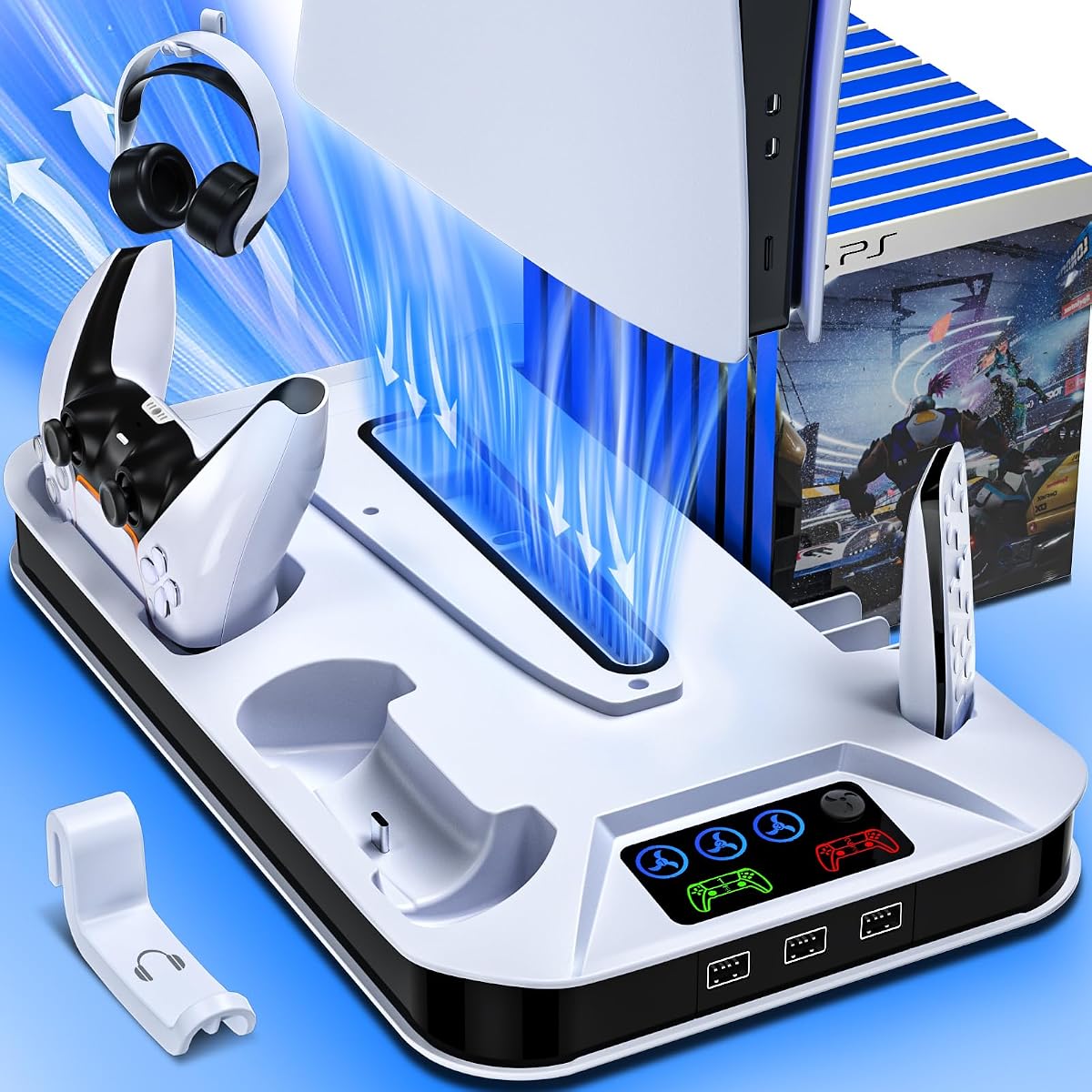
The Kammkonb PS5 Cooling Station combines a vertical console holder, a three-speed turbo fan, a two-controller charging dock, and several accessory-storage areas. With a 4.4 rating, its strongest qualities are versatility and physical organization: the same base that supports the console can also charge controllers, hold a headset, store a media remote, and keep game discs together.
We may earn a commission when you buy through this link, at no additional cost to you.
The cooling system offers high, medium, and low settings intended to dissipate heat from the bottom of the console during longer sessions. Two controller charging positions can charge original PS5 controllers simultaneously in approximately three hours, while three additional USB ports provide power for compatible accessories such as a headset, camera, controller, or other devices.
Compatibility extends to the standard, Slim, and Pro consoles in disc and digital configurations. The supplied safety screw helps secure the console, although the removable panel adapter must be taken off for Slim and Pro disc or digital models. Overcharge, overheat, overcurrent, overvoltage, and short-circuit protection are also listed among the charging safeguards.
This is a strong choice for someone who wants a single vertical hub rather than a plain stand. It suits gamers with multiple accessories who value charging and organization alongside cooling. Those who use the PS5 Edge controller should choose a different model because this station is explicitly not designed for that controller.
Combining the console holder and dual charging dock reduces the need for separate desktop pieces. LED indicators clearly distinguish charging from a fully charged or standby state.
The headset holder, media remote slot, three USB ports, and game-disc storage make this more than a cooling accessory. It is better suited to users who want a central gaming hub than to those seeking the simplest possible stand.
We may earn a commission when you buy through this link, at no additional cost to you.
This horizontal PS5 stand offers a practical alternative to the vertical stands that dominate the list. It holds the console sideways, integrates an adjustable cooling fan, and includes a dual charging dock for original and Edge controllers. Its 4.3 rating reflects a versatile design aimed at saving desk or shelf space.
We may earn a commission when you buy through this link, at no additional cost to you.
A scalable structure is designed for the 2020 standard, 2023 Slim, and 2024 Pro consoles in both disc and digital editions. Special EVA foam is used for digital editions, and installation involves placing the foam, fixing the screws, connecting the stand, and turning on power. This makes the setup reasonably approachable even for first-time stand users.
The fan offers low, medium, and high settings controlled through a touch switch. The charging dock can power two compatible controllers in roughly three to three and a half hours, with red and green LEDs indicating their status. Because it draws power directly from the PS5, the station may depend on the console's standby power settings for charging or cooling while the system is off.
Choose this model if you prefer the console positioned horizontally or need a single unit for cooling, controller charging, and compact storage. It is particularly useful for original and Edge controller owners. Be sure to position the correct foam and complete the screw installation so the console rests securely.
Holding the console horizontally can make better use of limited desk space while keeping the controllers and cooling hardware together. It is a notable alternative for users who do not prefer a tall vertical setup.
The adjustable charging contacts accommodate both original DualSense-style controllers and Edge controllers. The scalable body also supports all three major PS5 console generations.
We may earn a commission when you buy through this link, at no additional cost to you.
The Tokluck Auto Cooling Station is designed for users who want the fan to respond to console temperature without continuous manual adjustment. It holds a 4.4 rating and combines a vertical stand, automatic and manual fan controls, dual-controller charging, temperature sensing, and nine RGB lighting effects.
We may earn a commission when you buy through this link, at no additional cost to you.
Automatic mode uses a built-in temperature probe to select low, medium, or high cooling according to the listed temperature ranges. Manual mode cycles through high, medium, low, auto, and off, while a memory function restores the last fan speed after a restart. The lighting also remembers its previous mode and can have its brightness reduced or switched off.
The movable charging port can be shifted to accommodate original PS5 controllers or Edge controllers, with a listed full-charge time of approximately two and a half hours. Three USB ports are positioned on the side for accessories. Installation involves placing the console, removing screws and a charging cable from the console's lower area, and connecting the station as described in the instructions.
This is an appealing option for players who want automatic thermal management, multiple fan modes, and a visually integrated station. It is more configurable than many simpler stands. Because it offers several control methods and lighting functions, buyers who prefer minimal controls may find one of the more straightforward three-speed models easier to manage.
The temperature probe and automatic mode reduce the need to watch the console and adjust the fan during play. Manual and automatic controls remain available when you want direct control.
Nine lighting effects, adjustable brightness, and setting memory make the station easy to tailor to different gaming environments without repeatedly resetting it after power changes.
We may earn a commission when you buy through this link, at no additional cost to you.
The JAVRUNWOF PS5 Cooling Station offers one of the strongest balances of price, function, and customer feedback in the roundup. Its 4.5 rating reflects a popular combination of three-speed cooling, dual-controller charging, accessory organization, and broad support for the standard, Slim, and Pro PS5 families.
We may earn a commission when you buy through this link, at no additional cost to you.
Cooling is delivered by a low-noise turbo fan with normal, medium, and strong settings. The base can charge two PS5 controllers simultaneously in approximately two and a half hours when connected to the console or a suitable 5V/3A adapter. Red and green LEDs communicate charging status, and the included protective circuit stops charging at a stated 80% battery level.
Three additional USB ports support accessories such as a headset, camera, controller, or other compatible device. A media remote slot and headset holder keep frequently used accessories close at hand. The console is secured with a screw and non-slip pads, but the removable panel adapter must be detached when using a Slim or Pro disc or digital console.
This station is a practical recommendation for the majority of original PS5 controller owners who want meaningful cooling and charging without paying for a more elaborate lighting system. Its primary limitation is explicit: it does not fit the PS5 Edge controller. Buyers using Edge controllers should select a model with an adjustable charging contact.
Normal, medium, and strong settings let users match fan output to the intensity of a session. The low-noise design also makes the station more suitable for close desk placement.
Two dedicated controller positions, three USB ports, a headset holder, and a media remote slot make the base useful even when the console is not actively being cooled.
We may earn a commission when you buy through this link, at no additional cost to you.
The Rysker PS5 Cooling Station is a vertical, multifunctional base designed for the standard, Slim, and Pro consoles in disc and digital editions. It carries a 4.4 rating and focuses on a useful mix of three-speed cooling, flexible controller charging, secure placement, and accessory organization.
We may earn a commission when you buy through this link, at no additional cost to you.
The enlarged turbo fan provides three speed levels selected with a simple button, and the station remembers the preferred mode after a restart. A safety screw fastens the console to help prevent accidental movement or knocks, while the vertical format keeps the system upright and accessible.
Its charging dock supports both original PS5 controllers and the PS5 Edge controller, but it is not intended for third-party PS5 controllers. Three USB ports on the side offer additional charging options, and a dedicated media remote slot keeps that small accessory from disappearing. The smart charging system stops at a listed 80% charge level as an overcharging safeguard.
This model is a sensible choice for gamers who want a secure vertical station without automatic temperature adjustment. Its remembered fan setting reduces repeated configuration, while support for Edge controllers widens compatibility. The absence of dedicated game-disc storage means it is less focused on organizing a large physical game collection.
The included fastener helps keep the console stable on the base. This is particularly useful in setups where bumps or frequent controller handling could otherwise move a freestanding console.
Compatibility with original and Edge controllers is a meaningful advantage. The charging dock, USB ports, and media remote slot consolidate frequently used accessories around one stable unit.
We may earn a commission when you buy through this link, at no additional cost to you.
The Auto-Control PS5 Cooling Stand combines a 4.5 rating with a relatively focused feature set. It supports PS5, Slim, and Pro consoles in disc and digital editions, adds temperature-controlled cooling, charges two controllers, and adds a nine-mode honeycomb RGB lighting system without requiring a large collection of separate accessories.
We may earn a commission when you buy through this link, at no additional cost to you.
The built-in temperature probe changes the fan from low to medium to high as the console temperature passes the listed thresholds. A button also provides manual high, medium, low, and off settings, and a memory function restores the previous choice after restart. This gives users both automatic convenience and direct control.
Original and Edge controllers can be charged simultaneously, with a stated full-charge time of approximately two and a half hours. The status light is red while charging and blue when a controller is fully charged or in standby. Seven single-color and two breathing RGB modes add visual customization, with a long press available to turn the lighting off.
This stand is a good fit for users who prioritize automatic cooling, lighting, and dual charging but do not need extensive game-disc or headset storage. Its compact vertical format is easier to integrate into a display area than a large organizer-style station, although that also means fewer built-in storage functions.
Temperature-based adjustment provides a simple way to keep airflow responsive, while manual controls remain available for quieter periods, testing, or personal preference. The memory function reduces setup repetition.
The honeycomb pattern and nine lighting modes create a more decorative gaming station. Turning the lights off provides an easy way to keep the setup visually restrained when desired.
We may earn a commission when you buy through this link, at no additional cost to you.
The Scalable Horizontal Charging Stand is another strong sideways option, combining an adjustable cooling fan with a two-controller charging dock. Its 4.3 rating reflects a design that prioritizes compact placement, broad console support, and a straightforward all-in-one setup.
We may earn a commission when you buy through this link, at no additional cost to you.
The scalable structure fits the 2020 standard, 2023 Slim, and 2024 Pro consoles in disc and digital editions. It holds the console horizontally, while low, medium, and high fan settings allow users to adjust airflow. The charging dock has an up-and-down push design for original DualSense-style controllers and Edge controllers.
Power comes directly from the PS5 through the included cable, and two controllers can charge in approximately three to three and a half hours. Red and green indicators show charging status. Installation takes only a few steps: add EVA foam for a digital edition, secure the screws, connect the stand, and power it on.
The major consideration is standby operation. To keep charging and cooling available while the console is off, the instructions direct users to change the power-saving setting for features available in rest mode and set USB port power to always. This model is attractive for limited-space setups and users who prefer horizontal console placement.
The adjustable body is a practical feature for households with standard, Slim, or Pro systems, or for someone considering a future console change. The digital-edition foam should be positioned correctly before installation.
Because the stand draws power from the console, the PS5's rest-mode USB power setting matters. Enabling the specified always-on option helps keep the charging dock available when the console is not fully powered down.
We may earn a commission when you buy through this link, at no additional cost to you.
The PS5 Auto Cooling and Storage Station is the most complete organizer in the roundup. Its 4.5 rating is supported by a feature set that includes automatic fan control, rapid dual-controller charging, three accessory charging ports, a headset stand, a media remote slot, a hard-drive slot, and room for fourteen game cards.
We may earn a commission when you buy through this link, at no additional cost to you.
A larger turbo fan uses a built-in sensor to monitor console temperature and select one of three levels automatically. The listed thresholds are below 35 degrees Celsius for low speed, 35 to 37 degrees for medium speed, and above 37 degrees for high speed. Manual three-speed control is also available through the touchscreen controls.
The station can charge two controllers in approximately two hours, the fastest listed charging time in this comparison. A Type-C cable allows connection to a wall outlet or the console, and the product description states that controller charging can continue when the console is off. Three additional charging ports support accessories, while protective circuitry stops controller charging at a stated 70% level.
This is the most attractive choice for a gamer who wants cooling, charging, and serious physical organization in one place. Its array of functions and storage slots require more consideration than a simple cooling stand, and the 70% charging cutoff should be understood before purchase. Even so, it delivers the strongest overall combination of utility in this list.
Fourteen game-card spaces, a hard-drive slot, media remote holder, and headset stand make this a practical central hub. It can reduce clutter while keeping the most frequently used items accessible.
The automatic fan system changes output according to the listed temperature thresholds, while the larger fan and manual controls offer flexibility. This combination suits both intensive sessions and lighter use.
We may earn a commission when you buy through this link, at no additional cost to you.
The heclynis RGB Cooling Stand is a visually oriented vertical station with a 4.4 rating. It supports the PS5, Slim, and Pro families in disc and digital versions, combines a three-level turbo fan with dual charging, and includes enough game-disc storage to keep twelve titles organized.
We may earn a commission when you buy through this link, at no additional cost to you.
Fan output is selected through a button, with different speed levels indicated by corresponding colors. A ring of LEDs provides four lighting modes across eight RGB color choices, and a long press turns the lighting off. This makes the base appealing for setups where ambient RGB lighting is part of the gaming aesthetic.
Two controllers can charge simultaneously in about three hours. Red indicates charging, while blue indicates standby or a completed charge. Overcharging, overcurrent, overvoltage, and overheating protection are listed. Two USB-A hub ports provide additional power, and the console can be secured using the included screw to reduce the chance of accidental movement.
This is a good middle ground for a gamer who wants more than a bare cooling base but less complexity than the largest storage station. The absence of an automatic fan mode means cooling remains manually selected, so it may suit users who already understand their console's typical thermal behavior and prefer direct control.
The LED ring offers more color choices than many competing stands. Turning the lighting off is straightforward for users who want the functional benefits without a strong decorative effect.
Twelve game-disc spaces and an included security screw improve organization and stability. Two USB-A ports add basic accessory power without turning the base into a large charging hub.
We may earn a commission when you buy through this link, at no additional cost to you.
The PS5 Pro Cooling and Charging Station is a versatile vertical base with a 4.5 rating. It supports standard, Slim, and Pro disc and digital consoles, uses a three-level adjustable turbo fan, charges two controllers, and adds several USB connections alongside a dedicated headset holder.
We may earn a commission when you buy through this link, at no additional cost to you.
The fan is designed to move hot air away from the lower portion of the console, with high, medium, and low settings for different operating conditions. Concealed built-in cables and a sturdy security screw help create a tidy and stable installation, while the vertical design keeps the console in its familiar upright orientation.
The charging section can bring two controllers to a full charge in approximately three hours, with red and blue LEDs indicating charging and completion. A protective smart chip is listed as guarding against overcharging, overheating, overvoltage, and short circuits. Three USB ports and one Type-C port expand the hub beyond controller charging.
This station is a strong option for users who want a broad range of device-charging connections and a cleaner cable presentation. It also includes a 24-month warranty according to the product information. It is less compelling for buyers who want automatic fan control or extensive game-disc storage, since the core feature set emphasizes power and tidy organization.
The combination of three USB connections and a Type-C port offers flexibility for compatible controllers, headsets, phones, tablets, headphones, power banks, and other devices. It functions as a broader power hub than a simple two-controller dock.
Concealed internal cables reduce visual clutter, while the security screw helps keep the console stable. These details are especially helpful in a display-oriented gaming setup.
We may earn a commission when you buy through this link, at no additional cost to you.
The most useful PS5 cooling stand depends on console generation, controller type, available space, and how much organization you want in one unit. Review these factors before comparing the technical features.
First confirm whether you own the standard, Slim, or Pro console and whether it is the disc or digital edition. Although many stands in this roundup support all three generations, some use removable adapters, and the horizontal designs may require specific EVA foam for digital models. Controller compatibility deserves equal attention: several vertical stations charge original PS5 controllers only, while others explicitly support both original and Edge controllers.
Vertical stands preserve the familiar upright presentation of the PS5 and often provide more room for accessories around the base. Horizontal stands can use desk or shelf space more efficiently and may appeal to gamers who prefer the console placed sideways. The choice also affects installation because horizontal models commonly need specific foam, screw placement, and console-powered cable routing.
Manual three-speed controls are simple and dependable, allowing you to increase or decrease airflow as needed. Automatic modes use a temperature probe and are more convenient during changing workloads because the stand adjusts output according to console temperature. Consider whether you value a quick physical button, touch controls, a temperature display, or an automatic mode that can operate without constant attention.
Charging times in this roundup range from approximately two to three and a half hours for two controllers. The docking mechanism must also fit your controller shape, and some models offer adjustable charging contacts for original and Edge controllers. Review the power source as well, since some stations run from the console while others support a suitable wall adapter or other compatible power connection.
Additional USB or Type-C ports can charge a headset, camera, phone, tablet, power bank, or other compatible device, reducing the need for a separate adapter. The number and type of ports vary significantly across the list, from two USB-A ports to three USB ports plus Type-C. More connectivity is useful in a shared entertainment area, but it also makes the station larger or more complex.
Some stands include only a basic console support, while others add a headset holder, media remote slot, USB hub, and storage for game discs. Models with twelve or fourteen game-card spaces can make a physical collection easier to manage. These extras are valuable if your gaming area is crowded, but they may make the stand less suitable for a small display shelf.
RGB lighting can make a gaming setup feel more cohesive, and several models offer multiple colors, breathing effects, brightness controls, or memory functions. Lighting is optional rather than essential to cooling. If the stand will sit in a shared room, bedroom, or media cabinet, consider models with a straightforward light-off control and a design that does not look excessively busy.
Some stations are powered directly by the PS5, while others can use a suitable wall adapter or additional compatible sources. Console-powered models may require you to change the rest-mode USB power setting so charging and cooling remain available when the system is off. Review cable routing, concealed cable features, and the supplied connection instructions before installation.
Begin by identifying the correct panel or adapter for your console generation. Install the station on a stable, level surface, follow the included screw guidance, and use the specified EVA foam when required for a digital console. Connect the stand using the appropriate power method, place the PS5 securely, and check that the console does not shift when touched.
For optimal cooling, leave the lower intake area unobstructed and keep the station away from walls, closed cabinets, loose fabric, and other surfaces that could restrict airflow. Choose automatic mode if you want temperature-responsive operation, or use manual low, medium, and high settings according to your session. Turn the fan off during extended non-use periods as appropriate.
Clean the stand by unplugging it and using a soft, dry or lightly dampened cloth. Avoid spraying cleaner directly onto the fan, buttons, USB ports, or charging contacts, and do not let moisture enter the electronics. Inspect the screw, pads, fan, and charging slots periodically, and keep controllers positioned firmly so the contacts connect correctly.
No. A cooling stand is an accessory that adds external airflow while the console remains in its normal upright or horizontal operating position. The PS5 still relies on its internal cooling system, so a stand should be used as an additional cooling and organization option rather than a substitute for proper ventilation. Keep the console's intake and exhaust areas clear.
No, even though many products in this guide advertise broad compatibility. The JAVRUNWOF, Kammkonb, and heclynis stands include separate panel arrangements for different console generations, while the horizontal products use a scalable body and model-specific foam. Always check the included parts and compatibility notes before removing adapters or installing the console.
Several models can. The Scalable Horizontal PS5 Stand, Rysker, Tokluck, Auto-Control PS5 Cooling Stand, and Scalable Horizontal Charging Stand list support for both original and Edge controllers. The JAVRUNWOF station explicitly does not fit the Edge controller, and the Kammkonb model is also not designed for it. Verify the dock shape before buying.
It depends on the model. Some stands are designed to draw power from the PS5, while others can also operate with a compatible 5V/3A adapter. Console-powered units may require the PS5's USB supply power setting to remain active in rest mode. Follow the power instructions supplied with the selected product.
Automatic control is more convenient when console temperature changes during different games or workloads. It uses a built-in probe to adjust the fan without repeated input. Manual control remains useful when you want a specific level, prefer the fan off at times, or want to understand exactly how much airflow is running.
Digital console models do not have the wider disc-drive section found on disc editions, so the stand needs a different support arrangement to keep the console stable. The horizontal stands in this guide specify EVA foam for digital models. Correct placement is important for both stability and the cooling system's ability to draw air through the base.
Yes, but only through compatible ports and devices. The list includes models with two or three USB ports, and one station also provides a Type-C connection. Depending on the model, these ports may support items such as a headset, camera, phone, tablet, headphones, power bank, or another controller. Check the product specifications for port type and supported accessories.
Start with the base dimensions and placement style. A compact vertical model may use less desk depth than a wide horizontal stand, while a horizontal model can reduce overall height. If space is especially tight, prioritize cooling, secure console support, and dual charging, and avoid selecting a large organizer unless the added storage will actually be used.
The PS5 Auto Cooling and Storage Station is the most complete overall option, combining temperature-responsive cooling, fast dual charging, accessory power, and extensive organization. The JAVRUNWOF station offers a balanced set of core features and a 4.5 rating, while the Auto-Control PS5 Cooling Stand adds automatic airflow, Edge controller support, and nine RGB modes in a more compact vertical format.
Prioritize exact console and controller compatibility first, followed by whether you need manual or automatic fan control. Charging speed, power routing, standby operation, and the amount of physical storage should be considered before choosing color or lighting. Horizontal stands suit sideways layouts, while vertical models often provide a more familiar and organized presentation.
Ratings, availability, product configurations, and prices can change, so check the current listing and included accessories before ordering. Verify model-specific instructions, particularly the panel adapter, EVA foam, screw placement, and any required console power settings.