
ACEMAGICIAN S3A
4.6Editor score
Radeon 780M integrated graphics
Eight-core Ryzen 7 processor
Three adjustable performance modes
Gaming Mini PC for Cyberpunk guide comparing ten compact PCs for 1080p and 4K play, featuring graphics, memory, cooling, connectivity, and expandability.
A compact PC can be a surprisingly capable home for Cyberpunk 2077, especially when you value desk space, quiet operation, and straightforward organization. The right mini PC balances graphics performance, memory, cooling, storage, and display support rather than relying on processor specifications alone.
We compared all ten systems using their published specifications, focusing especially on integrated or discrete graphics, gaming-oriented features, memory capacity, storage expansion, cooling, networking, and monitor connectivity. The list covers entry-level Ryzen 5 and Ryzen 7 options, Intel-based systems, and compact RTX gaming rigs.
Each review identifies the strongest use case for that model and explains where its capabilities may fall short. Hardware configurations and retailer availability can change, so check the current product listing, warranty terms, operating system details, and total configuration before making a purchase.
4.6Editor score

4.6Editor score

This side-by-side comparison highlights each mini PC's graphics, processor, memory, storage, and connectivity, helping you identify the most practical configuration for Cyberpunk 2077 and related gaming workloads.


The ACEMAGICIAN S3A is a compact Ryzen 7 system whose Radeon 780M integrated graphics make it more compelling for gaming than a typical office mini PC. It carries a 4.6 rating and combines an eight-core, 16-thread Ryzen 7 H 255 processor with fast LPDDR5 memory and PCIe 4.0 storage. Those specifications place it among the strongest integrated-graphics options in this guide.
We may earn a commission when you buy through this link, at no additional cost to you.
Its main appeal for Cyberpunk 2077 is the balance between everyday responsiveness and gaming capability. The Radeon 780M includes 12 graphics cores at up to 2600MHz and supports modern display output, hardware media features, and FSR-based gaming workflows. Three performance modes let you move from a quiet 20–35W setting for desktop work to a 40–54W performance mode when responsiveness matters more.
The compact design also accommodates multiple displays through HDMI 2.0, DisplayPort 2.0, and full-function USB4 Type-C. A dual-fan cooling system is designed to maintain stable operation without making the system excessively loud, while a tool-free removable storage design supports expansion up to 4TB. Those practical features make the S3A useful beyond a single gaming session.
The main limitation is its 16GB of LPDDR5 memory, which offers less flexibility than a dual-SO-DIMM configuration, and integrated graphics remain less capable than a discrete RTX GPU. Even so, the S3A is a sensible recommendation for a compact, expandable system intended to balance Cyberpunk play, entertainment, and productivity rather than deliver maximum gaming settings.
The Radeon 780M gives this mini PC a much stronger foundation for 3D games than standard office processors. It is a sensible match for 1080p gaming with graphics settings adjusted thoughtfully, while multiple high-resolution outputs make it useful for a compact workstation.
Silent, Auto, and Performance modes allow you to tune the system for noise, efficiency, or processing power. The 35dB quiet-mode claim makes the S3A relevant to shared rooms, desks near speakers, and extended gaming sessions where constant fan noise would be distracting.
We may earn a commission when you buy through this link, at no additional cost to you.
The MINISFORUM G1 Pro is the clearest dedicated gaming choice in this roundup. It combines a Ryzen 9 8945HX processor with a full-power 145W GeForce RTX 5060 featuring 8GB of GDDR7 memory, and it has a 4.6 rating. Unlike an integrated mini PC, this system offers the graphics hardware and video memory needed for a more convincing Cyberpunk 2077 experience at demanding settings.
We may earn a commission when you buy through this link, at no additional cost to you.
The discrete GPU provides 3,840 CUDA cores, 614 TOPS of AI performance, fourth-generation RT cores, fifth-generation Tensor cores, and DLSS 4 Multi Frame Generation support. The 16-core, 32-thread Ryzen 9 can reach 5.4GHz, making the system suitably equipped for gaming, streaming, content creation, and heavy multitasking without relying on integrated graphics.
Sustained performance is supported by a 245W total power allowance, a cooling system rated for up to 300W dissipation, five copper heat pipes, dual-side exhaust, and a built-in 350W power supply. The system also offers 5Gb Ethernet, Wi-Fi 7, several USB 3.2 Gen2 ports, and up to five outputs, including three DisplayPort and two HDMI connections for quad 4K use.
Its trade-offs are size, power, and heat: a high-performance desktop GPU and 100W-class sustained CPU power cannot be completely separated from a heavier cooling and energy profile. Even so, the G1 Pro is the strongest all-around match for buyers who want dedicated graphics in a compact 3.8L chassis and want fewer compromises than an integrated system requires.
The RTX 5060 is the decisive feature for this guide. Its dedicated 8GB GDDR7 memory and ray-tracing hardware provide a different performance class from Radeon 780M systems, particularly when ray tracing, high textures, and aggressive resolution scaling are priorities.
Five heat pipes, dual-side exhaust, and a 245W performance envelope are important because compact high-power systems must dissipate heat consistently. The built-in 350W supply also simplifies a multi-power-cable desktop-style installation.
We may earn a commission when you buy through this link, at no additional cost to you.
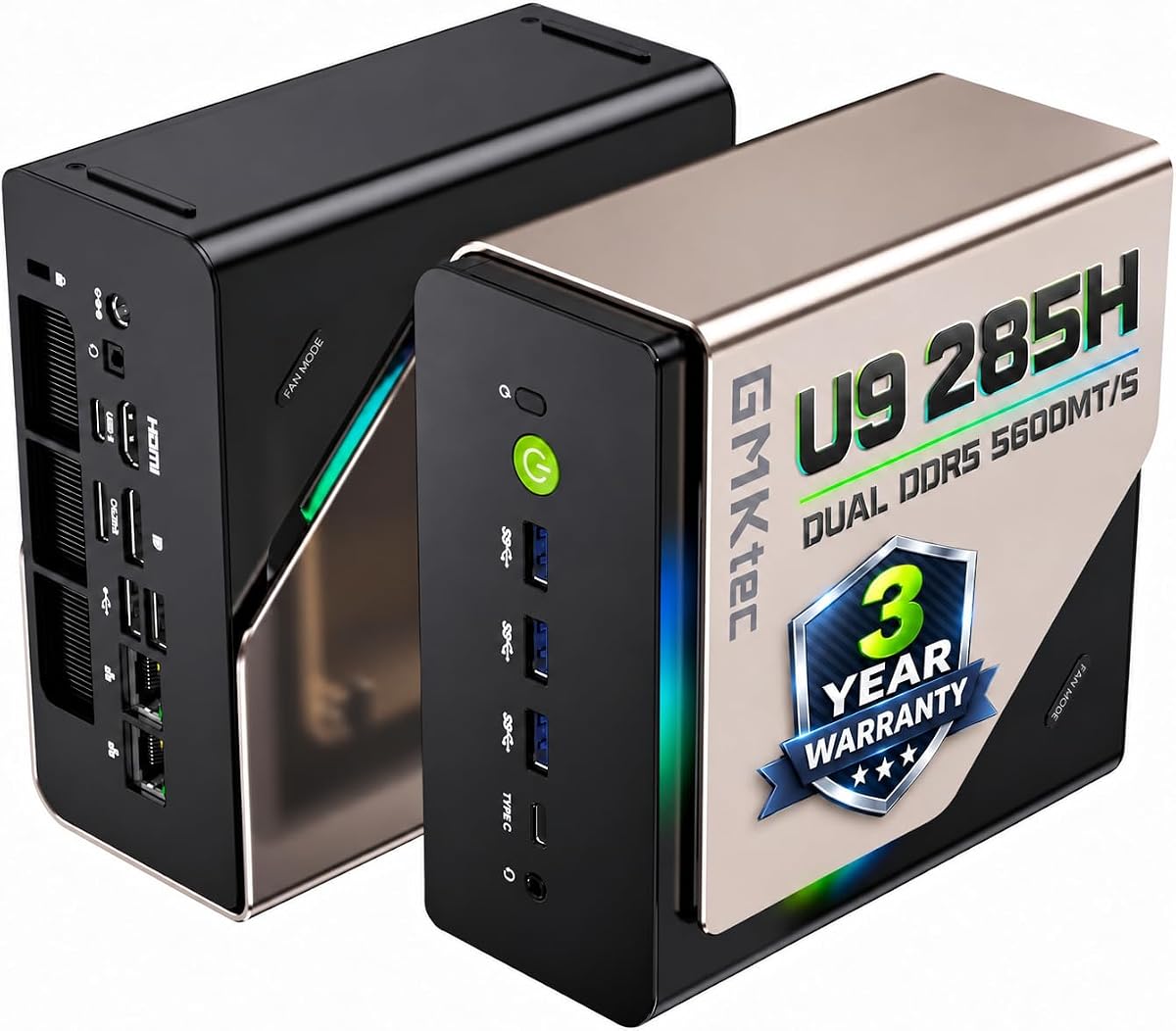
The GMKtec EVO-T1 32GB combines modern Intel platform features with an expandable, workstation-like mini PC design. Its 4.4 rating, Core Ultra 9 285H processor, 32GB of dual-channel DDR5 memory, and Intel Arc 140T graphics make it a versatile option for Cyberpunk 2077 and related creative workloads.
We may earn a commission when you buy through this link, at no additional cost to you.
The processor contains 16 cores across performance, efficiency, and low-power efficiency cores, with a turbo clock of 5.4GHz. Intel's AI Boost NPU provides up to 13 TOPS of INT8 computation, while the integrated Arc 140T has eight Xe cores and supports DirectX 12, OpenGL 4.5, OpenCL 3, Quick Sync Video, and AV1 encoding and decoding.
Display and expansion options are particularly strong. The system supports four-screen 4K or 8K output through HDMI 2.1, DisplayPort 1.4, and USB Type-C. Its Oculink port operates at PCIe x4 speeds for compatible external graphics solutions, while three M.2 2280 positions provide extensive storage expansion. Networking includes 2.5GbE, Wi-Fi 6, and Bluetooth 5.2.
The key caveat is that integrated graphics will not match the MINISFORUM G1 Pro or the discrete-GPU ROG systems for high-settings 4K gaming. Some published storage information is also internally inconsistent, listing both a 2TB drive and a 1TB configuration. Buyers should verify the exact shipped drive, while the overall platform remains compelling for gaming, AI tools, and productivity.
The dedicated NPU is useful for software that can call on Intel AI acceleration, while Arc media features support efficient AV1, HEVC, and AVC work. These traits make the EVO-T1 more relevant to a creator who also wants to play Cyberpunk 2077.
Dual SO-DIMM memory, three M.2 positions, and Oculink support create a flexible foundation. The eGPU interface is particularly useful because it can add graphics capability without requiring a full-size desktop replacement.
We may earn a commission when you buy through this link, at no additional cost to you.
The ROG NUC is a premium compact gaming system featuring an Intel Core Ultra 9 Series 2 processor, an NVIDIA GeForce RTX 5070 Mobile GPU, 32GB of DDR5 memory, and a 2TB NVMe drive. Its 3.5 rating is the lowest published score in this guide, so buyers should examine recent customer feedback carefully rather than relying on its aspirational specifications alone.
We may earn a commission when you buy through this link, at no additional cost to you.
The RTX 50-series mobile GPU is designed to bring DLSS and modern ray-tracing features into a compact chassis. The listed platform performance reaches more than 200 platform TOPS, with an indicated 18% generation-over-generation improvement. Together with 32GB of memory and 2TB of storage, the specification set should appeal to gamers who also edit video or install substantial game libraries.
Cooling is handled by three fans and dual vapor chambers in a chassis measuring only 3L. Thumb screws provide convenient access for memory and storage upgrades, which is useful for long-term ownership. Thunderbolt 4 expands connection options, and ROG Aura Sync lighting adds a polished visual element for a desk setup.
The main uncertainty is real-world consistency: the 3.5 rating suggests some buyers may have encountered configuration, thermal, or support concerns. Mobile GPU performance also depends on its assigned power envelope. The ROG NUC remains a feature-rich premium option, but it is best purchased only after checking the current user feedback and confirming that its graphics performance meets your display resolution and settings.
RTX 5070 graphics, DLSS support, and a modern Intel processor place the ROG NUC among the more capable compact systems. Its 32GB memory configuration also avoids the tight limits of many integrated mini PCs.
Three fans and dual vapor chambers address the thermal demands of high-performance mobile graphics. Tool-free access makes memory and storage maintenance more approachable in a chassis that is otherwise notably compact.
We may earn a commission when you buy through this link, at no additional cost to you.
The GMKtec K12 is a well-equipped Ryzen mini PC for gamers who want more memory and expansion than a basic office system offers. Its 4.4 rating, Ryzen 7 H 255 processor, 32GB of dual DDR5 memory, and Radeon 780M graphics form a capable platform for Cyberpunk 2077 at 1080p with sensible settings.
We may earn a commission when you buy through this link, at no additional cost to you.
The Ryzen 7 H 255 provides eight cores and 16 threads at up to 4.9GHz. Its Radeon 780M includes 12 compute units and 768 shaders at up to 2600MHz, with hardware support for common modern codecs. The product data also highlights FSR use, making resolution scaling a practical way to manage performance in demanding scenes.
Expandability is a defining strength. Three M.2 2280 positions support up to 24TB in total, dual 2.5GbE ports serve advanced networking tasks, and Oculink provides PCIe x4 bandwidth for compatible external GPUs. Quad display output includes HDMI 2.1, DisplayPort 1.4, and USB Type-C, while dual cooling fans and heatpipes support a stated 35dB quiet mode.
Its 512GB starting drive is modest for a gaming library, and the integrated GPU remains below discrete RTX alternatives. Still, 32GB of RAM, extensive storage expansion, and an Oculink port make this a flexible recommendation. It works particularly well for 1080p gaming, emulation, streaming, and general desktop use, with the option to add graphics later.
Thirty-two gigabytes of dual-channel DDR5 provides a useful margin over common 16GB configurations. It is particularly useful when running Cyberpunk alongside a browser, voice chat, recording software, or background applications.
Three M.2 slots make it easy to build a generous game library without relying on network storage. Oculink also creates a path to stronger external graphics for users who later need more than Radeon 780M performance.
We may earn a commission when you buy through this link, at no additional cost to you.
The ASUS ROG GR70 is positioned as a premium performance mini PC for gamers, pairing the Ryzen 9 9955HX3D with an NVIDIA GeForce RTX 50-series mobile GPU. It is the most aspirational gaming platform in the guide, with hardware intended to deliver high frame rates, low latency, and visual features such as DLSS in a highly compact enclosure.
We may earn a commission when you buy through this link, at no additional cost to you.
The 9955HX3D is built around the Ryzen 9000 family and brings flagship-class processing capability to a mini PC form factor. Pairing it with RTX 50-series mobile graphics addresses the graphics side of Cyberpunk 2077, while the processor provides ample headroom for demanding games, streaming, multitasking, and content creation.
ROG's custom cooling system is intended to control temperatures and acoustics under sustained loads, which matters considerably in a compact high-power chassis. Wi-Fi 7 and certified Bluetooth 5.4 provide current wireless standards, while the silver enclosure and desk-friendly proportions make the system suitable for a polished gaming setup.
The published product information is less detailed than for some alternatives, and no customer rating is currently supplied in the source data. That limits confidence in making fine-grained comparisons. Even so, the GR70 is a compelling premium recommendation for a buyer prioritizing maximum gaming hardware, provided the final configuration, memory capacity, and operating system are verified on the listing.
The Ryzen 9 9955HX3D is designed for workloads where both gaming and heavily threaded applications matter. In Cyberpunk, it complements the discrete GPU by preventing the processor from becoming the obvious bottleneck during demanding scenes or multitasking.
A custom cooling design is essential when concentrating flagship mobile graphics and a powerful Ryzen chip into a small chassis. ROG's emphasis on temperature and acoustic control is appropriate for sustained sessions, although published noise figures would be useful before buying.
We may earn a commission when you buy through this link, at no additional cost to you.
The BOSGAME P3 Pro is a compact Ryzen 9 system with a 4.6 rating, combining an eight-core, 16-thread Ryzen 9 7940HS with Radeon 780M integrated graphics. Its 1TB PCIe 4.0 drive, 16GB of dual-channel DDR5 memory, and preinstalled Windows 11 Pro make it approachable for a first gaming mini PC.
We may earn a commission when you buy through this link, at no additional cost to you.
The Ryzen 9 7940HS boosts to 5.2GHz, and the Radeon 780M operates at up to 2700MHz. Although it lacks a discrete GPU, this hardware is well suited to 1080p gaming when resolution scaling and graphics quality are adjusted to the system. The included 1TB drive provides ample room for Cyberpunk 2077 and several other modern titles without immediate storage pressure.
The P3 Pro supports three displays at up to 4K 60Hz through HDMI 2.0, DisplayPort 1.4, and USB Type-C. Oculink support opens the door to a compatible external GPU, while dual 1GbE Ethernet, Wi-Fi 6E, and Bluetooth 5.2 cover networking and accessory needs. The system also includes a three-year warranty.
Memory expansion and the 16GB default are the main constraints. A Windows 11 Pro license may be included with the product, but buyers should confirm its activation status and the exact package contents. The P3 Pro is a strong value-oriented recommendation for 1080p gaming and a compact general-purpose PC, particularly when a larger SSD and straightforward setup matter.
The Ryzen 9 7940HS and Radeon 780M pairing provides enough capability for 1080p play when the resolution and graphics settings are managed. It is a meaningful step above basic mini PCs intended only for office tasks.
A 1TB PCIe 4.0 drive and three 4K outputs reduce the need for immediate upgrades. The Oculink interface is also valuable because it provides a route to stronger graphics without replacing the entire mini PC.
We may earn a commission when you buy through this link, at no additional cost to you.
The GMKtec M6 Ultra is the most modest dedicated gaming option in this guide, offering a six-core Ryzen 5 7640HS and Radeon 760M graphics in a compact package. Its 4.4 rating reflects a capable everyday mini PC, and the system is better suited to 1080p Cyberpunk 2077 on lower or adjusted settings than to high-detail 4K gaming.
We may earn a commission when you buy through this link, at no additional cost to you.
The Ryzen 5 7640HS has six cores and 12 threads with a boost clock of up to 5.0GHz. Radeon 760M integrated graphics make it possible to play modern titles, although the lower GPU tier means users should expect fewer demanding settings than the Radeon 780M systems and discrete RTX alternatives. The practical advantage is a more modest power and thermal footprint.
The M6 Ultra includes 16GB of DDR5 memory and a 1TB M.2 PCIe SSD. Dual SO-DIMM slots support memory expansion, while dual M.2 2280 positions allow storage growth. Display options include HDMI 2.0, DisplayPort, and full-function USB4 with display output up to 8K 60Hz, allowing as many as three displays to be configured.
Networking is unusually strong for this class, with two 2.5GbE ports, Wi-Fi 6E, and Bluetooth 5.2. A VESA mount, HDMI cable, and power adapter support quick installation. This is a good recommendation for a small gaming-and-office system, but buyers wanting smoother Cyberpunk frame rates should upgrade the memory if necessary and accept lower graphics settings.
The Ryzen 5 7640HS and Radeon 760M prioritize efficiency and compactness. They are suitable for 1080p gaming with reduced settings, making this model relevant for builders who want a small system without a desktop-class power draw.
Dual 2.5GbE ports are useful for NAS access, network services, and flexible home-office arrangements. USB4, three USB 3.2 ports, and support for three displays provide room for a complete compact workstation.
We may earn a commission when you buy through this link, at no additional cost to you.
The GMKtec EVO-T1 64GB stands out for its generous memory and broad expansion capabilities. It carries a 4.5 rating and uses the same Core Ultra 9 285H and Intel Arc 140T platform as the 32GB model, but equips the system with 64GB of dual DDR5 memory for demanding multitasking, content creation, and large game libraries.
We may earn a commission when you buy through this link, at no additional cost to you.
The processor provides 16 cores and 16 threads, including six performance cores, eight efficiency cores, and two low-power efficiency cores, with a maximum turbo clock of 5.4GHz. Its Intel AI Boost NPU handles up to 13 TOPS of INT8 operations, while the Arc 140T offers eight Xe cores, modern graphics API support, and hardware media encoding and decoding.
Memory capacity is the defining advantage. Sixty-four gigabytes removes much of the pressure associated with heavy applications, extensive mod lists, large project files, and multiple games running in the background. Three M.2 positions, Oculink support, quad 4K or 8K display output, 2.5GbE, Wi-Fi 6, and Bluetooth 5.2 reinforce the system's creator and workstation orientation.
Its gaming limitation is the integrated Arc 140T, which cannot compete with a full-power discrete RTX GPU. The product data also contains inconsistent storage references, so the exact included SSD should be confirmed. This remains a recommended choice for buyers who prioritize memory, AI features, and flexibility, while gaming-focused shoppers should look toward the G1 Pro.
Sixty-four gigabytes provides abundant headroom for games, creative applications, and background tasks. It is especially useful for users who keep large asset libraries open or run multiple demanding programs alongside a game.
The NPU, hardware AV1 support, multi-display capability, and Oculink make this more than a basic gaming machine. It works well for creators who want a compact system for both entertainment and production work.
We may earn a commission when you buy through this link, at no additional cost to you.
The GMKtec K12 1TB combines the Ryzen 7 H 255 and Radeon 780M with 32GB of DDR5 memory and a 1TB PCIe 4.0 SSD. Its 4.5 rating and balanced specifications make it a strong all-round recommendation for 1080p Cyberpunk 2077, particularly for users who want a larger storage configuration than smaller models offer.
We may earn a commission when you buy through this link, at no additional cost to you.
The processor has eight cores and 16 threads with a boost clock of up to 4.9GHz, while Radeon 780M provides 12 compute units and 768 shaders at up to 2600MHz. This combination is suited to 1080p gaming, and the system supports modern resolution-scaling workflows. Users should adjust demanding settings rather than expecting the frame rates of a discrete RTX system.
The K12 offers three M.2 2280 storage positions with a listed total capacity of up to 24TB, dual 2.5GbE Ethernet, Wi-Fi 6E, and Bluetooth 5.2. Its Oculink port supports PCIe x4 external graphics, providing a valuable upgrade path. Four displays can be connected through HDMI 2.1, DisplayPort 1.4, and USB Type-C.
Dual cooling fans, heatpipes, and 360-degree airflow support sustained operation, with a stated 35dB quiet mode and 13 RGB lighting modes. Compared with the 512GB K12, the main improvement is immediate storage capacity. It is a particularly balanced recommendation for a compact system that will serve gaming, media, and productivity rather than gaming alone.
The Ryzen 7 H 255 provides enough CPU performance for a responsive system, while Radeon 780M handles mainstream 3D graphics. Thirty-two gigabytes of RAM gives games and background applications more breathing room than a typical entry configuration.
A 1TB starting drive reduces the need for an immediate storage upgrade, while three M.2 positions preserve future flexibility. Dual 2.5GbE and Wi-Fi 6E also make the system suitable for local network services and fast wireless connectivity.
We may earn a commission when you buy through this link, at no additional cost to you.
Choosing a gaming mini PC starts with the graphics and the resolution you intend to play. Processor, memory, cooling, storage, and connectivity then determine how comfortably the system handles the game alongside streaming, chat, and other applications.
Graphics performance is the most important factor for Cyberpunk 2077 because the game relies heavily on the GPU. Integrated Radeon 780M systems are viable for 1080p play when settings and resolution are managed carefully, while the Radeon 760M in the M6 Ultra sits at the more modest end of this guide. Systems with an RTX 5060, RTX 5070 Mobile GPU, or other discrete graphics offer substantially more headroom for ray tracing, high texture quality, high resolutions, and demanding frame rates.
Choose a discrete GPU for maximum settings and 4K ambitions. Choose integrated graphics for a smaller, quieter, and more economical system.
A modern Ryzen 5, Ryzen 7, Ryzen 9, Core Ultra 9, or Ryzen 9 HX processor provides enough CPU power for gaming and multitasking. The Ryzen 7 H 255, Ryzen 9 7940HS, Core Ultra 9 285H, Ryzen 9 8945HX, and Ryzen 9 9955HX3D cover different levels of capability, but processor speed alone does not overcome weak integrated graphics. For a small gaming system, prioritize a capable GPU first, then select CPU headroom for streaming and multitasking.
Match processor class to workload intensity. Higher-core models help heavy multitaskers, while GPU quality matters more for frame rates.
Memory affects smooth multitasking more than isolated gaming benchmarks. The 16GB systems can run Cyberpunk 2077, but 32GB is more comfortable when a browser, Discord, capture software, and other applications remain open. The EVO-T1 64GB configuration goes further and is particularly attractive to creators, though more memory does not improve the GPU's maximum texture capability. Dual-SO-DIMM layouts also make future memory upgrades easier than soldered LPDDR5.
Choose 32GB for a flexible modern gaming setup. Verify whether memory is soldered before considering future upgrades.
A 1TB SSD is a more comfortable starting point for a game such as Cyberpunk 2077 because installs are substantial and modern libraries grow quickly. Several systems in this guide provide three M.2 positions, allowing multiple NVMe drives to be added without replacing the primary drive. USB4 can also support external storage, though internal NVMe expansion usually provides a cleaner and faster result. Check the installed drive because some product descriptions contain conflicting storage figures.
Prioritize at least 1TB and multiple M.2 slots. Confirm the exact included drive before ordering.
Compact systems generate heat in a restricted space, and sustained gaming places sustained thermal demands on the processor and GPU. The G1 Pro uses a 300W-rated cooling system, while the ROG systems emphasize multiple fans and vapor chambers. Integrated models can often run more quietly because their power requirements are lower. Performance modes should be used when needed rather than kept at maximum during routine browsing or office work.
Treat cooling as essential for sustained frame rates. A quiet mode is valuable for shared rooms and nearby speakers.
Check the output configuration before buying, particularly if you use an ultrawide, high-refresh monitor, multiple displays, or a television. HDMI 2.1, DisplayPort 1.4, and full-function USB Type-C are common in the stronger models. Oculink is especially useful because it provides PCIe x4 bandwidth for a compatible external GPU, offering a way to improve integrated-graphics performance while retaining the compact computer.
Verify resolution and refresh-rate support for your monitor. Use Oculink if future GPU expansion matters.
Online games need stable networking, and a fast Ethernet connection can reduce latency and prevent interruptions. The G1 Pro includes 5Gb Ethernet and Wi-Fi 7, while numerous GMKtec systems provide 2.5GbE and Wi-Fi 6 or 6E. Dual Ethernet ports may be unnecessary for gaming but are useful for NAS access, firewall functions, local services, and advanced home-lab arrangements. Bluetooth support also simplifies wireless peripherals.
Choose 2.5GbE or faster for a modern network. Dual ports matter mainly for specialized networking tasks.
Mini PCs range from highly compact productivity designs to performance systems with substantial cooling and power demands. Confirm the physical dimensions, included power supply, display mounting needs, and expected noise under load. Also verify the operating system, especially for listings that mention Windows 11 Pro or allow installation of another system. Warranty length, included accessories, and support options can add value without directly changing gaming performance.
Check dimensions, power requirements, included accessories, and operating system. These details determine setup convenience.
Begin by confirming that the mini PC's power adapter and selected display outputs match your monitor arrangement. Install the graphics drivers provided by the hardware vendor, then use the system's performance or power controls to select an appropriate mode. For initial setup, begin with balanced or quiet settings and move to a higher performance mode when launching demanding games.
In Cyberpunk 2077, use the game's own graphics menu to choose a resolution and preset that the system can sustain consistently. Resolution scaling and FSR can be useful on Radeon 780M systems, while DLSS-supported systems benefit from the corresponding frame-generation and upscaling options. Close unnecessary background applications, maintain open space around the chassis, and avoid placing it inside a closed cabinet during long gaming sessions.
For maintenance, keep intake and exhaust openings clear of dust and clean the exterior vents regularly. Use the manufacturer's software or BIOS controls to check temperatures, fan behavior, and memory or storage status. Update the system and graphics drivers as needed, preserve important data with backups, and avoid changing memory or storage settings unless you understand the procedure and power down the system safely.
Yes, but performance depends heavily on the graphics hardware and target settings. Radeon 780M systems can handle 1080p gaming with sensible adjustments, while systems with an RTX 5060 or RTX 5070 Mobile GPU provide more headroom for higher settings and resolutions. Faster processors improve responsiveness and multitasking, but they cannot replace a capable GPU for frame rates.
An integrated Radeon 780M offers a reasonable foundation for 1080p play when resolution scaling and graphics quality are adjusted. A Radeon 760M is a more modest option and will require additional compromises. A discrete RTX model is preferable when you want higher texture settings, ray tracing, stable high frame rates, or less dependence on upscaling.
Thirty-two gigabytes provides more comfortable headroom for Cyberpunk 2077 when chat, browsers, capture software, and other games are also running. It does not directly increase maximum graphics settings, but it can reduce pressure on system memory and improve multitasking. Sixteen gigabytes remains workable, while 64GB is primarily beneficial for demanding creators and power users.
Oculink is particularly attractive if you want the option to add a compatible external GPU later. It operates at PCIe x4 speeds and can provide better bandwidth than a basic USB-based external graphics connection. It does not accelerate games by itself, so an integrated-GPU model should still be selected according to your current gaming requirements.
Thermal behavior depends on the chassis, cooling system, workload, and ambient conditions. High-performance mini PCs use multiple fans, heat pipes, larger power supplies, and carefully positioned exhausts to manage sustained loads. Integrated systems generally create less heat. Leave adequate clearance around all vents and use performance modes selectively to keep temperatures and noise controlled.
Most systems in this guide support multiple displays, but the exact count and maximum resolution depend on the available HDMI, DisplayPort, and USB Type-C outputs. Some provide triple 4K support, while higher-end models support quad 4K output. Check whether the USB Type-C port supports DisplayPort Alternate Mode and verify the refresh rate required by an ultrawide or high-frequency monitor.
One terabyte is a reasonable starting point, but it can fill quickly when several large games and updates are installed. It is generally more comfortable than a 512GB drive. Look for multiple M.2 2280 slots so additional NVMe SSDs can be installed without replacing the primary drive, and remember that some listings contain inconsistent information about the included capacity.
A mini PC can offer a smaller desk footprint, better cooling headroom, easier storage and memory upgrades, and the ability to use your preferred monitor, keyboard, and mouse. A gaming laptop is more convenient for travel. If portability is unimportant and you want a dedicated gaming system, a mini PC with discrete graphics can be an effective alternative.
The MINISFORUM G1 Pro is the strongest all-around choice because its full-power RTX 5060, Ryzen 9 processor, 32GB memory, and mature cooling design offer the most convincing foundation for demanding Cyberpunk 2077 play. The ASUS ROG GR70 represents the premium performance alternative, while the ACEMAGICIAN S3A delivers the most approachable integrated-graphics configuration.
Prioritize the graphics hardware first if gaming is the primary goal. Choose 32GB of memory for comfortable multitasking, verify that the storage configuration is adequate, and make sure the cooling design suits the noise level of your room. The GMKtec K12, BOSGAME P3 Pro, and EVO-T1 are strong 1080p choices, but they remain a tier below the discrete-GPU systems for high-settings gaming.
Before purchasing, check the latest listing and customer feedback, confirm the included memory, storage, operating system, cables, and warranty, and review the monitor connection requirements. Hardware configurations and retailer details can change, so current product information should be the final basis for your buying decision.