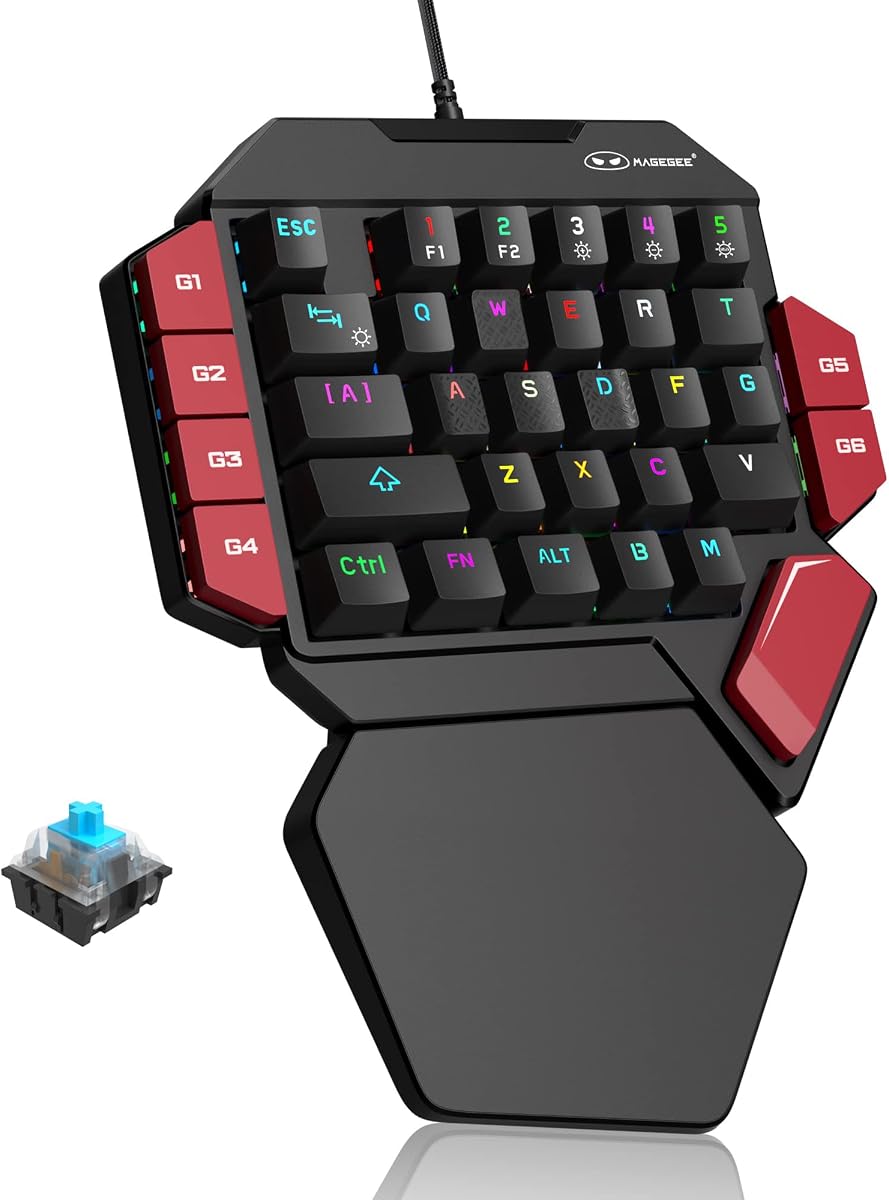
MageGee 35-Key Mini
4.3Editor score
Thirty-five mechanical keys
Six macro recording keys
Driver-free plug-and-play operation
Our Gaming Keypads guide compares ten options across layouts, switches, macros, RGB lighting, connectivity, ergonomics, and custom controls.
Gaming keypads place frequently used commands, movement controls, macros, and configurable actions within easy reach of one hand. A well-designed model can reduce desk clutter, improve access to secondary controls, and complement a conventional keyboard without asking the mouse to perform tasks it was not built for.
We compared the ten featured models by examining their layouts, switch technology, programmability, lighting, connectivity, build features, and stated compatibility. The list covers wired and wireless keypads, membrane and mechanical designs, Hall Effect models, and one compact wireless keyboard with a control knob.
Each review identifies the strongest reasons to consider a particular keypad while acknowledging meaningful trade-offs. Rankings reflect the supplied product information and customer ratings, and current prices, availability, software behavior, and retailer listings can change over time.
4.3Editor score

4.3Editor score

4.2Editor score
The comparison below highlights the principal differences among the featured gaming keypads, including control capacity, switch behavior, connection method, programmable features, and physical layout.


The Razer Tartarus V2 Left-Handed Gaming Keypad is a focused solution for players who want keyboard-like commands under the left hand while keeping the right hand on the mouse. Its 4.3 customer rating reflects a generally favorable reception, while the combination of 32 programmable keys, an eight-way thumbpad, and Chroma lighting gives it a particularly complete feature set.
We may earn a commission when you buy through this link, at no additional cost to you.
Its mecha-membrane switches seek a middle ground between full mechanical switches and ordinary membrane keyboards. The stated construction emphasizes a soft-cushioned feel with tactile feedback, making it relevant for long sessions where a sharply sprung mechanical switch might feel less comfortable. Razer Hypershift allows keys and combinations to be remapped, while the directional thumbpad offers another input method for suitable console-oriented games.
The left-handed design is the decisive advantage for this model. Many competing one-handed products are shaped primarily for right-handed players using a left-hand keypad, but this version reverses that arrangement for a different grip and control strategy. The trade-off is narrower audience appeal, and the keypad remains dependent on Razer software and Chroma-compatible software for full customization and lighting integration.
This is a strong recommendation for a left-handed player who values mature customization, comfortable switches, and a recognizable gaming ecosystem. Those who prefer wireless freedom, analog movement control, or browser-based configuration may find one of the newer alternatives more aligned with their setup.
The reversed layout demonstrates that one-handed control is not a single universal formula. Players accustomed to controlling movement with the left hand and aiming with the right may find this orientation particularly useful, especially alongside a directional thumbpad.
Hypershift and Chroma extend the keypad beyond a collection of extra buttons. That makes it appealing for players who already use Razer software or want lighting to synchronize with compatible games and other supported equipment.
We may earn a commission when you buy through this link, at no additional cost to you.
The Redragon K585 combines a large 42-key tactical layout with several conveniences usually associated with more elaborate gaming keyboards. Its 4.4 rating places it among the most favorably reviewed products in this guide, and the hot-swappable sockets, macro profiles, RGB modes, and removable wrist rest make it a versatile wired option.
We may earn a commission when you buy through this link, at no additional cost to you.
Seven dedicated macro keys provide 28 total assignments across four profiles, reducing the need to depend entirely on a single game preset. Switch sockets accept nearly any 3-pin or 5-pin mechanical switch, allowing users to alter travel, sound, and feel without soldering. A USB pass-through port offers a cleaner connection for a mouse or headset, while the magnetic wrist rest can be removed to reduce the footprint.
The denser 42-key arrangement is more than a simple numeric pad, although that does not guarantee better comfort for every hand. Some players may need time to learn the location of unfamiliar tactical keys, and the wired design prevents easy relocation between systems. The supplied information also places more advanced macro and lighting work in the companion software, adding another layer beyond basic use.
Choose the K585 when a high key count, switch customization, and generous onboard macro storage matter more than wireless flexibility. It is especially attractive for users who want to experiment with mechanical switches without committing to a permanently soldered keypad.
Socketed switches make this keypad approachable for enthusiasts who want to tune feel over time. The ability to use common 3-pin and 5-pin options also separates it from models with a fixed switch design.
Four profiles and 28 total macro assignments offer room to organize abilities by game or activity. Profiles are especially useful for players who play games with substantially different control requirements.
We may earn a commission when you buy through this link, at no additional cost to you.
The Redragon K585 PRO brings wireless freedom to the substantial 42-key one-handed format found in the standard K585. It holds a 4.2 rating and supports both Bluetooth and 2.4GHz connections, making it a natural fit for players who want to arrange their controls away from a fixed cable or move between gaming locations.
We may earn a commission when you buy through this link, at no additional cost to you.
Its stated battery life of 15 to 20 hours covers many gaming sessions, although that estimate should be understood as a manufacturer specification rather than a guarantee for every use pattern. RGB lighting, wireless radios, and switch activity can affect endurance. Players who game around the clock may need a dependable charging routine or access to a nearby outlet.
The PRO retains seven macro keys with 28 assignments across four profiles, switch sockets for nearly any 3-pin or 5-pin mechanical switch, and a detachable magnetic wrist rest. Red switches are rated for 50 million keypresses according to the product information, adding useful context about the included hardware.
This is a compelling option for a player who values the K585's dense layout but prioritizes wireless placement. It is less suitable for users who require an uninterrupted, always-connected design or who prefer a simpler keypad with fewer keys and no battery management.
Bluetooth and 2.4GHz options let players choose between a more universal wireless link and a dedicated receiver. That flexibility is useful for travel, shared spaces, and changing desk arrangements.
The 42-key layout accommodates more commands than a conventional 35-key pad, while the removable wrist rest allows users to trade support for a smaller footprint.
We may earn a commission when you buy through this link, at no additional cost to you.
The AZERON Cyborg II is the most specialized product in the guide, offering an analog Hall Effect thumbstick alongside 30 individually mappable inputs. Its 4.3 rating suggests a positive reception, but the real appeal lies in a feature set built around fine movement control, flexible layouts, and an unusually deep software tool.
We may earn a commission when you buy through this link, at no additional cost to you.
The thumbstick supports WASD or 360-degree analog movement in compatible games, with adjustable dead zones, sensitivity, cone angles, eight directional zones, and analog smoothing. It can also function as a mouse and includes calibration and a mid-click function. Thirty inputs may be assigned as keyboard commands, controller or mouse inputs, or macros, while up to six layouts can be stored directly on the device.
The tradeoff is specialization and cost. Its right-handed 3D-printed design is explicitly intended for players who will use the keypad with the left hand, and comfort may vary for hand sizes outside the stated 6.3-to-7.5-inch range. Analog movement also depends on game support, so the thumbstick cannot deliver identical benefits in every title.
For players seeking a deeply configurable movement solution, this is the premium recommendation in the roundup. Buyers should verify game compatibility, hand fit, and the learning curve before settling on a more conventional keypad.
The thumbstick is more than an extra directional control. Adjustable cone angles, dead zones, sensitivity, and smoothing allow players to shape movement behavior for compatible FPS, MOBA, and RPG titles.
Six onboard layouts make it easier to separate game, productivity, and general command sets. Additional profiles can be managed through the Azeron software, offering more flexibility than a single fixed layout.
We may earn a commission when you buy through this link, at no additional cost to you.
The RedThunder One Handed Gaming Keyboard is a straightforward 35-key option aimed at PC players who want dedicated command access without a complex configuration process. It carries a 4.4 rating and emphasizes portability, broad compatibility, a large wrist rest, and simple macro recording.
We may earn a commission when you buy through this link, at no additional cost to you.
All 35 keys support anti-ghosting, and the product information states a 3-millisecond response speed for the built-in game chip. Two macro sets can be recorded through FN combinations, allowing relatively involved sequences to be assigned to dedicated keys. The keypad uses a wired, driver-free connection and is listed as compatible with Windows, macOS, Linux, and several older or alternate environments.
Its main limitation is the modest depth of its shortcut and lighting systems. Two macro recording keys offer less flexibility than models with six or seven dedicated macro buttons, while the seven-color RGB selection is narrower than 16.8-million-color systems. The supplied information also does not describe a hot-swappable switch design, so users seeking extensive tactile tuning should look elsewhere.
The RedThunder is best for straightforward gaming, travel, and users who value quick setup over sophisticated profile management. It provides a practical way to keep less-used actions under the left hand while the right hand remains dedicated to the mouse.
The compact design saves space and is easy to carry. Driver-free operation also reduces the setup burden, making the keypad approachable for first-time gaming keypad users.
FN-based recording lets users capture sequences directly from the keypad. Although there are only two macro keys, the workflow is understandable and does not depend on a full configuration suite.
We may earn a commission when you buy through this link, at no additional cost to you.
The Keychron C0 HE is built around fast input detection, precise magnetic switches, and a high stated polling rate. Its 4.2 rating reflects a competitive feature set for competitive FPS players, while the 35-key layout and browser-based configuration also make it relevant to streamers, editors, and power users.
We may earn a commission when you buy through this link, at no additional cost to you.
Each Hall Effect magnetic switch supports adjustable actuation with 0.01-millimeter precision, and Rapid Trigger can reset a key as soon as it is released rather than waiting for a conventional reset point. The stated 8K polling rate supports low-latency operation, making this model especially relevant to games such as Valorant and CS2 where quick repeated inputs can matter.
The configurator operates through a browser without requiring installation, which simplifies access to remapping, actuation settings, and per-key RGB lighting. Windows and macOS support makes it suitable for multi-system desks. The principal limitation is its wired design; users wanting Bluetooth or receiver-based freedom must look to the Redragon K585 PRO or Redragon RM104.
Buy the C0 HE if competitive input behavior is the priority and a compact 35-key command surface fits your workflow. It is less compelling for users who do not need Rapid Trigger, although its shortcut support broadens its appeal beyond traditional gaming.
Magnetic sensing changes the relationship between physical travel and registered input. Fine actuation control and rapid reset behavior can make repeated actions feel more immediate than fixed mechanical switch points.
The browser-based utility is convenient for users who dislike permanent desktop software. It also makes key remapping, RGB changes, and actuation tuning accessible across supported systems.
We may earn a commission when you buy through this link, at no additional cost to you.
The MageGee One Handed Professional Gaming Keyboard delivers a useful combination of mechanical feedback, RGB lighting, and six macro keys at an accessible tier. Its 4.3 rating makes it a strong budget recommendation, particularly for players who want more shortcut capacity than a basic numpad-style device.
We may earn a commission when you buy through this link, at no additional cost to you.
All 35 keys are described as non-conflict or anti-ghosting keys, supporting simultaneous inputs without missing commands. The included blue mechanical switches provide crisp tactile feedback and an audible click, which can help confirm each press but may be undesirable in shared rooms or for players who prefer quieter operation. Six dedicated macro recording keys add a substantial amount of shortcut capacity.
RGB controls provide static and dynamic effects, while the keypad works over USB without requiring a driver. Broad compatibility across Windows, macOS, Linux, and several older operating systems adds flexibility. The trade-off is that its control suite is less sophisticated than dedicated software platforms, and the loud switches may not suit every environment.
This is the budget choice for a player who wants a mechanical one-handed keypad with meaningful macro support and RGB lighting. If adjustable actuation, analog movement, wireless connectivity, or extensive profile storage is central to the purchase, a higher-tier model will serve better.
The blue switches deliver distinct tactile and audible feedback, making each action easier to feel. Players who work in quieter environments should consider whether that sharper sound profile suits their setup.
Dedicated macro recording keys make it easy to bind lengthy sequences without relying on a mouse or full keyboard. The keypad can also serve as a general command surface for editing, streaming, and productivity shortcuts.
We may earn a commission when you buy through this link, at no additional cost to you.
The AJAZZ AK029 is the smallest conventional keypad in the roundup and holds the highest customer rating at 4.5. Its 29-key design, Hall Effect switches, 8KHz polling rate, Rapid Trigger capability, and onboard memory make it a compelling choice for competitive players who value a minimal footprint.
We may earn a commission when you buy through this link, at no additional cost to you.
Actuation can be adjusted from 0.1 to 3.5 millimeters in 0.01-millimeter increments, while a 30-gram initial force and zero-dead-zone sensing support quick, consistent presses. The product information also lists SOCD and DKS functions, giving users tools associated with advanced counter-strafing and combo movement workflows.
Its web-based driver requires no installation or administrator privileges and supports remapping, RGB presets, actuation settings, and profiles saved directly to the keypad. That portability is a practical advantage. The trade-off is the reduced 29-key capacity, which leaves less room for general-purpose shortcuts than 35- or 42-key alternatives.
The AK029 is ideal for FPS players who want a very small one-handed command surface beside a low-sensitivity mouse. Its advanced controls demand a little setup, so new users should begin with default settings and gradually tune actuation and profiles.
Twenty-nine keys create one of the most compact layouts in the guide. The smaller surface can free mouse space and reduce accidental contact with nearby controls.
Saving configurations in onboard memory means the keypad can move between computers without losing its key assignments. This is useful for LAN events, shared workstations, and multi-system setups.
We may earn a commission when you buy through this link, at no additional cost to you.
The standard Razer Tartarus V2 combines a 32-key programmable layout with a directional thumbpad and the brand's mecha-membrane switch approach. It has a 4.2 rating and shares the Razer design language of the left-handed model, offering a familiar option for players who prefer Chroma and Razer software.
We may earn a commission when you buy through this link, at no additional cost to you.
The hybrid switches are intended to provide mechanical-style tactile feedback with a softer membrane feel. A 32-key surface offers more commands than a conventional number pad while remaining less crowded than the Redragon's 42-key design. The thumbpad provides an additional movement-oriented input, while programmable macros support longer or layered commands.
Compared with newer alternatives, the Tartarus V2 lacks adjustable Hall Effect actuation, analog thumbstick control, and a browser-based configurator. It is also a wired design. These limitations do not undermine its core value for a player who wants a conventional gaming keypad with established Razer integration rather than a specialized control instrument.
The Razer Tartarus V2 suits gamers who prioritize comfortable hybrid switches, recognizable software, and lighting compatibility. Those seeking the widest control options or a wireless layout should compare it carefully with the Keychron, AJAZZ, and Redragon PRO models.
The mecha-membrane construction is intended to balance tactile feedback with cushioning. That makes it a middle path for players who want a mechanical appearance without the feel of a particularly stiff standard mechanical switch.
Razer's lighting ecosystem can synchronize supported games and compatible peripherals. It adds atmosphere while also providing visual state cues when those integrations are available.
We may earn a commission when you buy through this link, at no additional cost to you.
The Redragon RM104 is a compact wireless keyboard with a multifunction knob rather than a conventional one-handed gaming keypad. Its inclusion makes the list useful for readers seeking a related control device, and its 4.4 rating, tri-mode wireless support, RGB lighting, and programmable buttons give it several attractive qualities.
We may earn a commission when you buy through this link, at no additional cost to you.
The knob can rotate to adjust volume, press to mute, and be held to cycle RGB modes. The keyboard supports Bluetooth and 2.4GHz wireless, with USB-C also mentioned in the product title, while a 4000mAh battery provides substantial stated capacity. Companion software supports button remapping, macros, and profiles for games or applications.
Its main limitation is form factor. A full compact keyboard cannot provide the same mouse-free desk positioning as a one-handed keypad, and a knob is less flexible than a programmable thumbstick. It is therefore best viewed as a specialized option for users who want a wireless control surface with volume management rather than a dedicated left-hand game pad.
The RM104 is worth considering for a small desk, travel setup, or hybrid work-and-play environment. Buyers seeking the true gaming-keypad format should prioritize one of the 29-, 32-, 35-, or 42-key models in this guide.
Volume adjustment, mute, and lighting control are grouped in a single physical control. This reduces the need for keyboard shortcuts and makes common system actions easier to access.
Bluetooth and 2.4GHz connectivity offer flexible arrangements for Windows, macOS, and compatible setups. The large battery is particularly useful for a device intended to remain available throughout the day.
We may earn a commission when you buy through this link, at no additional cost to you.
The right gaming keypad depends on how you play, which hand controls the mouse, how much customization you need, and whether your games benefit from analog or mechanical-style inputs. Use the following factors to narrow the field before choosing a model.
A one-handed keypad should place frequently used actions where your fingers can reach them without lifting the hand from its resting position. Pay attention to the number of keys, the location of the mouse-side controls, the shape of the case, and the supplied wrist support. The Razer Tartarus V2 Left is designed specifically for a left-hand orientation, while the AZERON Cyborg II and most Redragon models are described as right-handed products intended for left-hand use.
Choose a layout that matches your existing habits, and remember that more keys are not automatically better. A dense 42-key board offers capacity, while a 29-key board may preserve more mouse space and reduce accidental input.
Switch choice affects feel, sound, durability, and in some cases competitive performance. Mecha-membrane designs aim for cushioned tactile feedback, standard mechanical switches provide familiar travel and sound, and Hall Effect magnetic switches allow actuation points to be adjusted. Rapid Trigger can further improve reset behavior by registering a release as soon as the key rises.
Pick a switch style based on comfort and the games you play. Traditional mechanical feedback is broadly understandable, while magnetic control is most valuable to players who want precise, rapid input adjustments.
An analog thumbstick is a specialized movement controller rather than a simple directional pad. It can support variable-speed motion, 360-degree control, adjustable dead zones, and different sensitivity profiles when the game supports compatible input methods. The AZERON Cyborg II is the featured model with an explicit Hall Effect analog thumbstick.
Verify game support before buying. An analog stick cannot deliver its full potential in titles that do not recognize the required movement input.
A useful keypad should let you assign longer sequences, common abilities, and application commands to reachable keys. Dedicated macro keys offer convenient physical targets, while software remapping expands what the rest of the surface can do. Profile support matters for players who switch among games, creative software, streaming controls, and everyday tasks.
Compare the number of onboard profiles, available macro keys, software depth, and whether settings can be stored directly on the keypad. A portable onboard profile system can be especially valuable at LAN events or shared computers.
Wired models provide a consistent connection and eliminate battery management, making them a natural choice for a fixed gaming desk. Wireless models allow freer placement, easier travel, and cleaner cable management, but they introduce charging routines and the possibility of connection interruptions. Bluetooth and 2.4GHz receivers can also behave differently in crowded wireless environments.
Prioritize uninterrupted low-latency operation for competitive play, but consider wireless flexibility if your setup changes often. Check receiver compatibility, recharge time, and stated battery life before committing.
RGB lighting can improve visual appeal and sometimes communicate input state, but it is secondary to dependable controls. The featured models range from seven-color backlighting to per-key lighting with numerous colors and effects. Some rely on dedicated utilities, while the Keychron C0 HE and AJAZZ AK029 use browser-based configuration tools.
Choose based on how much you value effects and integration. A polished lighting system is useful, but easy remapping, stable software, and clear key labels should take priority for a dedicated control device.
The keypad should fit your desk and support the way you play. Detachable wrist rests can reduce bulk, while aluminum reinforcement, gasket mounting, and dampening structures may improve perceived build quality and sound. Portability also depends on weight, footprint, cable design, and whether a protective case is available.
Look for an adjustable or removable support that matches your hand size. Very small hands may find dense tactical layouts uncomfortable, while users who prefer a large rest may accept a bulkier case in exchange for steadier wrist support.
Confirm that the keypad works with your primary operating system and the software used by your games. The listed products variously support Windows, macOS, Linux, and several legacy environments. Dedicated RGB utilities and macro software may not behave identically across every platform, and browser-based tools can simplify cross-system use.
Check compatibility before finalizing your choice, especially when relying on advanced features such as analog movement, SOCD, DKS, or game-specific lighting synchronization. Basic keyboard input may work even when optional integrations do not.
Begin by placing the keypad where your supporting hand can rest naturally without blocking the mouse. Connect the device using its recommended wired connection or wireless pairing method, then update any required configuration utility before assigning commands. Start with a small set of frequently used abilities or editing commands rather than immediately filling every key with a complex macro.
Assign each action a stable location and use layers or profiles to separate different games or applications. Test the mappings in a noncompetitive practice environment, checking that simultaneous inputs register correctly and that macro timing feels natural. For devices with adjustable actuation, begin with a moderate setting and make small changes rather than choosing an extreme value on the first attempt.
Keep the keypad free of dust, spills, and unnecessary pressure, and clean it with a soft dry cloth or a lightly dampened cloth that has been wrung out. Disconnect the device before cleaning around switches or ports. Recharge wireless models regularly, replace worn keycaps cautiously, and review the manufacturer's instructions for any switch, thumbstick, or firmware maintenance recommendations.
A gaming keypad is a compact control device designed for one-handed use, commonly by placing the left hand on the keys while the right hand controls the mouse. It can provide programmable abilities, macros, movement controls, and shortcuts without requiring a full-size keyboard. Some models also support productivity, streaming, and creative applications.
A gaming keypad is not automatically better, because it provides fewer physical keys and a different layout. It can be better for games where the mouse is more important than frequent access to a full keyboard. A full-size or compact conventional keyboard remains more versatile for writing, document editing, and applications that need standard key combinations.
Mechanical switches provide established tactile, travel, and sound characteristics, while Hall Effect switches allow precise adjustment of the point at which a key registers. Hall Effect models may also support Rapid Trigger behavior. Choose based on whether you value familiar switch feel or fine control over activation and reset timing.
Wireless can be suitable when the connection is stable and the device supports a low-latency mode. A 2.4GHz receiver often provides a dedicated connection, while Bluetooth can introduce more variability depending on the system. Competitive players should test the connection under the same conditions used for gaming and keep the battery adequately charged.
The right number depends on the game and personal habits. Twenty-nine keys emphasize compactness, 32 to 35 keys provide a balanced command surface, and 42 keys offer greater capacity for dense tactical layouts. More keys can make commands easier to separate, but they also increase the distance a finger must travel to reach less familiar inputs.
Yes. Programmable keys can trigger streaming software functions, push-to-talk controls, scene changes, editing commands, and macro sequences. Models with dedicated macro keys or browser-based remapping are especially convenient because they let users place common actions in predictable locations without occupying a full keyboard.
No. Many use a traditional directional thumbpad or a cluster of movement keys, while only certain models offer a true analog stick. The AZERON Cyborg II is the featured example with a Hall Effect analog thumbstick, and its advanced movement functions still depend on compatibility with the game being played.
Most gamers keep the mouse on the right, so a conventional one-handed keypad goes on the left. A model explicitly designed for left-hand control may instead belong on the right side of the keyboard or in another position. Choose the orientation that supports your strongest movement hand and feels natural before considering less familiar layouts.
The AZERON Cyborg II is the standout for players who want a Hall Effect analog thumbstick, deep control customization, and six onboard layouts. The MageGee 35-Key Mini delivers the best budget combination of mechanical feedback, RGB lighting, and six macro keys, while the Keychron C0 HE is the premium pick for adjustable actuation, Rapid Trigger, and high-rate polling.
Prioritize the features that match your actual games. Analog movement matters most in supported competitive titles, switch customization suits enthusiasts, dense layouts benefit tactical games, and wireless operation is valuable when your desk or system changes frequently. A simpler 35-key model may be more useful than a feature-dense alternative if plug-and-play operation and comfortable wrist support matter most.
Before purchasing, verify operating system support, game compatibility, hand fit, and the available configuration features. Current prices and retailer listings can change, so compare the latest product details and read recent customer feedback to confirm that the model still meets your preferred control, comfort, and connectivity requirements.