
VIVO Black Pole Mount Monitor Arm
4.6Editor score
Fits 1.1 to 2.4-inch poles
Supports 17 to 32-inch screens
Offers 360-degree rotation
Pole sold separately
A monitor arm pole extension mount can raise, extend, and reposition a display while reclaiming valuable desk space. The right option depends on pole diameter, VESA compatibility, screen weight, articulation, and whether the pole or arm is already included.
We compared all ten products by examining their stated screen-size limits, weight capacities, VESA patterns, extension lengths, adjustment ranges, mounting methods, and cable-management features. The list includes complete pole-and-arm systems, arm-only pole mounts, and tall standalone poles.
Each review explains where a product is strongest, where its requirements deserve attention, and which workspaces it suits best. Ratings reflect the supplied customer feedback, while availability and pricing can change, so confirm current product details before purchasing.
4.6Editor score

5.0Editor score

4.5Editor score
As an Amazon Associate we earn from qualifying purchases.
This side-by-side comparison highlights the essential differences in pole inclusion, display capacity, VESA support, extension, adjustment, and installation, helping you distinguish complete systems from individual components.


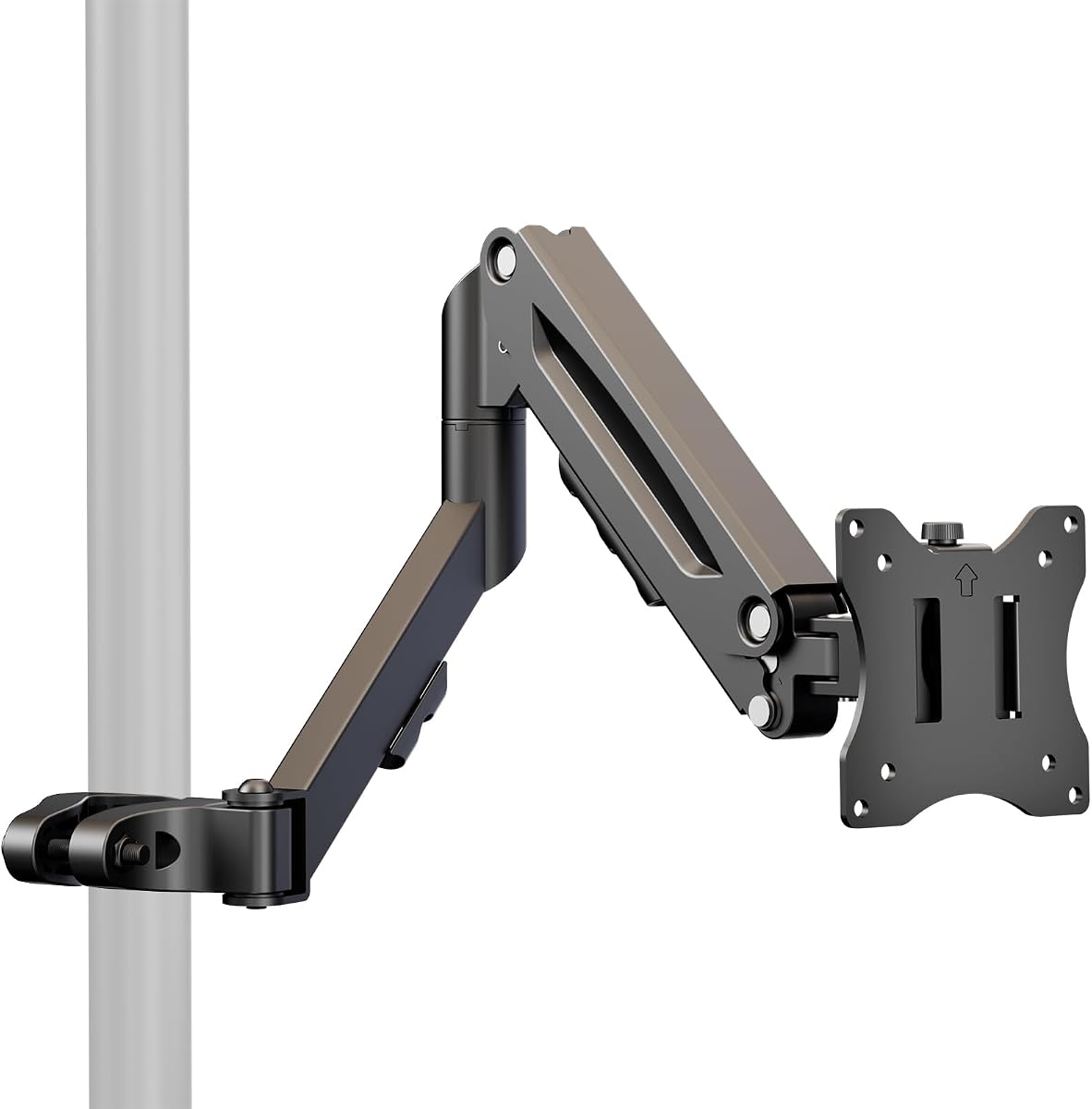


The VIVO Black Long Pole Mount Monitor Arm is an arm-only solution for anyone who already owns a compatible pole. It carries a 5.0 rating and stands out for a balanced set of reach, motion, and screen-support specifications. It is designed for 17-inch through 32-inch displays, including televisions, with a maximum stated weight of 22 pounds.
We may earn a commission when you buy through this link, at no additional cost to you.
The mount accommodates poles measuring 1.1 to 2.0 inches in diameter and provides a total extension of 26.8 inches. Its bracket supports 30 degrees of tilt in either direction, 90 degrees of swivel in either direction, and 180 degrees of rotation in either direction. A clamp that rotates around the pole adds further positioning flexibility for shared viewing or collaboration.
Its main limitation is that the pole is not included, so this is most appropriate for someone who already has a suitable support. The listed VESA compatibility is limited to 75x75mm and 100x100mm patterns, which covers many mainstream monitors but not every large display. Cable clips, a removable VESA plate, instructions, and required hardware are included, reducing the assembly burden.
Choose this model when you want a long-reach, highly adjustable arm without replacing your entire desk mount. It is a particularly good fit for standard office monitors that use common VESA patterns and weigh no more than 22 pounds. For a complete system, a bundled pole-and-arm product may be more convenient.
The combination of tilt, swivel, and rotation makes it straightforward to align a display for seated work, standing work, or shared viewing. Its rotating pole clamp also helps the arm move around the support rather than forcing the screen into a fixed position.
Dedicated clips route power and display cables along the arm, helping prevent loose leads from drifting across the desktop. This is a practical refinement for anyone creating a permanent single-monitor workstation.
We may earn a commission when you buy through this link, at no additional cost to you.
The MOUNT PRO Single Long Monitor Arm combines a long-reaching arm with a tall support column, giving it a 4.5 rating and strong value for desk-focused users. It supports screens from 13 to 32 inches, with a stated capacity of 4.4 to 19.8 pounds. Compatibility covers standard 75x75mm and 100x100mm VESA patterns.
We may earn a commission when you buy through this link, at no additional cost to you.
The arm extends as far as 27.76 inches and can position a display up to 28.5 inches above the desktop. That extra vertical reach may suit taller users, deep desks, or setups that need clearance for a laptop, keyboard, and other accessories. Movement includes 90-degree swivel in either direction, tilt from 85 degrees up to 45 degrees down, and 360-degree rotation.
This model is not suitable for every curved display. The supplied information specifically excludes 1000R, 1500R, and 1800R curved screens, even though ordinary flat and moderately curved LCD or LED models may fit. It also cannot carry displays heavier than 19.8 pounds. Its clamp accommodates desktops from 0.39 to 3.15 inches thick, while the grommet option works with desk thicknesses from 0.39 to 1.97 inches.
It is a strong choice for a single monitor in a spacious workstation, particularly if a tall display position and long reach matter more than supporting a heavier screen. The tested motion-cycle claim and labeled components also make it appealing for users who value clear assembly guidance.
The long arm and elevated column can open space beneath the screen and move the display closer to eye level. This can make a deep workstation feel less crowded without adding another monitor.
Shoppers can choose a clamp for an edge-mounted setup or a grommet base for a through-hole installation. Both methods are intended to provide a stable base while keeping the desk relatively uncluttered.
We may earn a commission when you buy through this link, at no additional cost to you.
The VIVO Black Pole Mount Monitor Arm for 17 to 32-inch screens is a focused arm-only product with a 4.6 rating. Its most useful distinguishing feature is the ability to fit poles from 1.1 through 2.4 inches in diameter, the broadest pole range among the arm options in this guide.
We may earn a commission when you buy through this link, at no additional cost to you.
The arm is built for displays weighing up to 17.6 pounds and using 75x75mm or 100x100mm VESA patterns. The mounting bracket offers 30 degrees of tilt in either direction, 180-degree swivel, and 360-degree rotation. Together with the pole clamp's complete rotation around the support, this provides a useful degree of movement for repositioning a display.
The lower 17.6-pound capacity deserves attention when comparing it with the other VIVO long-arm model, which supports 22 pounds. Buyers should also note that the pole is not included. On the positive side, cable clips, all mounting hardware, instructions, and a removable VESA plate help keep installation straightforward.
This is a compelling selection for users who already have a pole of uncertain diameter within the broad supported range. It works best with mainstream 17- to 32-inch monitors, particularly those below the stated weight limit and equipped with common VESA holes.
A generous pole-diameter range reduces the chance of discovering an incompatibility after ordering. It can be useful when adapting an existing riser, lift column, or custom vertical support.
The rotating bracket and clamp make it possible to bring a display toward another person more easily. That makes the mount relevant to collaborative desks, presentations, and flexible hot-desking arrangements.
We may earn a commission when you buy through this link, at no additional cost to you.
This 31.6-inch Steel Extra Tall 2-Section Monitor Arm Pole is a support component rather than a complete monitor mount. With a 4.2 rating, it is best considered by anyone who already owns a compatible monitor arm and wants to install it at a higher position.
We may earn a commission when you buy through this link, at no additional cost to you.
The pole is approximately 31.6 inches tall, measures about 1.4 inches in diameter, and has a stated load capacity of approximately 44 pounds. Those figures make it a useful extension for positioning a compatible arm higher above the work surface. Because no screen-size range is specified, compatibility must be determined from the separate arm's requirements.
Installation can use either a clamp or a grommet method. The clamp supports desk thicknesses from 0.4 to 3.3 inches, while the grommet installation works with thicknesses from 0.4 to 1.6 inches. Cable-management parts are included to keep leads close to the vertical support.
The main trade-off is obvious: this product does not include the arm, VESA plate, or display. Purchase it as an upgrade for an existing setup rather than as a first monitor mount. It makes the most sense when height is the primary concern and the current arm already matches the pole diameter.
The two-section tall pole gives an existing compatible arm a new vertical starting point. That can help create more clearance below the display or place a screen closer to eye level.
The dual installation approach allows users with a deep desk edge or an available grommet hole to select the more appropriate mounting method. Each requires checking its listed thickness range before installation.
We may earn a commission when you buy through this link, at no additional cost to you.
The SUPTEK Single Monitor Arm is a three-tier pole-mount arm with a 5.0 rating. It is designed for one monitor and provides a telescoping, fully adjustable structure that can reach up to 27.56 inches from the pole to the center of the panel.
We may earn a commission when you buy through this link, at no additional cost to you.
Although the product title refers to 13- to 27-inch screens, the supplied specifications state that the arm fits one monitor up to 32 inches, holds up to 22 pounds, and supports 75x75mm through 100x100mm mounting holes. It requires a pole with a 1.375-inch diameter, and the pole is not included. That exact fit requirement is more restrictive than some competing arm-only products.
The three arm sections measure 7.48, 8.07, and 8.07 inches. Tilt and swivel each cover 90 degrees in either direction, while the plate rotates 360 degrees for portrait or landscape use. Detachable cable clips help organize power and AV leads, and the package includes the arm, VESA plate, and mounting hardware kit.
Choose this option when a modular, multi-joint extension is important and you already own the correct pole. It is especially suitable for a standard single display that needs broad positioning control and clean cable routing.
The tiered construction lets the user set the display at different distances from the pole. That flexibility can make fine adjustments easier than working with one long, fixed arm segment.
A 360-degree rotating plate supports portrait and landscape positioning. This is useful for narrow editorial pages, vertical dashboards, and other content that benefits from a taller layout.
We may earn a commission when you buy through this link, at no additional cost to you.
The Steel Extra Tall 32 Inch 2-Section Monitor Stand Pole is a heavy-duty support upgrade with a 4.5 rating. It is positioned for large gaming monitors, ultrawide screens, and demanding workstation configurations, although it does not include a monitor arm.
We may earn a commission when you buy through this link, at no additional cost to you.
Its steel tubing measures 35 millimeters, or about 1.38 inches, in diameter, and the pole is 32 inches tall. The stated load capacity reaches 88 pounds, or 40 kilograms, considerably higher than the other standalone poles in this list. The matte black powder-coated finish is intended to resist fingerprints and blend into office or gaming environments.
Users can pair the pole with an existing monitor arm or use it as part of a custom setup. Installation choices include a C-clamp for desks from 0.39 to 3.35 inches thick and a grommet base for desks from 0.39 to 1.97 inches thick. A dual-joint design is included for stability.
Despite its strong pole rating, the display still needs a compatible arm and supported VESA pattern. This product is therefore most appropriate for builders upgrading a heavy-display workstation, not for shoppers seeking a ready-to-assemble monitor mount.
The 88-pound stated capacity provides considerable headroom for demanding screens. It is especially relevant to custom configurations that use a large ultrawide or a multi-component support structure.
Because the product is a pole, it can be used to replace a shorter support while retaining a compatible arm. Users should verify the pole diameter, mounting-hole pattern, and load rating of every component in the final assembly.
We may earn a commission when you buy through this link, at no additional cost to you.
The Height Adjustable Pole Mount Monitor Arm for 17- to 32-inch screens stands apart through its internal mechanical spring, which is described as a gas-spring-style height mechanism. It carries a 4.4 rating and is designed to make vertical movement easier while the display remains attached.
We may earn a commission when you buy through this link, at no additional cost to you.
The screen capacity is 19.8 pounds, with compatibility for 75x75mm and 100x100mm VESA patterns. The articulated arm reaches 19.8 inches when fully extended and supports 55 degrees of tilt in either direction, 90 degrees of swivel in either direction, and 180 degrees of rotation in either direction.
The height mechanism provides a total range of approximately 5.98 to 17 inches. That adjustment is localized around the arm mechanism rather than relying only on sliding a screen up a long pole. The stated design includes a secure pole clamp and cable management, although the supplied information does not give a precise acceptable pole-diameter range.
This is a good fit when frequent height changes are central to the workflow, such as alternating between seated and standing work. Buyers should confirm the physical dimensions of their pole and inspect the included clamp before ordering. It is also less suitable for very large or heavy displays because its stated limits are more modest.
The internal spring assists vertical movement, reducing the effort needed to raise or lower the display. This is a meaningful advantage in a workstation where the screen position changes frequently.
Broad tilt, swivel, and rotation ranges allow a display to be aligned for different viewing positions. The result is a flexible mount for everyday desk work, collaboration, and orientation changes.
We may earn a commission when you buy through this link, at no additional cost to you.
The VIVO Extra Tall Single Monitor Desk Mount is a complete pole-and-arm system with a 4.5 rating. Its 39-inch center pole allows the display to move between sitting and standing positions, making it a strong premium option for users who want substantial vertical travel without assembling separate components.
We may earn a commission when you buy through this link, at no additional cost to you.
The mount supports screens from 13 to 32 inches as well as ultrawide displays up to 38 inches, provided the screen weighs no more than 22 pounds. It uses standard 75x75mm or 100x100mm VESA mounting holes. The arm provides 90 degrees of tilt in either direction, 360-degree swivel, 360-degree rotation, and adjustment along the center pole.
A heavy-duty C-clamp secures to surfaces up to 4 inches thick, while an optional grommet mount offers an alternative installation method. Cable clips run along both the arm and center pole, and a detachable VESA plate simplifies the final screen attachment. Instructions and assembly hardware are supplied.
The main trade-off is size: a 39-inch pole occupies more vertical and potentially desktop space than a compact arm. It is best for a spacious, dedicated workstation that benefits from a high and frequently adjustable display, especially one using an ultrawide monitor.
The long center pole gives a display enough travel to follow the difference between seated and standing working heights. That makes the system more useful than a fixed, short monitor arm on an adjustable desk.
The included arm, pole, hardware, and VESA plate reduce compatibility guesswork. Buyers can select edge clamping or a grommet installation according to their desk and preferred cable routing.
We may earn a commission when you buy through this link, at no additional cost to you.
The VIVO Black Long Pole Mount Monitor Arm is the most specialized large-screen option in this guide. With a 5.0 rating, it supports 23- to 43-inch monitors and televisions while retaining a 22-pound weight limit and a 27-inch total extension.
We may earn a commission when you buy through this link, at no additional cost to you.
Its VESA compatibility extends from 75x75mm up to 200x200mm, which is broader than the common 75x75mm and 100x100mm patterns supported by most products here. The arm fits poles measuring 1.1 to 2.3 inches in diameter, giving it a useful balance of compatibility with the separate VIVO long-arm model.
The bracket offers 30 degrees of tilt in either direction, 90 degrees of swivel in either direction, and 180 degrees of rotation in either direction. The pole clamp rotates completely around the support, allowing the screen to move for collaboration. Cable clips, a removable VESA plate, mounting hardware, and instructions are included.
This model is most appropriate for a larger workstation display mounted to a compatible existing pole. It is not intended for screens below the stated 23-inch minimum, and the pole must be sourced separately. Its broader VESA range makes it especially attractive for larger professional monitors that use more widely spaced mounting holes.
Support up to 200x200mm opens the door to a broader set of professional and larger consumer displays. This is the clearest advantage over arms limited to the two most common VESA patterns.
A 27-inch extension combines with broad tilt, swivel, and rotation to make the display easy to reposition. The result suits deep desks and setups where the screen must move around the user or a nearby pole.
We may earn a commission when you buy through this link, at no additional cost to you.
The HUANUO Single Monitor Arm with 39-inch Extra-Tall Pole is a complete system with a 4.6 rating. It combines a long center pole, an articulating single arm, and two base options, making it convenient for shoppers who do not want to combine separate components.
We may earn a commission when you buy through this link, at no additional cost to you.
The 39-inch pole allows the screen to move between sitting and standing positions. The arm supports most 13- to 32-inch screens and ultrawide models up to 38 inches, with a maximum capacity of 22 pounds. Standard 75x75mm and 100x100mm VESA holes are supported through detachable mounting plates.
Articulation includes 180-degree tilt, 180-degree swivel, and 360-degree rotation, allowing the display to be repositioned in portrait or landscape orientation. The included C-clamp fits desks up to 3.93 inches thick, while the grommet base supports desk thicknesses up to 2.75 inches. Integrated cable management keeps the power cable organized.
Its principal requirement is careful measurement before installation. A clamp that appears suitable can fail if the desk is thicker than its stated range or if the mounting area lacks sufficient edge clearance. With that check completed, it is a capable complete option for a tall single-screen workstation.
The extra-tall center pole gives the display enough vertical range to move between seated and standing positions. It can also help place the top of a large screen near eye level.
Having both a C-clamp and grommet base gives buyers flexibility in desk construction. The grommet option can suit a cleaner permanent installation, while the clamp avoids adding a hole through the desktop.
We may earn a commission when you buy through this link, at no additional cost to you.
Choose a monitor arm pole extension mount by first separating complete systems from arm-only products, then matching the support, screen, VESA pattern, weight, adjustment, and installation method to your desk and display.
The pole is the physical link between the desk base and the monitor arm, so its diameter is a fundamental compatibility requirement. The arm options in this guide support varying ranges: one fits 1.1- to 2.0-inch poles, another accepts 1.1- to 2.4-inch poles, and the large-screen VIVO arm fits 1.1- to 2.3-inch poles. The SUPTEK arm is more restrictive, requiring a pole with a 1.375-inch diameter. Complete systems specify their own included pole and eliminate the need to match a separate component.
Measure the pole's outside diameter before ordering and compare it with the product requirements. Do not rely on visual similarity, because nominal pole sizes can vary between manufacturers.
Screen dimensions establish the intended scale of the mount, while the weight rating determines whether the support can safely carry the actual panel. Most products accommodate mainstream monitors from 13 to 32 inches. The VIVO large-screen arm starts at 23 inches and extends to 43 inches, while two complete 39-inch systems also claim compatibility with ultrawide screens up to 38 inches. Stated load limits range from 17.6 pounds to 22 pounds for complete arm products, with the standalone heavy-duty pole claiming a much higher figure.
Check both dimensions and weight. A screen may fall within the stated size range yet exceed the mount's load limit, particularly when it is a large ultrawide or has a substantial housing.
VESA describes the distance between the four mounting holes on the back of a compatible display. Most products in this guide support 75x75mm and 100x100mm, which covers a large share of standard monitors. The VIVO large-screen pole arm supports patterns from 75x75mm through 200x200mm, giving it an advantage for certain professional displays. Some monitors, including many compact or nonstandard models, may not have compatible VESA holes at all.
Measure the hole pattern and confirm both the dimensions and maximum load of the display. A wider VESA plate can also change how the screen sits relative to the arm, so physical clearance matters.
Extension determines how far the display can move away from its pole or base. The MOUNT PRO reaches 27.76 inches, the VIVO long arm reaches 26.8 inches, and the SUPTEK arm reaches 27.56 inches. The gas-spring model has a 19.8-inch extension, and the 39-inch complete systems are distinguished more by their vertical reach than by a stated horizontal extension figure.
Choose a longer reach for a deep desk, multiple accessories, or a need to slide the screen aside. A more compact extension may suit a smaller desk where excessive motion could cause the display to collide with nearby objects.
Height adjustment controls whether the display can follow a sit-stand desk or move to a comfortable eye level. Long center poles provide broad vertical positioning, while the gas-spring model uses an internal spring across an approximately 5.98- to 17-inch range. Tilt, swivel, and rotation determine how readily the screen can be shared or changed between landscape and portrait orientation.
Prioritize the movement you will actually use. Frequent sitting-to-standing changes benefit from a tall pole, while occasional sharing can be handled through swivel and rotation.
A complete pole-and-arm system is generally simpler because the major components are designed to work together. Products such as the VIVO 39-inch desk mount, HUANUO 39-inch system, and MOUNT PRO include their support structures. Several VIVO products and the SUPTEK arm are arm-only, and two products are poles without an arm. The latter categories are appropriate for upgrades and custom builds but require more compatibility planning.
Choose a complete system unless you already own a suitable pole or need to replace only one component of an established setup.
Clamp and grommet installations serve different desk layouts. A C-clamp grips the desk edge and often works well with thick desks, although it requires adequate clearance below and behind the edge. A grommet base passes through an existing hole and can create a tidier permanent arrangement, but it requires a compatible hole and enough space inside the desk.
Measure desk thickness and check the stated range for the chosen base. For a clamp, also check for drawers, support rails, modesty panels, or other obstructions that could prevent a full, stable grip.
Cable clips, routed channels, or integrated management systems keep display and power leads away from the work surface. Every product in this guide offers some form of cable organization, although the degree of concealment varies. Steel tubing and powder-coated finishes are common, but stated construction details do not replace checking load ratings and assembly instructions. For a permanent workstation, consider how cables move when the arm is adjusted.
Choose a mount with clips along the intended cable path and leave enough slack for full articulation. Check that the clips do not pinch the cable or interfere with the VESA plate.
Begin by confirming that the display, pole, arm, VESA plate, and desk base form a compatible system. Measure the pole diameter, locate the screen's VESA holes, verify its weight, and check the desk thickness against the base specifications. Assemble the pole and base before attaching the display, following the included manual rather than relying on force or improvised hardware.
Attach the monitor using the correct bolts for the VESA pattern and tighten them evenly. Secure the arm to the pole, then move it through its adjustment range gradually. Route power and video cables through the provided clips while leaving enough slack for swivel, tilt, rotation, and height changes. Stop if the arm becomes difficult to move or if the pole begins to shift.
For care, keep the joints free of dust and avoid hanging objects from the arm. Inspect bolts periodically, especially after moving the display or changing desk height. Do not exceed the stated weight limit, and use caution when lowering a heavy display. If the mount creaks, leans, or no longer holds position, unload it and check the base, fasteners, and pole fit before continuing use.
It depends on the product. Complete systems such as the VIVO 39-inch desk mount, HUANUO 39-inch setup, and MOUNT PRO include their support poles, while several VIVO arm-only products and the SUPTEK arm do not. The two standalone steel-pole listings are also poles without monitor arms. Always check the package contents before ordering.
Measure the outside diameter of your existing pole and compare it with the arm's accepted range. Some products accept a broad interval, while the SUPTEK arm requires a pole with a 1.375-inch diameter. If you are starting from scratch, a complete system avoids the need to match a separate pole to the arm.
Only if the mount meets all three relevant limits: screen size, weight, and VESA pattern. The VIVO 39-inch system, HUANUO 39-inch system, and heavy-duty pole are described as accommodating ultrawide displays up to 38 inches, while the 22-pound arm limit still applies where stated. The MOUNT PRO also excludes highly curved 1000R, 1500R, and 1800R screens.
A monitor arm is the articulated component that connects the screen to its support. A pole mount is an arm designed to attach around a vertical pole, while a pole extension is simply a tall support used to raise that arm. Some listings combine these functions, whereas others sell only the pole or only the arm.
Choose a clamp when you want to avoid drilling and when the desk edge can accommodate the mount. Choose a grommet base when an existing hole is available and you prefer a more permanent, integrated installation. Verify desk thickness, edge clearance, and the exact thickness range listed for the selected base.
The limit depends on the complete assembly, and the weakest component matters most. Most arm products support up to 19.8 or 22 pounds, while the VIVO MOUNT-POLE01A supports 17.6 pounds. The standalone steel poles claim higher capacities, but those figures do not guarantee compatibility with every arm or display.
It can, provided the pole is attached to a base that moves securely with the desktop and the arm's adjustment range covers the desk's travel. The 39-inch systems are specifically designed to help the display move between sitting and standing positions. Check clamping clearance and make sure the tall assembly will not strike shelves, lights, or overhead cabinets.
Most of these products require a display with a compatible four-hole VESA pattern. Standard 75x75mm and 100x100mm patterns are widely supported, while the VIVO large-screen arm extends up to 200x200mm. Displays without standard mounting holes need a separate VESA adapter that is rated for the combined weight.
The VIVO Black Long Pole Mount Monitor Arm stands out as the strongest all-around arm for existing compatible poles, combining a 5.0 rating with broad articulation and a useful 26.8-inch extension. For shoppers seeking a complete system, the VIVO Extra Tall Single Monitor Desk Mount provides a 39-inch pole, flexible installation, and support for mainstream and ultrawide displays.
Prioritize the requirement that cannot be compromised: pole fit, display weight, and VESA compatibility should come first. After that, choose based on whether you need a complete setup, maximum height, heavy-duty pole capacity, a long horizontal reach, or assisted height movement. Compact desks may favor an arm-only option, while spacious and sit-stand workstations benefit most from a tall bundled system.
Ratings, availability, and pricing can change, so review the current listing and all included components before making a final decision. Also recheck desk thickness, pole diameter, and mounting-hole spacing during installation. Those simple compatibility checks can make the difference between a smooth setup and a mount that cannot safely or neatly support the intended display.
