
Anker SD Card Reader
4.6Editor score
Concurrent card reading and writing
USB 3.0 with backward compatibility
Driver-free computer operation
Discover the best Microsd to USB Adapter options for phones, laptops, and cameras, comparing speed, ports, card support, capacity, and portability.
A microsd to USB adapter turns a tiny memory card into a practical storage bridge for computers, tablets, and compatible phones. The right reader should fit your cards, match your device ports, transfer files efficiently, and remain easy to carry. Connector type, card format, and simultaneous-read support matter as much as advertised speed.
This guide compares ten adapters using the supplied specifications, including interface design, operating-system support, card capacity, transfer capabilities, and physical features. It covers USB-A-only readers, USB-C models, and dual-connector options designed to work across newer and older equipment without requiring extra adapters.
Each review explains the strongest use case and any meaningful limitations, helping you move from camera storage to a computer, import images on a phone, or back up files while traveling. Ratings and product details reflect the current listings, while prices can change and should be checked before purchasing.
4.6Editor score

4.7Editor score

4.6Editor score
The table below compares connector layouts, card-slot support, transfer claims, and practical features across all ten adapters, making it easier to match a reader to your devices and workflow.



The Wansurs USB 3.0 2-in-1 holds a 4.5 rating and combines a standard SD slot with a microSD slot in a compact USB-A reader. Its headline appeal is a claimed transfer rate of up to 5Gbps, making it a practical option for moving camera photos, action-camera footage, and large project files between compatible computers.
We may earn a commission when you buy through this link, at no additional cost to you.
Its compatibility list covers SD, SDHC, SDXC, MMC, RS-MMC, microSD, microSDHC, microSDXC, and UHS-I cards. The reader supports Windows, macOS, Linux, and Android, requires no separate driver, and can also connect to a television or projector for playback. A two-year warranty and stated replacement support add reassurance for regular use.
The important limitation appears directly in the specifications: the SD and microSD slots cannot work simultaneously. That restriction makes this less attractive for workflows involving card-to-card copying or two-camera backups. The body also uses USB-A, so a USB-C-only computer or phone would require an appropriate adapter.
Overall, this is the strongest general-purpose choice for a desktop or laptop workflow that needs both card sizes. It combines broad compatibility, quick plug-and-play operation, useful playback support, and a portable form factor. Users who must work with two cards at once should instead consider a simultaneous-read model.
A dependable adapter should make transferring files feel simple while avoiding unnecessary compatibility problems. This Wansurs reader delivers that balanced experience for most photographers and everyday computer users, provided they understand the single-card-at-a-time limitation.
The separate SD and microSD slots make this adapter useful with cameras, phones, action cameras, and other devices that use different card formats. You can swap cards without changing readers or carrying an additional dongle.
USB 3.0 is specified for transfers up to 5Gbps, while plug-and-play operation eliminates separate driver installation. Actual performance still depends on the card, computer port, and files being transferred.
We may earn a commission when you buy through this link, at no additional cost to you.
The Anker SD Card Reader carries a 4.6 rating and is a refined 2-in-1 solution for users who regularly move files from full-size SD and TF/microSD cards. Its defining feature is simultaneous reading and writing, allowing two cards to remain connected without repeated unplugging and reconnection.
We may earn a commission when you buy through this link, at no additional cost to you.
USB 3.0 supports transfer rates of up to 5Gbps and remains backward compatible with USB 2.0 and USB 1.1. The reader draws power directly from the USB port, so it needs no separate supply, and it operates without additional drivers on supported Windows and Mac OS X systems.
The USB-A form factor limits direct use with USB-C-only devices, although a suitable adapter can bridge that gap. The supplied feature list does not mention broader phone compatibility, so this model is more clearly oriented toward traditional computers than travel-oriented mobile workflows.
This is an excellent choice for photographers, editors, and backup-minded computer users who value stable, straightforward operation. It is especially compelling when both an SD card and a microSD card need to be copied, synchronized, or checked at the same time.
Compared with readers offering only one connector or no simultaneous-card capability, Anker offers the most focused professional workflow in this list. The trade-off is connector age, but its backward compatibility and no-extra-power design soften that limitation.
Simultaneous reading and writing is valuable when comparing files across two cards, organizing separate shoots, or avoiding repeated swaps. It is the feature that most clearly separates this reader from simpler one-card-at-a-time designs.
Because the reader is powered through USB and needs no extra supply, setup is straightforward on compatible computers. Its backward compatibility also allows use with older USB ports, although older ports will limit performance.
We may earn a commission when you buy through this link, at no additional cost to you.
The UANTIN Dual Slots Reader has the highest rating in this roundup at 4.7. It combines USB-A and USB-C connectors, separate SD and microSD slots, and true simultaneous reading and writing in an exceptionally small package, giving it broad appeal for creators working across several devices.
We may earn a commission when you buy through this link, at no additional cost to you.
Its advertised maximum transfer rate is 5Gbps, supported by a heat-dissipation layout and a smart chip intended to reduce speed throttling during large transfers. The listing notes that actual speed depends on the host port, connection, and memory-card rating, which is an important and honest qualification.
Compatibility spans SD, SDHC, SDXC, microSD, microSDHC, and microSDXC cards. It is designed for plug-and-play use with USB-C phones and tablets, laptops, and USB-A computers, although the listed card support stops at UHS-I. A safety chip is included for over-current, short-circuit, and thermal protection.
The integrated keychain loop is a thoughtful portability feature for travel, outdoor shoots, and everyday editing. Buyers should still insert cards gently, safely eject them before removal, and expect the reader to become mildly warm during prolonged high-speed transfers.
For most buyers, this is the most complete general-purpose option because it addresses connector changes, card variety, simultaneous access, and portability at once. It is particularly suitable for someone moving between a USB-C laptop and an older USB-A computer without carrying separate adapters.
The USB-A and USB-C connectors eliminate much of the guesswork involved in choosing a reader for a mixed device ecosystem. It can connect directly to newer phones, tablets, and laptops while remaining useful with older computer ports.
True simultaneous reading and writing supports direct transfer between SD and microSD cards. That can be valuable for copying vacation images from one card to another or organizing footage before archiving it.
We may earn a commission when you buy through this link, at no additional cost to you.
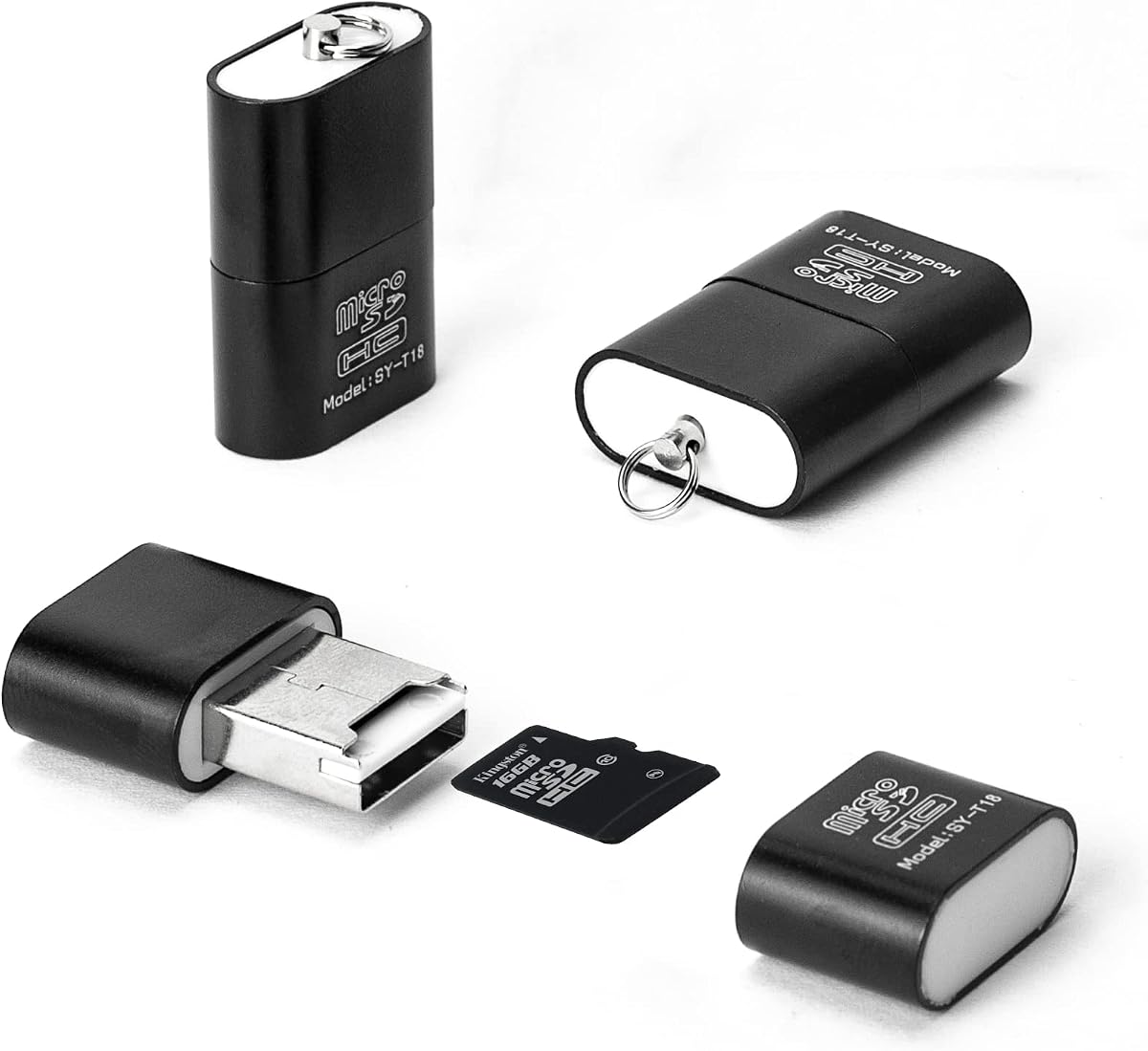
The Wansurs 3-Pack Mini Reader is built around portability and redundancy. It uses a concealed microSD slot integrated near the USB plug, reducing overall bulk and helping protect the card. The set includes three readers for keeping one at home, one in a camera bag, and one in a travel kit.
We may earn a commission when you buy through this link, at no additional cost to you.
Its aluminum alloy shell is designed for durability, while the listed chip and circuit arrangement aims to reduce heat and maintain transfer stability. A lanyard hole makes it easy to attach to keys or other small accessories. It is a focused microSD adapter rather than a universal card reader.
The advertised speed is 480Mbps, which is appropriate for USB 2.0 operation and the reader remains compatible with USB 3.0 ports. That older speed ceiling makes it less attractive for large 4K files than adapters specified for up to 5Gbps.
The low 4.2 rating should also factor into the decision. It does not negate the useful three-pack arrangement, but it makes this option more suitable for occasional transfers, spare-card backups, and users who value multiple tiny adapters over maximum throughput.
Choose this reader when portability, card protection, and having several units matter more than fast transfers. Its hidden slot and lanyard design make it particularly appropriate for everyday phone backups, travel, and quick access to microSD cards stored in a compact bag.
Embedding the microSD slot in the USB plug reduces the reader's footprint and helps protect the card from bumps. The lanyard hole adds another practical carrying option for travel and daily use.
The three-pack format allows adapters to be distributed between a camera bag, laptop sleeve, and travel kit. It is useful for users who want a spare without buying the same device repeatedly.
We may earn a commission when you buy through this link, at no additional cost to you.
The UGREEN USB-A USB-C Reader combines a 4.6 rating with the features most often sought in a general-purpose adapter: two connectors, two card slots, simultaneous card access, and a USB 3.0 transfer specification of up to 5Gbps.
We may earn a commission when you buy through this link, at no additional cost to you.
The slim body is intended to fit in a camera bag or laptop sleeve, and the listing highlights compatibility with Windows, macOS, and most Android devices. It supports full-size and microSD standards including SDXC, SDHC, SD, MMC, RS-MMC, microSDXC, microSD, and microSDHC.
Its USB-C and USB-A construction gives it broader device reach than single-interface readers. It can serve laptops, tablets, compatible USB-C phones, and older USB-A computers without relying on a separate cable or dongle. Plug-and-play operation removes the need to install drivers or provide extra power.
Although the design covers many common cards, UHS-II is not explicitly included in the supplied compatibility list. That distinction matters for buyers using newer high-speed camera cards, while UHS-I users are well served by the stated formats.
This UGREEN adapter is an excellent all-rounder for travelers, photographers, and mobile users who want one reader to cover several devices. Its combination of dual connectors, concurrent operation, broad format support, and compact construction makes it easy to recommend.
Keeping USB-A and USB-C in one body reduces the need to carry different adapters. It is especially convenient when moving between a current laptop, an older desktop, and a compatible phone.
The ability to read SD and microSD cards at the same time reduces repeated connection and reconnection. That is especially helpful during card organization, backups, and selective file copying.
We may earn a commission when you buy through this link, at no additional cost to you.
The 5-in-1 USB-C Card Reader is the most expandable model in the group, with SD, microSD, and Memory Stick slots, a USB-C connector, and dual USB-A ports. It also carries a detachable USB-C-to-USB adapter, allowing the main reader to work with legacy computer ports.
We may earn a commission when you buy through this link, at no additional cost to you.
The listed card capacity reaches 2TB, and the supported formats include SD, SDHC, SDXC, microSD, TF, microSDHC, microSDXC UHS-I, and UHS-II camera cards. That makes it relevant to photographers using several camera formats as well as owners of older Memory Stick equipment.
Compatibility is a major selling point. The listing names current and previous iPhone generations, iPad Pro models, MacBook Pro and Air, Surface devices, Galaxy phones and tablets, and other USB-C equipment. Plug-and-play support extends across Windows, macOS, Chrome, and Linux without additional drivers.
The two USB-A ports add utility by allowing peripherals such as flash drives, keyboards, mice, and cameras to be connected through the reader's hub function. However, the multi-function arrangement creates a bulkier package than a simple two-slot adapter, and no specific maximum transfer speed is provided.
This is a sensible choice for a shared desk or mixed-format media kit where connector flexibility matters more than minimal size. It is less suitable for someone who only needs one card format and prioritizes a pocket-sized adapter.
Three card slots broaden the reader beyond the usual SD and microSD pairing. That makes it useful for photographers, archivists, and users still working with Memory Stick devices or a range of camera cards.
The dual USB-A ports can accommodate peripherals such as a flash drive, keyboard, mouse, or digital camera. That turns the adapter into a small workstation hub as well as a card reader.
We may earn a commission when you buy through this link, at no additional cost to you.
The SZHAIYIJIN USB-C Reader is designed around modern USB-C equipment, including recent iPhone Pro models, iPads, Mac computers, Android devices, and Windows systems. Its stated read and write speed reaches 90MB/s, offering a more concrete performance figure than many competing listings.
We may earn a commission when you buy through this link, at no additional cost to you.
Separate SD and microSD slots support reading and writing two cards simultaneously, with capacity stated up to 2TB. Supported formats include SD, SDHC, SDXC, microSD, TF, microSDHC, microSDXC UHS-I, and UHS-II camera cards, covering common camera and action-camera media.
The reader also includes a USB-A female port for accessories such as a flash drive, camera, keyboard, or mouse. Because the main connector is USB-C, using that hub with a traditional USB-A device requires a separate USB-C-to-USB-A adapter.
Plug-and-play operation requires no driver installation across the listed Windows, macOS, Chrome, and Linux environments, and the product includes over-current and short-circuit protection. Android users need a device that supports the appropriate USB OTG functionality.
This is a strong choice for an all-USB-C kit, particularly when transferring files to a recent phone or laptop. Buyers who need to connect directly to older USB-A computers should prioritize a reader with a built-in USB-A plug.
The stated maximum of 90MB/s is useful for buyers comparing performance across large photo sets and 4K video files. Real results will still depend on the card, device port, and workload.
USB-C connectivity makes this reader suitable for a current iPhone, iPad, MacBook, or Android device that supports the required connection standard. It avoids relying on a legacy USB-A plug for core operation.
We may earn a commission when you buy through this link, at no additional cost to you.
The Dual Connector USB 3.0 Reader combines USB-C and USB 3.0 connectivity with separate SD and microSD slots. Its 4.6 rating and travel-oriented details make it an appealing choice for photographers and phone users who want to move files without apps, Wi-Fi, or driver installation.
We may earn a commission when you buy through this link, at no additional cost to you.
Both card slots can be read and written simultaneously, and the reader supports cards up to 2TB. The listing specifically describes use with iPhone 15 and later, iPad, Android phones, MacBook, and Windows laptops, although compatibility still depends on the device's port and file-access support.
An extended USB-C connector is designed to fit thicker phone cases, reducing the need to remove a protective case before connecting. The included lanyard allows the reader to attach to a keychain or camera bag, making it less likely to be left behind during travel.
The rugged aluminum casing is intended to dissipate heat during extended transfers and reduce the chance of performance loss. One caveat is that the listing does not provide an exact maximum speed, so the USB 3.0 designation is less precise than the 5Gbps or 90MB/s figures supplied for some alternatives.
This model is well suited to mobile-first travelers who need broad card compatibility and convenient carrying. Its main appeal is the combination of connector flexibility, case-friendly design, and dual-card operation rather than a precisely quantified peak speed.
The included lanyard and compact connector-based design make it easy to keep the reader beside a camera bag or keys. Its direct USB-C connection also reduces the number of separate cables needed while traveling.
The aluminum housing is intended to dissipate heat during large 4K video transfers. That helps support steadier performance when the reader is working for extended periods.
We may earn a commission when you buy through this link, at no additional cost to you.
The SZHAIYIJIN Lightning Adapter stands out by serving both modern USB-C Apple devices and older Lightning devices. It includes a detachable USB-C-to-Lightning adapter, allowing photographers to move between recent iPhones, older iPhones, iPads, Macs, Android devices, and PCs.
We may earn a commission when you buy through this link, at no additional cost to you.
Its SD and microSD slots support two-way transfers on compatible iOS 13 through 18 devices. Files can be imported from a card to an iPhone or iPad and exported from the device back to a card. The listing notes that no app download is required; users can access the import function through the Photos app.
The female USB interface also supports digital cameras, flash drives, card readers, headphones, electric guitars, and MIDI keyboards, provided the peripheral does not draw more than 500mA. Printers and hard disk drives are expressly not supported.
Wi-Fi-enabled SD cards are not supported, which is a significant detail because those cards use a different connection method. The broader Apple compatibility is excellent, but Lightning users should verify their iOS version and confirm that the desired file types appear in the native Photos workflow.
This adapter is best for Apple users who need one reader across both connector eras. It is less suitable for anyone expecting a high-powered storage peripheral, printer, or hard-drive connection through the USB port.
The detachable Lightning adapter allows the same card reader to work with both USB-C and Lightning equipment. That is particularly useful for households or teams that still use older iPads or iPhones alongside newer models.
Two-way transfer supports moving images from a memory card into an iPhone or iPad and copying supported files back onto a card. This adds flexibility beyond a basic import-only adapter.
We may earn a commission when you buy through this link, at no additional cost to you.
The Wansurs 2-Pack USB-C Reader is a compact, mobile-oriented microSD adapter with both USB-A and USB-C plugs. It is designed for Android phones and tablets with OTG support, as well as computers and laptops with matching ports, making it a convenient option for basic card access away from a desk.
We may earn a commission when you buy through this link, at no additional cost to you.
Its hidden microSD slot and covered plugs improve portability and protect exposed components when the reader is carried in a pocket or camera bag. The included chip solution is intended to provide stronger data-transfer capacity while limiting heat generation.
The reader can browse documents, view pictures, watch videos, and play music from compatible external storage. It may also support real-time sharing, but users must first enable OTG on supported Android devices. Compatibility should not be assumed for every phone or tablet.
The two-reader pack offers more flexibility than a single adapter, while the microSD-only design keeps the body small. However, no precise maximum transfer speed is stated, and the 4.1 rating is the lowest in the group, making it less compelling for demanding professional workflows.
Choose this product for lightweight Android backups, occasional card access, and users who want a spare microSD reader. If you need full-size SD support, faster stated performance, or simultaneous multi-card access, a dual-slot model is the better choice.
The tiny body and concealed slot make this reader easy to carry while traveling. Compatible Android devices can access files after OTG is enabled, while USB-A and USB-C plugs cover most computer connections.
Covered plugs and a hidden card slot reduce exposure to dust and impacts. The two-reader pack also lets one unit remain in a camera bag while another stays with a phone or laptop.
We may earn a commission when you buy through this link, at no additional cost to you.
The best microsd to USB adapter depends on the cards you use, the ports available on your devices, and how often you transfer files. Connector compatibility, card formats, capacity, simultaneous access, and thermal design deserve more attention than headline speed alone.
Choose a dual-connector reader for mixed device ecosystems and a single connector for a dedicated setup. Never assume that a USB-C shape alone guarantees USB 3.0 transfer performance; the host device must also support the required protocol and speed.
Pick a reader that explicitly lists every card standard your equipment requires. Avoid inferring support from a generic SD or TF label, especially when capacity and generation standards matter.
Choose simultaneous operation for active media workflows. Choose a single-card model only when simplicity, lower cost, or a more compact body matters more than working with two cards concurrently.
Prioritize speed when moving large RAW files or 4K footage, but also consider whether the source card can sustain that rate. A fast reader cannot make a slow memory card substantially faster.
Confirm both hardware support and the intended file-access method before buying for mobile use. A reader that works perfectly on a laptop may not offer the same import experience on a phone.
Use the capacity figure as a baseline, then verify the specific card standard and host support. A larger advertised limit does not guarantee that every file format will open or copy correctly.
Balance size against durability and thermal management. The smallest reader is not necessarily the best if it runs hot, flexes at the connector, or leaves the card exposed.
Prioritize safeguards and functions that you will actually use. Simple plug-and-play behavior and correct card support are more valuable than a long feature list that includes unsupported or unnecessary capabilities.
Begin by confirming that the reader supports the exact card format and the connector on your computer, phone, or tablet. Insert the memory card gently in the orientation indicated by the slot or adapter markings. Force should never be used, and the card should sit fully and evenly rather than being pushed beyond the normal insertion point.
Connect the reader directly to the device and wait for the operating system to recognize it. On an Android phone or tablet, enable OTG if required. On an iPhone or iPad, use the native Files or Photos workflow described by the manufacturer. Before removing the card, safely eject the reader or volume and wait for every transfer to finish; premature removal can interrupt a write operation and damage files.
Store the reader in a clean, dry place, protect it from bending or impact, and avoid leaving it in a hot vehicle or exposed to moisture. Periodically inspect the connector and card slot for debris. If transfers slow down or the reader becomes unusually hot, stop the operation, let it cool, and move large workloads to a computer with a stable USB connection. Always use the safe-eject procedure, even when changing cards frequently.
Only if the reader has a full-size SD slot. Many compact adapters accept microSD cards exclusively, while dual-slot models support both formats. Check the slot labels and compatibility list before inserting an SD card, and never force a card that does not fit.
USB 3.0 offers a higher maximum interface rate and is better suited to large photo collections or 4K video. USB 2.0 is slower but may still be adequate for documents and smaller transfers. Real speed also depends on the memory card, device, connection, and file workload.
The phone may not support USB OTG, the required feature may need to be enabled, or the connector and reader may not be compatible. Check the device specifications, try another USB port, confirm that the card is inserted correctly, and verify that the reader supports the card format.
Yes. Insert the card into a compatible reader and connect the reader to the computer, then select it from the file manager. The drive should appear without additional drivers on most supported Windows, macOS, and Linux systems. Safely eject the reader before removing the card.
No. Removing or ejecting a card while data is being written can corrupt the transfer or damage the file system. Wait for the operation to finish, use the operating system's safe-eject function, and then remove the reader before taking out the card.
Most readers in this guide are designed for plug-and-play use and require no additional driver on supported systems. Compatibility can vary by device and operating-system version, particularly for phones and tablets, so check the listing for platform requirements before purchasing.
Yes, if the device connectors and operating systems are compatible. USB-A and USB-C dual-connector models are convenient for mixed setups, while a dedicated USB-C reader is simpler for modern devices. Mobile compatibility may still require OTG or a specific native file-access workflow.
Not necessarily. Fast readers can generate more heat during sustained transfers, although good thermal designs help dissipate it. The memory card's own rating, the transfer duration, device power, and ambient conditions also influence operating temperature. Gentle insertion and safe removal remain essential.
The UANTIN Dual Slots Reader is the most versatile overall option, combining USB-A and USB-C connectors, simultaneous SD and microSD access, and a compact keychain-friendly design. The Anker SD Card Reader is a strong premium choice for computer workflows that need two active card slots, while the UGREEN reader offers an excellent balance of connector flexibility, broad card support, and practical portability.
Prioritize exact card-format compatibility, the connector on the intended device, and whether simultaneous operation is genuinely useful. Faster specifications help with large media, but the source card and host device determine real performance. For phones, verify OTG or native file-access support before buying, and for travel, consider recessed slots, covers, and lanyard attachment points.
Ratings and specifications can change as product listings evolve, and prices also fluctuate. Before purchasing, confirm the current card capacity support, connector arrangement, operating-system requirements, warranty details, and latest product information on the listing.