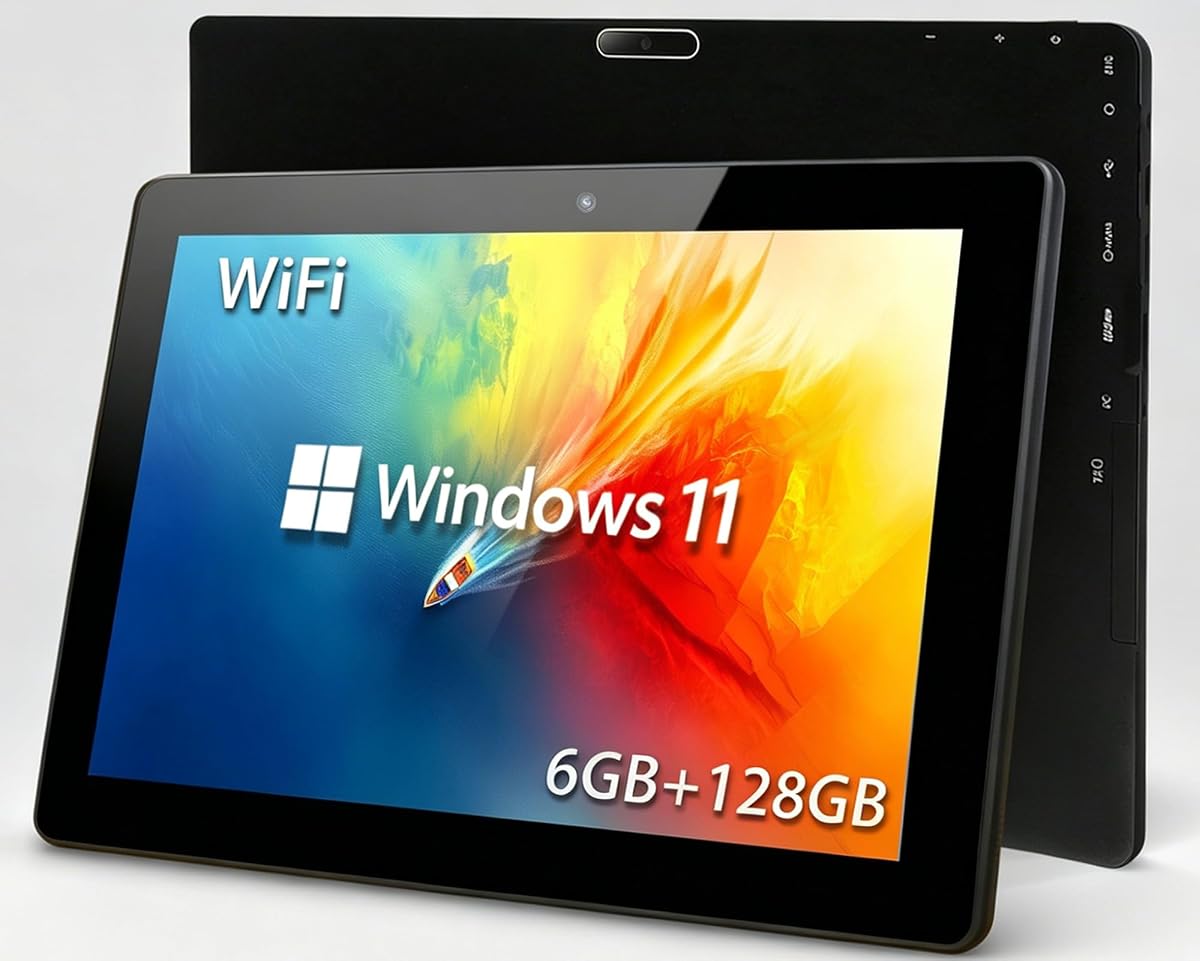
10.1-Inch Windows 11 HDMI Tablet
2.7Editor score
Built-in HDMI output
Expandable 512GB storage
Portable 6000mAh battery
Dual-band Wi-Fi connectivity
A tablet with HDMI output can function as a portable computer while also driving a larger monitor, television, or projector. The most useful models combine a responsive touchscreen, dependable wired video connections, enough memory for demanding applications, and a form factor suited to work, study, entertainment, or embedded operation.
This guide compares ten tablets and related connectivity options based on the supplied specifications. It distinguishes between devices with dedicated HDMI ports, tablets that require a compatible USB-C adapter or hub, and industrial panel computers designed for permanent installation. The comparison also considers screen size, memory, storage, wireless connectivity, operating system, mounting options, and intended environment.
Each review identifies the strongest feature and the compromises that shoppers should understand. Some products are better suited to presentations and external displays, while others prioritize industrial durability, compact everyday use, or affordable accessory-based HDMI expansion. Product ratings and specifications can change over time, and current prices, availability, compatibility, and retailer policies should be confirmed before purchase.
2.7Editor score

5.0Editor score

3.7Editor score
As an Amazon Associate we earn from qualifying purchases.
The comparison below includes dedicated HDMI tablets, industrial panel computers, compact Android tablets, and USB-C display accessories, with each product positioned according to its verified specifications and practical use case.


This 15.6-inch Android panel PC combines a large 1920×1080 touchscreen with a dedicated HDMI 2.0 connection, making it a practical option for installations that need both a built-in interface and an external display. Its 3.6 rating reflects a mixed reception, but the supplied specifications clearly target kiosk, warehouse, office, bar, and automation environments where an integrated touchscreen can be more useful than a conventional portable tablet.
We may earn a commission when you buy through this link, at no additional cost to you.
The RK3399 platform runs Android 12 with 4GB of memory and 64GB of storage, a configuration aimed at steady operational workloads rather than heavy desktop multitasking. A G+G ten-point capacitive panel supports precise interaction, including use with wet or gloved hands. The 1000M Ethernet port, Wi-Fi 5, and Bluetooth 4.2 provide both wired and wireless connectivity, while HDMI 2.0 allows the large internal screen to be supplemented by compatible external equipment.
Its fanless aluminum alloy frame, sealed waterproof front, and moisture-resistant rear enclosure are more important than ordinary consumer polish for a permanently installed system. PPC mounting hooks support integration into cabinets, and standard VESA holes offer flexibility for wall or desktop mounting. The main compromises are the modest memory and storage, as well as Android's limited compatibility with specialized Windows-only industrial software.
This is a strong choice for a large touchscreen control panel or kiosk with external-display needs, especially where a fanless, moisture-resistant design matters. It is less suitable for shoppers who want a lightweight travel tablet, extensive local storage, or a full desktop application environment. For those requirements, the 10.1-inch Windows panel PCs elsewhere in this guide offer a more conventional software foundation.
The 15.6-inch Full HD panel gives operators a generous on-device workspace, while HDMI 2.0 provides a direct route to a second screen. That combination is useful for control interfaces, order terminals, status displays, and kiosk deployments where visibility at a distance matters.
The fanless design, sealed front, moisture-resistant rear, and dual mounting approach support long-term installation. These physical characteristics are particularly relevant in warehouses, bars, automation cabinets, and other environments where a consumer tablet would be less appropriate.
We may earn a commission when you buy through this link, at no additional cost to you.
This 10.1-inch Windows 11 embedded panel PC offers one of the most balanced approaches to tablet-with-HDMI use. It has a 4.5 rating, an IPS touchscreen, Windows 11 Pro with a valid license, and dual HDMI 2.0 outputs capable of supporting 4K 60Hz video across two monitors through integrated UHD Graphics 600. That makes it a strong candidate for control desks, kiosks, and work areas requiring two external displays.
We may earn a commission when you buy through this link, at no additional cost to you.
The quad-core Intel Celeron N5095 is paired with 8GB of LPDDR4x memory and 128GB of storage. A microSD slot supports expansion up to 512GB. The machine can operate without a mouse or keyboard through its ten-point touchscreen, supports wake-on-LAN and PXE, and can serve as a remote-desktop endpoint for another computer. TPM 2.0 support adds another layer of appeal for business and industrial deployments.
Connectivity is unusually comprehensive for this category. The specification lists dual HDMI ports, a USB-C 3.1 connection for 4K display output, four USB 3.0 ports, and DB9 RS232 ports for professional networking or serial equipment. That range reduces reliance on unverified adapters and makes the panel easier to integrate with existing machinery. Embedded installation and reserved VESA holes further support fixed use.
The main limitation is mobility. Its panel-computer design, embedded-installation features, and focus on cabinets, CNC tools, and control consoles make it less compelling for ordinary travel. It is best recommended for an installer or business user who values Windows software, dual-display flexibility, serial connectivity, and straightforward mounting over ultra-portability.
Dual HDMI 2.0 outputs provide more display flexibility than a single-port tablet. The stated 4K 60Hz capability is especially useful for dashboards, control interfaces, monitoring stations, and operators who need detailed information across multiple screens.
Four USB 3.0 ports, USB-C display output, Gigabit Ethernet, and RS232 serial support create a more useful workstation foundation. The additional interfaces also make the device easier to connect to laboratory equipment, industrial controls, and specialized peripherals.
We may earn a commission when you buy through this link, at no additional cost to you.
The Samsung Galaxy Tab A11+ is a polished general-purpose Android tablet rather than a dedicated HDMI-output model, but its strong 4.6 rating, large 11-inch display, and expandable storage make it worth considering for portable entertainment and light productivity. The product title identifies 6GB of RAM and 128GB of storage, while the supplied feature text also describes the wider A11+ family with up to 8GB of memory and 256GB of storage, so buyers should confirm the exact configuration of the selected listing.
We may earn a commission when you buy through this link, at no additional cost to you.
Its bright 11-inch screen supports refresh rates up to 90Hz, making it well suited to fluid scrolling, casual gaming, streaming, and reading. Quad speakers with Dolby Atmos add a strong entertainment advantage, while a 5MP front camera supports video calls. Google Gemini and Circle to Search add convenient everyday tools, and the long-lasting battery with fast charging helps reduce interruptions during travel.
External display support is the main uncertainty. The supplied information does not state that the Galaxy Tab A11+ has a dedicated HDMI port or that its USB-C port supports DisplayPort Alt Mode. An adapter therefore should not be assumed to work. If video output is essential, verify the exact tablet's port capabilities or choose a model whose listing explicitly confirms HDMI support.
This Samsung tablet is best for buyers who want an enjoyable, slim Android device and may occasionally mirror content to another screen after confirming compatibility. It is not the leading recommendation for kiosks, industrial control, or guaranteed external-monitor operation. Those priorities are better served by the OuuOee panel PCs or the explicitly featured Windows HDMI tablet.
The 11-inch panel and refresh rate of up to 90Hz create a fluid viewing experience for streaming, games, reading, and general browsing. Combined with quad speakers and Dolby Atmos, it is particularly compelling for entertainment-focused households.
Because the supplied product data does not confirm a dedicated HDMI port or DisplayPort Alt Mode, buyers should check the tablet's specifications before purchasing an adapter. This avoids the disappointment of discovering that the USB-C port supports data and charging but not external video.
We may earn a commission when you buy through this link, at no additional cost to you.
The Fusion5 FWIN232 PRO N5 combines a 10.1-inch Full HD Windows tablet with a notably generous configuration of 12GB RAM and a 512GB SSD. Its Intel 13th Gen Alder Lake N100 quad-core processor, Windows 11 Pro, 500-nit IPS display, and included 512GB microSD card make it a premium-oriented option for users who need more flexibility than a basic tablet offers.
We may earn a commission when you buy through this link, at no additional cost to you.
The hardware should handle everyday productivity, video calls, streaming, content creation, and multitasking more comfortably than configurations with only 4GB or 6GB of memory. Integrated graphics and the Full HD panel are attractive for a compact desktop replacement, while dual front and rear cameras add versatility. The product title includes HDMI and USB-C, indicating that external-display and accessory connections are central to its proposition.
The 24-month full warranty with coverage for up to two accidental-damage incidents adds meaningful reassurance. Assembly in Pasco County, Florida, is also a stated selling point. On the other hand, the 3.7 rating suggests that customer experiences are not uniformly positive. Buyers should examine current reviews and warranty terms closely, especially if the device will be used in a mobile work setting.
This model is recommended for professionals, students, and technically inclined users who value storage, memory, Windows Pro, and service coverage. It may be less suitable for buyers focused on maximum portability or rugged industrial use. The clear advantage is the balance between a large memory reserve, fast solid-state storage, a capable display, and warranty support.
Twelve gigabytes of RAM gives the tablet more room for browser sessions, office applications, and background tasks than many entry-level alternatives. A 512GB SSD also provides useful space for applications, project files, media, and an additional 512GB microSD card is listed in the supplied features.
A two-year full warranty with accidental-damage protection is a notable advantage over many similarly compact Windows tablets. The coverage can be especially relevant for mobile professionals who regularly travel with their device.
We may earn a commission when you buy through this link, at no additional cost to you.
This 10.1-inch Windows 11 tablet stands out in this roundup because its supplied information explicitly confirms a built-in HDMI output function. It is designed for people who want to connect a monitor, projector, or television without relying on a separate USB-C video adapter. The included 1280×800 capacitive touchscreen and OTG support add everyday flexibility for study, office work, and entertainment.
We may earn a commission when you buy through this link, at no additional cost to you.
Its configuration includes an activated Windows 11 Home system, a 1.6GHz Intel Celeron quad-core processor, 6GB of RAM, and 128GB of flash storage. Storage can be expanded by up to 512GB with a TF card. These specifications should suit browsing, online courses, mainstream office applications, video calls, media playback, and light editing, although they are not intended to replace a high-end workstation.
The 6000mAh battery is listed as supporting up to 12 hours of standby and video playback, while dual-band 2.4GHz and 5GHz Wi-Fi improves connection options. Bluetooth 4.2 can be used with peripherals such as a mouse, keyboard, or headphones. Its slim, lightweight body is easy to carry, making the tablet more travel-friendly than the industrial panel computers in this guide.
The significant drawback is its 2.7 rating, the lowest among the tablets reviewed. That suggests some buyers have encountered issues or have not been fully satisfied. The choice therefore makes the most sense for value-focused shoppers who prioritize a native HDMI port, portability, and a large battery over stronger processing performance or embedded durability.
A dedicated HDMI output simplifies presentations, study sessions, and home entertainment. Users can connect a larger display directly, avoiding the need to purchase and configure a separate USB-C display adapter for basic mirroring or extension.
The 6000mAh battery, slim construction, dual-band Wi-Fi, and Bluetooth support make the tablet practical for commuting, classes, and light travel work. Expandable storage improves its suitability for offline media and study materials.
We may earn a commission when you buy through this link, at no additional cost to you.
The OuuOee 10.1-inch industrial mini PC is the strongest all-around pick because it directly addresses the central promise of a tablet with HDMI output: a responsive built-in touchscreen, a full Windows environment, and two high-resolution external displays. Its 5.0 rating is the highest listed among the products, and the dual HDMI 2.0 ports are explicitly stated to support 4K 60Hz output across two monitors.
We may earn a commission when you buy through this link, at no additional cost to you.
Windows 11 Pro comes preinstalled with a valid license, making the device substantially more useful for organizations than a locked-down Android appliance. The quad-core N5095 processor, 8GB of LPDDR4x memory, and 128GB of storage support control interfaces, remote access, and everyday business applications. A microSD slot permits expansion up to 512GB, while TPM 2.0 and remote-desktop capabilities suit professional deployments.
Its I/O selection is one of the strongest aspects. The specification includes four USB 3.0 ports, USB-C 3.1 with 4K display output, dual HDMI, and DB9 RS232 connections. A touchscreen allows operation without a mouse or keyboard, and reserved VESA mounting holes support cabinets, CNC equipment, and control consoles. Wake-on-LAN and PXE functions are also useful for managed environments.
It is not the lightest or most attractive tablet for casual media consumption, and permanent embedded installation is its central design purpose. Even so, it offers the most convincing combination of Windows compatibility, display expansion, connectivity, mounting support, and customer rating. It is the recommended choice for a serious control panel, industrial workstation, kiosk, or two-monitor Windows installation.
Two HDMI 2.0 outputs supporting 4K 60Hz provide a substantial workspace expansion. The built-in IPS screen can serve as a control interface while detailed information appears on one or two external displays.
VESA mounting, PXE support, wake-on-LAN, RS232 ports, and a valid Windows 11 Pro license cover many requirements of a fixed workstation. The interface mix is also broad enough to connect storage, networking, and display equipment without a large collection of adapters.
We may earn a commission when you buy through this link, at no additional cost to you.
The Crelander 8.7-inch Android 16 tablet is a compact, lightweight option for browsing, streaming, reading, and basic on-the-go use. Its 335-gram listed weight, 8.7-inch form factor, protective case, and 5000mAh battery make it easy to carry, while the 1340×800 IPS touchscreen provides a reasonably detailed display for its size.
We may earn a commission when you buy through this link, at no additional cost to you.
The product lists 16GB of combined memory in a 3GB+3GB+10GB arrangement and 128GB of internal storage. It also includes 5MP and 13MP cameras for photographs and video communication. Android 16, Bluetooth, and Wi-Fi support cover the fundamental needs of a secondary family or personal tablet, and the stated three-month product warranty provides basic coverage.
The principal concern is HDMI support. Nothing in the supplied specifications mentions a dedicated HDMI port, DisplayPort Alt Mode, or a compatible adapter. A shopper looking for an Android tablet with HDMI output should therefore verify the exact USB-C capabilities before purchasing or be prepared to choose a different model. The 3.3 rating also suggests mixed experiences, so current user feedback deserves close attention.
This tablet is recommended for buyers who prioritize compact size, Android flexibility, and a generous listed memory configuration rather than external-display operation. It can still be useful for streaming to a television if its wireless casting functions or port capabilities support that method, but it should not be considered a confirmed wired-HDMI solution based on the available information.
At 8.7 inches and 335 grams, the device is easier to hold for extended periods than a larger tablet. The included case adds a layer of grip and protection for commuting, reading, and casual use.
A USB-C-shaped charging port does not automatically guarantee video output. Buyers should search for DisplayPort Alt Mode or an official video-output specification for the exact model before ordering an adapter.
We may earn a commission when you buy through this link, at no additional cost to you.
The Warrky USB-C to HDMI cable is not a tablet, but it is a useful companion for any compatible tablet that lacks a full-size HDMI port. It provides a direct six-foot connection to a monitor, television, or projector and supports 4K at 60Hz through USB-C DisplayPort Alt Mode. Its 4.5 rating makes it one of the better-rated accessories in this guide.
We may earn a commission when you buy through this link, at no additional cost to you.
Installation is straightforward: connect the USB-C end to a compatible tablet and the HDMI end to the display. No driver is required, and the cable supports mirroring or extending UHD content. It is also HDCP compliant for media streaming. Backward-compatible resolutions and refresh rates include 1440p at 144Hz and 1080p at 240Hz, according to the supplied product information.
Build details include a gold-plated connector, thicker copper wiring, an aluminum connector housing, and a nylon-braided jacket. A non-slip thumb grip improves handling, and the included hook-and-loop tie helps with travel. These features make the cable more appropriate for frequent setup changes than a basic disposable lead.
The important limitation is that the tablet must support video through its USB-C port. It will not add HDMI capability to a charging-only USB-C connection. This makes the cable a straightforward solution for compatible modern tablets, laptops, phones, and handheld gaming devices, but shoppers should verify the exact device's display-output specification first.
A direct USB-C-to-HDMI lead removes the need for a separate dongle and reduces connection points. Six feet of length also provides enough reach for many desk, presentation, and home-theater arrangements.
DisplayPort Alt Mode is the deciding specification, not the connector shape alone. Confirm that the tablet supports external video and that the selected display, resolution, and refresh rate are accepted by both devices.
We may earn a commission when you buy through this link, at no additional cost to you.
The BENFEI nine-in-one folding dock is the most versatile accessory in the guide, combining a rotating tablet stand with HDMI, Ethernet, USB, card-reader, and charging functions. Its 4.7 rating is second only to the 5.0-rated industrial mini PC among the listed products, and the 4K 60Hz HDMI output makes it an effective display solution for compatible tablets.
We may earn a commission when you buy through this link, at no additional cost to you.
The hub adds a 1000Mbps Ethernet connection, one USB-C port, three USB 3.0 ports, and an SD/TF card reader. Its 100W power-delivery input supports charging the connected device, with the supplied description noting 85W output. That is still useful for a docked workstation, although the distinction between accepted input power and delivered charging power is worth checking for particularly power-hungry tablets.
The 360-degree adjustable aluminum stand can be used as a dock or folded flat for travel. Silicone pads help prevent slips and scratches, and the open-back design leaves cooling vents exposed during demanding work. The product is explicitly described as compatible with iPad Pro, Air, and Mini models that use USB-C, as well as other compatible USB-C tablets.
This is an excellent choice for a tablet user who also needs networking, card transfer, USB peripherals, charging, and a physical stand. It offers more than the Warrky cable but is less direct than a tablet with native HDMI. Compatibility with the exact tablet, case, and port remains essential, and the larger footprint makes it better suited to a desk than compact travel.
The combination of Ethernet, USB peripherals, card reading, power delivery, and a rotating stand turns a compatible tablet into a practical workstation. It is especially useful when one device must support both display work and file transfers.
The folding design reduces the bulk associated with a conventional dock. That makes the hub easier to carry between a home office, classroom, or meeting room while retaining multiple connection options.
We may earn a commission when you buy through this link, at no additional cost to you.
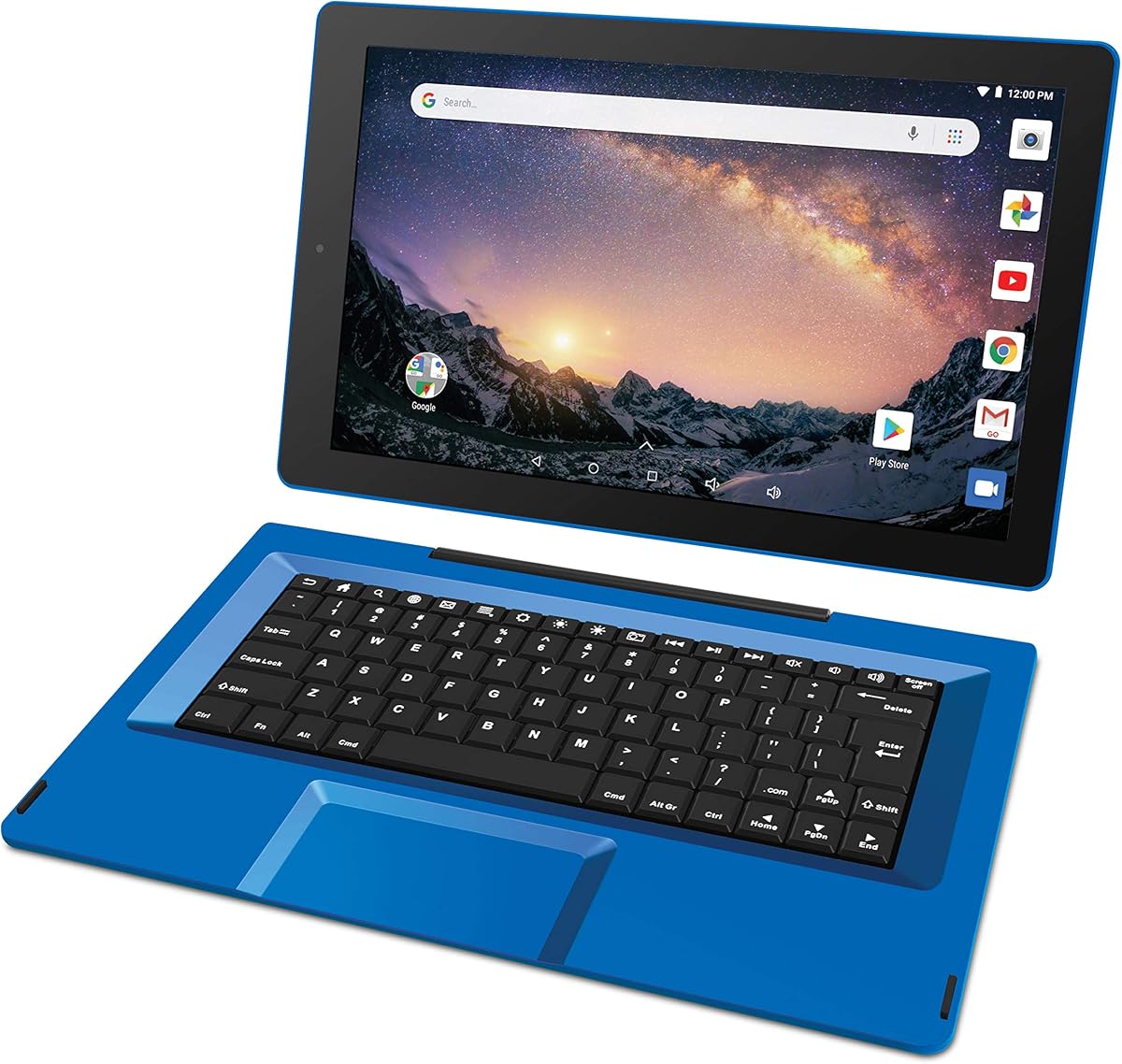
The RCA Galileo 11.5-inch tablet offers a large touchscreen, a detachable keyboard, and a basic Android 8.1 Go Edition environment. It can function as a handheld tablet or a notebook-style device, making it a flexible option for browsing, simple apps, media, and light productivity. Its 3.8 rating places it above several lower-rated products in the roundup.
We may earn a commission when you buy through this link, at no additional cost to you.
Hardware specifications include a 1.3GHz quad-core processor, 1GB of memory, and 32GB of flash storage with microSD expansion. The 1024×600 touchscreen is larger than many compact tablets, while front and rear cameras support video calls and photographs. Full USB, Micro USB, MicroSD, a 3.5mm headphone jack, microphone, and DC charging port provide a practical collection of basic connections.
Its biggest limitation is that no HDMI output is listed. The full-size USB port is primarily a data interface, and the supplied information does not establish that the Micro USB port supports video. This model should therefore be treated as a general Android alternative rather than a confirmed HDMI tablet. Users requiring wired display output should select a product with an explicit HDMI specification.
The older Android version and 1GB of memory also limit future software support and multitasking. Its best audience is a buyer seeking an inexpensive, large-screen Android device with a keyboard case for simple tasks. It may be useful as a secondary display or media device, but it is not the strongest choice for modern productivity or dependable external-monitor work.
The removable keyboard allows the device to shift easily between handheld entertainment and a more conventional typing setup. That versatility is useful for browsing, note-taking, and light office tasks.
Android 8.1 Go and 1GB of memory are dated specifications. Basic tasks remain the sensible target, while demanding applications and intensive multitasking should be avoided.
We may earn a commission when you buy through this link, at no additional cost to you.
The most important decision is whether you need native HDMI, a reliable USB-C video adapter, or a fixed industrial display. Beyond video output, screen quality, processing power, storage, battery life, mounting, and connectivity determine which tablet will serve your needs most effectively.
A tablet with a full-size HDMI port offers the simplest connection to a monitor, television, or projector. Models such as the 10.1-inch Windows tablet make the capability explicit, while the industrial OuuOee panels provide dedicated HDMI 2.0 outputs for one or two displays. USB-C can also carry video, but only when the tablet supports DisplayPort Alt Mode or a comparable output standard. A USB-C port used solely for charging and data cannot drive an external display.
Choose native HDMI when simplicity, reliability, and frequent use are priorities. Choose a USB-C adapter or dock when portability matters and the tablet is confirmed to support video output. Users needing more peripherals or Ethernet should consider a multiport dock rather than a basic cable.
External display support should be evaluated in two parts: what the tablet can output and what the attached monitor accepts. A 4K 60Hz claim offers useful headroom for detailed dashboards, media, and productivity, but resolution, refresh rate, color depth, and scaling may vary by operating system and application. The industrial models list dual 4K 60Hz output, while the budget Windows tablet confirms HDMI output without specifying the maximum resolution in the supplied information.
Match the tablet to the intended display rather than focusing only on headline resolution. Verify HDMI version, maximum supported mode, whether audio accompanies the video signal, and whether mirroring or extension is available in the required applications.
Processor generation and memory determine how comfortably a tablet handles its intended applications. The N5095 industrial panels pair a quad-core processor with 8GB of memory, while the Fusion5 model offers 12GB with a 512GB SSD and a 13th Gen Intel N100. The 10.1-inch budget Windows tablet uses 6GB and a 1.6GHz Intel Celeron, making it more appropriate for mainstream applications and light editing.
For office work, browsing, remote access, and embedded control panels, the difference between 4GB, 6GB, and 8GB can be meaningful. For demanding multitasking or heavier applications, prioritize a newer processor, more memory, and solid-state storage rather than a larger battery alone.
Built-in storage should be large enough for the operating system, applications, and essential files. The industrial mini PCs provide 128GB with microSD expansion up to 512GB, while the Fusion5 combines a 512GB SSD with a listed 512GB microSD card. The budget Windows tablet also supports TF-card expansion. Android models may offer expandable storage, but the exact card format and maximum supported capacity should be verified.
For files that remain on-site, such as manuals, media libraries, or machine data, check the available format and speed. For portable use, memory expansion and removable storage are useful, but an SD card does not improve processing speed and should not be treated as a replacement for faster internal storage.
Windows 11 Pro provides broad support for business software, remote access, and embedded applications, making it the more practical choice for workstations and control panels. The industrial OuuOee models include a valid Windows 11 Pro license, while the Fusion5 tablet also runs Windows 11 Professional. Android 12 and Android 16 models are generally simpler and more suitable for focused interfaces, consumer applications, and controlled deployments.
The Galaxy Tab A11+ and Crelander are primarily entertainment-oriented Android tablets, while the RCA Galileo uses an older Android 8.1 Go environment. Software compatibility should be checked before purchase, especially for line-of-business software, device-management utilities, or applications that require specific drivers.
Portable users should weigh screen size, weight, battery capacity, and wireless standards together. The 8.7-inch Crelander weighs 335 grams, while the 10.1-inch Windows tablet includes a 6000mAh battery and dual-band Wi-Fi. The 15.6-inch industrial panel and 10.1-inch embedded computers are designed more for fixed operation, where weight and battery life matter less than mounting and wired connectivity.
Wi-Fi 5, dual-band Wi-Fi, and Bluetooth versions affect everyday use differently. Dual-band connectivity can reduce congestion on crowded networks, while Bluetooth allows convenient use of keyboards, mice, headphones, and other accessories. Verify that required wireless standards are present rather than assuming compatibility from the operating system.
A permanent kiosk or industrial terminal needs a different feature set from a portable entertainment tablet. The 15.6-inch Android panel has a fanless aluminum alloy frame, sealed waterproof front, moisture-resistant rear enclosure, PPC mounting hooks, and VESA holes. Both OuuOee Windows panels also include VESA mounting holes and are positioned for cabinets, CNC tools, and control consoles.
Embedded systems may also offer remote-management features such as PXE and wake-on-LAN, which can simplify fleet deployment. Consumers should focus on protective cases, screen durability, and battery support instead. A warranty with accidental-damage coverage, such as the Fusion5's two-year package, can also be valuable for frequently transported devices.
Begin by confirming that the tablet supports the display mode and operating system settings you intend to use. For a USB-C solution, check for DisplayPort Alt Mode before buying an adapter, and use the supplied cable or a certified alternative. For a native HDMI connection, connect the tablet while it is awake or asleep as permitted, then select the appropriate external-display option in system settings.
After connecting, set the external display as the primary, secondary, or mirrored screen according to your workflow. Applications may require the tablet to be moved to a separate extended workspace. Adjust resolution and scaling from the operating system's display settings, and test audio separately because some adapters carry video but not sound. For docked industrial systems, configure startup, remote access, and display behavior before final mounting.
Care for the tablet according to its environment. Keep charging ports and ventilation openings clear, avoid prolonged exposure to moisture unless the model has a sealed enclosure, and use a stable mount rather than leaning the screen on an unsupported surface. Portable devices benefit from a protective case and regular battery care, while fixed installations should be checked periodically for loose mounts, cable strain, and operating-system updates.
Look for a full-size HDMI port in the product specifications or choose a tablet that explicitly confirms HDMI output. A USB-C port alone is not enough; it must support DisplayPort Alt Mode or another video-output function. Manufacturers may state this as USB-C video output, DP Alt Mode, or display expansion, so check the manual for the exact model.
Yes, provided the tablet can output video and the television has an available HDMI input. A native HDMI port can use a standard HDMI cable, while a compatible USB-C tablet can use an adapter or dock. Set the television to the correct input and choose mirroring or extension in the tablet's display settings.
Mirroring shows the same content on the tablet and external display, which is useful for presentations or watching together. Extending creates a separate desktop area on the external screen, allowing windows to be moved between displays. Extension is more useful for productivity, but it requires the tablet and application to support multiple-screen operation.
No. The tablet, adapter, cable, display, and application must all support the desired resolution and refresh rate. A cable may advertise 4K 60Hz, but it cannot add that capability to a tablet whose USB-C port lacks video output. Check the specifications for each component before purchasing.
An embedded panel computer is generally more suitable than a consumer tablet because it may include VESA mounting, sealed construction, serial ports, and embedded operating-system features. The OuuOee Windows models offer dual HDMI, RS232, and Windows 11 Pro, while the 15.6-inch Android panel provides a larger sealed touchscreen for kiosk-style use.
It can if the tablet supports USB-C video output. A hub or dock can add HDMI, Ethernet, USB ports, card readers, and charging in one device, which is convenient for a desk setup. It does not make video output possible on a charging-only USB-C tablet, so compatibility must be confirmed first.
It can help when multitasking, running remote desktops, or controlling data-heavy applications. HDMI itself does not require a particular amount of memory, but the operating system and active software do. Models with 8GB to 12GB of memory provide more headroom than 1GB, 4GB, or 6GB configurations for demanding work.
Open the tablet's display, power, or presentation settings and choose the option that keeps the screen active while connected to an external display. The exact wording depends on the operating system. For an industrial panel, configure the behavior before mounting the device so unattended operation behaves as intended.
The OuuOee 10.1-inch Windows industrial mini PC is the strongest overall option because it combines a touchscreen, Windows 11 Pro, a 5.0 rating, dual 4K 60Hz HDMI outputs, extensive I/O, and VESA mounting. The 10.1-inch Windows 11 tablet is the best direct-value choice for portable users who want a native HDMI port, while the Fusion5 FWIN232 PRO N5 is the premium pick for buyers prioritizing memory, SSD storage, Windows Pro, and warranty coverage.
Choose based on the actual display requirement rather than the tablet label alone. A native HDMI port is the simplest route, a compatible USB-C cable is more portable, and a dock is best when Ethernet, storage, charging, and multiple peripherals are needed. Industrial buyers should prioritize mounting, sealing, serial connectivity, and remote-management features; entertainment buyers should focus on screen quality, speakers, and battery life.
Before ordering, confirm the exact model's video-output support, display resolution, connector requirements, operating system, and warranty terms. Ratings, configurations, and availability can change, and current prices should be checked with the retailer. With those details verified, the right tablet can function as a dependable personal display, mobile workstation, presentation device, or permanently installed control interface.