
GE Big Button Universal Remote
4.2Editor score
Controls up to two devices
Large, simplified button layout
Automatic and direct code setup
Simple TV Remote Control guide comparing 10 simple remotes for seniors, large-button users, traditional TVs, smart TVs, and easy setup and care options.
A simple TV remote should make everyday viewing easier, not introduce another complicated device to learn. The most useful options offer clearly labeled, large buttons, straightforward setup, reliable control of essential functions, and compatibility with the television equipment already in your home.
We compared ten remotes based on their button layouts, programming requirements, device compatibility, visibility features, battery needs, and suitability for seniors or anyone with limited dexterity. The list includes universal models, brand-specific replacements, traditional-TV remotes, and a backlit option for smart televisions.
Each review identifies the strongest use case and relevant trade-offs, while the comparison table offers a quicker overview. Ratings reflect the supplied customer feedback, compatibility changes over time, and current product availability, so verify your equipment and compare current prices before buying.
4.2Editor score

4.2Editor score

4.1Editor score
The table below compares all ten remotes by their main strengths, device coverage, setup requirements, and best-fit users, making it easier to identify the model that matches your television and accessibility needs.



The Flipper Big Button TV Remote stands out as the most deliberately simplified option in this guide. Its customer rating is 4.2, but that number understates the value of its specialized design. Instead of presenting a full television keypad on the surface, it keeps only four oversized controls visible: green power, orange volume controls, blue channel controls, and a gray mute button. That arrangement makes the remote easier to understand and use without relying on a smartphone, complicated menus, or assistance from another person.
We may earn a commission when you buy through this link, at no additional cost to you.
Its strongest benefit is the combination of size, color, and tactile feedback. The large buttons are designed to be recognizable by sight or touch, which is especially useful for someone with low vision, arthritis, reduced dexterity, or memory difficulties. Additional controls slide out for customization rather than remaining permanently visible and potentially confusing. The ability to preprogram as many as 25 favorite channels is especially useful for a viewer who wants to reach familiar programming without scrolling through a long channel list or remembering numbers.
The trade-offs are clear. Flipper can handle basic functions on compatible smart TVs, including power, volume, and channel changes, but it lacks the navigation controls needed to move through streaming interfaces such as Netflix, YouTube, Prime Video, Hulu, Roku, Google TV, Apple TV, or Fire TV. It also supports major traditional television brands and major cable or satellite providers, yet compatibility still depends on the user's specific equipment. Programming and two AA batteries are also required, and the batteries are not included.
This is the most suitable recommendation for a household that primarily watches broadcast, cable, or satellite television and wants a remote that minimizes confusion. It is particularly compelling for an older adult, a person living with dementia or Alzheimer's, or a caregiver seeking to reduce the number of buttons a loved one must navigate. For a streaming-focused home, choose a model with a directional pad and app shortcuts instead. For a traditional viewing setup, Flipper offers the clearest and most purpose-built user experience in the group.
Keeping the visible face focused on power, volume, channel, and mute functions reduces accidental selections and makes the remote easier to learn. Colors provide an additional recognition cue, while oversized tactile buttons help users locate controls without looking closely at printed labels.
Programming up to 25 favorite channels creates a personalized channel lineup. This can save time, reduce frustration, and give independent viewers more convenient access to familiar content without navigating an extensive electronic program guide.
We may earn a commission when you buy through this link, at no additional cost to you.
The black EZclicker TV Remote for Seniors has a 4.2 rating and offers a compact, approachable alternative for people who only need basic television control. Its 6-by-2-by-1-inch body is smaller than many full-size universal remotes, which can make it easier to hold, carry between rooms, or store in a designated place. Despite its modest footprint, it retains large, tactile controls designed to support users with limited dexterity or vision.
We may earn a commission when you buy through this link, at no additional cost to you.
The programming process is refreshingly direct. After turning on the television and pointing the remote toward it, the user holds the Mute and Volume Up buttons together for as long as necessary, up to 60 seconds, and releases them when the television's volume changes. This approach is more approachable than searching through a long manual for device codes. It is important, however, to follow the compatibility list and programming instructions because this remote is intended for televisions rather than cable boxes, Firestick devices, Roku devices, or streaming platforms.
The principal compromises are functional limitations and the need for two AAA batteries, which are not included. A person who relies on a set-top box may find that the original provider remote is still needed, and the remote has no navigation controls for streaming menus. Even a smart television's applications are outside its intended scope. Its 6-inch length is also shorter than the 7-inch models in the group, which may be preferable for users with smaller hands but offers less separation between buttons for someone with very limited vision.
This EZclicker is a solid choice for a secondary television, bedroom set, or simple traditional TV used primarily for channel changing, volume adjustment, muting, and power. It is especially helpful when a full-size original remote has become lost, damaged, or difficult to use. Buy it when the television is the only device that needs control and when the goal is uncomplicated, compact basic control rather than comprehensive smart-TV functionality.
The 6-inch body takes up less space than a traditional full-length remote and may be easier for a person with smaller hands to grip. It is also convenient to keep beside a chair, on a bedside table, or in a drawer without creating additional visual clutter.
The hold-and-release method avoids manual code entry and can make initial setup feel less intimidating. Users should still keep the remote pointed at the powered television during programming and release the buttons promptly after the volume response appears.
We may earn a commission when you buy through this link, at no additional cost to you.
The EZclicker Samsung TV Remote Big Button is one of the strongest choices for a household that owns only compatible Samsung televisions. It carries a 4.5 rating, tied for the highest customer rating among the ten products. Its defining convenience is that no programming or pairing is required: install two AAA batteries, point it at the television, and use the controls. That removes one of the most common sources of frustration when replacing an original remote.
We may earn a commission when you buy through this link, at no additional cost to you.
Accessibility is built into the physical design. An extra-large Enter button is joined by large universal controls and tactile feedback, making the remote easier to operate for seniors and people with limited dexterity or vision. Its 7-by-2-by-1-inch dimensions provide enough space for separated controls while remaining manageable and easy to store. The simplified surface is not intended to replace advanced navigation, but it works well for viewers whose priority is easy power, volume, channel, and menu access.
The limitation is specificity. This model is designed for Samsung television models and is explicitly not compatible with streaming devices, cable boxes, or unrelated television platforms. That means it is a poor choice for a mixed entertainment setup, even if it would serve as an excellent Samsung-only replacement. It also uses two AAA batteries, which are not included. The benefit of immediate use comes at the expense of flexibility, so buyers should confirm the television brand before choosing it.
Choose this remote when a Samsung television is the primary device, its original remote is missing, or a family member wants a more legible replacement. It is especially helpful for a Samsung set in a bedroom, den, or assisted-living space where uncomplicated operation matters more than support for every possible device. For people who own more than one brand of television or depend on a set-top box, a broader universal model will be a more sensible long-term purchase.
Brand-specific preconfiguration is a major advantage for Samsung owners. A user can replace a lost remote without searching through code lists, entering a sequence, or repeatedly testing multiple commands before the television responds.
The oversized Enter key and tactile controls make common actions easier to locate and press. This approach can reduce the strain and uncertainty associated with a dense, narrow button layout, especially for users with impaired vision or arthritic hands.
We may earn a commission when you buy through this link, at no additional cost to you.
The EZclicker Big Button Universal TV Remote offers a useful middle ground between a brand-specific replacement and a full-featured universal remote. Its 4.1 rating reflects its straightforward approach: a compact 7-inch body, an extra-large Enter button, large universal controls, and tactile feedback. The intended user is anyone who finds conventional television remotes too crowded, including seniors, children, and people who simply prefer fewer visible controls.
We may earn a commission when you buy through this link, at no additional cost to you.
Compatibility extends across top television brands, making it more adaptable than a single-brand model. Setup uses the same direct programming technique as other EZclicker universals: turn on the television, point the remote toward it, hold Mute and Volume Up together for up to 60 seconds, and release them when the volume response is detected. This avoids device-code lookup and is likely easier for a nontechnical user than navigating a multi-level programming menu.
The same boundary defines the product. It is for televisions only and is not compatible with cable boxes, Firestick devices, Roku devices, or streaming applications. Its term universal therefore refers to support for numerous television brands rather than control of every device attached to a home entertainment system. Two AAA batteries are required, and the user must follow the supplied compatibility list carefully. The result is a remote that is simple but not universally capable.
This model suits a household with several televisions from different manufacturers but no need to operate a separate cable receiver through the same remote. It also works for a child's room, a guest room, or a care environment where one dependable television remote is preferable to multiple complex ones. Buyers who stream heavily or use a set-top box should instead prioritize a model with a directional pad and dedicated streaming controls.
Support for top television brands gives households with different makes a cleaner alternative to searching for separate replacements. It is particularly useful for renters, caregivers, or anyone who moves between rooms with televisions from several manufacturers.
The enlarged controls and tactile feedback make the remote approachable for children and older adults alike. It provides enough physical definition to locate common functions quickly without reproducing the dense layout of a manufacturer-supplied remote.
We may earn a commission when you buy through this link, at no additional cost to you.
The Big Button Universal Remote is a flexible television-only option with a 4.4 rating. Its compatibility list includes Samsung, LG, Vizio, Sony, Hisense, Philips, Panasonic, and Sharp televisions, along with other supported models. The product information says no programming is required for supported televisions, making setup unusually simple when the user's television falls within the preconfigured range. An extra-large Enter button, large universal controls, and tactile feedback improve everyday operation.
We may earn a commission when you buy through this link, at no additional cost to you.
The remote is designed around accessibility rather than comprehensive smart-TV navigation. Large controls are easier to distinguish and press, while tactile feedback gives users confirmation that a button has registered. That combination can be helpful for a person with reduced vision, limited hand strength, or a preference for uncomplicated controls. The design is also less intimidating to younger viewers who may otherwise have little interest in navigating a complicated original remote.
Compatibility is the principal constraint. The remote does not work with streaming devices, cable boxes, or unrelated platforms. Some supported television models may still need programming, so the statement about no setup should be understood as applying to compatible sets rather than every television. The listed after-sales offering includes a free replacement within a 90-day warranty and direct support, which adds reassurance for a purchase whose fit depends partly on equipment compatibility.
This is a strong recommendation for a household that wants one uncomplicated remote to operate televisions from several major brands. It is especially practical for a senior who primarily uses conventional TV functions and wants visible, easy-to-press controls. Check the compatibility information against the exact television model before ordering. If the main entertainment source is a streaming stick, cable box, or satellite receiver, choose a model that explicitly supports that device.
Covering widely sold television brands reduces the likelihood of maintaining a collection of nearly identical remotes. It also gives family members a consistent control method when moving among different rooms or television sets.
The stated 90-day replacement policy and direct customer support can make a compatibility-focused purchase feel less risky. Users should still confirm the exact television model and retain proof of purchase if setup assistance becomes necessary.
We may earn a commission when you buy through this link, at no additional cost to you.
The EZclicker LG TV Remote Big Button is a focused replacement for LG television owners. It has a 4.5 rating, tied for the highest score in the selection, and centers on an extra-large Enter button, large universal controls, and tactile feedback. Those features are intended to make common actions easier for seniors and people with limited dexterity or vision while preserving a familiar television-control experience.
We may earn a commission when you buy through this link, at no additional cost to you.
Its 7-by-2-by-1-inch body is compact and lightweight. The separate large controls are easier to distinguish than the tightly packed keys found on many original remotes, and the tactile response provides useful confirmation without requiring the user to read a screen or examine the remote closely. The design is marketed as a practical gift for grandparents, older adults, and family members affected by dementia, Alzheimer's, impaired vision, or reduced mobility.
The product is deliberately limited to compatible LG television models. It is not compatible with streaming devices, cable boxes, or unrelated television platforms, so it cannot consolidate a full home entertainment setup. Two AAA batteries are required and not included. Those limitations are easy to understand before purchase, but they mean this remote should be selected only after confirming that an LG television is the device that needs replacement.
This is a compelling choice for an LG television in a bedroom, den, or senior living space where the original remote is lost or difficult to operate. It offers a low-friction alternative to searching for a compatible original replacement while improving the size and clarity of the most frequently used buttons. For a home with multiple television brands, external boxes, or streaming services, select a more flexible universal remote with directional navigation instead.
Buying a remote designed for a specific television brand can simplify setup and reduce uncertainty. It is a sensible alternative when a compatible original remote is unavailable, lost, or physically too small and difficult for the intended user.
Large universal controls make common functions easier to identify, while tactile feedback helps confirm activation by touch. These details can make routine television use more independent and less demanding for the user.
We may earn a commission when you buy through this link, at no additional cost to you.
The GE Big Button Universal Remote Control combines a readable layout with more device flexibility than most television-only remotes in this guide. Its 4.2 rating reflects a well-established general-purpose design with large, simplified keys, an ergonomic shape, and support for controlling up to two devices. Compatible equipment can include a television, soundbar, cable box, satellite receiver, or another supported device, allowing users to reduce remote clutter.
We may earn a commission when you buy through this link, at no additional cost to you.
Setup offers two methods: an automatic code search and direct code entry. A master-volume function can adjust audio regardless of which of the two devices is active, a useful feature when the television and soundbar have separate volume controls. The remote is preprogrammed for Samsung televisions, while its broader universal functions and listed brand support give it more flexibility than a single-brand model. Two AA batteries are required, and they are not included.
Compared with minimalist senior remotes, the GE includes more conventional controls and programming complexity. That makes it better suited to a user who wants a simplified layout but still expects partial control of a cable box, receiver, or soundbar. It may not be the ideal choice for someone who benefits most from having only four visible everyday buttons. The two-device limit also prevents it from serving a crowded entertainment system with a television, receiver, streaming player, soundbar, and additional equipment.
This model is a balanced recommendation for a home that wants large, readable buttons and the ability to operate two devices without complicated on-screen setup. It is also suitable for hotels, nursing homes, and assisted-living environments where a dependable universal remote can simplify shared spaces. U.S.-based technical support and online programming videos add practical help. For the steadiest everyday television use, confirm that the television and any secondary device are supported before purchasing.
Two-device control is most helpful when a television is paired with a soundbar, cable box, or satellite receiver. Keeping both functions in one remote can reduce the number of objects a user must find, remember, and operate during a typical viewing session.
Automatic code search is generally faster for many users, while direct code entry offers a backup when needed. Master volume control adds another layer of convenience once setup is complete and both devices respond correctly.
We may earn a commission when you buy through this link, at no additional cost to you.
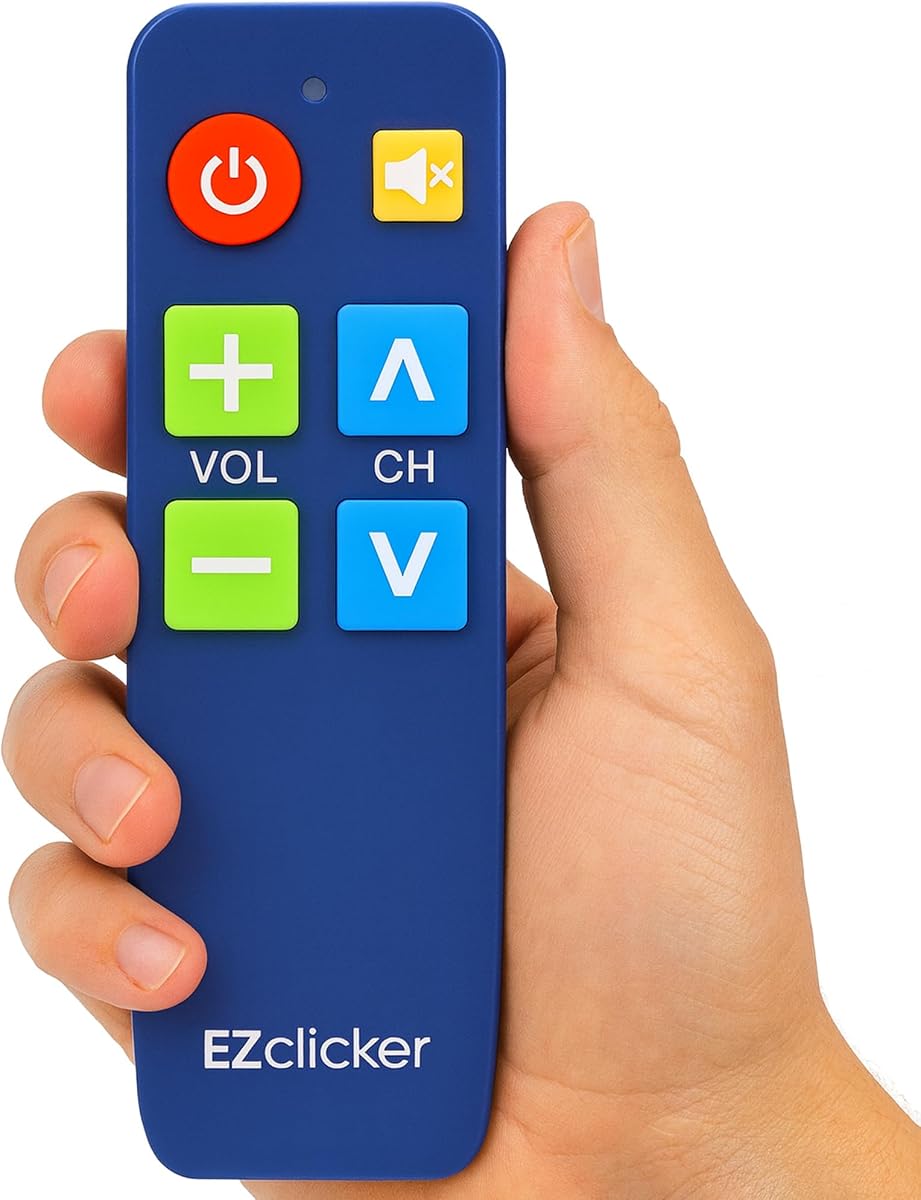
The blue EZclicker TV Remote for Seniors offers the same accessible design philosophy as the black version, with a 4.2 rating and a compact 6-by-2-by-1-inch body. Large universal controls and tactile feedback make it suitable for seniors and users with limited dexterity or vision. The blue finish also gives households a visually distinct option for identifying a particular room or television.
We may earn a commission when you buy through this link, at no additional cost to you.
Its programming method is short and intuitive: turn on the television, point the remote at it, then hold Mute and Volume Up together for up to 60 seconds. Release the buttons once the television's volume changes. This avoids searching for a code list and reduces the number of steps compared with many conventional universal remotes. The compact body is easy to hold and store, particularly in a bedroom or care setting where space is limited.
As with other simplified EZclicker television remotes, compatibility is deliberately narrow. It works with supported television brands but not cable boxes, Firestick devices, Roku devices, or streaming platforms. The remote also requires two AAA batteries, which are not included. Buyers who need a streaming-stick remote or set-top-box control should not interpret the term universal as covering every component in an entertainment setup.
Choose the blue model when a straightforward television-only remote is the goal, particularly for a secondary set or a care environment. It is suitable for viewers who need large, easy-to-feel buttons and a setup process that avoids advanced menus. The color difference is minor compared with the physical accessibility, but it can be useful for helping someone consistently identify the correct remote. For cable or streaming control, choose a more comprehensive alternative.
The blue casing makes the remote easy to distinguish from black models scattered around a home. In a bedroom, assisted-living room, or shared family area, a recognizable remote can reduce the chance of someone picking up the wrong controller.
The combination of large buttons, tactile feedback, and a short programming sequence keeps both initial setup and daily operation uncomplicated. A user only needs to learn the essential controls rather than the complete function set of a full-size original remote.
We may earn a commission when you buy through this link, at no additional cost to you.
The GE Big Button Universal Remote Control provides a useful middle ground between an ultra-simple senior remote and a conventional smart-TV controller. It has a 4.0 rating, the lowest numerical score in the group, but its specifications address a clear need: a readable button layout combined with directional navigation. That makes it more capable than television-only remotes when a viewer wants to move around smart-TV menus.
We may earn a commission when you buy through this link, at no additional cost to you.
It can control up to two compatible devices, including a television, streaming media player, cable box, satellite receiver, soundbar, or similar equipment. The directional pad is the key distinction for smart televisions, where simply changing volume or channels is not enough. Automatic code search and direct code entry provide setup options, while master volume allows audio adjustment regardless of the active device. The remote is preset for Samsung televisions, which should make it especially convenient for Samsung owners.
The trade-off is that a more capable layout introduces programming and more controls than the most basic senior remotes. Two AAA batteries are needed and not included. Its 4.0 rating suggests that some users may have experienced setup or compatibility frustrations, although the supplied information does not identify a specific defect. Anyone with very limited vision or dexterity should consider how well the standard-size buttons and directional pad meet their needs before choosing.
This is a good option for a Samsung television owner who also uses a compatible streaming player, soundbar, or receiver and wants to consolidate two controls. It also suits a household seeking a large-button replacement that can still navigate smart-TV interfaces. It is less appropriate when the goal is to minimize the number of visible buttons for a user with cognitive difficulty. Confirm the two device types, check the programming instructions, and keep the original provider remotes available until setup is complete.
A directional pad allows the user to move through menus and select on-screen options rather than merely changing channels. That makes the remote more useful for smart televisions, streaming media players, and other interfaces that require cursor-style navigation.
Two-device control can eliminate one frequently used remote from the coffee table or bedside stand. Master volume adds convenience, but users should test volume behavior during setup because the two components may otherwise have separate audio controls.
We may earn a commission when you buy through this link, at no additional cost to you.
The UltraPro OneTouch Backlit Remote is the most feature-oriented option in this guide and earns the Best Premium designation for its fully illuminated keypad and dedicated streaming shortcuts. It carries a 4.1 rating and supports Samsung, LG, Sony, Vizio, Fire TV, and Roku television models. Some Sharp and Insignia Roku televisions may need programming, but the primary supported brands can be configured simply by inserting batteries and selecting the television brand.
We may earn a commission when you buy through this link, at no additional cost to you.
Backlighting is the standout physical feature. Every button is illuminated, making the remote easier to use in a dark bedroom, dim media room, or low-light living space. This visibility can reduce the need to turn on a lamp or hold the remote at an awkward angle while searching for a control. Dedicated buttons for Netflix, Prime Video, Disney+, and YouTube provide direct access when the relevant applications were installed by the television manufacturer.
There are important qualifications. Support for user-installed applications may vary, so the shortcut buttons are not guaranteed to launch every streaming service on every television. The remote still requires two AAA batteries, which are not included. While it offers more capabilities than a senior-focused four-button remote, its larger feature set may not be as easy for a user with significant memory or vision limitations to navigate.
This is the leading choice for a smart-TV household that watches primarily in a dim room, especially one with children, older adults, or anyone who benefits from clearly illuminated controls. It also works well as a shared family remote because the supported-brand setup is quick and the application shortcuts are visible. Choose a more minimalist model for a user with cognitive difficulty or a traditional television-only viewing setup. For smart-TV users, however, the combination of backlighting and direct app access is particularly useful.
A fully backlit keypad makes the complete control layout visible without relying on room lighting. This is especially useful at night, where a bright overhead lamp can be uncomfortable and a remote with tiny printed labels may be difficult to read.
Dedicated Netflix, Prime Video, Disney+, and YouTube buttons can shorten the path to commonly viewed content. Their usefulness depends on whether the television manufacturer installed the corresponding applications, and compatibility should be confirmed before purchase.
We may earn a commission when you buy through this link, at no additional cost to you.
The best simple TV remote depends on your television brand, the other devices you use, and the level of visual or physical accessibility you need. Consider compatibility, button layout, setup, navigation, lighting, and batteries before making a choice.
In short, check the exact model before buying, not merely the device category. Compatibility can vary among television models, and streaming applications require their own navigation support.
In short, choose the smallest layout that still supports the functions you need. Clear labels, generous spacing, and physical differentiation matter more than button count.
In short, treat streaming capability as a separate requirement. A universal label is not enough; look for navigation controls and confirmed application support.
In short, favor the shortest setup process the equipment permits. Keep the original remotes nearby until every required function has been tested.
In short, add backlighting for dark rooms and color coding for quick visual recognition. These features complement rather than replace large, clearly separated controls.
In short, verify the cell size and keep fresh replacements available. Consistent power helps prevent setup errors and unexplained unresponsiveness.
Begin by identifying the device or devices you want the remote to control, then read the included setup directions and compatibility chart. Install fresh batteries of the required type, noting the correct polarity. Keep the original remotes within reach until the replacement has been configured and every function the household needs has been tested.
For models requiring programming, follow the specified code search, direct-entry sequence, or button-hold method exactly. Point the remote at the powered television, complete one step at a time, and wait for a clear response. A volume indicator is often the easiest signal that programming has succeeded. For smart-TV remotes, select the correct television brand and then test power, navigation, volume, application shortcuts, and any second device before putting the old remote away.
For daily care, keep the remote on a flat surface away from moisture, food, and direct heat. Remove the batteries if it will be stored for a long period, and replace them as a set when commands become slow or unreliable. Periodically wipe the exterior with a dry or lightly damp cloth, avoid liquid entering the seams, and do not spray cleaner directly onto the buttons.
A brand-specific remote is usually the easiest to program because it may work as soon as the batteries are inserted. Among the models reviewed, the EZclicker Samsung Big Button Remote is designed for Samsung televisions without programming, while the UltraPro OneTouch Backlit Remote also offers a simple brand-selection process for its six supported brands. Always confirm the exact television model before making a purchase.
Only remotes with directional navigation and suitable smart-TV controls can open and operate streaming applications. The Flipper and the television-only EZclicker models are intended primarily for basic television functions, while the GE Samsung Big Button Remote and UltraPro OneTouch Backlit Remote include navigation features. Application shortcut support can also vary depending on how the applications were installed.
The Flipper Big Button TV Remote is the clearest option for a traditional viewing setup because it presents only four large, color-coded everyday buttons. Its hidden customization and programmable favorite channels further reduce the need to navigate long menus. If the person primarily uses streaming services, however, simplicity must be balanced against the navigation controls required to launch an application.
The EZclicker models described as universal television remotes are not compatible with cable boxes, Firestick devices, Roku devices, or other streaming platforms. They are intended for supported television brands and basic television functions. A GE universal remote that explicitly supports two devices may be a better fit when a cable or satellite receiver also needs to be operated.
A backlit keypad makes every button easier to identify in a dark bedroom, media room, or other low-light space. It reduces the need to turn on an overhead lamp and makes navigation less frustrating for people with impaired vision. The UltraPro OneTouch Backlit Remote is the clearest example in this selection, with illumination across the entire keypad.
It depends on the model. The two GE remotes in this guide can control up to two compatible devices, while the simplified EZclicker and Flipper options are designed primarily around television or traditional set-top-box functions. Confirm both the number of devices and the specific device categories supported before buying, because a broader feature set may also make programming more complex.
No batteries are included with the reviewed products. Depending on the model, a remote requires two AA or two AAA batteries, so check the requirement before ordering. Fresh batteries are especially helpful during programming because weak cells can produce delayed or inconsistent responses. Using matching batteries from the same package and replacing the entire set when needed can improve reliability.
That depends on the remote and the compatible equipment. The GE Big Button Universal Remote can control two devices, with listed support for equipment such as a television and soundbar, and includes master volume control. The UltraPro focuses on television brands and streaming shortcuts. Check both the soundbar and television model against the remote's instructions before attempting setup.
The strongest overall choice is the Flipper Big Button TV Remote for traditional viewing because its four visible, color-coded controls, tactile design, and programmable favorite channels offer exceptional clarity. The GE Big Button Universal Remote is the best budget-oriented option for people who need two-device control, while the UltraPro OneTouch Backlit Remote is the premium selection for smart televisions, streaming shortcuts, and low-light visibility.
Prioritize compatibility before layout. A remote with beautiful oversized buttons is not useful if it cannot operate the television, receiver, or streaming device in your home. After confirming that fit, choose the simplest control layout that still supports your everyday functions, paying particular attention to button size, tactile feedback, navigation, programming, and backlighting.
Finally, compare current prices and read the latest customer feedback before ordering, since availability, ratings, and compatibility details can change. Keep the original remotes until every needed function works, and buy fresh batteries in the correct size for a dependable first setup.