
Joyreal 5-Button Communication Board
4.4Editor score
Four themed communication modules
Forty preset picture phrases
Editable recording-button stickers
Explore the best Acc Device for Autism Non Verbal Communication, comparing buttons, recordings, portability, volume, and ease of use for kids and adults.
An AAC device gives people who are nonverbal or have difficulty speaking a practical way to request needs, share feelings, and participate in everyday conversations. A useful model combines clear visual buttons, adjustable audio, portable construction, and customizable recordings, making communication more accessible at home, school, therapy, or while traveling.
We compared these ten devices by examining their preset vocabulary, programmable controls, voice options, volume controls, portability, intended users, and available support materials. The list covers models designed for children and adults, including options with few buttons for simple starts and larger systems for broader everyday vocabulary, while keeping accessibility and ease of use central.
Each review explains the device's strongest features, practical limitations, and likely user fit. Ratings and specifications reflect the supplied product information, while product details and pricing can change over time, so readers should confirm current specifications and availability before purchasing a device suited to an individual communication plan.
4.4Editor score
4.4Editor score

4.4Editor score
The side-by-side comparison highlights the differences in preset vocabulary, recording capacity, portability, and guidance features, helping readers identify a device that matches a user's age, motor skills, support environment, and communication goals.



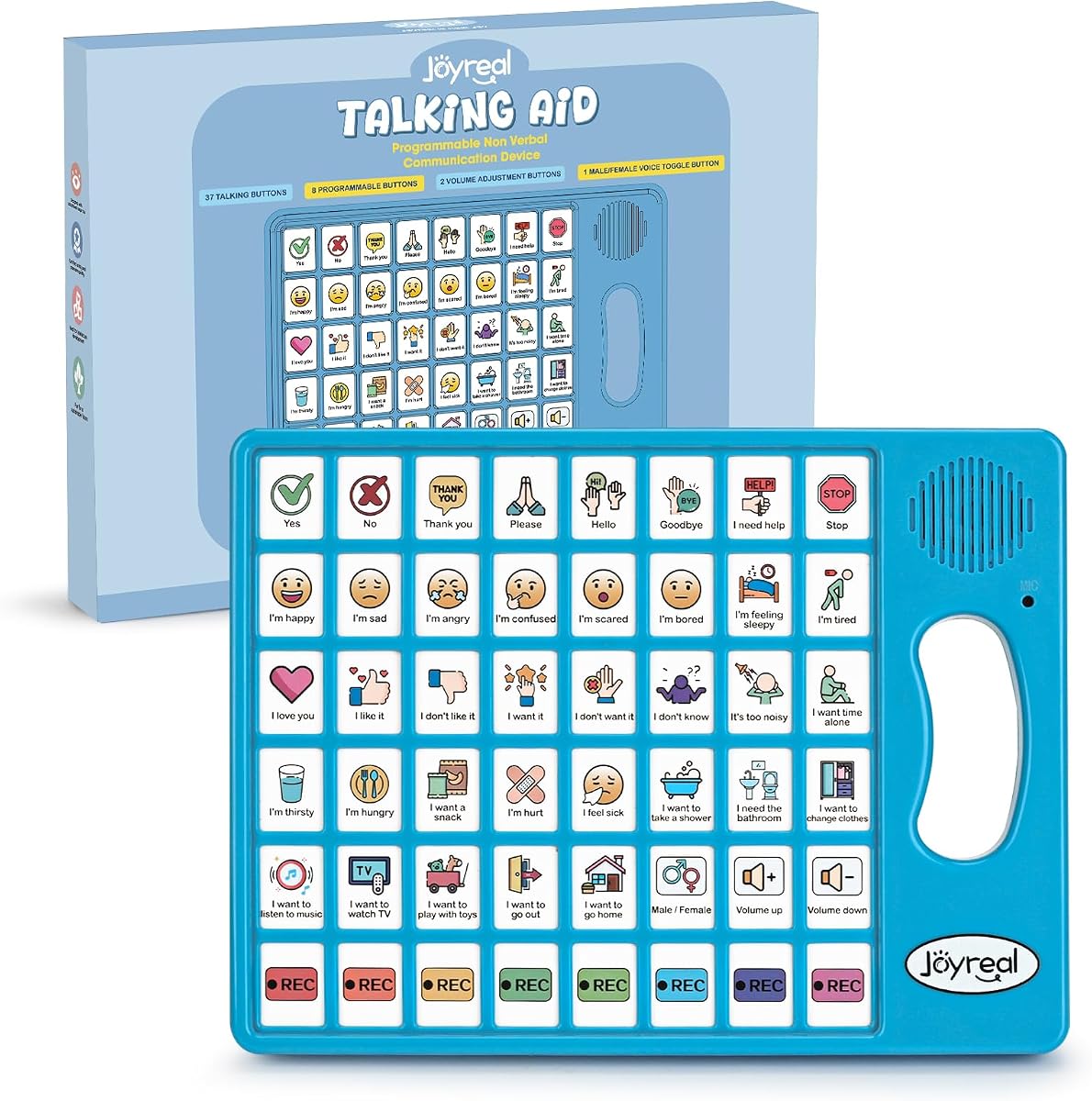
The Joyreal 8-Button AAC Device offers the broadest all-around feature mix in this group, earning a 4.4 rating. It combines 37 picture-based talking buttons with eight programmable controls, giving a user a ready-made vocabulary while leaving room for personal messages. The result feels especially practical for someone who needs quick access to common requests but also benefits from a familiar voice recording a parent, caregiver, or therapist.
We may earn a commission when you buy through this link, at no additional cost to you.
Its visual layout is a major strength. Preset instructions use pictures and colors to represent messages such as yes, no, thirst, sleepiness, and excessive noise. The eight recording buttons are more versatile than the single-message approaches found on very simple boards, allowing a support team to build a more personal set of expressions. A male/female voice switch, adjustable volume, and a lightweight form with a storage bag further improve its usefulness across home, school, therapy, and travel.
The tradeoff is that 37 preset controls plus eight customizable controls can create a steeper learning curve than a compact board with fewer choices. Users who become overwhelmed by a crowded layout may need guidance to begin with a small group of high-value buttons. Voice recording and programming also require an adult or caregiver to invest time in setting up useful messages, and the device should never be viewed as a substitute for individualized speech-language support.
This is the strongest general recommendation for a user who wants meaningful vocabulary, several personalized recordings, and portability in one device. It is especially suitable for a child or adult who can gradually learn a structured button layout and whose caregivers want to record messages in a familiar voice. Among the options reviewed, it offers the most convincing balance of breadth, personalization, and everyday convenience.
The 37 preset picture buttons cover common needs and feelings, allowing communication to begin without requiring every message to be recorded from scratch. This is helpful during the early stages of AAC use because the user can practice familiar phrases while caregivers develop a more individualized set of custom recordings.
Eight recording controls provide meaningful personalization without making the interface excessively complex. A caregiver can record practical phrases, names, responses, or reassuring messages, and the male/female voice switch adds another layer of flexibility for different users and situations.
We may earn a commission when you buy through this link, at no additional cost to you.
The Joyreal 6-Button AAC Device delivers a well-balanced entry point for nonverbal children and adults, and its 4.4 rating reflects a generally positive user reception. It offers 24 preset picture-and-color instructions and six programmable buttons. That combination is less crowded than a 40- or 60-button system but still gives a user more choices than a minimal two-button device.
We may earn a commission when you buy through this link, at no additional cost to you.
The preset vocabulary addresses useful everyday expressions, including basic responses, needs, and environmental comments. Custom recordings make the device more personal by allowing a caregiver to capture messages that the preset set cannot anticipate. Adjustable volume, a lightweight body, and an included storage bag make the unit practical for transitions between home, school, and therapy. Its broad intended use also makes it relevant to people with aphasia, apraxia, stroke-related speech difficulty, or other communication challenges.
A potential limitation is that a new user may not immediately know which of the 24 preset icons to press. Unlike simpler products, it assumes some ability to learn a visual layout. In addition, the six programmable buttons will only be as useful as the messages recorded into them, so setup time should be planned. Users should also consider how a relatively large collection of controls feels to someone with limited motor precision or visual processing difficulties.
This model is a strong pick when the goal is a middle ground between a minimal starter board and a large communication system. It works well for users who can recognize pictures and benefit from both ready-made phrases and a manageable number of personal recordings. For households beginning AAC use, it offers enough flexibility to grow without requiring the most complex interface in the roundup.
Twenty-four preset buttons give users a meaningful set of common phrases, while the six custom controls keep the surface approachable. This balance can be useful for children who are still learning to scan a board without being overwhelmed by dozens of equally prominent choices.
The lightweight construction and storage bag support communication beyond a single room. Adjustable volume also helps the same device remain useful in quiet homes, busy classrooms, appointments, and other environments where sound requirements vary.
We may earn a commission when you buy through this link, at no additional cost to you.
The Joyreal 5-Button Communication Board is the most structured option in this roundup, earning a 4.4 rating. Its most distinctive feature is a collection of four communication modules—Basic Expressions, Feeling and Emotions, Personal Needs, and I Want—supported by 40 preset picture-and-color phrases. It also includes a communication guide and an icon meaning guide, making it more than a collection of independent message buttons.
We may earn a commission when you buy through this link, at no additional cost to you.
The thematic approach can help users understand what a group of phrases has in common. A child might begin with basic responses, move into feelings and personal needs, and then build longer sentence structures such as expressing a want, describing an emotion, or asking for rest. Five programmable buttons allow personal recordings, while four volume levels adapt the output to different settings. Editable stickers for recording buttons are a thoughtful organizational feature that can help caregivers and users remember what each custom message contains.
Its sophistication creates two practical downsides. A larger assortment of modules and icons may be more than a beginner can independently navigate without guidance, and the additional stickers and guides require some setup before the full benefit is realized. The product description frames its approach as evidence-based, but families should still coordinate its use with a qualified speech-language professional and make sure the learning structure matches the individual's communication goals.
This is the top pick for users who want a guided path beyond isolated phrase selection. It is particularly compelling for a child working from simple commands toward more complete sentence structures and for caregivers who value a communication guide alongside the hardware. It also stands out as the most premium because its layered modules and supplementary learning materials go beyond the basic function of playing recorded audio.
The four modules make it easier to teach communication as a structured activity rather than an unstructured collection of sounds. Matching words and pictures provide context, helping a learner connect a visual symbol with the message it produces.
The included communication guide and icon meaning resource can help caregivers introduce symbols consistently. These materials are especially useful for families beginning to understand how an AAC device can support functional requests, emotions, and sentence development.
We may earn a commission when you buy through this link, at no additional cost to you.
The Subao Portable AAC Device holds the highest supplied rating at 4.6, making it a strong contender for users who prioritize portability. Its compact, phone-sized structure is designed to fit comfortably in a child's hand, while 20 common voice commands and four programmable recording keys offer a practical way to express basic needs. The device is aimed at home, school, therapy, and other communication settings.
We may earn a commission when you buy through this link, at no additional cost to you.
Accessibility is a major focus of the design. Raised buttons are easier to see and press than flat controls, while textured areas on both sides may provide useful grip and tactile input. A lanyard hole and included spring lanyard allow the device to be worn on the wrist or attached to a backpack, reducing the chance that it will be left behind. Five volume levels offer better control across quiet and noisy environments.
The primary limitation is vocabulary breadth. Twenty commands are fewer than many competing systems provide, so the four custom recordings become important for extending the range of messages. The textured sides, while potentially helpful, may not be comfortable for every sensory profile. A lanyard can also swing during movement or draw attention in settings where a device needs to remain visually understated.
This is the pick for someone who needs a compact, reachable tool more than a large vocabulary. The ergonomic body and attachment options make it especially appropriate for children who may lose a stationary board between activities. Caregivers should use the four recording keys strategically to add high-value phrases while keeping the preset commands visible and easy to learn.
The phone-sized body, lanyard hole, and spring wrist lanyard make spontaneous communication more realistic. A child can keep the device attached to a backpack or wrist instead of searching for a communication board after every transition.
Prominent buttons are easier to identify and press than flat alternatives. This design may be particularly helpful for users who need clear tactile boundaries when attempting to activate a specific message.
We may earn a commission when you buy through this link, at no additional cost to you.
The Brightway 60-Button AAC Device is built around breadth of expression, with 60 total buttons, 10 programmable recording controls, and a 4.3 rating in the supplied source. It is designed for nonverbal children and adults, including people with autism, speech delays, dementia, and difficulty speaking. The goal is to cover basic needs, feelings, and daily messages in a single board.
We may earn a commission when you buy through this link, at no additional cost to you.
Its large, responsive buttons are described as requiring minimal pressure, which is useful for children, seniors, and users with limited motor skills. A natural, easy-to-understand voice can make recorded output more familiar, while the male/female switch offers alternative voice options. Ten custom buttons provide considerably more personalization than compact models, and multiple volume levels help the board work in different environments.
The same breadth that makes this device useful can also make it difficult for a new user. Sixty buttons create a large visual field, so a beginner may need deliberate instruction and a strategy for locating specific icons. The 3.9 rating is the lowest among the listed products, although the available information does not identify a specific defect. As with any extensive board, the most meaningful phrases should be organized and taught rather than left to random exploration.
This is the strongest option for a user who needs a wide range of preset vocabulary and can benefit from many custom recordings. It is a strong fit for a child who has already learned a visual scanning system or an adult who wants substantial everyday coverage. Beginners should consider whether a smaller, less crowded device would make early practice more manageable.
Sixty total buttons allow the board to cover more subject areas than the other devices in the list. That makes it easier to include basic needs, emotions, and routine messages rather than limiting the user to a narrow set of phrases.
The large, responsive controls are intended to minimize the force required for activation. That is valuable for younger children, older adults, and anyone who may fatigue when repeatedly pressing smaller buttons.
We may earn a commission when you buy through this link, at no additional cost to you.
The Compact 2-Button AAC Device is a straightforward communication tool with a 4.3 rating. It includes 14 picture-and-color preset instructions and two programmable buttons for personal recordings. That simpler construction may be less intimidating than a large board, while still providing enough choices for a beginner to practice basic responses, identify needs, and communicate feelings.
We may earn a commission when you buy through this link, at no additional cost to you.
Its small, lightweight body is designed to support communication wherever the user is. That portability is valuable for children who move between classes, therapy appointments, meals, and outdoor activities. The two custom buttons can preserve highly personal information, such as a child's name, a caregiver's reassurance, or a situation-specific response. The broader stated applications also include stroke recovery, aphasia, apraxia, and other speech difficulties.
The device is limited by its small number of custom controls and comparatively narrow preset vocabulary. A user who wants to communicate more detailed ideas may quickly outgrow it unless the caregiver carefully selects the two recordings. A physical device with preset phrases also cannot independently interpret situations or generate novel language, so it should be used as a communication aid rather than treated as a complete replacement for spontaneous speech.
This is a good choice for a first AAC experience, especially when simplicity matters more than extensive vocabulary. It may be better suited to a young child, someone in early language intervention, or a caregiver testing which messages are most useful before moving to a more advanced system.
Fourteen familiar preset messages and two custom controls create a small enough interface for introductory practice. Beginners can learn a few core phrases, observe which situations generate the most requests, and use that information to guide future recordings.
The lightweight format is useful when communication needs follow the user throughout the day. A compact device is easier to keep nearby than a larger board and can become a consistent part of a travel or therapy routine.
We may earn a commission when you buy through this link, at no additional cost to you.
The Special Supplies Talker Buddy Cloud is a straightforward, family-friendly AAC option with a 4.5 rating. Its defining feature is a soft-touch button layout designed to be simple to understand and quick to learn. Preinstalled common phrases, words, and sentences allow a nonverbal user to begin communicating without a lengthy initial programming process.
We may earn a commission when you buy through this link, at no additional cost to you.
The product is intended for both children and adults, including people with autism, stroke-related communication difficulty, other special needs, or temporary inability to speak. This broad scope makes it relevant to families, caregivers, and professionals. A lightweight body and included travel bag support use in the home, classroom, car, therapy session, or other activity, which helps maintain access to familiar vocabulary across locations.
The supplied information does not detail programmable controls, voice choices, or the number of volume levels, so buyers should verify those details before choosing it for a specialized plan. A soft-touch layout may be comfortable for some users, but tactile preference varies widely, and a child with particular sensory needs may respond better to a different material or control shape. Ready-made vocabulary also may not cover a person's most meaningful messages.
This Talker Buddy Cloud is a compelling option for anyone who values a simple layout, immediately available vocabulary, and an included travel bag. It may work particularly well when continuity across locations matters and a caregiver wants an approachable tool for occasional communication needs without extensive setup.
The soft-touch layout is presented as easy to understand and designed to minimize the learning curve. That makes the device approachable for beginners and for caregivers who want a simple tool to introduce functional communication.
The included travel bag helps protect and carry the device while its lightweight design supports use in the car, at school, during appointments, and at therapy sessions. Maintaining access to the same vocabulary can make communication more consistent.
We may earn a commission when you buy through this link, at no additional cost to you.
The Joyreal 6-Button Travel Device earns a 4.4 rating and combines 23 preset picture buttons with six programmable recording controls. It also includes a male/female voice switch, adjustable volume, a lightweight construction, and a storage bag. For users who want a familiar voice without giving up selectable voice options, it offers a flexible combination.
We may earn a commission when you buy through this link, at no additional cost to you.
The preset vocabulary follows a practical format, using visual prompts for messages such as yes, no, thirst, sleepiness, and excessive noise. Six custom buttons allow a caregiver to add messages that matter to the individual, while the voice switch can make the output feel more familiar or allow different voices for particular recordings. The included bag makes the device convenient to pack for school, appointments, or travel.
Its core drawback is that the benefits closely overlap with other six-button Joyreal models, so shoppers should compare exact button counts, included accessories, and current specifications before choosing between them. The supplied details do not state the power source, so battery requirements should be confirmed. Customization also depends on a caregiver's ability to record and maintain useful messages rather than simply filling every available button.
This device is a solid recommendation for someone who specifically values selectable male and female voices in a portable format. It works especially well for caregivers who can record a focused set of custom phrases and want those messages available wherever the user goes.
The male/female switch distinguishes this model from many compact AAC options. It can make a single device feel more adaptable to different users or to messages that sound more natural when spoken by a particular family member.
Six recording buttons are enough for a manageable set of high-value phrases without recreating the scale of a large board. Caregivers can focus on requests, transitions, emotions, and reassurance that are most useful in the user's daily routine.
We may earn a commission when you buy through this link, at no additional cost to you.
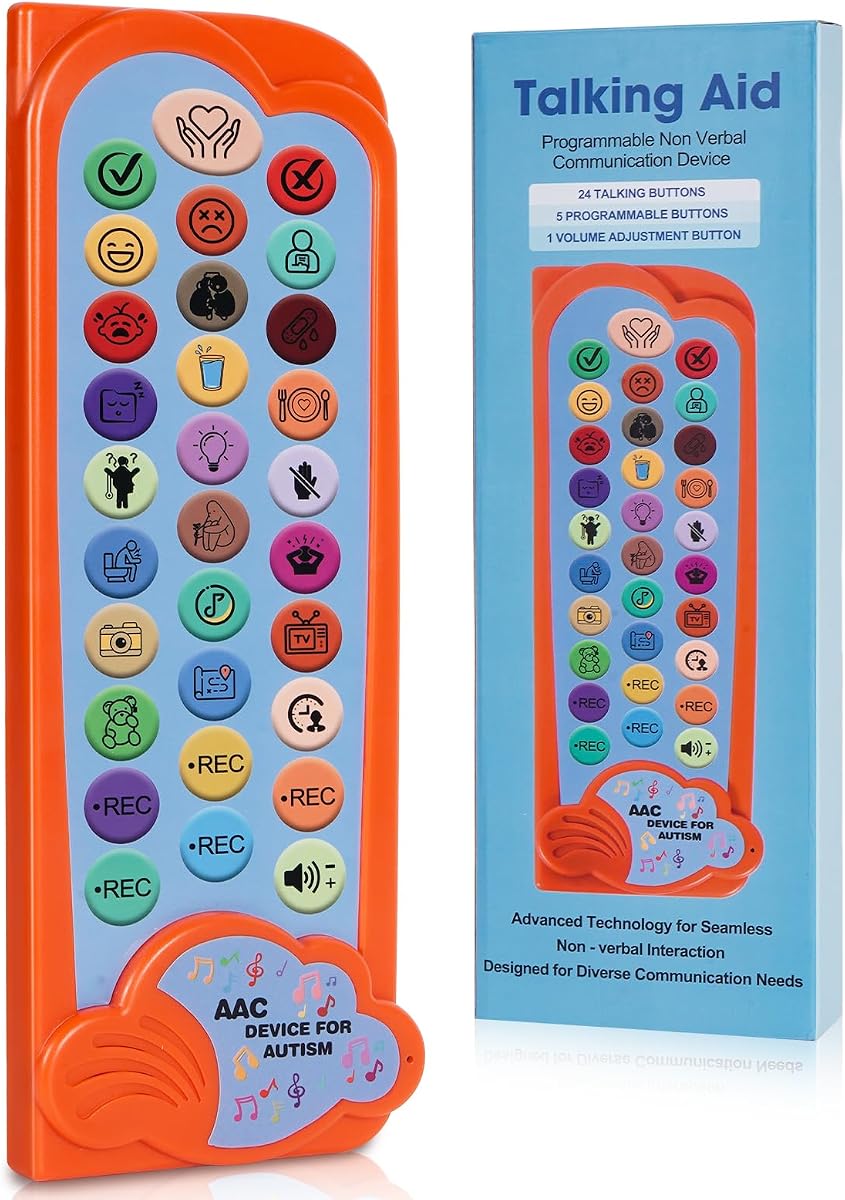
The AAC Device with 5 Programmable Buttons combines 24 preset talking buttons, five custom recordings, and three volume levels. Its 4.4 rating places it among the stronger-reviewed options, while its relatively focused design makes it a compelling value for users who need essential daily phrases and several personal messages without a large board.
We may earn a commission when you buy through this link, at no additional cost to you.
The 24 vivid preset icons cover common needs such as thirst, temperature, and yes-or-no responses. Five programmable buttons let a caregiver record phrases in a familiar voice, potentially including a child's name, a family message, or transition language. The device is described as lighter than a smartphone and suitable for travel, school, and therapy. Its three-level volume adjustment offers a useful but less granular range than models with four or five levels.
The limited number of custom buttons means careful message selection is important. The supplied information also does not identify a male/female voice switch, so anyone who requires selectable voices should verify that feature before purchasing. The use of three AAA batteries is clearly stated, and caregivers should establish a routine for checking and replacing them to avoid communication interruptions.
This is the best budget pick for a user who wants a portable, uncomplicated device with more customization than a two-button model. It is especially suitable for a child or adult who can use 24 familiar visual prompts and whose family can record five carefully selected personal messages.
Five custom buttons strike a useful middle ground between minimal boards and larger systems. Users can select a small set of meaningful messages while retaining 24 ready-made icons for immediate communication.
The lightweight form is designed for movement between classes, appointments, therapy, and home. Adjustable output and familiar picture prompts help preserve a consistent communication method in changing environments.
We may earn a commission when you buy through this link, at no additional cost to you.
The Special Supplies Talker Buddy Pro is a simple AAC communication device designed for home, school, and travel. It has a 4.4 rating, a soft-touch button layout, preinstalled vocabulary, and a travel bag. The goal is to give caregivers and professionals a tool that nonverbal children and adults can begin using without a complicated setup process.
We may earn a commission when you buy through this link, at no additional cost to you.
Its preprogrammed common phrases, words, and sentences can address basic situations, while the straightforward interface is designed to minimize the learning curve. The stated audience includes people with autism, stroke, other special needs, hospitalization-related inability to speak, and general difficulty speaking. A lightweight body and included bag make the device easy to pack for therapy sessions, school, the car, appointments, and family activities.
As with the Talker Buddy Cloud, the supplied details do not specify programmable controls, selectable voices, or volume levels. Buyers who require those features should confirm them before purchasing. The soft-touch surface and existing vocabulary may not align with every sensory or communication profile, and the device is best viewed as a support tool within a broader language plan rather than a replacement for direct instruction.
This Talker Buddy Pro is a practical choice for anyone seeking a straightforward, portable device with ready-made vocabulary. It works well when a user needs consistent access to common messages across several environments and caregivers want a low-complexity tool for everyday communication.
Preinstalled vocabulary makes the device practical as soon as it is introduced. Users can practice common phrases without waiting for a caregiver to build a large set of personal recordings.
The included travel bag supports regular use in school, therapy, the car, and other settings. Keeping the same device and vocabulary available can help a user associate particular buttons with recurring situations.
We may earn a commission when you buy through this link, at no additional cost to you.
Choosing an AAC device is not simply a matter of counting buttons. The most useful device is one whose vocabulary, physical design, recording process, and portability fit the user's abilities, routines, and communication goals, ideally with guidance from a qualified professional.
Preset buttons determine how quickly a user can begin communicating. The roundup ranges from 14 preset instructions on the compact two-button model to 60 total controls on the Brightway device, with most systems offering between 20 and 40. A larger library can cover more subjects, but it may also make scanning more difficult. Look for recognizable pictures, strong color contrast, consistent icon placement, and phrases that reflect common daily needs. A smaller set of highly relevant buttons may be more useful than a large board filled with words that do not match the user's experiences.
Programmable buttons let caregivers add messages that preset vocabulary cannot cover, including a user's name, family preferences, reassurance, activity choices, or specific needs. Available capacity ranges from two custom recordings to ten, and the voices used for those recordings can make output feel more familiar and motivating. Consider not only how many messages can be stored, but also whether the recording process is manageable for the person responsible for maintaining the device. A focused set of well-chosen recordings is often more useful than every control being filled without a plan.
A familiar voice can make a recorded message easier for the user and listeners to recognize. Several Joyreal models include a male/female voice switch, while others provide a natural voice and custom recording options. When comparing models, check whether the device can be programmed in a caregiver's own voice and whether that option suits the intended listener. The best-sounding voice is not automatically the most useful; clarity, consistent activation, and the ability to maintain accurate recordings matter more.
The interface must be physically manageable for the person using it. Raised or large buttons, as seen on the Subao and Brightway devices, may be easier to locate and press for users with limited motor precision or reduced pressing force. Soft-touch layouts may feel comfortable for some users, while a crowded board may challenge users with visual or cognitive processing differences. A child who tires quickly may benefit from fewer prominent controls, while an experienced user may benefit from a denser board. Motor ability, vision, tactile preference, and current scanning skills should all guide the choice.
Communication devices are used in environments that vary greatly in sound. The listed models offer two, three, four, or five adjustable volume levels, depending on the product. A higher maximum output may help in a busy classroom, public place, or therapy room, while lower levels can be preferable in a quiet or sensory-sensitive environment. Volume control cannot compensate for a device being too difficult to carry or reach, so portability and output should be evaluated together. Caregivers should test the available levels in the user's most common spaces whenever possible.
A device only supports communication when it is available at the moment it is needed. The roundup includes lightweight units, models with storage bags, and a compact phone-sized device with a wrist or backpack lanyard. Consider where the device will be used: school, therapy, appointments, meals, the car, outdoor activities, or multiple locations. A bag can reduce loss and protect the unit, while a lanyard can make it easier for a child to retrieve. Portability should not come at the expense of a layout that becomes difficult to use once the user is moving.
Guides, themed modules, icon references, and editable stickers can make a device easier to introduce and maintain. The Joyreal 5-Button Communication Board stands out with four thematic modules, a communication guide, and an icon meaning guide, while editable stickers help users remember what has been recorded on custom buttons. These resources do not replace individualized instruction, but they can give caregivers a consistent starting point. Look for materials that support practical routines, language progression, and clean organization rather than simply adding decorative extras.
A communication device needs dependable power and a maintenance routine. Some listed products use three AAA batteries, while detailed power information is not supplied for every model, so buyers should verify requirements before purchase. Caregivers should keep spare batteries available, establish a routine for checking power, and learn how to replace or clean controls according to the manufacturer's guidance. A storage bag can make transport easier, but it does not replace careful handling or regular inspection of buttons, recordings, and battery compartments.
Begin by choosing a small group of high-value messages, such as yes, no, help, finished, hungry, thirsty, toilet, and a favorite activity. Introduce the device during a calm, predictable moment rather than waiting for frustration to escalate. Point to the picture, activate it together if necessary, and connect the spoken message with the user's intended meaning. Consistent modeling by caregivers, teachers, and therapists helps the user learn that selecting a control can produce a result.
After basic preset phrases become familiar, record custom buttons in short, clear messages that matter to the individual. Use a familiar voice when that supports recognition, and avoid filling every available control without a plan. Label or organize custom buttons as recommended by the manufacturer, and periodically check that each recording remains accurate. Practice the same message in several settings so the user learns that the device works at home, in the classroom, at therapy, and while traveling.
For care, follow the manufacturer's instructions for cleaning, battery replacement, and storage. Keep spare batteries on hand for models that use them, and check the device before leaving for an outing. Use the included case or bag during transport, and avoid exposing the unit to moisture or impact beyond its stated construction. Periodically revisit the vocabulary: retire phrases that are not useful, add messages for new activities, and arrange professional review if the user's communication needs or motor abilities change.
Start with the child's current communication skills, motor access, sensory preferences, and everyday needs rather than choosing solely by button count. A speech-language professional or occupational therapist can help determine whether a small starter device, a themed board, or a larger system is appropriate. The child should also be involved in trials whenever possible, because ease of pressing, recognition of symbols, and willingness to use the device will strongly affect everyday success.
No. A larger vocabulary and more recording controls can be valuable, but a complex board may be harder for a beginner to scan or navigate. The best device is the one that provides meaningful communication at an appropriate level of complexity. A simple model with carefully selected preset phrases may produce better results than an advanced system that has not been properly introduced or individualized.
Often, a familiar voice can make a message easier for a child to recognize and may feel more reassuring, especially for short personal phrases. However, the content and clarity of the recording matter more than whether it is a parent, caregiver, or therapist speaking. Keep messages brief, test them in the child's routine, and ensure that every recording remains accurate and appropriate.
Preset buttons immediately play common phrases that are already installed on the device. Programmable buttons can be assigned to messages recorded by the user or caregiver. Preset controls are convenient for frequent needs, while programmable controls are valuable for personal information, specific activities, and requests that a general vocabulary cannot anticipate.
Several of the listed products are explicitly intended for stroke recovery, aphasia, apraxia, and other speech difficulties. An AAC aid can provide a way to request help, identify discomfort, and communicate basic needs while speech rehabilitation continues. It should support, rather than replace, professional therapy and should be introduced in a way that matches the person's current abilities and goals.
Start with a small number of meaningful, predictable phrases and practice them during routines when communication is naturally needed. Model the action, allow time for the child to select a button, and praise purposeful communication without making every attempt feel like a test. As recognition grows, introduce additional symbols gradually and involve the child's speech-language professional so that the vocabulary supports broader language development.
Review recordings periodically, especially after changes in routines, relationships, activities, or the user's communication goals. Listen for accuracy, remove outdated phrases, and re-record anything that is difficult to understand. A brief regular check also helps catch controls that have been accidentally changed or assigned to the wrong message.
Consider size, weight, button access, carry options, battery needs, and the included storage solution. A lanyard can keep a compact device available to a child, while a bag can make a larger board easier to transport. The most important feature is that the user can reach, understand, and operate the device comfortably in the places where communication is needed.
The Joyreal 8-Button AAC Device is the strongest all-around recommendation because it combines 37 preset visual messages, eight custom recordings, selectable voices, adjustable volume, and a portable bag. The Joyreal 5-Button Communication Board leads for structured learning with its four themed modules and supporting guides, while the AAC Device with 5 Programmable Buttons offers a focused, portable option for essential daily phrases and personal recordings.
Prioritize the user rather than the specification sheet. A smaller, clearly organized device may be easier to learn than a crowded vocabulary, while a larger board may better serve a user who already scans symbols confidently. Button size, tactile response, voice clarity, carrying method, teaching resources, and caregiver recording time all influence whether the device becomes a consistent communication tool in daily life.
Before ordering, confirm current specifications, included accessories, compatibility with the user's needs, and the manufacturer's care instructions. Product details, availability, and pricing can change, so checking the current listing is important. A speech-language professional can also help ensure that the chosen device complements an individualized communication plan rather than operating as an isolated gadget.