
ASUS ROG Strix B550-F Gaming WiFi II
4.6Editor score
WiFi 6E and 2.5Gb LAN
Dual M.2 connectivity
Robust teamed power stages
Discover the best Amd B350 motherboards for Ryzen builds, comparing AM4 compatibility, expansion, networking, memory, storage, and practical features.
Amd B350 motherboards were designed as affordable entry points for AMD Ryzen processors, combining AM4 processor support with useful features for gaming and general-purpose builds. The best boards balance socket compatibility, memory options, storage expansion, networking, display outputs, and practical diagnostics rather than focusing only on inexpensive components.
This guide compares ten AM4 motherboards associated with the B350 platform and the generations that followed it, including B450, B550, and A520 models. We examined supported processors, memory capacity, PCIe and M.2 connectivity, networking, onboard features, physical format, and practical advantages described in the supplied product information.
Each entry identifies the board most likely to suit a particular type of builder, from compact systems to feature-rich gaming desktops. Ratings and specifications can change as drivers, BIOS revisions, and processor support evolve, while market prices fluctuate, so readers should confirm current compatibility and cost before purchasing.
4.6Editor score

4.6Editor score

4.4Editor score
The comparison covers AM4 socket compatibility, processor support, board size, memory, storage, networking, display output, and expansion features to help readers identify the most appropriate platform for their build.
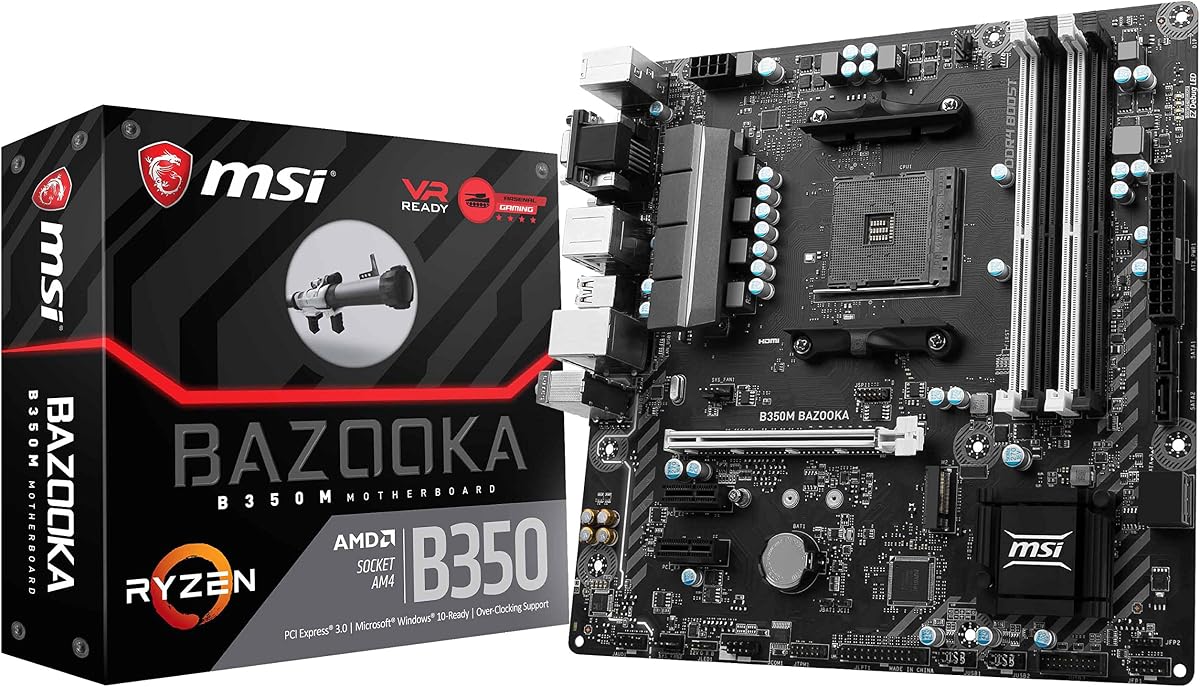

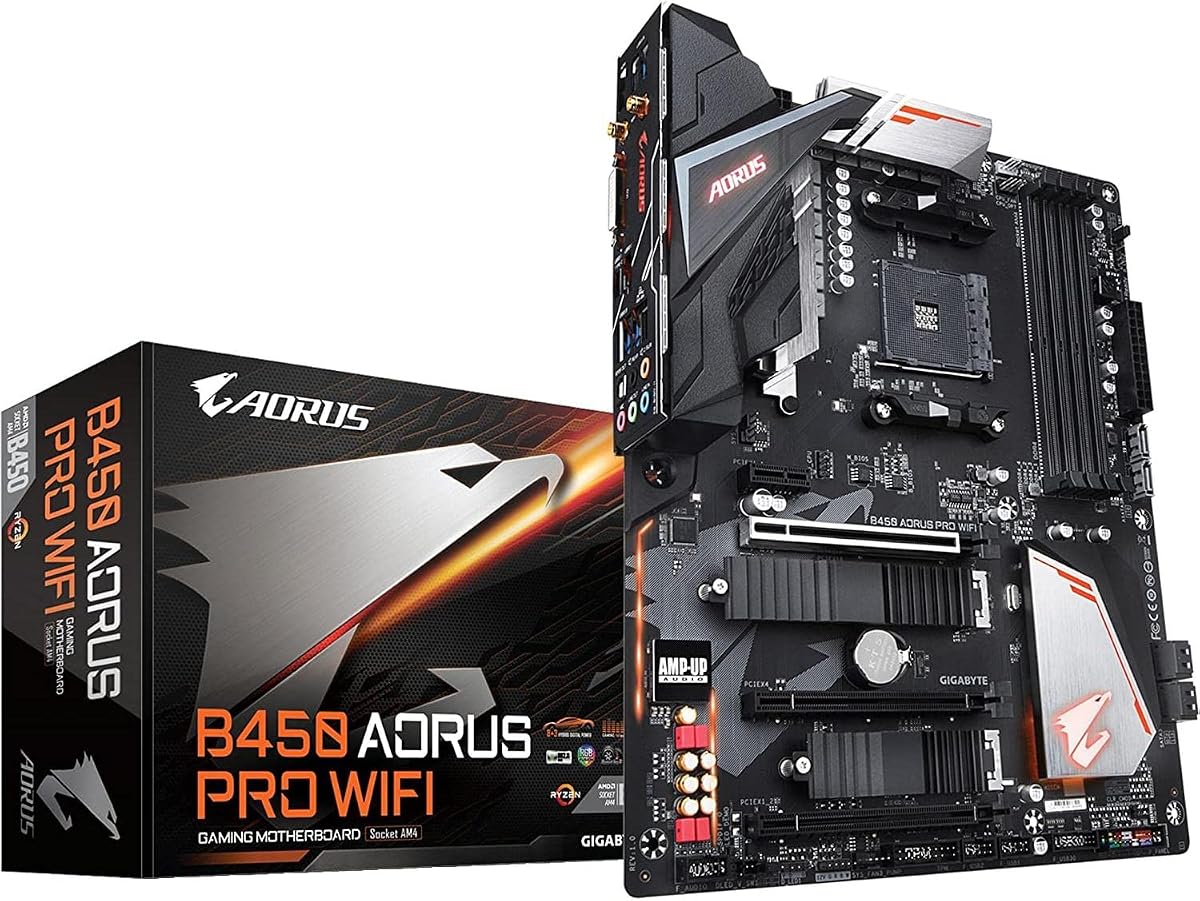



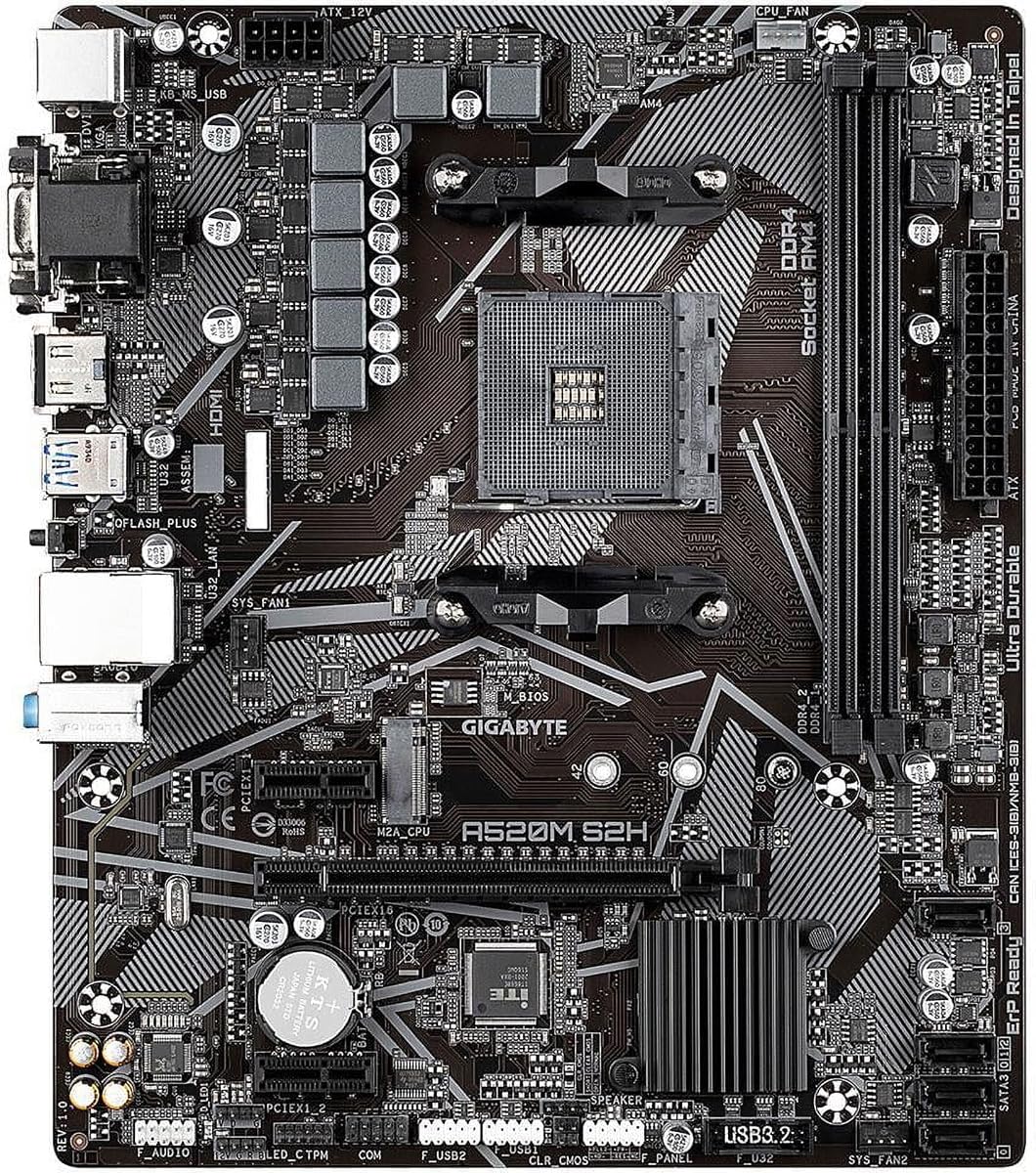
The MSI Gaming AMD Ryzen B350 is a conventional B350 micro-ATX motherboard aimed at cost-conscious Ryzen builders. It carries a 3.9 rating, lower than the other products in this guide, but its core platform remains easy to understand: an AM4 socket, DDR4 memory support, HDMI, and USB 3 connectivity.
We may earn a commission when you buy through this link, at no additional cost to you.
Its strongest qualities are direct support for AMD Ryzen series and 7th-generation A-series and Athlon processors, plus listed DDR4-3200+ memory support. Gaming-oriented features such as Game Boost, Gaming Hotkey, and X-Boost add convenience, while the EZ Debug LED system can make basic troubleshooting more approachable.
The main compromise is that B350 is an older chipset with a less expansive feature set than the newer B550 alternatives listed here. A 3.9 rating suggests that some buyers may have encountered issues, although the supplied information does not identify specific recurring problems, so no stronger conclusion should be drawn.
This board makes the most sense for a straightforward AM4 gaming or general-purpose build where compact size and direct B350 support matter more than Wi-Fi, PCIe 4.0, or the newest power-delivery features. For buyers seeking a broader range of features, the ASUS Prime B450M-A/CSM is the stronger all-around choice.
Support for Ryzen, Athlon, and compatible A-series processors makes this board a familiar entry point for AM4 systems. Buyers should verify the exact processor generation and ensure that the installed memory and graphics setup matches their needs.
Game Boost, Gaming Hotkey, X-Boost, and EZ Debug LEDs focus on everyday usability rather than exotic overclocking. These functions are useful for builders who want convenient controls and clearer diagnostics during initial setup.
We may earn a commission when you buy through this link, at no additional cost to you.
The ASUS Prime B350-Plus combines a 4.4 rating with a conventional ATX layout, making it appealing to builders who want more physical space than micro-ATX provides. It supports AMD Ryzen AM4 processors, 7th-generation Athlon processors, and HD 2000 series processors.
We may earn a commission when you buy through this link, at no additional cost to you.
Storage and connectivity are notably useful for the chipset generation. NVMe M.2 support, USB 3.1, DDR4 memory, and a Realtek RTL8111H Gigabit LAN controller provide a well-rounded foundation for a Ryzen system. HDMI, DVI, and VGA outputs also give this board unusual flexibility for integrated graphics.
Its safeguards and physical design deserve attention. ASUS 5X Protection III provides hardware-level safeguards, the SafeSlot Core reinforces the primary PCIe slot for heavy graphics cards, and FanXpert 2+ offers detailed cooling controls. On the other hand, the board has no listed onboard wireless connection.
Choose the Prime B350-Plus when full-size ATX convenience and a strong B350 feature set matter. It is especially suitable for a desktop using wired networking and a dedicated graphics card. Builders seeking newer processor support, Wi-Fi, and PCIe 4.0 may prefer one of the B550 models in this guide.
The ATX format provides room for a larger board layout, multiple slots, and easier cable routing than many compact alternatives. It is a practical choice when future expansion or component accessibility is a priority.
HDMI, DVI, and VGA outputs make this board suitable for processors with integrated graphics. That flexibility can also reduce the need for a discrete graphics card in basic office or media-oriented systems.
We may earn a commission when you buy through this link, at no additional cost to you.
The ASUS Prime B450M-A/CSM earns a 4.6 rating and stands out as the most balanced board in the guide for many AM4 builders. Its micro-ATX format is easier to accommodate than full-size ATX, while its connectivity and protection features exceed the minimum expected from a basic gaming motherboard.
We may earn a commission when you buy through this link, at no additional cost to you.
The board supports second-generation AMD Ryzen processors and includes NVMe M.2, USB 3.1 Gen2, DDR4, and Gigabit LAN. Its Corporate Stable Model designation also indicates a focus on long lifecycle management, complimentary Advance Replacement, a COM header, and legacy PS2 ports, making it relevant to offices, schools, and multi-computer environments.
Physical safeguards add value. ASUS 5X Protection III is designed to support component longevity and reliability, while the SafeSlot Core fortified PCIe slot helps protect against structural damage from a heavyweight graphics card. Aura Sync adds a multicolor RGB header for compatible lighting ecosystems.
This is the recommendation for most readers who want a compact, well-protected AM4 board without paying for a premium gaming model. Its limitations are the absence of onboard Wi-Fi and the older B450 interface generation, but those trade-offs are reasonable for a build that uses Ethernet and current-generation devices.
Micro-ATX saves space while ASUS 5X Protection III and the reinforced SafeSlot Core address long-term durability. That combination makes it practical for compact workstation and gaming builds alike.
The Corporate Stable Model support, COM header, and PS2 connectivity distinguish this board from many enthusiast models. Those characteristics may matter more than RGB styling in offices, labs, and educational environments.
We may earn a commission when you buy through this link, at no additional cost to you.
The GIGABYTE B450 AORUS PRO Wi-Fi delivers a 4.5 rating and a broad feature set for an ATX gaming motherboard. It supports first- and second-generation Ryzen processors and Ryzen processors with Radeon Vega graphics, giving builders a clear path to an AM4 configuration.
We may earn a commission when you buy through this link, at no additional cost to you.
Networking is a major strength because the board includes Intel Ethernet and dual-band 802.11ac Wi-Fi. Storage is also well considered, with dual PCIe Gen3 M.2 NVMe slots protected by thermal guards. Four DDR4 DIMM slots, USB 3.1 Gen2 with Type-C and Type-A, RGB Fusion headers, and an integrated I/O shield round out the package.
Display support includes DVI-D and HDMI, and the board uses an enhanced ALC1220-VB audio solution with WIMA capacitors. One caveat is the stated restriction of the Intel Wi-Fi driver to Windows 10 64-bit. The full-size ATX footprint may also be inconvenient for a small chassis.
This board suits a builder who wants a complete B450 package without moving to B550. It is particularly attractive when onboard Wi-Fi, premium audio, dual NVMe support, and a full ATX layout are priorities. For newer platforms or PCIe 4.0 expansion, the ASUS ROG Strix B550-F Gaming WiFi II offers a more advanced foundation.
Integrated dual-band 802.11ac Wi-Fi simplifies desktop placement and removes the need for a separate wireless adapter. Ethernet remains available for users who want a wired connection.
Two PCIe Gen3 M.2 NVMe slots give the system room for fast boot and game storage. Thermal guards help manage heat around the SSDs and add a useful layer of physical protection.
We may earn a commission when you buy through this link, at no additional cost to you.
The ASUS ROG Strix B550-F Gaming WiFi II is the feature leader in this collection, earning a 4.6 rating. Although it is not a B350 board, its AM4 platform and support for Ryzen 3000, 5000, 4000 G-series, and 5000 G-series desktop processors make it a compelling modern alternative for many buyers.
We may earn a commission when you buy through this link, at no additional cost to you.
Connectivity is the board's defining advantage. It offers PCIe 4.0, dual M.2 slots, USB 3.2 Gen2 Type-C, HDMI 2.1, DisplayPort 1.2, onboard WiFi 6E, and Intel 2.5Gb Ethernet with ASUS LANGuard. Bluetooth 5.2, BIOS Flashback, and a 12+2 teamed power-stage design add further utility for a modern gaming desktop.
The trade-off is complexity and cost. A full-size ROG motherboard with advanced networking, extensive power delivery, and gaming-oriented styling is more than a basic B350 system requires. Some users also prefer a smaller board with a more modest feature set and lower overall spending.
Choose this model when you want a long-lived, high-end AM4 build with fast networking and current connectivity. It is particularly compelling for a Ryzen 5000 gaming system, high-bandwidth storage, and a dedicated graphics card. Value-focused builders should examine the GIGABYTE B550M K instead.
WiFi 6E and 2.5Gb Ethernet provide modern options for downloads, cloud services, local file transfers, and gaming. The ASUS LANGuard feature adds protection around the network interface.
A 12+2 teamed power-stage design, ProCool connector, alloy chokes, and durable capacitors support demanding Ryzen processors. This foundation is useful when pairing the board with a high-power processor or graphics card.
We may earn a commission when you buy through this link, at no additional cost to you.
The GIGABYTE B550M K provides a 4.4 rating and a value-focused route into the B550 platform. Its micro-ATX size suits smaller cases, while support for Ryzen 5000, 4000, and 3000 series processors gives buyers access to a broad range of AM4 processors.
We may earn a commission when you buy through this link, at no additional cost to you.
The board includes a digital 3+3 VRM design, chipset heatsinks, four DDR4 DIMM slots with Extreme Memory Profile support, an Ultra Durable PCIe 4.0 x16 slot, one PCIe 4.0 M.2 slot, one PCIe 3.0 M.2 slot, and four USB 3.2 Gen1 ports. Q-Flash support adds a convenient route for firmware updates.
Its limitations reflect its position as an entry-level model. The 3+3 power phase is less substantial than the higher-phase designs found on premium boards, and Gigabit Ethernet is the only listed wired network option. There is no onboard Wi-Fi, so a USB adapter or network cable may be needed.
This is the budget recommendation for a small, modern Ryzen 5000 gaming or general-purpose system. It provides more useful storage expansion and newer platform support than a typical B350 board without carrying the cost of premium networking or elaborate RGB equipment.
The B550M K delivers modern processor support and PCIe 4.0 in a space-efficient format. It is an attractive foundation when the case cannot accommodate a full-size ATX motherboard.
One PCIe 4.0 M.2 and one PCIe 3.0 M.2 connector allow a fast primary drive to be paired with additional NVMe storage. Four memory slots also give compact builders more upgrade flexibility.
We may earn a commission when you buy through this link, at no additional cost to you.
The GIGABYTE B550 Gaming X V2 combines a 4.5 rating with a full-size ATX layout and a substantial 10+3 digital power design. It supports Ryzen 5000, 4000, and 3000 series processors, making it a strong general-purpose choice for a modern AM4 gaming desktop.
We may earn a commission when you buy through this link, at no additional cost to you.
Its expansion includes an Ultra Durable PCIe 4.0 x16 slot, one PCIe 4.0 M.2 connector, one PCIe 3.0 M.2 connector, and four rear USB 3.2 Gen2 Type-A ports. A front USB 3.2 Gen1 Type-C header, Gigabit Ethernet, Bluetooth 5.3, RGB Fusion, and an integrated I/O shield create a convenient everyday feature set.
Q-Flash Plus is particularly useful because it allows BIOS upgrades without installing the CPU, memory, or graphics card. That simplifies firmware maintenance and can help a board support newer processors. As with many gaming boards, the RGB lighting is an aesthetic feature that carries no benefit for users who prefer a subtler case.
This motherboard is a good middle ground for builders who want ATX expansion and robust power delivery without moving to the ROG Strix B550-F. It suits a Ryzen 5000 system with multiple fast devices, while users needing onboard Wi-Fi should verify whether the separate Bluetooth and network functions meet their requirements.
The twin 10+3 power phase, premium chokes, and capacitors provide a firmer foundation for sustained Ryzen workloads. It also gives the board a useful degree of future-facing flexibility.
An integrated I/O shield reduces installation work, and the refreshed Easy Mode BIOS interface simplifies navigation. Q-Flash Plus further reduces the risk and inconvenience of firmware maintenance.
We may earn a commission when you buy through this link, at no additional cost to you.
The MSI B550M PRO-VDH WiFi ProSeries receives a 4.5 rating and combines a compact form factor with convenient wireless connectivity. Its AM4 platform supports third-generation Ryzen processors and future Ryzen processors through a BIOS update, making it a practical choice for an expandable AM4 system.
We may earn a commission when you buy through this link, at no additional cost to you.
Memory support reaches 128GB across dual-channel DDR4 configurations, with a listed maximum speed of 4400 MHz. Storage and expansion include PCIe 4.0, Lightning Gen4 M.2 with M.2 Shield Frozr, SATA 6Gb/s, and USB 3.2 Gen2. Wi-Fi, Bluetooth, D-SUB, HDMI, and DisplayPort provide useful connection options.
Core Boost uses optimized power-circuit layouts and digital power regulation for controlled current delivery. The thermal solution includes a 7W/mk-rated thermal pad and a PCB with two-ounce thickened copper. A flash BIOS button permits firmware updates even without a processor or memory installed.
This board is a strong fit for a compact Ryzen 5000 desktop that needs Wi-Fi, modern storage, and flexible display options. Compared with the ASUS ROG Strix B550-F, it offers a smaller footprint and simpler feature set, while compared with basic B450 models it adds a more current chipset.
Built-in Wi-Fi and Bluetooth remove two common upgrade requirements. Multiple display outputs give the board flexibility with integrated and dedicated graphics configurations.
Support for up to 128GB of dual-channel DDR4 is useful for demanding multitasking and specialized applications. A PCIe 4.0-capable M.2 position supports a fast primary drive.
We may earn a commission when you buy through this link, at no additional cost to you.
The MSI PRO B550M-P has a 4.3 rating and offers a straightforward micro-ATX platform for AMD Ryzen 5000, 5000 G-Series, 4000 G-Series, and 3000-series desktop processors. Its focus is a practical AM4 foundation rather than premium networking or elaborate visual features.
We may earn a commission when you buy through this link, at no additional cost to you.
Four DDR4 DIMM slots can support listed memory speeds up to 4400-plus MT/s in a one-DIMM, one-rank configuration. The primary graphics slot is PCIe 4.0 x16 with Steel Armor, while dual M.2 connectors include one PCIe Gen4 x4 position and one PCIe Gen3 x4 position. Rear USB 5Gbps Type-A and 7.1-channel Audio Boost round out the listed essentials.
Cooling is handled through passive chipset heatsinks and Frozr AI cooling, which automatically adjusts fans according to CPU and GPU temperatures. MSI Core Boost supports the board's VRM, while a Gigabit LAN controller provides standard wired connectivity. The 4.3 rating is respectable, although it is lower than the ratings of several competing compact B550 boards.
Choose this board for a compact Ryzen 5000 gaming or productivity system that values storage flexibility and automatic fan control. It is less appropriate if onboard Wi-Fi, faster Ethernet, or premium audio hardware is a requirement.
Frozr AI cooling adjusts system fans based on CPU and GPU temperatures. The feature can simplify initial configuration for builders who do not want to tune fan curves manually.
Two M.2 slots combine PCIe Gen4 x4 and PCIe Gen3 x4 positions. This offers a clear path to fast primary storage plus additional high-speed capacity in a compact chassis.
We may earn a commission when you buy through this link, at no additional cost to you.
The GIGABYTE A520M S2H is an essential-value board for simple AM4 systems, carrying a 4.5 rating despite its entry-oriented chipset. It supports third-generation Ryzen processors through the AM4 socket and uses a compact micro-ATX design suited to smaller cases.
We may earn a commission when you buy through this link, at no additional cost to you.
Its core specifications include dual-channel DDR4 across two DIMM slots, a 4+3-phase digital PWM design, a PCIe 3.0 x16 graphics slot, and one NVMe PCIe 3.0 x4 M.2 connector. Gigabyte Gaming GbE LAN, an ALC887 audio codec, Q-Flash Plus, and RGB Fusion 2.0 provide the essentials for a modern desktop.
Three display interfaces—D-Sub, DVI, and HDMI—offer good flexibility for processors with integrated graphics. The limitations are equally clear: two memory slots restrict future upgrades, and the lack of PCIe 4.0 makes this board less attractive for cutting-edge graphics and storage configurations than B550 alternatives.
This motherboard is best for an inexpensive office, home, or light-gaming computer where a Ryzen processor and basic DDR4 memory are already available. It also serves as a straightforward repair or upgrade platform. Builders planning a high-end gaming system should choose a B450 or B550 board with more expansion capability.
D-Sub, DVI, and HDMI outputs make the board useful with compatible integrated-graphics processors. This can create a complete system without adding a dedicated graphics card.
Q-Flash Plus enables BIOS updates without the processor, memory, or graphics card installed. The feature makes maintenance easier when the board is being prepared or diagnosed.
We may earn a commission when you buy through this link, at no additional cost to you.
Selecting an AM4 motherboard requires balancing chipset generation, processor support, physical size, memory capacity, expansion, networking, and the features your build will actually use.
Begin with the AM4 socket but do not assume every board supports every Ryzen generation. B350 and B450 boards were designed around earlier Ryzen processors, while B550 models extend support to Ryzen 5000 desktop chips and compatible G-series processors. Check the manufacturer's current specification and BIOS requirements before choosing a board for a specific CPU.
Choose a chipset that explicitly supports your processor and intended upgrade path.
Full-size ATX boards provide more expansion slots, wider layouts, and generally easier cable management, but require a compatible case. Micro-ATX boards are shorter and can fit more cases, including many compact designs, while still supporting powerful processors, multiple memory modules, and modern graphics cards in most builds.
Match the motherboard format to the chassis before considering decorative features.
Memory capacity matters for modern multitasking, content creation, and games with large working sets. Four DIMM slots provide more upgrade flexibility than two, while the highest advertised speeds may depend on processor, chipset, BIOS, and whether one or four modules are installed. Treat maximum overclocking figures as conditional rather than guaranteed with every memory kit.
Prioritize capacity first, then verify compatible speed and module configuration.
A dedicated graphics card normally benefits from a full-length PCIe x16 slot, while NVMe storage uses a dedicated M.2 connector. PCIe 4.0 provides greater bandwidth than PCIe 3.0, although real-world performance depends on the connected devices. Boards with two M.2 positions make it easier to combine an operating-system drive with a separate game library.
Count the graphics and storage slots your planned components will actually require.
Gigabit Ethernet is sufficient for many homes and offices, but 2.5Gb Ethernet is useful for large file transfers, fast network storage, and high-bandwidth wired connections. Onboard Wi-Fi adds convenience in difficult-to-wire locations, although the operating system, drivers, antenna placement, and wireless standard should be considered. USB adapters remain a flexible alternative when a board lacks wireless hardware.
Choose wired or wireless networking based on your connection, not merely the board's specification sheet.
The VRM, heatsinks, chokes, and capacitors influence stability when using power-hungry Ryzen processors and graphics cards. Premium boards generally offer more elaborate power stages and cooling than entry models. For a modest or efficient processor, a well-designed lower-tier board may be sufficient, while overclockers and heavy users should favor stronger power delivery and airflow.
Give the processor and graphics card the power headroom they actually require.
Integrated graphics require matching display outputs such as HDMI, DisplayPort, or DVI, and not every processor sold for AM4 includes an integrated GPU. A dedicated graphics card requires a suitable full-length PCIe slot and adequate power delivery. Builders without a discrete card should confirm both processor graphics capability and the motherboard's available outputs before purchasing.
Verify graphics support at both the processor and motherboard levels.
A clear BIOS interface, Q-Flash or BIOS Flashback, onboard debug LEDs, and an integrated I/O shield can make installation and maintenance easier. These features do not improve gaming performance directly, but they can save time when memory fails to train, storage is not detected, or a firmware update is needed. A newer board may also offer a more convenient software interface.
Consider practical diagnostic features if you are comfortable assembling or maintaining PCs.
Begin by checking the processor, memory, graphics card, storage, and operating system against the board's support list. Install the processor and memory before applying the graphics card or connecting case power. Confirm that the BIOS is current for the selected Ryzen processor, using the board's built-in flashing feature when CPU or memory support is required.
Handle the motherboard by its edges and avoid touching contacts. Connect the processor power connector, CPU fan, memory modules, storage devices, front-panel wiring, and display outputs according to the manual. Enable the memory profile supported by the board if the manufacturer provides one, then save settings only after the system passes a stability test.
Keep the board's ventilation area clear, use appropriately sized standoffs, and check that graphics-card support brackets do not place excessive pressure on the PCB. Update chipset, network, and graphics drivers after installation. Periodically clear dust, confirm cables remain secure, and review BIOS updates when adding memory or processors that the board may not initially recognize.
Some B350 boards can run Ryzen 5000 processors after a compatible BIOS update, but support depends on the exact board and processor. B450 and B550 models generally provide clearer or broader Ryzen 5000 compatibility. Always confirm the CPU's support status and BIOS requirements with the motherboard manufacturer before purchasing.
B350 was an entry-level AM4 chipset, while B450 added refinements and broader feature options. B550 introduced PCIe 4.0 support, improved power and connectivity options, and strong Ryzen 5000 compatibility. The best choice depends on processor support, expansion, networking, case size, and budget rather than chipset label alone.
A B350 board can support capable AM4 Ryzen processors and modern graphics cards. Performance largely depends on the processor, graphics card, memory, cooling, and game rather than the older chipset itself. For a new build, a B450 or B550 board usually offers more storage, networking, and future compatibility.
No. B350 and B450 boards use DDR4 memory, and their supported speeds may still be sufficient for mainstream gaming. B550 can offer stronger memory overclocking and more platform features, but compatible DDR4 kits work across many AM4 chipsets. Always verify the board's memory specifications and supported module configurations.
Micro-ATX is usually the easiest option for compact builds because it is smaller than full-size ATX while retaining multiple memory slots and modern storage support. Confirm the case supports the exact board dimensions and has clearance for the graphics card, CPU cooler, and rear ports. Mini-ITX saves even more space but generally offers fewer expansion choices.
It depends on where the computer will be used and how it connects to the network. Onboard Wi-Fi is convenient when running a network cable is inconvenient, while Gigabit Ethernet usually offers a simpler and consistently fast connection. If a board lacks wireless hardware, a USB Wi-Fi adapter can provide wireless access.
Only certain B350 models support Ryzen 5000 desktop processors, and many require a BIOS update performed with an already supported processor. Compatibility can also vary among Ryzen 5000 series members. Check the manufacturer's CPU support list, and choose a B450 or B550 model if broad certainty is important.
It depends on the board, and the number of M.2 connectors ranges from one to two among these recommendations. Check the manual for supported M.2 lengths, interface generations, and SATA sharing behavior. A second M.2 slot is convenient for separating the operating system and games or for expanding a fast storage pool.
The ASUS Prime B450M-A/CSM is the strongest overall AM4 recommendation for most buyers because it combines a 4.6 rating, compact size, modern storage support, protection features, and managed-system connectivity. The ASUS ROG Strix B550-F Gaming WiFi II leads for premium networking and full ATX expansion, while the GIGABYTE B550M K delivers the most compelling budget route into a Ryzen 5000 platform.
Prioritize processor compatibility, case size, memory capacity, and the storage and networking you genuinely need. Features such as RGB, onboard Wi-Fi, reinforced slots, and enhanced audio can be worthwhile, but they should not outweigh a stable power foundation or a board layout that fits your chassis correctly.
Before buying, check current motherboard and processor support, BIOS availability, physical dimensions, and the cost of complementary components. Market prices and retailer availability change over time, so comparing the complete build cost is more useful than relying on a motherboard's rating or generation alone.