
myTRACKS Groovebox
4.6Editor score
Beginner-friendly automatic note guidance
Built-in sampler for recordings
Hands-on filters, echoes, and pitch
Our Groovebox for Live Performance guide compares ten standalone instruments for portability, sound, sequencing, sampling, connectivity, and dependable stage
A live-performance groovebox should make it easy to trigger sounds, shape arrangements, and react to an audience without making the device the focus of the show. The strongest options combine tactile controls, dependable sequencing, flexible sampling, practical audio connections, and a workflow that remains usable under stage conditions.
We compared these ten products by examining their standalone operation, pad and control layouts, sequencer capabilities, sampling tools, sound libraries, effects, connectivity, and suitability for musicians moving between rehearsals, studios, and stages. The list covers portable grooveboxes, performance samplers, hybrid production stations, and a specialized backing-track player.
Each pick highlights a different path into live electronic music, from simple all-in-one composition to deep sample manipulation and complete show control. Ratings and specifications reflect the supplied product information, while prices can change at any time, so readers should confirm current availability and cost before purchasing.
4.6Editor score

4.8Editor score
4.5Editor score
The table below compares the core performance capabilities of all ten products, including track counts, sequencing, sampling, portability, and stage-oriented connectivity.




The Akai Professional MPC Sample combines an approachable portable layout with the familiar MPC method of chopping, sequencing, and layering sounds. Its 4.8 rating reflects an especially attractive balance of standalone capability, studio integration, and creative range. The 16-pad layout gives performers a manageable number of targets while leaving enough room for drums, samples, melodic parts, and effects.
We may earn a commission when you buy through this link, at no additional cost to you.
Standalone operation is one of its strongest features. A rechargeable battery, built-in speaker, internal microphone, and microSD storage allow performers to create and play without a computer or DAW. Instant Sample Chop Mode, real-time timestretch and repitch, internal resampling, and more than 100 factory kits shorten the path from an unprocessed recording to something ready for a performance. Four onboard FX processors provide 60 effect types, including FlexBeat, Color Compressor, vinyl and tape emulations, and a retro-colored master compressor.
The device is not limited to isolated performances. Stereo 1/4-inch TRS line input and output, 1/8-inch headphone output, MIDI input and output, sync output, USB-C audio and MIDI connectivity, and smart-device sampling make it useful in larger production setups. The MIDI DIN adapter is not included, and the compact 2.4-inch display is less immersive than a larger touchscreen, but neither issue undermines the core value for a musician who wants immediate, tactile sample performance.
The MPC Sample is best for beatmakers, finger drummers, singer-songwriters, and live performers who want productive sampling without a computer. It also suits producers who value cross-platform MPC integration through MPC OS 3.8. For a first portable groovebox, a scratchpad-based live instrument, or a compact bridge between stage and studio, it offers one of the most complete feature combinations in this guide.
Instant chopping, timestretching, repitching, and internal resampling let a performer turn source material into playable material without leaving the device. This makes the MPC Sample especially valuable for improvisation, transitions, and last-minute changes during a set.
The built-in speaker, microphone, rechargeable battery, and microSD storage cover the essentials for untethered use. Line outputs, headphones, sync, and USB-C expand those options when the groovebox becomes part of a larger PA, synthesizer, or MIDI rig.
We may earn a commission when you buy through this link, at no additional cost to you.
The myTRACKS Groovebox is designed for performers who want to make complete music quickly without first learning a complex production system. It combines drums, instruments, loops, effects, and recordings in a format that emphasizes immediate participation. Its 4.6 rating suggests a strong balance of accessibility and creative flexibility, particularly for beginners, songwriters, and live improvisers.
We may earn a commission when you buy through this link, at no additional cost to you.
The defining feature is its automatic musical guidance. Notes automatically work with selected sound sets, reducing the barrier between choosing a sound and producing a musically usable result. Players can still combine kits, instruments, loops, effects, and recordings, which means the simplified starting point does not prevent more adventurous arrangement work. Pianos, guitars, orchestral instruments, percussion, and synthesizers provide a broad palette for stage sets.
Sound shaping remains tactile through filters, echoes, pitch effects, and other hands-on controls. A built-in sampler records voices, instruments, and environmental sounds, giving performers a way to add personal or unexpected material. That recording capability can make a set feel more responsive, particularly when live sounds are chopped, pitched, layered, or introduced as transitions.
This is not the most elaborate sequencer or sampler in the guide, and performers who need extensive routing, deep MIDI control, or intricate modulation may need a more specialized instrument. Even so, myTRACKS fills a useful niche: a straightforward groovebox for quickly turning musical instincts into arrangements. It is an attractive choice for new performers, classroom demonstrations, jam sessions, and anyone who values immediate musical results over a steep learning curve.
Automatic note compatibility with each sound set reduces the effort involved in constructing songs. Musicians can begin experimenting with drums and instruments as soon as they power on, then introduce filters, echoes, pitch effects, and recordings as their confidence develops.
The sampler can capture voices, instruments, and everyday sounds directly through the device. That turns the groovebox into a source of real-time material rather than only a player of preprogrammed patterns.
We may earn a commission when you buy through this link, at no additional cost to you.
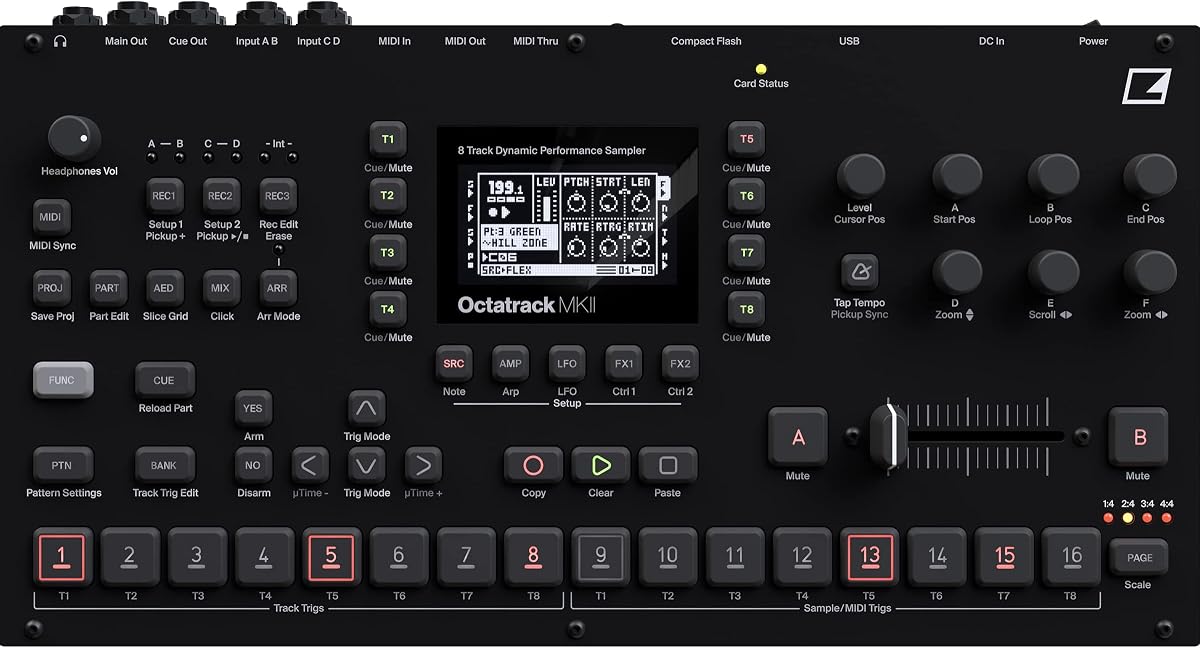
The Elektron Octatrack MKII is built for musicians who treat the groovebox as an instrument rather than merely a pattern launcher. It combines eight stereo audio tracks, eight dedicated MIDI tracks, real-time pitch shifting and time stretching, and a 16-track sequencer. Its 4.5 rating reflects a specialized tool capable of serious performance work, though its complexity makes it less approachable than the simpler alternatives here.
We may earn a commission when you buy through this link, at no additional cost to you.
The track structure offers considerable flexibility. Performers can combine sampled audio, external or internal MIDI sources, effects, and sequenced material without limiting the project to a small number of layers. The OLED display provides clear navigation, while high-resolution precision encoders and dedicated function buttons support detailed adjustment. Real-time pitch and time manipulation is especially valuable when a loop must conform to a changing tempo or when a sample needs to become a melodic instrument.
Stage-oriented construction is another major strength. The rugged backlit buttons are rated for 50 million presses, and the contactless crossfader enables smooth transitions without the mechanical resistance associated with some physical faders. Balanced inputs offer headroom and clean signal handling. These details make the Octatrack look and feel like a dedicated performance machine rather than a compact production device.
The trade-off is complexity. Deep sampling, many tracks, and detailed sequencing require time to learn, while performers who simply want to launch songs may find the workflow unnecessarily demanding. For an experienced electronic musician, live sampler, producer building complex arrangements, or artist who wants full control over timing and timbre, however, the Octatrack MKII offers exceptional control and remains one of the most compelling premium choices.
The combination of eight internal audio tracks, eight MIDI tracks, and an onboard 16-track sequencer supports arrangements that move well beyond simple loops. This makes it possible to balance samples, external instruments, and sequenced variations in a coherent live structure.
Backlit controls and a rugged button layout help a performer navigate a dark stage and repeat the same actions throughout a set. The contactless crossfader also supports smooth, reliable transitions when a track or effect must change under pressure.
We may earn a commission when you buy through this link, at no additional cost to you.
The Ableton Move translates the strengths of Ableton Live into a standalone instrument built for contemporary performance. It includes 32 backlit silicone pads with velocity sensitivity and polyphonic aftertouch, nine touch-sensitive encoders, and a 16-step sequencer. With a 4.8 rating, it stands out for its expressive controls, integrated sampling workflow, and ability to sketch, arrange, and perform without a computer.
We may earn a commission when you buy through this link, at no additional cost to you.
The four flexible tracks can each serve as a drum kit, sampler, or synthesizer, with up to two effects per track. Audio tracks support tempo synchronization, independent pitch and tempo adjustment, live input processing, and sample slicing. The built-in microphone, 3.5-millimeter input, and USB-C provide several ways to capture material, while internal resampling allows performers to remix their own audio on the fly.
Standalone operation feels unusually complete. The rechargeable battery, speaker, microphone, processor, and 64 GB of storage eliminate the need for a laptop during a set. More than 1,500 sounds are included, spanning samples, presets, drum hits, and artist collaborations. Ableton Cloud, Move Manager, Wi-Fi, Link Audio, and Control Live Mode extend the device's relationship with Ableton Live and Push 3 once it returns to the studio.
Move is best for a performer already invested in Ableton's ecosystem or anyone who wants a portable instrument with expressive modern pads. The included Live 12 Intro has limited tracks and instruments and effects, while the standalone unit's four-track structure may not satisfy every arrangement. Even with those limitations, its combination of aftertouch, sampling, resampling, and wireless integration makes it one of the strongest live-performance choices in the guide.
Velocity sensitivity and polyphonic aftertouch allow chords, melodies, drums, samples, and clips to respond differently to each finger. On-device slicing and resampling add tactile depth, making it possible to transform a fresh recording during the same performance.
Wi-Fi, Ableton Cloud, Link Audio, and Move Manager create a practical bridge between the standalone instrument and a larger production setup. Artists can move Sets and audio between Move and Live without rebuilding every part from scratch.
We may earn a commission when you buy through this link, at no additional cost to you.
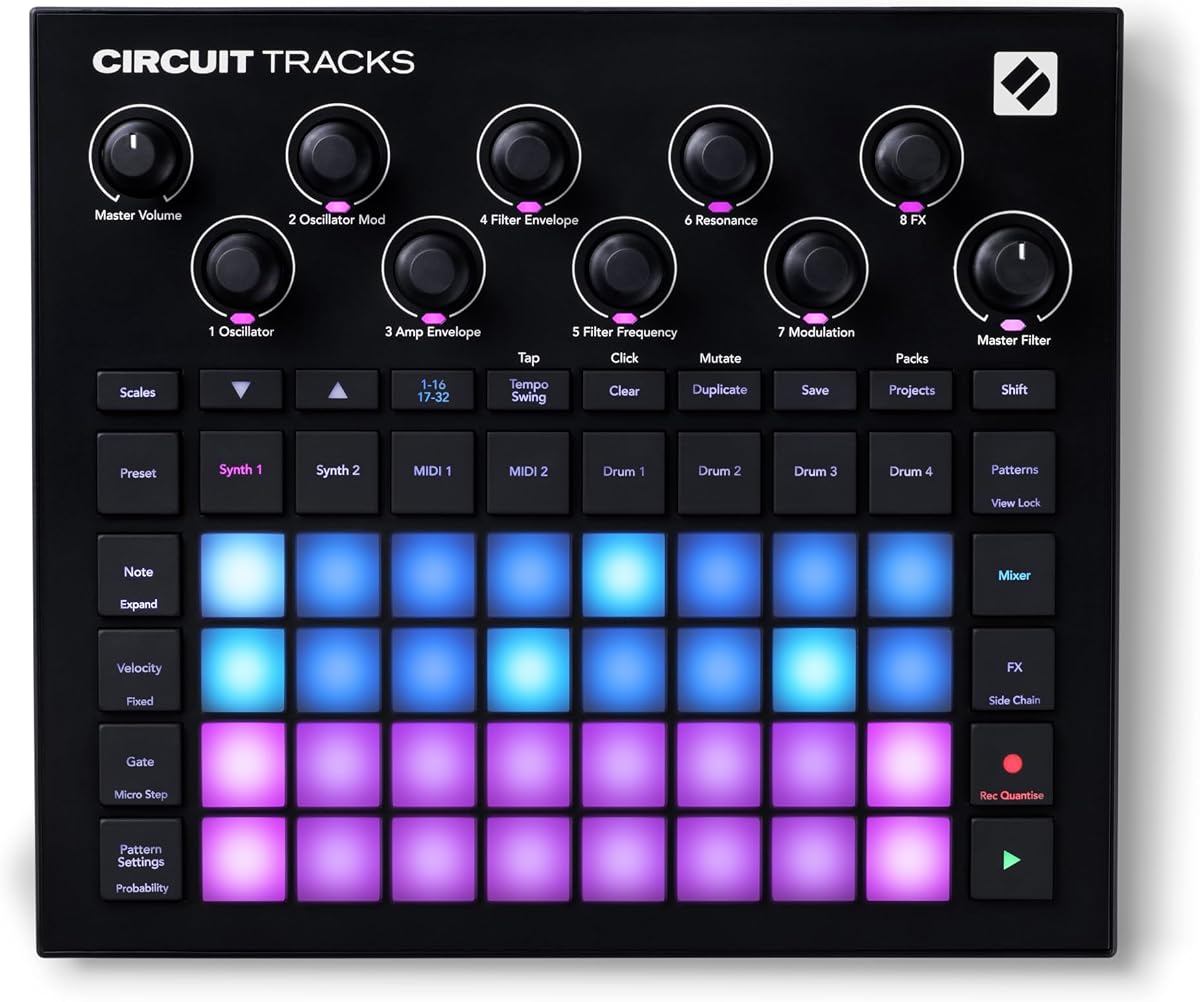
The Novation Circuit Tracks is a compact groovebox that balances synthesis, drum programming, sequencing, and external MIDI control. Its 4.7 rating reflects a mature design offering two polyphonic digital synthesizer tracks, two MIDI tracks, and four drum tracks. It is especially compelling for performers who want to combine generated sounds with samples and external hardware in one portable system.
We may earn a commission when you buy through this link, at no additional cost to you.
Each track can use a chainable 32-step pattern, allowing longer sequences across the device. Microtiming introduces deliberate departures from the grid, while probability and pattern-mutate functions prevent repetitive parts from becoming predictable. The synthesizer tracks include premade artist samples and allow users to load their own material, while dedicated MIDI tracks can send notes and CC automation to other equipment.
Connectivity is a defining strength. Full-size MIDI input, output, and thru provide better integration with stage synths, pedals, controllers, and sequencers than adapter-based approaches. Analog sync output adds further synchronization possibilities. On the unit, velocity-sensitive pads, tactile encoders, dedicated buttons, and customizable patches make the device responsive to hands-on performance.
Circuit Tracks is a strong recommendation for electronic musicians who still want a hardware sequencer and synthesizer rather than a computer-centered setup. Its main compromises involve the compact display and limited screen area, while exact speaker and battery provisions are not stated in the supplied specifications. For performers who value expressive synthesis and full-size MIDI routing in a portable format, it remains an excellent, mature choice.
Probability and pattern mutation can make a simple sequence feel active without requiring continuous manual intervention. These tools are particularly effective in electronic sets, where small timing or note variations can add motion while preserving the underlying structure.
Full-size MIDI input, output, and thru make Circuit Tracks easy to incorporate into a larger hardware setup. Analog sync output broadens its compatibility with external timing systems, while the two MIDI tracks can control stage equipment beyond the groovebox.
We may earn a commission when you buy through this link, at no additional cost to you.
The Roland MC-707 is a complete standalone workstation designed to create and perform music without a computer. It supports eight tracks and 128 clips, with 16 clips available per track, and includes a 128-step sequencer. Its 4.3 rating places it behind several newer competitors, but the combination of clip arrangement, sampling, effects, and stand-alone operation still makes it a capable live instrument.
We may earn a commission when you buy through this link, at no additional cost to you.
Three track types—Tone, Drum Kit, and Looper, also called Audio Loop—allow different kinds of material to coexist within a set. Tone tracks cover melodic and harmonic material, drum tracks support rhythm programming, and looper tracks accommodate audio-based performance. This structure is useful for live performers who move between conventional sequencing and more improvisational audio workflows.
The effects architecture is extensive. It includes 90 track multi-effects, track EQ, nine chorus and delay types, seven reverb types, 90 master effects, a master compressor, and master EQ. Such depth can produce polished results without relying on a separate effects rack, although navigating that many options during a live set requires preparation. An included SD card provides expandable storage for project and audio data.
Connectivity includes 1/4-inch phone jacks, MIDI, and USB, giving the MC-707 more stage integration options than very compact devices. The MC-707 is best for producers who want clip-based arrangement, hands-on sound design, and complete sequencing in a standalone unit. Its age may show in the interface and workflow, but performers who understand its strengths can still build sophisticated sets around it.
With 128 clips across eight tracks, performers have room to organize distinct song sections, variations, and transitions. The three track types make it possible to combine tonal instruments, programmed drums, and audio loops within the same project.
Track and master effects cover compression, EQ, chorus, delay, reverb, and numerous other treatments. This internal processing can simplify a stage rig, although the broad selection is most effective when scenes are prepared ahead of the performance.
We may earn a commission when you buy through this link, at no additional cost to you.
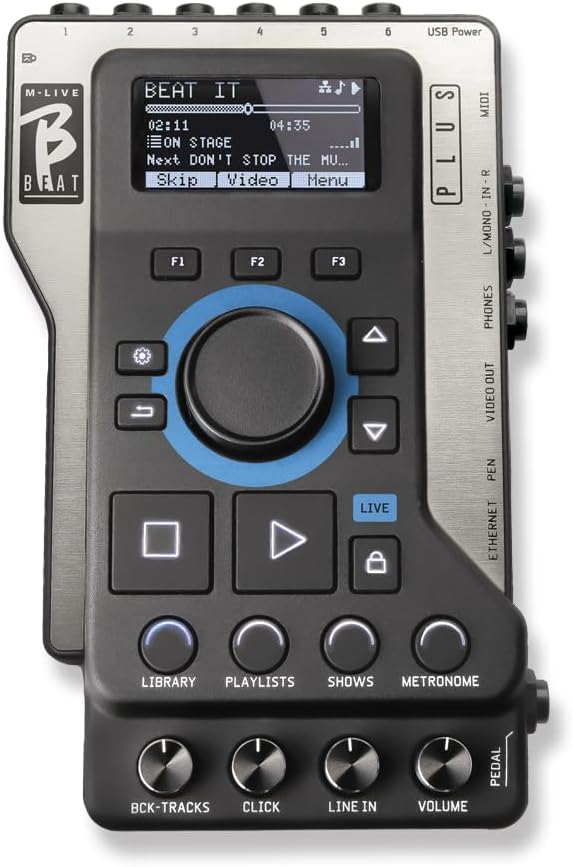
The M-Live B.Beat Plus 256GB is a specialized stage solution for musicians who want dependable backing-track playback without a laptop, sound card, and conventional mixer. Its 4.7 rating reflects the strength of its live-show workflow, including multitrack playback, setlist management, markers, loops, video synchronization, and six balanced outputs.
We may earn a commission when you buy through this link, at no additional cost to you.
The player supports up to 16 mono or 8 stereo tracks. Performers can mix individual stems in real time, route them across the balanced outputs, and use the included E.Beat software on PC or Mac to prepare projects. Markers define song sections, while loops can repeat, extend, or jump between parts. These controls allow a set to change with the moment rather than forcing the performer to rely on one rigid playback sequence.
Its show-focused features extend beyond audio. HDMI synchronization can connect backing tracks with video or images, and compatible guitar modelers including Kemper and Fractal Axe-FX III can be managed directly from the project timeline. Preset and scene changes can be triggered in sync with each song. Stem removal, individual-track EQ, real-time transposition, and 256 GB of internal storage add further flexibility for rehearsing and assembling a show library.
This is not a conventional sound-design groovebox, so musicians who want to synthesize, freely sequence, or improvise with a broad internal sound palette may find its emphasis on prepared playback limiting. For solo artists and bands that rely on multitrack arrangements, however, it can consolidate several stage components into a compact and purpose-built solution. It is best treated as a specialist performance player rather than a substitute for every type of groovebox.
Setlists, playlists, markers, and live loops organize the performance around what happens onstage rather than around a desktop production workflow. This reduces setup complexity for artists whose primary requirement is reliable playback of prepared material.
Six balanced audio outputs support separate mixes for instruments, vocals, monitors, and external effects. The multitrack mixer and per-track EQ also make it easier to adapt stems to the venue instead of accepting a fixed stereo mix.
We may earn a commission when you buy through this link, at no additional cost to you.
The Elektron Digitakt II is a 16-track drum computer and sampler centered on precise sequencing and detailed per-track control. With a 4.4 rating, it is especially compelling for drummers, beatmakers, and electronic musicians who want samples, MIDI, modulation, and effects to behave predictably under a complex arrangement.
We may earn a commission when you buy through this link, at no additional cost to you.
All 16 audio tracks can work with stereo or mono samples, or serve as MIDI tracks. The 128-step sequencer provides substantial room for detailed patterns, and Song Mode allows full compositions to be created, edited, and played. Each track includes three assignable LFOs, while delay, reverb, chorus, bit reduction, sample reduction, and overdrive provide a substantial selection of per-track treatments.
The filtering system adds another layer of design. A base-width filter is available alongside interchangeable filter types including multimode, four-pole low-pass, comb, EQ, and legacy low-pass and high-pass options. Four trig modes offer different ways to trigger sounds, and the Euclidean sequence generator helps create rhythms mathematically without requiring every pattern to be programmed step by step.
The Digitakt II is best for musicians who want a dependable hardware sequencer with deep control over timing and sound. It may be less immediately engaging than a pad-focused performance groovebox or a dedicated backing-track player, and its supplied specifications do not emphasize a built-in speaker for completely standalone monitoring. Nevertheless, the robust sequencing, modulation, and Song Mode make it a powerful center for a prepared live set.
Three assignable LFOs on every track make it possible to introduce movement into filters, effects, and other parameters over time. This supports evolving parts that remain controlled and repeatable instead of relying entirely on live knob movement.
Song Mode takes the focus beyond short performance patterns by supporting complete compositions. A drummer or producer can arrange sections, transitions, and repeats within the hardware and recall them consistently during a live set.
We may earn a commission when you buy through this link, at no additional cost to you.
The Roland MC-101 is a compact four-track workstation that carries many musical capabilities of the larger MC-707 into a portable format. It supports standalone production and performance, includes high-quality sounds, sequencing, and effects, and can run for about five hours on four AA batteries. It is a particularly useful choice for performers who want Roland synthesis without carrying a larger workstation.
We may earn a commission when you buy through this link, at no additional cost to you.
Its ZEN-Core Synthesis System supplies the internal sound character, including Roland sounds associated with electronic and dance music. Every track includes a sample player, allowing performers to import their own audio and process it with the onboard effects and hands-on controls. Imported material can be synchronized with the tempo, making the MC-101 useful for incorporating prepared loops and one-shot sounds into a set.
The four-track format is compact enough for mobile use, and the battery runtime supports rehearsals, writing sessions, and modest performances where reliable untethered operation matters. The bundle includes a 10-foot MIDI cable, an instrument cable, and an Austin Bazaar polishing cloth, allowing a new owner to begin making connections without separately sourcing basic accessories.
The main limitation is obvious: four tracks may be restrictive for a layered, arrangement-heavy live show. A built-in speaker is not identified in the supplied specifications, and performers may need external monitoring or a small speaker. Even so, the MC-101 is a strong recommendation for a musician who wants a lightweight, sample-capable Roland instrument, a straightforward writing setup, or a compact controller for focused live arrangements.
The ZEN-Core engine brings a substantial selection of Roland sounds into a smaller performance format. This makes the MC-101 appealing to musicians who already appreciate Roland synthesis but want something easier to carry between locations.
A sample player on each track gives performers more freedom to incorporate their own sounds than a basic preset-only groovebox. Tempo-synced imports can then be shaped through the internal effects and physical controls during practice or performance.
We may earn a commission when you buy through this link, at no additional cost to you.
The Akai Professional APC40 MKII is not a standalone groovebox; it is a USB MIDI controller designed to make Ableton Live more tactile during production and performance. Its 4.8 rating reflects a mature control surface with an integrated clip-launch matrix, hardware faders, rotary encoders, and RGB feedback that closely follows Live's software environment.
We may earn a commission when you buy through this link, at no additional cost to you.
The 5-by-8 matrix allows performers to trigger clips, loops, and samples while seeing clip states and color assignments through RGB illumination. Nine channel faders provide mixer control, while eight control knobs and eight device controls provide access to virtual instruments, effects, and parameters. The assignable A/B crossfader adds a performance-oriented mixing gesture that can move between two assigned destinations.
USB power and plug-and-play connectivity simplify setup with Mac and PC. Ableton Live Lite is included along with Puremagnetik Effect Racks, Hybrid 3 and TubeSynth by AIR Music Tech, Prime Loops sample packs, and Toolroom Records artist launch packs. That makes the controller a meaningful entry point for a new producer, although experienced Live users will likely already own a more complete software library.
This controller is best for a laptop-based performer who wants faster, more visible control over clips and mixer parameters. It is also useful for lighting designers and visual performers because the robust faders and buttons can control lighting cues and effects through assigned parameters. Those who need a self-contained battery-powered groovebox should choose one of the standalone alternatives; for controlling Ableton Live from a computer, the APC40 MKII remains a focused and highly rated choice.
RGB feedback shows clip status and color coding directly on the controller. During a live set, that visual information reduces uncertainty and allows a performer to locate the next section without navigating entirely through a software display.
Nine channel faders, eight control knobs, and eight device controls cover common Live parameters without relying exclusively on the mouse. The assignable crossfader adds a hands-on transition between two mapped destinations for mixes, effects, or visual cues.
We may earn a commission when you buy through this link, at no additional cost to you.
The best live groovebox is not necessarily the device with the longest feature list. It is the instrument whose controls, sound design tools, sequencing model, and physical connections match the way you perform and the amount of setup your stage allows.
A standalone groovebox should be able to produce, sequence, save, and perform a set without relying on a laptop. That independence reduces external failure points and makes rehearsal-to-stage transfer simpler, but it also means internal storage, battery behavior, and onboard monitoring become important. A computer-based controller can offer a larger visual interface, extensive software, and quick access to existing libraries, though it requires reliable hardware and a prepared DAW environment.
Choose standalone if you value portability and minimal setup. Choose computer-controlled if your existing Live-based workflow and visual feedback are central to the performance.
Pads should react clearly and consistently under real-time conditions. Velocity sensitivity, aftertouch, backlighting, pad size, and the placement of encoders can materially change how naturally a performer can trigger breaks, slices, and melodic parts. A smaller pad count may be easier to manage in a dense patch, while a larger matrix can support more scenes, drum zones, or clip launchers.
Prioritize immediate, visible feedback and controls you can locate without looking. The number of pads matters less than how clearly they support your intended performance.
Look beyond the advertised step count. A useful sequencer should offer stable timing, musically useful editing, flexible pattern lengths, probability or mutation where appropriate, and a way to combine short patterns into complete arrangements. Live performers also benefit from transitions, repeats, alternate fills, and scene recall rather than isolated loops that must be restarted manually.
Match sequencing depth to your set design. Simple devices suit immediate improvisation, while detailed sequencers are better for arrangements that change in carefully controlled ways.
Onboard sampling can make a groovebox far more interactive if you can record, trim, chop, pitch, and resample material without leaving the device. Real-time time stretching and pitch shifting are particularly useful because they let existing audio follow changing material or become a playable melodic voice. The number of sample tracks determines how many layers can be active at once.
Check whether sampling is a core feature or merely a supporting function. Performers who regularly transform live recordings will benefit far more from dedicated chopping and resampling tools.
A live groovebox may need to send clean stereo or balanced outputs, connect headphones, control external synths, accept MIDI from a controller, synchronize with other gear, or present media to a video system. Balanced outputs can help in larger rigs, while full-size MIDI connectors simplify setup with older hardware. USB-C audio and MIDI support can broaden studio integration, but adapter requirements should be considered.
List every device in your signal chain before buying. The right choice is one that connects cleanly to your existing mixers, synths, pedals, computers, and synchronization systems.
A built-in speaker and microphone make a groovebox genuinely portable, while a rechargeable battery or clearly stated battery runtime supports untethered use. Screen size also matters: small displays encourage fast knob-based navigation, while large touchscreens can simplify deeper editing but may consume more space. Consider how the device will be carried, mounted, and powered in a venue.
Favor a size and power system you can genuinely maintain. The most capable instrument is less useful if it is difficult to transport or cannot last through a rehearsal and show.
A large library is only useful when it sounds appropriate and can be selected quickly. Drum-focused performers need convincing percussion and useful sequencing tools, while melodic performers may prioritize synth engines, polyphony, filters, and modulation. Per-track effects and LFOs add variation during a set, whereas global effects are simpler to manage but less flexible.
Listen for sound range and variety, but also consider organization. A large set of sounds arranged into practical categories will outperform a bigger but confusing library during a live performance.
Multitrack playback, balanced outputs, markers, loops, setlists, video synchronization, amp-modeler control, and stem manipulation can be more valuable than extra synthesis features for a band that performs prepared arrangements. These features allow one device to handle tracks, navigation, and show flow. For an improviser, clip launching, live sampling, and immediate pattern variation may matter more.
Decide whether your set is primarily prepared, improvised, or mixed. Choose the device that directly supports the way your show changes in real time.
Begin by building and rehearsing the complete performance rather than individual sounds. Organize patches or songs by the order they appear in the set, remove effects that are not essential, and assign controls to the parameters you genuinely expect to adjust. If the device supports setlists, scenes, chains, or markers, use them to reduce navigation during the show.
Test the entire signal path before traveling. Confirm that line or balanced outputs feed the mixer correctly, headphones work quietly enough for a proper balance, MIDI connections respond, storage has adequate space, and any needed adapters or cables are present. Back up important projects to a second location and carry a current backup even when the groovebox can operate entirely on its own.
Protect the instrument from heat, moisture, impact, and loose cables. Clean the controls and display with a soft, dry cloth, keep ventilation openings unobstructed, and avoid placing the device on a surface that could interfere with cooling. For battery-powered models, carry a dependable power option, update the software when convenient, and inspect contacts and adapters before every important rehearsal or performance.
The best type depends on how the set is constructed. A pad-based groovebox suits improvisation, a sequencer-rich model supports programmed arrangements, and a performance sampler is ideal for manipulating recorded sounds. A multitrack player is better for bands that need prepared backing tracks, stems, and synchronized show control.
A standalone groovebox removes the need for a computer, reduces setup time, and can make rehearsals more portable. A laptop offers a larger visual interface, extensive software access, and convenient editing. Choose standalone for mobility and reliability, or computer-controlled operation when your existing DAW workflow is a major part of the performance.
Velocity sensitivity is valuable when dynamics need to reflect how firmly a performer strikes a pad. It helps with realistic drums, expressive samples, and subtle control over melodic parts. However, a device with clear non-velocity-sensitive controls can still work well, especially for pattern-based performance or users who value consistency over expression.
At minimum, most performers want reliable line-level outputs and a headphone connection. MIDI input and output become important when controlling or receiving from external gear, while sync, USB audio, video output, or balanced multichannel outputs matter for larger or synchronized rigs. Confirm connector types before buying.
Usually not without careful planning. A groovebox may replace a laptop, audio interface, and basic sequencer, but microphones, monitors, mixers, amplifiers, controllers, and specialist effects can still be necessary. The B.Beat Plus is specifically oriented toward backing-track playback, while the Ableton Move and other standalone units are more appropriate for hands-on electronic performance.
Onboard sampling is important if you want to record and transform material during a set. It allows a voice, percussion, or environmental sound to become part of the performance without a computer. Models with chopping, timestretching, pitch adjustment, and resampling provide the greatest live value, while simpler samplers are sufficient for basic one-shot replacement.
The required number depends on the arrangement. Four tracks may be sufficient for focused bass-and-drum performances, while eight or sixteen tracks provide more room for layered samples, separate instruments, stems, and variations. Consider not only the track count but also how easily those tracks can be controlled and recalled during the show.
Create a complete show file, verify every output and connection, back up all projects, update the device before the tour, and carry essential cables and a backup power solution. Rehearse transitions using the same navigation method you will use onstage. If the venue is unfamiliar, arrive early enough to check output levels, monitoring, and available connections.
The myTRACKS Groovebox is the most approachable budget option, with automatic musical guidance and a built-in sampler that helps new performers create complete music quickly. The Ableton Move is the strongest all-around recommendation for expressive, untethered performance, thanks to its 32 responsive pads, flexible tracks, sampling tools, and Ableton integration. The Elektron Octatrack MKII is the premium choice for serious performance sampling and real-time control.
The right decision depends on the set. Novation Circuit Tracks emphasizes synthesis and MIDI, Roland's MC-707 and MC-101 provide compact standalone production, Digitakt II prioritizes sequencing and modulation, and B.Beat Plus specializes in multitrack show playback. The APC40 MKII serves a different role entirely by giving a computer-based Ableton Live performer immediate physical control.
Whichever model fits the performance, verify the current specifications, included software, required adapters, and accessory availability before purchasing. Prices and promotions can change over time, so check the current listing and compare the final package with the needs of your stage setup rather than choosing from a category label alone.