
Lamicall Adjustable Tablet Stand
4.8Editor score
Aluminum and alloy construction
Portrait and landscape viewing
Supports devices up to 13 inches
An iPad stand can transform a crowded desk by raising the screen, supporting hands-free viewing, and making everyday tasks more comfortable. The right model balances stability, smooth adjustment, device fit, portability, and enough support for the way you work, whether that means video calls, reading, drawing, or streaming.
We compared ten stands using the supplied product specifications, customer ratings, compatibility details, construction materials, adjustment mechanisms, and intended uses. The list covers aluminum desktop models, foldable travel stands, rotating mounts, portable monitor supports, and a commercial-style kiosk stand.
Each review explains what makes the stand useful and where its design may be less suitable. The first three earn the Best Budget, Editor's Choice, and Best Premium designations, while the remaining products provide alternatives for particular workspaces. Product availability and prices can change, so confirm current details before buying.
4.8Editor score

4.6Editor score

4.5Editor score
As an Amazon Associate we earn from qualifying purchases.
The table below compares all ten stands by construction, adjustment, compatibility, and portability, making it easier to match a stand to your desk, device, and typical tasks.



The Lamicall Adjustable Tablet Stand is a strong all-purpose desk accessory with a 4.8 customer rating, the highest in this group. It combines an aluminum frame with reinforced alloy steel, supporting devices from 4 to 13 inches while allowing either vertical or horizontal placement. Its broad compatibility makes it useful across iPad generations, phones, Kindles, and other tablets.
We may earn a commission when you buy through this link, at no additional cost to you.
The stand's main attraction is straightforward adjustability. Users can shift the tablet into portrait for reading or vertical browsing and into landscape for video calls, streaming, typing, and games. Rubber pads and feet help protect both the device and the desktop from scratches, sliding, and the minor vibrations produced by frequent touch interactions.
One important limitation involves the 18mm hook width, which means a tablet and case together should not exceed 0.71 inches. The listed compatibility is extensive, but the physical clearance remains more relevant than model names alone. For very large tablets, the manufacturer recommends horizontal placement because that orientation can offer greater stability.
This is an easy recommendation for most home offices, study spaces, and meeting rooms. It offers a durable frame, flexible viewing positions, and broad device support without requiring a specialized installation. The Lamicall is our Best Budget selection because it combines one of the strongest ratings in the list with a versatile design suited to many everyday tasks.
The aluminum and alloy steel construction provides a reassuringly rigid structure for browsing, typing, and media viewing. Rubber contact points reduce sliding and help protect the device's finish during prolonged desk sessions.
Switching orientation makes the same stand suitable for reading in portrait and for calls, tutorials, or streaming in landscape. This flexibility reduces the need for multiple separate supports.
We may earn a commission when you buy through this link, at no additional cost to you.
The COOPER TabHolder earns a 4.6 rating and stands out for its unusually broad range of supported equipment. It accommodates devices up to 17 inches, including 12.9-inch iPad Pro models, Galaxy tablets, Kindles, and portable monitors. Devices up to 4.4 pounds are supported, making the design relevant to more than a typical lightweight iPad accessory.
We may earn a commission when you buy through this link, at no additional cost to you.
Stability comes from a three-part approach: a weighted metal base, nonslip EVA padding beneath the stand, and a holding plate that is described as 40 percent wider. The aluminum rod and steel base create a rigid support structure, while silicone padding grips the device without relying on visible edge clips. Cooling vents offer another practical advantage during extended video calls or media playback.
Adjustment is centered on a telescoping 7-to-10-inch range and up to 270 degrees of tilt. That range lets the screen move between a lower typing position and a higher eye-level position, while a friction-based adjustment mechanism helps the chosen angle remain steady. The feature set makes this stand useful in a home office, kitchen, studio, or living room.
The COOPER is our Editor's Choice because it balances stability, broad compatibility, and flexible positioning more completely than most basic models. It is particularly compelling for users who alternate between an iPad and a larger portable monitor. Those who require the smallest possible footprint should compare it with one of the folding stands, but as a multi-device desk solution it is especially capable.
The 17-inch capacity and 4.4-pound limit make this holder suitable for larger tablets and portable monitors. A household or office can use one support for a phone during calls, an iPad for notes, and a monitor for detailed work.
A telescoping shaft, broad tilt range, and friction-based rod give users precise control over screen height and angle. Silicone pads add grip while helping the device remain stable during touch input.
We may earn a commission when you buy through this link, at no additional cost to you.
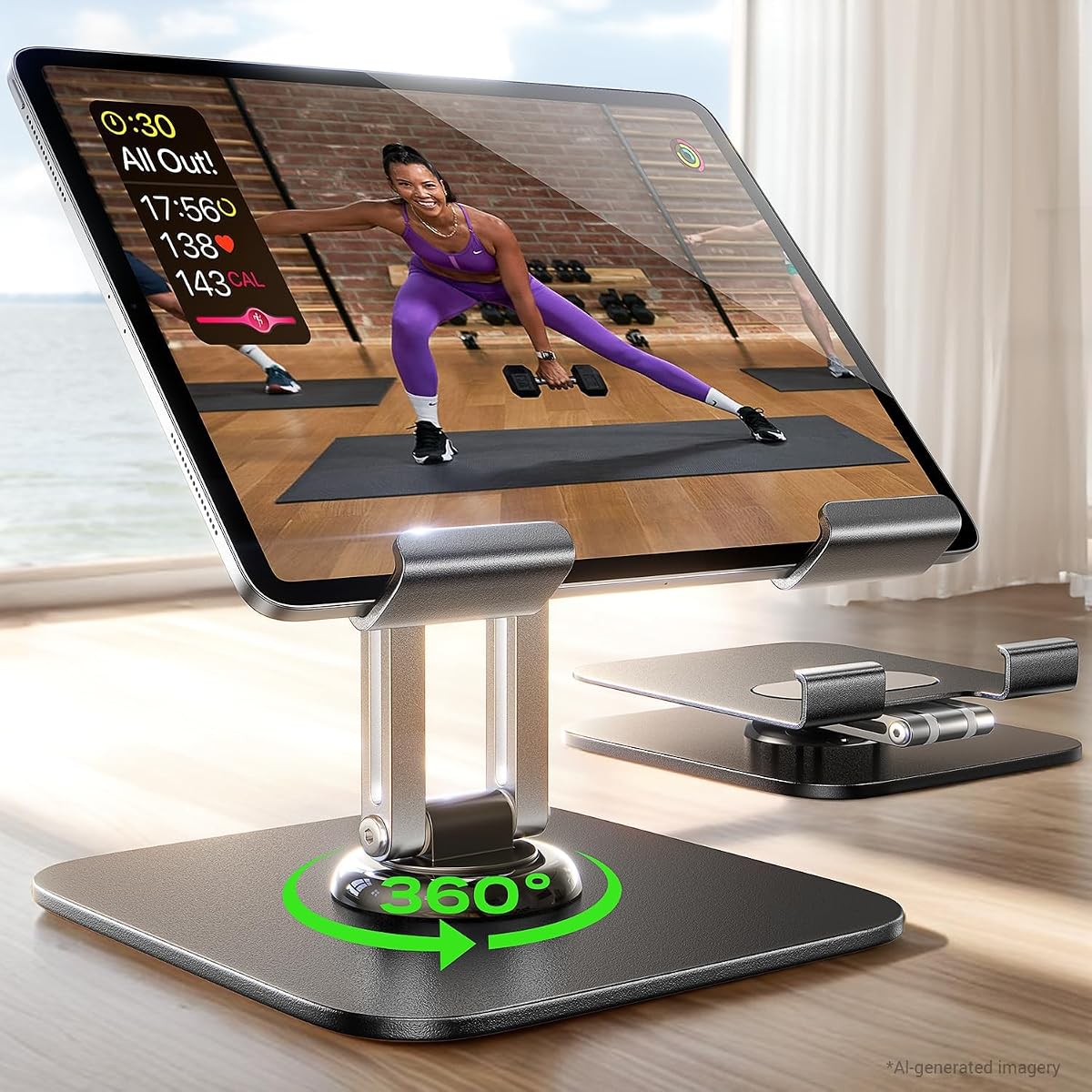
The Lamicall Adjustable iPad Stand for Desk is a sophisticated portable option with a 4.6 rating. It folds to only 0.59 inches, making it one of the most travel-friendly choices in the roundup, while its weighted metal base and alloy steel rod provide a desktop foundation that feels considerably more substantial than a basic plastic holder.
We may earn a commission when you buy through this link, at no additional cost to you.
Two adjustable hinges control the tablet's height and tilt, and the base rotates through 360 degrees. This makes it easy to change orientation without moving the entire base, share a screen with someone sitting nearby, or reposition the display for a presentation. Devices from 4.7 to 13 inches are supported, and widened hooks accommodate cases up to 0.75 inches thick.
The manufacturer notes that the tight high-strength hinges may require firm force when unfolding for the first time. An included wrench lets owners tighten the hinges to suit their device and preferences. This is a sensible system for preserving stability, although it is less convenient for users who expect every adjustment to require no tools at all.
We selected this model as Best Premium because it combines a genuinely slim folded size with a sophisticated metal structure, broad case compatibility, and unusually complete rotation. It is an excellent fit for frequent travelers, hybrid workers, and people who want one polished stand for home, office, and client meetings.
At just 0.59 inches when folded, the stand fits into a backpack, laptop bag, or carry-on without taking over the packing space. Its support structure remains suitable for extended use at temporary workspaces.
Two hinge controls, a rotating base, and an included wrench provide a level of fine-tuning that simpler gravity stands do not offer. Owners can tune the resistance once and then reposition the device as needed.
We may earn a commission when you buy through this link, at no additional cost to you.
The tounee Dual Rod Adjustable Aluminum Desktop Stand has a 4.7 rating and is built for a wide assortment of screens. It supports devices from 4.7 to 16.9 inches, covering iPads, Surface tablets, e-readers, and larger portable monitors. The stated range makes it especially appealing to users who alternate between compact and substantial displays.
We may earn a commission when you buy through this link, at no additional cost to you.
Its dual-rod structure separates the base from the device support, creating room for height adjustment and a clear path for cables. A locking mechanism is designed to keep the chosen position secure, which is useful when typing, drawing, or following a recipe with both hands occupied. The weighted all-metal base and silicone pads help prevent tipping, wobbling, and surface scratches.
The stand folds flat for storage and can be carried in a bag, but the broad device range means buyers should still consider desk depth and available clearance. It is explicitly not designed for laptops, and larger portable monitors may require more room than a compact iPad. Compatibility is based on supported device dimensions rather than a promise that every large screen will be equally suitable.
This tounee model is a strong choice for a multi-device workspace that needs more reach than a conventional tablet stand. Its locking adjustment, all-metal construction, and large compatibility range distinguish it from simpler portable designs, while the fold-flat format remains useful for students and traveling professionals.
Supporting up to 16.9 inches gives the stand a useful role with portable monitors and larger tablets. The dual-rod format provides more vertical positioning options than many compact desk stands.
The locking mechanism is intended to keep a selected height and viewing angle in place. That controlled position is particularly helpful during typing, drawing, video calls, and other touch-heavy activities.
We may earn a commission when you buy through this link, at no additional cost to you.
The LISEN iPad Stand Tablet Holder for Desk combines a 4.6 rating with a highly portable ABS design. It folds into a pocket-size form and weighs 15.2 ounces, making it attractive for students, commuters, and anyone who regularly works away from a permanent desk. A metal panel and anti-slip silicone at the bottom add a useful base of rigidity.
We may earn a commission when you buy through this link, at no additional cost to you.
The gravity-based support system uses the rear tilt to keep the device in place without clips or magnets. Users can also adjust the angle with the included bridge screw, which is valuable because ordinary joints may loosen over time. The locking mechanism can be made tighter or looser according to the device's weight and the user's preferred support.
Compatibility extends across devices listed from 4.0 to 15.9 inches, but two constraints deserve attention. Device width must be less than 0.7 inches, and heavy-duty cases are not supported. Smartphones work only in landscape mode rather than portrait orientation, limiting the stand's flexibility for phone-based tasks.
This LISEN is a good pick when portability matters more than using premium metal throughout the frame. It is simple to carry, compact when stored, and still offers more adjustment control than a basic gravity holder. For users with a moderately thick tablet case or a need for portrait phone support, one of the aluminum or case-compatible alternatives may be a better fit.
The fully folded design is easy to slip into a pocket or bag and occupies little room when stored. It is a practical accessory for mobile workers who need a consistent stand wherever they open their tablet.
The gravity-based design avoids clips and magnets, reducing contact with the device's edges. Its angle should be kept low for maximum stability when tapping or typing.
We may earn a commission when you buy through this link, at no additional cost to you.
The AboveTEK Retail Kiosk iPad Stand is designed for settings where a tablet needs to serve multiple people. Its 4.5 rating reflects a commercial-style design featuring a weighted base, folding arm, 360-degree rotatable base, and tablet bracket. The screen can turn from a staff-facing position toward a customer without moving the entire unit.
We may earn a commission when you buy through this link, at no additional cost to you.
A push-button release allows the tablet bracket to attach or detach quickly, which is useful for storage, charging, and device changes. Dedicated space in the holder accommodates a power cord, helping maintain a cleaner counter in a restaurant, shop, reception area, kitchen, or office. The smooth swiveling motion is intended to make interaction feel quick in busy settings.
The bracket fits 6-to-13-inch tablets, and both rubber-padded clips accommodate cases less than 0.5 inches thick. That is narrower than many competing models, so buyers should measure their case before ordering. The construction is also more substantial than a typical personal desk holder, reflecting its business-oriented purpose.
AboveTEK is a compelling option for retail, hospitality, demonstrations, and shared workstations. Home users seeking a compact stand for occasional travel are unlikely to need this level of kiosk functionality. For a counter where staff and customers both interact with the screen, however, the rotating arm and quick-release bracket make it especially effective.
The 360-degree rotating base and folding arm make it simple to change who views the display. A cashier can check information and then swivel the tablet toward a shopper for a transaction or demonstration.
The push-button bracket releases the tablet for carrying or charging. A dedicated cord area helps keep the connection organized on a busy counter or shared desk.
We may earn a commission when you buy through this link, at no additional cost to you.
The Urmust Tablet Stand for Desk has a 4.5 rating and offers a useful combination of an aluminum frame, rotating base, height adjustment, and cable management. It fits devices from 4.7 to 15.6 inches and supports up to 2.42 pounds, covering common iPads, Galaxy tablets, phones, and e-readers.
We may earn a commission when you buy through this link, at no additional cost to you.
Both the height and angle are adjustable, allowing the screen to be placed closer to eye level for calls or lowered for reading and recipes. A wrench included in the box lets users tighten the joint if a heavier device causes sagging or slipping. The manufacturer explicitly recommends using the stand only on a flat, stable desk or table.
That tabletop limitation is important despite the product title's bed reference. It should not be used on a headboard, where wobbling and slipping could occur. The anti-slip base and adjustable tension are designed for stable horizontal surfaces, and integrated cable clips help keep charging lines from spreading across the workspace.
Urmust is a solid all-around choice for users who want more control than a simple folding holder and value tidy cable routing. Its weight limit and 15.6-inch size range are ample for many tablets, though unusually heavy portable monitors may exceed the stated limit. It is best suited to a permanent or semi-permanent desk rather than a soft or unstable sleeping surface.
The included wrench allows the joint to be tightened around a specific device. This addresses sagging and slipping while preserving the freedom to change the viewing angle.
Integrated clips hold charging cables against the stand and reduce clutter. The result is a tidier setup around a desk where power access is important.
We may earn a commission when you buy through this link, at no additional cost to you.
The LISEN Aluminum Tablet Stand provides a 4.5 rating and a metal construction intended to resist the instability associated with lighter folding holders. It supports devices from 4.7 to 12.9 inches, including iPad Pro, iPad Air, iPad mini, Galaxy tablets, Surface devices, Kindle Fire HD, and drawing tablets.
We may earn a commission when you buy through this link, at no additional cost to you.
Its 360-degree rotating design makes the stand useful when a screen must be shared during a meeting or presentation. A heavier, wider weighted base improves stability, and soft silicone at the base helps prevent sliding and scratching. The included bridge screw adjustment truss rod can be tightened when the extension needs additional support over time.
The stand folds into a pocket-size shape for travel, making it more versatile than a permanently mounted desktop support. The locking mechanism allows the viewing angle to be adjusted and held in place, while the metal components provide a more substantial feel than basic plastic models.
Phone support is restricted to landscape orientation, and the maximum listed size is 12.9 inches. Those constraints make this a better fit for tablets and e-readers than for phones requiring portrait placement. For a home office or business workspace seeking a compact metal stand with smooth rotation, it remains a capable choice.
The aluminum alloy body, steel components, and broad weighted base create a stable support structure. Silicone feet help the stand remain fixed and protect the surface beneath it.
A full 360-degree base rotation lets the display move between the user and nearby colleagues. That makes the stand practical for quick reviews, presentations, and shared demonstrations.
We may earn a commission when you buy through this link, at no additional cost to you.
The UGREEN Tablet Stand Holder combines a 4.6 rating with a small footprint and a wide selection of viewing angles. It supports 4-to-11-inch tablets, phones, and e-readers, including numerous iPad, iPhone, and Samsung models. The maximum device thickness, including a case, is 0.55 inches.
We may earn a commission when you buy through this link, at no additional cost to you.
Its viewing angle can be adjusted from 15 to 100 degrees, giving users options for low-angle typing, inclined reading, and upright video calls. Premium ABS construction keeps the unit light, while silicone pads on the bottom help prevent the device from sliding and protect against scratches.
The stand measures 4.7 by 4.2 inches and folds for easy transport. It is a particularly straightforward choice for a small desk where footprint matters. The trade-off is that its 11-inch maximum does not cover larger iPad Pro models or portable monitors, and its case clearance is tighter than several metal stands in this guide.
UGREEN is a practical recommendation for students, travelers, and home users who mainly need a dependable holder for an 11-inch or smaller tablet. It offers more angle choices than many simple stands without taking up much room. Buyers should measure their device and case first, especially if they plan to use a protective cover.
The compact dimensions conserve desk space while the 15-to-100-degree adjustment provides several practical viewing positions. It suits small workspaces where a larger metal arm would be unnecessary.
The folding construction slips into a pocket for commuting or travel. It is a simple way to maintain a consistent viewing position in different rooms without carrying a separate full-size mount.
We may earn a commission when you buy through this link, at no additional cost to you.
The COOPER TabStand 20-Inch is designed to raise a tablet or portable monitor toward eye level. Its 4.5 rating reflects a substantial design aimed at professionals who use larger screens, including traders, designers, and people joining video calls on an iPad. The 20-inch height creates a distinctly different viewing position from conventional low-profile stands.
We may earn a commission when you buy through this link, at no additional cost to you.
The support reaches from an iPad mini to a 13-inch iPad Pro and can hold 17-inch portable monitors up to 4.4 pounds. A reinforced silicone-padded clamp grips the device, while a weighted anti-slip base helps prevent movement. The stand rotates 360 degrees, allowing a quick switch between portrait and landscape.
Its larger reach is beneficial for dual-screen arrangements because the elevated tablet can complement a separate desktop display. The assembly is described as taking about 30 seconds, and the package uses plastic-free eco packaging. This makes setup relatively straightforward, although the tall frame still requires enough vertical and desk clearance.
The TabStand is ideal for users who specifically want a higher screen position and may move between an iPad and a larger portable monitor. It is less suitable for a cramped desk or a small travel bag. For those needing maximum height, broad rotation, and professional workstation positioning, it delivers the most specialized experience in the roundup.
The extended height can place a tablet closer to the user's eyes during calls or alongside a conventional monitor. That position may reduce the need to look downward repeatedly during long work sessions.
The 17-inch capacity and 4.4-pound limit extend the stand beyond ordinary tablet sizes. Reinforced silicone padding and a weighted base provide grip and stability for these larger devices.
We may earn a commission when you buy through this link, at no additional cost to you.
The most useful iPad stand is the one that matches your device, available desk space, and typical tasks. Compatibility, stability, adjustment, portability, and construction should be considered together rather than one at a time.
Begin with the stand's stated size range, but also measure the width, height, and thickness of the device together with its case. A model advertised for a 12.9-inch iPad may not securely hold a large folio case, and several stands place specific limits on case thickness. Phones may also be limited to landscape orientation, as seen with the LISEN models, while some stands accommodate only tablets.
Check the support area as well as the headline size. The listed limits should cover your device without leaving the lower edge unsupported, and the case should fit between the retaining lips or hooks. Measure before ordering whenever compatibility depends on unusual dimensions.
A stable stand needs a broad base, rigid connection points, and contact points that resist sliding. Weighted metal bases generally provide more resistance to tipping than lightweight plastic models, while silicone pads help protect the device and desk. The structure matters most when typing, drawing, or using a large portable monitor.
Look for a base that fits the available desk space and a surface that feels solid. Avoid placing any of these stands on a soft bed or unstable headboard unless the manufacturer explicitly permits it. Stability also depends on keeping the device within the supported range.
Useful adjustment lets you alternate between a low typing position, an inclined reading position, and a higher angle for video calls. Look for a broad tilt range, telescoping height, or multiple hinged joints. Locking mechanisms are especially helpful because they prevent the screen from drifting during touch input.
Consider the type of adjustment rather than just the advertised number of positions. Friction joints, gravity supports, screw-tensioned hinges, and rotating bases provide different experiences. A tool-free system is convenient, while a wrench or bridge screw can offer more precise tension control over time.
Rotation is valuable when sharing a screen, moving between portrait and landscape, or using the stand beside another monitor. Some models rotate only at the base, while others allow the complete screen section to turn through 360 degrees. Confirm whether a product supports full screen rotation or only a base swivel.
If you often read documents, portrait mode may be more natural. Landscape is usually better for video calls, typing, recipes, and entertainment. The best design offers both without requiring the user to remove and reposition the device repeatedly.
Travelers and hybrid workers may prioritize how little room a stand occupies when folded. The Lamicall Foldable Stand, for example, is listed at 0.59 inches thick, while the UGREEN and LISEN models also emphasize compact folding. A portable stand should still unfold into a rigid, stable structure rather than merely reducing storage size.
Include the device and stand in the dimensions of your travel bag, and remember that a tall stand may not fit in a small hand luggage pouch. Carrying cases and loose adjustment tools can also be easy to leave behind, so a simple setup is a practical benefit.
Aluminum and steel stands tend to provide a firmer support structure and useful weight without becoming cumbersome. ABS and other plastics can still be effective for light devices, especially when the design is compact. Look for a stable hinge, strong support rods, and nonslip pads rather than relying on material labels alone.
The finish should also protect the surrounding workspace. Soft silicone at the base reduces scratching, while a plate or bracket that holds the device securely limits unwanted movement. For frequent repositioning, a controlled locking mechanism is generally more useful than a very loose joint.
A personal desk, shared office, retail counter, and kitchen each place different demands on a stand. A personal setup may prioritize low cost and compact storage, while a commercial kiosk benefits from quick attachment, cord management, and rapid customer-facing rotation. Home entertainment may need broad angle movement rather than extreme height.
Choose the design that matches the environment's constraints. For a customer-facing counter, the AboveTEK kiosk style is purpose-built; for a mobile office, a folding model is more convenient; for a dual-monitor workstation, the taller COOPER TabStand offers greater vertical reach.
Start by placing the stand on a flat, stable desktop and confirming that the base sits flush with the surface. Loosen any adjustment hardware only as much as needed, then attach the tablet or portable monitor. Center the device within the supports and ensure the case does not exceed the stated thickness limit.
Adjust the height and angle after the device is mounted rather than while the stand is empty. Tighten locking screws or friction joints gradually, testing the position with a light touch before typing or drawing. For rotating stands, move the upper section as intended by the manufacturer and avoid forcing the hinge past its range.
Care for the stand by wiping the base and contact pads with a soft, dry or lightly damp cloth. Do not use harsh chemicals, and do not pull on a device while removing it. Retain included wrenches, check adjustable joints periodically, and tighten them if the device begins to sag. When folding a portable model, protect the hinge and do not force it if a locking mechanism is engaged.
Choose a model whose stated size range includes your iPad and its case. Most personal stands cover common 10.2- to 12.9-inch models, while very large portable monitors may require a taller or heavier frame. Also check the maximum case thickness, because a device that fits by screen size may still be too thick for the retaining hook or bracket.
No, the best stand is the one that suits the device, tasks, and workspace. Aluminum can improve rigidity and reduce tipping, but it may be unnecessary for light reading and unsuitable for a crowded travel bag. A compact ABS stand may be more valuable for a student who carries a tablet between classes, while a larger metal frame is helpful for touch-heavy work and bigger monitors.
Yes, provided the stand is stable and the device is positioned at an appropriate angle. A locking or tension-adjustable mechanism is preferable because repeated taps can make a loose hinge shift. Lower the device closer to the desk for typing and drawing, and tighten the support if the iPad sags or slides.
Some do, but case clearance varies considerably. The Lamicall Foldable Stand supports cases up to 0.75 inches, while the UGREEN model limits thickness to 0.55 inches and the AboveTEK kiosk clips support less than 0.5 inches. Measure the combined width or depth of the case and compare it with the manufacturer's stated limit before purchasing.
A rotating base is helpful but not essential for every video call. It makes it easier to move the screen toward a colleague, switch between portrait and landscape, or reposition the device without touching the entire base. A simple fixed-angle stand can work well if the user has a clear, comfortable viewing position and rarely needs to share the display.
Several models in this guide explicitly support portable monitors. The COOPER TabHolder and TabStand accommodate larger screens up to 17 inches, and the tounee stand supports devices up to 16.9 inches. Always verify both the screen size and maximum supported weight, since a wide range alone does not guarantee stability with every monitor.
Check that the device is centered and that the retaining hook or bracket holds the case securely without pressing against a port. Silicone pads and a nonslip base should provide additional friction, but loose hinges or an unsupported case can still allow movement. Tighten the relevant screw, move the stand to its lowest stable angle, and use a thinner case if the listed clearance has been exceeded.
They are usually more suitable than fixed desktop stands. Models such as the Lamicall Foldable, LISEN ABS, LISEN Aluminum, and UGREEN emphasize compact folded sizes, while the tounee stand also folds flat. Check the folded dimensions against your bag, unfold the stand fully before use, and make sure the desk surface is stable enough to support it.
The Lamicall Adjustable Tablet Stand is the most balanced overall choice, combining a 4.8 rating, strong mixed-metal construction, broad compatibility, and easy orientation changes. The COOPER TabHolder earns the Editor's Choice designation for its weighted base, wide device range, cooling vents, and ability to support both tablets and portable monitors.
For a premium portable setup, the Lamicall Foldable Stand offers a remarkably thin packed size, 360-degree rotation, and two-hinge adjustment. Buyers should prioritize case clearance, device dimensions, weight capacity, and desk space rather than focusing on one advertised feature. A fixed stand is best for a permanent workstation, while a folding model is more useful for travel.
Each stand has a different balance of stability, portability, rotation, and device support, so the right choice depends on the tasks and devices involved. Product specifications, ratings, and prices can change, so check the current listing and confirm fit before placing an order.