
GIGABYTE B850M AORUS Elite WIFI6E ICE
4.6Editor score
Compact micro-ATX design
Four DDR5 DIMM slots
Two PCIe 5.0 M.2
WiFi 6E connectivity
Discover the best motherboards with DDR5, comparing AMD and Intel models for performance, expansion, connectivity, thermals, and build quality.
Motherboards with DDR5 support the latest generation of desktop memory while providing the foundation for AMD Ryzen or Intel Core processors. A strong board balances power delivery, cooling, expansion slots, networking, BIOS features, and practical layout, making it essential to match the board with your processor, case, and performance goals.
This guide compares ten motherboards with DDR5 across AMD AM5 and Intel LGA 1700 platforms. The evaluation focuses on processor compatibility, memory support, VRM design, M.2 and PCIe capabilities, wired and wireless networking, USB connectivity, thermal provisions, and helpful enthusiast features rather than treating any single specification as decisive.
Each selection demonstrates a different use case, from a straightforward high-speed AM5 bundle to feature-rich ROG boards and a compact micro-ATX option. Ratings reflect the supplied customer feedback, while feature assessments are based on the published specifications. Product pricing and availability can change, so compare current listings before purchasing.
4.6Editor score
4.5Editor score

4.4Editor score
The comparison below places every board on the same practical criteria, including CPU platform, memory support, storage expansion, and network options. It reveals which models prioritize simplicity, which are suited to compact builds, and which provide the most advanced enthusiast features.


The GIGABYTE B650 AORUS Elite AX is an ATX AM5 motherboard that combines broad processor support with a practical collection of storage, networking, and convenience features. Its 4.4 rating reflects solid customer satisfaction, and the combination of a 14+2+1 power design, four DDR5 slots, and modern connectivity makes it a sensible all-rounder for a new Ryzen system.
We may earn a commission when you buy through this link, at no additional cost to you.
The board supports Ryzen 9000, 8000, and 7000 processors, giving buyers flexibility when choosing a CPU. Four DDR5 DIMM slots support AMD EXPO and Intel XMP profiles. Its twin 14+2+1 power phases use 70A power stages on an eight-layer, two-copper PCB, while a six-millimeter heatpipe, covered MOSFET heatsinks, and M.2 Thermal Guard address sustained-load thermals.
Storage and networking are the main reasons to prefer this model over a barebones entry board. It includes a PCIe 5.0 NVMe x4 M.2 slot alongside another M.2 connection, front and rear USB-C connectivity, WiFi 6E, and 2.5GbE. The compromises are that B650 is an established rather than newest chipset, and the two-storage-slot arrangement offers less freedom than the five-slot boards in this guide.
This motherboard is a good match for gamers and general creators who want AM5 without paying for every premium feature. It offers enough power delivery for demanding Ryzen processors, fast networking, and convenient installation aids. Choose it when the combination of Ryzen support, modern storage, and balanced ATX design matters more than maximum M.2 expansion.
Support for Ryzen 9000, 8000, and 7000 processors makes this a versatile AM5 platform. The 70A power stages and substantial VRM cooling also provide a reassuring foundation for sustained all-core workloads.
WiFi 6E and 2.5GbE cover both wireless and wired networking, while PCIe 5.0 M.2 support enables a fast modern primary drive. EZ-Latch and Q-Flash add convenience during installation and maintenance.
We may earn a commission when you buy through this link, at no additional cost to you.
The GIGABYTE B850 AORUS Elite WIFI7 is an ATX motherboard aimed at builders who want a newer AM5 platform with up-to-date wireless networking. Its 4.4 rating shows favorable customer feedback, while the B850 chipset, three M.2 slots, and 14+2+2 power stages distinguish it from many simpler B650 alternatives.
We may earn a commission when you buy through this link, at no additional cost to you.
Ryzen 9000, 8000, and 7000 processors are supported, and four DDR5 DIMM slots provide ample room for a high-bandwidth memory configuration. The board's power stage arrangement is reinforced by VRM heatsinks and an M.2 Thermal Guard. Three M.2 slots make it more accommodating for multi-drive systems than many two-storage alternatives.
Connectivity includes PCIe 5.0, USB-C, WiFi 7, and 2.5GbE LAN. A sensor panel link and EZ-Latch add practical touches for easier setup. However, buyers should not mistake the B850 label or WiFi 7 for a guarantee that every premium ecosystem feature is present; simpler boards in this guide offer fewer storage slots, while flagship ROG models go much further.
This is an attractive recommendation for an AM5 gaming or productivity build that prioritizes current wireless standards, multiple storage drives, and robust power delivery. It is especially sensible when a five-year warranty is important. Users focused on maximum M.2 capacity or extensive thermal hardware should compare it with the X870E alternatives.
The B850 platform delivers current AM5 features without the extensive overclocking suite and premium I/O found on flagship boards. It focuses on practical connectivity, storage expansion, and dependable power delivery.
A three-slot storage layout can accommodate a fast boot drive, a large game library, and a dedicated working drive. VRM and M.2 thermal guards help maintain more stable operating temperatures.
We may earn a commission when you buy through this link, at no additional cost to you.
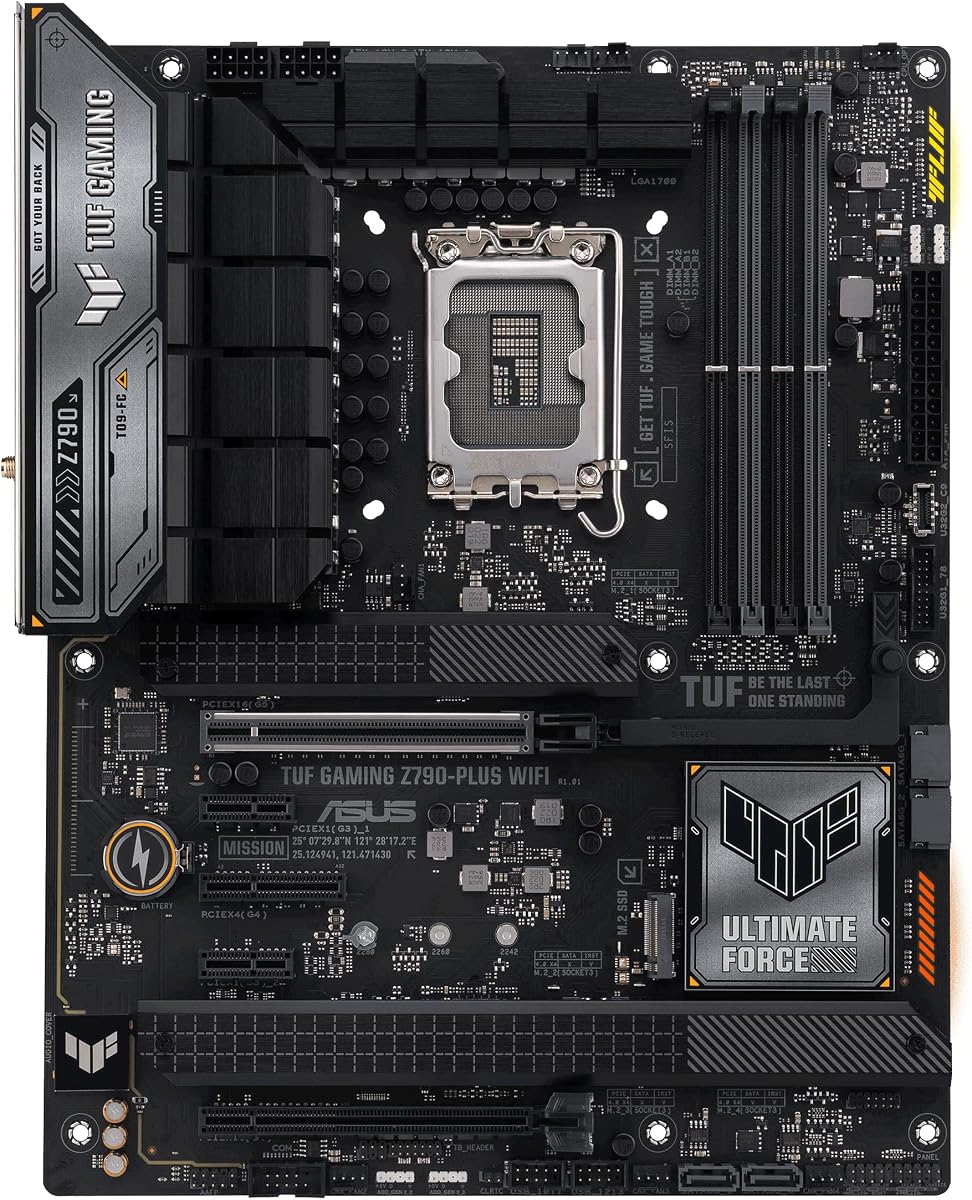
The ASUS TUF Gaming Z790-Plus WiFi is a well-rounded LGA 1700 motherboard for builders using 12th, 13th, or 14th generation Intel Core processors. It holds a 4.5 rating and stands out through four M.2 slots, a 16+1 DrMOS power solution, WiFi 6, 2.5GbE, and broad USB connectivity.
We may earn a commission when you buy through this link, at no additional cost to you.
The VRM uses ProCool sockets, military-grade TUF components, and Digi+ VRM technology. Cooling includes a VRM heatsink, fanless PCH heatsink, M.2 heatsinks, hybrid fan headers, and Fan Xpert 4. For storage, the board supports four M.2 NVMe drives, while PCIe 5.0 prepares the system for a modern graphics card and high-speed peripherals.
Networking combines Intel AX201 WiFi 6 with an Intel I225-V 2.5Gb LAN controller. TUF LANGuard and TurboLAN technology add protection and management features. A front USB 3.2 Gen 2 Type-C header, USB Gen 2×2 Type-C, and Thunderbolt 4 header make the board particularly useful for docks, high-speed drives, and demanding accessories.
This motherboard is a strong recommendation for an Intel gaming system that needs extensive storage and polished connection options without moving into the flagship ROG tier. The main limitation is that LGA 1700 does not offer the same forward CPU-socket path as AM5. Within that platform, however, the TUF balance of power, cooling, networking, and connectivity is difficult to overlook.
Four M.2 positions are unusually useful for systems combining NVMe boot, game, and scratch drives. Their support makes the board a strong foundation for a high-capacity gaming or productivity desktop.
Front Type-C, USB Gen 2×2, and Thunderbolt 4 support cover common high-speed accessories. WiFi 6 and Intel 2.5GbE also provide flexible networking without requiring additional adapters.
We may earn a commission when you buy through this link, at no additional cost to you.
The MSI B850 GAMING PLUS WIFI is distinctive because it includes a TEAMGROUP T-Force Delta 16GB DDR5-6000 module with the motherboard. Its 4.6 rating is the highest among the supplied products, and the bundle can be especially convenient for a first AM5 build that needs a recognized memory option from the outset.
We may earn a commission when you buy through this link, at no additional cost to you.
The included memory is a single 16GB module operating at 6000MHz, equivalent to PC5-48000, with CL38 timings. A second slot remains open for a future upgrade, although matching a lone module later may not deliver the full bandwidth of a properly configured matched kit. The board supports Intel XMP 3.0 and AMD EXPO for straightforward profile-based configuration.
The motherboard supports Ryzen 9000 through 7000 processors and advertises DDR5 memory speeds of 8200+ MT/s with overclocking. Storage includes an M.2 Gen 5 connection and four M.2 positions overall. PCIe 5.0 x16 and PCIe 4.0 x16 expansion are also listed, giving builders useful graphics and accelerator options.
WiFi 7 and 5G LAN make this bundle especially relevant to users who want current connectivity without assembling a complete component list independently. It is a sensible pick for a gaming or general-use system on a budget, particularly if the included memory fits the build. Buyers comfortable selecting and tuning their own matched memory kit may prefer a standalone motherboard listing.
Including a 6000MHz DDR5 module reduces one purchasing decision and lets a compatible system proceed directly to processor, graphics, storage, and case selection. The open slot preserves an upgrade path.
WiFi 7 and 5GbE provide unusually modern network options, while four M.2 slots offer strong storage flexibility. PCIe 5.0 and 4.0 x16 slots support a high-bandwidth modern build.
We may earn a commission when you buy through this link, at no additional cost to you.
The GIGABYTE Z790 AORUS Elite AX combines a strong 16+1+2 digital VRM with four M.2 slots and modern wireless networking. Its 4.4 rating indicates broadly positive feedback, while support for Intel Core 12th, 13th, and 14th generation processors makes it a versatile option for LGA 1700 builders.
We may earn a commission when you buy through this link, at no additional cost to you.
The VRM uses twin 70A power stages, ProCool-style power delivery, and a six-layer PCB. Fully covered MOSFET heatsinks and an M.2 Thermal Guard III assist with heat management, while PCIe Ultra Durable Armor adds structural protection to expansion slots. Four SMD DDR5 DIMM slots support XMP 3.0 memory profiles.
Storage is the board's defining practical feature: all four M.2 positions use PCIe 4.0 x4 connections, and the board also provides PCIe 5.0 elsewhere. For many gaming systems, four PCIe 4.0 drives provide more usable capacity than a smaller number of mixed-speed slots. WiFi 6E, 2.5GbE, and USB 3.2 Gen 2×2 Type-C cover everyday modern connectivity.
This is a good match for an Intel system requiring abundant fast storage and strong power delivery. It lacks the newest WiFi 7 standard and the explicit Thunderbolt 4 header offered by the TUF model, but it compensates with a substantial VRM and four well-equipped M.2 positions. For storage-heavy Intel builders, it is a particularly coherent choice.
Four PCIe 4.0 x4 M.2 slots allow multiple NVMe drives without relying on slower SATA storage for the main library. Thermal Guard III coverage helps keep those high-speed drives at suitable temperatures.
Twin 70A stages and fully covered MOSFET heatsinks support sustained power delivery. The design is well suited to Intel processors that can increase their multi-core power demand under heavy workloads.
We may earn a commission when you buy through this link, at no additional cost to you.
The GIGABYTE B850M AORUS Elite WIFI6E ICE offers a compact route into the AM5 and DDR5 ecosystem. Its 4.6 rating ties for the strongest customer feedback among these selections, and the micro-ATX format is paired with four memory slots, PCIe 5.0, USB-C, WiFi 6E, and 2.5GbE.
We may earn a commission when you buy through this link, at no additional cost to you.
The board supports Ryzen 9000, 8000, and 7000 processors, giving users the same broad CPU compatibility as the larger B850 AORUS Elite. A 12+2+2 power design is accompanied by VRM heatsinks and an M.2 Thermal Guard. Although the phase count is lower than that of premium X870E models, it remains a credible foundation for a range of Ryzen processors.
Two M.2 slots both support PCIe 5.0, creating a straightforward high-speed storage configuration. The micro-ATX layout reduces the board's footprint, which can make it easier to accommodate in smaller enclosures, although users should still verify case support for micro-ATX boards and full-length graphics cards. EZ-Latch aids installation, and a five-year warranty improves ownership confidence.
This motherboard is an excellent candidate for a compact gaming PC or a builder who prefers fewer expansion options in exchange for a smaller board. It delivers current platform features and good feedback without requiring the feature density of a flagship ROG board. Its main limitation is storage expansion, since two M.2 connectors are fewer than most full-size alternatives here.
The micro-ATX design preserves four DDR5 slots, offering more memory flexibility than many compact boards. It is a useful format for builds that want AM5 capabilities in a smaller enclosure.
Two PCIe 5.0 M.2 slots, USB-C, WiFi 6E, and 2.5GbE give this board useful modern features. A five-year warranty adds a practical advantage for long-term ownership.
We may earn a commission when you buy through this link, at no additional cost to you.
The ASUS ROG Strix X870E-E Gaming WiFi is an extensive premium AM5 platform built around an 18+2+2 power solution, five M.2 slots, and current high-speed connections. Its 4.4 rating is solid despite the board's advanced feature set, and the supplied specifications position it as a flexible foundation for high-end Ryzen 9000, 8000, and 7000 systems.
We may earn a commission when you buy through this link, at no additional cost to you.
The power stages are rated for 110A per stage and use dual ProCool II connectors, alloy chokes, and durable capacitors. An L-shaped heatpipe connects massive heatsinks with an integrated I/O cover and high-conductivity thermal pads. These provisions are aimed at processors capable of substantial sustained power draw, particularly when overclocking or running demanding all-core workloads.
Storage is exceptionally flexible, with three onboard PCIe 5.0 M.2 slots and two PCIe 4.0 positions, all covered by substantial cooling. Connectivity includes dual USB4 Type-C ports, a front USB 20Gbps Type-C connector, a USB 10Gbps port with up to 30W PD 3.0, nine additional USB 10Gbps ports, PCIe 5.0 x16 SafeSlots, and HDMI. WiFi 7 accompanies Realtek 5Gb Ethernet.
The ROG ecosystem adds numerous installation and management conveniences, including Q-Release Slim, M.2 Q-Latch, Q-Slide, Q-Antenna, Q-Dashboard, Q-Code, Q-LED, a start button, BIOS FlashBack, a Clear CMOS button, and a pre-mounted I/O shield. This is the recommendation for a builder who wants exceptional expansion, polished setup tools, and premium cooling and power hardware, although many of those extras are unnecessary for a basic system.
Five M.2 slots, including three PCIe 5.0 positions, support elaborate multi-drive configurations. Dual USB4 Type-C ports and numerous 10Gbps USB ports simplify docks, external drives, and high-speed peripherals.
The 110A-rated stages, dual ProCool II connectors, and connected heatpipe are designed for sustained high-power operation. Large heatsinks and high-conductivity pads reinforce the board's thermal margins.
We may earn a commission when you buy through this link, at no additional cost to you.
The ASUS ROG Strix B650-A Gaming WiFi brings recognizable ROG styling and features to the established B650 platform. It holds a 4.5 rating and supports Ryzen 9000, 8000, and 7000 processors, four DDR5 DIMMs, three M.2 slots, and both 2.5GbE and WiFi 6E networking.
We may earn a commission when you buy through this link, at no additional cost to you.
Its 12+2 power stages use 8+4-pin ProCool connectors, alloy chokes, and durable capacitors. The VRM cooling system includes large heatsinks with designed airflow channels and high-conductivity thermal pads. These features make the board suitable for a range of mainstream and enthusiast Ryzen processors, although its power configuration is less expansive than the 18+2+2 designs in the X870E range.
Storage flexibility comes from one PCIe 5.0 M.2 slot and two PCIe 4.0 slots, all equipped with heatsinks. The board also provides PCIe 4.0 expansion, USB 3.2 Gen 2×2 Type-C, 2.5G LAN, and WiFi 6E. Aura Sync integration allows coordinated lighting with compatible components for builders who want the board to contribute to a themed system.
A BIOS update may be required for Ryzen 9000 and 8000 processors, so buyers should check the board's current firmware before assembly or confirm that the installed version is compatible. The B650-A is a compelling choice for users who value recognizable ROG design, solid networking, and three storage slots without moving to the most elaborate premium models.
The board combines coordinated styling and Aura Sync support with broad Ryzen compatibility. It gives builders access to a recognizable ROG platform while retaining a more moderate feature set than flagship X870E boards.
One PCIe 5.0 slot provides a route to the fastest primary drive, while two PCIe 4.0 positions add inexpensive secondary storage. Heatsinks across all three connectors aid heat management.
We may earn a commission when you buy through this link, at no additional cost to you.
The ASUS ROG Crosshair X870E Hero is built as a showcase AM5 platform with an 18+2+2 power solution, five M.2 slots, PCIe 5.0 support, WiFi 7, and USB4. Its 4.4 rating reflects a positive customer response, while the supplied specifications make clear that this is a motherboard for enthusiasts who intend to use its extensive tuning and connectivity features.
We may earn a commission when you buy through this link, at no additional cost to you.
The power system combines 110A-rated stages with ProCool II connectors, MicroFine alloy chokes, and premium metallic capacitors. That level of electrical capacity is designed for powerful Ryzen processors and serious overclocking. The board also supports AMD Ryzen 9000, 8000, and 7000 series desktop processors, preserving broad platform compatibility.
The feature set includes AI Overclocking, AI Cooling II, AI Networking, and AEMP. ROG-specific controls add Dynamic OC Switcher, Core Flex, Asynchronous Clock, and PBO Enhancement. Five M.2 positions, PCIe 5.0, WiFi 7, and USB4 support modern storage and peripheral needs, while PCIe Slot Q-Release Slim improves graphics card maintenance.
This Crosshair model is most appropriate for enthusiasts who value maximum power delivery, fine-grained tuning, premium components, and extensive connectivity. It offers little reason for a light-use or budget-focused system to carry such a sophisticated platform. The ROG Strix X870E-E is the more practical premium alternative when extensive storage and modern USB are desired without moving into the Crosshair's specialized feature set.
Dynamic OC Switcher, Core Flex, Asynchronous Clock, and PBO Enhancement provide multiple avenues for tuning. AI-assisted features are intended to make setup and optimization more approachable.
ProCool II connectors, metallic capacitors, five M.2 slots, and PCIe 5.0 create a high-end platform foundation. WiFi 7 and USB4 complement the extensive onboard storage and expansion options.
We may earn a commission when you buy through this link, at no additional cost to you.
The ASUS TUF Gaming B850-PLUS WiFi is a polished current-generation AM5 motherboard combining 80A power stages, three M.2 slots, WiFi 7, and 2.5GbE. Its 4.4 rating indicates solid customer feedback, and support for Ryzen 9000, 8000, and 7000 processors gives it broad appeal for new desktop builds.
We may earn a commission when you buy through this link, at no additional cost to you.
The 14+2+1 power stages use an eight-layer PCB, 8+8-pin ProCool connectors, alloy chokes, and durable capacitors. These provisions support stable power delivery for mainstream and higher-tier Ryzen processors without matching the extreme current capacity of the ROG Crosshair X870E Hero. The board's design remains clearly oriented toward robust everyday use.
Storage includes one PCIe 5.0 M.2 slot and two PCIe 4.0 slots, with heatsinks fitted to all three. A PCIe 5.0 x16 slot supports the latest graphics hardware, while DisplayPort and HDMI outputs add display options. Network connectivity combines WiFi 7 with Realtek 2.5Gb Ethernet, and USB includes rear 20Gbps Type-C, front 10Gbps Type-C, and Thunderbolt USB4 header support.
BIOS FlashBack lets users update firmware without a fully installed operating system, which is particularly useful during initial setup. The TUF B850-PLUS WiFi is a strong recommendation for a modern AM5 gaming or productivity PC that wants current connectivity and convenient maintenance features. Its three M.2 slots and 14+2+1 power configuration make it more restrained than the five-slot, 18+2+2 ROG alternatives.
B850 brings current platform support without the most elaborate premium-tier component count. Three Ryzen processor generations, PCIe 5.0, and four DDR5 slots cover the core needs of a new system.
WiFi 7 and Realtek 2.5GbE provide fast network options. Rear 20Gbps Type-C, front 10Gbps Type-C, and Thunderbolt USB4 header support make high-speed external devices easier to accommodate.
We may earn a commission when you buy through this link, at no additional cost to you.
Choosing a DDR5 motherboard starts with CPU compatibility, but the most useful purchase also fits the case, supports the intended memory and storage layout, provides stable power, and includes the connectivity actually needed. These factors separate a practical board from one that is simply expensive or elaborate.
The socket determines which processors the board can physically accept, and the chipset determines its supporting features. Six of the selections here use AMD AM5 with B650, B850, or X870E, while the GIGABYTE Z790 AORUS Elite AX and ASUS TUF Gaming Z790-Plus WiFi use Intel LGA 1700. AMD B650 and B850 boards support Ryzen 7000, 8000, and 9000 series processors, as do the listed X870E boards. Intel LGA 1700 options support 12th, 13th, and 14th generation Core processors. A processor and board are not interchangeable across these ecosystems, so confirm socket, chipset, BIOS support, and any firmware requirements before buying.
Every board in the guide provides four DDR5 DIMM slots, allowing substantial theoretical memory capacity. A matched pair of modules is generally the preferred starting configuration because it uses the full memory channel more effectively than a single stick. The MSI bundle includes one 16GB DDR5-6000 TEAMGROUP module, leaving another slot open; adding a second module later can help, though matched kits are the clearer way to avoid memory-training variability. AMD EXPO and Intel XMP profiles provide an accessible path to advertised memory speeds, but users should confirm that the board supports the profile used by their chosen kit.
The VRM should be evaluated in relation to the chosen Ryzen or Core processor. The more demanding the CPU, the more important its high-current stages, connector design, heatsink area, and thermal interface become. The boards range from the ROG Strix B650-A's 12+2 design to 18+2+2 configurations rated at 110A per stage. More phases are not automatically necessary for every processor, but stronger designs provide additional margin for high sustained loads and tuning. Also consider the number and location of fan headers, the size of the chipset and M.2 heatsinks, and the airflow available inside the intended case.
M.2 slot count determines how many NVMe drives can be installed without using SATA, while the PCIe generation of each slot affects potential transfer speed. The selections range from two M.2 positions to five. The B650 AORUS Elite AX and B850M AORUS Elite each offer two, the ROG Strix B650-A and TUF B850-PLUS provide three, and the MSI B850 GAMING PLUS WIFI and GIGABYTE Z790 AORUS Elite AX provide four. The X870E Hero and ROG Strix X870E-E reach five. Builders should also count full-length PCIe slots, consider whether they will need a capture card or accelerator, and check the physical spacing of M.2 and heatsinks.
2.5GbE is a meaningful upgrade for many home networks and supports fast file transfers and downloads, while 5GbE offers additional headroom where the network and storage devices can use it. Wireless options range from WiFi 6 to WiFi 7. These features are particularly useful in the MSI B850 GAMING PLUS WIFI, GIGABYTE B850 AORUS Elite WIFI7, ASUS ROG Strix X870E-E, and ASUS TUF B850-PLUS. USB-C connectivity is also varied: look for a matching front-panel header, rear 20Gbps Type-C, USB4 or Thunderbolt 4 headers, and sufficient USB-A ports for peripherals rather than treating the presence of one Type-C port as sufficient.
ATX provides a broad balance of expansion, heat dissipation, and everyday affordability, and nine selections use that format. The GIGABYTE B850M AORUS Elite WIFI6E ICE is micro-ATX, making it useful for smaller cases and builds that do not need many expansion slots. Even with a micro-ATX board, a full-length graphics card can require substantial case clearance, so the case specification matters as much as the board label. Check maximum GPU length, CPU cooler height, ATX or micro-ATX support, and the placement of rear ports and power connectors before ordering.
A motherboard's BIOS determines how easily memory reaches its rated speed and how much control the user has over fans, power limits, and processor behavior. The AMD boards support EXPO-oriented memory use, and the Intel boards support XMP, though exact profile compatibility should be verified. BIOS FlashBack or Q-Flash features can make early firmware updates more convenient, while features such as EZ-Latch, Q-Latch, Q-Release Slim, pre-mounted I/O shields, Clear CMOS buttons, and onboard diagnostic displays reduce common build hassles. These conveniences are especially valuable during initial assembly.
Premium boards add more than raw performance. AI-assisted overclocking, cooling, and networking tools, advanced fan control, extensive telemetry, PCIe slot release mechanisms, and high-current power designs can be valuable to enthusiasts. They can also add cost, heat, complexity, and physical bulk without improving a lightly used system. A well-chosen B650 or B850 board may offer everything a gaming PC needs, while X870E boards make more sense for demanding processors, extensive storage, or deliberate overclocking. Judge these features by whether the planned build will actually use them.
Before installing the board, read its manual and identify the CPU socket, memory slots, primary PCIe x16 slot, M.2 positions, fan headers, and front-panel connectors. Install the processor and its cooler according to the manual, confirm that the thermal interface is applied properly, and verify that the memory sticks are seated with their clips fully closed. If using a profile such as EXPO or XMP, enable it only after the system reaches a stable boot.
A new DDR5 system benefits from a methodical first boot. Connect the monitor to the graphics output, use the memory slots recommended in the manual, and leave unnecessary storage devices disconnected while checking basic stability. Update the BIOS if needed, monitor temperatures, and use the board's diagnostic tools or display codes to investigate boot issues. If instability appears after enabling a memory profile, update the BIOS first, then test more conservative memory settings.
Treat the motherboard as part of a complete cooling and airflow system. Keep large air coolers and AIO radiators clear of obstructed memory or M.2 heatsinks, confirm that all required power connectors are seated, and arrange case fans to move air through the VRM, chipset, and expansion area. Periodically clean dust from heatsinks and filters, keep cables clear of fans, and monitor long-term temperatures under the workloads you actually use.
Yes, processor memory support and motherboard memory support must match. A DDR5-capable Ryzen processor requires a compatible AM5 board with DDR5 support, while a DDR5-capable Intel Core processor requires a compatible LGA 1700 board listed for DDR5. Check the processor specifications and the motherboard's memory type before purchasing either component.
No. DDR5 and DDR4 use different physical notch positions, electrical layouts, and signaling standards. A DDR5 module cannot fit safely into a DDR4 slot, and a DDR4 module cannot be used in a DDR5 slot. The motherboard must explicitly list DDR5 support for the memory kit to be compatible.
Usually yes, if the kit is designed for that profile and the board supports it. EXPO is intended for AMD platforms, while XMP is commonly used with Intel platforms. Enabling the profile is usually easier than manually entering timings, but the system may require recent BIOS firmware and sufficient memory training time before reaching its rated settings.
One module can run a system, but a matched pair generally uses dual-channel memory more effectively and is preferable for gaming and bandwidth-sensitive workloads. The MSI B850 GAMING PLUS WIFI bundle includes one 16GB module and leaves a slot open. A second module can help, though a factory-matched pair is the most predictable way to obtain balanced dual-channel performance.
One M.2 slot is enough for a basic system with a single NVMe boot drive, while two or three provide room for separate game, media, and working drives. The five-slot boards in this guide suit extensive storage configurations. Also consider case airflow, operating-system drive requirements, and whether PCIe 5.0 storage is worth the additional cost for your workload.
Not necessarily. Faster networking helps when the router, storage, internet service, and other devices can support it, but many users will be fully served by 2.5GbE and WiFi 6. WiFi 7 and 5GbE are desirable for compatible infrastructure and future-proofing, rather than mandatory features for every DDR5 build.
ATX generally offers more expansion slots, larger heatsinks, and easier access to connectors, while micro-ATX can reduce the footprint of a system without sacrificing modern essentials. The GIGABYTE B850M AORUS Elite WIFI6E ICE retains four DDR5 slots and two PCIe 5.0 M.2 slots, making it a capable compact option. The better choice still depends on the case, graphics card, cooler, and required expansion.
Usually yes, provided the motherboard has a compatible full-length PCIe x16 slot and the graphics card fits physically. A modern PCIe 5.0 slot can generally accommodate a PCIe 4.0 or older graphics card. Verify slot dimensions, case clearance, power requirements, and display outputs before completing the purchase.
The ASUS TUF Gaming Z790-Plus WiFi is the most balanced Intel selection, offering four M.2 slots, a 16+1 DrMOS power design, 2.5GbE, WiFi 6, and Thunderbolt 4 support. The GIGABYTE B850M AORUS Elite WIFI6E ICE stands out for compact builds, while the ASUS ROG Strix X870E-E Gaming WiFi represents the premium AM5 option with five M.2 slots, 110A-rated power stages, USB4, and WiFi 7.
For most builders, prioritize processor compatibility, a VRM appropriate to the CPU, the number of M.2 and expansion slots required, and matching case dimensions. Memory profile support and current networking matter too, but premium lighting, advanced overclocking tools, and maximum phase counts are less important unless the system is intended for specialized enthusiast use.
Finally, check the current listing for exact component contents, warranty information, BIOS revisions, and current pricing before ordering. Inventory and prices change frequently, and the same model can be sold as a standalone board or a bundle. Confirm that the selected processor, DDR5 kit, case, cooler, and graphics card all support one another before making the final purchase.