
10 Inch 8U Desktop Mini Rack
4.8Editor score
Space-saving 10-inch width
Open-frame airflow design
Rack shelf improves stability
Accessories included for setup
A server rack for a home lab brings order to switches, patch panels, power distribution, storage, and other equipment while protecting a build from accidental impact. A suitable rack should match your available space, accommodate the right equipment format, provide useful mounting options, and remain easy to access when troubleshooting.
The racks in this guide were compared using the information supplied for each model, including rack-unit capacity, dimensions, supported equipment width, construction, mounting style, included accessories, and load rating. The list covers compact 10-inch desktop cabinets, standard 19-inch open frames, wall-mountable racks, and a mobile server cart for larger or expandable labs.
Each review explains where that rack is strongest, where compromises may appear, and which type of home-lab builder it suits. Ratings and specifications reflect the supplied product information, while availability and pricing can change. Always confirm dimensions, rack width, depth, and equipment compatibility before ordering.
4.8Editor score
4.6Editor score

4.8Editor score
As an Amazon Associate we earn from qualifying purchases.
This side-by-side comparison highlights the most important differences among the ten racks: equipment width, usable rack units, mounting style, depth, weight capacity, and included accessories. It is designed to help you identify the most compatible option for a compact desktop lab, a standard 19-inch installation, or a larger mobile rack.


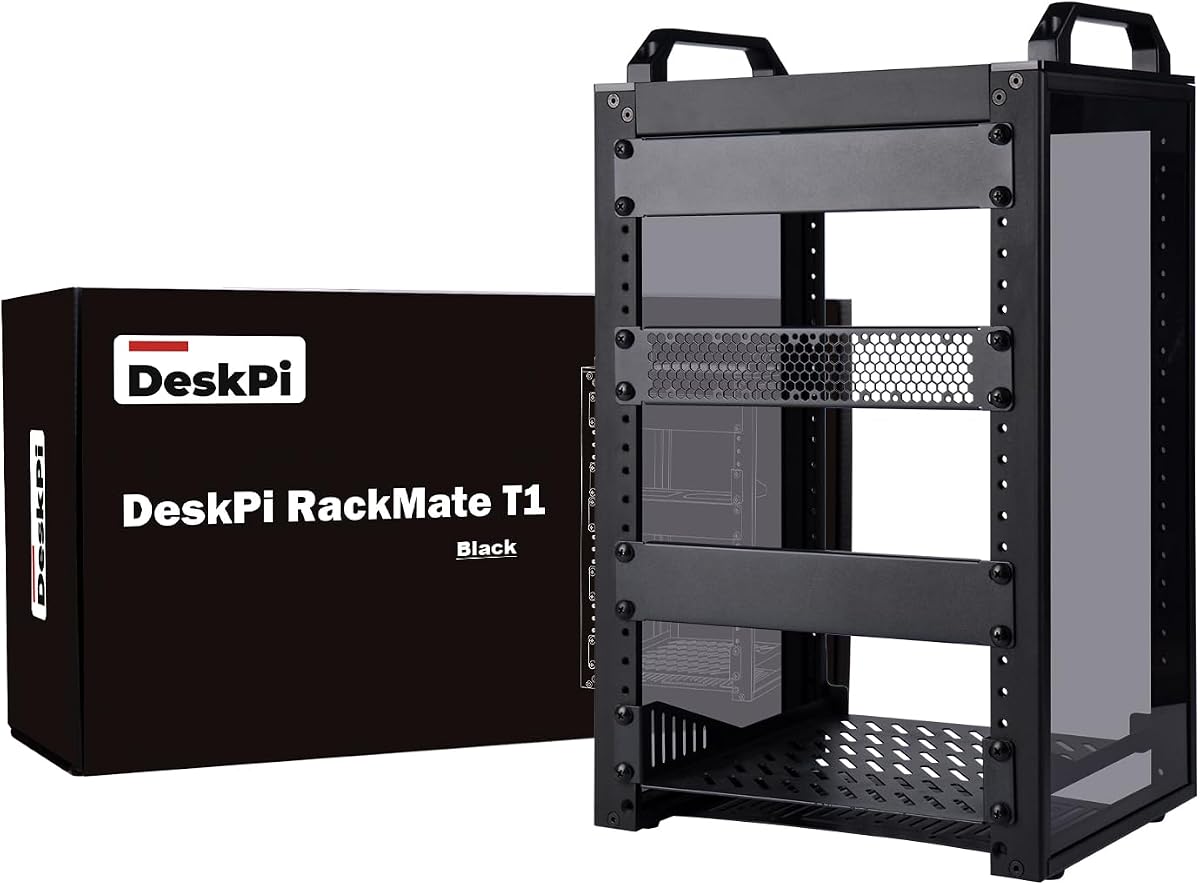
The GeeekPi DeskPi RackMate T1 is an 8U mini network rack designed for home labs, small offices, and desktop server arrangements. It receives a 4.6 rating and stands out for its combination of a 10-inch width, an open aluminum structure, translucent acrylic sides, and a relatively compact footprint of 11 by 7.8 by 16 inches. It is particularly appealing when desk space is limited but a more organized system than loose equipment is desired.
We may earn a commission when you buy through this link, at no additional cost to you.
Its open construction supports airflow and makes it straightforward to install, inspect, and reach equipment. The translucent side panels add dust resistance and let users observe status lights without opening a door. The frame uses an aluminum alloy chassis with an acrylic frame, while the stated 8U height provides room for compatible network devices, power hardware, or other compact equipment. The rack arrives flat-packed and includes the necessary assembly hardware.
The main limitation is the 10-inch format. It is not intended for standard 19-inch enterprise rack equipment, and builders should verify that each switch, patch panel, shelf, or power distribution unit supports 10-inch mounting. Its 7.87-inch depth also leaves less room for cable management and deeper server hardware than a full-size open frame. These restrictions are understandable for a desktop enclosure, but they make advance compatibility checks essential.
This is a strong general recommendation for a compact home lab built around 10-inch equipment, particularly a small cluster or home-automation setup. Its combination of visibility, airflow, modest dimensions, and eight rack units offers more flexibility than a tiny desktop shelf. Choose it when appearance and space efficiency matter, and avoid it if your equipment list already includes 19-inch devices.
The RackMate T1 turns a collection of small network components into a deliberate home-lab installation without requiring a full-height cabinet. Its 10-inch width is much easier to place beside or beneath a desk than a conventional 19-inch rack, while the open front provides quick access to connections and controls.
Translucent acrylic sides let you monitor indicator lights while helping limit dust exposure. The open frame promotes airflow around active equipment, making this design practical for switches, compact servers, and related devices that benefit from unrestricted circulation.
We may earn a commission when you buy through this link, at no additional cost to you.
This 6U mini server rack offers a straightforward way to organize a small network installation while solving the power-distribution problem at the same time. It has a 4.3 rating and includes a 10-inch rack-mount PDU with four outlets, reducing the need to hunt for a separate compatible power strip. Its open frame and semi-transparent panel balance airflow, visibility, and some protection from dust.
We may earn a commission when you buy through this link, at no additional cost to you.
The rack is designed for 10-inch rack-mount equipment such as patch panels, network switches, cable-management parts, and power strips. High-strength steel provides the main structural support, while acrylic side panels add visual separation without closing the frame. The included accessory set comprises the rack-mount PDU, a blank panel, a rack bracket, and mounting hardware, giving a new builder several pieces needed for a complete small setup.
Six rack units is less generous than the eight- and twelve-unit options elsewhere in this guide, and the 10-inch width will not accept standard 19-inch gear. The PDU is a meaningful convenience, but users should still confirm the number and type of plugs required by their devices. Semi-transparent coverage is also only a partial dust barrier rather than a sealed enclosure, so it should not be treated as one.
This rack is a good fit for a small home network, compact home-automation server, or audiovisual system that needs only a few mounted components. The bundled PDU makes it particularly convenient for builders who want power organized inside the enclosure. For more expansion headroom, choose a taller mini rack, but for a tightly defined six-device arrangement, this package offers an efficient combination of storage and power.
The included four-outlet PDU is designed for 10-inch racks and allows power connections to remain routed within the enclosure. That makes the kit especially useful for small labs where loose power strips would consume valuable desk space or interfere with cable management.
The open frame encourages heat dissipation, while the semi-transparent panel makes device indicators visible and provides some separation from surrounding dust. The result is practical for frequently monitored network equipment that should remain easy to service.
We may earn a commission when you buy through this link, at no additional cost to you.
The VEVOR 12U open-frame rack is built for home labs and small commercial spaces that need standard 19-inch equipment and more depth flexibility than a desktop cabinet. It has a 4.0 rating, 12 rack units of capacity, and an adjustable depth of 23 to 40 inches. That range allows builders to position equipment for better rear access, cable routing, or a closer wall fit.
We may earn a commission when you buy through this link, at no additional cost to you.
Construction uses carbon steel, with a stated ground-mounted load capacity of 500 pounds and a wall-mounted capacity of 150 pounds. The frame can be used freestanding or wall-mounted, giving it flexibility for a closet, office, retail location, or classroom. Four casters make the assembled rack easier to reposition, and an additional top panel creates useful space for lightweight items or equipment that does not require rack mounting.
The mounting method matters because the lower wall-mounted capacity is substantially below the freestanding figure. Its 4.0 rating is also the lowest among the ten products, although that does not erase the objective benefits of adjustable depth and dual installation styles. Users should make sure a wall installation is structurally suitable and avoid confusing a floor-standing maximum with a safe load for every installation method.
This rack is an excellent option for a lab using routers, modems, switches, patch panels, and AV equipment that follows the standard 19-inch format. It is particularly useful when equipment depth is inconsistent or rear clearance must be adjusted. The combination of 12U capacity, casters, and wall or floor placement makes it more versatile than a fixed-size mini rack.
The 23-to-40-inch adjustment range is the defining feature. Builders can shorten the rack for shallow network gear, extend it for deeper devices, and improve access to rear ports without moving the entire installation each time a component changes.
The same four-post frame can serve as a mobile floor rack or a wall-mounted installation. That versatility helps it fit both larger home labs and rooms where reclaiming floor space matters.
We may earn a commission when you buy through this link, at no additional cost to you.
The 15U open-frame server rack offers more vertical room than most compact home-lab options while adding useful storage surfaces. It carries a 4.2 rating and includes two 1U rack shelves, a top platform, a bottom platform, and hook-and-loop straps. Its stated dimensions are 19.7 inches long, 18.8 inches wide, and 32.3 inches high, with 18.35 inches of mounting-hole spacing.
We may earn a commission when you buy through this link, at no additional cost to you.
The cold-rolled steel frame is powder-coated to resist rust and corrosion, and the open, ventilated structure supports heat dissipation. It is compatible with server, stereo, switch, data, AV, and IT equipment, making it useful for a home lab that also handles audio or video components. Swivel casters add mobility even though the frame can be wall-mounted, and the shelves provide landing places for equipment that is not rack-mountable.
The rack is one of the taller conventional options in the list, so users need adequate vertical clearance and a safe way to move or install it. The listed 200-pound capacity should be considered alongside the actual weight of every device, shelf, cable bundle, and accessory. Mounting photographs and the available installation video are particularly important because the wall-mounted configuration should be set up correctly and safely.
This is a strong fit for a home media lab, stereo system, or IT corner that needs shelves alongside standard rack-mounted equipment. The 15U height provides comfortable growth room, while the platforms reduce the need for separate furniture. It is less appropriate for a confined desk area, but for a dedicated wall or floor zone, its organization and included accessories are compelling.
Two 1U shelves support devices that do not use standard rack ears, while the top and bottom platforms create additional staging areas. This makes the enclosure useful when a lab contains a mixture of switches, computers, media gear, and other components.
The powder-coated cold-rolled steel frame provides a durable structure, and the open layout encourages passive cooling. Vented shelving and an unobstructed front also reduce the likelihood of hot-air buildup during extended operation.
We may earn a commission when you buy through this link, at no additional cost to you.
The RackPath 12U network rack is a flexible open-frame enclosure for standard 19-inch equipment, with a 4.6 rating. It can be wall-mounted or left freestanding, making it a useful middle ground between a small desktop rack and a large server cabinet. Two 14-inch vented 1U shelves with rear support brackets are included, along with 30 10-32 mounting screws and eight M5 wood screws for wall installation.
We may earn a commission when you buy through this link, at no additional cost to you.
Reinforced cold-rolled steel and a black powder-coated finish support a stated capacity of up to 150 pounds. The 12U opening can accept network switches, patch panels, AV equipment, and other standard rack-mountable devices. The shelves are intended for heavier items such as modems, DVRs, and UPS units, with their vented construction supporting airflow and rear brackets improving load distribution.
Although the frame is described as wall-mountable or floor-standing, the supplied wall screws do not eliminate the need for sound wall anchoring and safe load distribution. The included shelf depth is 14 inches, so it may not support equipment with greater depth even though the rack itself can accept standard rack hardware. The 150-pound limit is suitable for many home labs but demands restraint when adding dense servers or storage arrays.
This rack is a good recommendation for a dedicated wall area, network closet, or home AV installation that uses 19-inch components. It offers useful mounting flexibility and a pair of reinforced shelves without requiring a full mobile cart. Choose it when a compact 12U footprint and visible equipment are priorities, but verify equipment depth and mounting conditions before purchase.
The two included shelves combine vented surfaces with rear support brackets. That makes them more useful for placing moderately heavy equipment on a shelf rather than relying on front-mounted rack ears alone.
The package includes rack screws and wall-mounting screws, reducing the need for separate hardware shopping. Builders still need suitable tools, a correctly positioned wall, and safe anchoring practices.
We may earn a commission when you buy through this link, at no additional cost to you.
This second GeeekPi listing represents the same 8U DeskPi RackMate T1 concept, including a 4.6 rating, a 10-inch width, and a compact open aluminum-and-acrylic enclosure. It is especially relevant to home-lab builders creating a neat cluster or home-automation arrangement where visual presentation matters as much as basic organization. The overall dimensions are 11 by 7.8 by 16 inches.
We may earn a commission when you buy through this link, at no additional cost to you.
The translucent acrylic sides provide visibility into the equipment while adding some dust resistance and keeping the frame visually light. The open construction makes installation and routine maintenance convenient, and the 8U capacity offers a useful balance between compact size and room for compatible equipment. The product arrives flat-packed with all necessary hardware for assembly.
The obvious constraint is that this is a 10-inch mini rack rather than a conventional 19-inch enclosure. It also provides only 7.87 inches of stated depth, so deep servers, vertically mounted power distribution, and elaborate cable management can be difficult. The translucent panels are not sealed panels, and users should not infer that the enclosure provides the environmental isolation of a closed cabinet.
For a small, appearance-conscious home lab built around compatible 10-inch equipment, this model is an attractive organizer. It works particularly well for a compact cluster or home assistant server and offers easier desktop placement than a full-size rack. Buyers should compare the ASIN with the related 4U and 12U DeskPi variants when they need a different capacity.
Translucent side panels, a slim 10-inch profile, and an open front give the rack a more refined appearance than a bare metal utility frame. It can serve as an intentional part of a home-lab setup rather than something hidden in a closet.
The open chassis gives quick access to mounted equipment and supports cooling around small servers. It is a practical configuration for a compact cluster where users frequently add, remove, or monitor nodes.
We may earn a commission when you buy through this link, at no additional cost to you.
The VIVO 25U freestanding server rack cart is the largest and most expandable enclosure in the comparison, earning a 4.7 rating. Four vertical support rails can hold servers, UPS units, patch panels, switches, and AV equipment. Its 25U capacity makes it suited to a growing home lab, a serious networking corner, or an installation that needs room for future expansion.
We may earn a commission when you buy through this link, at no additional cost to you.
Depth can be adjusted from 22 to 40 inches in precise one-inch steps, allowing builders to align equipment of different sizes. The open steel frame is rated to support up to 1,200 pounds. Four casters make the rack mobile across suitable floor surfaces, and included leveling feet allow it to stand securely once its final position is selected. Assembly hardware and step-by-step instructions are also provided.
The trade-off is physical scale. This product is not a compact desktop solution and will require meaningful floor space, clear routes for movement, and careful planning around wall clearance. A high load rating describes structural capacity rather than permission to overload the frame with dense equipment without considering mounting methods and floor conditions. Casters also need to be locked or replaced with feet when the rack should remain stationary.
Despite those considerations, the VIVO is a strong choice for a lab with ambitious expansion plans or substantial equipment. Its depth adjustment, 25U capacity, mobility, and exceptional listed weight support separate it from lighter wall and mini racks. It is overkill for a handful of network devices, but well matched to a full server-room-style home build.
Twenty-five rack units provide substantially more expansion capacity than the compact alternatives. That makes the cart useful for gradual lab growth without repeatedly moving equipment to a different enclosure.
Four casters allow the entire rack to be repositioned for cleaning, maintenance, or room reorganization. Included leveling feet create a stable stationary configuration once the cart reaches its intended location.
We may earn a commission when you buy through this link, at no additional cost to you.
The 8U 10-inch desktop mini rack is a space-conscious enclosure for home labs that need organized rack mounting without a full-size cabinet. It has the highest listed rating in the comparison at 4.8 and measures 10.4 by 9.4 by 16.6 inches. Its 10-inch width allows it to fit into tighter workspaces while still providing eight rack units for compatible networking and electronic equipment.
We may earn a commission when you buy through this link, at no additional cost to you.
The open frame is made from cold-rolled steel, and a reinforced rack shelf improves support for mounted equipment. The open structure promotes airflow, while transparent panels provide visibility of device indicators and some protection from dust. It is designed for 10-inch rack-mountable patch panels, network switches, cable organizers, and power strips.
The accessory package includes a blank panel, a brush panel, a rack shelf, and mounting hardware. The brush panel can help block airflow through an unused opening, while the blank panel covers other spaces. Even so, the design remains limited by the 10-inch width and 9.45-inch depth, so it cannot directly accept standard 19-inch rack equipment or particularly deep server chassis.
This is one of the most attractive choices for a small home network, compact home assistant installation, or space-constrained desk lab. Its 4.8 rating, open construction, and included panel accessories create a strong feature set without requiring a larger open frame. It is ideal when every dimension matters and all planned hardware can use the 10-inch format.
Eight rack units are a meaningful amount of capacity for a desktop enclosure. Combined with the narrow 10-inch profile, they let a builder consolidate switches, power products, and small systems without surrendering most of the work area.
The included blank and brush panels let users close selected openings while permitting controlled cable passage where needed. These small accessories support a cleaner installation and help manage dust and airflow.
We may earn a commission when you buy through this link, at no additional cost to you.
The GeeekPi DeskPi RackMate T2 is the most substantial of the compact 10-inch racks in the guide. It has a 4.8 rating, 12 rack units of capacity, and overall dimensions of 11.02 by 10.23 by 23.22 inches. The aluminum-alloy and acrylic-frame construction gives it a refined appearance, while the translucent sides let users observe the equipment inside.
We may earn a commission when you buy through this link, at no additional cost to you.
Compared with an 8U mini rack, the T2 offers more vertical expansion and a deeper stated rack depth of 10.23 inches. That extra room can make cable routing and equipment placement easier, particularly for a home assistant server, a small cluster, or a mixed network build. The open front continues to support cooling, quick installation, and routine maintenance, and the 12U height follows the standard rack-unit proportion.
Compatibility remains the defining constraint. The product information explicitly notes that it is designed for 10-inch form factors and is not compatible with standard 19-inch enterprise equipment. Its greater height also makes it less suitable for a small desk than the 8U alternatives. Users should treat the stated dimensions as a planning guide and verify the clearance of their intended location before assembly.
This rack is a premium-style choice for a home lab that wants a polished compact enclosure with more room than an 8U model. It is best suited to builders assembling around 10-inch switches, power hardware, and compact servers. If those are the intended components, its 12U capacity, visibility, and deeper format create a more flexible foundation than a very small desktop enclosure.
The aluminum-alloy chassis and acrylic frame create a clean enclosure that can remain visible in a home office or entertainment area. Translucent sides preserve that presentation while allowing quick visual checks of operating status.
Twelve rack units and a 10.23-inch stated depth offer a meaningful upgrade in usable space without moving to a full 19-inch cabinet. This balance is useful for home automation and cluster projects that need room to grow.
We may earn a commission when you buy through this link, at no additional cost to you.
The AxcessAbles 8U network rack is a mobile 19-inch enclosure designed for AV, networking, computer, server, and home-theater equipment. It has a 4.5 rating, real front and rear rack rails, and an open front and back for straightforward access. Vented side panels provide some dust protection while allowing users to view the equipment, and the frame supports gear up to 18 inches deep.
We may earn a commission when you buy through this link, at no additional cost to you.
Locking three-inch casters allow the rack to move across carpet and then hold its position. The listed weight capacity is 330 pounds with the wheels and 440 pounds without them. A 1U blank panel is included, along with packs of 5mm and 6mm screws for American and European rack-mount standards. The included screwdriver and preassembled wheels simplify preparation, although the rack still requires assembly.
Its 18-inch depth limit is the main concern for modern server builders because some rack-mount systems extend farther back than that. The open rear also provides convenient service access, but buyers need to plan for cable bends and airflow around deeper equipment. Because the rating is calculated with and without wheels, the lower wheeled figure is the relevant limit while the casters are attached.
This rack is well suited to a home theater, DJ studio, sound room, or mobile AV lab where standard 19-inch equipment needs to be grouped and moved. It is less appropriate for deep enterprise servers. For lighter media components, patch panels, switches, and shallow network hardware, however, its locking mobility and broad screw compatibility make it a versatile organizer.
The three-inch casters make it possible to roll an organized rack into position for maintenance or equipment changes. Locking them once installed keeps the rack stable during normal use.
Support for both 5mm and 6mm rack screws accommodates American and European standards. The included hardware is particularly useful for mixed AV and IT collections where different equipment may use different screw dimensions.
We may earn a commission when you buy through this link, at no additional cost to you.
The right home-lab rack depends on equipment format, available space, expected growth, cooling needs, and how often the system will be serviced. Begin with the hardware you already own, then select a rack that can accommodate it without forcing awkward mounting or cable routing.
Rack width is the first compatibility filter. The GeeekPi T1, T2, 6U mini rack, and 8U desktop mini rack support 10-inch equipment, while the VEVOR, 15U open frame, RackPath, VIVO, and AxcessAbles products use the standard 19-inch format. A 10-inch enclosure can save space, but it cannot accept 19-inch switches, patch panels, or servers without an unsuitable adaptation. Measure the actual mounting ears and hardware before selecting a compact rack.
Rack capacity is expressed in units, with one unit representing 1.75 inches of vertical mounting space. The list ranges from 6U to 25U, but usable space can be reduced by fixed panels, power distribution, cable management, and equipment mounted with gaps. Add the rack-unit height of every device, then leave room for future expansion and the routing of power and data cables.
Rack depth determines which chassis can fit and whether rear connectors remain accessible. Compact 10-inch models provide approximately 7.87 to 10.23 inches of stated depth, while the larger open frames extend considerably farther. AxcessAbles supports equipment up to 18 inches deep, and the VEVOR and VIVO offer adjustable ranges. Compare usable rack depth with the full body of each device, including connectors, handles, and cable bend requirements.
A home lab can use a desktop-sized mini rack, a wall-mounted frame, a floor-standing cabinet, or a rolling cart. The 10-inch models are suited to desks and tight rooms, while the 15U and 25U products need substantial vertical clearance. Wall mounting can reclaim floor area, but floor-standing racks are easier to move and expand. Measure the location, doorway widths, ceiling height, and service routes before ordering.
Most products use an open frame to promote airflow. The mini racks add semi-transparent or transparent panels that provide visibility and some dust resistance, while closed cabinets offer the greatest physical protection. Check whether the supplied shelves, blank panels, or brush panels could block ventilation. Position sensitive equipment so front and rear vents remain unobstructed, and consider room-level cooling if the hardware produces substantial heat.
Published capacity figures range from 150 pounds for the RackPath to 1,200 pounds for the VIVO, with other listed limits in between. Do not select solely by the highest number. Include servers, storage, UPS systems, shelves, power distribution, and cable weight, while leaving a reasonable margin. For wall-mounted racks, use the applicable wall-installed rating and confirm that the wall structure can support the complete load.
The included accessories can materially improve the setup. The 6U mini rack comes with a four-outlet rack PDU, blank panel, and bracket. The 8U desktop rack includes a shelf, blank panel, brush panel, and hardware. RackPath supplies vented shelves and mounting screws, while AxcessAbles includes both screw standards and a screwdriver. Check whether the essential pieces for your chosen layout are actually included.
Home labs change over time, so service access matters as much as initial capacity. Open fronts and rears make equipment easier to remove, while transparent panels improve visual troubleshooting. A deeper chassis provides more room for cables, and extra rack units allow future devices to be added without replacing the enclosure. For larger systems, casters and adjustable depth make expansion more convenient.
Begin by inventorying every device, adapter, shelf, power strip, and patch panel. Confirm that each item uses the correct rack width, fits within the available rack units, and is shallower than the usable mounting depth. Assemble the rack in an open area, install the required mounting hardware, and use the supplied instructions to tighten cage nuts, rails, shelves, brackets, and panels securely.
Load lighter and shallower equipment first when practical, while distributing heavier devices across supported shelves and brackets. Route power and data cables separately where practical, leave service loops behind equipment, and avoid sharply bending cables. Secure loose cords with appropriate ties or hook-and-loop straps, but do not bundle cables so tightly that their connectors are strained.
Periodically check that casters are locked or leveling feet are stable, screws remain tight, and equipment has not been pushed beyond its mounting depth. Dust the rack and panels with a dry, non-abrasive method, inspect cable routing for heat or strain, and keep vents unobstructed. Before adding new hardware, confirm the load, rack-unit count, electrical requirements, and cooling demands still fit the planned layout.
No, not without an unsuitable or specially designed adapter. The 10-inch racks in this guide are intended for native 10-inch equipment, while the other products support standard 19-inch rack hardware. Check the mounting-ear width and product specifications before buying, because a shared rack-unit number does not mean the two formats are interchangeable.
An open frame generally provides easier access and better passive airflow than a closed cabinet. It also makes it easier to see cables and indicator lights, although it offers less protection from accidental contact and dust. Closed cabinets are worth considering for equipment that needs physical isolation, while open frames suit network gear that benefits from cooling and frequent servicing.
Add the rack-unit height of every device you plan to mount, including switches, patch panels, power distribution, UPS units, and blank panels. Leave additional space for airflow, cable management, and future hardware. A compact installation may fit comfortably in 8U, while a growing lab with servers and storage is better served by 12U, 15U, or 25U.
Only if the product is specifically designed for wall installation. The VEVOR, 15U open frame, and RackPath products list wall-mount options, but the load limit can differ from the freestanding limit. Use appropriate anchors, confirm the wall can support the complete assembly, and follow the installation instructions to protect equipment and people.
Wheels are valuable for larger systems, home theaters, and AV installations that may need to move for cleaning, maintenance, or room reconfiguration. They are less useful for a small desktop rack and add weight to the structure. If the rack includes casters, lock them once it is positioned or use its leveling feet for a stable stationary setup.
Keep the front and rear of each device unobstructed, avoid using solid panels over active equipment, and organize cables so they do not block vents. Open frames and vented shelves promote passive airflow, but adequate room ventilation and suitable active cooling may still be needed for dense servers or storage systems.
Rack screws vary by standard and device. The AxcessAbles rack supports both 5mm and 6mm mounting screws, while other racks include their specified hardware. Always compare the screw thread and head size with the equipment, and obtain compatible fasteners rather than forcing an incorrect screw into a cage nut or rail.
Included shelves can save time and make the rack more useful for equipment that does not have standard rack ears. They are especially helpful for UPS units, modems, DVRs, and other moderately heavy devices. Confirm shelf depth, rear support, and load suitability, and check whether adding shelves reduces usable rack-unit space.
The GeeekPi DeskPi RackMate T1 is the most versatile compact pick in the guide, combining 8U of capacity, a 10-inch desktop format, open airflow, and translucent sides. The 8U 10-inch desktop mini rack offers an even higher listed rating and useful panel accessories, while the RackMate T2 delivers 12U and a deeper, more polished enclosure for 10-inch builds.
For a standard home lab, compatibility should come before size or appearance. Choose a 19-inch open frame when your equipment uses 19-inch mounting hardware, and use the VEVOR or VIVO when adjustable depth and larger capacity are valuable. Select a wall rack when floor space is precious, and choose casters when the equipment collection is large enough to justify moving the entire installation.
Finally, check the current listing for dimensions, included components, load ratings, and equipment compatibility before ordering. Product availability and prices can change, and the correct rack will ultimately be the one that fits your actual devices, room, cooling plan, cable routes, and expected growth.