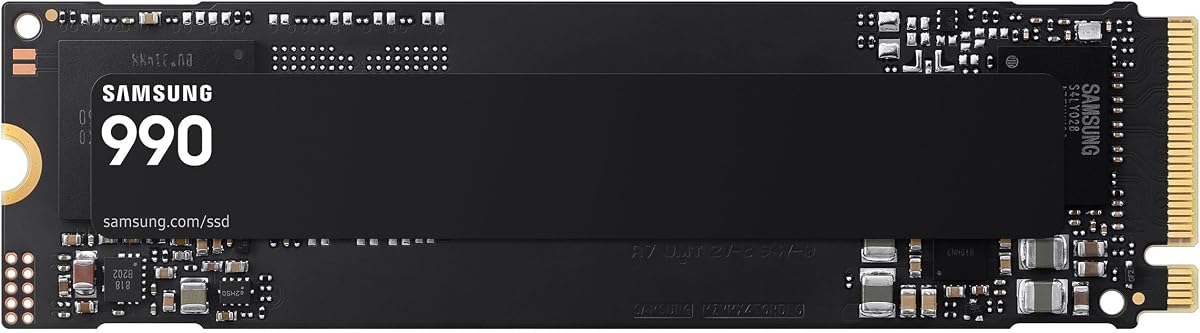
Samsung SSD 990 1TB
4.8Editor score
Up to 7,150 MB/s reads
Up to 6,450 MB/s writes
Power-conscious 1TB design
Our expert guide compares the 10 best NVME SSDs for Linux, covering PCIe generations, capacities, endurance, thermals, software, and Linux compatibility.
NVMe SSDs are among the most effective upgrades for a Linux system because they reduce application load times, accelerate file transfers, and make multitasking feel more responsive. A capable drive also matters for Linux users who work with virtual machines, containers, large repositories, creative files, or extensive game libraries.
The following recommendations compare ten M.2 NVMe models based on their stated performance, capacities, power characteristics, thermal features, management utilities, and potential fit within Linux-oriented systems. We consider PCIe 4.0 and PCIe 5.0 options, consumer and creator workloads, and drives suitable for laptops as well as desktop builds.
Each review identifies the strongest reason to consider a particular SSD and the compromises that buyers should understand. The list also shows how changing prices and platform conditions can alter the value equation, so readers should verify current listings and Linux hardware compatibility before purchasing.
4.8Editor score

4.7Editor score

4.7Editor score
This side-by-side comparison covers all ten recommended NVMe SSDs, highlighting their interfaces, stated speeds, capacities, and most relevant platform features for Linux users.


The Kingston NV3 1TB is a 4.7-rated M.2 2280 NVMe SSD aimed at users who want responsive PCIe 4.0 storage without moving directly to the most expensive drives. Its stated performance of up to 6,000 MB/s sequential reads and 4,000 MB/s writes is more than sufficient for booting Linux, loading applications, transferring project files, and keeping a game library accessible.
We may earn a commission when you buy through this link, at no additional cost to you.
Its Gen 4×4 interface supports a modern NVMe path, while the listed low-power characteristics suit both desktop and compatible laptop installations. The included Acronis cloning software is particularly useful when migrating a Linux installation from an older drive. A five-year limited warranty also provides useful support for a drive expected to remain inside a system for several years.
The tradeoff is straightforward: the NV3 does not reach the sequential or random-performance figures of higher-ranked PCIe 4.0 models, and its 1TB capacity may be modest for extensive virtual-machine images, container layers, or large media collections. Buyers who mostly need fast everyday storage and boot responsiveness can accept those limitations without sacrificing the core benefits of NVMe.
This is a strong recommendation for a budget-conscious Linux desktop or laptop upgrade, especially when cloning tools and a long warranty matter. It is less compelling when a workstation must ingest sustained multi-gigabyte transfers or a collector needs more room. For those situations, the Samsung 990 PRO and Crucial P310 offer more headroom.
The NV3 can make a Linux system feel much more responsive by moving the operating system and frequently used applications onto NVMe storage. Its quoted speeds provide ample room for common desktop tasks, while low-power operation suits systems where energy efficiency matters.
Bundled Acronis cloning software simplifies the most demanding part of a typical upgrade: transferring an existing installation. Buyers should still create an independent backup and confirm that the selected cloning workflow supports their exact Linux layout.
We may earn a commission when you buy through this link, at no additional cost to you.
The Samsung SSD 9100 PRO 2TB combines a 4.7 rating with PCIe 5.0×4 performance of up to 14,700 MB/s sequential reads and 13,400 MB/s sequential writes. It is the clear high-end option in this guide, built for Linux workstations that need fast transfers, quick project access, and room for demanding applications or virtual environments.
We may earn a commission when you buy through this link, at no additional cost to you.
Samsung states that the 9100 PRO can deliver up to 1,850K random read IOPS and 2,600K random write IOPS. Those figures are particularly relevant when many small files must be located and manipulated. Its 5nm controller is also claimed to improve power efficiency by as much as 49% over the 990 PRO, while advanced thermal control is intended to maintain performance during heavy work.
The main limitation is platform compatibility. A PCIe 5.0 M.2 slot, appropriate CPU support, a compatible motherboard, and a thermal solution may be needed to realize the advertised advantage. In a PCIe 4.0 system, the drive can still be used, but buyers should not expect its highest headline speed in that environment.
Despite the premium position, the 2TB capacity makes this a compelling drive for video editing, AI-related file handling, large development projects, and high-end Linux workstations. Choose the 9100 PRO 2TB when the hardware can exploit PCIe 5.0 and sustained performance matters more than minimizing the purchase cost.
High sequential and random performance makes the 9100 PRO 2TB well suited to large media libraries, code repositories, virtual machines, and projects with many small files. The extra capacity also reduces the pressure to constantly move data to slower secondary storage.
The controller's 5nm process and the drive's thermal-control features support both performance and efficiency. Linux workstations should still use an appropriate motherboard heatsink, particularly during sustained transfers that can expose the limits of any compact M.2 enclosure.
We may earn a commission when you buy through this link, at no additional cost to you.
The SanDisk Optimus 5100 500GB is a 4.7-rated PCIe 4.0 SSD designed for users who want a compact, power-conscious drive for a creator workstation or compatible laptop. Its M.2 2280 format and low-power architecture are useful for systems where efficiency and portability matter as much as raw throughput.
We may earn a commission when you buy through this link, at no additional cost to you.
The product family uses eighth-generation SanDisk BiCS QLC 3D CBA NAND, and the supplied details list capacities from 500GB through 4TB. The 7,100 MB/s read and 6,700 MB/s write figures are explicitly associated with larger capacities in the range, so buyers should avoid assuming that the 500GB version matches those exact numbers.
Capacity is the central compromise. A 500GB drive can hold a Linux installation, applications, and an active project, but it offers limited room for large footage, game installations, package caches, or virtual disks. The drive also offers an endurance rating of up to 1,200 TBW on the 4TB model, which should not be applied to the smaller capacity.
This is a reasonable choice for a lightweight Linux laptop or a secondary creator drive where low power consumption is valuable. For a primary system drive, a 1TB or 2TB model would offer much more flexibility. The included SanDisk Dashboard is also a point in favor, although Linux users should verify the availability and features of the relevant management tools for their distribution.
The power-efficient design makes the Optimus 5100 family relevant to Linux users who regularly move between outlets or work on battery. Its M.2 2280 form factor also makes it straightforward to install in compatible laptops and compact desktops.
Although the smaller model may be adequate for an operating system and select projects, creators should account for the rapid expansion of high-resolution media and caches. Larger members of the range provide more room while retaining the family's efficiency-oriented design.
We may earn a commission when you buy through this link, at no additional cost to you.
The Samsung SSD 990 PRO 2TB is a 4.7-rated drive that represents an excellent balance of speed, capacity, power efficiency, and platform maturity. It reaches up to 7,450 MB/s sequential reads and 6,900 MB/s writes, making it a strong all-round choice for a Linux desktop used for development, gaming, content creation, or general productivity.
We may earn a commission when you buy through this link, at no additional cost to you.
Samsung highlights a more than 55% random-performance improvement over the 980 PRO, along with as much as 50% better performance per watt. Those characteristics matter in compact systems because they can preserve responsiveness without asking the processor to compensate for a slower drive. The 2TB capacity also gives Linux users enough room to separate operating systems, games, virtual disks, and personal files.
The main limitation is that the 990 PRO is a PCIe 4.0 drive. A PCIe 5.0 workstation can deliver much higher sequential throughput with a Gen5 model, while the 990 PRO may cost nearly as much as some of those alternatives. Its standard form also benefits from a motherboard heatsink or other thermal solution, as many high-performance M.2 SSDs do.
For most Linux builders, the 990 PRO 2TB is easy to recommend. It offers excellent performance on widely available PCIe 4.0 hardware, a generous capacity, and a mature management ecosystem. Pick the 9100 PRO instead when a workstation has PCIe 5.0 support and the additional bandwidth will materially improve demanding workflows.
The combination of 2TB capacity and near-limit PCIe 4.0 throughput suits systems that need quick access to a broad mixture of applications and files. It is a particularly sensible primary drive for Linux desktops where users do not want to manage separate storage tiers.
The claimed performance-per-watt improvement is useful in laptops and power-conscious builds. A faster drive can shorten active tasks, while the drive's low-power design may complement systems that spend much of their time idle.
We may earn a commission when you buy through this link, at no additional cost to you.
The Crucial P310 2TB is a 4.7-rated PCIe 4.0 M.2 2280 drive with stated speeds of up to 7,100 MB/s reads and 6,000 MB/s writes. Its combination of a 2TB capacity, broad platform support, and standard Gen4 performance makes it a practical option for Linux desktops, laptops, and compatible handheld gaming systems.
We may earn a commission when you buy through this link, at no additional cost to you.
The supplied compatibility information is unusually useful. The drive is designed for laptops, desktops, and selected gaming consoles such as the ROG Ally X, Lenovo Legion Go, and AYANEO Kun. It is also backward compatible with PCIe Gen3 systems, allowing a newer drive to be installed on older hardware even when the full Gen4 bandwidth is unavailable.
Acronis Data Recovery Software is included, adding a potential aid for users who need assistance recovering files. However, Linux users should not assume that every feature of a Windows-oriented recovery package is available in their distribution. As always, a separate backup remains more dependable than relying on recovery software after a failure.
The P310 2TB is well suited to a general-purpose Linux installation, a large game library, or a creator system that does not require PCIe 5.0 bandwidth. It may be the most straightforward choice for a user who wants a recognized 2TB drive with broad device support and a strong speed rating. The 990 PRO offers more headroom, while this model focuses on familiar Gen4 performance.
Backwards compatibility with PCIe Gen3 systems makes the P310 useful in systems that are not ready for a platform upgrade. Linux users can install it now and still benefit from a substantial improvement over older storage.
Two terabytes is enough for an operating system, applications, active games, and a reasonable collection of media. It also provides more flexibility than a smaller boot drive without requiring the cost of the premium Gen5 options.
We may earn a commission when you buy through this link, at no additional cost to you.
The Samsung SSD 9100 PRO 1TB delivers the same headline PCIe 5.0 performance as the larger 9100 PRO model while offering half the capacity. With a 4.7 rating and stated sequential speeds of up to 14,700 MB/s reads and 13,300 MB/s writes, it is a strong choice for a compact Linux workstation focused on speed rather than maximum storage.
We may earn a commission when you buy through this link, at no additional cost to you.
The 5nm controller and advanced thermal control are important to the drive's positioning. Samsung claims power-efficiency gains of as much as 49% over the 990 PRO, while the 1,850K/2,600K random read/write IOPS ratings support fast handling of smaller files. Magician Software adds firmware updates, encryption options, and ongoing drive-health monitoring.
The capacity limitation is more important than it is for the 2TB version. A 1TB drive can comfortably serve as a Linux system drive for a focused set of applications, but it may fill quickly when used for game libraries, virtual machines, container images, or large media projects. Users should avoid assuming that the highest transfer rate compensates for insufficient space.
This 1TB configuration makes sense for a premium desktop with a faster operating system drive or a second high-speed scratch drive. It is most compelling when the machine has native PCIe 5.0 support and a proper thermal solution. For large libraries, the 2TB 9100 PRO or 990 PRO offers a more practical balance.
Linux creators and developers can use a fast 1TB NVMe drive for temporary files, active projects, and frequently accessed resources. The result is a system that remains responsive even when the underlying project includes large files or many small assets.
Samsung Magician provides a centralized place for firmware updates, encryption features, and health monitoring. Linux support and exact feature availability should be verified for the chosen distribution before relying on the utility for critical maintenance.
We may earn a commission when you buy through this link, at no additional cost to you.
The Acer Predator GM7 1TB combines a 4.7 rating with a 4.0 rating and PCIe 4.0 x4 performance of up to 7,400 MB/s reads and 6,500 MB/s writes. It is a compelling enthusiast option for compatible Linux systems, particularly when users value modern NVMe features, caching, and detailed drive-management tools.
We may earn a commission when you buy through this link, at no additional cost to you.
NVMe 2.0 support, Host Memory Buffer functionality, and SLC caching form the technical foundation of the GM7's performance claims. Its controller and flash are designed to balance speed with lower power and heat. The drive also uses thermal throttling and power management to control temperature automatically under heavy workloads.
Biwin Intelligence adds performance testing, data migration, drive cloning, and other management functions. Some of these operations may be more convenient in Windows, so Linux users should investigate command-line alternatives and current kernel support before purchasing specifically for the bundled utility. The standard M.2 2280 format and claimed laptop, desktop, and PS5 compatibility broaden its potential uses.
The GM7 1TB is a strong choice for a gaming-oriented Linux build or a performance desktop that already supports PCIe 4.0. It competes closely with the Samsung 990 PRO in headline speed, although Samsung offers a broader mature software ecosystem. Acer appeals to buyers who want NVMe 2.0 capabilities and Predator's feature set.
SLC caching and Host Memory Buffer support can make repeated application launches and file operations feel more immediate. These features are especially useful in systems with limited memory because they help smooth access patterns that would otherwise generate a higher volume of direct storage requests.
Thermal throttling and power management help the drive respond to changing temperatures during demanding transfers. Linux builders should still ensure airflow around the M.2 slot and add a suitable heatsink where sustained workloads are expected.
We may earn a commission when you buy through this link, at no additional cost to you.
The Samsung SSD 990 PRO 1TB is a proven high-performance option with a 4.7 rating and sequential speeds of up to 7,450 MB/s reads and 6,900 MB/s writes. It offers a more compact capacity than the 2TB 990 PRO without sacrificing the headline speed of that broader PCIe 4.0 family.
We may earn a commission when you buy through this link, at no additional cost to you.
Random performance of up to 1,400K read IOPS and 1,550K write IOPS makes the drive responsive across mixed workloads. Samsung also reports a 40% read and 55% write improvement in random performance compared with the 980 PRO, along with up to 50% better performance per watt. Its nickel-coated controller supports effective thermal control.
For Linux, Samsung Magician's health monitoring, optimization tools, and update features are useful, although users should confirm the current Linux experience. The drive also needs adequate thermal management, and the listed compatibility with the PCI-SIG D8 standard means buyers should verify the physical clearance of a thin laptop or compact desktop.
This 1TB version is a strong primary drive for a focused Linux workstation, gaming system, or development machine. It is less appealing when PCIe 5.0 is available, because the 9100 PRO offers much greater sequential bandwidth. Within the mature PCIe 4.0 category, though, its combination of speed, efficiency, and recognized management software remains difficult to dismiss.
The strong random-read and random-write figures benefit operating systems, development tools, and applications that access many smaller files. A Linux user can expect snappier launch times and more consistent behavior than a typical SATA or lower-end NVMe installation.
The nickel-coated controller and compact PCI-SIG D8 design help manage heat while preserving compatibility in thinner systems. Proper placement and airflow remain important, especially when the drive is expected to handle sustained write workloads.
We may earn a commission when you buy through this link, at no additional cost to you.
The Samsung SSD 990 1TB holds the highest numerical rating in this guide at 4.8. It combines up to 7,150 MB/s sequential reads, 6,450 MB/s writes, and as many as 700K/1,100K random read/write IOPS, giving Linux users a responsive and efficient drive for everyday computing.
We may earn a commission when you buy through this link, at no additional cost to you.
Samsung claims up to 38% better performance per watt than the 990 PRO, an appealing characteristic for laptops and efficient desktop builds. The drive supports active tasks such as loading games, installing updates, transferring high-resolution files, and exporting creative projects. Management tools provide firmware updates, encryption options, and continual health monitoring.
It does not lead the guide in absolute sequential speed, and 1TB is a modest capacity for a workstation containing multiple virtual machines or a large game and media collection. The performance-per-watt claim also does not replace a direct comparison across the user's particular workload. Nevertheless, the stated efficiency focus gives this model a distinct role.
The Samsung 990 1TB is our best budget-oriented top pick because it brings a high rating, modern speed, and management features without occupying the premium PCIe 5.0 tier. It is an excellent fit for a primary Linux drive in a general-purpose laptop or desktop, especially for users who value efficiency as much as maximum throughput.
The combination of high sequential throughput and capable random performance ensures that both large transfers and small-file operations remain responsive. That balance suits a Linux system used for browsing, development, communication, media playback, and general productivity.
The claimed 38% performance-per-watt improvement can benefit portable systems that balance responsiveness and battery life. Actual results depend on the host platform, workload, thermal environment, and Linux power-management configuration.
We may earn a commission when you buy through this link, at no additional cost to you.
The SanDisk Optimus GX 7100 1TB is a 4.6-rated PCIe 4.0 drive aimed particularly at gamers and users who want responsive storage for modern applications. Its quoted speeds of up to 7,250 MB/s reads and 6,900 MB/s writes place it close to the top of the Gen4 field, while random performance reaches up to 1M read and 1.4M write IOPS.
We may earn a commission when you buy through this link, at no additional cost to you.
Microsoft DirectStorage support can improve how compatible games access assets, and the integrated nCache Technology is intended to keep frequently used data readily available. The 1TB and 2TB capacities use eighth-generation SanDisk BiCS TLC 3D CBA NAND, while the broader family is offered in capacities up to 4TB. That combination of TLC NAND and strong performance is appealing for a gaming library.
The bundled management options are less clearly aligned with Linux. SanDisk Dashboard is described as Windows only, and its Game Mode should not be assumed to function in Linux. Users should rely on Linux-native tools such as SMART monitoring utilities and kernel-supported firmware mechanisms where appropriate. The 4.6 rating is also the lowest in the list, though it still represents a favorable customer response.
The GX 7100 1TB is a good option for a gaming-focused Linux desktop that already supports PCIe 4.0. It offers enough performance for quick game loading and strong random access without requiring a Gen5 platform. Buyers should verify DirectStorage game compatibility and the available Linux management path before finalizing the purchase.
Support for games that use Microsoft DirectStorage can make asset-heavy titles load more efficiently on compatible systems. Linux compatibility of each game remains a separate consideration, and the drive itself should be paired with a platform that can take advantage of the feature.
BiCS TLC NAND and integrated nCache Technology support a strong balance of sustained performance and responsiveness. The cache can be particularly useful for repeated access to active files, although users should maintain enough free capacity for caching to work as intended.
We may earn a commission when you buy through this link, at no additional cost to you.
Choosing an NVMe SSD for Linux requires more than comparing headline read speeds. Interface generation, capacity, power use, thermals, software, and intended workloads all influence whether a fast drive will feel fast in everyday use.
PCIe generation determines the theoretical bandwidth available to an NVMe drive. PCIe 4.0 x4 is the practical sweet spot for many modern Linux systems, while PCIe 5.0 x4 can deliver substantially greater sequential throughput on compatible workstations. A Gen5 SSD can operate in a Gen4 slot, but its most impressive specifications will not be available. Check the motherboard manual, CPU support, slot layout, and chassis clearance rather than assuming every M.2 slot supports the advertised speed.
Capacity should match how the drive will actually be used. A 500GB model may be sufficient for a lightweight Linux installation, while 1TB offers room for applications and an active game collection. A 2TB drive is more practical for virtual machines, containers, creative assets, and extensive archives. Account for filesystem overhead, package caches, and the need to leave some unused space for efficient SSD operation.
Sequential figures describe large, continuous transfers, while random IOPS indicate how effectively a drive handles scattered reads and writes. Linux desktop responsiveness depends heavily on random performance, but sustained sequential speed remains important for large archives, video files, and project assets. A drive with balanced figures is usually more versatile than one optimized only for a narrow benchmark scenario.
Fast NVMe drives generate heat, especially during long file transfers or write-intensive tasks. Look for thermal throttling, power management, and a controller designed to control temperature. Linux desktop users should ensure airflow around the M.2 slot, while workstation builders may need a motherboard heatsink or dedicated cooler. Advertised peak speeds generally reflect short favorable test conditions rather than every sustained workload.
Power efficiency is especially important in laptops and other portable Linux systems. Look for a drive described as low power, check its idle and active consumption, and consider how performance-per-watt claims are measured. A more efficient drive can complete tasks sooner, although the total system draw also depends on the CPU, display, memory, cooling, and power-management profile.
Management software can help with firmware updates, health monitoring, cloning, migration, and secure erasure. Some utilities are Windows-only, while others offer limited or changing Linux support. Linux users should confirm compatibility before purchasing and learn how to inspect SMART data, firmware revision, and filesystem health with native tools. A backup strategy should remain separate from the manufacturer's utility.
Every recommended drive uses the M.2 2280 form factor, but the available space around the module can differ between a desktop motherboard, laptop, handheld console, and compact enclosure. Check thickness, screw placement, heatsink clearance, and whether the device supports 2280 drives. Some systems also place M.2 slots behind other components or limit access after installation.
Endurance ratings indicate how much data a drive is designed to tolerate over its rated life. A drive used for temporary project files and a drive holding years of archival data do not face the same write load. Creators, developers, and users of virtualized environments should consider the workload rather than choosing solely by capacity and speed. Model-specific endurance figures should be checked for the exact capacity being purchased.
Before installing an NVMe SSD, back up important data, confirm that the computer supports a 2280 M.2 module, and verify whether the intended slot provides PCIe 4.0 or PCIe 5.0 x4. In Linux, identify the new drive with commands such as lsblk and inspect its partitions and mount points before making changes. Formatting and partitioning should be performed only after the correct device has been selected.
After installation, mount the new filesystem through the appropriate entries in /etc/fstab and assign it a stable name with a filesystem UUID rather than a temporary device path. When cloning an existing root or home partition, use a procedure that supports Linux filesystems and verify the boot configuration after switching drives. Keep at least one independent backup until the new installation has been tested thoroughly.
Monitor the drive's health, temperature, and firmware through Linux-native SMART tools and the relevant vendor utility when supported. Avoid sudden power removal, fill the filesystem completely, and provide adequate airflow or a heatsink for sustained workloads. Periodically check for firmware updates, but install them only after confirming the exact model and reviewing the release requirements.
Usually, yes. Linux supports the standard NVMe interface, but management and cloning software may be Windows-only. Check the drive's hardware requirements, firmware tools, and any encryption implementation before migrating. The operating system can normally be installed and used without relying on the bundled Windows application.
It can be worthwhile in a compatible workstation that regularly transfers large files or handles demanding storage workloads. Otherwise, a PCIe 4.0 drive may offer better value because most everyday tasks do not require Gen5 bandwidth. Confirm that the CPU, motherboard, slot, and cooling solution all support the full interface.
A 500GB drive can work for a focused installation with limited applications and files. A 1TB drive provides more practical room for games, development tools, and a modern desktop, while 2TB suits larger media libraries, virtual machines, and containers. Leave additional room for updates, package caches, and filesystem overhead.
A heatsink is strongly advisable for high-performance drives that may handle sustained writes or long transfers. Even drives with built-in thermal control benefit from airflow and a properly fitted thermal solution. The need is greater in compact desktops and laptops with limited ventilation than in a well-cooled tower.
Yes, using a Linux-compatible cloning workflow that accounts for the file system, partition layout, bootloader, and target hardware. The Kingston NV3 and Crucial P310 include Acronis-related software, but Linux users should confirm the exact tool and features available for their distribution. Keep a separate backup and test the cloned system before relying on it.
It can improve loading times, installation times, and access to large game libraries. The largest benefits generally appear with compressed or fragmented data and modern storage APIs, while already-fast games may show smaller frame-rate changes. A capable CPU, sufficient memory, and DirectStorage-compatible software also influence the result.
Linux provides native SMART information through utilities such as smartctl, while additional drive-specific monitoring may be available from the manufacturer. Users should check health attributes, temperature history, error counters, and firmware versions periodically. Monitoring does not replace regular backups.
It should operate at the older interface's supported speed when the slot and device are physically and electrically compatible. Check the M.2 form factor, protocol support, and keying before installation. The drive will not deliver its full advertised bandwidth in a system without a PCIe 5.0 x4 path.
The Samsung SSD 990 1TB stands out as the best budget-oriented top pick, pairing the guide's highest numerical rating with modern speed and strong power-efficiency claims. The Samsung 990 PRO 2TB is the more versatile all-round recommendation, while the Samsung 9100 PRO 2TB leads buyers with compatible PCIe 5.0 hardware toward premium performance and additional capacity.
Prioritize compatibility before speed. Confirm the M.2 slot, PCIe generation, physical clearance, Linux driver situation, and management software support. Then choose a capacity that comfortably holds your operating system, applications, and active files, and consider cooling if sustained workloads are likely. A well-matched PCIe 4.0 drive will usually serve more Linux users effectively than an incompatible premium model.
Prices and product availability change over time, so verify the current listing before buying. Compare the exact capacity, warranty, included accessories, and latest firmware details rather than relying on an old recommendation. With those checks in place, one of these ten drives can provide a responsive and dependable NVMe upgrade for a Linux system.