
Cosmo Mini 100
4.3Editor score
Compact smartphone-focused copy stand
Adjustable column and phone holder
Floating magnetic board included
This expert guide compares 10 copy stands for film scanning and photo digitizing, covering stability, camera support, alignment, portability, and device
A copy stand keeps photographs, film negatives, documents, and small objects flat while a camera records them from directly above. A useful model must provide stable positioning, repeatable alignment, and enough camera clearance to create consistent digital copies without the complexity of a full professional scanning system.
The products in this guide were compared using the supplied specifications, including base dimensions, support construction, camera capacity, adjustment ranges, alignment aids, and device compatibility. The list covers portable smartphone stands, more versatile camera copy stands, dedicated film-scanning equipment, and magnetic boards that supplement an existing setup.
Each review explains where that model is strongest, what compromises buyers should consider, and which users it suits best. The top selections include a budget-friendly Cosmo model, a highly rated Cosmo Mini 700, and a premium Kaiser system. Product availability and prices change, so check current listings before purchasing.
4.3Editor score

4.8Editor score

4.2Editor score
This side-by-side comparison highlights the base size, included alignment aids, camera support, and intended use of each copy stand. The differences reveal which products favor portability, large-format overhead photography, dedicated film duplication, or professional camera mounting.


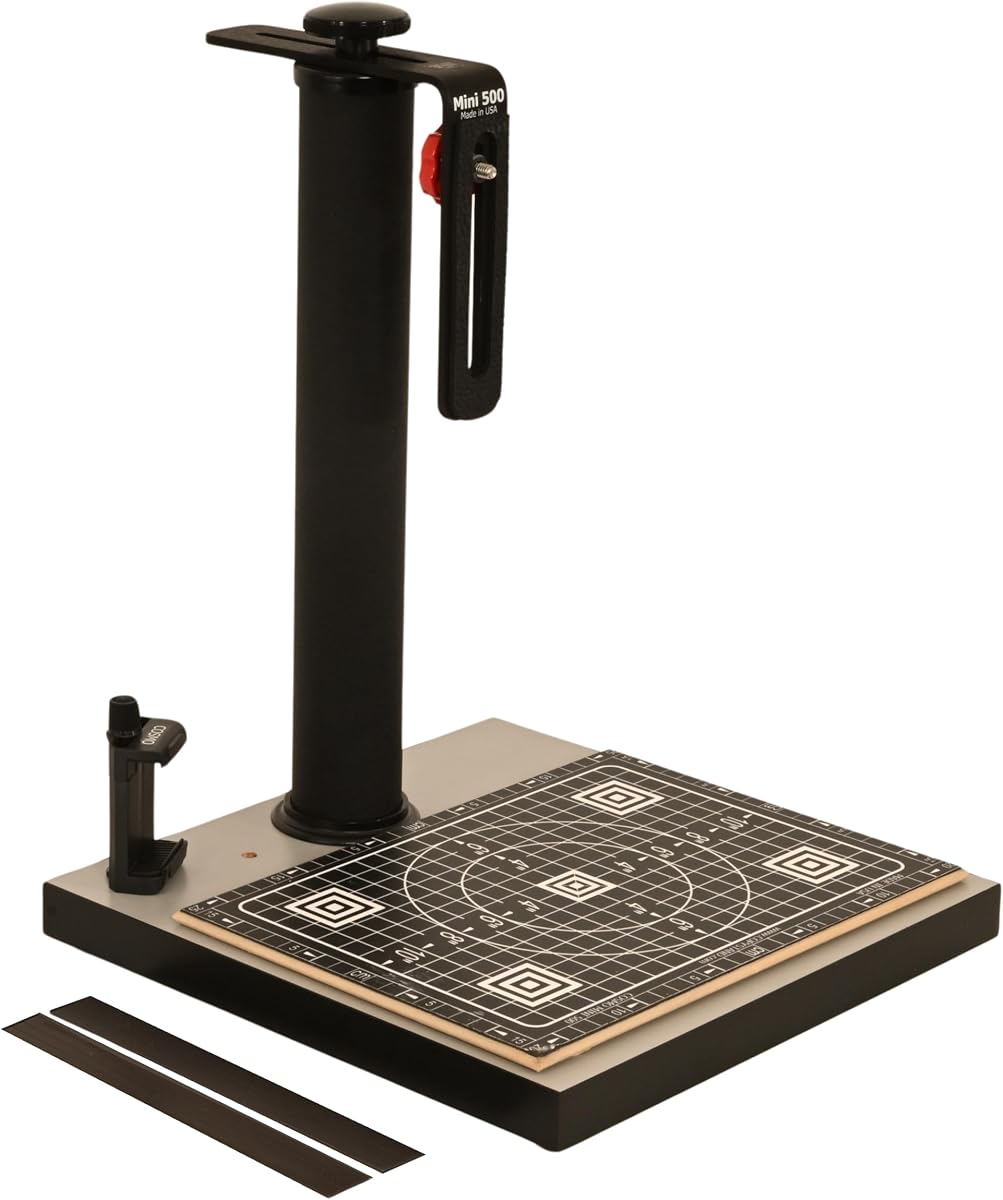
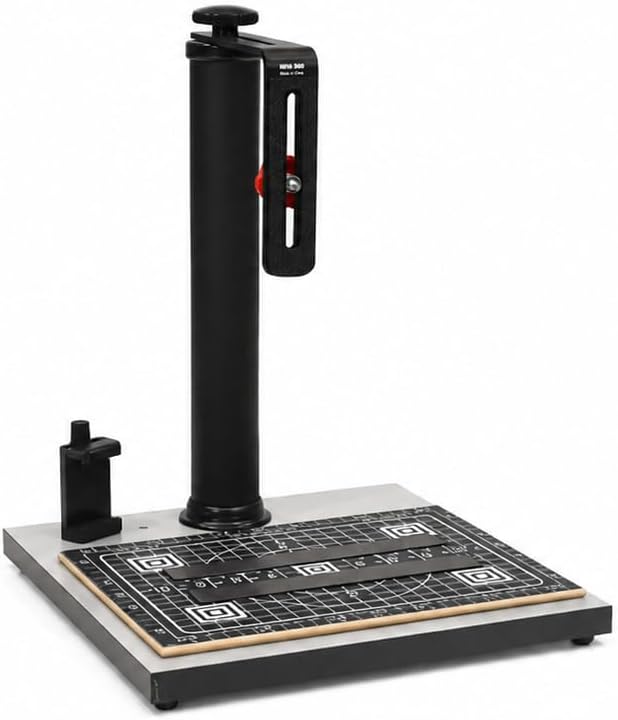
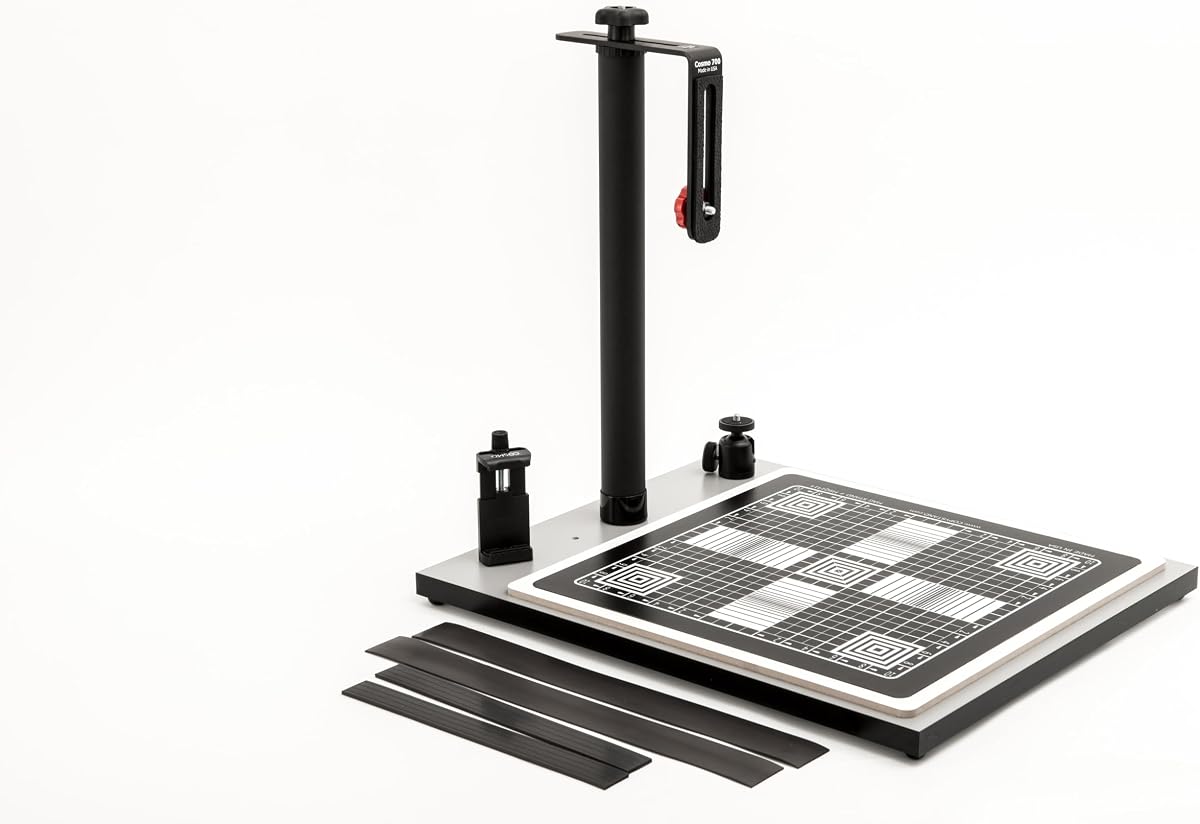


The Cosmo Mini 100 is a compact copy stand designed primarily for smartphone-based digitization of photographs, documents, checks, jewelry, coins, and other small objects. Its 4.3 rating reflects a generally practical design that combines a portable base, an adjustable support, and an included floating magnet board. It is a strong entry for home archives and casual users who want more control than a handheld phone photograph can provide.
We may earn a commission when you buy through this link, at no additional cost to you.
Its 10.5 by 8.5 by three-quarter-inch base uses a dark gray melamine finish, while the adjustable one-inch-diameter column extends from 11 to 16 inches. A center mounting hole is intended for compact, light-duty cameras under one pound, and a side hole helps align a smartphone over the working area. The aluminum L-bracket offers vertical and horizontal positioning, and the included phone holder accommodates most phones between 2.25 and 3.5 inches wide.
The included 9 by 7-inch Floating Magnet Board adds useful structure to the package. Two magnetic strips help hold originals flat, and the printed half-inch grid assists with alignment, focusing, sizing, and positioning. The main limitation is scale: the center camera hole is restricted to cameras under one pound, and the base is smaller than the working surfaces available on the larger Cosmo models.
Choose the Mini 100 when portability, straightforward smartphone capture, and quick setup matter more than large working space or support for a heavier camera. It is particularly appropriate for family photo digitization, document records, small collectibles, and mobile deposit workflows. For users who regularly photograph oversized artwork or a full-size camera body, one of the more substantial stands in this guide is the better investment.
The side base hole is designed to help position a smartphone camera over the center of the board, reducing the need for improvised placement. Combined with the phone holder and half-inch grid, it makes repeated captures more consistent without turning the process into a precision optical setup.
The compact base, folding-style support arrangement, and quick assembly make the Mini 100 easier to store than larger copy stands. The floating magnetic board remains a notable addition because it helps users position smaller originals consistently while protecting the base from direct contact.
We may earn a commission when you buy through this link, at no additional cost to you.
The Cosmo Mini 300 is a compact copying tool for old photographs, documents, and other originals that need overhead digital capture. It earns a 4.2 rating and stands out by supporting cameras up to three pounds as well as compatible smartphones. That broader camera allowance makes it a more flexible choice than the smaller Mini 100 while retaining a relatively manageable footprint.
We may earn a commission when you buy through this link, at no additional cost to you.
The gray melamine base measures 12 by 9.5 by three-quarter inches and includes a center camera hole plus a side opening for smartphone alignment. A reversible anodized aluminum L-bracket adjusts vertically from seven to 17 inches, with horizontal holes spaced one inch apart. The support uses a 1.5-inch steel tube with a durable black wrinkle powder coating, giving the system more rigidity than a lightweight all-plastic frame.
Its 10 by 7.5-inch Floating Magnet Board includes two magnetic strips and a half-inch alignment grid. The board can be moved to find an attractive or useful position for the original, a useful feature for photographs that do not need to be centered precisely in the frame. However, the manufacturer explicitly positions this stand for amateur and hobbyist use rather than professional workflows.
The Mini 300 is a sensible middle choice for people who want more camera support and a larger magnetic board than the Mini 100 without moving to the footprint of a Mini 500 or Mini 700. It suits family archives, classroom projects, artwork reproduction, and small-business document imaging. Users needing extensive large-format capacity or vibration control for a heavier professional camera should consider a Kaiser or dedicated film stand.
Supporting cameras up to three pounds opens the stand to more mirrorless bodies, compact cameras, and related imaging setups. The 1.5-inch steel column also provides a firmer foundation for repeat positioning, although it adds more weight and bulk than the Mini 100.
The floating board helps keep prints flat while allowing the subject to be moved within the larger base. Its grid remains useful for framing, while the magnetic strips reduce the need for tape or other temporary fasteners that could lift the original.
We may earn a commission when you buy through this link, at no additional cost to you.
The Copy Macro Stand is explicitly designed for film digitization, including 135 and 120 negatives and slides. It has no supplied customer rating, but its feature set distinguishes it from general-purpose overhead photography stands. A sturdy metal base, adjustable leveling feet, quick-release plate, and integrated bubble level make it a purpose-built option for users who regularly work with film.
We may earn a commission when you buy through this link, at no additional cost to you.
The aluminum alloy frame supports heavier camera and lens combinations, while the 240 by 200-millimeter base provides a compact platform for negatives and slides. Vertical adjustment on the quick-release mounting plate helps frame different formats, and the bubble level provides a visible way to confirm that the camera is not tilted. The quick-release clip accepts DSLRs, mirrorless cameras, and L-brackets.
Its primary compromise is working area. A 240 by 200-millimeter base is appropriately sized for strips of negatives and individual slides, but it does not provide the broad surface needed for oversized photographs, documents, artwork, or food photography. The stand is also less versatile than full-size copy stands when the primary goal is broad overhead capture.
Buy this model if film duplication is the central activity and you want a compact, metal, levelable system rather than a general photography table. It is a sensible match for photographers converting negatives or producing digital slide copies with a camera. For mixed-format work, select a larger Cosmo stand or a Kaiser system with a broader base and more flexible camera support.
The built-in bubble level and adjustable feet are especially useful when a camera, macro lens, and close focusing distance leave little room to correct perspective digitally. Confirming level before each session helps maintain a square and repeatable setup.
The removable mounting plate makes it easier to switch among a DSLR, mirrorless body, or L-bracket. Its vertical adjustment also allows the camera to be framed more closely for small film formats without relocating the entire stand.
We may earn a commission when you buy through this link, at no additional cost to you.
The Kaiser RS 2-XA is a traditional camera copy stand with a 4.6 rating, the highest confirmed customer rating among the listed products. It is designed around a non-reflective matte gray base printed with a fine grid and inch and centimeter scales. The measuring references make it especially useful when reproductions need consistent dimensions, framing, or alignment.
We may earn a commission when you buy through this link, at no additional cost to you.
A matte black anodized aluminum column includes inch and centimeter scales, while the height-adjustable camera arm can rotate 180 degrees. The arm also provides approximately 2.7 inches of horizontal adjustment between itself and the column. A 1/4-inch mounting thread supports smaller SLR cameras, digital cameras, and CCD or CMOS cameras, and optional lighting kits are available for setups that require more even illumination.
The maximum stated load is 3.3 pounds, so this is not intended to carry the heaviest professional body-and-lens combination. Its strengths instead lie in the refined positioning system, scale markings, and non-reflective surface. The adjustable arm and rotatable column give a photographer more direct control over camera angle and working distance than a simple phone holder.
Choose the RS 2-XA when accurate alignment, measured positioning, and repeatable overhead framing matter. It suits photographers working with smaller cameras, detailed prints, documents, and controlled studio projects. Users who need greater load capacity or a larger working surface should examine the Kaiser RS1, while filmmakers and multi-device creators may prefer the included ball head on the Cosmo Mini 700.
Fine grid printing on the base and scales on the column make it easier to repeat a setup. These references are particularly valuable when scanning collections, creating catalog images, or producing copies that need consistent placement.
The rotatable column and adjustable horizontal arm distance allow the camera to approach the subject from more than one position. That flexibility makes the stand useful for finding a clear angle without moving delicate originals on the base.
We may earn a commission when you buy through this link, at no additional cost to you.
The Cosmo Mini 500 is a versatile overhead stand for digitizing photographs, slides, negatives, artwork, calligraphy, sketches, tattoos, restorations, presentations, and video projects. Its 4.2 rating and extensive intended uses distinguish it from models focused primarily on phones or film. A 12 by 12 by one-inch base gives it a stable, square working area.
We may earn a commission when you buy through this link, at no additional cost to you.
The integrated phone holder supports smartphones between 2.25 and 3.5 inches wide, while the center mounting hole accepts cameras weighing up to three pounds. A reversible anodized aluminum L-bracket adjusts from nine to 19 inches vertically and offers approximately four inches of horizontal travel. The two-inch fixed steel column is finished with black wrinkle powder coating for rigidity and durability.
The included 8.5 by 11.5-inch Floating Magnet Board has a half-inch precision grid and two magnetic strips. It is particularly valuable for letter-size documents, prints, artwork, and slides. Some negative or transparent-material applications may require an LED light box, which is not included, so those tasks need additional equipment.
This Mini 500 is a strong all-around choice for home studios, students, crafters, and creative professionals who need more working area than the Mini 100 or Mini 300. It remains explicitly intended for amateur and hobbyist use rather than professional copying. A buyer who needs large-format originals, a larger magnetic surface, or especially smooth ball-head positioning should move up to the Mini 700.
The wide application range comes from the combination of an integrated phone holder, camera mounting hole, substantial base, and magnetic board. That makes it easier to consolidate document capture, image reproduction, and overhead creative projects in one setup.
The thick base and two-inch steel column help reduce movement during long sessions. The bracket's broad vertical and horizontal adjustment ranges make it practical for different camera heights and for working around the edges of larger subjects.
We may earn a commission when you buy through this link, at no additional cost to you.
This Cosmo Mini 500 listing offers the same general copy-stand concept as the standard Mini 500 but with a larger 13 by 12.5 by three-quarter-inch base. It has no supplied customer rating, so the comparison relies on its stated construction and capabilities. The wider surface is the central difference, making the model more accommodating for documents, photographs, and small objects.
We may earn a commission when you buy through this link, at no additional cost to you.
Its adjustable bracket moves vertically from nine to 19 inches and horizontally over approximately four inches. A two-inch powder-coated steel column supports the bracket, while the center hole and side opening support cameras or smartphones. Cameras may weigh up to three pounds, and the phone holder accommodates most devices between 2.25 and 3.5 inches wide.
The Floating Magnet Board measures 8.5 by 11.5 inches and includes a half-inch grid and two magnetic strips. This board can be repositioned on the wider base, which gives the user some freedom in arranging the subject. As with other Cosmo Mini 500 variants, an LED light box may be needed for certain negative or transparency workflows and is not included.
Consider this listing if you want the familiar Mini 500 support system with extra base width. It is appropriate for mixed creative work, print reproduction, document capture, and smartphone overhead photography. Those wanting an even larger magnetic area and ball-head positioning should evaluate the Mini 700, while buyers focused specifically on film should consider the dedicated macro stand.
The larger base provides more space for arranging the magnetic board and accessories around a subject. That makes the stand less restrictive when working with documents, wider prints, or a composition that does not fit neatly on a smaller board.
The nine-to-19-inch vertical range, four-inch horizontal travel, phone holder, and camera hole make this a flexible platform for different imaging devices. It combines a stable steel column with a lightweight, portable overall format.
We may earn a commission when you buy through this link, at no additional cost to you.
The Cosmo Mini 700 is built for large overhead projects, including big photographs, documents, plated food, jewelry, coins, collectibles, and other three-dimensional objects. It has no supplied customer rating, but its large magnetic board, 15.5 by 18.5-inch base, and included ball head make it one of the most capable general-purpose models in this guide.
We may earn a commission when you buy through this link, at no additional cost to you.
The 15 by 15-inch Floating Magnetic Board provides a 14 by 14-inch magnetic working area, a clear advantage when photographing larger prints, documents, dishes, or collections. Four magnetic strips keep originals flat, and half-inch grid lines assist with focusing, sizing, and positioning. The base includes a center hole for cameras and a side hole for smartphone alignment.
Its 1.5-inch-diameter, 16-inch powder-coated steel column uses an aluminum L-bracket with multiple vertical and horizontal positions. The included ball head allows smoother angle adjustment, while the phone holder supports devices from 2.25 to 3.5 inches wide. DSLR cameras under three pounds are also supported. At 15.5 by 18.5 by 17 inches and 14 pounds, it is substantially less portable than the smaller Cosmo stands.
Choose the Mini 700 when a large subject area, flexible camera angle, and comprehensive working platform are the priority. It suits photography enthusiasts, art students, food creators, and online sellers who need one station for several kinds of overhead work. It is not labeled as a professional copy stand, and its size makes permanent storage and transport less convenient.
The 14-inch magnetic area creates room for oversized documents, large prints, plated meals, and grouped objects. Four strips improve subject control, while the printed grid helps establish consistent dimensions and framing across a series of images.
The ball head allows the camera or phone to be angled with finer control than a basic fixed holder. It is useful when working around raised objects, but users should keep the camera axis as parallel to the subject as possible for flat copy work.
We may earn a commission when you buy through this link, at no additional cost to you.
This Cosmo Mini 700 listing has a 4.8 rating, making it the highest-rated option with a confirmed customer score in the supplied data. It is especially relevant to online food vendors, photographers, and sellers who need to create consistent overhead images of meals, large documents, prints, and small three-dimensional objects.
We may earn a commission when you buy through this link, at no additional cost to you.
The 15.5 by 18.5 by three-quarter-inch melamine base supports a 15 by 15-inch Floating Magnetic Board with a 14 by 14-inch magnetic area. Four magnetic strips secure the subject, and half-inch printed lines assist with framing and measurement. The generous surface reduces the need to rearrange a smaller board for every plate, artwork, or document.
A 1.5-inch-diameter, 16-inch steel column and aluminum L-bracket provide multiple vertical and horizontal positions. The included ball head adds smooth angle adjustment, while the phone holder fits most modern smartphones. A camera center hole is also provided, and DSLR cameras under three pounds are supported. The complete unit weighs 14 pounds and measures 15.5 by 18.5 by 17 inches, so storage is a real consideration.
This is an excellent choice for creators who value a large, organized overhead workspace over maximum portability. The rating and included hardware support its position as the editor's selection, but the design remains compact and hobby-oriented rather than a professional copy stand. Those with lighter needs can use the magnetic board separately, while users needing premium vibration control should look to the Kaiser RS1.
The large magnetic surface gives food and product photographers room to compose complete plates or grouped merchandise. Grid lines support repeatable framing, while the flat board keeps items from shifting between exposures.
The ball head, camera opening, side phone position, and phone holder allow the same station to serve different devices. That versatility is useful for creators who move between phone content, digital camera work, and ecommerce listings.
We may earn a commission when you buy through this link, at no additional cost to you.
The Kaiser RS1 with RA1 Camera Arm is the premium, studio-oriented selection in this guide. Its 4.2 rating reflects a specialized system built around an extra-wide, vibration-resistant anodized aluminum column. Fine grid markings on the matte gray base support measured alignment, while the column's inch and centimeter scales help set working height accurately.
We may earn a commission when you buy through this link, at no additional cost to you.
The interchangeable threaded bushing accepts 1/4-inch and 3/8-inch interfaces, and the package includes a camera adjustment tool. A roll-off spring mechanism provides weight compensation for the camera arm, reducing the effort required to change its position. The height-adjustable arm and interchangeable fitting provide a more controlled camera mounting arrangement than the simple L-brackets used by many compact stands.
This level of control is useful for photographers who repeatedly return to the same framing, need to reproduce a consistent camera distance, or work with heavier camera arrangements than a small copy stand is intended to carry. The trade-off is a specialized, premium purchase for a dedicated workspace rather than a lightweight, portable tool for occasional smartphone capture.
Select the RS1 when precision, rigidity, and repeatable camera positioning justify a professional-style setup. It is best for dedicated photography, archival digitization, and studio workflows where the stand will remain assembled. Buyers who need a phone holder, large magnetic board, or portable design may find a Cosmo model more convenient, while the Kaiser RS 2-XA offers a less extensive version of the same refined positioning approach.
The extra-wide column is designed to resist movement under a camera and lens combination. That rigidity helps limit blur caused by vibration, particularly when a camera is positioned close to the subject for maximum detail.
The interchangeable 1/4-inch and 3/8-inch threaded bushing broadens compatibility with camera support hardware. Combined with the adjustment tool and spring compensation, it makes camera changes more controlled and repeatable.
We may earn a commission when you buy through this link, at no additional cost to you.
The Photography Copy Holder Mag Stand 1612DTM is a 16 by 12-inch magnetic document holder rather than a complete copy stand. It has a 5.0 rating, the highest listed score in the product data, and can be used on a desk or placed on the base of a compatible copy stand. It is therefore best viewed as a flexible alignment accessory for photographers who already own imaging equipment.
We may earn a commission when you buy through this link, at no additional cost to you.
The board is constructed from three wood layers, rubber steel, and a laminated car-wrapping film surface. Printed half-inch precision grids, squared corners, and the overall dimensions help with initial focusing, alignment, adjustment, and sizing. Two magnetic strips secure originals while allowing the board itself to be moved to find the desired shooting position or pan during videography.
Because no column, camera arm, or phone holder is included, the product cannot independently provide overhead support. Its strength is the unusually large 16 by 12-inch working area and the freedom to use it directly on a compatible tabletop or as the subject platform within another system. Buyers who already own a copy stand may use it to improve original placement.
Choose this holder when you need a large, flat magnetic surface but already have a stable camera or phone arrangement. It is particularly useful for desktop copying, quick reference photography, and panning shots. If you need an all-in-one package, select one of the Cosmo stands, which combine the magnetic board with an adjustable support system.
The board can sit on a desk beneath an existing overhead camera, tripod, or other support. Its printed grid and squared corners provide a repeatable reference even when it is not mounted inside a complete copy stand.
The magnetic strips restrain the original while the board can be moved across the larger work surface. This is helpful for finding a better composition or creating a controlled pan without repeatedly moving the paper itself.
We may earn a commission when you buy through this link, at no additional cost to you.
The best copy stand depends on the subject size, camera or phone used, required stability, and how often you plan to shoot. The following factors help separate compact digitizing kits from professional-style overhead systems.
Start by confirming how the imaging device attaches. Some models include a phone holder and side base hole for centering a phone camera, while others provide a center mounting hole for a camera. Camera support is also commonly limited by weight. The Cosmo Mini 100 accepts compact cameras under one pound, while several Cosmo Mini 500 and Mini 700 configurations support cameras up to three pounds. Dedicated camera stands may use 1/4-inch threads, and the Kaiser RS1 includes interchangeable 1/4-inch and 3/8-inch bushing options.
Choose based on the device you already own, not merely the devices advertised on the listing. Confirm phone width, camera weight, mounting thread, and the physical clearance required by your lens.
The base must be large enough to hold the original, magnetic board, and any framing guides without crowding the camera. A 9 by 7-inch floating board works well for smaller prints and cards, while the Mini 700 provides a 15 by 15-inch board with a 14-inch magnetic area. Large documents, oversized photographs, food plates, and grouped objects benefit from the broad Mini 700 platform. Dedicated film stands can use a much smaller base because strips and individual slides occupy limited space.
Match the working area to the largest subject you expect to photograph. A small board is portable and precise, but it becomes cumbersome when large originals must be rearranged repeatedly.
Stable support reduces blur and makes framing more repeatable. Steel columns, wide bases, rigid brackets, and vibration-resistant aluminum construction are especially useful with heavy camera-and-lens combinations. Compact models can still work well with phones, but their greater portability usually comes with less surface area or a narrower support. The Kaiser RS1 emphasizes an extra-wide vibration-resistant column, while the dedicated macro stand uses a full-metal frame, adjustable feet, and a bubble level.
Look for a rigid center of gravity and enough base footprint to keep the system from tipping. If you will mount a heavier camera, prioritize the load rating and column construction over extra accessories.
Height adjustment determines whether the camera can sit close enough for detail while still clearing the subject. Horizontal movement lets the operator find a centered view without shifting the original. A reversible L-bracket with multiple holes, a rotatable column, and a ball head all improve positioning, but a numeric scale on the base or column makes the result easier to reproduce later. The Kaiser stands are especially oriented toward measured, repeatable setups.
Prioritize smooth controls and clearly marked ranges. A stand that can be placed in two slightly different positions may produce inconsistent results across a large digitization project.
A printed grid, squared corners, and magnetic retaining strips simplify framing and keep originals flat. The floating magnetic board is a defining feature of the Cosmo line, allowing the subject platform to be moved while its strips prevent curling or shifting. The 10 by 12.5-inch Photography Copy Holder provides a similar surface for an existing setup. A magnetic board is useful for prints and documents, but transparent film may require a separate light source.
Check whether the board size, grid markings, and magnetic strips match the formats you handle. For negatives or slides, also consider whether you need an LED light box, which is not included with the relevant Cosmo listings.
Portability matters when the stand must move between rooms, travel for family events, or serve as a temporary digitization station. The Cosmo Mini 100 assembles quickly and has a relatively compact base and column. Larger systems trade mobility for a broader working area: the Mini 700 weighs 14 pounds, while the Kaiser RS1 is designed for a permanent studio position. Measure storage space before buying a large model.
Choose the smallest stand that comfortably handles your subjects and device. If it will remain assembled, prioritize rigidity; if it must travel, portability should be a leading criterion.
A copy stand holds the camera in position, but it does not solve uneven lighting. Matte, non-reflective surfaces help reduce glare, and printed grid boards can make framing visible without adding a glossy layer. For film, artwork, reflective coins, jewelry, or glass, diffused even illumination may be more important than adding another positioning feature. Some Cosmo listings specifically note that an LED light box may be required and is not included.
Plan lighting separately unless a compatible kit is already part of the setup. The Kaiser RS 2-XA offers optional lighting kits, which should be checked for availability and suitability.
Several Cosmo models are explicitly described as compact tools for amateur and hobbyist use, not professional copy stands. That distinction is not a negative for home archiving; it simply identifies the expected operating level. A dedicated film macro stand, a studio-style Kaiser system, and a large Cosmo Mini 700 each serve different levels of specialization. Look for features that directly support the work you intend to perform rather than paying for capabilities you will never use.
For occasional smartphone archiving, a compact Cosmo is sensible. For regular film duplication, a levelable dedicated stand is more relevant. For controlled studio work, a Kaiser system offers refined arm and column hardware.
Assemble the stand on a level, vibration-free surface and secure the column, bracket, camera arm, or phone holder before placing an original on the base. Check that the device is centered over the subject, that the lens is parallel to the copy surface, and that the camera or phone cannot contact the stand. Use the printed grid or magnetic board to establish framing before turning on the camera.
Control lighting before recording. Diffuse reflections, avoid mixed light sources, and confirm that the subject is evenly illuminated. For film, negatives, or transparencies, use an appropriate light box or backlighting solution and disable automatic features that could create inconsistent exposure. Take a test image, inspect the corners and focus, and then capture the final file with consistent camera settings.
After the session, release any adjustment locks carefully, remove the camera or phone, and detach the floating board if the stand is being folded or stored. Wipe the base and board with a dry or lightly damp cloth, remove dust from moving parts, and keep liquids away from the metal components. Do not pull on the column, arm, magnetic strips, or phone holder, and store the stand fully supported so the base does not warp.
A copy stand is a rigid support that positions a camera directly above a flat original. It replaces a handheld photograph with a repeatable overhead setup, helping keep the image square, evenly framed, and easier to reproduce. Depending on the model, the original may sit directly on the base or on an included magnetic board.
Yes, provided the stand includes a compatible phone holder and offers a way to align the phone's camera with the subject. Many Cosmo models include a side base hole and a holder for phones between 2.25 and 3.5 inches wide. Check the dimensions and disable phone camera rotation or unexpected software movement before capturing.
A light box or another suitable diffuse light source is generally necessary for transparent negatives and slides because the image must be illuminated from behind. Several Cosmo listings explicitly state that an LED light box may be required and is not included. A copy stand holds the camera steady, but it does not replace proper film illumination.
A model with a magnetic board around the size of common prints is usually sufficient for a family photo collection. The Cosmo Mini 100 and Mini 300 include smaller floating boards, while the Mini 500 and Mini 700 offer larger working areas. If you also photograph large documents, artwork, or food plates, prioritize the broader Mini 700 platform.
A floating magnetic board creates a flat, movable subject platform within the larger base. Magnetic strips keep prints and papers from curling or shifting, while the printed grid assists with focusing, framing, and sizing. Moving the board lets you find a better composition without directly repositioning a delicate original on the base.
Support varies significantly by model. The Cosmo Mini 100 is intended for compact, light-duty cameras under one pound, while the Mini 300, Mini 500, and Mini 700 support cameras up to three pounds. Kaiser systems state their own load or mounting limits, so users should verify both weight capacity and camera-mount compatibility.
A permanent studio generally benefits from the Kaiser RS1 because of its extra-wide vibration-resistant column, measured scales, interchangeable bushing, and spring-compensated camera arm. A portable setup is better served by a compact Cosmo model, especially the Mini 100, which assembles quickly and takes less space. Choose based on the device, subject size, and stability requirements you actually have.
Use a matte, non-reflective work surface, diffuse the light, and keep the camera lens parallel to the original. A bubble-level stand can help confirm level alignment, while grid markings make framing visible. Lock all joints after positioning and check a test image for perspective distortion before completing a batch.
The Cosmo Mini 100 is the practical budget choice for portable smartphone capture, while the Cosmo Mini 700 is the most well-rounded option for large overhead work. The Kaiser RS1 serves buyers who want a premium, controlled studio system with a rigid column, measured positioning, and an interchangeable camera interface. Each addresses a different balance of portability, working area, and precision.
Prioritize device compatibility first, then choose enough working area for your largest subject. Confirm camera weight, phone dimensions, mounting hardware, stability, and any lighting requirements before purchasing. A smaller stand is adequate for individual slides and standard prints, while large documents, food, collectibles, and broad creative projects benefit from the larger magnetic surfaces of a Mini 700.
Ratings and product configurations can change over time, and available listings may differ in included accessories or specifications. Review the current product page, confirm compatibility with your equipment, and check current prices before ordering. Those final checks help ensure that the selected copy stand fits both your workflow and your available space.