
AIMZENIX Blader Pro
4.3Editor score
App-assisted mapping customization
Supports 1000Hz mouse polling
Broad modern console compatibility
Our Nintendo Switch Keyboard Mouse Adapter guide compares 10 options for compatibility, mapping, sensitivity, setup ease, and multi-platform control for gaming.
A Nintendo Switch keyboard mouse adapter can give supported console games a more familiar PC-style control scheme, particularly when precise aiming and rapid movement are important. The right adapter should translate input accurately, support your preferred peripherals, make mapping intuitive, and connect without complicated software or driver installation.
This guide compares ten adapters based on the information supplied for each product, including Nintendo Switch compatibility, controller requirements, wired and 2.4G wireless support, remapping options, sensitivity controls, platform coverage, and setup considerations. It also highlights important exclusions involving newer consoles, Bluetooth devices, and official-controller authentication.
Each product entry explains the adapter’s strongest features, practical limitations, and likely audience. The top selections cover different priorities, from a feature-rich option with app-assisted setup to well-rounded plug-and-play choices. Product listings and prices can change, so confirm current availability, compatibility, and the latest package contents before purchasing.
4.3Editor score

4.1Editor score

4.0Editor score
The comparison below evaluates each adapter by its Nintendo Switch support, peripheral compatibility, customization options, controller requirements, and platform reach. These details help reveal which products suit newer systems, older consoles, players who need multiple profiles, and gamers who prefer a simple wired setup.


The arVin Keyboard and Mouse Adapter has a 4.0 rating and provides a broad feature set for gamers who want to replace a gamepad with a keyboard and mouse. It supports the Nintendo Switch, Switch OLED, PS4, PS3, Xbox One, and Xbox 360, giving it more platform reach than a Switch-only accessory. Its plug-and-play design is reinforced by the absence of required software or driver installation.
We may earn a commission when you buy through this link, at no additional cost to you.
A major advantage is the ability to store up to eight keyboard and mouse mapping profiles. Players can use the supplied shortcut method to switch between configurations for different games, reducing the need to rebuild every binding. The product information also describes mouse-sensitivity adjustment for Xbox systems and support for both wired and 2.4G wireless peripherals, covering the two most common input methods among console players.
There are meaningful limitations. The adapter does not support PS5, Xbox Series consoles, Switch Lite, PCs, or Bluetooth-only keyboards and mice. Third-party controllers are also excluded, and the manual or setup video should be consulted before changing mappings. These restrictions make careful compatibility checking essential, especially for owners of newer consoles or unusual peripherals.
This arVin model is a sensible choice for a player who wants extensive profile storage, sensitivity controls, and several older console platforms in one package. It is especially suitable for a Switch or Switch OLED owner who plays shooters, strategy games, and other genres where keyboard-and-mouse control may be preferred. It is less appropriate for someone who needs Bluetooth support or a modern console not named in the specifications.
Storing up to eight configurations allows players to maintain separate control schemes for different genres. This is useful when movement, aiming, and action commands vary substantially between a shooter and an RPG.
Support for wired and 2.4G wireless keyboards and mice gives buyers more choice than a wired-only adapter. Bluetooth-only equipment remains outside the supported category.
We may earn a commission when you buy through this link, at no additional cost to you.
The INF Mouse Keyboard Adapter carries a 3.9 rating and focuses on a clear, approachable way to use familiar PC-style controls on supported consoles. It works with the Nintendo Switch, Switch OLED, PS4, PS3, Xbox One, and Xbox 360. The absence of mandatory software or driver installation makes it appealing to players who want to begin playing without a complicated configuration process.
We may earn a commission when you buy through this link, at no additional cost to you.
Its core strength is controller-guided customization. Players can use the console’s official gamepad to assign controller functions to keyboard keys and mouse clicks. This creates a more personal control layout without requiring a separate configuration program. The product also supports most wired USB devices and 2.4G wireless keyboards and mice, while its compact shell is designed for easy storage and transport.
The main drawback is that the supplied information does not advertise a specific number of stored profiles, even though custom mapping is supported. Gamers who routinely switch among several games may therefore prefer an adapter that explicitly documents profile memory. Compatibility requirements can also vary by console, so players should read the manual and confirm how the adapter interacts with their official controller.
The INF adapter is best for a buyer who values straightforward installation and broad console support over extensive memory features. It is a practical choice for Switch, Switch OLED, and selected older-console owners who use a standard wired keyboard and mouse. Those willing to accept a simpler customization workflow should find its plug-and-play approach easy to manage.
Using the official controller as a guide allows keyboard and mouse inputs to mirror controller functions. This approach reduces software setup while still permitting personalized bindings.
The lightweight enclosure and straightforward port layout make the adapter convenient to move between a docked Switch, another supported console, or a gaming setup with limited space.
We may earn a commission when you buy through this link, at no additional cost to you.
The Joso Keyboard and Mouse Adapter has a 4.1 rating and stands out for its combination of broad profile memory, sensitivity controls, and simple setup. It supports the first-generation Switch, Switch OLED in dock mode, Xbox One, PS4, and PS3. It does not support Xbox Series X, Xbox Series S, PS5, or Switch 2, so the intended console must be confirmed before buying.
We may earn a commission when you buy through this link, at no additional cost to you.
Eight distinct profiles are one of its most useful features. The adapter can remap controls with an official controller and save separate configurations for shooters, real-time strategy games, and other titles. Mouse sensitivity can also be adjusted, which is particularly relevant for players accustomed to mouse-aiming. Setup is described as plug and play, without required software, and setup videos plus a downloadable PDF manual are offered through the product website.
Some extra care is necessary when connecting the Switch. If a wireless Pro Controller is already paired, the console may continue to prioritize it, so the controller may need to be powered off. To use a controller and keyboard-and-mouse controls simultaneously, the Pro Controller should be connected to the adapter’s controller USB port. On Xbox One, PS4, and PS3, an official controller is needed for setup and authentication.
This adapter is an excellent choice for owners of a standard Switch or Switch OLED who regularly play games with several different control configurations. The eight profiles and sensitivity adjustment provide more day-to-day utility than a basic converter. It is a weaker fit for Switch 2 or current-generation console owners, or for anyone whose keyboard and mouse rely exclusively on Bluetooth.
Eight saved profiles make it easier to maintain separate WASD layouts, action keys, and sensitivity settings. That flexibility is valuable for players moving between shooters, tactical games, and role-playing titles.
The availability of a full manual and setup videos can make a complex mapping process easier to understand. Users should still read the instructions carefully before connecting devices.
We may earn a commission when you buy through this link, at no additional cost to you.
The Keyboard and Mouse Adapter has a 4.0 rating and offers an unusually broad set of features for a general-purpose console converter. It supports the Switch, Switch OLED, PS3, PS4 variants, Xbox 360, and several Xbox One models. The adapter converts keyboard and mouse signals into controller-style input and is intended for FPS, TPS, RPG, and RTS games.
We may earn a commission when you buy through this link, at no additional cost to you.
Custom mapping, a reset button, and eight preset keyboard-and-mouse key sets make it easier to manage different control arrangements. A genuine official controller is recommended to reduce compatibility issues, while the plug-and-play approach avoids driver installation. The product’s USB support is also extensive, covering wired keyboards, mice, storage devices, card readers, tablets, and other compatible USB accessories.
The exclusions are significant for newer hardware. It does not support Xbox Series consoles, PS5, or Switch Lite, and Bluetooth keyboards and mice are not supported. An official genuine controller must remain connected for normal operation on applicable systems. The long list of supported USB devices is useful, but it should not be mistaken for broad Bluetooth or universal controller compatibility.
This is a strong budget-oriented choice for gamers who want eight mapping sets, a convenient reset option, and extensive USB support. It suits owners of a standard Switch or Switch OLED and selected older PlayStation and Xbox systems. Buyers who need newer-console support should choose a more recent platform-specific model, while those relying on Bluetooth peripherals should look elsewhere.
A dedicated reset button offers a quick way to recover from an unwanted configuration. Combined with eight saved key sets, it supports experimentation without rebuilding every setting manually.
The adapter can accommodate many wired USB devices in addition to keyboards and mice. This expands its usefulness around a console, although unsupported device classes should still be verified.
We may earn a commission when you buy through this link, at no additional cost to you.
The CHEERKONTEK BLADER has a 3.5 rating and is designed for console players who want keyboard-and-mouse control without a complicated installation process. It supports the Nintendo Switch, Xbox One, Xbox Series X/S, and PS4. Its small enclosure is easy to carry, while the plug-and-play arrangement eliminates a requirement for additional software.
We may earn a commission when you buy through this link, at no additional cost to you.
Shortcut-key customization and sensitivity adjustment let users adapt mouse movement and key assignments for FPS and RTS games. The adapter translates keyboard and mouse behavior into controller signals, making it useful for players who already understand PC-style aiming. The product instructions recommend consulting the manual or video tutorial before editing the mapping controls.
There are several important caveats. The corresponding original controller is required, and the product information confusingly states that the authorized controller is not supported, so buyers should confirm the exact wording in current documentation. The controller’s 3.5mm headphone jack becomes unusable when the controller is routed through the adapter. In addition, mice requiring driver installation are excluded, and in-game view sensitivity should be maximized.
The BLADER is most appropriate for a player who values portability, modern console compatibility, and shortcut-based setup. It is less attractive for anyone who depends on the controller’s headphone port, uses specialized driver-based mice, or needs Switch 2 support according to the stated platform list. Its lower rating and extra conditions make careful preparation especially important.
The lightweight body fits easily into a backpack or console case. That portability makes the adapter practical for taking one control setup between compatible systems.
Customization is performed through keyboard shortcuts rather than a dedicated program. The manual and tutorial are essential for learning the available mappings and sensitivity controls.
We may earn a commission when you buy through this link, at no additional cost to you.
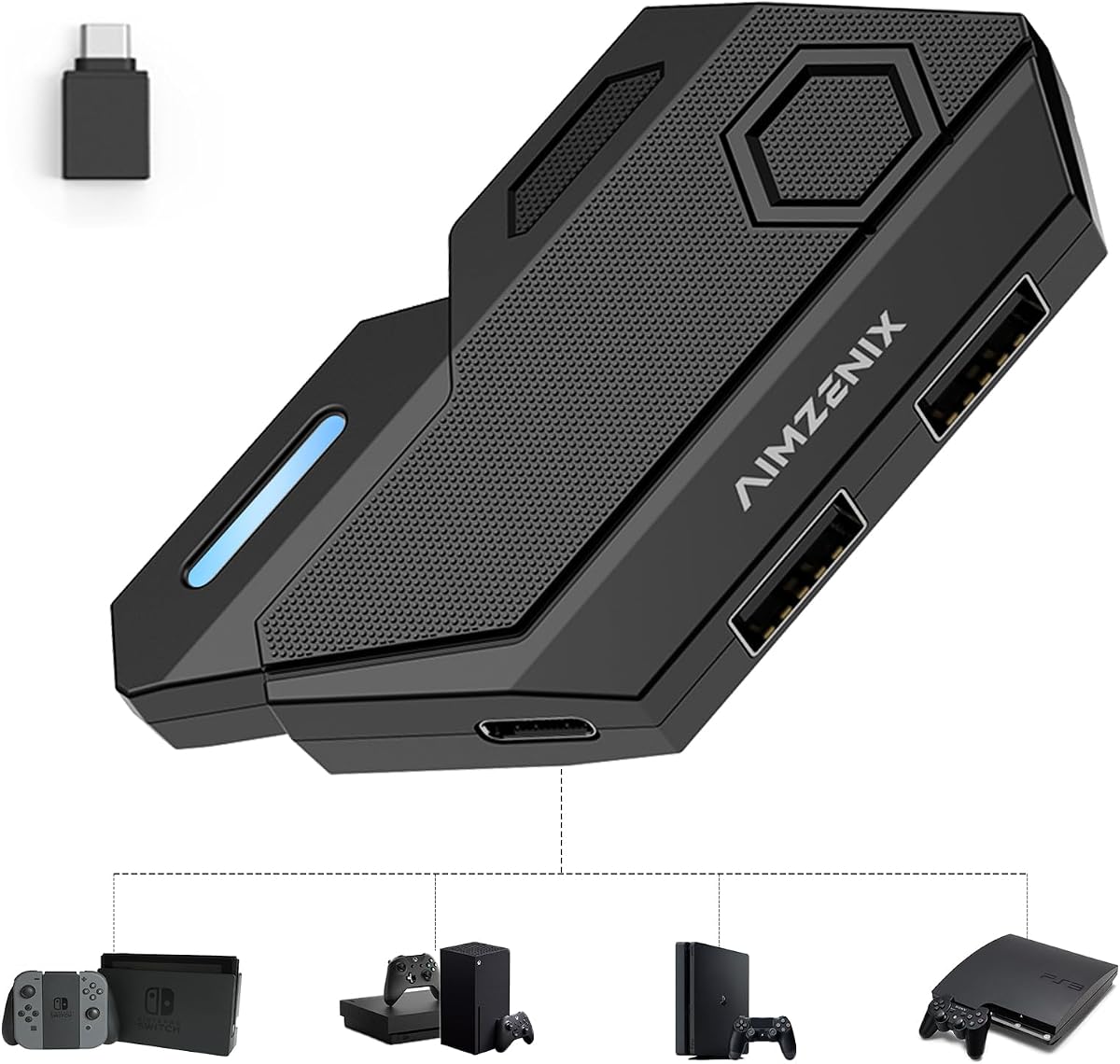
The AIMZENIX BLADER has a 4.0 rating and differentiates itself through its stated support for Switch 2, the standard Switch, Xbox One, Xbox Series X/S, and PS4. It translates keyboard and mouse actions into controller signals and uses shortcut customization and sensitivity adjustment to give players greater control over supported FPS and RTS games.
We may earn a commission when you buy through this link, at no additional cost to you.
The adapter’s plug-and-play approach avoids complicated software installation, while the included Type-C cable, OTG adapter, instruction manual, and electronic manual make the package relatively complete. As with other converter-style products, an original controller is required to connect to the console. The electronic documentation gives users a way to understand mapping shortcuts before they begin playing.
The adapter carries the BLADER platform’s notable restrictions. A mouse that needs a driver installation is not supported, and the 3.5mm headphone jack on the connected controller stops working. View sensitivity and related game settings should be maximized for the intended mouse-switching behavior. The documentation also uses ambiguous language about authorized controllers, so current user guidance should be checked closely.
This AIMZENIX model is a compelling option for gamers who want a single adapter spanning Switch-family hardware and current Xbox systems. It is particularly relevant to owners of Switch 2 who cannot use older adapters. It is less suitable for players who require controller headset audio or use specialized mice that depend on software drivers.
Support for both Switch generations and current Xbox hardware creates a wider setup window than many competing converters. PS4 coverage extends its appeal across console families.
The supplied Type-C cable, OTG adapter, and manuals cover the core connection and setup needs. Buyers should verify that the included cables are appropriate for their exact console and controller.
We may earn a commission when you buy through this link, at no additional cost to you.
The AIMZENIX Blader Pro has the highest rating in this comparison at 4.3 and offers the most polished configuration approach. It supports the Switch 2, standard Switch, PS4, Xbox Series X/S, and Xbox One. Rather than relying only on complicated shortcut combinations, it connects to the GEEKVICE app through Bluetooth for mapping, basic mouse-sensitivity changes, and one-tap official game presets.
We may earn a commission when you buy through this link, at no additional cost to you.
Its hardware approach is aimed at gamers with standard gaming peripherals. Most wired and 2.4GHz keyboards and mice are supported, and an auxiliary USB-C 5V power port can help stabilize high-power RGB equipment. The adapter is optimized for standard 1000Hz mouse polling rates, while RGB indicators provide visual information about connection and device status. An integrated USB-A console cable also helps create a secure, uncluttered setup.
The most advanced peripherals are not compatible. Bluetooth-only, magnetic-switch, Hall-effect, and optical keyboards are excluded, as are likely unsupported high-end device features. While the app simplifies setup, it creates an additional configuration component that older plug-and-play adapters do not require. Buyers should therefore assess their keyboard and mouse type before choosing the premium option.
The Blader Pro is ideal for a player who wants easy visual configuration, game presets, modern console coverage, and support for a mainstream 1000Hz gaming mouse. Its 4.3 rating and advanced feature set make it the leading premium choice in this guide. It is less appropriate for owners of specialized keyboards or mice that fall outside the supported hardware categories.
The app replaces lengthy shortcut procedures with visual mapping, basic sensitivity adjustment, and selectable official presets. This makes the premium adapter particularly approachable for configuration-focused gamers.
Optimization for standard 1000Hz polling rates targets a common gaming-mouse class. The auxiliary power port can improve reliability when using high-power RGB peripherals.
We may earn a commission when you buy through this link, at no additional cost to you.
The Mcbazel KX Converter has a 3.7 rating and stands out for supporting both docked and handheld use on the standard Nintendo Switch. Its compatibility list includes PS4, PS3, Xbox One, Xbox Series X/S, and Xbox 360. The included OTG Type-C adapter allows the converter to be used in handheld mode, giving Switch players a wider range of play situations.
We may earn a commission when you buy through this link, at no additional cost to you.
The adapter supports HID-protocol keyboards and mice, reportedly covering more than 90 percent of models on the market. It can map aiming, shooting, and camera movement in FPS games, though the mouse has no function on the Switch home screen. Setup is described as three steps, and the product supports both standalone and network modes across many compatible games.
The peripheral rules are restrictive in specific ways. A wired keyboard and wired mouse are supported, as is one wireless device paired with one wired device, but two wireless devices cannot be used together because only one receiver can be connected. Keyboards with a built-in USB hub are not supported. On PS4 and Xbox, an original controller must remain connected for authorization, and a charging-and-data cable is required rather than a charge-only cable.
The Mcbazel KX is a strong choice for a player who wants to use the Switch both docked and handheld or who owns multiple supported PlayStation and Xbox systems. It is particularly useful for PS4 and Xbox owners willing to keep an original controller connected. It is less convenient for buyers with two wireless peripherals, a USB-hub keyboard, or a need for Switch 2, PS5, or original Xbox support.
The included OTG Type-C adapter makes the converter useful in handheld Switch sessions as well as docked play. This is a meaningful advantage over converters limited to dock-mode operation.
The adapter can combine one wireless device with one wired device, but not two wireless devices. Players with separate keyboard and mouse receivers should plan to rewire one peripheral.
We may earn a commission when you buy through this link, at no additional cost to you.
The Joso Switch 2 Adapter has a 3.8 rating and provides broad platform support with an emphasis on Nintendo’s console family. It is listed for the Nintendo Switch, Switch 2, Xbox Series X/S, Xbox One, PS4, and PS3. PS5 is explicitly excluded, and using an official Xbox or PS4 controller is recommended to reduce connection issues and achieve full functionality.
We may earn a commission when you buy through this link, at no additional cost to you.
The adapter includes four mapping profiles, customizable keyboard and mouse bindings, and sensitivity adjustment. This is enough structure for players who use several configurations, although the eight-profile alternatives offer more room. Setup requires no software or downloads, and it supports most wired USB and 2.4G wireless keyboard-and-mouse combinations. Bluetooth and driver-dependent devices are not supported.
Its 3.8 rating suggests a balanced package, but some details deserve attention. Four profiles may be restrictive for a player who regularly uses separate configurations for many games. Official-controller requirements can also complicate setup, particularly for users who do not own the matching controller. As with any console input converter, supported games must still recognize the translated control format correctly.
This Joso model is a good fit for owners of either Switch 2 or the standard Switch who also play on Xbox and PS4. The included USB-C-to-USB-A cable, OTG converter, and manual provide a convenient package, while four profiles and sensitivity settings cover essential customization needs. It is not the right choice for PS5 gamers or users with Bluetooth-only peripherals.
Support for both Switch 2 and the standard Switch reduces the need to replace an adapter across console generations. Buyers should still verify the exact connection method for their model.
The adapter, USB-C-to-USB-A cable, OTG converter, and manual provide the basic items required for setup. Website tutorials can help with mappings and compatibility questions.
We may earn a commission when you buy through this link, at no additional cost to you.
The Arvin Multi-Platform Adapter has a 3.8 rating and offers one of the most extensive compatibility lists in the group. It supports the standard Switch, Switch OLED, Switch Lite, Xbox 360, Xbox One, Xbox One S/X, Xbox Series S/X, PS3, and PS4 variants. PS5 consoles can physically connect the adapter through a PS4 controller, but PS5 controllers and PS5 games are not supported.
We may earn a commission when you buy through this link, at no additional cost to you.
Custom key mapping stores up to four keyboard and mouse configurations. Mouse sensitivity on Xbox One is adjusted with Ctrl and the mouse wheel, making quick changes possible during setup. The device has three USB-A ports and one Type-C port, and the package includes the adapter, an OTG adapter, a Type-C charging cable, and a user manual. The enclosure is made from hard ABS material for repeated use.
The adapter requires an original controller, and third-party controller connections are not supported. Bluetooth keyboards and mice are also excluded, though wired and 2.4G wireless devices are accepted. Its most confusing platform detail is PS5: a PS5 can be used only with a PS4 controller and PS4-compatible games through the adapter. This is not equivalent to full PS5 support and should not be marketed as such.
The Arvin model is well suited to a gamer who owns a wide range of older and current consoles, especially a Switch Lite owner. Its three USB-A ports and included accessories also make it convenient to connect several peripherals. It is a poor match for a PS5-focused buyer or anyone whose setup depends on third-party controllers or Bluetooth-only devices.
Multiple USB-A ports make it easier to connect a keyboard, mouse, and another compatible USB device. This is convenient for players who want more than the two standard input connections.
The adapter’s compatibility includes Switch Lite and numerous older console models. That breadth makes it useful for a household with several generations of gaming hardware.
We may earn a commission when you buy through this link, at no additional cost to you.
The best Nintendo Switch keyboard mouse adapter depends on console model, peripheral type, desired mapping controls, and tolerance for extra setup. Reviewing these factors before buying helps prevent an adapter that looks universal from becoming incompatible with a particular setup.
Compatibility differs significantly among the standard Switch, Switch OLED, Switch Lite, and Switch 2. Some adapters work with the Switch OLED only while docked, while others include an OTG adapter for handheld use. The Joso model supporting eight profiles explicitly lists first-generation Switch and Switch OLED dock mode. The Mcbazel KX supports the standard Switch in both docked and handheld modes. By contrast, the first arVin option and the generic eight-profile adapter explicitly exclude Switch Lite, while the later Arvin model lists it as supported. Buyers should match the exact model and connection method rather than assuming all Switch hardware behaves identically.
Most adapters support standard wired keyboards and mice, but wireless arrangements require closer attention. A 2.4G wireless mouse uses a USB receiver and is widely supported, whereas Bluetooth-only devices are excluded by many products in this comparison. The Mcbazel KX adds a strict one-receiver limit, so one wireless and one wired peripheral can be used but two wireless peripherals cannot. Some newer products also exclude magnetic-switch, Hall-effect, optical, and driver-dependent hardware. Identifying whether each peripheral uses a wired cable, a 2.4G receiver, or Bluetooth prevents the most common source of setup disappointment.
Custom mapping allows keyboard keys and mouse clicks to operate console functions, but the available controls differ among models. Some products use button combinations to move between configurations, while the AIMZENIX Blader Pro adds the GEEKVICE app, basic sensitivity controls, and official game presets. Profile storage ranges from four slots on the Joso Switch 2 Adapter and later Arvin model to eight on the Joso profile-focused adapter, arVin model, and generic eight-key adapter. More profiles are useful for players who switch frequently between shooters, strategy games, and RPGs with different layouts.
Many console adapters need the original controller to remain connected so the console recognizes and authorizes the converted input. This is especially common for PS4 and Xbox systems. Some adapters require a controller during setup, while others require it continuously. The Mcbazel KX specifically says PS4 and Xbox need an original controller and a charging-and-data cable, whereas PS3 and Switch can leave that port empty. On the Switch, a wireless Pro Controller may also take input priority unless it is powered off. Checking these conditions is essential for anyone who expects to use a different controller or play without a traditional gamepad connected.
Mouse aiming is most useful when the player can adjust sensitivity in a way that feels familiar. Several adapters advertise adjustable sensitivity, either through dedicated buttons, keyboard shortcuts, mouse-wheel controls, or an app. The first arVin model combines sensitivity adjustment with custom mapping and eight stored profiles. The Joso and AIMZENIX BLADER products offer shortcut-based sensitivity settings, whereas Blader Pro moves basic adjustment into the GEEKVICE app. Some converters also expect the game’s view sensitivity to be maximized. Reviewing both adapter controls and in-game sensitivity settings helps keep aim from feeling sluggish or excessively fast.
A multi-platform adapter can be useful for a household with several console generations, but every platform list has exceptions. The Joso and AIMZENIX options support Switch 2, while several older products explicitly do not. Xbox Series support is available on the CHEERKONTEK BLADER, AIMZENIX models, Mcbazel KX, Joso Switch 2 Adapter, and later Arvin model. PS5 support is largely absent, and one Arvin listing explains that PS5 compatibility is limited to PS4 controllers and games. A product intended for PS4, PS3, and Xbox One should not be assumed to cover the latest consoles.
All ten products describe a plug-and-play approach, but plug-and-play does not remove the need to map controls or connect a controller correctly. Some rely entirely on shortcut combinations, while the AIMZENIX Blader Pro provides a Bluetooth-connected app and downloadable game presets. The Joso products direct buyers to setup videos and manuals, and the AIMZENIX BLADER includes both printed and electronic documentation. Players should look for clear instructions, especially if they have never used a controller-signal converter. A well-explained setup process can prevent incorrect input assignments or connection problems that are difficult to diagnose after entering a game.
The number and type of ports determine how easily peripherals can be connected. The later Arvin adapter includes three USB-A ports and one Type-C port, while most competitors provide the basic connections needed for a keyboard, mouse, and controller. Some packages also include an OTG adapter, USB-C cable, or instruction manual. Consider the size of the enclosure, cable direction, and available space near the console. A compact adapter is easier to carry between systems, but a product with additional ports may also serve as a small hub for other compatible USB devices.
Begin by identifying the console, controller, keyboard, and mouse you intend to use. Check the adapter’s compatibility list and confirm whether your peripherals use wired, 2.4G, or Bluetooth connections. Read the included manual and identify the required cable, particularly for the Switch OLED, Switch Lite, Switch 2, PS4, or Xbox systems. Connecting a charge-only controller cable or a Bluetooth-only peripheral can prevent the adapter from operating even when the console itself is compatible.
Connect the console and the required official controller to the adapter, then attach the keyboard and mouse to the appropriate USB ports. On PS4 and Xbox systems, keep the original controller connected for authorization; on the Switch, a wireless Pro Controller may need to be powered off so the console recognizes keyboard and mouse input. If simultaneous control is desired, follow the product-specific instructions for routing the controller to the adapter. Use the manual to assign buttons and create the first profile, then test the configuration in a practice area before relying on it in a competitive session.
Treat the adapter and connected cables as one system. Avoid sharply bending the console cable, force a connector into a port, or expose the device to moisture and excessive heat. When changing games or profiles, power down or disconnect devices in the order specified by the manual, and do not unplug a controller while its authorization is in use. Periodically inspect connector fit and cable condition, especially if the adapter is moved frequently between docked, handheld, and other console setups.
No. The adapter translates keyboard and mouse input into controller-style signals, but the game itself must support an appropriate control format. Even compatible adapters may provide mouse functions only in selected menus or gameplay areas, and some games may not support keyboard input at all. Check the game’s control options before expecting mouse-aiming features.
Most products in this comparison do not support Bluetooth-only keyboards or mice. They generally work with wired USB devices and keyboards or mice using a 2.4G USB receiver. The AIMZENIX Blader Pro also excludes Bluetooth-only, magnetic-switch, Hall-effect, optical, and driver-dependent keyboards, so checking the exact peripheral type is essential.
Several console adapters need the platform’s original controller to remain connected because the console uses it to recognize or authorize keyboard-and-mouse input. This is especially common on PS4 and Xbox. The controller may also need to be powered off while plugged in so it does not pair through Bluetooth and bypass the adapter. Exact behavior varies by model, so follow the included instructions.
Only if the particular adapter supports handheld OTG operation. The Mcbazel KX explicitly works with the standard Switch in both docked and handheld modes using the included OTG Type-C adapter. Other products list only dock-mode support or do not clarify handheld behavior. Check the product specifications and console model before purchasing for portable play.
All ten adapters are described as usable without mandatory driver installation, and most rely on plug-and-play setup. However, most still require button-mapping instructions through shortcut keys. The AIMZENIX Blader Pro additionally uses the GEEKVICE app for visual mapping, sensitivity changes, and official game presets, so it offers a different setup experience.
The number of profiles determines how many keyboard-and-mouse configurations can be stored and recalled. Four is sufficient for many players, while eight offers more room for separate layouts across shooters, strategy games, and RPGs. The Joso profile-focused adapter, the first arVin model, and the generic eight-preset adapter advertise eight profile sets.
It depends on the model. The AIMZENIX BLADER, AIMZENIX Blader Pro, Mcbazel KX, Joso Switch 2 Adapter, and later Arvin model list Xbox Series support. PS5 support is limited: the later Arvin product can connect a PS4 controller and play PS4 games on a PS5, but it does not support PS5 controllers or PS5 games. Other adapters explicitly exclude these platforms.
Console games and mouse adapters may use different sensitivity scales, acceleration, or switching behavior from a desktop PC. Some adapters expect in-game view sensitivity and related settings to be maximized. Adjust the adapter’s available sensitivity controls, calibrate in-game settings, and use a practice area to find a stable combination before making small changes.
The AIMZENIX Blader Pro is the strongest premium option for gamers who value app-assisted mapping, official presets, 1000Hz mouse support, and broad modern-console compatibility. The Joso profile-focused adapter is a strong all-around choice for standard Switch, Switch OLED, Xbox One, PS4, and PS3 users who want eight stored profiles without software. The generic keyboard and mouse adapter with eight preset sets and a reset button is a practical budget-focused option with broad USB support.
Prioritize exact console compatibility, peripheral connection type, and official-controller requirements before considering extra features. A device with extensive mappings will not help if it cannot accept your Bluetooth keyboard, recognize your console model, or complete the required authorization process. Profile count, sensitivity controls, documentation quality, and handheld support should then determine which feature-rich option fits your play style best.
Finally, verify the latest listing, package contents, compatibility notes, and current price before ordering. Console hardware and adapter revisions can change, and the same product family may have different compatibility wording. The links provided lead to current product pages, where buyers can confirm the latest details and read additional customer feedback.