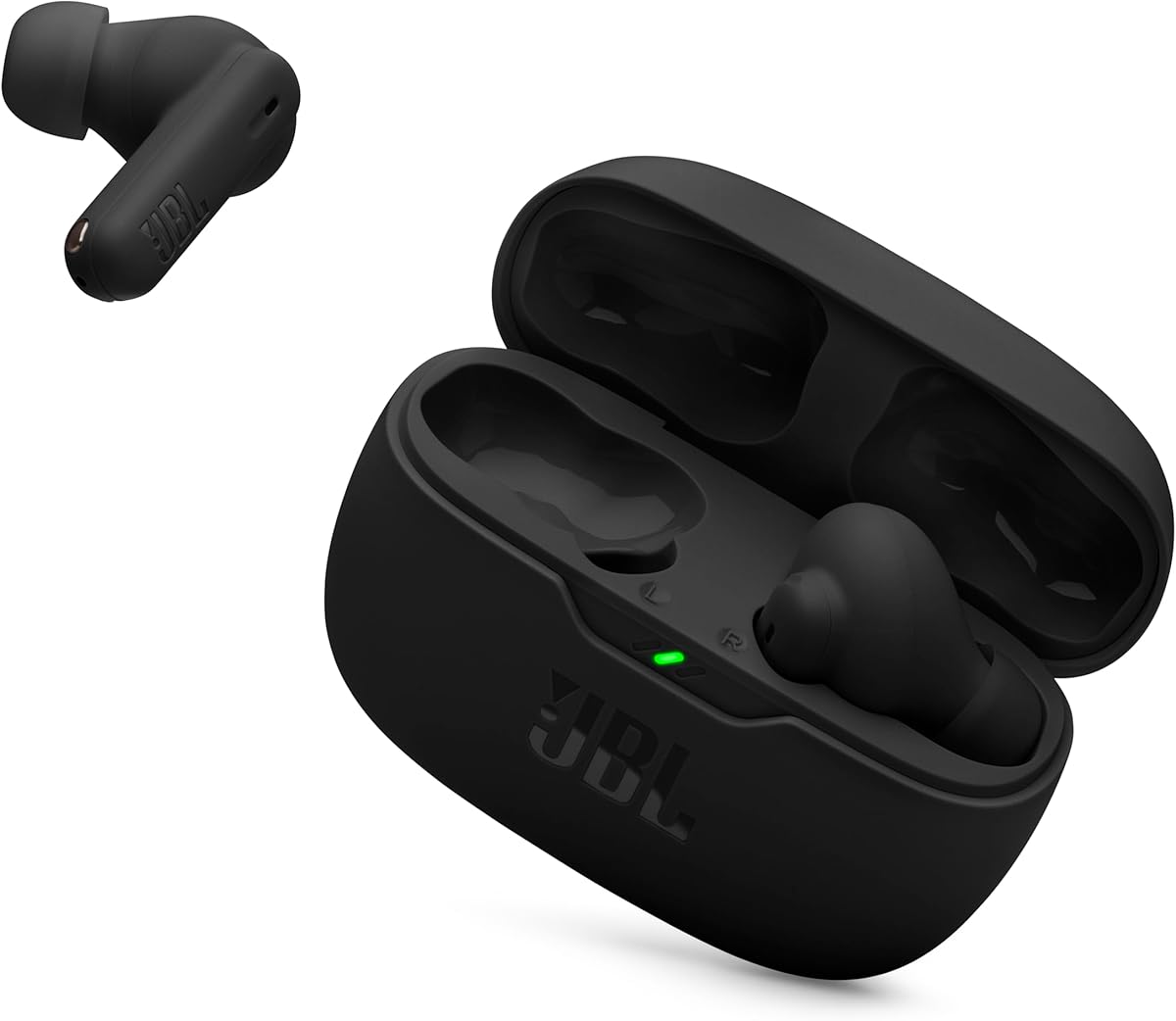
JBL Vibe Beam 2
4.1Editor score
Four call-focused microphones
Active noise cancelling
40-hour total battery life
JBL Headphones app support
Earbuds for Teams Meetings guide comparing noise cancellation, microphone quality, multipoint connectivity, comfort, battery life, and meeting-app compatibility
The best earbuds for Teams meetings must do more than play sound. They need to capture your voice clearly, limit distracting background noise, connect reliably to a laptop and phone, and remain comfortable through long virtual meetings. The right model can also help you hear colleagues more clearly while protecting your focus in a busy workspace.
We compared the supplied models based on microphone and call-focused features, noise cancellation, connectivity options, comfort-related design, battery specifications, app support, and stated meeting-platform compatibility. The list includes dedicated work headsets, certified conference products, and versatile wireless earbuds that can work well for Teams when paired with a suitable computer.
Each pick reveals what it does best, from clear voice pickup and multipoint switching to compact charging cases and extended battery life. Ratings and specifications reflect the supplied product information, while availability and prices can change, so check the current listing before deciding which model fits your working setup.
4.1Editor score

3.7Editor score
3.5Editor score
The comparison below highlights the microphone systems, noise-control features, connectivity options, and battery characteristics that matter most when using earbuds for Teams meetings and other virtual calls.


The Dell Pro Plus Earbuds EB525 have a 4.1 rating and are built around a workplace-oriented proposition: make the speaker sound clear while reducing distractions around the speaker. Their AI-based noise-cancelling microphone is designed to recognize and filter background noise, making them an appealing option for noisy homes, shared offices, and other environments where your voice matters as much as your music.
We may earn a commission when you buy through this link, at no additional cost to you.
The most interesting feature is the combination of Adaptive ANC and enhanced transparency mode. A pinch can move between deep focus and greater environmental awareness without removing the earbuds. Touch controls also manage calls, music, and volume, including a swipe for level changes. This makes the EB525 convenient during meetings because switching modes or handling a call does not require reaching for a laptop.
Bluetooth 5.3 supplies the wireless foundation, but the product information does not explicitly state Microsoft Teams certification, multipoint pairing, or the inclusion of a computer USB receiver. Those omissions matter if you regularly move between a laptop and phone or want assurance that the earbuds have been formally validated for Teams. The supplied 4.1 rating is respectable, although it does not stand apart from several less specialized alternatives.
This is a strong recommendation for professionals who prioritize microphone-focused noise handling and quick physical controls. It may be an even better fit for one-device users who want a refined mix of adaptive noise cancellation and transparency. Teams users who depend on formal certification or seamless computer switching should confirm those requirements with the current manufacturer documentation before purchasing.
The AI-based microphone is designed to emphasize speech while filtering environmental sound. That focus is particularly valuable when colleagues need to hear you clearly without an elaborate headset microphone.
Pinch and swipe operation allows mode changes, call handling, music control, and volume adjustment without using the Teams interface or removing the earbuds.
We may earn a commission when you buy through this link, at no additional cost to you.
The JBL Vibe Beam 2 carries a 4.1 rating and offers a balanced mix of call clarity, noise control, familiar JBL sound, and practical battery life. Four microphones—two in each earbud—are designed to transmit the wearer's voice while canceling ambient noise, which makes the model relevant for Teams calls conducted around household or street noise.
We may earn a commission when you buy through this link, at no additional cost to you.
Active Noise Cancelling reduces distractions, while Smart Ambient lets users decide how much surrounding sound to hear without taking the earbuds out. The 8mm dynamic drivers provide JBL Pure Bass sound, and the JBL Headphones app offers EQ presets, custom settings, voice prompts, and Relax Mode. Those extras extend the product beyond meetings without complicating the core call experience.
Battery life is listed at 10 hours per charge and 40 hours with the case when ANC is off. A ten-minute USB-C charge adds three hours of playback. As with many compact true wireless earbuds, turning on noise reduction can affect available listening time, so a busy professional may want to recharge between intense meeting days.
The JBL Vibe Beam 2 is our Best Budget selection because it addresses the major everyday requirements without claiming formal Teams certification. It should appeal to hybrid workers who want credible microphone performance, useful ANC, familiar app support, and strong battery specifications. Confirm your computer's Bluetooth behavior and meeting setup before committing.
Two microphones in each earbud create a call-focused system intended to separate your voice from ambient noise. The result is particularly relevant for online meetings in unpredictable environments.
The JBL Headphones app adds EQ selection, custom sound profiles, battery prompts, and Relax Mode, giving the earbuds more value for both calls and focused work.
We may earn a commission when you buy through this link, at no additional cost to you.
The Logitech Zone True Wireless has a 3.7 rating, but its workplace credentials are among the strongest in this roundup. The earbuds are certified for Microsoft Teams, Zoom, Google Meet, and Google Voice, making them one of the clearest choices for someone whose main goal is dependable integration with a virtual meeting platform.
We may earn a commission when you buy through this link, at no additional cost to you.
Each earbud contains three microphones, creating six microphones in total. Beamforming, cascaded noise reduction, and dynamic processing distinguish the user's voice from surrounding sounds. For computer use, the included USB receiver offers an alternative to native Bluetooth and is intended to provide more reliable wireless connectivity with a computer.
Comfort and isolation receive attention through removable ear gels in three sizes. Hybrid ANC reduces distractions, transparency mode lets users remain aware of their surroundings, and 12mm drivers provide full-bodied audio. Logi Tune adds five-band EQ controls, while Logitech Sync centralizes management of supported video-calling devices. The tradeoff is that the supplied rating is lower than those of several competing models.
This is our Editor's Choice because explicit Teams certification, an included USB receiver, and a detailed six-microphone system directly address the keyword. It is best for hybrid workers who want a purpose-built conference solution rather than a general earbud that happens to support Bluetooth calling. Verify USB receiver compatibility with your computer before ordering.
Formal certification across Teams, Zoom, Google Meet, and Google Voice gives office users greater confidence than basic Bluetooth compatibility alone.
The included USB receiver bypasses some native Bluetooth behavior on a computer, which can be useful where pairing consistency or wireless performance is a concern.
We may earn a commission when you buy through this link, at no additional cost to you.
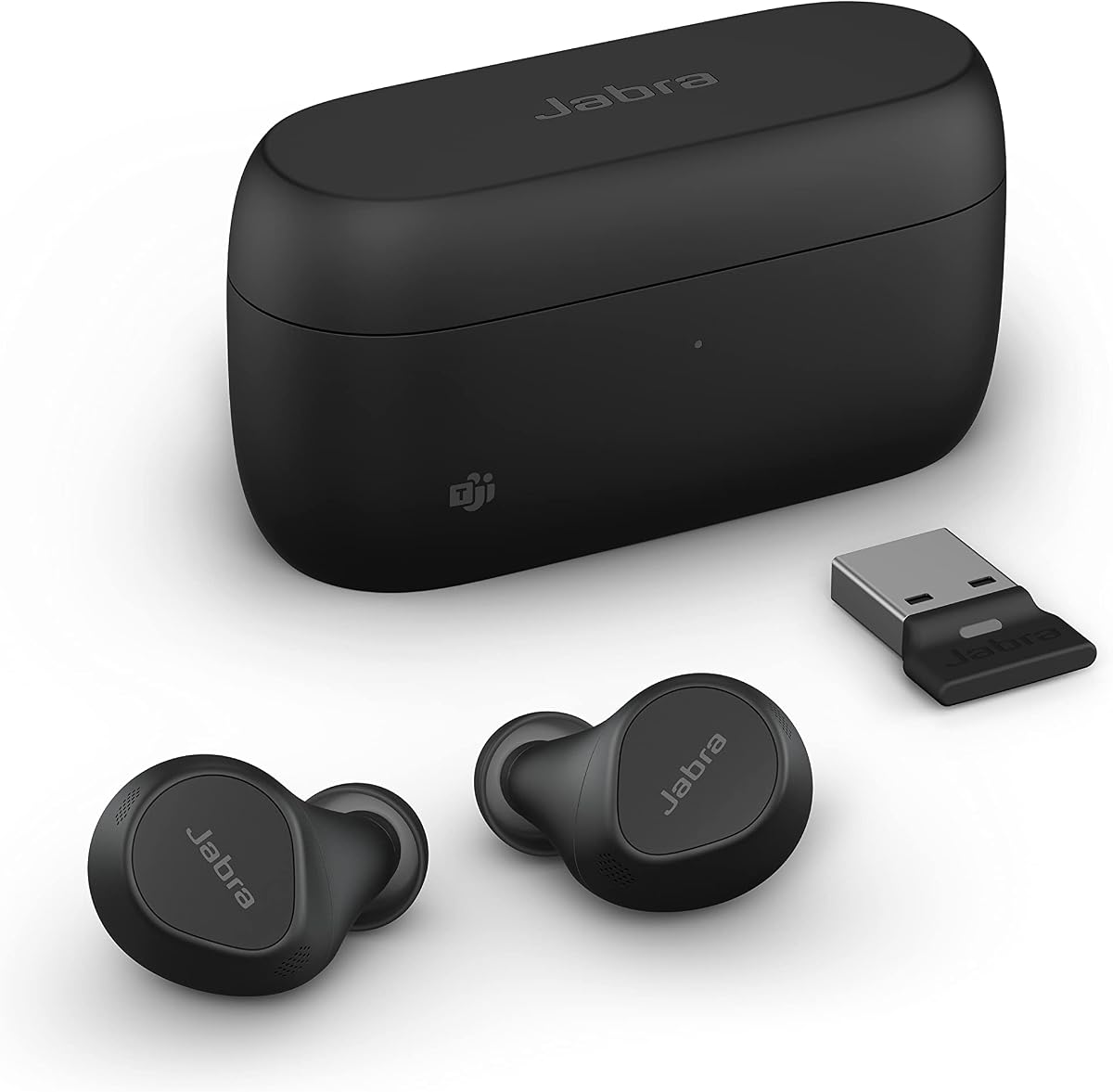
The Jabra Evolve2 True Wireless has a 3.5 rating, but its feature set is clearly aimed at demanding mobile professionals. It is Microsoft Teams certified, works with other meeting applications, and combines four microphones, intelligent algorithms, and bone-conduction sensors to help listeners hear the user's voice clearly in challenging surroundings.
We may earn a commission when you buy through this link, at no additional cost to you.
Bluetooth Multipoint keeps the earbuds connected to a laptop and smartphone at once, allowing a professional to take a meeting on one device and then shift to the other without a full reconnection routine. The included USB dongle provides another connection path and is specifically associated with a more stable meeting-platform connection.
Active Noise Cancellation gives users control over their acoustic environment, while the compact, water-resistant, in-ear design supports travel and work away from a desk. The trade-off is that the supplied rating is the lowest in the lineup. This should not be interpreted as proof of poor performance, but it does mean buyers should compare fit, controls, app behavior, and their own microphone expectations carefully.
Choose the Evolve2 if formal Teams certification, multipoint switching, and a dedicated business-focused voice system justify a premium-oriented purchase. It is particularly suitable for consultants, travelers, and hybrid employees who regularly move between a computer and phone. For occasional Teams use, simpler models may provide a more comfortable entry point.
Four microphones, voice algorithms, and bone-conduction sensors work together to improve the clarity of calls in busy offices, airports, and other active environments.
Bluetooth Multipoint and the included USB dongle support a flexible workday, including quick transitions between a laptop meeting and smartphone calls.
We may earn a commission when you buy through this link, at no additional cost to you.
The XIAOWTEK Wireless Earbuds have the highest supplied rating at 4.9 and an unusually long feature list for a value-oriented model. Their four-microphone environmental noise cancellation system is designed to isolate the wearer's voice and suppress background noise, making them worth considering for Teams calls in shared or busy spaces.
We may earn a commission when you buy through this link, at no additional cost to you.
Bluetooth 5.4, automatic pairing, and a stated connection range of up to 15 meters support everyday use with phones, tablets, and laptops. The product information also mentions low-latency performance, triple-layer 13mm drivers, AAC and SBC support, and Qualcomm aptX Adaptive Audio. Smart touch controls provide playback, volume, track, call, and assistant functions.
Battery features include six hours per earbud, a 470mAh case, and up to 50 hours of combined playback. Dual digital displays show the charging-case and earbud levels. These are appealing practical features, although the earbuds lack stated Teams certification, and the supplied 4.9 rating should not be confused with an independent assessment of meeting performance.
This model fits budget-conscious users who want extensive specifications, strong feedback, and comfortable everyday versatility. It is best for someone using a single Bluetooth computer, accepting manual platform selection rather than relying on formal certification. Users joining many daily meetings may still prefer a certified work model or USB receiver for greater platform-specific confidence.
The four-mic ENC arrangement focuses on separating speech from surrounding noise, a useful feature when joining online meetings outside a controlled home office.
Digital displays on the case reduce the need to guess remaining charge, while the stated combined playback makes the model practical for travel-heavy schedules.
We may earn a commission when you buy through this link, at no additional cost to you.
The TAGRY Hybrid Active Noise Cancelling Wireless Ear Buds have a 4.4 rating and center on endurance, environmental control, and physical operation. Their hybrid ANC system is stated to reduce ambient noise by as much as 90%, while transparency mode lets wearers retain awareness of their surroundings without removing the earbuds.
We may earn a commission when you buy through this link, at no additional cost to you.
The 13mm drivers and Hi-Res audio positioning target clear treble, bass, and overall fidelity for music between meetings. Bluetooth 5.4 is included, and the stated connection range reaches 33 feet. Physical multifunction buttons control calls, track skipping, and mode changes, which can be easier to identify than touch gestures when you need to mute or answer quickly.
Battery life is the standout specification: up to 10 hours per charge and 80 hours with the case. The earhook structure and IPX7 rating target active use, while three ear-tip sizes help with fit and isolation. However, the earhook design may feel less discreet in formal settings, and the product information does not list Teams certification or a computer dongle.
This is a compelling choice for professionals who split their day between calls, focused work, and exercise, especially those who value physical buttons and rarely need a full day's charge. For conventional office meetings, remove or adapt the earhook arrangement if a low-profile appearance is important. It is less suited to users who require formal meeting-platform certification.
An 80-hour combined playback specification reduces charging frequency, while a one-hour case recharge and Type-C connection support routine office use.
Multifunction buttons offer straightforward access to calls and noise modes, which can be helpful when you need to answer, mute, or hear your surroundings.
We may earn a commission when you buy through this link, at no additional cost to you.
The Soundcore P30i have a 4.3 rating and offer adaptive noise control, four microphones, app support, and a useful charging case that doubles as a phone stand. These features make them a versatile choice for users who want one pair of earbuds to handle online meetings, commuting, entertainment, and lighter video viewing.
We may earn a commission when you buy through this link, at no additional cost to you.
The adaptive ANC system detects external sound and selects an appropriate cancellation level automatically. For calls, four microphones work with an AI algorithm to capture the user's voice precisely. Transparency mode offers a quick way to hear announcements or nearby conversations without removing the earbuds.
The case supports 10 hours per charge and up to 45 hours of combined playback without ANC; stated totals fall to 25 hours with ANC active. A ten-minute charge supplies two hours of use. The soundcore app adds EQ modes, adjustable ANC settings, and firmware updates, while Bluetooth 5.4 provides one-step pairing to the most recently used device.
The P30i are a good match for hybrid workers who want flexible controls and a distinctive case. Their strongest meeting attribute is the four-microphone AI call system rather than a stated platform certification. If formal Teams validation is essential, choose a certified work headset instead. For most other users, the adaptive behavior and app features make the P30i especially versatile.
Instead of relying on one fixed ANC setting, the earbuds assess external sound and adjust cancellation to suit the environment.
The combination of four microphones and AI-assisted processing is designed to make your voice more prominent during calls in less-than-ideal surroundings.
We may earn a commission when you buy through this link, at no additional cost to you.
The Soundcore Liberty 5 Pro Max have a 4.2 rating and distinguish themselves with an advanced voice system, extensive AI processing, and a large display on the charging case. Ten sensors work with the Thus AI Chip to capture speech and help callers hear you even in environments stated to reach 100 dB or more.
We may earn a commission when you buy through this link, at no additional cost to you.
Noise cancellation is also unusually elaborate, using eight sensors and the same AI chip to process more than 384,000 noise signals per second. The result is designed to reduce subway, office, and street distractions. Battery life reaches 6.5 hours with ANC on and 28 hours with the case, while a five-minute charge supplies four hours of listening.
The charging case includes a 1.78-inch AMOLED display and can record in-person meetings and interviews, transcribe them, and create summaries. Crucially, the product information explicitly says it does not capture online meetings, video calls, or phone calls. Privacy features include local AES-256 encryption and stated compliance with multiple security standards, while some transcription functions require a subscription plan.
Choose the Liberty 5 Pro Max for professionals who want top-tier voice processing, sophisticated ANC, and an unusually capable case. It is not an automatic choice for recording Teams meetings because the recorder is specifically excluded from capturing online calls. Buyers should also understand that the most advanced note-taking functions are tied to the separate service plan.
Ten sensors and dedicated AI processing are intended to isolate speech and preserve vocal clarity across quiet rooms and demanding noisy environments.
The case can record and organize in-person conversations, but it is not designed to capture Teams meetings, video calls, or ordinary phone calls.
We may earn a commission when you buy through this link, at no additional cost to you.
The JLab Work Buds have a 3.9 rating and stand apart from conventional earbuds with a detachable noise-cancelling boom microphone. That boom can be positioned near the mouth for clearer voice pickup, or attached to either earbud for a personalized fit. It is an appealing design for people who want earbud freedom without giving up a headset-style microphone.
We may earn a commission when you buy through this link, at no additional cost to you.
The earbuds also include built-in MEMS microphones, Bluetooth 5.3, and Bluetooth Multipoint. The latter supports maintaining connections to two devices, useful for moving between a computer and phone. A USB-C charging dock provides additional charging and keeps the earbuds and boom organized in a travel bag.
Battery specifications are generous: each earbud lasts more than 10 hours for playback and more than six hours for talking, with more than 55 hours of total playback when combined with the dock. The main trade-off is that no IP rating is listed, making them less clearly suited to sweaty workouts than several other choices.
The Work Buds are best for users who feel that tiny earbud microphones do not provide enough voice direction for their calls. The boom mic offers a clearer physical approach to speech pickup while retaining multipoint convenience. They are less compelling for exercise-focused use, but they make sense for office, travel, and hybrid-work routines.
The detachable boom positions the microphone close to your mouth, which can provide more consistent voice pickup than a microphone embedded deep inside an earbud.
Bluetooth Multipoint allows the earbuds to remain connected to a laptop and smartphone, making it easier to move between Teams meetings and regular calls.
We may earn a commission when you buy through this link, at no additional cost to you.
The TOZO Hybrid Active Noise Cancelling in Ear Wireless Earbuds have a 4.3 rating and provide one of the strongest combinations of call microphones and battery specifications in the group. Six built-in microphones work with ENC technology to reduce background noise and make your voice clearer during phone calls and online meetings.
We may earn a commission when you buy through this link, at no additional cost to you.
Hybrid ANC is stated to reduce ambient noise by up to 45 dB, focusing particularly on steady low-frequency sounds such as subway rumble, aircraft noise, and air-conditioning hum. Multiple ear-tip sizes help create the seal required for consistent performance. Transparency mode keeps you aware of announcements and nearby conversations.
The TOZO app supplies 32 EQ presets, custom sound options, sharing features, and in-app AI assistance. Battery life reaches 13 hours per charge with ANC off and 68 hours with the case; with ANC on, the stated figures are 9.5 and 40 hours. IPX8 protection adds resilience against sweat, rain, and splashes.
This is an attractive recommendation for a professional who wants clear calls, meaningful ANC, extensive personalization, and fewer charging interruptions. It lacks stated Teams certification and a USB receiver, so buyers who need formal platform validation should not overlook the certified alternatives. Otherwise, its microphone count and battery endurance make it a convincing meeting companion.
The six-microphone ENC arrangement is specifically positioned as a way to improve the clarity of your voice in offices, cafés, and other busy environments.
Thirty-two EQ presets and custom tuning let you balance voices, music, and podcasts without compromising the core meeting functions.
We may earn a commission when you buy through this link, at no additional cost to you.
The right meeting earbuds balance voice pickup, stable computer connection, usable noise control, comfort, and battery life. Teams certification and a USB receiver can add confidence, but microphone design and daily workflow are equally important.
Start with the microphone system rather than general audio specifications. More microphones can improve the signal-to-noise ratio, but their placement and processing matter just as much. The Logitech Zone uses three microphones per earbud, Jabra combines four microphones with algorithms and bone-conduction sensors, TOZO uses six microphones, and the JLab Work Buds provide a detachable boom mic close to the mouth. These approaches can help your voice remain distinct from keyboards, fans, traffic, and nearby conversations.
Choose based on your environment and speaking style. A boom microphone offers a visibly directed approach to speech pickup, while sophisticated multi-mic arrays are more discreet. For everyday office use, four or more microphones and a stated ENC system provide a useful baseline. Always prioritize models that describe voice pickup rather than merely listing microphone count.
Microsoft Teams certification indicates that a product has been evaluated for communication within the Teams ecosystem. Among the supplied models, Logitech Zone and Jabra Evolve2 are explicitly certified for Teams, with Logitech also certified for Zoom, Google Meet, and Google Voice. That explicit support can be valuable for organizations that standardize their meeting hardware or require a known level of platform compatibility.
Certification should be your priority when deploying earbuds to a team. For personal use, standard Bluetooth audio can work well, but you remain responsible for microphone permissions, output-device selection, and pairing behavior. Treat certification as one factor rather than the sole measure of call quality.
A stable computer connection is essential because a perfect microphone is not useful if the earbuds disconnect, select the wrong output, or introduce delay. Native Bluetooth is convenient and supports most modern laptops, while the included USB receivers supplied with Logitech Zone and Jabra Evolve2 offer an alternative computer connection path. The Logitech listing specifically describes its receiver as useful for extra-reliable wireless connectivity, while Jabra associates its dongle with stability and a better meeting-platform call experience.
Check the receiver connection type and your computer's available ports before buying. Also review the operating systems and Teams environments used by your organization. For occasional travel, Bluetooth-only operation may be sufficient; for daily conference calls, a receiver can provide a more predictable route.
Multipoint allows one pair of earbuds to remain connected to two devices, typically a laptop and phone. That convenience matters in hybrid work because a meeting can begin on Teams while a personal call arrives on a mobile device. Jabra Evolve2 and JLab Work Buds explicitly support Bluetooth Multipoint. Other products may offer automatic reconnection to the last device, but automatic pairing and multipoint are not the same feature.
If you regularly switch devices, prioritize explicit multipoint support. If you mostly use one computer, simpler automatic pairing may be enough. Check how the earbuds handle incoming calls and whether your conferencing application offers manual microphone selection so switching does not leave you connected to the wrong device.
Noise cancellation serves two different goals in a meeting: helping you concentrate and making your environment easier for the microphone system to handle. Adaptive ANC can adjust to changing surroundings, while a more conventional system offers a fixed level. Transparency mode provides a quick way to hear a colleague who walks into the room, a delivery announcement, or a nearby conversation without removing the earbuds.
The strongest noise-reduction claims in this group come from TAGRY and TOZO, while Dell uses an AI-based microphone with Adaptive ANC, and TOZO emphasizes steady low-frequency sounds. No specification can guarantee performance in every room. Use the stated strengths as a guide, and consider a model with both ANC and transparency for maximum flexibility.
Meeting earbuds may remain in your ears for much longer than music earbuds because you need them for communication throughout the workday. Logitech includes removable ear gels in three sizes, TOZO provides multiple tip sizes, and TAGRY includes S, M, and L tips. A good seal supports both comfort and noise isolation, but the earhook design on TAGRY may be more noticeable than a conventional in-ear shape.
Consider your typical wear duration and whether you share earbuds with other people. Removable tips are useful for hygiene and fit adjustments. If you wear glasses, test the interaction between the frame and earbud, or if you exercise, choose a model with a stated water-resistance rating.
Battery specifications vary significantly, from 28 hours with the case for the Soundcore Liberty 5 Pro Max with ANC on to 80 hours for TAGRY. Longer totals can be helpful for frequent travelers, although actual results depend on ANC, features, volume, and call use. Most products here use USB-C, and several support short top-ups that are useful immediately before a meeting.
Compare battery life with ANC enabled rather than relying only on the largest headline figure. A stated 10-minute top-up of one to three hours can be especially valuable, but you should carry a cable or power bank if your schedule regularly includes long calls. Charging cases with stands or displays add convenience beyond raw endurance.
The best controls are the ones you can use without thinking. Touch gestures offer a discreet experience, while physical buttons are easier to identify and can be more reliable with wet hands or when wearing gloves. Dell supports pinch and swipe operation, TAGRY uses multifunction buttons, and Soundcore P30i provides app-based EQ and ANC adjustments. JBL adds EQ, voice prompts, and Relax Mode through its app.
Extra features should support rather than distract from meetings. The Soundcore Liberty 5 Pro Max includes a display and in-person recording tools, though it does not capture online meetings. Evaluate whether its advanced functions match your workflow before considering its complexity, and review app permissions, privacy settings, and subscription requirements when applicable.
Before your first Teams session, charge both earbuds and the case, update the companion app if one is provided, and complete the appropriate ear-tip fit check. Pair the earbuds with your computer through Bluetooth or the included USB receiver, then confirm that the computer recognizes both the input and output devices. In Teams, select the earbuds as the microphone and speaker, and say a short test phrase before joining the meeting.
Set expectations before entering the call. Begin with ANC or transparency according to your surroundings, keep the microphone unobstructed, and avoid rotating or touching an earbud excessively. If using a boom microphone, position it close to your mouth without pulling on the cable. Use the mute control in Teams rather than relying only on a physical mute action, and test the microphone again after switching devices.
For care, remove the earbuds after long sessions, wipe the tips and outer surfaces with a dry or lightly damp cloth, and keep the charging contacts free of debris. Store the earbuds in their case when they are not being used, avoid exposing them to excessive heat, and check the battery display periodically. When pairing becomes unstable, consult the manufacturer's reset instructions rather than repeatedly re-pairing without clearing the device list.
They can provide greater confidence because the product has been evaluated for use with Teams. Certification does not guarantee that every microphone will sound perfect in every room, but it is valuable when your organization manages meeting hardware centrally. Logitech Zone and Jabra Evolve2 are explicitly certified in the supplied product information.
No, most modern computers can use Bluetooth earbuds directly for Teams. A USB receiver may improve connection consistency or provide an easier device-selection route on some systems. Logitech Zone and Jabra Evolve2 include receivers, while the other models rely on their stated Bluetooth connection methods.
A dedicated voice-focused microphone system is the leading priority. Look for multiple microphones, environmental noise cancellation, beamforming, or a boom microphone positioned near the mouth. Microphone quality also depends on room noise, software settings, and speaking position, so no specification can overcome every poor environment.
ANC is generally useful in a distracting office, shared home, cafe, or on public transport because it reduces ambient sound. Transparency mode is better when you need awareness of colleagues entering the room or important announcements. Some users also prefer starting in transparency mode and switching to ANC once a meeting begins.
Only if the model supports multipoint or another form of simultaneous multi-device connection. Jabra Evolve2 and JLab Work Buds explicitly list Bluetooth Multipoint. Other earbuds may reconnect quickly to a previously paired device, which is convenient but does not necessarily mean both devices remain connected at once.
It depends on the model, active features, and how often you talk. The supplied specifications range from about 2.5 hours in extreme ANC mode for Soundcore Liberty 5 Pro Max to 10 hours per charge for several models. Carrying a USB-C cable and using a quick-charge feature is sensible for back-to-back meetings.
A boom microphone can be better when it sits consistently near your mouth, because it captures speech directly and reduces the influence of distant noise. The JLab Work Buds use a detachable boom that can move between ears. Standard earbuds are more discreet, but their voice performance depends heavily on the array, algorithms, fit, and room.
The Soundcore Liberty 5 Pro Max note-taker records in-person meetings and interviews, but the supplied information explicitly says it does not capture online meetings, video calls, or phone calls. You should always follow your organization's recording consent and privacy policies and use only recording tools that are designed for the specific meeting type.
The Logitech Zone True Wireless stands out for the keyword because it combines Microsoft Teams certification, an included USB receiver, and a six-microphone voice system. JBL Vibe Beam 2 is the practical Best Budget choice for balanced everyday performance, while Jabra Evolve2 is the Best Premium option for formal certification, multipoint connectivity, and a business-focused voice system.
Prioritize the microphone design first, then confirm that your computer connection method and meeting platform meet your needs. Dedicated work models offer the most explicit Teams support, whereas versatile models such as Dell Pro Plus, Soundcore P30i, TOZO, XIAOWTEK, and TAGRY provide varying combinations of noise control, app features, and battery endurance. Comfort and a secure fit remain equally important for long sessions.
Ratings, feature sets, availability, and prices can change, so check the current listing and manufacturer documentation before buying. Verify Teams certification, receiver compatibility, device permissions, and the microphone behavior in your own room. That final compatibility check can make the difference between a technically capable earbud and a genuinely effective Teams meeting headset.