
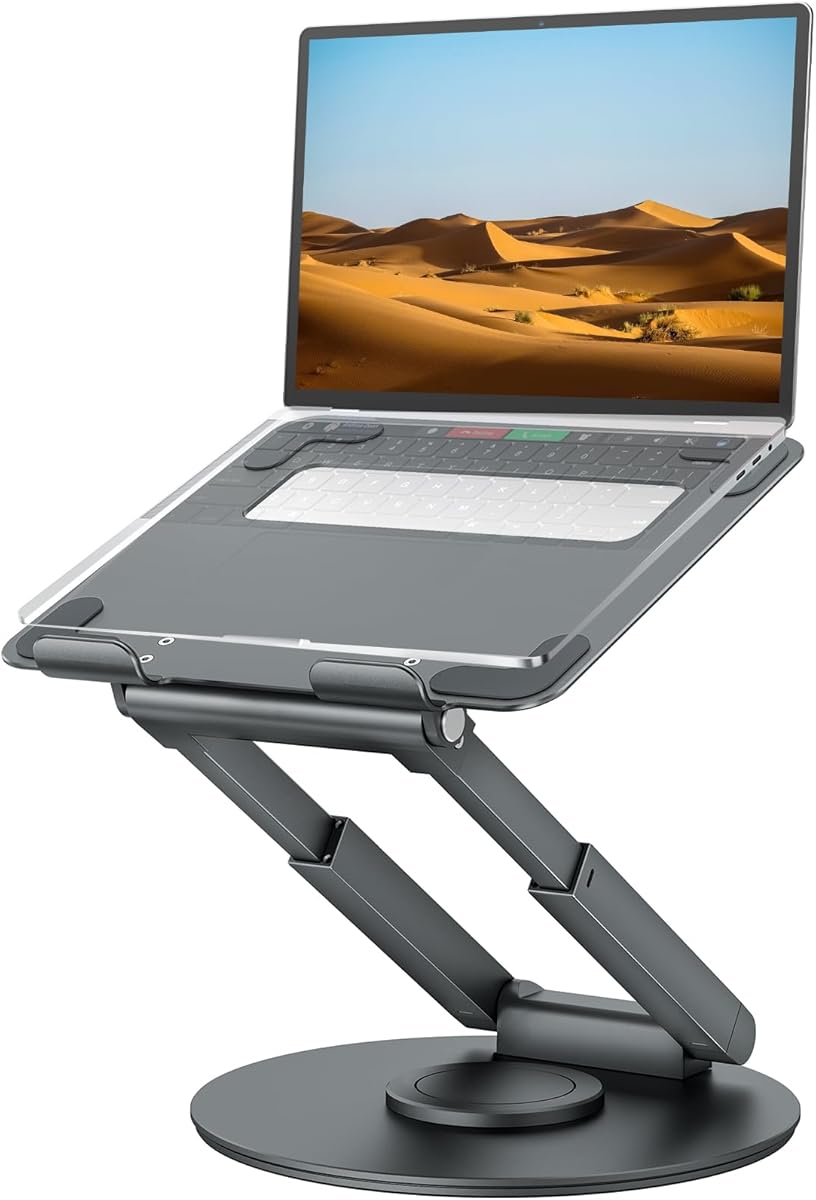
Nulaxy Telescopic Rotating Stand
4.7Editor score
Height reaches 18 inches
Tilt and swivel controls
Supports up to 22 pounds
A swiveling laptop stand combines height adjustment with rotating movement, making it easier to share a screen, change viewing angles, and support a more comfortable posture. The best models balance a stable base, smooth rotation, useful heat ventilation, broad device compatibility, and a structure that suits your workspace.
This guide compares ten stands using the specifications and product information supplied for each model. It covers compact rotating risers, telescopic sit-to-stand designs, locking aluminum stands, foldable options, and one adjustable non-swiveling alternative, allowing readers to identify the most relevant features for their desk.
Each pick reveals what distinguishes it in stability, portability, adjustment, cooling, and everyday usability. Ratings and specifications reflect the provided listing data, while feature summaries explain practical trade-offs. Product availability and prices can change, so confirm the current listing and fit before making a final purchase.
4.7Editor score

4.6Editor score

4.7Editor score
As an Amazon Associate we earn from qualifying purchases.
The table below compares all ten stands by rotation, adjustment range, construction, portability, cooling, device fit, and practical use, making it easier to identify the model that matches your desk and workflow.




The LOXP Adjustable Laptop Stand is a strong all-around choice for people who want a rotating platform without moving to a large telescopic frame. It carries a 4.6 rating, and its defining feature is a 360-degree rotating base connected directly to the support structure. That makes it particularly useful when a screen must be turned toward a colleague, shown during a presentation, or moved between viewing positions.
We may earn a commission when you buy through this link, at no additional cost to you.
Its one-piece fiber-metal construction is presented as more durable and stable than ordinary aluminum alloy, while non-slip silicone is intended to keep the laptop from sliding and protect its finish. Height and angle can be adjusted without tools, allowing the screen to sit closer to eye level while seated or standing. The open arrangement also promotes airflow, helping a laptop dissipate heat more effectively than when it rests directly on a desk.
The trade-offs are modest but relevant. The listed compatibility ends at 16 inches, so a larger 17-inch workstation will not fit the specified range. The supplied information also does not mention mechanical locking controls for the rotating base or height adjustments. Heavy devices may therefore deserve extra care during angle changes, even though the manufacturer emphasizes an upgraded base for stability.
This stand is best for students, hybrid workers, and anyone sharing a laptop in a home office, studio, or collaborative workspace. It offers the core benefits expected from a swiveling laptop stand—adjustment, rotation, cooling, and portability—without the bulk of a sit-to-stand model. For those priorities, it is the strongest general recommendation in the group.
The rotating base allows the display to be shared without relocating the entire stand. This is particularly useful during video calls, screen reviews, and short team meetings where turning the computer toward another person is more convenient than asking everyone to move around the desk.
Because the platform folds, the stand can move between a permanent desk and a temporary workspace. Its open support design and silicone contact points serve both portability and everyday device care, though buyers should confirm their laptop remains within the stated size range.
We may earn a commission when you buy through this link, at no additional cost to you.
The MOALLIA N86 distinguishes itself with a 360-degree rotating axis, an X-shaped aluminum frame, and locking knobs for its adjustments. Its 4.6 rating reflects a well-rounded product aimed at collaborative desks. The low center of gravity is designed to keep the stand balanced while the display turns, and the knobs offer more precise positioning than a friction-only hinge.
We may earn a commission when you buy through this link, at no additional cost to you.
Height and viewing angle can be adjusted by hand without tools. The aluminum body and open X-frame help distribute heat, while anti-slip silicone pads grip compatible laptops and guard their surfaces from scratches. The listed device range covers 11- to 16-inch laptops, including common MacBook, Surface, Dell, HP, and Chromebook models. Vertical placement requires device thickness of no more than 0.8 inches.
This model is not as travel-focused as smaller foldable risers. At 790 grams, or 1.74 pounds, it can fold down but is explicitly described as a desktop stand rather than an ultra-light travel accessory. The manufacturer also warns that heavy gaming laptops may sag slightly even with the knobs tightened. Users should remove the device before adjusting or folding the stand.
Choose the N86 when control and stable positioning matter more than minimum packed size. It is well suited to shared offices, meeting rooms, and desk-based work where a screen is repeatedly turned or tilted. The locking hardware and broad compatibility make it a practical alternative to the LOXP for buyers who want more mechanical control over their adjustments.
The upgraded knobs help hold a chosen height and angle after adjustment. That makes the stand attractive for users who frequently switch between a personal viewing position and a shared screen angle without wanting the platform to drift.
The X-shaped frame leaves substantial space beneath the laptop, while the aluminum construction assists heat diffusion. This combination is practical for extended work sessions, provided the device is operated on a hard surface and remains within the specified thickness limit.
We may earn a commission when you buy through this link, at no additional cost to you.
The JOYEKY Rotating Riser is one of the most highly rated products in this guide, carrying a 4.7 rating. It uses an aluminum alloy body, a larger weighted base, and a dual-axis 360-degree swivel. The platform is designed to rotate smoothly for presentations, collaboration, or simple repositioning, while height and viewing angle remain independently adjustable.
We may earn a commission when you buy through this link, at no additional cost to you.
Its largest practical advantage is the combination of broad adjustment and compact storage. Height can reach 11.81 inches, and the stand folds to 9.45 by 9.45 by 1.25 inches. It is advertised as suitable for 10- to 16-inch laptops, including MacBook Air and Pro, Dell XPS, HP, Lenovo, Acer, and Chromebook models. The stated load capacity is 11 pounds, accompanied by a larger base intended to prevent shaking, sliding, or falling during typing.
Some of the supplied copy conditionally mentions tablet support, so laptop buyers have clearer fit information than tablet buyers. The stand also lacks the dramatic vertical travel of a telescopic model. That is not a drawback for a conventional desk arrangement, but it means the product cannot independently serve as a full sit-to-stand workstation.
This riser is an excellent fit for mobile professionals who want real swivel movement in a package that can fit into a backpack. It also suits students and office users who regularly share screens. For anyone needing a taller pedestal, the telescopic models later in the list provide a better match; for compact versatility, the JOYEKY is difficult to overlook.
The square folded form is small enough for a backpack and still preserves adjustable height, angle, and 360-degree rotation when set up. This makes the stand practical for users who alternate between a dedicated office and temporary work locations.
The larger, heavier base is intended to improve stability when the laptop is used on the elevated platform. Anti-skid silicone and smooth edges add grip and device protection, while the open suspended design encourages airflow.
We may earn a commission when you buy through this link, at no additional cost to you.
The Nulaxy Dual-Rod Stand earns a 4.7 rating and offers a different proposition from most rotating models. It does not swivel, but its dual-support rod mechanism, broad device fit, and stated 22-pound capacity make it a strong ergonomic riser for users who primarily want stability and better screen height.
We may earn a commission when you buy through this link, at no additional cost to you.
The engineering focus is on reducing movement. Rather than relying on a single hinge, the stand uses two support rods to distribute weight and limit wobble during typing. Its upper platform includes a geometric heat-vent pattern intended to provide better airflow than a solid surface, while anti-slip silicone pads keep laptops from shifting or scratching. Compatibility extends across 10- to 16-inch devices, including large gaming laptops.
The absence of rotation is the central trade-off. It cannot be turned toward another person without repositioning the entire stand, so it is less useful for presentations and face-to-face collaboration. It also does not provide the height range of a telescopic pedestal. Even so, its fold-flat construction makes it more portable than many fixed-frame desktop stands.
This is a strong option for buyers who equate a useful laptop stand with rigid support, cooling, and portability rather than swivel movement. It can serve a home office, travel setup, or shared desk where screen sharing is uncommon. Those who regularly rotate a display should choose a dedicated swiveling model instead, but for stable everyday elevation, the Nulaxy remains highly practical.
The dual-rod structure is designed to distribute the laptop's load and reduce visible wobble. That makes the riser more suitable for users who type directly on an elevated keyboard rather than merely viewing content on it.
The perforated upper panel is positioned where it can promote air movement around the device. Combined with the elevated platform, it gives the laptop more room to release heat than it would have while lying directly on a desk.
We may earn a commission when you buy through this link, at no additional cost to you.
The Adjustable Laptop Stand for Desk, Metal Laptop Riser Holder is a straightforward 4.6-rated option for users who want an elevated screen without a complex rotating mechanism. Its metal construction supports up to 17.6 pounds, and the height and angle can be adjusted according to the user's preferred position.
We may earn a commission when you buy through this link, at no additional cost to you.
Protective detailing distinguishes it from a bare metal frame. Rubber mats sit at the hook area, while anti-skid silicone pads on the top and bottom help secure the device and reduce sliding. Smooth edges are intended to avoid uncomfortable contact with the hands. Multiple ventilation holes and the open structure allow air to circulate around the laptop during operation.
Its foldable design makes it easy to place in a backpack, and compatibility covers laptops from 10 to 15.6 inches. That range includes mainstream MacBook, Pixelbook, Dell XPS, HP, ASUS, Lenovo ThinkPad, Acer, Chromebook, and Microsoft Surface models. As with many compact risers, a larger 16- or 17-inch device may exceed the listed fit.
The stand is most appropriate for a straightforward home, office, or travel arrangement where the screen needs to be raised but does not need to rotate. Its foldability and protective pads offer clear everyday utility. Buyers whose priority is sharing a display with colleagues should instead consider one of the 360-degree models in this roundup.
The rubber and silicone contact points help keep the laptop stable while reducing the chance of scratches. Smooth metal edges also make the riser more comfortable to handle during the frequent folding and unfolding associated with mobile work.
The multiple holes in the upper surface support airflow while keeping the overall frame relatively uncomplicated. This is useful for frequent work sessions, provided the laptop is placed on a hard, ventilated surface rather than soft fabric.
We may earn a commission when you buy through this link, at no additional cost to you.
The JCZT Rotating Stand combines a dual-axis 360-degree base with a foldable metal design, giving it a balanced mix of collaboration and portability. Its 4.6 rating places it alongside several other well-reviewed products in the guide. The swivel is intended for sharing presentations, repositioning a screen, and finding a comfortable angle during normal use.
We may earn a commission when you buy through this link, at no additional cost to you.
Height and angle are adjustable by hand, allowing the display to approach eye level whether the user is seated or standing. The stand uses one-piece fiber-metal construction and an upgraded rotating base, while non-slip silicone is included to reduce movement and protect the laptop. Its open, suspended support also promotes airflow around the device.
The supplied specifications do not provide a stated load capacity or mention locking controls. That makes it difficult to compare its load limits directly with stands rated for 11, 17.6, or 22 pounds. Tablet compatibility is also conditionally worded, so buyers with a tablet should verify the physical support and lip arrangement before ordering.
The JCZT is a good middle-ground option for a commuter, student, or hybrid employee who wants true rotation and a package that folds into a backpack. It offers the same core swivel concept as the LOXP but uses a different frame and product design. It is best suited to mainstream 10- to 16-inch laptops and desks where a large telescopic pedestal would be inconvenient.
The dual-axis movement makes it easy to direct the display toward a colleague without moving the base. This is helpful for collaborative reviews, short presentations, and conversations that would otherwise require turning the whole computer away from the user.
The listed folded size allows the stand to fit into a backpack for work, travel, or hybrid schedules. Its support platform remains open and elevated, preserving airflow while the whole unit is stored compactly.
We may earn a commission when you buy through this link, at no additional cost to you.
The tounee Telescopic Laptop Stand is a premium-style solution for users who want more than a slight screen elevation. It carries a 4.7 rating and combines a 360-degree swivel base with a telescoping column that adjusts from 2.1 to 21 inches. That range allows the same stand to move between seated work and an active standing position.
We may earn a commission when you buy through this link, at no additional cost to you.
The turntable rotates smoothly with light force, making it convenient to redirect a video call or share the screen with someone nearby. A large aluminum base and two pivot joints provide the stated structural support, with a load capacity of up to 22 pounds. The broad 10- to 17-inch compatibility also makes the platform suitable for larger laptops than many compact models.
The main drawback is size. A telescoping pedestal needs more room than a folding riser, and its full-height configuration is not ideal for a cramped desk or minimalist workspace. It is also more mechanically complex, so users should extend and collapse it according to the manufacturer's guidance rather than forcing the mechanism.
This stand is best for people who alternate between sitting and standing, work at a large desk, or regularly share screens. It is particularly valuable in an office where one device may be used by multiple people during the day. For a smaller workspace or occasional travel, a compact rotating riser will be easier to manage.
The 2.1- to 21-inch adjustment range gives the laptop screen a much broader working envelope. A simple control allows the user to raise or lower the platform quickly, supporting the creation of a standing workstation without requiring a separate desk.
The two-pivot design is intended to make the stand stronger than comparable single-pivot products. Combined with the large base and stated 22-pound capacity, it offers a reassuring structure for users who expect to type directly on the raised laptop.
We may earn a commission when you buy through this link, at no additional cost to you.
The Amazon Basics Ergonomic Laptop Stand is a familiar 4.6-rated riser aimed at straightforward desktop use. It does not rotate, but it delivers the essentials expected from a portable ergonomic stand: height adjustment, ventilated construction, broad compatibility, and a compact folded profile.
We may earn a commission when you buy through this link, at no additional cost to you.
Its height can be adjusted by up to seven inches, allowing users to find a more comfortable screen position. The stand supports laptops and tablets from 10 to 15.6 inches, including MacBook, Surface Laptop, Dell XPS, Google Pixelbook, HP, ASUS, Acer, and Chromebook models. The lightweight, rust-resistant aluminum body has a stated load capacity of 11 pounds.
The manufacturer warns that larger or heavier devices may affect balance and stability. It also advises using the stand on a flat, solid surface and avoiding excessive downward pressure while typing. Non-slip silicone pads and protective hooks help secure the device, but a 15.6-inch laptop with a deep chassis can still sit closer to the edge of the support area.
This is a practical pick for a shared home office, student desk, or travel setup where a rotating mechanism is unnecessary. The folded dimensions of 10 by 8.7 by 1.8 inches and a listed weight of 1.7 pounds make storage straightforward. Those who share screens frequently should look to a 360-degree model, while users focused on simple elevation will find this design uncomplicated and dependable.
A seven-inch adjustment range gives users meaningful control over screen placement without adding a complex telescoping mechanism. The result is a stand that can be repositioned quickly as seating, viewing, or typing preferences change.
The flat-folding profile reduces the space occupied when the stand is not in use. Its light weight and recognizable everyday design make it convenient for temporary offices, shared workspaces, and users who want one dependable riser to move around the home.
We may earn a commission when you buy through this link, at no additional cost to you.
The Lamicall Aluminum Laptop Stand is a 4.7-rated riser that emphasizes broad compatibility and a stable metal platform. It supports devices from 10 to 17.3 inches, giving it one of the widest stated size ranges in the roundup. The stand is not a rotating model, but it offers adjustable height and angle for users seeking a more permanent ergonomic arrangement.
We may earn a commission when you buy through this link, at no additional cost to you.
A large, heavy aluminum base is designed to prevent shaking, sliding, or falling while the laptop is used on the elevated surface. Multiple ventilation holes promote airflow, and anti-skid silicone plus smooth edges protect the device from movement and scratches. Its foldable construction also allows it to be carried for business trips or stored in a laptop bag.
The product information contains broad language about avoiding overheating, but buyers should understand that a laptop stand cannot replace manufacturer-recommended ventilation practices. Heavy workloads still require a hard surface, unobstructed airflow, and attention to the computer's own thermal guidance. Like other aluminum risers, it also has no mechanism for turning the screen toward another person.
This stand is well suited to users with larger laptops, including 17-inch systems, who want one platform to handle a range of devices. It also works for offices equipping multiple workstations because the simple aluminum design requires no complex assembly. Choose it for stability, wide fit, and adjustability; choose a swiveling model when collaboration and screen sharing are central priorities.
The 10- to 17.3-inch range makes the Lamicall useful for a varied collection of computers. This broad fit is especially useful for households or offices where the stand may be used with both compact ultraportables and larger mainstream laptops.
The large base is intended to keep the elevated laptop steady during typing. Its aluminum construction and anti-skid contact points create a firm platform, while the ventilated surface allows air to move beneath the computer.
We may earn a commission when you buy through this link, at no additional cost to you.
The Nulaxy 18-inch Height Telescopic Stand is a feature-rich rotating pedestal rated 4.7. It combines a 360-degree rotating platform, an 18-inch maximum height, and an adjustable tilt angle, making it suitable for both seated and standing work. The rotating function is especially useful for meetings, presentations, and video calls in open offices.
We may earn a commission when you buy through this link, at no additional cost to you.
Its aluminum construction and solid base are designed to provide stability, with a stated bearing capacity of 22 pounds. The stand accommodates laptops, notebooks, and tablets up to 17 inches, covering common MacBook Air, MacBook Pro, Dell, HP, and Chromebook devices. It can also be folded for storage, although the telescoping form is inherently larger than a compact riser.
The manufacturer recommends taking the device off before changing height or angle, which reduces the risk of accidental movement or damage. It also suggests using an external keyboard and mouse for efficient typing because the elevated platform may feel different from a conventional desk. These precautions make the stand most attractive as a display and collaboration tool rather than a replacement for a full keyboard tray.
This is an excellent choice for an office, home studio, or conference space where the screen must be shared regularly and may need to reach a relatively high position. Its 360-degree rotation, 18-inch height, and tilt control offer more range than compact rotating stands. Buyers who type long passages on the laptop itself should add an external keyboard for the most comfortable setup.
The rotating platform allows a user to turn the display toward another person in an open office or meeting space. This is a practical advantage over fixed risers and makes the stand particularly useful for collaborative projects and group video calls.
Height adjustment reaches 18 inches, while independent tilt control fine-tunes the viewing angle. Together, these features allow the laptop to approach eye level in either sitting or standing arrangements, reducing the need for separate equipment.
We may earn a commission when you buy through this link, at no additional cost to you.
Choosing a swiveling laptop stand requires balancing rotation, height, stability, cooling, portability, and device fit. The right priorities depend on whether you mainly work alone, share screens, sit for long periods, alternate between sitting and standing, or carry your setup between locations.
Prioritize smooth movement, a stable center of gravity, and a platform large enough for your device. Locking knobs are an added benefit when frequent angle changes are needed, although not every rotating model includes them.
Choose enough vertical travel to suit your workspace, but avoid selecting an oversized pedestal if desk area is limited. Check whether the stand requires the laptop to be removed before adjustment.
For typing directly on the laptop, favor a wide base, strong support structure, and an adequate stated capacity. Larger or heavier computers should also fit comfortably within the platform rather than hanging over its edges.
Look for open construction, ventilation holes, and enough clearance beneath the device. A larger gaming laptop generally needs more airflow than a slim ultraportable.
Compare folded dimensions, not just the open profile. Choose a compact riser for frequent carrying and a telescopic model when height range and shared-screen mobility matter more.
Measure the laptop and check both the listed size range and any thickness restrictions. Large, heavy, or unusually deep systems deserve particular attention to fit and balance.
Choose a rigid frame with non-slip contact points and a smooth lip. Inspect the fit with the laptop powered off and confirm that openings and edges do not interfere with ports.
Map the stand to the dominant task: sharing, mobility, elevation, or active typing. Avoid buying a complex pedestal for occasional use or a minimal riser for daily shared presentations.
Begin by placing the stand on a flat, hard desktop and checking that its feet or base sit fully on the surface. Attach the laptop only after confirming the size and thickness fit, then adjust the height and tilt before applying light typing pressure. For a rotating model, move the screen with a light touch and avoid pushing against the frame or forcing the platform beyond its intended range.
When changing a telescoping height or a mechanism that bears the laptop's weight, remove the device first if the manufacturer recommends doing so. Rotate only when the stand is properly seated, and tighten any locking knobs gradually. Users who type heavily on an elevated platform may benefit from an external keyboard and mouse, particularly on tall telescopic models.
For care, wipe the metal surfaces with a soft, slightly damp cloth and dry them immediately. Avoid abrasive cleaners, excessive moisture, and strong chemicals near silicone pads. Keep ventilation holes and open areas free of dust, and do not use the stand on soft bedding or fabric. Periodically inspect hinges, knobs, silicone pads, and fasteners for looseness, especially if the stand carries a larger or heavier laptop.
The main benefit is the ability to turn a laptop screen without moving the entire stand. This is useful for sharing presentations, involving a nearby colleague, or participating in face-to-face meetings. Many models also combine rotation with height and tilt adjustment, allowing the display to be positioned closer to eye level.
It depends on the base, support structure, load rating, and laptop weight. Wide bases, dual pivot joints, and dual-rod designs generally provide better rigidity for active typing. The most important precaution is to keep the laptop centered on the platform and avoid pressing excessively on the keyboard while it is elevated.
Some stands support devices up to 17 or 17.3 inches, while others stop at 16 inches or 15.6 inches. Check the exact compatibility range before buying, and also consider the laptop's depth, weight, and any vertical-placement thickness requirement.
They can improve airflow by lifting the laptop away from the desk and allowing heat to dissipate from more surfaces. Some models add ventilation holes, while open aluminum frames promote heat transfer. They do not guarantee that a computer will remain cool, so the device should still be used on a hard surface with its vents unobstructed.
Removing the device is the safer approach, especially for telescopic or height-adjustable models. It prevents the laptop from moving unexpectedly or falling as the mechanism changes. Some stands can be adjusted while loaded, but following the manufacturer's instructions protects both the computer and the stand.
A telescopic stand is better when you alternate between sitting and standing, need a high screen position, or want a larger desktop setup. A foldable riser is usually easier to carry, less likely to occupy a crowded desk, and more convenient for travel. The best choice depends on whether height range or portability is your higher priority.
An external keyboard can make a tall or rotating setup more comfortable, especially when the laptop is raised near eye level. It also allows you to keep the laptop's position unchanged while using a separate keyboard and mouse at desk height. This is particularly useful for long typing sessions and presentations.
Use a soft, slightly damp cloth to wipe the frame and platform, then dry the surfaces immediately. Avoid abrasive pads, harsh chemicals, and excessive liquid around joints or locking knobs. Keep the ventilation openings free of dust so the elevated laptop can continue to receive airflow.
The LOXP Adjustable Stand is the strongest general choice because it combines smooth 360-degree rotation, tool-free height and angle adjustment, portability, cooling, and broad laptop compatibility. The MOALLIA N86 stands out when locking knobs and a low-center X-base are important, while the JOYEKY Rotating Riser offers a highly rated and compact alternative.
Your priorities should determine which feature receives the most attention. Choose the tounee or Nulaxy telescopic models for substantial height range and sit-to-stand flexibility. Choose the LOXP, MOALLIA, or JCZT for a more compact rotating platform. If rotation is unnecessary, the Nulaxy dual-rod riser, Amazon Basics stand, and Lamicall model may deliver better value and everyday simplicity.
Before ordering, verify the current listing, device size, thickness requirements, and available desk space. Ratings, features, product availability, and prices can change over time, so the current product page should be used to confirm the final details. With those checks in place, you can choose a swiveling stand that suits both your laptop and the way you work.