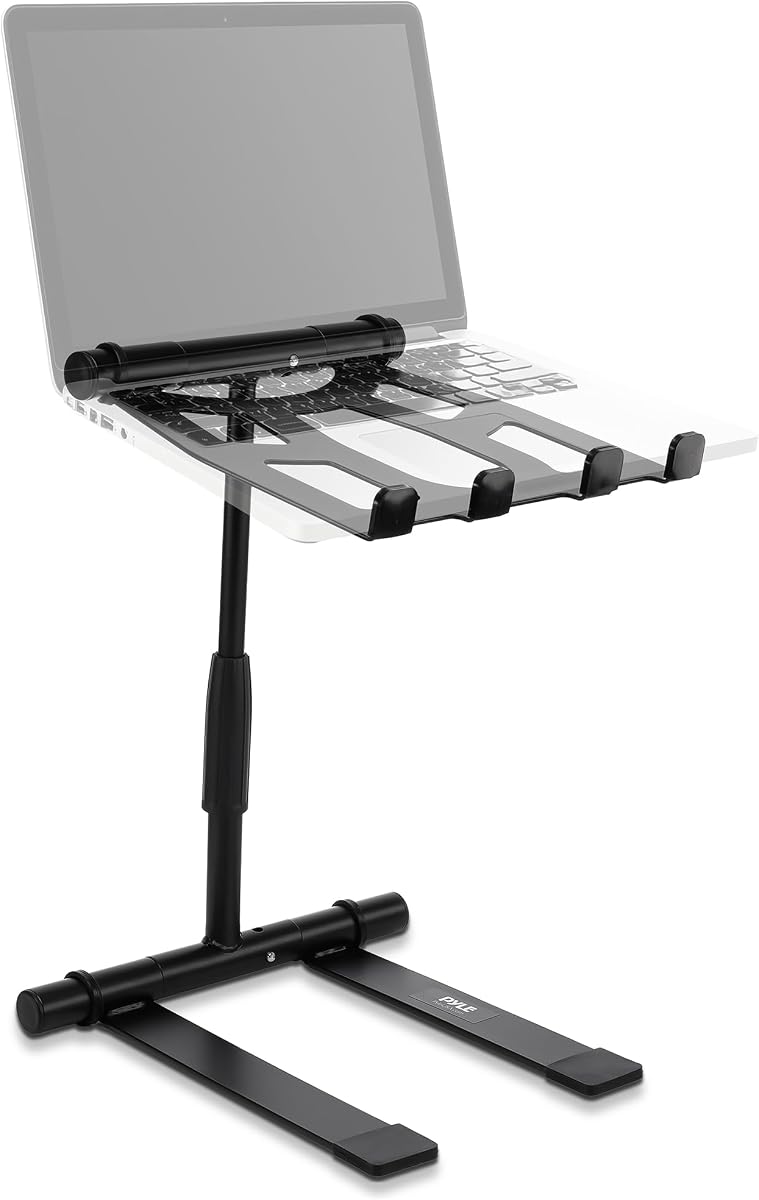
Pyle PLPTS55 Folding Laptop Stand
4.5Editor score
Four-prong anti-slip tray
Telescoping height adjustment
Flat-folding portable design
Explore the best Foldable Laptop Dj Stand options, comparing portability, stability, height adjustment, accessory shelves, and compatibility for DJs and
A foldable laptop DJ stand should place a computer and performance gear at a comfortable height without taking over the booth. The best models balance sturdy support, quick setup, compact storage, useful angle adjustment, and compatibility with laptops, controllers, mixers, and other equipment.
This guide compares ten stands using the information supplied for each model, focusing on construction, folded portability, platform design, adjustment mechanisms, carrying accessories, and the amount of equipment each stand can organize. It covers models intended for live performances, studios, home production, streaming, and mobile use.
Every listing reveals a different balance of features. Some prioritize a lightweight frame, while others emphasize accessory shelving, wide adjustability, or fast setup, so the best Foldable Laptop Dj Stand depends on the equipment, venue, and level of portability you need. Retailer listings and availability can change.
4.5Editor score

4.6Editor score

4.7Editor score
The comparison below highlights the construction, portability, adjustment, equipment support, and storage features that distinguish these foldable DJ laptop stands.


The AXA AXCESSABLES DJ Laptop Stand combines a 4.6 rating with a particularly practical mix of stability, portability, and organization. It arrives ready to use, so performers do not have to spend time assembling a complicated frame before a rehearsal or mobile set. Its machined aircraft-grade aluminum construction gives it a more substantial feel than many lightweight portable stands.
We may earn a commission when you buy through this link, at no additional cost to you.
The primary platform accommodates laptops up to 15 inches and 20 pounds, which covers many performance notebooks and compact production computers. An additional adjustable shelf can hold an audio interface, keyboard, launchpad, or other accessories. This two-level arrangement is especially useful when booth space is limited because it brings frequently used equipment into one organized footprint.
Adjustment is described as straightforward, and the stand's durable black powder-coated finish is intended to protect both the metal and the appearance of the equipment. The included AxcessAbles carry bag adds value by protecting the finish during transport. One limitation is that the listed laptop-size limit is more restrictive than the broad language used for some competing models.
This is the strongest general recommendation for a DJ who wants a dedicated stand without complicated setup. It suits performers, producers, and streamers who need a laptop raised above a mixer or controller while keeping accessories nearby. Anyone whose computer exceeds the stated size or weight should verify fit before ordering, but for common mobile DJ setups it offers an excellent balance.
The no-assembly design makes this model attractive for performers who move between locations. Opening the case and placing the computer on the platform is considerably more convenient than sorting hardware and tools before every setup.
The adjustable accessory shelf gives the stand a practical advantage over single-platform designs. It can keep an interface, launchpad, keyboard, or other small device accessible without requiring a separate table.
We may earn a commission when you buy through this link, at no additional cost to you.
The Pyle PLPTS55 earns a 4.5 rating and stands out for its unusually broad adjustment options. It combines a telescoping frame with a rotating tray, allowing users to raise the device and alter its viewing angle rather than relying on a fixed platform. That flexibility makes it useful for DJ mixers, laptops, tablets, and general workstation setups.
We may earn a commission when you buy through this link, at no additional cost to you.
Its four-prong tray is designed to hold a device securely, while anti-slip legs help prevent accidental movement. The listed height adjustment extends from 12.6 to 16.7 inches, and the shelf measures 8.6 by 9 inches. These dimensions should be checked against the user's computer and controller to ensure the platform is large enough.
The stand folds to 10.6 by 12.6 by 1 inches and can also be disassembled for easier packing. It comes assembled, which reduces setup time, while its relatively compact folded profile helps with travel and temporary use. The lack of a dedicated accessory shelf means users needing to organize a controller and audio interface will need another surface.
This is a compelling budget choice for a beginner, home producer, streamer, or mobile performer who values angle and height control. It also works beyond DJ duties, making it a versatile laptop riser. Buyers should account for the fact that its fully extended structure is fairly tall and that a separate shelf may be necessary for a complete workstation.
Independent height and tray-angle adjustments help users find a comfortable position for mixing, viewing, or presenting. This is especially useful when the same stand moves between seated production and standing performance environments.
The low folded profile and optional disassembly make transport easier than with a permanently rigid riser. It is a practical option for DJs who carry substantial equipment between venues.
We may earn a commission when you buy through this link, at no additional cost to you.
The Pyle Portable Folding Laptop Stand has a 4.3 rating and a useful 3.3-pound weight that makes it easy to move. Its steel alloy frame provides a durable base, while anti-slip legs are intended to maintain stability on different surfaces. The stand can accommodate laptops, tablets, iPads, and DJ mixers.
We may earn a commission when you buy through this link, at no additional cost to you.
Its most attractive feature is the secondary accessory tray. The tray slides into position and creates space for small devices such as sound cards, hard drives, or mixers. This improves workflow by keeping frequently accessed equipment close to the computer, particularly in home, office, or mobile production setups.
The folding format allows the stand to fit into a backpack or carrying bag, and the supplied case reduces the need to protect the frame during transport. The sliding tray design may not be as secure or configurable as a permanently mounted shelf, but it provides useful flexibility without adding another permanent tier.
This model is a good choice for a producer or traveling performer who wants organized equipment storage without carrying a large stand. It is particularly suitable for light mobile rigs, rehearsal rooms, and temporary workstations. Users who need maximum load capacity or highly specialized angle control should review the complete dimensions and available adjustment before buying.
At 3.3 pounds, the stand is among the more portable options listed. Its folding structure and included carrying case support the needs of musicians who move frequently between rehearsal spaces, studios, and events.
The sliding tray keeps compact accessories close without turning the stand into a large workstation. It works well for sound cards, drives, and other small components that would otherwise occupy precious table space.
We may earn a commission when you buy through this link, at no additional cost to you.
The Ultimate Support JamStands LPT500 has a 4.4 rating and focuses on a low-profile, ergonomic approach to laptop support. Its single-tier design keeps the overall structure simple, while the fully adjustable configuration allows users to select a comfortable working height and arrangement.
We may earn a commission when you buy through this link, at no additional cost to you.
The stand's thin feet can slide under mixers and keyboards without disrupting an existing setup. This is a practical benefit in crowded DJ booths because it reduces the chance of cables, controllers, or other equipment being pushed out of position. Sturdy construction and locking mechanisms help keep the laptop secure during use.
The LPT500 folds flat and slides into an included tote, making it straightforward to store between engagements. It does not offer a second shelf, so users who need an integrated place for an audio interface or controller will need to arrange that equipment separately. The supplied information also does not state a maximum load figure.
This is an excellent recommendation for DJs who already have a compact table and want a laptop riser that can tuck neatly around existing gear. It is also useful for home production where a restrained, single-level design is preferred. Those needing integrated accessory storage should look instead to the dual-tier models later in the guide.
The slim foot design is one of the LPT500's most useful distinctions. It can fit under nearby equipment, helping the user preserve working space on a densely packed DJ table.
The included tote gives the stand a clear place in a mobile equipment case. Its flat-folding design also reduces storage demands in rehearsal rooms and home studios.
We may earn a commission when you buy through this link, at no additional cost to you.
The HULISEN DJ Laptop Stand has a 4.1 rating and presents the clearest dedicated two-tier DJ layout in this group. Its upper tier holds a laptop, while the lower tier is designed for a controller, mixer, audio interface, or MIDI device. This arrangement consolidates the main performance workflow into a compact workstation.
We may earn a commission when you buy through this link, at no additional cost to you.
Quick assembly and foldable storage make it relevant to performers moving between weddings, parties, and mobile events. Adjustable height and viewing angle are intended to reduce neck and shoulder strain during long mixing, production, or streaming sessions. Anti-slip pads, raised edge protection, and secure locking points help keep equipment steady during active use.
The specified support limit is 7.7 pounds, or 3.5 kilograms, which deserves attention when choosing a stand. The top tier is intended for most 10- to 15.6-inch laptops, while the lower tier accommodates devices up to 12.6 inches wide. The lower customer rating and load limitation are the main reasons it does not rank higher.
This stand is well suited to DJs and producers whose primary setup is a laptop plus one compact controller or interface. It can also support podcasting, streaming, music production, and office workflows. Users should verify the weight and dimensions of their equipment before relying on it for a full performance rig.
The separate upper and lower levels prevent the laptop and controller from competing for the same surface. That makes the stand efficient for compact booths and focused live-performance setups.
Height and angle adjustments let users bring the screen closer to eye level. For extended mixing, production, or streaming work, that flexibility can support a more comfortable working posture.
We may earn a commission when you buy through this link, at no additional cost to you.
The Hercules DG400BB carries the highest customer rating in this selection at 4.7. Its defining qualities are straightforward height and angle adjustment, a one-piece design, and substantial stated support for laptops up to 22 pounds. These features position it as a premium option for users who prioritize dependable support over a multi-shelf layout.
We may earn a commission when you buy through this link, at no additional cost to you.
Extra rear legs provide additional stability, while the one-piece construction simplifies both setup and breakdown. That makes the stand attractive for performers who need to establish a laptop riser quickly and then move or store it after a session. The included carry bag protects the stand and simplifies transport.
Its main limitation is that it is a dedicated laptop stand rather than a full equipment organizer. DJs who need a lower platform for a mixer or audio interface will have to supply that separately. Nevertheless, the stronger stated load rating and high customer feedback make the DG400BB a compelling premium choice for a heavier or more demanding computer setup.
Choose the Hercules when support strength, ease of adjustment, and a refined carrying setup matter most. It works well for live DJs, studio producers, presenters, and streamers who want a dedicated laptop riser. Verify that its single-tier layout matches the rest of the equipment in the booth before purchasing.
The stated capacity of 22 pounds distinguishes the DG400BB from lighter portable stands. It offers reassurance for users supporting a larger laptop or a computer with substantial internal hardware.
The integrated frame avoids a complicated assembly process. A performer can position the computer, adjust the viewing position, and begin working with less setup time.
We may earn a commission when you buy through this link, at no additional cost to you.
The Odyssey LSTAND360 has a 4.3 rating and stands apart through its 360-degree rotating arm and base. Instead of relying only on a tilted shelf, it allows the platform to be repositioned through a broad range of angles. This makes it particularly useful when a performer needs to move between performance, editing, and presentation positions.
We may earn a commission when you buy through this link, at no additional cost to you.
The stand weighs only 2 pounds, making it one of the easiest options in the guide to carry. It folds flat to 12.5 by 1.25 by 11.5 inches and comes with a carrying pouch. Adjustable frame height extends the body from 11 to 16 inches, excluding the arms, offering a broad working range.
Rubber grip stickers are included to improve stability, while hooks at the end of the arm extend an additional half inch for steeper positioning. There is no secondary shelf, and the rotating structure may take slightly more attention to configure than a basic fixed riser. Its low weight also means users should consider stability carefully on crowded or uneven surfaces.
The Odyssey is ideal for a mobile DJ or presenter who values minimal carrying weight and precise repositioning. It can also support a studio, podcast, or livestream arrangement where changing screen orientation is useful. It is less appropriate for someone who wants integrated controller storage without adding another piece of furniture.
The rotating arm and base provide more positioning freedom than a conventional fixed-angle shelf. Users can orient the computer to suit a performer, engineer, camera, or audience arrangement.
A two-pound frame and flat-folding design reduce the burden of carrying a stand between bookings. The included pouch helps protect the components when the stand is stored with other equipment.
We may earn a commission when you buy through this link, at no additional cost to you.
The Rockville RLS2400 Steel has a 4.4 rating and combines a relatively light four-pound frame with a useful extra shelf. Its multi-purpose design supports laptops, lighting controllers, small mixers, CD players, and DJ interfaces, giving it value beyond conventional laptop use.
We may earn a commission when you buy through this link, at no additional cost to you.
The secondary shelf provides a place for an audio interface or other small electronics, reducing the amount of loose equipment on the booth table. Arms and base legs snap into place and remain locked until released. This design emphasizes fast setup, which is useful for changeovers, rehearsals, and mobile performances.
The stand folds flat to 14 by 10.5 by 0.75 inches and fits into the included travel bag. Compared with a very compact folding riser, its footprint is larger, but the extra shelf accounts for much of that size. The supplied information does not state a maximum load capacity, so buyers should consider the combined weight of all equipment placed on both levels.
This is a strong recommendation for DJs who want a recognizable two-level structure, quick assembly, and broad equipment compatibility without moving to a more complex rotating stand. It also suits small studio desks, livestream booths, and mobile performance kits. Those needing the lightest possible frame may prefer a dedicated laptop riser instead.
The snap-together arms and legs are designed to speed up setup and remain locked during use. That efficiency is valuable for performers with limited rehearsal time or frequent venue changes.
The extra shelf prevents small electronics from competing with the computer for surface area. It creates a more complete workstation while keeping the overall package relatively easy to transport.
We may earn a commission when you buy through this link, at no additional cost to you.
The ProX Foldable DJ Laptop Stand offers a balanced combination of portability, height adjustment, and accessory support. Its steel frame and wide base are designed to provide stable support during live performances, studio sessions, and everyday workstation use. The laptop platform and accessory shelf can be adjusted to create a more comfortable equipment layout.
We may earn a commission when you buy through this link, at no additional cost to you.
The lower shelf is intended for a DJ controller, mixer, audio interface, MIDI controller, or other essential gear. This makes the stand more versatile than a basic laptop riser and particularly useful for performers who need a computer and compact controller in one footprint. The broad equipment compatibility also extends its use to music production and content creation.
It folds flat in seconds and includes a carrying bag for travel between gigs, studios, rehearsals, and events. One important consideration is that the supplied listing does not include a numerical customer rating or maximum load figure. Prospective buyers should therefore assess those details carefully, particularly if they plan to place a dense collection of equipment on the adjustable shelf.
The ProX is a compelling choice for users who want more flexibility than a single-tier riser but less complex geometry than a rotating stand. It works well for mobile DJs, producers, and streamers who prioritize a clean two-level setup. Checking the current retailer listing for dimensions, load details, and customer feedback is recommended before making a final decision.
The adjustable laptop height and shelf positioning make it easier to tailor the setup to different users and equipment. This is useful for a workstation that must serve more than one production style.
The steel construction and broad base are intended to limit movement on performance tables. Anti-slip details are not specified, so users should consider their surface and equipment weight carefully.
We may earn a commission when you buy through this link, at no additional cost to you.
The Rockville RLS2400 Aluminum is a compact, collapsible option designed for DJs, producers, streamers, and performers. It raises the laptop platform 14 inches above the table, bringing the display and controls closer to eye level while leaving room underneath for an audio interface or other electronics.
We may earn a commission when you buy through this link, at no additional cost to you.
Its open-arm design is intended to promote airflow around the computer, potentially reducing heat buildup during extended sessions. The second shelf organizes compact gear, and the lightweight frame is easy to move between venues. The stand also supports a wide range of devices, including laptops, lighting controllers, small mixers, DJ interfaces, and CD players.
The folded dimensions are 14 by 10.5 by 0.75 inches, allowing the stand to fit neatly into the included zippered bag. Fast assembly and disassembly suit frequent changeovers. The listing does not provide a customer rating, and it describes the product as aluminum even though another RLS2400 listing identifies steel construction, so buyers should confirm the material and specifications in the current listing.
This model is best for mobile performers who want a space-saving stand with integrated accessory storage. It can also serve studio, gaming, podcast, presentation, and office configurations. It is a sensible compact option, but the material discrepancy and absence of customer feedback make careful review of the listing especially important.
The slim folded profile lets the stand occupy less storage space than a fixed-frame riser. The included zippered bag keeps it together and provides a place within a larger equipment kit.
The 14-inch platform height improves screen positioning, while the open structure allows air to circulate around the computer. Together, these features suit long studio sessions and live streams.
We may earn a commission when you buy through this link, at no additional cost to you.
The right foldable DJ laptop stand depends on the equipment it must support, the available table space, and how often the setup moves. The following factors help narrow the field before making a purchase.
Begin with the dimensions and weight of the laptop, controller, and every accessory that will share the stand. Some listings provide a maximum laptop size, while others list only a general compatibility range. Compare those figures with the actual footprint of the equipment, including the portion that may overhang the platform or rest near a raised edge.
Choose a platform large enough to support the computer securely and a stated load capacity that comfortably exceeds the combined equipment weight. Never assume that a general description of durability establishes safe capacity. For heavily equipped DJ rigs, a model with an explicit load rating provides clearer guidance than one without.
A raised computer can reduce the need to hunch over a table, but the useful range depends on the performer. Fixed-height stands are simple, while telescoping frames, tilting platforms, and rotating arms offer more ways to position the screen. Consider whether the adjustment occurs in smooth steps and whether the chosen position can be held securely.
Match the adjustment to the environment. A home user may need only a modest tilt, while a DJ moving between a club booth and a rehearsal space may need both height and orientation changes. Test the available range against the user's seated and standing positions before ordering.
A single-tier stand is focused on elevating a laptop and usually takes up less space. It works well when the booth already has a table for a mixer, controller, or audio interface, or when the user wants a simple and lightweight setup. It is also usually easier to configure and carry.
A dual-tier stand integrates the computer and a second device into a more compact workstation. It can save table space and keep essential controls within reach, but it may be heavier, larger when folded, and more complicated to adjust. Choose based on table layout and the number of devices that truly need to travel together.
Portable only helps if the stand fits the user's actual transport system. Compare the folded dimensions with a backpack, flight case, vehicle trunk, rehearsal-room cupboard, or DJ flight bag. Also account for the space occupied by the carrying case and any tools needed for assembly.
A compact flat fold is convenient for frequent travel, while a very low folded weight matters when the performer already carries cases of records, speakers, cables, and accessories. Weight and size are separate concerns, so consider both before choosing a model based on portability alone.
Quick setup matters when a DJ arrives at a venue with limited time or changes rooms frequently. Some stands arrive fully assembled, while others use snap-fit arms, locking feet, or a one-piece folding design. The best mechanism is one that locks positively and can be operated without repeatedly searching for small parts.
Practice assembling the stand before an event. Confirm that each joint holds its position and that the feet remain stable after the laptop and accessories are loaded. A simple design with clear locking points is often more dependable in a busy backstage environment than a complicated adjustable mechanism.
Steel and aluminum offer different balances of strength, weight, and portability. The AXA model uses machined aircraft-grade aluminum, while several other choices use steel frames. The material alone does not determine stability; base width, leg geometry, support points, and surface contact also affect how securely the computer rests.
Look for anti-slip feet, raised edges, rubber grips, or similar details that keep the computer from sliding. A wide base is particularly useful for a controller-heavy setup. Users should also place the stand on a level, sturdy table and avoid extending cables so forcefully that they can pull the computer out of position.
A secondary shelf can hold an audio interface, MIDI controller, small mixer, drive, or keyboard, but shelf size matters. Some lower tiers are designed for compact devices, while others have specific width limits. The HULISEN model, for example, lists a lower tier for devices up to 12.6 inches wide, so larger controllers may not be suitable.
Consider cable routing as well as platform space. A shelf can organize equipment but still leave leads crossing the work area. A clean layout keeps controls accessible, supports proper cooling, and reduces the chance of snagging a cable while changing tracks or moving a controller during a performance.
A protective case is valuable for any stand transported regularly because it keeps the finish, joints, and adjustment hardware together. Models such as the AXA, Ultimate Support, Odyssey, Rockville, and ProX include carrying bags or totes. This reduces abrasion and makes it easier to locate all stand components after unpacking.
Also consider whether the stand is intended only for DJ performance or for broader uses. Several models work with tablets, presentations, gaming, podcasting, production, and home workstations. A versatile stand can be a better investment for buyers who expect to use the same equipment in several roles.
Set the stand on a level, sturdy table before unfolding or extending it. Clear cables and accessories away from the legs, confirm that the base is fully planted, and lock every adjustable joint. Place the laptop squarely on the platform, with its weight centered rather than concentrated near an edge.
Lower equipment should be added only after the main stand is stable. Route power and signal cables so they do not hang from the platform, cross foot traffic, or interfere with folding mechanisms. When changing the angle or height, remove fragile accessories first and support the frame with both hands.
For transport, fold or disassemble the stand according to its instructions, secure loose adjustment pieces, and place the frame in its carrying case. Wipe the surface with a soft, slightly damp cloth, avoid harsh cleaners, and allow it to dry fully before packing. Check the locking mechanisms and feet periodically for looseness or wear.
Choose a stand whose stated platform size comfortably accommodates the footprint of your laptop. Some models specify a maximum laptop size, such as 15 inches, while others are described more generally. Consider the computer's width and depth, not only its screen size, and check for raised edges or anti-slip surfaces before loading it.
Many models can support a laptop plus a small controller, mixer, or interface. Dual-tier stands such as the HULISEN, Rockville, and ProX options provide a dedicated lower level for compatible equipment. Check the lower shelf dimensions and the combined load, since a controller designed to sit on a table may be too large for a compact shelf.
Not necessarily. A heavier frame may feel stable, but geometry, base width, locking points, and surface contact are more important than weight alone. Portable stands can still perform well when properly locked, provided the table is level and the equipment is centered. The Hercules DG400BB stands out because it combines easy adjustment with a stated capacity of up to 22 pounds.
A tilting stand changes the platform's forward-and-back angle to improve screen viewing. A rotating stand can turn the entire platform through a wider range of orientations, which can help with unusual booth layouts or changing between performer, engineer, and audience positions. The Odyssey LSTAND360 offers the latter approach with a 360-degree rotating arm and base.
An accessory shelf is useful when a controller or audio interface needs to travel with the laptop and table space is limited. A single-tier stand is simpler and often more compact, making it better when another surface already holds the other equipment. Measure the shelf and confirm that the lower device is compatible before choosing a dual-tier model.
Place the laptop squarely and keep it away from the platform edge. Models with anti-slip pads, raised edges, rubber grips, or a four-prong tray provide added security. Avoid leaving a computer on a steeply inclined platform, and tighten any adjustable joints before the performance begins.
Yes. Most of the listed models can support laptops, audio interfaces, MIDI controllers, and compact mixers in addition to DJ duties. A dual-tier stand can create a dedicated production station, while a single-tier model can raise the display for editing, streaming, or general computer work.
Fold or disassemble it according to the included instructions, check that locking mechanisms are engaged, and store loose pieces together. Using the supplied carrying bag helps prevent scratches and keeps the stand organized with the rest of a mobile rig. Before the next setup, inspect the joints and feet for looseness.
The AXA AXCESSABLES stands out as the best overall choice because it combines a strong rating, no-assembly setup, durable aluminum construction, an adjustable accessory shelf, and a protective carrying case. The Pyle PLPTS55 is a strong budget alternative for users who prioritize height and angle adjustment, while the Hercules DG400BB is the premium choice for a dedicated, high-load laptop riser.
Before buying, prioritize the dimensions and weight of your actual equipment, followed by the type of adjustment, folding size, and stability at the intended table. Choose a dual-tier model for a laptop plus controller, a single-tier stand for a simpler workstation, and a rotating design when unusual positioning is important. Transport and setup time should also influence the decision for mobile performers.
Retailer listings, customer feedback, specifications, and availability can change over time. Review the current product page and recent buyer feedback before purchasing, especially for models without a numerical customer rating. With the right fit confirmed, a well-chosen foldable DJ laptop stand can create a safer, more organized, and more comfortable performance setup.