
Vezzio 512GB Magnetic Portable SSD
4.7Editor score
Up to 510MB/s read speed
4K 60fps ProRes recording
MagSafe magnetic attachment
Aluminum alloy enclosure
Our SSD for iPhone Prores guide compares 10 magnetic and USB-C drives for 4K recording, transfer speed, capacity, cooling, durability, and phone compatibility.
Recording ProRes on an iPhone can transform a phone into a compact production camera, but only when external storage is fast, reliable, and compatible with the device. The best drives support direct recording, provide stable transfers, handle sustained heat, and offer enough capacity for long shooting sessions without interrupting the creative workflow.
This guide compares 10 external SSDs highlighted for iPhone ProRes workflows, focusing on stated recording support, read and write speeds, capacity, magnetic attachment, USB-C connectivity, cooling features, durability, and cross-device compatibility. It includes mobile-focused creator drives, compact magnetic models, high-capacity options, and a dual-interface flash drive for broader use.
Each review explains what distinguishes the drive within this particular lineup, from direct Apple ProRes 4K capture to monitoring displays, fingerprint security, passive charging, and rugged enclosures. Product listings and availability can change, so confirm the current specifications, phone model, storage format, and accessory requirements before making a final purchase.
4.7Editor score

4.4Editor score

4.1Editor score
The table below compares all 10 drives by their most relevant mobile-production attributes, including ProRes recording support, stated performance, capacity, physical connection, and standout design features.



This 512GB magnetic portable SSD combines a high stated transfer rate with explicit support for 4K 120fps ProRes HDR recording on the iPhone 16 Pro Max. Its 4.4 rating reflects a generally favorable customer reception, while the product's strongest appeal is its combination of throughput, direct-recording intent, and phone-focused magnetic design.
We may earn a commission when you buy through this link, at no additional cost to you.
The manufacturer states that USB 3.2 Gen 2×2 can reach 2000MB/s on a compatible 20Gbps computer interface, making it the most aggressively specified transfer option in this guide. That figure is most relevant when moving large project folders, RAW photographs, and finished video between a laptop and the drive. It also supports direct 4K 120fps ProRes HDR capture, a demanding mode that benefits from a drive designed to avoid dropped frames.
Its magnetic construction helps the drive sit securely against a compatible phone, while an included magnetic ring broadens support for other USB-C devices. The metal enclosure and broad Android, Windows, macOS, tablet, laptop, and console compatibility make it useful beyond iPhone production. The main qualification is that real transfer performance depends on the phone, computer, cable, and interface, so the maximum figure should not be treated as a guaranteed result on every device.
Choose this drive when high frame-rate ProRes capture and fast media movement are the priorities, especially on the stated iPhone 16 Pro Max workflow. It offers an attractive balance of responsiveness, portability, and direct-recording features without adding a display, fan, or fingerprint system. Confirm that your exact iPhone model, iOS version, and recording configuration appear in the current product guidance before purchasing.
Direct 4K 120fps ProRes HDR recording is the defining feature for creators working with the specified iPhone 16 Pro Max. The stated 20Gbps interface also gives the drive a strong role in moving completed footage, RAW files, and project folders between mobile and desktop environments.
Magnetic attachment reduces the need for a separate phone cage during handheld shooting, while the supplied ring supports compatible non-MagSafe devices. USB-C plug-and-play operation across mobile, desktop, tablet, and console ecosystems adds flexibility outside the recording role.
We may earn a commission when you buy through this link, at no additional cost to you.
The Sandisk 1TB Creator Phone SSD is purpose-built for mobile video production and carries a 4.5 rating. Its defining credentials are direct Apple ProRes 4K 60fps capture, up to 1000MB/s stated read speed, MagSafe attachment, and an IP65-rated enclosure designed to tolerate demanding travel and shooting environments.
We may earn a commission when you buy through this link, at no additional cost to you.
For an iPhone 15 Pro, iPhone 15 Pro Max, or iPhone 16 Pro or Pro Max, the drive can serve as the storage destination for 4K ProRes footage and a convenient place to keep media close at hand for editing. The 1TB capacity gives creators more breathing room than a compact card while remaining easier to carry than a conventional multi-drive storage solution.
Its ruggedization is one of the most meaningful distinctions from basic thumb-drive-style products. IP65 protection addresses water and dust resistance, making the drive more appropriate for location work than a bare-metal flash drive. The included month of Adobe Creative Cloud is a convenience, although the drive's essential value lies in its storage performance and mobile integration rather than software access.
This is a strong recommendation for creators who want a recognizable mobile SSD, generous capacity, and a straightforward MagSafe-based setup. It does not claim the same 120fps target as the first-ranked drive, so extremely high-frame-rate shooters should verify their exact format. For most 4K 60fps ProRes projects, however, it offers a balanced and purpose-built feature set.
The drive's ProRes support and MagSafe connection are tailored to iPhone production rather than general file storage. It can hold media for immediate access during an edit, reducing the need to move every captured clip back to internal phone storage first.
An IP65 rating provides a meaningful advantage when the drive travels between outdoor sets, crowded locations, and changing environments. Its solid mobile orientation and 1TB capacity make it particularly useful for creators who want room for extended footage libraries without carrying multiple storage devices.
We may earn a commission when you buy through this link, at no additional cost to you.
The Sandisk 2TB Creator Phone SSD expands the creator-focused design of the 1TB model into a higher-capacity mobile storage solution. It retains a 4.5 rating, up to 1000MB/s stated read speed, 4K 60fps ProRes support, MagSafe attachment, and IP65 water and dust resistance.
We may earn a commission when you buy through this link, at no additional cost to you.
Capacity is the decisive feature. Two terabytes is better suited to long shoots, large RAW archives, and creators who prefer to keep a substantial body of footage directly on the drive. Being able to save ProRes media to the SSD and access those files for editing can streamline the path from capture to post-production without relying entirely on the phone's internal storage.
The design remains portable enough for a mobile production kit, and its magnetic attachment simplifies positioning around a compatible iPhone. The included USB-C cable supports the connection process, while the IP65 enclosure is a practical feature for field use. As with the smaller Sandisk model, direct recording depends on the exact phone model and iOS configuration.
This is the option to consider when storage runway matters more than having the smallest possible device. Its high capacity reduces the frequency of file rotation and backup sessions during multi-day productions. Creators working with lower-frame-rate 4K ProRes will appreciate the balance, while those requiring 120fps capture should compare the stated capabilities of the higher-speed drives in this list.
A 2TB capacity gives ProRes shooters a larger recording runway and room for photographs, project files, and exports. This is especially useful for travel work or multi-day assignments where frequent offloading would otherwise consume valuable production time.
MagSafe attachment, a supplied USB-C cable, and IP65 protection form a practical mobile package. The drive is designed to move comfortably between direct capture, on-site review, and later editing on a compatible computer.
We may earn a commission when you buy through this link, at no additional cost to you.
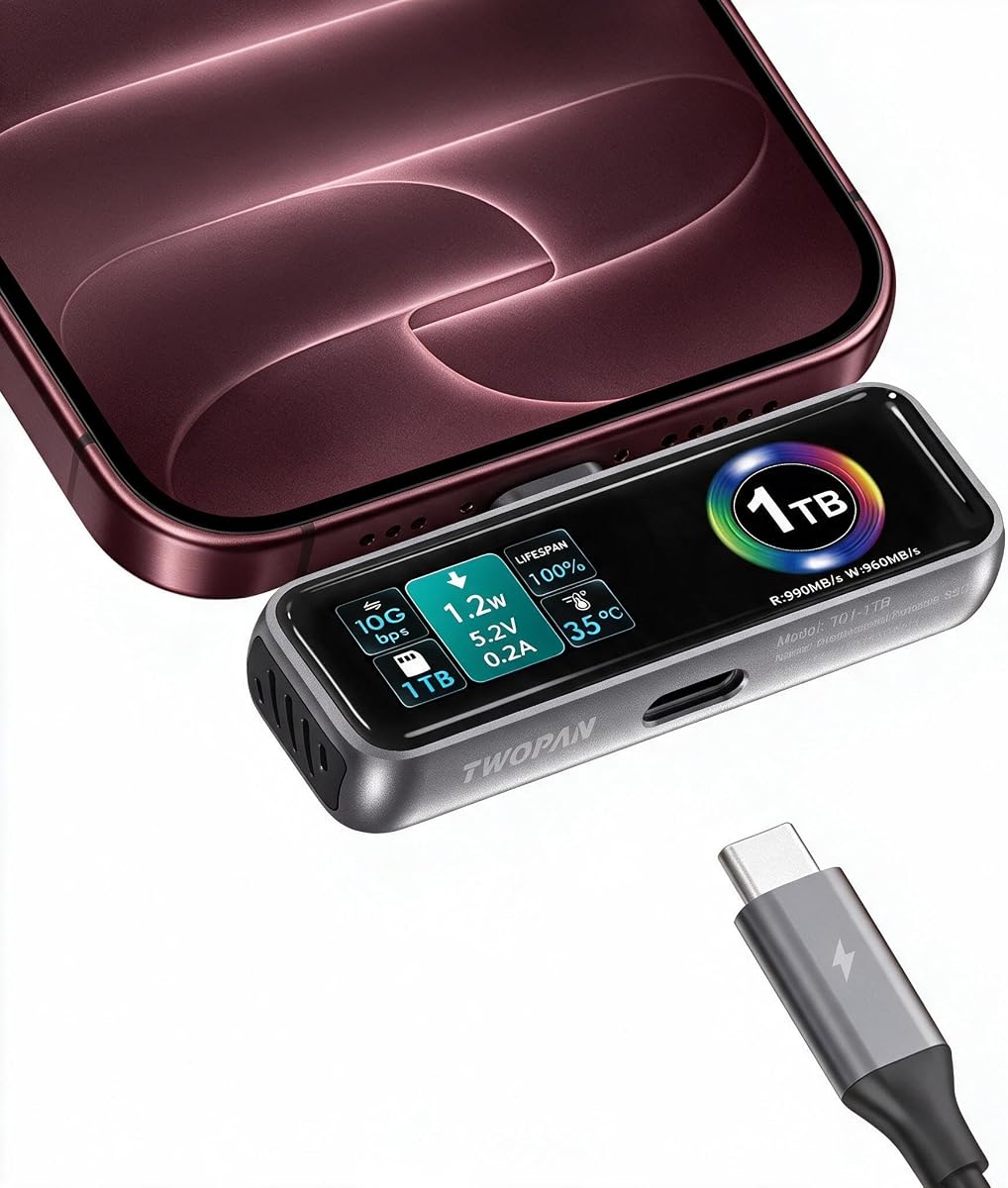
The TWOPAN Magnetic Portable iPhone SSD combines 1TB capacity, 990MB/s stated read speed, 960MB/s write speed, an LCD, an active cooling fan, and USB-C Power Delivery. Its 4.0 rating reflects a solid but less emphatic customer score, yet the feature set is among the most complete for mobile ProRes production.
We may earn a commission when you buy through this link, at no additional cost to you.
The LCD gives the user immediate information about storage activity and connection status, while the built-in silent fan is designed to limit thermal throttling during intensive recording and transfers. Direct Apple ProRes 4K 60fps capture is explicitly supported on the listed iPhone 18, 17, 16, and 15 families, making the product relevant for creators who need a self-contained phone rig.
PD 3.0 support can keep the connected phone powered while the drive is used, and the USB-C port is also positioned as a connection point for hubs or wireless microphones. At 2.5 by 1.3 by 0.5 inches and 0.82 ounces, the drive is designed to minimize bulk. The manufacturer also acknowledges that heat from the phone can reach the drive, which may shorten recording time in demanding conditions.
This is a compelling option for creators who value monitoring, cooling, charging, and compactness in one accessory. The fan and display go beyond basic storage, while the 1TB capacity and strong transfer figures cover serious editing workflows. It is best suited to users willing to monitor thermal conditions and manage their phone's temperature during prolonged ProRes takes.
The LCD makes connection and storage activity easier to check at a glance, which is useful when the drive is mounted behind or beside a phone. The silent fan adds an active response to the heat generated by sustained high-resolution recording and large transfers.
PD 3.0 charging can maintain power during a connected workflow, while the same USB-C connection can accommodate compatible accessories such as a hub or microphone. That versatility makes the drive function as more than a passive storage device.
We may earn a commission when you buy through this link, at no additional cost to you.
The Vezzio 512GB Magnetic Portable SSD has the highest customer rating in this selection at 4.7. It offers a focused mobile-creator package: magnetic attachment, an aluminum alloy shell, up to 510MB/s read and 470MB/s write speeds, and direct 4K 60fps Apple ProRes recording on the iPhone 15 Pro, Pro Max, and newer supported devices.
We may earn a commission when you buy through this link, at no additional cost to you.
Its 512GB capacity is more modest than several larger drives, but it remains practical for shorter projects and creators who routinely move completed footage to another location. The magnetic ring supports compatible phones without native MagSafe, while the enclosure resists scratches, dissipates heat, and is stated to withstand falls up to 3.94 feet.
Transfer performance varies by host device, interface, and usage conditions, according to the product information. That qualification is important because the maximum figures are internal test results rather than a guarantee for every iPhone or laptop. Even so, the stated performance is focused on a realistic target for 4K 60fps ProRes capture and rapid transfer workflows.
This is an attractive recommendation for creators who want a compact, durable, magnetic drive without paying for a display, fan, fingerprint reader, or premium accessory system. It is particularly compelling for iPhone 15 Pro and newer compatible models. Users producing longer-form projects should consider whether 512GB provides enough runway for their preferred bitrate and number of simultaneous media files.
The drive concentrates on the essentials: direct 4K 60fps ProRes recording, useful transfer speeds, magnetic placement, and broad USB-C support. That focus makes it a straightforward option for creators who do not need advanced monitoring or accessory power.
The aluminum alloy shell provides scratch resistance and heat dissipation while remaining light enough for a pocket or small production bag. Stated fall resistance to 3.94 feet adds reassurance for mobile use, although careful storage remains important.
We may earn a commission when you buy through this link, at no additional cost to you.
The 960G Magnetic Portable SSD combines a near-1TB capacity with a stated transfer rate of up to 2000MB/s and explicit 4K 120fps ProRes HDR support for the iPhone 16 Pro Max. Its 4.4 rating matches the first-ranked 512GB model, making this the higher-capacity expression of the same performance-oriented design.
We may earn a commission when you buy through this link, at no additional cost to you.
The larger capacity provides nearly twice the recording runway of the 512GB version while preserving the same headline transfer and ProRes claims. That makes it useful for creators who want to capture high-frame-rate footage for longer periods, archive RAW photographs, or keep multiple large project folders close to a phone or laptop.
As with the related design, the 2000MB/s figure depends on a 20Gbps computer interface. It should not be assumed that a phone will sustain the same throughput while recording or transferring. The product's magnetic design, supplied ring, USB-C connection, and compatibility with modern phones, tablets, computers, consoles, and car systems make it broadly adaptable.
Choose this model if the balance between capacity and maximum stated speed matters more than having the most compact option. It is especially relevant to high-frame-rate shooters on the stated iPhone 16 Pro Max workflow. Users recording for extended periods should also consider phone temperature and keep a cooling strategy available because the product information does not describe a built-in fan.
A 960GB capacity provides a practical middle ground between compact card-sized storage and a multi-terabyte mobile archive. It allows a creator to record and organize more ProRes media before the need to rotate files becomes urgent.
The USB 3.2 Gen 2×2 interface is designed for rapid movement of 4K video, RAW photos, and project folders. Cross-platform support makes the drive useful across phone capture and desktop post-production, with actual results determined by the connected host.
We may earn a commission when you buy through this link, at no additional cost to you.
The 512GB iPhone ProRes Creator Drive offers up to 1050MB/s read and 950MB/s write speeds, direct 4K ProRes recording on compatible iPhone 15 and 16 Pro devices, and a slim aluminum-style portable design. Its 3.7 rating is the lowest in the lineup, so buyers should examine the listing carefully and prioritize verified compatibility.
We may earn a commission when you buy through this link, at no additional cost to you.
The product's main advantage is its combination of strong stated throughput and a straightforward USB-C connection. It works across Windows, macOS, Chromebook, and iOS Type-C devices without driver installation, making it a practical choice for a creator who moves between a phone, tablet, and laptop. Direct capture can keep ProRes files on the external drive rather than the phone's internal storage.
The included silicone case provides IP65 dust and water resistance and is stated to survive drops from up to three meters. That protection is valuable for travel, although the product description refers to UX1 and UX2 in different places, creating some uncertainty about the exact model naming. It is also a less integrated option than the magnetic drives because it does not attach directly to the phone.
This drive makes the most sense for users who prioritize fast transfer, broad system support, and a protected cable-based workflow over magnetic convenience. The lower rating may reflect customer experiences that are not fully described in the supplied information, so it is wise to review recent feedback and confirm the current device list. If direct plug-in simplicity is the priority, it remains a capable specification-led option.
USB 3.2 Gen 2×2 performance and broad operating-system support make the drive convenient for moving between production and post-production systems. No driver installation is required, reducing setup friction at the start of a project.
The included silicone case adds IP65 dust and water resistance and a stated three-meter drop tolerance. Those protections are valuable for mobile creators, though the cable-based connection provides less physical stability than a magnetic phone mount during handheld movement.
We may earn a commission when you buy through this link, at no additional cost to you.
The TWOPAN 2TB Magsafe Pro SSD is the most feature-dense mobile storage device in this guide. It combines 2TB capacity, up to 990MB/s read and 960MB/s write performance, MagSafe attachment, hardware fingerprint security, a cooling fan, a monitoring LCD, and 40W Power Delivery. Its 4.1 rating indicates positive but less emphatic customer feedback.
We may earn a commission when you buy through this link, at no additional cost to you.
Fingerprint access is the standout premium feature. Users can register multiple fingers and keep the drive locked until a registered touch authorizes access, which is useful when sensitive footage or client material is stored on a shared production setup. Unlike software-only approaches, the fingerprint reader is integrated directly into the drive's hardware.
The LCD reports transfer speed, voltage, temperature, and SSD health, giving mobile creators a more complete view of storage activity. A noiseless cooling fan helps manage heat during long transfers, while direct Apple ProRes 4K 60fps recording is supported for iPhone 15 and 16 Pro users. The 40W PD connection can also serve AR glasses, an external monitor, or keep the phone powered during work.
This is the recommendation for creators who want their mobile storage device to function as a secure production hub rather than a simple file container. The 2TB capacity supports extensive footage, RAW archives, and project data, while fingerprint protection and monitoring improve control. It is best for a dedicated creator willing to learn the controls and verify support for the exact phone and accessories involved.
Fingerprint registration provides direct hardware authorization without relying on an iPhone password or a separate application. Multiple registered fingers create a convenient fallback, and the drive remains locked on connected devices until access is approved.
The combination of 2TB storage, active cooling, detailed monitoring, MagSafe placement, and 40W charging supports a broader range of connected workflows. It can serve as storage while also accommodating compatible displays, AR glasses, microphones, and other USB-C accessories.
We may earn a commission when you buy through this link, at no additional cost to you.
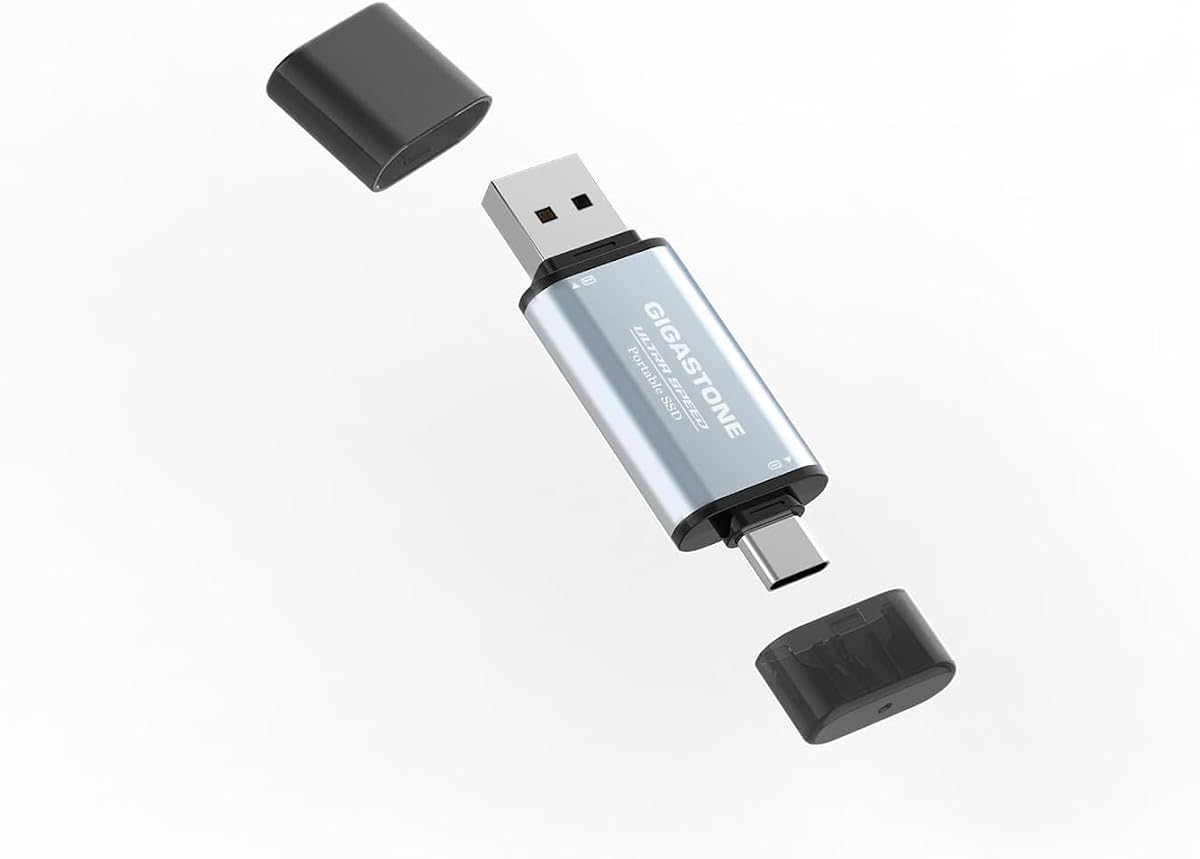
The Gigastone 1TB USB-C+A Portable SSD has a perfect 5.0 customer rating and a well-rounded feature set for mobile creators. It supports up to 500MB/s transfer speeds, direct 4K 60fps ProRes HDR recording on iPhone 15 and 16 Pro or Pro Max models, and offers both USB-C and USB-A connectivity.
We may earn a commission when you buy through this link, at no additional cost to you.
The dual-interface design is particularly useful when moving between an iPhone, Android device, tablet, laptop, MacBook, or PS5. USB-C handles modern mobile and computer connections, while USB-A broadens support for compatible traditional computer ports. Plug-and-play operation further reduces setup time, making the drive convenient for both field capture and general file management.
Its 1TB capacity offers a practical balance for ProRes footage, high-resolution photographs, documents, and large working files. The stated 500MB/s maximum is lower than the fastest USB 3.2 Gen 2×2 options, but it is positioned specifically for 4K 60fps ProRes HDR recording. A three-year worldwide replacement warranty and lifetime technical support add ownership value beyond the headline specifications.
This is a strong recommendation for buyers who want a straightforward dual-interface drive, generous support, and a high customer rating. It is not a magnetic rig, so it works best with a suitable cable and a stable mounting arrangement. The three-year warranty makes it especially appealing to creators who value long-term reliability and manufacturer assistance.
USB-C and USB-A connectivity simplifies transfers between modern mobile devices and a wider range of computers and consoles. The drive is therefore useful for direct iPhone capture, general backups, and shared media workflows without relying on one connector type.
A three-year replacement warranty and lifetime technical support add confidence for a drive intended to hold important creative files. The 1TB capacity balances recording runway with portability, while stated 4K 60fps ProRes support directly addresses the target use case.
We may earn a commission when you buy through this link, at no additional cost to you.
The SSK 4TB Dual USB SSD is a high-capacity flash drive with a stated speed of up to 1000MB/s and both USB-C and USB-A interfaces. It carries a 4.6 rating and supports phones, tablets, computers, smart TVs, and car audio systems, but the supplied information does not identify it as a dedicated ProRes recording drive.
We may earn a commission when you buy through this link, at no additional cost to you.
Its defining advantage is 4TB of storage in a compact dual-ended form. That makes it useful for moving extensive photo libraries, project folders, documents, and high-resolution media between modern Type-C devices and USB-A computers. A zinc alloy shell offers shock resistance and heat dissipation, while a protective cover helps shield the two connectors.
The drive supports plug-and-play operation and backward compatibility with USB 3.0 and 2.0 ports. Performance can vary with the host equipment, interface, and operating conditions. Compatibility includes the iPhone 15 and other USB-C devices, but Lightning-equipped iPhones are explicitly excluded, an important limitation for some mobile creators.
This drive is best understood as a flexible high-capacity storage and transfer tool rather than a purpose-built iPhone ProRes accessory. It may suit a creator who needs a large central library for footage that has already been captured or who wants one drive for several platforms. For direct sustained ProRes recording, a model with explicit recording support and a confirmed iPhone workflow is the safer choice.
Four terabytes offers ample room for completed projects, RAW photographs, and multiple video collections. The dual-ended design makes it convenient to move that library among compatible Type-C and USB-A devices without carrying separate media.
The drive works with USB-C-equipped iPhones, including the iPhone 15, but it is incompatible with Lightning ports. Creators using older iPhone models should verify this limitation before treating it as an iPhone storage solution.
We may earn a commission when you buy through this link, at no additional cost to you.
The right mobile SSD depends on recording format, phone model, session length, and the level of monitoring or accessory support needed. The most important choices are confirmed ProRes compatibility, sustained write performance, capacity, thermal behavior, and a secure connection.
Match the drive to the format you intend to record. A drive that handles 4K 60fps may not sustain a 120fps workflow, and broader device compatibility does not guarantee that every iPhone model can record ProRes directly. Exact iOS and storage-format support must therefore be verified.
Choose a drive explicitly designed for direct capture and prioritize consistent write performance over a headline read figure. Maximum laboratory speeds may not be reproduced by a phone, and recording performance can be limited by the device, cable, temperature, or storage format.
Estimate the amount of footage you can realistically shoot and retain before editing. Larger capacity reduces file rotation, but it should be balanced against portability, backup discipline, and whether direct recording support is the actual priority.
Think about the entire mobile rig rather than the SSD alone. Active storage cooling is helpful, but ventilation, room temperature, the phone's thermal state, and the recording duration ultimately influence whether performance remains stable.
Select the connection style that matches your rig. Magnetic models suit quick mobile deployment, direct cable connections suit stationary desks, and dual-interface drives help when one device must serve several types of hardware.
For frequent location work, ruggedization deserves nearly as much attention as speed. Confirm the exact rating and understand whether it covers the entire drive or only a supplied case before placing important footage on it.
Treat extra features as workflow tools rather than automatic quality upgrades. Choose them when they solve a recurring production problem, and avoid paying for complexity that will not be used.
Check that your editing software can access the drive's files and that you have a robust method for preserving originals. Capacity and speed are valuable only when paired with an organized and redundant workflow.
Before recording, confirm that the iPhone model and current iOS support external ProRes capture with the chosen drive. Format the SSD using the procedure recommended for the phone and app, and test it with a short recording before an important shoot. Verify that the drive appears in the Files app, that footage can be written to it, and that the recorded file opens correctly.
Connect the drive using the intended USB-C or magnetic arrangement, keep the phone and storage device adequately ventilated, and avoid covering either component during recording. Begin with a manageable frame rate, monitor write activity and device temperature, and pause or relocate the setup if sustained recording becomes unreliable. For long takes, phone cooling and a way to offload completed footage can help preserve performance.
After a session, safely eject the drive before disconnecting it and back up original footage to at least one additional location. Handle the drive by its enclosure, protect the ports from dust and moisture, and do not use it as the sole copy of irreplaceable footage. Periodic read checks and organized file folders make it easier to identify corrupted media, manage capacity, and transfer projects efficiently.
External ProRes recording generally requires a compatible Pro-class iPhone model, and the exact supported configuration depends on the drive, iOS version, resolution, and frame rate. Products in this guide specifically mention iPhone 15, 16, and newer families, but some claims are narrower than others. Check the current compatibility list for the exact drive, phone, and intended ProRes format before recording an important project.
No. Sustained write performance, available phone storage, device temperature, cable quality, and the selected format all influence direct recording. A headline transfer rate can be useful for moving completed files, but it does not guarantee stable capture on every phone. Use a drive with explicit ProRes support and conduct a test recording under similar conditions before the main shoot.
A magnetic SSD can be easier to position during handheld work and may reduce cable clutter around the phone. It does not automatically improve recording quality or stability, however, and the included ring or adapter must be compatible with the phone case and setup. For stationary editing or transfer, a reliable direct USB-C connection can be just as convenient.
Active cooling can be valuable during extended high-resolution recording because both the iPhone and drive generate heat. Models such as the TWOPAN drives include fans, while other products rely on their metal enclosure for passive heat dissipation. The phone may still become the warmer component, so good ventilation and phone cooling remain important even when the storage drive has a fan.
Required space varies substantially with the ProRes codec, resolution, frame rate, and recording duration. Higher-quality and higher-frame-rate files consume more room, while RAW photographs and project files add further demand. A 512GB drive can suit shorter projects, while 1TB and 2TB options provide more room for extended shoots; estimate the total media and maintain separate backups.
Most of the creator-focused drives support plug-and-play use across major desktop and mobile operating systems, although the exact product list should be checked. The SSK dual-interface model is particularly flexible for compatible USB-C and USB-A systems. A Lightning-equipped iPhone remains incompatible with the SSK drive, and older ports may operate at reduced speeds.
Formatting is advisable when first using a drive and after moving it between workflows. Use the formatting method supported by the iPhone and relevant app, and avoid interrupting the process. After formatting, create a short test recording and confirm that the file appears correctly and can be played before committing to a full production session.
No. An external drive is a useful working storage device, but keeping every original only on that drive creates a single point of failure. Maintain at least one additional copy on a computer, another drive, or a trusted backup service. Protect the SSD from impact, moisture, and accidental deletion just as carefully as you would any other primary storage device.
The 512G Magnetic Portable SSD stands out for its stated 2000MB/s transfer capability and support for 4K 120fps ProRes HDR recording, making it the most performance-forward option for the specified iPhone 16 Pro Max. The Vezzio 512GB drive offers an approachable magnetic alternative with strong customer feedback and 4K 60fps ProRes support, while the TWOPAN 2TB model is the most complete premium mobile hub.
The right choice depends on the work. Favor the 120fps model for the highest stated ProRes target, the Sandisk Creator Phone SSDs for established mobile creator design and rugged capacity, and TWOPAN models when monitoring, cooling, charging, or fingerprint access is valuable. The Gigastone drive stands out for dual interfaces and warranty support, while the SSK is better viewed as a large general-purpose library than a dedicated recorder.
Before ordering, verify the exact iPhone model, iOS compatibility, ProRes format, frame rate, storage requirements, and connection method. Also consider a cooling plan, organized file management, and a separate backup destination. Current product details and availability can change, so recheck the listing and manufacturer guidance at the time of purchase.