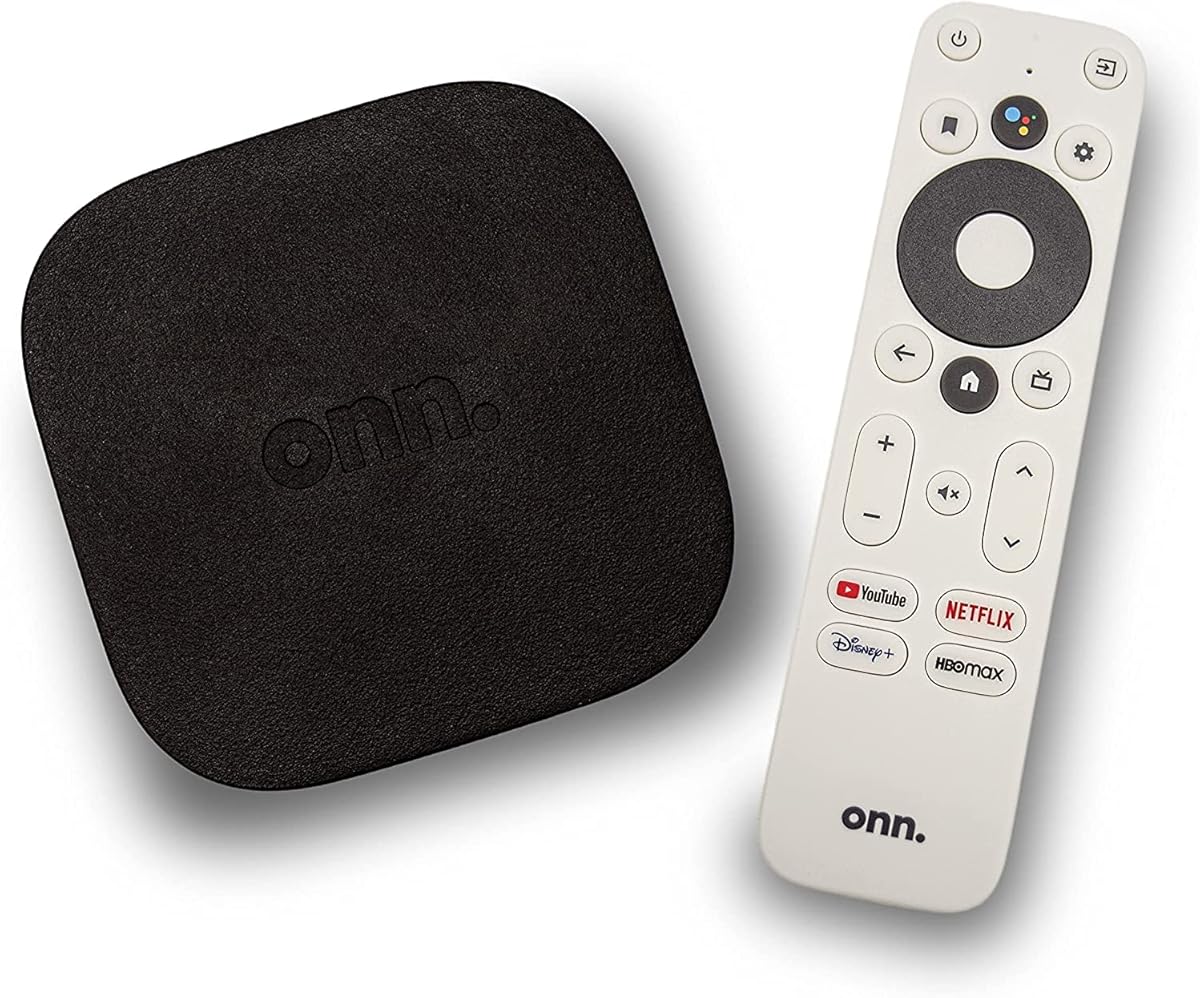
ONN Android TV 4K UHD Streaming Device
4.4Editor score
Google Play app access
Built-in Chromecast support
Voice remote included
Our 4K Kodi Box guide compares ten streaming devices for picture quality, app support, connectivity, storage, ease of use, and everyday value at home.
A 4K Kodi Box is a compact streaming device that connects to a television and can run Android apps, including Kodi when the operating system and installation method allow it. The best models balance 4K output, smooth navigation, reliable Wi-Fi, useful voice controls, and enough memory for demanding streaming menus.
We compared all ten products by examining their operating systems, video capabilities, processors, memory, networking, ports, remote controls, and extra features. The list covers Google TV and Android TV models, a Linux-based provider box, and more technically flexible Android options for different streaming needs.
Each review explains who the device is best suited for, where it stands out, and where buyers may encounter compromises. Ratings and specifications can change over time, while prices and promotional offers fluctuate frequently, so confirm the latest listing details before making a purchase.
4.4Editor score

4.4Editor score

4.3Editor score
The comparison below highlights the major differences in platform, memory, video formats, and connectivity. These details help separate purpose-built Android streaming boxes, Google TV models, and a Linux-based set-top box before you decide which format best fits your viewing setup.


The ONN Android TV 4K UHD Streaming Device is a practical, budget-conscious choice for anyone who wants a straightforward way to add streaming and Kodi functionality to a television. Its 4.4 rating places it among the strongest products in this guide, while the Android TV platform makes it more familiar and approachable than many generic Android boxes.
We may earn a commission when you buy through this link, at no additional cost to you.
Its main advantages begin with 4K Ultra HD output, Google Play access, and the included voice remote. Built-in Chromecast support lets compatible phones and tablets send movies, shows, or photos to the television, while Google Assistant provides a convenient way to locate and control content. The high-speed HDMI cable also removes the need to purchase that basic connection separately.
The product information does not highlight a modern processor specification, expanded internal memory, Dolby Vision, or an Ethernet port, so it may not satisfy buyers who prioritize specifications on paper. It also lists compatibility with many popular television brands, which makes setup less dependent on any one ecosystem. For a straightforward Android TV experience, those omissions are reasonable trade-offs.
This is the best pick for most budget-minded buyers who want a recognizable platform, useful streaming features, and easy voice control without paying for a more specialized system. Before installing Kodi, confirm that the current Android TV edition and available Google Play services support the version you intend to use. For viewers wanting a simple 4K television upgrade, it remains a strong overall recommendation.
Android TV provides a streamlined television-first interface rather than the dense menus found on many generic boxes. Google Play support, Chromecast integration, and a dedicated Assistant button make it easier to move from watching a service to searching for another program or mirroring a personal device.
The package includes an HDMI cable, and setup only requires connecting the box to a television, joining a Wi-Fi network, and signing into a Google account. Its listed television compatibility also gives buyers confidence when replacing an older streaming stick or set-top box.
We may earn a commission when you buy through this link, at no additional cost to you.
The R69 Max is built for buyers who care more about internal specifications and storage headroom than a minimalist television interface. It carries a 3.0 rating, placing it near the bottom of this list, but the supplied details describe a capable Android 14 device with 4GB of RAM, 64GB of storage, and an RK3528 processor.
We may earn a commission when you buy through this link, at no additional cost to you.
The combination of 4GB RAM and 64GB ROM is especially useful for users who expect to install Kodi, download media, retain multiple apps, or run additional utilities. A TF card slot supports expansion up to 256GB, creating a convenient route for local files. Video features include 8K decoding, HDR10, and smooth 4K playback according to the product information.
Connectivity is another strength. Dual-band Wi-Fi 6, Bluetooth 5.0, and a 100M Ethernet port give buyers both flexible wireless access and a stable wired option. The processor is a quad-core RK3528 with Mali-450 graphics, which is a recognizable platform, although the box is marketed around Android 14 rather than the more advanced Google TV platform.
Choose the R69 Max if storage, expandability, and local media use matter more than app curation or premium television features. The low rating and unspecified long-term software support are reasons to verify the seller's return terms and firmware reliability. It can be a capable Kodi box, but it is best suited to informed users who want control over their setup rather than a tightly managed smart-TV experience.
A 64GB internal drive is the largest listed in this roundup, and the included TF card slot can expand capacity further. That makes the device appealing for users with extensive local libraries who want to keep Kodi skins, add-ons, media files, and other apps without constantly managing limited internal space.
Wi-Fi 6 provides the convenient wireless option, while the 100M Ethernet connection can be preferable for uninterrupted large-file transfers. Bluetooth 5.0 adds support for compatible keyboards, mice, controllers, and other peripherals that may improve everyday control.
We may earn a commission when you buy through this link, at no additional cost to you.
The HK1 Android TV Box 2026 is an Android 13 streaming device aimed at buyers who want flexible app use, local media support, and useful connection options. Its 3.6 rating sits near the middle of the field, reflecting a product that offers plenty of hardware features without the stronger customer reception associated with the leading Google TV choices.
We may earn a commission when you buy through this link, at no additional cost to you.
Inside, a quad-core RK3528 processor and Mali-450 GPU are paired with 4GB of RAM and 32GB of storage. The platform supports 4K, 6K, and 8K resolution claims, along with 3D, HDR10, and H.265 decoding. Storage can be expanded through a microSD card, and Wi-Fi 6, HDMI 2.0, 100M Ethernet, and Bluetooth 4.0 cover the main connection needs.
Its USB arrangement is unusually useful compared with many compact streaming devices, with one USB 2.0 port and one USB 3.0 port. Both are described as supporting accessories such as mice and keyboards, which broadens the box's usefulness for casual browsing and light control. Its Android 13 environment, however, is not Google TV, so the app interface and update path may differ from the Xiaomi and onn Pro models.
The HK1 is a sensible choice for users who prioritize specifications, USB accessories, and expandable storage over a polished television-first platform. Confirm the current app availability, update reliability, and Kodi compatibility with the seller before installation. It offers more flexibility than a simple budget streamer but lacks the strongest audiovisual specifications found among the premium alternatives.
USB 2.0 and USB 3.0 can accommodate peripherals, external storage, or other compatible accessories. This is useful for a Kodi-centered setup where controllers, keyboards, mice, and local media devices may be part of the daily routine.
The combination of 4GB RAM, 32GB storage, microSD expansion, HDR10, and 3D support gives this box broad media capabilities. Buyers should still match their television and source material to the supported format for the most consistent results.
We may earn a commission when you buy through this link, at no additional cost to you.
The Xiaomi TV Box S 3rd Gen combines a polished Google TV platform with broad 4K and Dolby support, making it one of the most balanced options in this guide. Its 4.4 rating matches the strongest product in the roundup, and its specification list emphasizes both media capability and everyday convenience.
We may earn a commission when you buy through this link, at no additional cost to you.
Video output reaches 3840 by 2160 at 60 frames per second with Dolby Vision and HDR10+ support. Dolby Audio and DTS:X cover modern surround-sound formats, while a quad-core processor running up to 2.5GHz and an ARM G310 V2 GPU support navigation and multitasking. Its 2GB of RAM may look modest beside 4GB Android boxes, but the Google TV platform is designed around efficient television use.
Wi-Fi 6, Bluetooth 5.2, HDMI 2.1, USB 2.0, and Google Cast round out a modern connection package. The compact enclosure measures only 95.25 by 95.25 by 16.7mm, making it easy to place beside a television. The box, voice remote, power adapter, HDMI cable, and manual are all included, reducing setup friction.
This is the strongest all-around recommendation for buyers who want premium television features in a compact package. It suits official streaming services, casual games, and Kodi installations that work with Google TV's app limitations. Buyers wanting extra RAM or open Ethernet connectivity should compare it with the onn 4K Pro, but for audiovisual completeness and a refined interface, the Xiaomi is the standout.
Dolby Vision, HDR10+, Dolby Audio, and DTS:X support make this device a strong match for modern 4K televisions and compatible sound systems. The small enclosure also reduces visual clutter while preserving the features found on larger premium streamers.
Personalized recommendations, cross-service search, Google Assistant, and Google Cast create a more cohesive experience than a generic Android interface. Official app support is broad, but buyers using alternative Android software should verify Google TV's restrictions before installation.
We may earn a commission when you buy through this link, at no additional cost to you.
The IT'S BRAZILIAN onn 4K Pro stands out as a connected, feature-rich Google TV device with a 4.3 rating. Its combination of 3GB RAM, Wi-Fi 6, an Ethernet option, and a remote designed to be located in the dark makes it particularly appealing for a television setup used every day.
We may earn a commission when you buy through this link, at no additional cost to you.
The box delivers 4K Ultra HD, Dolby Vision, and Dolby Atmos, bringing it close to the Xiaomi in overall media capability. Its 3GB of RAM is described as 50% more than the onn 4K Plus model, which may help with app switching and multitasking, although the listing does not provide a processor specification. The 32GB of storage provides room for a typical collection of television applications.
Networking is a major advantage. Buyers can use Wi-Fi 6 in homes where a cable is inconvenient or connect Ethernet when they want a more stable path for high-bandwidth content. The Find My Remote with Backlight is a thoughtful addition for a device that may be tucked beneath a television stand, making a lost remote easier to recover.
This is the best option for someone who wants a modern Google TV experience, more memory than entry-level streamers, and both wired and wireless network choices. Its longer and less conventional product name may make it harder to identify in a search, and the unspecified processor prevents a complete specification comparison. Even so, the combination of Dolby features, 3GB RAM, and flexible connectivity makes it a premium Kodi-box candidate for compatible Android use.
Most compact streamers rely entirely on wireless networking, but this model also offers an Ethernet port. Buyers can use that connection in a fixed entertainment center, while Wi-Fi 6 preserves flexibility in bedrooms or secondary rooms.
The backlit remote and find-my feature address two common frustrations with home streaming devices. They make the controller easier to use in a dim room and quicker to locate after watching a film or switching between applications.
We may earn a commission when you buy through this link, at no additional cost to you.
The Xiaomi Android Google TV Box S 3rd Gen is another polished Google TV option, with a 4.1 rating and a strong focus on 4K visuals, surround sound, and voice interaction. It uses a 64-bit 6nm platform with a quad-core A55 processor rated up to 2.5GHz, paired with 2GB of RAM and 32GB of storage.
We may earn a commission when you buy through this link, at no additional cost to you.
Its headline features include 4K UHD, HDR10+, Dolby Vision, Dolby Atmos, and DTS:X. Wi-Fi 6 is supported, provided the connected router also supports that standard, and HDMI 2.1 offers a current high-speed connection for compatible televisions. The 360-degree Bluetooth remote provides voice search, playback control, and smart-home management through Google Assistant.
Compared with the other Xiaomi TV Box S listing, the two overlap in several areas and may represent different seller configurations of a similar platform. The current listing does not provide detailed physical measurements, and buyers should compare the included components, warranty terms, and exact hardware revision before deciding between them. Google Cast is also included for sending supported content from a phone or tablet.
This is a good fit for buyers who prioritize Dolby audio, modern Google TV functionality, and an easy Bluetooth remote. It may also be a sensible way to access legitimate Kodi-compatible distributions, although Google TV's platform restrictions and app availability should be checked for the intended setup. It is a refined all-round option, but the onn 4K Pro offers more RAM and an Ethernet connection for buyers who need them.
Dolby Vision and HDR10+ improve compatible picture output, while Dolby Atmos and DTS:X support modern home audio. The result is a box that can take advantage of a television and sound system beyond basic 4K streaming.
A dedicated Google Assistant button reduces the need to type, which is useful for long app names and content searches. Google Cast provides another convenient way to move personal content from a compatible mobile device or computer to the television.
We may earn a commission when you buy through this link, at no additional cost to you.
The Raxxio MAG544w3 is fundamentally different from the Android and Google TV devices in this guide. It is a Linux-based 4K HDR set-top box intended for compatible third-party providers, and it does not run Android apps or include a subscription. Its 4.2 rating reflects a focused product rather than a general-purpose streaming computer.
We may earn a commission when you buy through this link, at no additional cost to you.
Hardware includes an Amlogic S905Y4-B chipset with a quad-core ARM Cortex-A35 CPU, 1GB of DDR4 RAM, and 4GB of flash storage. It supports AV1 and HEVC, with the listing noting that HEVC can require less bandwidth than H.264. Connectivity includes a 100M Ethernet port, dual-band Wi-Fi, and USB 2.0, while Dolby Digital Plus provides surround-sound support.
The most important limitation is explicit: the box is hardware only, does not run Android apps, and does not include a service. Some providers may not support the newer MAG544w3 model, so buyers must confirm compatibility before purchasing. That restriction makes it a poor choice for anyone expecting to install Kodi or browse the Google Play Store.
Choose the Raxxio MAG544w3 only if you already know that your provider supports this exact model and your priority is a compact, dedicated 4K television box rather than app freedom. Its Ethernet connection, 4K HDR support, and included accessories make it practical for provider-led setups. It should not be compared directly with Android boxes on storage or Kodi compatibility because it is designed around a narrower role.
AV1 and HEVC support can improve compatibility with modern 4K sources and reduce bandwidth needs compared with older codecs. The hardware and software support of the chosen provider remain important, so confirm its recommended playback formats.
The MAG544w3 does not duplicate the app marketplace, voice assistant, and flexible installation options found in Android or Google TV devices. Its appeal lies in a focused set-top experience supplied through a compatible provider.
We may earn a commission when you buy through this link, at no additional cost to you.
The HK1 Android TV Box 2026 uses an Allwinner H618 processor and Android 12 to offer a specification-heavy alternative to more expensive Google TV devices. It carries a 3.8 rating, placing it in the lower-middle portion of the guide, but the combination of 4GB RAM, 32GB storage, and Wi-Fi 6 can appeal to buyers who prioritize raw configuration.
We may earn a commission when you buy through this link, at no additional cost to you.
Video specifications include support for 8K, 6K, and 4K resolutions, along with HDR10, 3D, and H.265 technologies. A microSD slot allows storage expansion, and the box provides dual-band Wi-Fi 6, HDMI 2.0, 100M Ethernet, Bluetooth 4.0, and USB 2.0. The listed quad-core Cortex-A53 and Mali-G31 MP2 graphics are suitable for basic television navigation and media playback.
Android 12 is the clearest concern. It is older than the Android 13, Android 14, and current Google TV platforms found elsewhere in the list, and buyers should check whether essential applications remain current on it. The claim of broad Google Play Store support is helpful, but future update support and specific app compatibility should be verified with the seller.
This model suits value-focused buyers who want enough memory for Kodi and local media without moving to a premium Google TV device. It is less attractive for shoppers who prioritize the newest operating system, advanced Dolby features, or a polished television-first interface. Within those boundaries, the hardware specification list is competitive.
The 4GB of RAM provides useful headroom for background apps, Kodi, and media management. Although the operating system is not the newest in the group, the memory allocation makes this model appealing to buyers focused on practical performance over platform branding.
Support for H.265, HDR10, 3D, and high-resolution decoding provides useful flexibility for local and streamed content. Actual output depends on the television, source files, application, and network conditions.
We may earn a commission when you buy through this link, at no additional cost to you.
The KICKPI KP1 is a Google Certified 4K streaming device that emphasizes official app access, familiar Google features, and straightforward operation. Its 4.1 rating places it among the stronger products in the guide, and the inclusion of Google Assistant and built-in Chromecast support makes it an accessible choice for everyday households.
We may earn a commission when you buy through this link, at no additional cost to you.
The device runs Android 14 on a quad-core Amlogic S905Y4 Cortex-A35 processor, with 2GB of RAM and 16GB of internal storage. Storage can be expanded via USB, which helps when 16GB is insufficient for additional applications or media. The product information also lists support for 4K HDR, Dolby Audio, Wi-Fi 5, and Bluetooth 5.0.
Its main limitation is the relatively small internal storage allocation compared with several 4GB and 32GB competitors. Wi-Fi 5 can still provide a good experience on a suitable network, but it lacks the newer Wi-Fi 6 standard found in the Xiaomi and onn 4K Pro models. Buyers in crowded wireless environments may notice a difference after upgrading their router.
The KP1 is best for someone who values Google certification, a current Android TV release, and a clean official-app experience over flagship connectivity. It is also a practical option for Kodi users who understand that installation methods must be legal and compatible with the certified system. It falls short of the Xiaomi's Dolby Vision specification and the onn Pro's memory and Ethernet options, but it remains a balanced, dependable choice.
Google certification supports a straightforward experience with major official streaming apps, while built-in Chromecast makes it easy to send supported content from a phone, tablet, or laptop. The voice remote adds another familiar route to search and playback control.
Android 14 provides current privacy and compatibility features, while the 16GB drive keeps costs down. Buyers who install many applications should account for system space and use the listed USB expansion option as needed.
We may earn a commission when you buy through this link, at no additional cost to you.
The LEFFOT M2 Plus is a versatile Android 14 box aimed at users who want more than standard television streaming. It carries a 3.4 rating, which is lower than many alternatives, but its list of features includes 4GB RAM, 32GB storage, dual-band Wi-Fi 6, Ethernet, multiple ports, screen mirroring, and an included wireless keyboard and mouse.
We may earn a commission when you buy through this link, at no additional cost to you.
Its RK3528 quad-core processor and Mali-450 GPU support navigation, app launches, and video playback, while the listed formats include 4K at 60 frames per second, 8K at 23 frames per second, H.265, H.264, and HDR10. Bluetooth 5.4 can be used with compatible speakers, headphones, and game controllers. These specifications give the device potential beyond a dedicated streaming stick.
The product listing says it can handle family streaming, local media playback, light office work, communication, and casual gaming. DLNA, Airplay, and Wi-Fi Display casting options increase compatibility with different source devices. However, the 3.4 rating suggests that some buyers may have found the software, support, or overall experience less consistent than those of the leading products.
Choose the LEFFOT M2 Plus if a television-connected Android computer with flexible inputs matters more than a refined Google TV experience. It may be useful for a light workstation, media center, or casual gaming setup, but it is not the strongest recommendation for a simple living-room stream. Confirm the precise application compatibility and included accessories before ordering, and favor one of the better-rated Google TV devices if app management is the priority.
The included keyboard and mouse, wired Ethernet, Bluetooth, and varied port selection make this box useful for light productivity and casual gaming as well as media. It is more of a general-purpose television companion than a dedicated entertainment stick.
DLNA, Airplay, and Wi-Fi Display support provide several routes for sharing content from phones and tablets. This flexibility can be useful when a household uses a mixture of device brands and operating systems.
We may earn a commission when you buy through this link, at no additional cost to you.
The right 4K Kodi box depends on the software you plan to run, the television and audio equipment you own, and how much control you want over storage and networking. Focus on confirmed platform compatibility rather than headline resolution alone.
Kodi runs on Android, but not every Android-based streaming device offers a legal, stable, or convenient installation path. Google TV and Android TV devices may restrict sideloading or access to unofficial installers, while a general Android box can be more flexible. Check the current operating system, Google Play availability, update policy, and the specific Kodi distribution method you intend to use before purchasing.
Prioritize a platform that supports your required applications, remote functions, and preferred video services. A familiar Google TV interface is easiest for mainstream streaming, while a less restricted Android environment may be better for technically experienced Kodi users.
A listing that says 4K, 6K, or 8K may describe decoding capability rather than guaranteed output at every frame rate. Look for a specified 4K resolution and frame rate, HDR format, television compatibility, and matching port standard. If you own a Dolby Vision television, check whether the box, application, and content all support that format rather than relying on a general UHD claim.
Choose a model whose documented output matches your television and source material. Higher theoretical resolution is useful only when the complete chain, including the app, network, cable, and display, can deliver it.
A quad-core processor is common across this category, but clock speed, graphics, thermal design, and software optimization also affect navigation. Memory helps when several applications remain open in the background, while storage determines how many apps, add-ons, and local files can be installed. Models with 4GB of RAM and 32GB or 64GB of storage offer more headroom for Kodi-oriented use.
Avoid equating storage capacity with permanent extra space without checking the operating system's usable allocation. Expandable microSD or USB storage can help, but external media should be used with the correct file system and safely ejected.
Wi-Fi 6 can improve performance on a compatible router, especially in congested networks, but the router and internet connection remain the limiting factors. Dual-band operation is valuable because 5GHz usually offers more available bandwidth, while 2.4GHz can provide better range. An Ethernet port gives fixed installations a stable alternative and may reduce buffering during large transfers.
Bluetooth is useful for voice remotes, controllers, keyboards, mice, and headphones, but compatibility varies. Check the listed Bluetooth version and the accessory types you plan to connect before relying on wireless peripherals.
Premium picture and sound support can transform the experience on a capable television and sound system. Dolby Vision, HDR10+, Dolby Atmos, and DTS:X each require compatible source content, applications, output settings, and playback hardware. HDMI 2.1 may be desirable for newer televisions, although many streaming applications do not use its full bandwidth.
If you already own premium audiovisual equipment, prioritize explicit format support. If you have a basic television and conventional speakers, the practical benefits may be much smaller, making app selection and ease of use more important.
A voice remote can make long searches and daily navigation much easier, particularly for users with large app libraries. Bluetooth remotes remove line-of-sight requirements, while backlighting and a find-my function are helpful in dim rooms. Some devices also include a Google Assistant button, although support for smart-home control depends on compatible services and devices.
Try to test the remote if possible or confirm that it includes navigation, playback, volume, and voice functions. Some low-cost models may use a simplified button layout or infrared-only control, which affects placement and responsiveness.
At least one HDMI output and two USB ports are useful for a flexible media-center arrangement. USB 3.0 can be preferable for external storage or peripherals, while Ethernet is useful when a wired connection is available. Buyers should also consider the size of the enclosure, cable bend requirements, ventilation, and whether the device can be hidden near the television.
Match the box to the furniture rather than assuming a compact device will fit every stand. A slightly larger model with better cooling and full-size ports may be easier to live with than a tiny unit that obstructs signals or creates heat buildup.
Some set-top boxes are tied to a compatible provider and do not run Android apps, while general Android devices offer greater control. For provider-based hardware, confirm that the provider supports the exact model and that the necessary service subscription and account are available. For Android products, confirm which applications are distributed through Google Play and whether Kodi installation is technically and legally permitted.
Do not assume that every label containing TV Box, Smart Box, or Kodi Box supports the same software. The platform is often the most consequential part of the purchase because it determines the applications, updates, remote behavior, and security options available to you.
Begin by placing the box near the television with unobstructed ventilation. Connect the included HDMI cable to an appropriate HDMI input, attach the power adapter, and turn on the television before selecting that input. During initial setup, connect to the intended Wi-Fi network or Ethernet connection, sign into the required account, and complete any software updates before installing additional applications.
For a Kodi setup, use a reputable and lawful source, confirm that the version is compatible with the box's operating system, and review permissions before granting file or network access. Organize local media in consistent folders, use supported file formats, and avoid deleting system files from the limited internal storage. If using expandable storage, format it appropriately and eject it through the operating system before unplugging it.
For day-to-day care, keep the vents free from dust and avoid placing the device inside a closed cabinet without airflow. Use the remote's search or voice function to find apps, and restart the box occasionally if navigation slows. Update software when offered, use licensed services, and periodically remove unused apps to preserve storage. Before changing cables or moving the device, disconnect power and allow the unit to cool.
The ONN Android TV 4K UHD is the most beginner-friendly choice in this guide because it uses a familiar Android TV interface, includes a voice remote, supports Google Play, and comes with an HDMI cable. It is also a practical budget option. First confirm that its current software supports the Kodi method you plan to use, because certified Google platforms can limit sideloaded applications.
No. A box may advertise Android or Android TV without guaranteeing every unofficial or sideloaded application can be installed. Platform version, certification, security settings, update restrictions, and the specific Kodi distribution method all matter. Read the current product documentation and seller guidance before purchase, and only use lawful, reputable installation sources.
Usually not for the display itself, because a 4K television cannot show native 8K detail. Higher-resolution decoding can still be relevant when downscales 8K or 6K content to a 4K panel, but picture quality depends on the source, encoder, television processing, and network. For most 4K viewers, 4K support, HDR, Dolby audio, and stable Wi-Fi matter more than an 8K label.
Ethernet is often more stable because it avoids wireless interference and fluctuating signal strength, making it preferable for large downloads and fixed media-center installations. The onn 4K Pro and several Android boxes include a 100M Ethernet port. Wi-Fi 6 can still perform well, especially with a nearby compatible router, and wireless remains more convenient when cabling a room is impractical.
For a lightly used Kodi setup, 2GB of RAM and 16GB of storage can be sufficient, particularly on a well-optimized Google TV platform. Users who install many add-ons, keep media applications open, or run other utilities benefit from 4GB of RAM and at least 32GB of storage. The R69 Max stands out with 64GB, while the LEFFOT M2 Plus combines 4GB and 32GB at a lower customer rating.
The Raxxio MAG544w3 is listed as a Linux-based hardware-only set-top box that does not run Android applications. It therefore should not be treated as a conventional Android Kodi box. It is intended for compatible third-party providers, and its listing states that no service subscription is included. Confirm provider support for this exact model before ordering.
Match the box's HDMI, 4K frame-rate, HDR, and Dolby capabilities to the television and sound system. A television with Dolby Vision and a compatible streaming service benefits from explicit Dolby Vision support, while basic TVs gain little from those premium formats. Also verify that the streaming application itself offers 4K and HDR in your region and on the selected subscription plan.
The Android and Google TV products are better suited to regular official streaming, while the more open Android models may be more suitable for Kodi users who understand the platform restrictions. The Xiaomi, onn, and KICKPI models emphasize official Google services, while the HK1, R69 Max, and LEFFOT models provide more traditional Android specifications. Verify compatibility before committing to any particular model.
The ONN Android TV 4K UHD is the best overall budget option, offering a familiar Google-based experience, a voice remote, and built-in Chromecast. The Xiaomi TV Box S 3rd Gen is the strongest premium all-rounder, with 4K at 60 frames per second, Dolby Vision, Dolby Atmos, Wi-Fi 6, and HDMI 2.1. The onn 4K Pro stands out for 3GB of RAM, Ethernet, Wi-Fi 6, and its practical backlit remote.
Prioritize confirmed software compatibility before considering resolution claims or processor numbers. A Kodi-oriented buyer should verify Android version, installation restrictions, app availability, and update practices, while a mainstream streaming buyer may place more weight on Google certification, Dolby formats, voice search, and a simple interface. Local-media users should also consider storage expansion, USB support, and wired networking.
Specifications are useful, but customer ratings, seller support, warranty terms, and real-world compatibility deserve attention before checkout. Prices and promotions can change at any time, so review the current listing and compare the final cost, included accessories, and return policy when you are ready to buy.