
M-Audio Keystation 49 MK3
4.5Editor score
Full-size velocity-sensitive keys
Essential transport and performance controls
Mac PC and iOS compatibility
Explore 49 key MIDI keyboards for production, comparing keybed feel, controls, connectivity, included software, portability, and creative versatility for
A 49-key MIDI keyboard offers enough range for melodies, bass lines, and chord progressions without taking over the desk. The right controller can make composing, arranging, performing, and producing feel more intuitive, whether your workflow revolves around Ableton Live, FL Studio, Logic, Cubase, or another DAW.
This guide compares ten 49-key controllers across keybed response, musical controls, DAW integration, pad performance, connectivity, included software, portability, and build considerations. The selections range from straightforward practice and composition tools to advanced production systems designed for hands-on control of virtual instruments and effects.
Each pick highlights a different reason to consider it, from budget-friendly simplicity to premium aftertouch and extensive creative features. Product specifications and ratings can change as manufacturers refine their models, while current prices and promotions frequently shift, so shoppers should confirm the latest details before purchasing.
4.5Editor score

4.7Editor score

4.4Editor score
This side-by-side overview highlights the keybed, control surface, performance features, and creative software associated with each controller, helping you identify the model that best matches your DAW, playing style, and workspace.




The Novation Launchkey 49 MK4 earns a 4.7 rating and stands out as the most complete general-purpose option in this guide. Its defining feature is a set of 16 responsive FSR pads with polyphonic aftertouch, but the keyboard is much more than a pad-equipped MIDI controller. It combines a full 49-note range with tools for composing, performance, beat creation, and direct manipulation of software instruments.
We may earn a commission when you buy through this link, at no additional cost to you.
Its integration is one of the strongest aspects. Launchkey provides intuitive workflows for Ableton Live, Logic, Cubase, Reason, Reaper, FL Studio, and Ardour, making it a practical choice for someone who may move between DAWs or wants a controller that already understands common production layouts. The pads can act as a step sequencer, clip launcher, chord trigger, or expressive performance surface, giving percussion, composition, and sound design tasks distinct physical controls.
Creative assistance is integrated directly into the controller. Scale Mode helps keep note selections musically appropriate, while chord tools allow one key or pad to generate richer harmony. Arpeggio features can also be expanded and mutated during a session, turning simple gestures into evolving musical patterns. For Native Instruments users, Native Kontrol Standard support improves the connection between the hardware and compatible software.
The package also includes Ableton Live Lite, Cubase LE, Novation Play, sounds from several recognized developers, and Melodics lessons. That makes the Launchkey appealing for a new producer, although the large feature set can feel busy to someone who only needs a simple keyboard. Even so, the combination of pitch, chord, scale, pad, and DAW control makes it our strongest all-around recommendation for 49-key MIDI controllers.
The 16 FSR pads respond with velocity and support polyphonic aftertouch, allowing more than one pad to be held independently. That opens the door to layered percussion, chord-shaped pad performances, clip launching, and step-sequencing tasks without forcing every function into a basic trigger-only layout.
Mappings for major DAWs make Launchkey approachable even when software changes. Scale Mode, chord triggering, and arpeggio mutation also help it serve as both a writing aid and an instrument, rather than functioning only as an input device.
We may earn a commission when you buy through this link, at no additional cost to you.
The M-Audio Keystation 49 MK3 carries a 4.5 rating and represents a balanced entry into full-size 49-key control. It focuses on the features musicians use most often: a velocity-sensitive keyboard, conventional performance wheels, a volume fader, transport controls, and octave shifting. The result is a controller that is easy to understand while still useful in a serious computer-based studio.
We may earn a commission when you buy through this link, at no additional cost to you.
The 49 full-size keys provide a familiar piano layout and respond to changes in playing intensity. This is important when controlling virtual pianos, samplers, and synthesizers because it allows a single software instrument to react more naturally to touch. A sustain pedal input and dedicated pitch and modulation wheels preserve familiar performance techniques, while the transport and directional buttons reduce the need to reach for a mouse.
Connection is refreshingly straightforward. It links to a Mac or PC without requiring drivers or a separate power supply, and compatibility with iOS devices is possible through an Apple to USB Camera Adapter, which is sold separately. Although it lacks pads and a large screen, its conventional control layout is a virtue for musicians who want uncomplicated access to their software.
The included package supports both learning and immediate production. MPC Beats, Ableton Live Lite, Velvet, XPand2, Mini Grand, and Touch Loops provide useful starting material, while Skoove lessons and more than 60 Melodics app-based lessons add structured guidance. For students, bedroom producers, and keyboardists who want a dependable, approachable controller, Keystation remains one of the most useful choices in the category.
Full-size velocity-sensitive keys, separate pitch and modulation wheels, octave buttons, and sustain input give players the controls they expect from a stage or studio keyboard. A learner can transfer existing playing habits without relearning an unfamiliar interface.
The controller works without drivers and pairs with a broad collection of included applications. That combination makes it useful for learning, songwriting, and basic production as soon as the software has been installed.
We may earn a commission when you buy through this link, at no additional cost to you.
The Nektar SE49 has a 4.5 rating and prioritizes broad compatibility over specialized performance hardware. Its 49-key velocity-sensitive layout is suitable for melodies, harmony, bass, and arrangement, while Nektar DAW integration and support for major MIDI applications reduce the amount of configuration required for everyday production.
We may earn a commission when you buy through this link, at no additional cost to you.
Compared with pad-heavy controllers, the SE49 offers a more traditional experience. There are no dedicated drum pads or elaborate display systems; instead, the product focuses on sending musical and control information efficiently to software. Its compatibility with Mac, PC, and iOS expands the possible uses to include mobile composition, rehearsal, and portable recording setups.
The included Bigwig Studio eight-track DAW and sound-content package improve the value of the package for new users. Rather than being limited to a bare hardware accessory, the SE49 can serve as an entry point into a broader production environment. This is particularly useful for musicians learning arrangement, recording, or editing with a computer.
Those searching for pressure-sensitive pads, many rotary encoders, or advanced chord and scale workflows may find the SE49 too simple. However, for someone who wants a dependable MIDI keyboard with broad software compatibility and a useful starter DAW, it remains a practical, focused recommendation.
Support for popular DAWs and general MIDI applications means the SE49 can be used across different production environments. Mac, PC, and iOS compatibility also makes it a sensible option for musicians who move between a desktop studio and a mobile setup.
Bigwig Studio and a sound package provide more than a blank controller. Learners can record, arrange, and explore sounds while becoming familiar with the relationship between hardware input and DAW workflow.
We may earn a commission when you buy through this link, at no additional cost to you.
The M-Audio Oxygen 49 MKV earns a 4.6 rating and offers one of the strongest combinations of keybed, pads, assignable controls, and bundled software in this roundup. Its 49 full-size velocity-sensitive keys are designed to control virtual samplers and synthesizers with a natural response, while 16 backlit, velocity-sensitive pads support beat creation, clip launching, and soundboard-style triggering.
We may earn a commission when you buy through this link, at no additional cost to you.
The physical control surface is the main attraction. Eight assignable knobs and nine assignable faders provide tactile access to instrument parameters, effects, and DAW functions. Automatic mapping simplifies initial setup, and Smart Chord, Smart Scale, and arpeggiator modes add composition tools. A pitch wheel, modulation wheel, and sustain pedal input are also included, covering the essential performance gestures of a conventional keyboard.
Native Kontrol Standard integration expands the controller's value for compatible Native Instruments software. Users can browse and control presets and libraries directly from the keyboard, and the supplied Komplete 15 Select bundle choices cover Beats, Band, or Electronic-oriented material. An included USB MIDI cable removes one potential connection accessory from the setup.
Software support includes MPC Beats, Ableton Live Lite, Hybrid 3, Mini Grand, and five Akai Professional MPC Expansion packs. This is a substantial package, but it also makes the Oxygen 49 MKV more complex than a straightforward learning controller. Producers who want dedicated hands-on mixing, instrument editing, and beat programming will get considerably more from it.
Nine faders and eight knobs make common mixing and sound-editing operations easier to perform by touch. Automatic mapping helps new users get started, while assignability provides a direct path to more personalized production setups.
The dual banks of eight backlit pads add more than percussion. Note Repeat, clip launching, and sound triggering make the Oxygen 49 MKV useful for rhythm programming, arrangement decisions, and instrument performance.
We may earn a commission when you buy through this link, at no additional cost to you.
The Arturia KeyLab Essential mk3 has a 4.5 rating and is designed as a flexible creative hub rather than a narrowly specialized controller. It combines a 49-key velocity-sensitive keyboard, RGB-backlit pads, a 2.5-inch LCD, and music-focused features such as Scale Mode, Chord Mode, and an arpeggiator. These tools support both deliberate composition and spontaneous improvisation.
We may earn a commission when you buy through this link, at no additional cost to you.
Its pads respond to velocity and pressure, allowing more expressive input than simple on-off triggers. The LCD provides real-time feedback, which can reduce the need to open a software window when selecting or adjusting parameters. Custom scripts for Ableton Live, Logic Pro X, FL Studio, and other DAWs also help the controller fit established production workflows instead of forcing every user into a generic mapping scheme.
Analog Lab V is a particularly significant inclusion. Its collection contains more than 2,000 presets, ranging from vintage-inspired tones to modern synths, hybrids, and orchestral sounds. The package also includes UVI Model D, Native Instruments' The Gentleman, and subscriptions to Loopcloud and Melodics, giving users a strong set of instruments and learning resources immediately after setup.
The Essential designation still permits a fairly rich control surface, though it does not include every feature found in the full KeyLab mk3. The screen, pressure-sensitive pads, and bundled instrument suite make this a particularly attractive option for musicians who want variety and visual feedback without moving to the premium model.
Analog Lab V's more than 2,000 presets cover familiar classics, modern synthesis, hybrids, and orchestral colors. With Model D and The Gentleman also included, the controller can become musically productive across acoustic, electric, and synthetic instrument categories.
The LCD keeps important information visible, while RGB pads respond to velocity and pressure. Together they make selection, sound triggering, and performance more interactive than a conventional button-and-knob controller.
We may earn a commission when you buy through this link, at no additional cost to you.
The Compact ABS MIDI Keyboard is a deliberately simple 49-key option for practice, composition preparation, recording activities, arranging, and desktop music creation. Its supplied information emphasizes a practical format, structured ABS construction, and an easy-to-store profile rather than a feature-heavy control surface.
We may earn a commission when you buy through this link, at no additional cost to you.
The listed dimensions of approximately 66 by 11.4 by 3.5 centimeters make it suitable for a desk, music room, or compact creative workspace. A full 49-note layout provides enough pitch range for melodies, basic chords, and arrangement exercises, while the restrained black finish should blend into many home-studio environments.
Unlike the more advanced models in this guide, the available product information does not identify velocity-sensitive keys, drum pads, displays, pitch wheels, or bundled production software. It is therefore difficult to compare its expressive capabilities with premium controllers. Its main appeal is a simple form factor and an approachable starting point for fundamental keyboard tasks.
A buyer should consider this model when a basic 49-note controller, compact footprint, and straightforward appearance matter more than extensive hardware controls. Those who need expressive playing, DAW mapping, or production software should examine one of the more fully specified options. Because the controller has no listed rating, its long-term user satisfaction is harder to gauge from the supplied information.
The slim rectangular profile and stated dimensions make the keyboard easy to position on an ordinary desk. It suits practice rooms and home workspaces where a large stage-style instrument would be inconvenient.
A 49-note layout covers common beginner and intermediate exercises. Its basic approach avoids the learning curve of deep mapping systems, although buyers should verify key response and connection details before committing.
We may earn a commission when you buy through this link, at no additional cost to you.
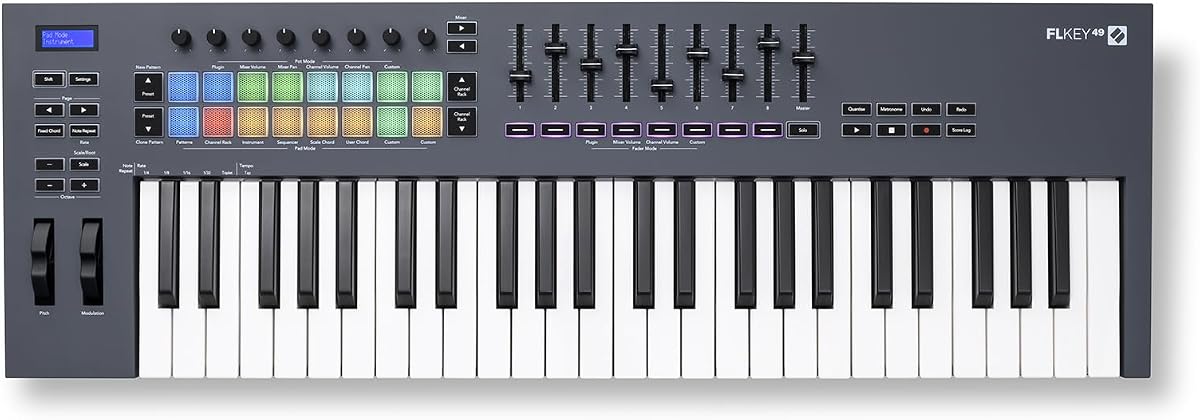
The Novation FLkey 49 carries a 4.6 rating and is an excellent choice for musicians who work primarily in FL Studio. Rather than requiring extensive manual assignment, the controller is built to bring FL Studio's Mixer and Channel Rack controls onto the physical surface. Eight pots and nine faders provide immediate access to volume, pan, and other common parameters.
We may earn a commission when you buy through this link, at no additional cost to you.
Essential buttons cover transport and score-log functions, along with undo, redo, quantize, and metronome access. This is a meaningful workflow advantage because routine editing commands can be performed without moving attention between the keyboard and the software interface. The full-size, velocity-sensitive keys also support more natural software-instrument performance than a purely command-oriented controller.
Sequencer Mode maps the pads to FL Studio's step sequencer, allowing patterns to be created and edited directly from the hardware. Two Pad mode introduces variation that can make programmed rhythms feel less rigid. Scale Mode helps users remain on musically appropriate notes, while three chord modes allow one-finger chord creation for quickly sketching fuller harmonic ideas.
The pads can also trigger FPC and SliceX for more involved beat and melody work. Because its controls are optimized around one DAW, FLkey may not be the most natural choice for someone working across unrelated applications. For an FL Studio producer, however, the tight integration can eliminate repetitive mapping and make hardware performance considerably more fluid.
Mixer pots, faders, transport commands, and sequencer functions are already arranged for FL Studio. This reduces setup time and makes the controller feel purpose-built rather than merely compatible.
Sequencer Mode turns the pad area into a hardware editing interface for patterns. Two Pad mode adds variation, helping users move beyond repetitive loops while remaining focused on the software environment.
We may earn a commission when you buy through this link, at no additional cost to you.
The M-Audio Oxygen Pro 49 has a 4.5 rating and targets producers who want more expressive control from a 49-key keyboard. Its semi-weighted keys add aftertouch, giving performers an additional dimension when shaping virtual instrument and synthesizer response. For expressive playing, that can be a meaningful step beyond a conventional velocity-only controller.
We may earn a commission when you buy through this link, at no additional cost to you.
The control layout is extensive. Sixteen RGB-backlit, assignable, velocity-sensitive pads support beat production, clip launching, and sound triggering, while eight knobs and nine faders provide tactile control over instruments, effects, and DAW parameters. Note Repeat is included for rhythmic work, and auto-mapping helps new users connect the physical controls to their software.
Smart Chord, Smart Scale, and an arpeggiator add composition-focused tools, alongside pitch and modulation wheels and sustain pedal input. The five-pin MIDI output is especially useful for a traditional studio setup because it can send MIDI to external hardware rather than limiting the controller to a computer connection. Native Kontrol Standard support also allows direct control of compatible Native Instruments sounds.
Bundled software includes MPC Beats, Ableton Live Lite, AIR Music Tech virtual instruments, and Akai Professional MPC Expansion packs. The breadth makes the controller capable, but users should be willing to configure mappings and install software to exploit it. For a producer who plays expressive virtual instruments and edits a mix with physical controls, Oxygen Pro 49 is a strong fit.
Aftertouch lets the keybed communicate changes in pressure as well as initial strike intensity. When working with synths and samplers that respond to it, this can provide finer dynamic shaping and a more instrument-like result.
Knobs, faders, and 16 RGB pads cover mixing, sound shaping, arrangement, and rhythm programming. The five-pin MIDI output also allows the controller to participate in a broader hardware setup rather than operating only as a USB accessory.
We may earn a commission when you buy through this link, at no additional cost to you.
The midiplus AK490 has a 4.3 rating and offers a traditional 49-note master-keyboard design. It uses velocity-sensitive piano-style keys and includes the performance controls commonly expected in this format: a pitch wheel, modulation wheel, and octave buttons for moving up and down the keyboard range.
We may earn a commission when you buy through this link, at no additional cost to you.
Its MIDI output is a DIN jack, while the supplied USB cable supports connection to a computer. This makes the AK490 relevant to both modern computer-based setups and users with older or dedicated MIDI equipment. The included accessories are an owner's manual and USB cable, with a sustain pedal explicitly not included.
The controller does not advertise drum pads, an LCD, assignable encoders, or dedicated DAW mapping. As a result, it is best suited to musicians who want a dependable input surface for software instruments or external sound modules and do not require one-touch control over a DAW.
Its traditional layout makes it approachable for keyboardists and stage-oriented users. The absence of a bundled pedal and more advanced production features are trade-offs, but the core keybed, wheels, octave controls, and dual connection options cover the essentials. It is a practical choice for straightforward MIDI control.
The AK490 uses a conventional arrangement of piano-style keys, pitch and modulation wheels, and octave buttons. Musicians can focus on playing rather than learning a dense software-centric interface.
USB connectivity suits computer-based production, while the DIN MIDI output can feed external modules. A sustain pedal is not supplied, so users who need that function should plan to obtain one separately.
We may earn a commission when you buy through this link, at no additional cost to you.
The Arturia KeyLab mk3 has a 4.4 rating and represents the premium selection in this guide. Its standout specifications are a 49-key keybed with aftertouch, 12 pressure-sensitive performance pads, nine encoders, and inputs for both sustain and auxiliary pedals. These details point toward a controller built for detailed performance and hands-on production control.
We may earn a commission when you buy through this link, at no additional cost to you.
Aftertouch gives the keybed an expressive dimension beyond the initial velocity of a note. Pressure-sensitive pads offer a similar benefit for percussion and performance tasks. Nine encoders provide precise adjustment access, while the dual pedal inputs allow more involved control during software-instrument performance than a model with only a single sustain input.
The white KeyLab mk3 offers a distinctive studio appearance, and USB-C power provides a modern connection approach. As the full-size member of the KeyLab line, it is intended to serve as a central control surface for composing, arranging, performing, and shaping sounds rather than as a basic entry-level keyboard.
The supplied specification list is concise and does not detail every software mapping, screen function, or included application. Buyers should therefore verify current package contents for the specific market. Even so, the aftertouch keybed, pressure-sensitive pads, numerous encoders, and pedal support give this model a clear premium identity and make it our top choice for users who value advanced physical control.
Aftertouch allows pressure changes to be communicated during a note, supporting nuanced expression with compatible software instruments. The result is a more dimensional performance surface for virtual synths and samplers.
Nine encoders, pressure-sensitive pads, and separate sustain and auxiliary pedal inputs offer many ways to shape a session. These features suit producers who prefer tactile interaction over mouse-driven editing.
We may earn a commission when you buy through this link, at no additional cost to you.
The best 49-key MIDI keyboard depends on how you play, which DAW you use, and how much of your production workflow you want to control physically. Compare expression, software integration, connectivity, and included tools before making a final decision.
A keyboard controller should feel comfortable under your fingers while accurately communicating timing and intensity to your software instrument. Velocity sensitivity is the most common expression feature, allowing a soft strike and a firm strike to produce different results. Full-size keys are useful when your technique is based on a standard piano, while semi-weighted or premium-feel keybeds can make sustained software-instrument playing more natural. Aftertouch offers even finer control by responding to pressure applied after the initial note. The M-Audio Oxygen Pro 49 and Arturia KeyLab mk3 explicitly include aftertouch, while the Arturia KeyLab Essential mk3 and Arturia KeyLab mk3 emphasize pressure-sensitive pads as well. Your choice should reflect both the instruments you play and how physically expressive you want the controller to be.
In short, choose velocity sensitivity for broad usefulness, and consider aftertouch when you routinely perform expressive virtual synths or samplers.
A controller that understands your DAW can save a considerable amount of setup time. Novation Launchkey 49 MK4 supports major DAWs including Ableton Live, Logic, Cubase, Reason, Reaper, FL Studio, and Ardour. Arturia KeyLab Essential mk3 provides custom scripts for applications including Ableton Live, Logic Pro X, and FL Studio, while Novation FLkey 49 is purpose-built around FL Studio's mixer, channel rack, transport, and sequencer. Nektar SE49 also includes DAW integration. If you work in one program, a dedicated mapping may be more useful than generic assignability. If you change software frequently, broad compatibility and customizable controls are generally more valuable than a narrow but deeply integrated system.
In short, match the controller to your primary DAW first, then confirm that essential playback, recording, and editing actions are physically accessible.
The number and type of performance controls can determine whether a keyboard is a simple musical input or a deeper production interface. Drum pads make beat programming, clip launching, and chord triggering more tactile. The Launchkey 49 MK4 and M-Audio Oxygen 49 MKV offer 16 responsive pads, while the FLkey 49 also provides pad-based sequencer control. Pressure sensitivity and polyphonic aftertouch add further expression, particularly on the Launchkey and Arturia models. Knobs and faders are more useful for mixing, effects, and instrument editing. Oxygen 49 MKV and Oxygen Pro 49 combine eight knobs with nine faders, and KeyLab mk3 includes nine encoders. Choose based on the tasks you perform most often rather than selecting the model with the highest total control count.
In short, prioritize pads for rhythm and arrangement, faders for mixing, and encoders for sound editing according to your normal workflow.
Scale Mode, chord generation, arpeggiation, and note-repeat tools can help both beginners and experienced producers move more quickly. Scale Mode keeps selected notes aligned with a chosen scale, while chord modes let one key trigger a fuller voicing. Arpeggios can turn simple notes into moving patterns, and note repeat is particularly useful for percussion and sound design. These features appear across the Launchkey 49 MK4, FLkey 49, Oxygen 49 MKV, Oxygen Pro 49, and KeyLab Essential mk3. They are helpful for sketching ideas, but they can also encourage predictable patterns. Treat them as aids that support composition rather than replacements for knowledge of music theory.
In short, use scale and chord tools to accelerate ideas, but learn the underlying harmonic and rhythmic concepts to make deliberate edits.
Most modern production setups rely on USB MIDI, but connection details can affect where and how a controller is used. The Keystation 49 MK3, SE49, and Oxygen 49 MKV support Mac, PC, and iOS use, while the Keystation requires an Apple to USB Camera Adapter for iOS, sold separately. The midiplus AK490 includes both USB and DIN MIDI output, and Oxygen Pro 49 provides a five-pin MIDI output for connection to external equipment. The KeyLab mk3 uses USB-C power. Check your computer's port, whether the controller is bus-powered, and whether your preferred mobile device requires an adapter. Traditional DIN MIDI remains valuable in studios containing hardware synths, drum machines, or sequencers.
In short, verify the physical connector and power method, especially if you alternate between a computer, a tablet, and external MIDI gear.
Bundled software can determine how quickly a new controller becomes useful. Several models include DAWs, virtual instruments, lessons, or preset libraries. Keystation includes Ableton Live Lite, MPC Beats, Velvet, XPand2, Mini Grand, Touch Loops, and lessons from Skoove and Melodics. The Launchkey package includes Ableton Live Lite, Cubase LE, Novation Play, and sounds from several developers. KeyLab Essential mk3 adds Analog Lab V, two piano instruments, and subscriptions to Loopcloud and Melodics. Nektar SE49 includes Bigwig Studio. These bundles are useful, but they should be viewed as tools rather than the sole reason to buy. Check whether the included software matches your DAW, whether downloads require activation, and whether any subscription has a renewal condition.
In short, prioritize included software that supports your actual DAW and musical goals, then consider lessons and preset libraries as supplementary learning aids.
A 49-note range generally provides a useful balance between musical reach and physical size, but control surfaces can add considerable depth. The compact ABS model is explicitly designed for a smaller footprint, while the Keystation also describes itself as compact. FLkey and the M-Audio Oxygen models are better suited to a permanent desk because their faders and pads require room. Consider where the instrument will live, whether it will travel to rehearsals, and how it will sit beside a computer, display, and speakers. A controller that is comfortable to play in a permanent studio may be awkward to transport, while a highly compact model may offer fewer controls for mixing and sound design. Dimensions, stand support, cable routing, and desk depth are all worth considering before checkout.
In short, choose the smallest control surface that still gives you every function you use often, and leave room for comfortable hand movement.
The right choice also depends on whether you need a practice instrument, a songwriting tool, a performance controller, or a production command center. The midiplus AK490 and compact ABS model favor fundamental note entry, while the FLkey 49 is optimized for FL Studio producers. The Launchkey 49 MK4 and Oxygen 49 MKV provide broad creative functionality, and KeyLab mk3 serves users seeking premium expression and detailed control. Beginners may benefit from a straightforward layout and included lessons, while experienced producers often value assignability, displays, and DAW-specific mapping. Some advanced features are easy to ignore, but others can consume desk space and attention. Match the instrument to your current skill level so every major control has a practical role in your work.
In short, choose a simple, reliable controller for fundamentals and a feature-rich one when you already know how you will shape your workflow.
Begin by connecting the controller to your computer, installing any required software, and placing the device where both hands can reach the keys and controls comfortably. Open your DAW, select the controller as the MIDI input, and confirm that notes appear on the software keyboard. Test velocity, pitch, modulation, octave, transport, and assigned controls before beginning a full recording session.
Assign controls gradually. Start with frequently used actions such as playback, record, mixer levels, or instrument parameters, then save the setup for your primary DAW. If your controller includes Scale, Chord, or arpeggiator modes, learn how each changes note selection and timing. Pads are often easier to learn by assigning them to a small number of related sounds rather than a large collection of unrelated commands.
Protect the controller by keeping liquids away from the keys and control surface, avoiding sudden temperature changes, and storing it in a padded case or on a stable surface. Clean the exterior with a soft, slightly damp cloth, but do not spray liquid directly onto the keyboard. Periodically check cables, firmware, software mappings, and pedal connections. A short setup routine helps maintain reliable MIDI communication and preserves the condition of the keybed, wheels, buttons, and pads.
A 49-key MIDI keyboard is mainly used to play and control virtual instruments, synthesizers, samplers, and recording software connected to a computer. Its four-octave range is well suited to melodies, chords, bass parts, arranging, and many instrumental arrangements. It is also a practical practice and composition tool because it can be expanded with pedals, pads, and other MIDI accessories.
Yes, 49 keys provide enough range for many melodies, chord progressions, and bass lines. The useful octaves depend on your instrument, and you can shift octaves when a composition moves beyond the displayed range. For a small bedroom studio, learning, and writing complete songs, a 49-key controller is often more practical than a larger and less portable instrument.
Velocity sensitivity is highly desirable because it lets software instruments respond to how hard each note is played. It improves the expressive range of virtual pianos, synths, and samplers without requiring additional hardware. Most of the featured premium and midrange controllers include it, although the compact ABS model does not list that feature in its supplied specifications.
MIDI describes the protocol used to transmit musical performance data, while USB is a connection method that can carry that MIDI data to a modern computer. Some controllers also provide a five-pin DIN MIDI output for older or dedicated hardware. The appropriate choice depends on whether you mainly use a DAW, external MIDI equipment, or both.
Pads are worthwhile if you produce beats, trigger samples, launch clips, or want hardware control over a step sequencer. They are less important for melodic composing or use with a standalone hardware instrument. Controllers such as the Launchkey 49 MK4, Oxygen 49 MKV, and Oxygen Pro 49 are stronger choices for pad-oriented workflows because they provide multiple illuminated or pressure-responsive pads.
A DAW-specific controller can save setup time when your work centers on one program. Novation FLkey 49, for example, is tightly integrated with FL Studio, while the Launchkey 49 MK4 supports a wider group of major DAWs. If you work across several applications, verify compatibility and custom mapping support before choosing a specialized layout.
Aftertouch is important if you want to shape a note continuously after pressing it and use software instruments that respond to pressure. It can add realism and expressive control to pads, strings, leads, and atmospheric sounds. It is not essential for every workflow, but the Oxygen Pro 49 and KeyLab mk3 are strong options when pressure-sensitive performance is a priority.
Choose 49 keys when portability, desk space, and sufficient pitch range matter most. Move to a larger keyboard if your repertoire regularly uses wide two-hand intervals, extensive piano voicings, or a full 88-note range. A 49-key model can still cover professional work through octave shifting, but a larger layout may be more convenient for certain pianists and live performers.
The Novation Launchkey 49 MK4 is the strongest overall choice because it combines a full keyboard, expressive polyphonic aftertouch pads, broad DAW support, and creative composition tools. The M-Audio Keystation 49 MK3 is the most approachable budget-oriented recommendation, while the Arturia KeyLab mk3 stands out as the premium option for aftertouch, pressure-sensitive pads, encoders, and detailed control.
Your priority should determine the direction of the choice. FL Studio users should examine the FLkey 49, Native Instruments enthusiasts may receive extra value from the Oxygen 49 MKV or Oxygen Pro 49, and beginners can benefit from a traditional controller such as the midiplus AK490. Whichever route you take, verify key response, DAW mappings, pedal support, connection method, and the usefulness of every included control before buying.
Ratings, included software, hardware revisions, and product availability can change over time, and current prices and promotions also fluctuate. Compare the latest manufacturer specifications with the current retail listing, check whether required software needs a download or activation, and ensure the controller's dimensions fit your intended workspace before making a final purchase.