
Elgato Stream Deck + XL
4.8Editor score
Thirty-six macro keys
Six multifunction dials
Expandable touch strip
Discover the best streaming decks for Twitch, with 10 expert picks compared for key layouts, controls, software, macros, and setup ease.
A streaming deck for Twitch can turn scattered keyboard shortcuts into clear, one-touch commands for scenes, audio, cameras, lighting, sound effects, and production software. The right controller makes live production faster while reducing the chance of pressing the wrong key during an intense broadcast.
We compared the included decks by examining their physical layouts, key counts, encoders and dials, touch controls, macro capabilities, software integrations, platform compatibility, and suitability for different creator budgets. The list includes compact six-key options, larger Elgato consoles, and feature-rich VSD controllers.
Each review identifies the strongest use case, practical limitations, and features that matter for Twitch. Ratings reflect the supplied customer feedback, while descriptions are based on the listed specifications. Prices and product availability can change, so confirm current details before buying.
4.8Editor score

4.6Editor score

4.7Editor score
The table below compares every listed streaming deck across its main control surface, macro features, connectivity, and creator-focused capabilities, making it easier to identify the right fit for a Twitch setup.





The VSD M18 Macro Pad combines 15 visual LCD keys with three physical buttons, giving Twitch creators considerably more control options than a minimalist shortcut pad. Its supplied rating of 4.4 reflects generally favorable customer feedback, and the standout appeal is the balance of a large command surface, customizable icons, multi-step macros, and an atmospheric RGB light ring.
We may earn a commission when you buy through this link, at no additional cost to you.
Every LCD key can display a JPG, PNG, or GIF image, including animated graphics that make commands easier to recognize. Single commands can launch applications, enter text, open files or webpages, control media, and switch OBS scenes. More complex workflows are handled through multi-shortcut macros, while the Operation Follow function can run several steps in a chosen order or simultaneously. The three non-LCD buttons provide useful differentiation when a creator wants tactile controls alongside visual buttons.
The outer RGB ring supports automatic color cycling and custom tones through a firmware upgrade, giving the controller a more prominent appearance than many office-oriented macro pads. That visual treatment is particularly effective in a dim streaming room, although it serves a cosmetic rather than operational purpose. Compatibility includes Windows 11 and later, macOS 11 and later, OBS, Streamlabs, YouTube, Twitter, Discord, Excel, Word, and Photoshop. Native Linux plug-and-play support is not available, although SDK development documents are included for custom secondary development.
This is a compelling choice for streamers who want many labeled commands but do not need rotary encoders or a large touch strip. Its limitations are the absence of tactile dials, the need to update firmware for custom RGB colors, and restricted native Linux support. For a Windows or Mac Twitch setup that prioritizes programmable variety and visual customization, it is one of the more flexible options in the roundup.
The fifteen LCD keys can use still or animated icons, allowing related actions to be grouped by color and symbol. This reduces reliance on memorizing keyboard shortcuts and makes the controller easier to use during a live broadcast.
Single commands remain useful for immediate response, while the Operation Follow function supports ordered or simultaneous macro steps. That flexibility can turn several repetitive actions into one press.
We may earn a commission when you buy through this link, at no additional cost to you.
The Elgato Stream Deck + is the strongest all-around option in this roundup, combining eight customizable LCD keys, two rotary dials, and a central touch strip in a compact production surface. Its supplied rating of 4.6 indicates strong customer satisfaction, while its balanced design makes it easier to recommend than a device that is optimized for only one part of a Twitch workflow.
We may earn a commission when you buy through this link, at no additional cost to you.
The rotary dials are especially valuable for live audio. A creator can assign volume, gain, or other adjustable functions and make fine changes without navigating a menu. The touch strip provides an additional place for information and commands, while the LCD keys give immediate visual confirmation that an action has registered. The hardware can therefore serve as an audio mixer, studio controller, or production console rather than only a scene-switching pad.
The software supports Multi Actions that can trigger several commands together or in sequence. Smart Profiles can automatically change the interface configuration for different applications, which is useful when moving between OBS, editing software, a game, and other tools. The plugin list includes Elgato Wave Link, Camera Hub, Control Center, OBS, Twitch, YouTube, Twitter, Discord, Spotify, and Philips Hue. The Stream Deck App and Store add drag-and-drop configuration, icons, royalty-free music, and sound effects.
Its main compromise is that eight keys are modest beside 15-, 18-, 32-, or 36-key alternatives. It also sits in a higher price tier than the Stream Deck Mini. Even so, the combination of tactile dials, visual feedback, a touch strip, smart profiles, and a broad integration catalog makes this the most versatile pick for most Twitch creators. It is especially attractive to streamers who mix audio and control multiple production tools from one surface.
The dials can be assigned to adjustable controls such as channel levels, making them useful during a live mix. Their tactile nature provides faster feedback than navigating software menus or relying only on a keyboard.
Profiles can change layouts for different applications or production stages. A creator can keep Twitch controls, editing shortcuts, and general desktop functions in distinct configurations without rebuilding every mapping.
We may earn a commission when you buy through this link, at no additional cost to you.
The VSD N4 Pro is a feature-rich streaming controller with 10 LCD keys, four RGB knobs, an interactive touch bar, and a foldable 60-degree stand. Its supplied rating of 4.4 reflects solid customer feedback, and its most compelling qualities are the unusually varied control surface, audio-focused functionality, visual customization, and an extensive plugin catalog.
We may earn a commission when you buy through this link, at no additional cost to you.
All ten LCD keys support configurable hotkeys and chained operations, with custom PNG, JPG, or GIF icons for rapid recognition. The controller can hold unlimited independent scene presets for streaming, editing, gaming, and office use, reducing the need to rebuild commands for each activity. Its no-code macro system turns complex steps such as editing shortcuts, application launches, webpage access, and text presets into one-tap actions.
The four RGB knobs bring dedicated control to audio and other adjustable tasks, while dynamic lighting can sync with the desktop and support GIF, MP4, and MOV files. Carbon-fiber panels and switchable haptic keys add a refined feel, and the passive USB dock provides extra ports for peripherals or storage. A stated ecosystem of more than 500 downloadable plugins expands the available functions, including tools for reminders, efficiency widgets, and sound-effect control.
One important distinction is that the USB sound deck function sends playback commands to the computer; it does not contain built-in speakers for producing audio output. The many settings and customization options may also demand more initial configuration than a simpler pad. Nevertheless, the N4 Pro stands out for streamers who want more than LCD keys and value RGB knobs, a touch bar, flexible media lighting, and a large plugin library.
Four rotary knobs are useful for rapid adjustments that are awkward to perform through keyboard shortcuts. They can complement the LCD keys and touch bar rather than serving as simple duplicate controls.
The touch bar, animated lighting, haptic key options, stand, and USB dock expand the device beyond a basic keypad. These extras are particularly useful for a dedicated desk-based streaming setup.
We may earn a commission when you buy through this link, at no additional cost to you.
The Elgato Stream Deck + XL is the premium choice for creators who want extensive control without relying on keyboard shortcuts. With 36 macro keys, six multifunction dials, and a larger touch strip, it offers a substantial command surface. Its supplied rating of 4.8 is the highest among the listed products, reinforcing its position as a particularly well-regarded option.
We may earn a commission when you buy through this link, at no additional cost to you.
Each of the 36 keys can trigger a command, tool, or Multi Action. The dials can handle continuous adjustments, and the Action Trigger tool can assign a dial multiple functions for additional control. The expanded touch strip presents important information at a glance and can reveal more action pages through swiping. Together, these controls support scene changes, audio levels, camera functions, lighting, and other production operations from a single device.
The integration list covers creative applications and production equipment, including digital audio workstations, video switchers, and related tools. Optional accessories such as the Network Dock can extend connectivity further. Custom profiles allow a creator to maintain distinct layouts for individual projects, workflows, or team members, while unlimited profiles support page navigation across a complex setup. The free Stream Deck app for PC and Mac handles customization.
The trade-offs are physical rather than functional. A 36-key control surface needs more desk space, and six dials plus a touch strip create a steeper learning curve than a six-key Mini or an eight-key Stream Deck +. Even so, the 4.8 rating, extensive control capacity, precision dials, and robust profile system justify the premium positioning. It is best suited to established creators, production teams, and streamers whose workflows have grown beyond a handful of basic shortcuts.
Thirty-six keys make it possible to organize live controls by category instead of combining many functions onto a crowded page. Icons and profiles help preserve clarity even when the setup becomes complex.
Each dial can serve as an adjustment control, while Action Trigger expands the number of possible functions assigned to it. This is valuable for audio mixing and other settings that benefit from incremental changes.
We may earn a commission when you buy through this link, at no additional cost to you.
The Insta360 Link 2 Pro is not a traditional button-filled streaming deck; it is a 4K pan-tilt-zoom webcam with dedicated Stream Deck integration. Its supplied rating of 4.5 reflects favorable feedback, while its appeal lies in making camera operation part of a larger Twitch production workflow rather than treating the webcam as an isolated device.
We may earn a commission when you buy through this link, at no additional cost to you.
A large 1/1.3-inch sensor supports detailed 4K capture and low-light performance. The camera can physically pan and tilt to follow a person or group with AI Tracking, while the software provides a natural bokeh effect reminiscent of a shallow depth of field. A redesigned dual-microphone system uses directional beamforming to improve voice isolation and reduce background noise. These features are especially relevant when the webcam is the primary visual and vocal source.
Stream Deck integration allows a creator to switch modes, trigger presets, and control multiple cameras more efficiently. Hand gestures or a smartphone can start tracking, zoom, change modes, or activate Whiteboard Mode. Other useful modes include DeskView, Whiteboard, and 4K Portrait Mode. Dedicated Link Controller software provides advanced settings and personalization, and the camera is compatible with Windows, macOS, Chrome OS, and Linux while supporting major platforms including Twitch and Zoom.
There are important limitations. It does not provide a conventional grid of programmable keys for scenes, sound effects, or application shortcuts. It also is not compatible with ARM-based Windows systems or Windows Hello Face Recognition. For creators already seeking a dedicated webcam and willing to use a Stream Deck separately, the integration is a strong addition. For those who need an all-in-one macro surface, one of the keypad-based models is a better fit.
Stream Deck commands can change camera modes, trigger presets, and help manage multiple cameras. This turns the webcam into a controllable part of a live production system instead of a device that must be adjusted manually.
AI Tracking physically follows movement, while the large sensor and software bokeh improve the visual presentation. Directional microphones help isolate speech in rooms with background noise.
We may earn a commission when you buy through this link, at no additional cost to you.
The Elgato Stream Deck Mini is the most approachable entry in the roundup, using six customizable LCD keys to provide a focused set of Twitch and productivity commands. Its supplied rating of 4.7 is notably strong. It is ideal for a new streamer who wants to stop memorizing shortcuts without committing to a large, complex production console.
We may earn a commission when you buy through this link, at no additional cost to you.
The Mini maps tedious or difficult-to-remember shortcuts to individual keys, making commands instantly identifiable and easy to trigger. Setup is handled through a user-friendly drag-and-drop interface. Actions can run simultaneously or in a precise sequence, so the device is not limited to one function per button. Visual feedback on the LCD keys confirms that a command has been activated.
Compatibility extends beyond streaming to Zoom, Teams, PowerPoint, Excel, Word, GoogleSuite, Microsoft Office, Photoshop, Adobe Creative applications, Spotify, and music software. That broad support makes the Mini useful beyond OBS and Twitch, including remote meetings, editing sessions, presentations, and general desktop productivity. Its small number of keys also keeps the physical footprint manageable on a crowded desk.
The obvious limitation is capacity. Six keys cannot offer the extensive command organization available from 15-, 32-, or 36-key decks, and there are no rotary dials for live adjustments. A creator with many scenes, cameras, audio channels, and applications may eventually need to move to a larger model. Even so, the Mini provides the core benefits of a streaming deck, supports multi-action workflows, and carries an excellent rating. It is the strongest simple choice for beginners and compact setups.
Six visible keys are enough to cover the actions used most often, such as changing scenes, muting a microphone, or launching a sound effect. A focused layout is easier to remember than a crowded collection of shortcuts.
Multi Actions can execute commands at once or follow a timed sequence. Even a small keypad can therefore handle a complete workflow rather than merely a single shortcut.
We may earn a commission when you buy through this link, at no additional cost to you.
The VSD M18 Stream Controller delivers 18 programmable controls in a layout consisting of 15 LCD keys and three physical buttons. Its supplied rating of 4.5 places it among the stronger-rated choices in the list. The controller is aimed at streamers and creators who want many commands, custom visuals, and multi-step automation without a large encoder-based console.
We may earn a commission when you buy through this link, at no additional cost to you.
The 15 LCD keys accept JPG, PNG, and GIF images, including animations, which makes it easy to design recognizable command groups. A single tap can run a macro, enter text, launch an application, open a file or webpage, control media, or change an OBS scene. The Operation Follow feature expands this into more advanced automation by running macro operations in a specified sequence or at the same time.
The surrounding RGB light ring supports automatic cycling and custom colors, adding a noticeable visual effect to a dark room or gaming desk. Compatibility covers Windows 11 and later and macOS 11 and later through USB-C. OBS, Streamlabs, YouTube, Twitter, Discord, Excel, Word, and Photoshop are among the listed compatible applications. Built-in plugins add a schedule reminder, clock, stopwatch, weather, and calendar, extending usefulness beyond live production.
The physical design lacks rotary dials, so continuous audio adjustments are less convenient than on the Elgato Stream Deck + family. Native Linux support is also unavailable, despite broader application support on Windows and macOS. For a Twitch creator who values custom graphics, macro sequencing, and a high command count, however, the M18 is a flexible and visually distinctive choice.
GIF and static-image icons can distinguish functions more clearly than plain labels. A creator can group scenes, alerts, audio actions, and desktop tools by consistent visual theme.
Operation Follow is useful for macros that require a specific sequence or simultaneous inputs. It can reduce the number of keystrokes needed for gaming, editing, and routine production tasks.
We may earn a commission when you buy through this link, at no additional cost to you.
The Elgato Stream Deck XL is a large 32-key studio controller that delivers extensive command capacity in a familiar LCD layout. Its supplied rating of 4.8 places it among the most highly rated products in the roundup. It is a strong fit for established Twitch creators who need to switch scenes, launch media, change cameras, adjust lighting, and manage audio simultaneously.
We may earn a commission when you buy through this link, at no additional cost to you.
The 32 customizable LCD keys can trigger an unlimited number of assigned actions, with the LCD surface confirming that a command has been executed. That visual response is valuable during a live show because a creator can verify that the intended action has been registered without interrupting the broadcast to check software.
Its integration list includes OBS, Twitch, YouTube, Twitter, Discord, Spotify, Philips Hue, Elgato 4KCU, vMix, VoiceMod, and additional tools. These integrations make the XL useful for more than OBS. A creator can launch media, post to social platforms, switch cameras, modify lighting, adjust audio, and operate live-production software from the same physical surface. The larger key count also allows related functions to be kept together instead of compressed into a few overloaded buttons.
Compared with the Stream Deck + XL, this model lacks the six multifunction dials and expanded touch strip, but its 32 LCD keys still provide excellent command capacity. The trade-off is desk footprint and the number of buttons a creator must learn to recognize. For a mature streaming setup that values visual organization and broad integrations over rotary adjustment, it remains a highly capable option.
Thirty-two keys provide enough room to separate scenes, media, camera, lighting, audio, and social functions into clear groups. This reduces the need to cycle through dense menus or overload each button with several unrelated tasks.
Integrations spanning Twitch, OBS, Discord, Spotify, vMix, VoiceMod, Philips Hue, and other platforms reduce setup friction. The controller acts as a central interface for several parts of a broadcast.
We may earn a commission when you buy through this link, at no additional cost to you.
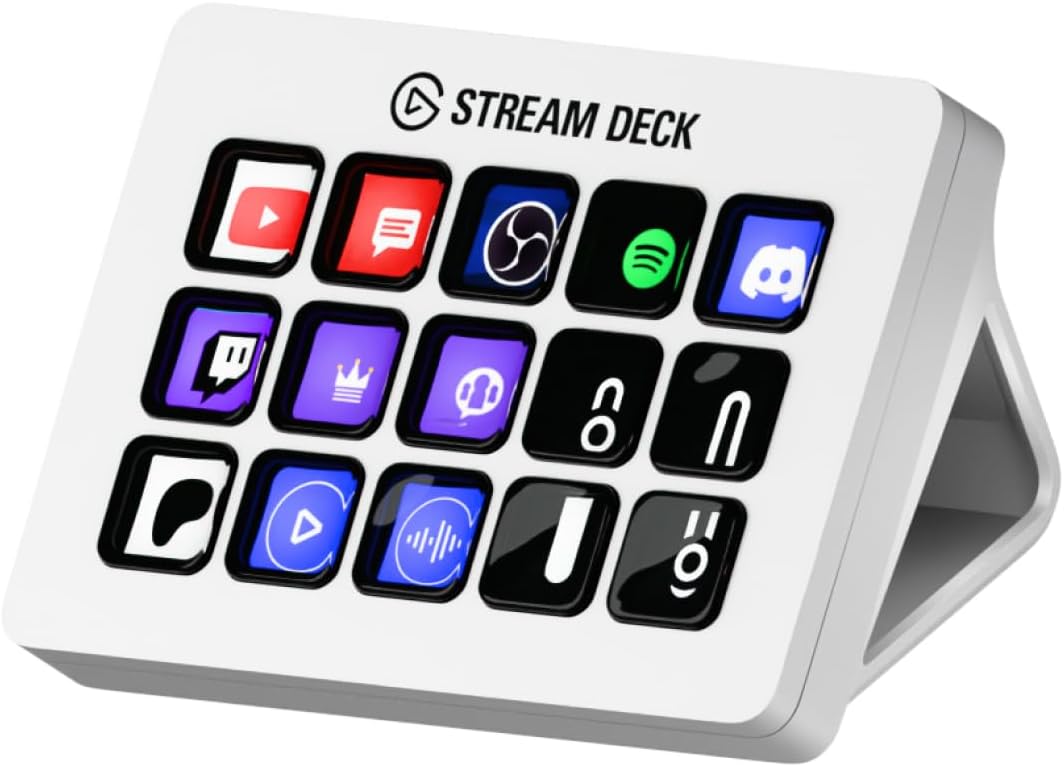
The Elgato Stream Deck MK.2 White offers 15 customizable LCD keys in a balanced studio controller, earning a supplied rating of 4.8. It occupies a useful middle ground between the six-key Mini and the much larger XL models, providing enough visible commands for detailed Twitch workflows without the footprint of a 32- or 36-key deck.
We may earn a commission when you buy through this link, at no additional cost to you.
Every key can control applications, tools, and platforms, and the software supports both individual commands and multi-step sequences. Visual feedback on the LCD keys makes it clear when a command has executed. This combination is useful for scene changes, social posts, audio adjustments, microphone muting, lighting control, and other recurring broadcast actions.
Its plugin support includes OBS, Twitch, YouTube, Twitter, Discord, Spotify, Philips Hue, and Elgato 4KCU. Hotkey actions also support less obvious workflows such as film editing, music production, and photography. In practice, that makes the MK.2 useful for creators who move between live production and post-production and want one consistent command surface.
There are no rotary encoders, so the Stream Deck + models may be more convenient for precise live audio changes. Its 15 keys also cannot match the XL units for highly segmented workflows. Still, the 4.8 rating, visual feedback, strong integration list, and manageable layout make the MK.2 an excellent general-purpose deck for streamers who want more than a Mini but do not need an oversized command center.
Fifteen keys provide enough capacity for core scene, sound, camera, and communication commands while remaining visually manageable. They can also serve as hotkeys for editing and other desktop workflows.
Each LCD key visually reflects its assigned state and confirms activation. This feedback is useful in a live production environment where a creator must know whether a command registered successfully.
We may earn a commission when you buy through this link, at no additional cost to you.
The Elgato Stream Deck + White combines eight customizable LCD keys, rotary dials, and a central touch strip in a compact studio controller. Its supplied rating of 4.6 indicates favorable customer feedback. Although it shares the general form of the standard Stream Deck +, the white finish gives desk-conscious creators a distinctive alternative to the usual dark hardware.
We may earn a commission when you buy through this link, at no additional cost to you.
Tactile dials are the defining feature for live production. They allow incremental changes to functions such as audio levels while a broadcast is running. The LCD keys remain useful for scenes, sound effects, applications, and communication controls, and the touch strip provides a further visual and interactive surface. Together, these elements make the controller more versatile than a conventional six- or eight-button macro pad.
Setup uses a drag-and-drop interface for placing actions and personalizing settings. Multi Actions can execute multiple commands at once or follow a timed sequence. Compatibility includes Zoom, Teams, PowerPoint, Excel, Word, GoogleSuite, Microsoft Office, Photoshop, Adobe Creative applications, Spotify, and music software. A Twitch streamer therefore receives a control surface that can also support meetings, presentations, post-production, and general productivity.
The eight-key count is the primary limitation, especially compared with the 15-, 18-, 32-, and 36-key alternatives. The white finish may also fit some studio aesthetics better than others. Even so, the dials, touch strip, visual feedback, and multi-action support offer a well-rounded feature set. It is best for creators who prioritize live adjustments and a compact layout over maximum command capacity.
The rotary dials complement the LCD keys by making gradual adjustments more direct. A streamer can keep scene commands and continuously variable audio functions in one compact control area.
Support for office, meeting, presentation, creative, and music applications makes the controller useful between broadcasts. Drag-and-drop setup and timed Multi Actions reduce the learning required for non-streaming tasks.
We may earn a commission when you buy through this link, at no additional cost to you.
The right streaming deck depends on the number of commands you use, the controls you need during a live show, your operating system, and the size of your desk. Reviewing these factors before buying helps prevent an oversized or under-equipped choice.
Start by listing the commands you genuinely need during a broadcast. Scene changes, microphone mute, camera switching, sound effects, lighting, alerts, and application launches can each occupy a key, while chained actions reduce the number required. A six-key pad suits a focused workflow, 15- and 18-key models support more categories, and 32- or 36-key decks suit creators with extensive production systems. Consider whether the keys are easy to distinguish and whether the controller fits beside your keyboard, mouse, and other equipment.
Rotary dials are especially valuable for live audio because they make gradual adjustments faster and easier to judge. A touch strip can present additional actions or information, but it may add less value if your workflow relies almost entirely on scene and application buttons. A conventional keypad without either control is often simpler and sufficient for creators who only need to trigger fixed commands. Match the physical controls to the actions you perform most often rather than selecting the controller with the most features by default.
A useful streaming deck should support both single commands and multi-step sequences. Multi Actions can launch applications, enter text, switch scenes, adjust media, and perform other actions together or at precise intervals. Some controllers also offer ordered or simultaneous macro execution. Check whether the software provides visual feedback, timed delays, and an understandable editor. Powerful automation is most useful when it is easy to assign, test, and maintain.
Native integrations save time by providing actions for OBS, Twitch, streaming utilities, microphones, cameras, lighting, chat platforms, and music services. The Elgato models in this roundup list broad plugin support, while the VSD devices emphasize their own downloadable plugin ecosystems. Review integration quality for the software in your exact workflow rather than relying on the number of supported apps. A smaller set of dependable integrations can be more valuable than many options that do not match your setup.
Most devices in the list support Windows and macOS, often with a minimum version requirement. The VSD M18 models specify Windows 11 or later and macOS 11 or later and do not offer native Linux plug-and-play support. Elgato software is available for PC and Mac. Confirm the operating system and version used by your streaming computer, and check whether a product requires additional configuration before it can launch applications or control applications such as OBS.
LCD keys help creators recognize commands at a glance and show whether an action has executed. Custom icons and animations can make a large deck easier to navigate, while RGB lighting can reinforce a visual theme or status. Color is useful only when it remains consistent and readable. A restrained layout with clear labels is often more efficient during a live show than a highly animated interface that distracts from the stream or the creator's monitor.
A larger deck provides more visible commands but occupies more desk space and may be harder to relocate. Compact models are easier to position beside a laptop and carry between streaming and work sessions. Some controllers include an adjustable or folding stand, while others are designed to sit flat, and the VSD N4 Pro includes a passive USB dock for extra peripheral connections. Evaluate the entire setup, including cable routing, hand placement, and whether the deck will obstruct a camera or monitor.
Some streaming decks double as audio mixers through rotary dials, and others can control compatible cameras and lighting. The Insta360 Link 2 Pro is a specialized 4K PTZ webcam with Stream Deck integration rather than a keypad. The VSD N4 Pro can send sound-control commands to the computer but does not have built-in speakers for audio output. Confirm whether a feature controls connected hardware, changes computer software, or produces sound directly before assuming it fulfills a particular part of your broadcast plan.
Begin by installing the controller's software, connecting it by its specified cable, and selecting a basic set of commands rather than configuring every available key immediately. Map the actions you use most often, add descriptive icons, and test each one in a private scene. Multi Actions should initially be kept simple so that timing and unexpected application behavior can be checked before they are used during a public broadcast.
Create separate profiles or pages for streaming, editing, and general desktop work when the software supports them. Organize keys by function, such as scenes, audio, cameras, media, and communication, and keep dangerous or disruptive commands away from frequently used buttons. Test profiles while the stream is offline, verify that Twitch and OBS remain synchronized, and rehearse the transitions that occur at the beginning and end of a broadcast.
Care for the controller by keeping it on a clean, stable surface and protecting its LCD keys from dust, moisture, and accidental impact. Route the cable so it cannot pull against the USB port, and avoid placing drinks near the device. Update software and firmware as provided by the manufacturer, periodically review assigned actions after changing applications, and remove commands that are no longer part of the workflow to keep the interface understandable.
A streaming deck is a programmable controller that places frequently used commands on visible buttons or other dedicated controls. It can switch scenes, launch media, play sound effects, adjust settings, control compatible hardware, and trigger multi-step workflows. For Twitch, its main advantage is faster, more visible operation than a collection of keyboard shortcuts.
No, a streaming deck is not required for Twitch broadcasting. OBS and other software can perform the same functions through keyboard shortcuts, menus, and plugins. A deck becomes valuable when a streamer wants faster access, visual confirmation, repeatable macros, audio controls, and a centralized production surface.
Yes, the listed Elgato models explicitly support Twitch alongside OBS and other streaming, communication, and creative applications. A creator can map scenes, audio changes, media launches, and social or chat actions to keys. The exact available actions can depend on the installed software and current plugin versions.
A six-key deck is compact and best for a focused set of frequently used commands. A 36-key deck offers much more visible space for scenes, cameras, media, lighting, audio, and production tools, making it better for complex workflows. The larger model also requires more desk space and may involve a steeper learning curve.
Rotary dials are especially useful for live audio because they allow gradual, tactile adjustments of levels or other variable settings. They are less essential when a creator only triggers fixed actions such as changing scenes or starting a sound effect. Stream Deck + models are most compelling for creators who regularly mix audio during a broadcast.
Yes, streaming decks can map actions from OBS, Twitch, and other compatible applications to the same control surface. Multi Actions can also combine commands across applications or execute them in sequence. A creator should test the order carefully because one action may change what a later action controls.
Most products in this roundup support both PC and Mac, although specific minimum operating-system versions apply. The VSD M18 options require Windows 11 or later and macOS 11 or later and do not provide native Linux plug-and-play support. Check compatibility for the exact computer and software version in your setup.
A basic deck is appropriate if you use only a few scenes, media cues, and application commands, while a large deck is better for detailed live-production systems. Choose based on your current workflow rather than the number of available buttons. It is easier to begin with the commands you use regularly and upgrade when page switching or repeated navigation becomes frustrating.
The Elgato Stream Deck + is the most versatile choice for most creators because it combines eight LCD keys, rotary dials, a touch strip, smart profiles, and extensive integrations. The Stream Deck + XL takes that concept further for complex premium setups, while the Stream Deck Mini offers a focused, approachable way to replace difficult keyboard shortcuts.
When choosing, prioritize the controls you will use during a live show. A creator mixing audio should strongly consider dials, a new streamer may prefer six or eight clearly labeled keys, and an established producer may need 15, 18, 32, or 36 commands. Confirm platform support, native integrations, profile organization, and multi-action reliability before making a final decision.
Prices, configurations, software features, and availability may change, so check the current listing and support details before purchasing. The best streaming deck is the one that reduces hesitation during production, keeps essential commands visible, and integrates cleanly with the Twitch tools already in your workflow.