
GIGABYTE Radeon RX 9070 XT Gaming OC 16G
4.7Editor score
16GB GDDR6 graphics memory
WINDFORCE cooling system
RGB lighting included
Flagship graphics cards deliver elite gaming and creative performance; this expert guide compares key specs, cooling, memory, features, power, and fit.
Flagship graphics cards sit at the top of the PC graphics market, combining high-end gaming performance, advanced ray tracing, AI-assisted upscaling, substantial video memory, and premium cooling. The right model can also determine whether your system has sufficient power, physical clearance, and display connectivity for demanding workloads.
This guide compares ten flagship graphics cards from NVIDIA, ASUS, GIGABYTE, MSI, and VIPERA. We evaluated the supplied specifications, focusing on processor generation, memory capacity and interface, boost clocks, cooling design, physical dimensions, power requirements, display outputs, and features intended to improve reliability or user control.
Each review shows where a card sits within this high-end range, from compact designs to enthusiast models with liquid cooling. The selections reflect the available specifications and ratings, while current prices and availability can change, so compare the latest listings and your system requirements before purchasing.
4.7Editor score

4.8Editor score

4.6Editor score
The comparison below places all ten cards side by side, highlighting their processor families, memory configurations, physical designs, cooling systems, and connectivity options for easier shortlisting.




The GIGABYTE GeForce RTX 5080 Gaming OC 16G combines NVIDIA's Blackwell architecture with 16GB of GDDR7 memory and a 256-bit interface. Its 4.6 rating reflects a strong showing among buyers, while the supplied specification highlights a modern foundation for high-end gaming, AI-accelerated features, and demanding graphics workloads.
We may earn a commission when you buy through this link, at no additional cost to you.
DLSS 4 is the headline platform feature, providing the card with an upscaling and frame-generation path that can complement capable rendering performance. The 16GB allocation and broad 256-bit bus give it a substantial memory configuration for high-resolution textures, complex scenes, and modern applications that can demand more than the capacity found in many midrange graphics cards.
The main consideration is that this is still a high-end GeForce RTX 5080 rather than the 32GB-equipped ASUS TUF GeForce RTX 5090 in the list. Buyers whose priority is maximum memory capacity for AI, rendering, or professional workflows may prefer that alternative. Otherwise, the GIGABYTE card pairs a contemporary processor generation with a balanced set of headline specifications.
This is a strong choice for a high-end gaming system that wants Blackwell and DLSS 4 without moving beyond a 16GB graphics card. Confirm the case has room for the WINDFORCE cooler, verify your power supply can support the platform, and compare the latest cost against other RTX 5080 models.
The 16GB GDDR7 memory and 256-bit interface provide a modern foundation for high-resolution gaming and memory-intensive graphics. This configuration also gives the card a clear distinction from many older 16GB designs that use GDDR6.
Blackwell architecture and DLSS 4 form the core software proposition. These features can help a compatible system preserve visual quality and improve frame delivery when the game and application settings allow it.
We may earn a commission when you buy through this link, at no additional cost to you.
The ASUS TUF Gaming GeForce RTX 5070 Ti 16GB GDDR7 OC Edition earns the Editor's Choice position with a 4.8 rating, the highest listed score in this guide. It pairs Blackwell architecture and DLSS 4 with 16GB of GDDR7 memory, a factory-oriented OC mode, and a cooling package designed for sustained enthusiast use.
We may earn a commission when you buy through this link, at no additional cost to you.
Its three Axial-tech fans work with a large fin array in a 3.125-slot design. ASUS also highlights military-grade components, protective PCB coating, a phase-change GPU thermal pad, and Auto-Extreme manufacturing as contributors to durability and reliability. GPU Tweak III adds practical control over performance settings, thermal behavior, and monitoring.
The 850W minimum PSU requirement and the use of a 16-pin 12V-2×6 connector are important limitations for builders. The card's size and dense thermal hardware may also require a spacious case. Those requirements make it less convenient than the slimmer ASUS Dual GeForce RTX 5060 Ti included in this list.
For a builder seeking a high-rated GeForce card with a generous memory allocation, serious cooling, and a clear emphasis on long-term build quality, this is a particularly compelling recommendation. Validate the connector and power-supply requirement before buying, and leave adequate ventilation around the three-fan cooler.
Military-grade components, PCB coating, and automated manufacturing are central to the TUF design. Together with the phase-change thermal pad, they form a durability-focused approach suited to users who expect their graphics card to handle extended gaming or creative sessions.
Three Axial-tech fans and a large fin array provide the physical cooling foundation. GPU Tweak III complements that hardware with controls for performance adjustment, thermal management, and real-time system monitoring.
We may earn a commission when you buy through this link, at no additional cost to you.
The VIPERA NVIDIA GeForce RTX 4090 Founders Edition is the premium pick in this roundup, pairing 16,384 CUDA cores with an advanced collection of NVIDIA technologies. Its 4.6 rating, 4K 120Hz HDR support, and 8K HDR capability make it especially relevant to buyers building a high-end display-focused system.
We may earn a commission when you buy through this link, at no additional cost to you.
Third-generation RT Cores target ray-tracing workloads, while fourth-generation Tensor Cores bring AI acceleration through DLSS 3. NVIDIA Reflex supports low-latency play, and the dedicated Encoder is designed for livestreaming workflows. The supplied specifications therefore give this card broad appeal for gaming, content creation, and high-resolution multi-monitor configurations.
Compared with the Blackwell models in this guide, the RTX 4090 uses an earlier architecture and DLSS generation. That distinction matters for buyers who prioritize the newest platform features or need 32GB of memory. Its large-scale hardware also demands careful attention to case fit, cooling, and power provisioning.
Choose this card when high refresh rates, high-resolution HDR, 8K output, and established NVIDIA features are central to your build. It is a premium hardware proposition rather than a value-oriented purchase, and current pricing should be compared carefully with newer alternatives.
Support for 4K 120Hz HDR and 8K 60Hz HDR makes the RTX 4090 particularly suitable for capable monitors. Variable Refresh Rate support through HDMI 2.1a also helps synchronize the card's output with compatible adaptive-sync displays.
Fourth-generation Tensor Cores, DLSS 3, NVIDIA Reflex, and the NVIDIA Encoder form a broad feature set. That combination supports AI-assisted gaming, low-latency responsiveness, and livestream-oriented workflows within compatible software.
We may earn a commission when you buy through this link, at no additional cost to you.
The ASUS TUF Gaming GeForce RTX 5080 16GB GDDR7 OC Edition combines Blackwell architecture with one of the more assertive boost-clock figures in the lineup. Its 4.6 rating and 2730MHz OC boost clock position it as a performance-oriented RTX 5080 alternative with a substantial cooling system.
We may earn a commission when you buy through this link, at no additional cost to you.
The card measures 348mm long and occupies 3.6 slots, while weighing 4.3lb. Those dimensions demand careful case planning, especially in systems with multiple expansion slots. Its three Axial-tech fans sit beneath a massive fin array, and the phase-change GPU thermal pad is designed to support thermal performance under heavy graphics loads.
The 850W minimum PSU and 16-pin 12V-2×6 requirement are substantial. Buyers should also account for connector routing and airflow because a large cooler can restrict the space available to adjacent components. Against that background, the model's military-grade components and protective PCB coating support its durability positioning.
This TUF model suits builders with a large chassis who want a recent flagship platform, a high boost clock, and extensive thermal hardware. It is less suitable for compact systems or anyone unable to satisfy the stated power requirements, so check dimensions and electrical compatibility before ordering.
The 3.6-slot cooler, three Axial-tech fans, and phase-change thermal pad form a substantial cooling package. This is a useful design for a high-end card expected to operate under sustained graphical workloads, provided the case offers sufficient airflow.
The stated 348mm length, 4.3lb weight, and 3.6-slot width create the most important compatibility issue. Compare these figures with your case specifications and the position of the CPU cooler, drive cages, and neighboring expansion cards.
We may earn a commission when you buy through this link, at no additional cost to you.
The GIGABYTE Radeon RX 9070 XT Gaming OC 16G is the budget-minded flagship selection in this guide. It delivers a 4.7 rating and pairs the Radeon RX 9070 XT with 16GB of GDDR6 memory, offering a generous memory allocation without moving to the 32GB configuration found in the top-end RTX 5090 model.
We may earn a commission when you buy through this link, at no additional cost to you.
Its WINDFORCE cooling system, Hawk Fan, server-grade thermal conductive gel, and RGB lighting provide the core feature set. PCIe 5.0 support places the card on a modern platform interface, while the gaming-oriented OC designation indicates that this is intended as a higher-tier Radeon implementation.
This card does not list the extensive software, dual BIOS, or 0dB features found on several ASUS models. Its memory also uses GDDR6 rather than GDDR7, so buyers prioritizing the newest memory standard may prefer an NVIDIA Blackwell option. Those are meaningful differences for specification-focused enthusiasts.
Among the products here, the GIGABYTE Radeon RX 9070 XT Gaming OC is the strongest choice for someone seeking flagship-class specifications at the lower end of this roundup. Confirm compatibility with the games, creative applications, and drivers you plan to use, and compare current availability against similarly equipped Radeon cards.
A 16GB allocation provides useful headroom for demanding modern titles and graphics workloads. Although the card uses GDDR6 rather than GDDR7, capacity remains one of its most attractive headline specifications.
The WINDFORCE system combines a Hawk Fan with server-grade thermal conductive gel. This is a more concise feature list than some ASUS competitors, but it directly addresses the essential cooling priorities for a high-performance card.
We may earn a commission when you buy through this link, at no additional cost to you.
The ASUS Dual GeForce RTX 5060 Ti 16GB GDDR7 OC Edition stands out for combining a compact 2.5-slot design with 16GB of GDDR7 memory. It carries a 4.7 rating and brings Blackwell architecture, DLSS 4, and a stated AI performance of 767 TOPS to a relatively space-conscious configuration.
We may earn a commission when you buy through this link, at no additional cost to you.
Axial-tech fans use smaller hubs and longer blades alongside a barrier ring designed to increase downward air pressure. The 2.5-slot construction is intended to improve compatibility in smaller chassis, while 0dB technology allows the fans to remain inactive during light gaming when the system permits it.
Two BIOS profiles provide a useful way to switch between Quiet and Performance behavior. Dual ball fan bearings are stated to last up to twice as long as sleeve-bearing designs, adding another point to the card's longevity-oriented feature list. GPU Tweak III is not listed for this model, so its software control set is less expansive than the TUF cards.
This is a compelling pick for a builder who wants 16GB of GDDR7, DLSS 4, and Blackwell without committing to a large three- or four-slot flagship. It is particularly relevant to compact builds, though it is not the highest-tier model in the guide. Confirm that its cooling performance suits your case and sustained workload.
The 2.5-slot design is the standout practical advantage. It can make a high-end card more manageable in compact cases, although the exact length and clearance should still be confirmed against the manufacturer listing and case dimensions.
Dual BIOS profiles let users move between Quiet and Performance modes, while 0dB technology supports silent operation in light loads. Together, these features make the card adaptable to different gaming and working environments.
We may earn a commission when you buy through this link, at no additional cost to you.
The ASUS TUF Gaming GeForce RTX 5090 32GB GDDR7 OC Edition is the memory-capacity leader in this roundup. Its 32GB of GDDR7 makes it particularly compelling for users who want the most VRAM available here, whether for high-resolution textures, complex graphics applications, AI workloads, or future-oriented system building.
We may earn a commission when you buy through this link, at no additional cost to you.
Blackwell architecture and DLSS 4 sit beneath a stated AI performance of 772 TOPS. The 2.5-slot design is described as SFF-ready, an interesting combination for an enthusiast card because it seeks to limit physical bulk while maintaining a powerful configuration. The OC boost clock is listed at 2580MHz, compared with a 2550MHz default boost clock.
Axial-tech fans, dual-ball fan bearings, 0dB technology, and two BIOS profiles provide the cooling and operating controls. GPU Tweak III adds tuning, thermal control, and monitoring, while Auto-Extreme manufacturing is credited with supporting precision and reliability. These features make the card more versatile than a bare-bones high-end model.
Its 4.4 rating is the lowest in the guide, which means the listed customer feedback is somewhat less favorable than that of the other cards. The exceptional 32GB capacity and compact-oriented design may still justify consideration for a high-end buyer, but power, case, and cooling requirements should be checked carefully.
The 32GB GDDR7 allocation is the defining feature. It provides twice the memory of the 16GB alternatives in the guide and can be valuable in complex production, AI, and high-resolution workflows where working-set size matters.
The SFF-ready 2.5-slot design attempts to combine flagship hardware with better case compatibility. Users should still verify the full dimensions and ensure that the surrounding chassis can supply adequate cooling for sustained workloads.
We may earn a commission when you buy through this link, at no additional cost to you.
The ASUS Prime Radeon RX 9070 XT 16GB GDDR6 OC Edition offers a 4.6 rating and a refined set of features in a 2.5-slot design. Its 16GB of GDDR6 makes it a credible high-capacity Radeon alternative, while the 3030MHz OC boost clock provides an impressive headline frequency.
We may earn a commission when you buy through this link, at no additional cost to you.
Axial-tech fans employ smaller hubs, longer blades, and barrier rings intended to increase downward air pressure. A phase-change GPU thermal pad supports heat transfer, while dual-ball fan bearings are stated to last up to twice as long as conventional sleeve-bearing designs. These details focus on both cooling and longevity.
Dual BIOS switching provides Quiet and Performance profiles, and 0dB technology allows quiet operation in light workloads. GPU Tweak III adds performance tweaking, thermal controls, and monitoring, giving the card a broader utility package than the GIGABYTE Radeon RX 9070 XT in this roundup.
The Prime card is most attractive to buyers who want a relatively compact Radeon flagship with 16GB of memory and detailed control options. Its GDDR6 memory places it behind the newest GDDR7 configurations on paper, so compare the latest prices and application needs before choosing.
The listed 3030MHz OC boost clock and 3010MHz default boost clock form the card's most prominent performance specifications. GPU Tweak III provides the stated software tools for adjusting performance and monitoring the resulting behavior.
The dual BIOS setup makes it easy to favor a quiet profile for general use or a performance profile for demanding games. Combined with 0dB fan behavior, it offers practical control over the relationship between noise and workload.
We may earn a commission when you buy through this link, at no additional cost to you.
The ASUS TUF Gaming GeForce RTX 5070 12GB GDDR7 OC Edition combines Blackwell architecture and DLSS 4 with a 4.7 rating. It is built around 12GB of GDDR7 memory and a 2640MHz OC boost clock, making it a modern high-end option with a more modest memory capacity than the 16GB and 32GB alternatives.
We may earn a commission when you buy through this link, at no additional cost to you.
Three Axial-tech fans support the 3.125-slot cooler, while military-grade components, protective PCB coating, and a phase-change thermal pad emphasize durability. ASUS GPU Guard and the included bracket are intended to secure the card and reduce the risk of cracks during mounting. Auto-Extreme manufacturing further supports the build-quality story.
The 12GB capacity is the main specification to consider. It is less generous than the 16GB configurations available elsewhere in the guide, which may matter for texture-heavy games and memory-intensive applications. The card's width can also complicate installation in systems with limited expansion-slot clearance.
This TUF model is a good fit for someone who values a recent NVIDIA architecture, modern GDDR7 memory, a three-fan cooler, and extensive reliability-focused construction. Choose it when 12GB meets your workload and you have a case that can accommodate its 3.125-slot design.
Military-grade components, protective PCB coating, and phase-change thermal material support a card designed for extended use. The construction emphasis makes the model appealing to buyers who value long-term reliability alongside its gaming features.
ASUS GPU Guard works with the bracket to help protect the graphics card from cracks and mounting-related damage. This is particularly relevant for a substantial three-fan card that may need careful support during installation.
We may earn a commission when you buy through this link, at no additional cost to you.
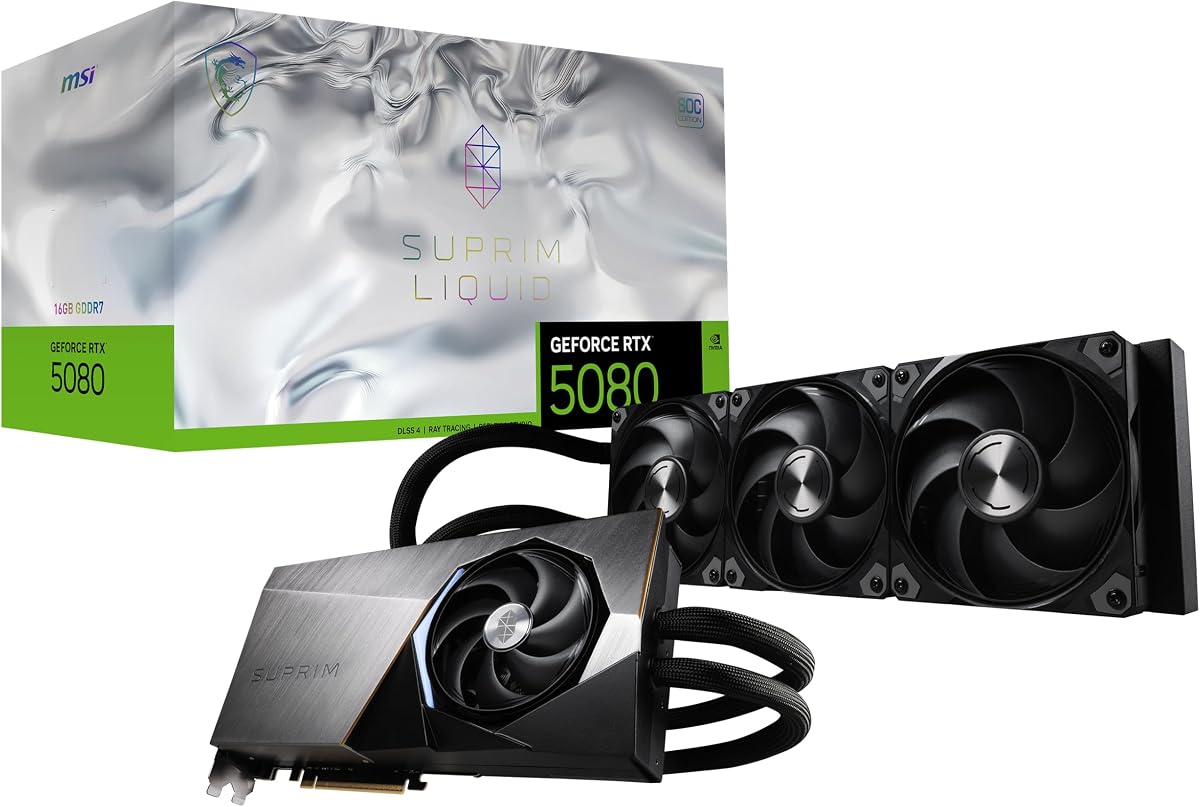
The MSI Gaming RTX 5080 16G SUPRIM Liquid SOC stands apart through its liquid cooling system, high stated 2760MHz performance clock, and generous display output selection. Its 4.7 rating indicates favorable buyer feedback, and the combination of Blackwell architecture with 16GB of GDDR7 places it among the most advanced models here.
We may earn a commission when you buy through this link, at no additional cost to you.
The 256-bit memory interface matches the other high-end 16GB RTX 5080 configuration in the guide. For connectivity, the card provides three DisplayPort 2.1a outputs and one HDMI 2.1b output, with a digital maximum resolution of 7680 x 4320. This makes it well suited to a single ultra-high-resolution display or a carefully configured multi-monitor arrangement.
Liquid cooling introduces installation considerations that are not present with conventional air-cooled cards. The user must ensure that the liquid-cooling system is correctly mounted, that its components are compatible, and that the case has sufficient space and support. Pump operation and connection details should be verified with the final product documentation.
This MSI model is a strong enthusiast choice for builders seeking the highest listed clock, liquid-assisted cooling, and extensive modern display connectivity. It suits RTX 5080 buyers with a well-planned high-end system, provided the cooling hardware and physical fit have been carefully checked.
The SUPRIM Liquid SOC's defining feature is its liquid cooling system. It is intended for enthusiasts who want a specialized thermal solution and are prepared to manage the additional installation requirements correctly.
Three DisplayPort 2.1a ports and one HDMI 2.1b port provide flexibility for modern high-resolution displays. The stated maximum resolution of 7680 x 4320 supports flagship monitor configurations when the rest of the system can meet their requirements.
We may earn a commission when you buy through this link, at no additional cost to you.
A flagship graphics card should be judged by more than its model name. The most important factors are workload fit, memory capacity, physical dimensions, power requirements, cooling design, and the features you actually intend to use.
Memory capacity determines how much data a graphics card can hold for high-resolution textures, complex scenes, AI workloads, and other demanding applications. The list includes 12GB, 16GB, and 32GB options, with GDDR6 and GDDR7 available. A 16GB card is a common high-end configuration, while 32GB provides the largest working space in this group. Memory type should also be considered because GDDR7 represents the newer standard among the listed specifications.
Choose enough memory for your intended workload rather than focusing only on the number. For high-resolution gaming, creative applications, and AI-related work, greater capacity can be more useful than a small clock or cooling-feature advantage.
The NVIDIA cards span RTX 40 Series and RTX 50 Series technologies. The supplied specifications list DLSS 3 for the RTX 4090 and DLSS 4 for the Blackwell-based models. These AI-assisted technologies can improve frame delivery and image quality in compatible games, but actual results depend on the application, settings, display, and underlying performance.
For a new high-end NVIDIA build, DLSS 4 and Blackwell offer the newest platform combination in this guide. An RTX 4090 can still make sense for users who value its high-refresh and 8K display capabilities or prefer the established feature set.
This roundup includes three Radeon RX 9070 XT models and seven NVIDIA GeForce options, although they span very different tiers. The Radeon cards use 16GB GDDR6, while the NVIDIA selection includes GDDR7 models and one high-end RTX 4090. Platform preference should reflect the games and applications you play, along with the features you need.
Do not treat the model names as interchangeable. Compare the complete specifications, software support, display needs, and memory configuration. The goal is the card that best matches your software, rather than the card with the largest number in its name.
The cards range from a 2.5-slot design to large 3.6-slot assemblies. ASUS TUF models use three Axial-tech fans, a massive fin array, and phase-change thermal pads, while the GIGABYTE models emphasize WINDFORCE cooling. The MSI SUPRIM Liquid uses a liquid-cooling approach, and several compact ASUS models offer 0dB behavior, dual BIOS profiles, and quiet or performance modes.
More cooling hardware is not automatically better if it prevents installation. Choose a cooler that fits your case and matches your noise tolerance. For silent general use, 0dB and dual BIOS features can be valuable; for sustained heavy loads, larger fins, multiple fans, or liquid cooling may be more appropriate.
Case clearance involves more than overall card length. The ASUS TUF RTX 5080 is stated at 348mm long, 3.6 slots wide, and 4.3lb, while the other TUF RTX 5070 Ti and RTX 5070 designs use a 3.125-slot cooler. The ASUS Dual and Prime cards use a 2.5-slot layout, and the RTX 5090 is also described as SFF-ready at 2.5 slots.
Measure the available space and account for the CPU cooler, drive cages, power cables, and neighboring cards. Liquid-cooled models also require room for the pump and tubing. Checking dimensions before purchase is one of the simplest ways to avoid an expensive installation problem.
The ASUS TUF RTX 5070 Ti and RTX 5080 specify a minimum 850W power supply and a 16-pin 12V-2×6 connector. High-end graphics cards can place substantial and variable demands on a system, so the power supply must meet the card's requirements while also supporting the processor, memory, storage, and other components.
Use the required connector type without forcing incompatible adapters. Check that the cable can route cleanly without an excessively tight bend and that the PSU has the appropriate capacity and connectors. A quality system power supply and clean airflow are both essential for sustained flagship use.
A flagship GPU may be connected to one demanding monitor or several high-resolution screens. The MSI RTX 5080 provides three DisplayPort 2.1a outputs and one HDMI 2.1b output, with support for a maximum digital resolution of 7680 x 4320. The RTX 4090 supports 4K 120Hz HDR, 8K 60Hz HDR, and Variable Refresh Rate through HDMI 2.1a.
Match the outputs to your monitor rather than choosing based on output count alone. Verify connector type, maximum refresh rate, HDR support, adaptive-sync behavior, and whether your system can drive the intended number of displays at the desired resolutions.
Several ASUS cards include GPU Tweak III for performance tuning, thermal controls, and monitoring. Dual BIOS switches on selected models let users move between quiet and performance profiles. Military-grade components, protective PCB coating, phase-change thermal pads, and automated manufacturing processes support the durability positioning of the TUF family.
The extra software is useful only if you understand what settings you want to change. Start with a stable default or Performance profile, make incremental adjustments, and monitor temperatures and stability. For most users, the hardware's core specifications and physical fit should take priority over fine-tuning.
Install the card into a compatible PCIe x16 slot with the system powered off and disconnected from mains power. Confirm case clearance, slot spacing, PSU capacity, and the required power connector before insertion. Secure the card with the supplied bracket and any additional supports recommended for its size, while avoiding a tight bend in power cables.
After installation, update the operating system and graphics drivers, then install the manufacturer's monitoring or tuning utility if you want detailed control. Begin with the default BIOS profile. Move to the Performance profile or make incremental adjustments only after confirming that the system is stable and the chosen settings are appropriate for your cooling arrangement.
Keep intake and exhaust paths unobstructed, clean dust from fans and filters periodically, and avoid placing the card in an area with persistent heat buildup. For a liquid-cooled model, inspect the pump, fittings, and tubing according to the installation guide. Monitor stability and temperatures during extended workloads, and use the card's default settings if unusual behavior appears.
The ASUS TUF Gaming GeForce RTX 5090 32GB GDDR7 OC Edition has the largest listed memory allocation at 32GB. It is the option to consider when memory capacity is more important than the lower-tier alternatives' more compact designs. The 16GB cards still offer substantial working memory for high-end gaming and many creative applications.
A 16GB allocation is a strong match for many modern high-end gaming systems and is used by most of the flagship cards in this guide. The best choice also depends on texture intensity, output resolution, and the specific title. You will also find 12GB and 32GB options, illustrating how memory requirements vary across the range.
GDDR7 is the newer memory standard represented in several of the NVIDIA Blackwell cards, while GDDR6 appears in the Radeon RX 9070 XT models and the RTX 4090. The practical choice should consider capacity alongside other specifications. Buyers should also verify the memory needs of their games and applications.
The ASUS TUF GeForce RTX 5070 Ti and ASUS TUF GeForce RTX 5080 explicitly require a minimum 850W PSU and a 16-pin 12V-2×6 connector. Other cards may have different requirements, so consult the final listing and manual. The complete system matters because the processor and other components also consume power.
The ASUS Dual GeForce RTX 5060 Ti, ASUS Prime Radeon RX 9070 XT, and ASUS TUF GeForce RTX 5090 all use 2.5-slot designs. The RTX 5090 is specifically described as SFF-ready, while the other 2.5-slot cards emphasize compatibility and cooling efficiency. Exact dimensions should still be checked before installation.
Yes, the MSI Gaming RTX 5080 16G SUPRIM Liquid SOC requires more attention to pump placement, tubing, connections, and supported components than a conventional air-cooled card. It is best suited to a builder comfortable with liquid-cooling installation. Check the included hardware and final instructions before planning the case layout.
No, but the display becomes important when assessing expensive flagship hardware. The RTX 4090 supports 4K 120Hz HDR and 8K 60Hz HDR, while the MSI RTX 5080 lists support up to 7680 x 4320. A high-resolution or high-refresh monitor can make better use of the platform's capabilities.
DLSS 4 belongs to the newer Blackwell models in this guide, while the RTX 4090 lists DLSS 3. Newer platform features can be attractive, but the broader decision should include memory, cooling, dimensions, application support, and cost. A capable card still benefits from choosing the right display and sensible settings.
The ASUS TUF GeForce RTX 5070 Ti 16GB GDDR7 OC is the Editor's Choice for its 4.8 rating, strong cooling design, and emphasis on component durability. The GIGABYTE Radeon RX 9070 XT Gaming OC 16G represents the budget-focused end of this flagship group, while the VIPERA GeForce RTX 4090 Founders Edition serves as the premium high-resolution and high-refresh option.
Prioritize the factors that can prevent an installation or limit usefulness: memory capacity, physical dimensions, PSU requirements, cooling, and software compatibility. The 32GB ASUS TUF RTX 5090 is the capacity leader, the MSI RTX 5080 SUPRIM Liquid offers specialized cooling and display connectivity, and the 2.5-slot ASUS models can suit builders who need a smaller footprint.
Flagship graphics cards are complex purchases whose prices and availability can change. Before ordering, verify the current listing, connector, PSU requirements, exact dimensions, and warranty information, then compare the latest cost with the alternatives that best match your particular workload and case.
