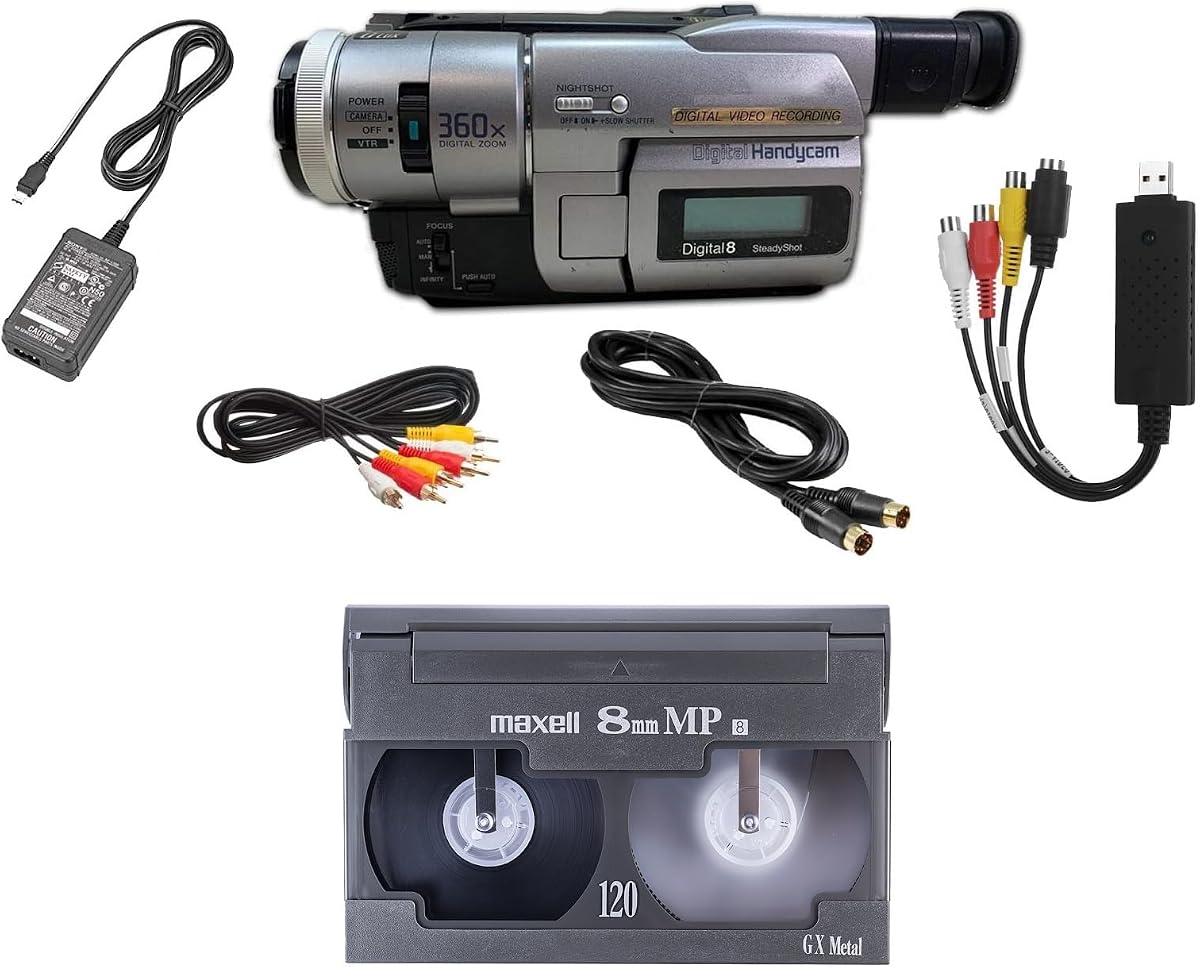
8mm Camcorder and Tape Player
3.6Editor score
Plays older 8mm tapes
Supports digital tape transfer
Includes battery and AV cables
Discover the best Hi8 and 8mm video cassette player options by comparing tape compatibility, transfer features, included accessories, and ease of use.
A Hi8 and 8mm video cassette player can unlock a collection of family recordings, vintage camcorder footage, and home movies recorded on formats that many modern devices no longer accept. A useful machine should do more than spin a tape: it should play the correct format, provide stable video output, and make digitization or conversion straightforward.
This guide compares ten dedicated camcorders, tape players, and signal converters with different roles in the analog-video ecosystem. We considered format support, playback capabilities, transfer connections, included cables and accessories, ratings, warranty information, and important limitations. The list includes both standalone playback solutions and devices intended to work with another player.
Each review explains what the product is best suited to do, where it fits in a digitizing setup, and what buyers should verify before ordering. The first three recommendations represent the strongest balance of capability and usefulness across the list, while later entries provide alternative options for different budgets or requirements. Prices and availability change over time.
3.6Editor score

4.7Editor score

4.0Editor score
The table below compares all ten options by format support, playback role, transfer method, and included equipment, making it easier to identify the right device for viewing old tapes or digitizing them.


The 8mm Video8 Hi8 Camcorder VCR Tape Player Vintage Camera is an unusual all-in-one option intended for viewing 8mm and Hi8 recordings, transferring them to a computer, and shooting new footage with a vintage look. It has no published rating, so its appeal comes from the range of functions described in the listing rather than from a large body of customer feedback.
We may earn a commission when you buy through this link, at no additional cost to you.
Its central advantage is the combination of playback, recording, and digitization. The included USB capture device provides a route from tape to computer, while the blank 8mm tape makes it possible to test the machine or begin creating analog-style home movies. This makes the package more useful than a basic player that can only send composite or S-Video output to a television.
The principal uncertainty is output quality. The supplied information does not state the capture resolution, video standard, audio format, or connection standards beyond USB. It also provides no details about the camcorder's optical or zoom specifications. Buyers who already own good playback equipment may therefore find a dedicated transfer setup more appropriate than this combined approach.
This is a reasonable option for someone who wants one inexpensive device to explore both playback and recording, especially if the included accessories are important. It is less suitable for a demanding archival workflow where resolution, signal stability, and precise editing controls matter. Confirming the tape compatibility, power supply, included cable types, and operating requirements before ordering would be wise.
The ability to play 8mm and Hi8 tapes while also recording to 8mm gives this package broader appeal than a player-only device. It can serve as an introduction to tape-based recording while also giving the owner a means to revisit existing home movies.
The included USB capture device creates a direct path for digitizing tapes into computer files. Because no detailed capture specifications are listed, buyers should treat the software workflow as part of the purchase and verify system compatibility before relying on it for a large archive.
We may earn a commission when you buy through this link, at no additional cost to you.
The Sony Camcorder for 8mm Digital8 Hi8 Tape Transfer to Computer USB and DVD earns the Best Premium designation because it combines extensive tape compatibility with a thoughtfully equipped transfer package. Its 4.0 rating reflects a generally useful approach, and the listed features cover both direct viewing and moving tapes into a digital workflow.
We may earn a commission when you buy through this link, at no additional cost to you.
Playback support spans 8mm, Video8, Hi8, and Digital8 tapes. The included USB capture device can save footage as computer files or support burning to DVD, while power supply, AV cables, and S-Video cables cover essential setup paths. Compatibility with Windows and Mac systems through USB, FireWire, and Thunderbolt adds flexibility for a mixed computer environment.
There are two important boundaries. The product does not support PAL, which may be a significant issue for recordings made under that television standard. It is also intended for playback and transfer rather than recording video. Buyers should check the video standard used by their tapes and ensure that the included transfer software works with their current computer before purchasing.
Overall, this is the most complete multi-format option in the list for NTSC-oriented users with an extensive tape collection. It is particularly suitable for transferring a mixture of 8mm and Hi8-family media, watching it on a television, and organizing copies on a computer or disc. Those seeking a universal PAL solution should look elsewhere.
Supporting 8mm, Video8, Hi8, and Digital8 is valuable for collectors who do not know exactly which format every cassette contains. This reduces the need to purchase separate playback hardware for different generations of consumer tape.
USB, FireWire, and Thunderbolt support gives the bundle several ways to connect with a computer. Combined with the ability to create files or burn them to DVD, it provides a more complete path from analog tape to organized digital media.
We may earn a commission when you buy through this link, at no additional cost to you.
The Hi8 8mm Tape Player Handycam CCD Camcorder w/Nightshot, Blank Tape, USB (USB) is one of the strongest-rated dedicated options in this guide. Its 4.2 rating, Nightshot capability, and combination of playback, recording, and USB transfer make it appealing to buyers who want a device that can both preserve old material and create new analog-style footage.
We may earn a commission when you buy through this link, at no additional cost to you.
The camcorder can shoot directly to tape for a vintage visual style without digital filters. It plays tapes on a television or computer, while the included USB adapter and digitizing software support moving recordings into a computer workflow. A blank tape is also supplied, allowing users to test recording and playback before committing to a larger project.
The listing does not provide detailed technical specifications for the CCD sensor, zoom, capture resolution, or output quality. The title emphasizes Hi8 and 8mm compatibility, but buyers with a mixed collection should confirm exactly which formats and tape standards the unit accepts. It is also important to distinguish creating new tape footage from the quality of preserving an existing archive.
This camcorder is a good fit for creative users who value the character of tape recordings, particularly in low-light situations where Nightshot is useful. It is also attractive for a first attempt at analog video. For large-scale archival transfers, a model with more detailed signal and resolution information may provide greater confidence.
Recording directly to tape creates the warm, nostalgic appearance associated with older camcorders. For filmmakers and hobbyists, that aesthetic can be more valuable than the consistency of a modern digital sensor.
Nightshot support is a meaningful feature for dim indoor scenes, family events, and deliberately atmospheric footage. It also differentiates this model from simple playback-only boxes that cannot record at all.
We may earn a commission when you buy through this link, at no additional cost to you.
The Tech Collector 8mm, Digital8, and Hi8 Transfer Bundle is explicitly designed for people who want to play and digitize tapes rather than simply watch them. Its 4.0 rating indicates a solid overall proposition, and the package combines a camcorder, USB capture device, battery, AV cables, and an 8mm tape.
We may earn a commission when you buy through this link, at no additional cost to you.
Its core strengths are clarity and convenience. The camcorder handles 8mm, Hi8, and Digital8 media, while the USB capture device transfers tapes to computer files or supports conversion to DVD. AV cables allow the same unit to be used for television viewing, which is helpful for checking the original picture before beginning a lengthy digitization project.
The listing provides few technical details about image quality, audio capture, operating systems, and television video standards. Although it says any 8mm tape can be played, buyers with extensive archives should determine whether their recordings use another supported format and whether the capture software matches their computer. The inclusion of a blank tape adds convenience but does not affect archival capability.
The bundle is well suited to a new digitization project because it contains the central components in one purchase. It is less suitable for users who already own compatible hardware and need only a converter. Confirming included power options and software requirements before ordering can prevent setup frustration.
The camcorder and USB adapter are packaged specifically for tape transfer, giving users a straightforward starting point. Extra AV cables and a battery help ensure that basic viewing and capture tasks can be completed without separately sourcing every accessory.
Moving footage to computer files creates a flexible digital copy, while DVD burning offers a convenient way to produce a familiar disc. These two output paths accommodate both archival workflows and simpler viewing arrangements.
We may earn a commission when you buy through this link, at no additional cost to you.
The Portta VHS to Digital Converter is the highest-rated product in this roundup, with a 4.5 rating, but it is not a tape player. It is a standalone recording and capture box designed to accept video from a VCR, DVD player, camcorder, Hi8 deck, Mini DV source, DVR, or game console.
We may earn a commission when you buy through this link, at no additional cost to you.
The device can record up to 1080P at 30Hz and stores output as MP4 video or MP3 audio. USB and SD card options provide flexible capacity, while a preview LCD and built-in speaker make it easier to frame recordings and monitor playback without a computer. It accepts composite AV, S-Video, and AUX audio inputs and requires no PC, software, or drivers for its stated core operation.
The crucial limitation is stated clearly: this converter cannot play tapes, DVDs, or other media independently. To use it with 8mm or Hi8 tapes, buyers need a compatible tape player and an appropriate cable. Storage devices are also not included, and high-capacity USB drives may need the converter's own power supply. The remote's AAA batteries are not included either.
This is a strong second-stage solution for people who already own a good 8mm or Hi8 deck, or who want to digitize several analog formats through one standalone box. It may be less convenient than an all-in-one camcorder, but its strong rating, broad input support, preview display, and computer-free operation make it a flexible choice.
The no-PC, no-driver design makes the converter approachable for users who want a direct transfer process. A USB drive or memory card can receive the recording, and the integrated screen provides immediate feedback.
Its support for VHS, Hi8, Mini DV, game consoles, and other video sources makes it useful beyond a single tape collection. A compatible player remains necessary, but one converter can then handle several kinds of analog material.
We may earn a commission when you buy through this link, at no additional cost to you.
The Tech Collector Sharp 8mm Tape Player Camcorder w/Blank Tape, USB has a 3.9 rating and offers a combination of tape playback, direct recording, and computer transfer. Its principal purpose is to recreate the look and process of older home video while also providing a way to view or digitize existing recordings.
We may earn a commission when you buy through this link, at no additional cost to you.
Recording directly to 8mm produces a vintage appearance without applying a digital filter. The included USB adapter and digitizing software support a transfer workflow, and tapes can be played on a television or computer. A blank tape provides an immediate way to test the recording system, while the included warranty and free returns reduce some of the risk associated with unfamiliar legacy hardware.
The product information remains general and does not identify the CCD or camcorder specifications, zoom range, audio capabilities, or capture resolution. It also does not provide a detailed compatibility list beyond the 8mm context implied by the title. Buyers who need to know the precise formats or television standards their tapes use should seek clearer confirmation before ordering.
This camcorder is most appropriate for creators who enjoy the physical, imperfect character of tape and want one device to make and transfer recordings. It may also be useful for a casual first entry into analog video. Buyers focused primarily on archival quality should compare the unspecified transfer specifications with models that publish more detail.
Direct-to-tape shooting gives footage the texture and visual character associated with vintage camcorders. The included blank cassette lets users experiment before committing to a larger recording project.
The USB adapter and digitizing software provide a direct route to computer files, while television playback lets users review footage on a larger screen. This combination supports both creative and practical uses.
We may earn a commission when you buy through this link, at no additional cost to you.
The 8mm Digital8 Hi8 Tape Player Nightshot CCD Handycam Camcorder w/Blank Tape, USB supports several familiar tape formats in a camcorder-style package. Its 3.3 rating is the lowest among the rated products here, so prospective buyers should pay particular attention to compatibility and return terms before committing.
We may earn a commission when you buy through this link, at no additional cost to you.
The principal advantage is flexibility. The title indicates support for 8mm, Digital8, and Hi8 playback, while the camcorder can also record vintage-style video directly to tape. Nightshot supports low-light shooting, and the included USB adapter and digitizing software offer a way to transfer recordings to a computer. A blank tape and one-year warranty are also included.
Its lower rating suggests that some buyers may have found aspects of the overall experience less satisfying, although the available product information does not specify the reasons. The listing also lacks detailed resolution, zoom, sensor, video-standard, and computer-compatibility information. These omissions make independent verification especially important before using the unit for irreplaceable family footage.
The camcorder makes sense for a buyer who wants one compact-looking device spanning three tape families and also wants to create new recordings. It is less convincing for a careful archival setup where documented specifications and stable signal performance are priorities. The stated free returns and warranty should be read closely before ordering.
Handling 8mm, Digital8, and Hi8 media helps reduce the inconvenience of identifying and connecting separate decks. It is particularly appealing to users whose collection contains tapes acquired over many years.
Nightshot adds a practical low-light option, while direct-to-tape recording produces the characteristic vintage look. The included blank tape allows users to evaluate both functions before organizing a larger shoot.
We may earn a commission when you buy through this link, at no additional cost to you.
The 8mm Camcorder and 8mm Tape Player is the most approachable entry in the guide for a buyer whose collection consists mainly of traditional 8mm cassettes. It has a 3.6 rating and a clearly focused role: playing old tapes, viewing them with the included AV cables, and digitizing them with the included camcorder.
We may earn a commission when you buy through this link, at no additional cost to you.
The package includes a battery and AV cables for TV playback or transfer, plus an 8mm tape that can be used for testing. It is also described as guaranteed to work and eligible for free returns, which is especially helpful when purchasing a legacy-format device whose condition and exact behavior may be less familiar than that of contemporary electronics.
The product appears narrower than several multi-format models because its supplied information focuses on 8mm. No Hi8 or Digital8 compatibility is explicitly confirmed, and the listing does not state capture resolution, video standard, or computer requirements. Owners of mixed-format archives should verify compatibility before selecting this option.
It is a sensible budget choice for viewing and transferring a straightforward 8mm collection without assembling many separate accessories. It may not be the right choice for broad archival work or creative tape recording because the emphasis is on old 8mm playback. Its included accessories and return policy help offset the limitations in the technical details.
The included AV cables and battery make it easier to connect the camcorder to a television and begin watching tapes. This reduces setup friction for users who do not already own legacy AV leads.
The device can digitize the owner's 8mm tapes and includes a sample cassette for testing. Buyers wanting a no-frills route from old recordings to computer files will find the bundle comparatively approachable.
We may earn a commission when you buy through this link, at no additional cost to you.
The Panasonic PV-8450 Video Cassette Recorder is a traditional VCR rather than a product explicitly identified as an 8mm or Hi8 camcorder. With a 3.9 rating and a Panasonic brand name, it may appeal to buyers seeking a dedicated vintage videocassette deck, but its relevance to the keyword depends on the formats it can actually accept.
We may earn a commission when you buy through this link, at no additional cost to you.
The supplied information is minimal, identifying the manufacturer as Panasonic and the product type as a VCR. It does not mention 8mm, Hi8, Digital8, USB transfer, computer compatibility, or included accessories. A recorder of this kind could serve as part of a broader analog-media setup, particularly when paired with a modern capture box, but it should not be selected for Hi8 playback without confirmation.
The biggest concern is compatibility. A conventional VCR can look similar to dedicated 8mm equipment in listings, yet the mechanisms and tape formats may be completely different. This model also lacks stated digitization features, so users who want files on a computer would need a separate converter such as the Portta option in this guide.
The PV-8450 is best considered only after verifying its supported media, physical connections, and whether it includes the necessary power cord and cables. It may suit someone building a retro home-video setup, but for the specific goal of playing and digitizing 8mm or Hi8 tapes, a purpose-built camcorder is the safer purchase.
Panasonic VCRs are associated with the home-video era, and this model may fit naturally into a collection of retro playback equipment. Its appeal is strongest when the goal is recreating a traditional setup rather than managing 8mm archives.
The listing does not confirm 8mm or Hi8 support. Because accepting a cassette physically does not necessarily mean the drive can play its format, buyers should check the manual or manufacturer documentation before ordering.
We may earn a commission when you buy through this link, at no additional cost to you.
The Sony GV-D200 Digital 8mm Portable Video Recorder is the Editor's Choice because it delivers the strongest published rating in the guide and supports the core playback formats requested. At 4.7, it also offers the most clearly described feature set among the dedicated camcorders, including recording, editing, and multiple output options.
We may earn a commission when you buy through this link, at no additional cost to you.
This ultra-portable VCR records and plays Digital8 cassettes while also playing Hi-8 and regular 8mm videocassettes. That three-format coverage makes it useful for both viewing and digitizing a varied collection. Its 20-segment assembly editing feature can join up to 20 assembled scenes at a time, adding a basic organizing option that many simpler playback devices lack.
Connectivity is another strength. The integrated IEEE 1394 FireWire i.Link port provides a direct route to compatible computers and capture equipment, while composite outputs allow tapes to be viewed on a television. However, modern computers often lack FireWire, so buyers should plan for an appropriate adapter or capture workflow rather than assuming immediate plug-and-play compatibility.
This recorder is the leading choice for a buyer who wants an established Sony device with broad playback support and useful editing functions. It is especially attractive for owners of Digital8 recordings, since it can both play and record that format. For effortless computer transfer, verify the available FireWire equipment and capture software before ordering.
The ability to play Digital8, Hi-8, and regular 8mm media makes the GV-D200 adaptable to collections assembled over many years. It can serve as the central playback device rather than one piece among several format-specific decks.
Twenty-segment assembly editing provides a convenient way to arrange scenes before copying or transferring footage. Although it is not a modern nonlinear editor, it adds useful control at the camcorder level.
We may earn a commission when you buy through this link, at no additional cost to you.
Choosing a tape player starts with the media you own, but the ideal setup also depends on whether you only want to watch recordings or need to preserve them as digital files. Format support, signal connections, recording capability, accessories, and computer compatibility should be evaluated together.
Begin by identifying every format in your collection. Regular 8mm and Video8 are related consumer formats, Hi8 uses a distinct tape system, and Digital8 stores video digitally on tape-like cassettes. Some products handle only one family, while broader models explicitly support 8mm, Video8, Hi8, and Digital8. A device that plays regular 8mm may not accept Hi8, and the word camcorder alone does not guarantee that every listed format is supported.
Choose a model whose published specifications explicitly cover your tapes. For a mixed collection, the Sony multi-format transfer camcorder or Sony GV-D200 provides a clearer three- or four-format proposition than a listing that only says 8mm. Do not infer compatibility merely from a compatible-looking cassette door or from the ability to record onto one format.
Some buyers want a device that can watch existing footage, while others hope to create new recordings with a retro appearance. A playback-only transfer camcorder may handle archival tasks more directly, whereas a camcorder with recording capability can also serve as a creative tool. The presence of a blank tape in a bundle often signals that the package is intended for new recording as well as transfer.
Match the feature to the purpose rather than assuming more functions are always better. If preservation is the priority, prioritize playback stability, output quality, and reliable capture. If creative recording matters, consider direct-to-tape operation, Nightshot or low-light features, and included accessories that support shooting.
A usable setup needs a clear route from tape to screen or storage. Composite AV is common and easy to connect to televisions, while S-Video can provide a better analog picture when both the source and display support it. USB capture devices add a direct path to computer files, and FireWire can be valuable for older Digital8 workflows. Modern computers frequently require adapters for legacy connections.
List the cables and interfaces included with the product, then compare them with the equipment you already own. Do not assume that a USB port automatically means the machine includes everything required for software-based capture. For a modern, computer-free workflow, a standalone converter with USB or SD storage can be paired with a separate tape player.
The digital quality of an archival copy depends on the capture device, source playback, cable quality, and software. Some listings disclose resolution and supported television standards, while others provide almost no technical details. A published resolution figure alone does not guarantee a faithful result, but the absence of any information makes comparison difficult. NTSC and PAL compatibility is especially important for tapes recorded outside the United States.
Look for explicit details about resolution, frame rate, video input standard, and audio output. When the listing is vague, contact the seller or manufacturer before purchase. Also verify whether the product can only capture a picture or can preserve stereo audio, because those differences can affect the usefulness of family recordings.
Digital8 and USB transfer workflows may depend on drivers, capture software, or an operating system that the manufacturer still supports. The Sony multi-format camcorder explicitly supports Windows and Mac through USB, FireWire, and Thunderbolt, while several other packages mention software without listing operating-system requirements. Before buying, check whether the included application is available for the computer you plan to use.
A standalone converter can avoid these compatibility problems because it records directly to a USB drive or memory card. Conversely, FireWire may offer a more traditional and potentially cleaner workflow if you already own the correct adapter and capture software. Choose based on your existing equipment rather than on interface popularity alone.
Legacy camcorders need the right power supply, and transferring to a computer or television requires suitable cables. Some packages include a power supply, battery, AV leads, S-Video leads, a USB adapter, and a blank tape. These accessories can make a new setup much easier, although they do not guarantee that every regional plug or adapter is included.
Compare the accessory list with the contents of your existing equipment. A tape deck without its power adapter may be difficult to use, while a missing AV cable can prevent immediate television viewing. Check whether batteries are supplied, whether they are proprietary, and whether remote-control batteries or storage media are excluded.
Camcorders with recording features may offer zoom controls, low-light modes, automatic exposure, or assembly editing. The Sony GV-D200 includes 20-segment editing, while several Handycam-style products emphasize Nightshot and direct-to-tape recording. These features can make the product more useful for original footage, although they are separate from the quality of digitizing old tapes.
Prioritize creative controls only if you plan to record. For preservation, stable tape transport and accurate playback matter more. When creative features are important, check the sensor description, zoom, audio capabilities, and recording format alongside the usual playback specifications.
Because tape mechanisms and camcorder electronics are aging technologies, warranty and return information can be valuable. Several products in this guide advertise a one-year warranty, free returns, a two-year warranty with technical support, or a guarantee that the unit works. These statements should be read alongside the exact terms offered at the time of purchase.
For a valuable archive, keep the original tapes in good condition and create redundant digital copies. A player is a tool for accessing the collection, not a substitute for preserving the originals. Choose a seller with clear support procedures, inspect the machine promptly upon arrival, and test it before beginning a large transfer project.
Before inserting a tape, inspect the cassette shell for cracks, loose tape, warping, or evidence of dirt and mold. Never force a cassette into the door. Connect the player according to its supported video standard, connect audio as needed, and power the unit before changing transport controls. Make a test copy before attempting a full collection, because the best workflow depends on whether the product outputs directly to a converter, a computer, or a television.
For computer capture, use the supplied USB adapter, FireWire interface, or compatible converter and follow the included software instructions. Confirm the input selection, storage location, and audio level before rewinding or fast-forwarding through an entire tape. A preview test of several minutes from the beginning, middle, and end can reveal tracking problems, dropped frames, noise, or a mismatch in audio.
Handle tapes gently, store them upright in a cool, dry place away from direct sunlight, and avoid leaving them in a vehicle or humid storage area. Clean the machine only as its manual permits, using appropriate magnetic-head cleaner for the transport when needed. Keep several digital copies of important footage on separate media, retain the original cassette, and document which file corresponds to each tape.
No. Regular 8mm, Video8, Hi8, and Digital8 are related but not interchangeable formats, and a player must explicitly support each cassette type it will encounter. Check the manufacturer's format list and confirm that your particular tapes are NTSC or PAL as applicable. A device that plays 8mm and Hi8 may not play Digital8.
A tape player contains the mechanism that reads the cassette and sends its video to another device. A capture converter takes video from an existing player and records it to digital storage, but it cannot independently play a tape. Some camcorder bundles combine both functions, while standalone converters usually require a separate VHS, 8mm, Hi8, or other player.
You need some way to move the player's video signal into a digital file. USB capture devices are common, FireWire is useful for legacy Digital8 equipment, and S-Video can feed a standalone converter when both devices support it. The best setup depends on your existing computer, capture software, television standard, and whether you prefer a computer-based or computer-free workflow.
Yes, if the specific model is designed for recording. Several camcorders in this guide record directly to tape and include a blank cassette for testing. Their picture has an intentionally vintage character, while features such as Nightshot can help in low light. Not every dedicated playback or transfer device can record.
Age, debris, dried tape-path components, head wear, and weak signals can all affect playback. Try a clean, undamaged cassette and follow the manual's cleaning guidance before assuming the tape itself is the problem. If several tapes show the same issue, the player may need service, particularly if its transport is noisy or cannot maintain stable tracking.
No. Digital copies can fail, lose context, or be compressed again, so the original cassette remains the authoritative source. Ideally, make at least two digital copies on separate storage media, keep the files in a clearly named folder, and preserve the original cassette in a stable environment.
It can be essential. Tapes recorded under the PAL television standard may not play correctly on an NTSC-only device, even when the cassette shape appears compatible. The Sony multi-format transfer camcorder explicitly states that it has no PAL support, so buyers with PAL recordings should choose another model or confirm compatibility in writing.
At minimum, you need the correct power supply, a compatible video connection, a capture destination, and storage for the resulting files. Depending on the setup, that may mean a USB adapter, FireWire interface, AV or S-Video cables, television, computer, capture software, and a USB drive or memory card. Check the package contents because batteries, storage media, and some cables may not be included.
The strongest general-purpose recommendation is the Sony GV-D200 Digital 8mm Portable Video Recorder. Its 4.7 rating, support for Digital8, Hi-8, and regular 8mm playback, built-in assembly editing, and FireWire connectivity make it an appealing choice for a varied collection. The Sony multi-format transfer camcorder is the premium alternative for buyers who want a broader connection kit and a direct file-or-DVD workflow.
For a simpler 8mm-focused setup, the 8mm Camcorder and 8mm Tape Player offers an accessible package with battery, AV cables, and a sample tape. Buyers who already own a reliable deck can consider the Portta converter, which provides flexible USB or SD storage, a preview display, and broad source compatibility without needing a computer.
Before buying, verify tape formats, NTSC or PAL requirements, included power supplies, cables, software, and capture destinations. Current prices, seller conditions, return policies, and product availability can change, so compare the complete package and current listing carefully. The most important choice is the unit that can reliably read your particular tapes and create backups you can organize and access for years to come.