
KODAK Luma 150 Mini Projector Kit
5.0Editor score
Adjustable tripod included
Articulating arm clamp included
HDMI USB microSD connectivity
Our projector for sewing patterns guide compares 10 options for clarity, alignment, connectivity, portability, and reliable creative tracing performance at
A projector designed for sewing patterns can transform dense digital files into large, traceable references without the need to print every page. The most useful models combine sharp rendering, flexible scaling, dependable focus, and easy rotation with stands that can be positioned over a cutting table, work surface, or fabric.
This guide compares ten compact projectors using the features listed in their product information, including supported resolutions, brightness, connection methods, adjustment controls, mounting options, and intended creative uses. It covers general entertainment models, purpose-built art projectors, tufting projectors, and portable options suited to tracing patterns at different scales.
Each review explains where a projector is strongest, which setup constraints deserve attention, and how its controls fit a sewing workflow. Ratings reflect the supplied customer feedback and may change over time. Product prices also fluctuate, so readers should check current listings and verify dimensions, compatibility, and included accessories before buying.
5.0Editor score

4.2Editor score

3.7Editor score
This side-by-side comparison highlights the image tools, resolution, positioning hardware, power options, and connectivity most relevant to projecting sewing patterns. The differences show why a general entertainment projector and a dedicated tracing projector may suit different workspaces and budgets.





The AKIYO Mini Projector with WiFi and Bluetooth is a compact entertainment projector whose 360-degree rotating stand also makes it unusually adaptable for craft work. It has a 4.2 rating in the supplied data, supported 1080P imagery, 200 ANSI lumens, and a listed 2000:1 contrast ratio. Those specifications make it a flexible option for displaying sewing references on a wall, worktable, or even a ceiling while the body remains close to the material.
We may earn a commission when you buy through this link, at no additional cost to you.
Its most useful sewing feature is the physical adjustability of the projector. The stand lets the user change the projection angle without finding a new level surface, and automatic vertical keystone correction helps maintain a rectangular image when the unit is tilted. The remote-controlled 50-percent zoom function provides another practical degree of freedom, allowing a pattern to be reduced after positioning instead of forcing the entire device to move.
Connection options are broader than those found on many compact projectors. The P2P direct connection can mirror from a compatible iOS or Android phone without requiring a shared WiFi network, while dual-band WiFi, HDMI, USB, and a 3.5mm audio output cover other source arrangements. These choices allow a computer, tablet, phone, or streaming device to act as the image source. Bluetooth 5.2 is reserved for audio accessories rather than smartphone video.
The trade-off is that this is a general-purpose mini projector rather than a dedicated tracing system. It has no dedicated line extraction, grid, drawing-mode, or pattern-alignment features, so users may need to square and scale the image themselves. The listed 200 ANSI lumens should also be considered with the manufacturer’s recommendation that the projector performs best in a dark environment. For someone wanting a versatile device that can handle patterns and entertainment without complicated setup, this remains a sensible general-purpose choice.
The rotating body and automatic vertical keystone reduce the need for repeated physical alignment. This is especially helpful when projecting a pattern onto fabric positioned at an angle or onto a surface that is not directly opposite the unit.
P2P casting, dual-band WiFi, HDMI, and USB make it possible to choose between live phone images and stored files. For pattern work, a wired computer source can offer a stable workflow while a phone remains useful for quick reference adjustments.
We may earn a commission when you buy through this link, at no additional cost to you.
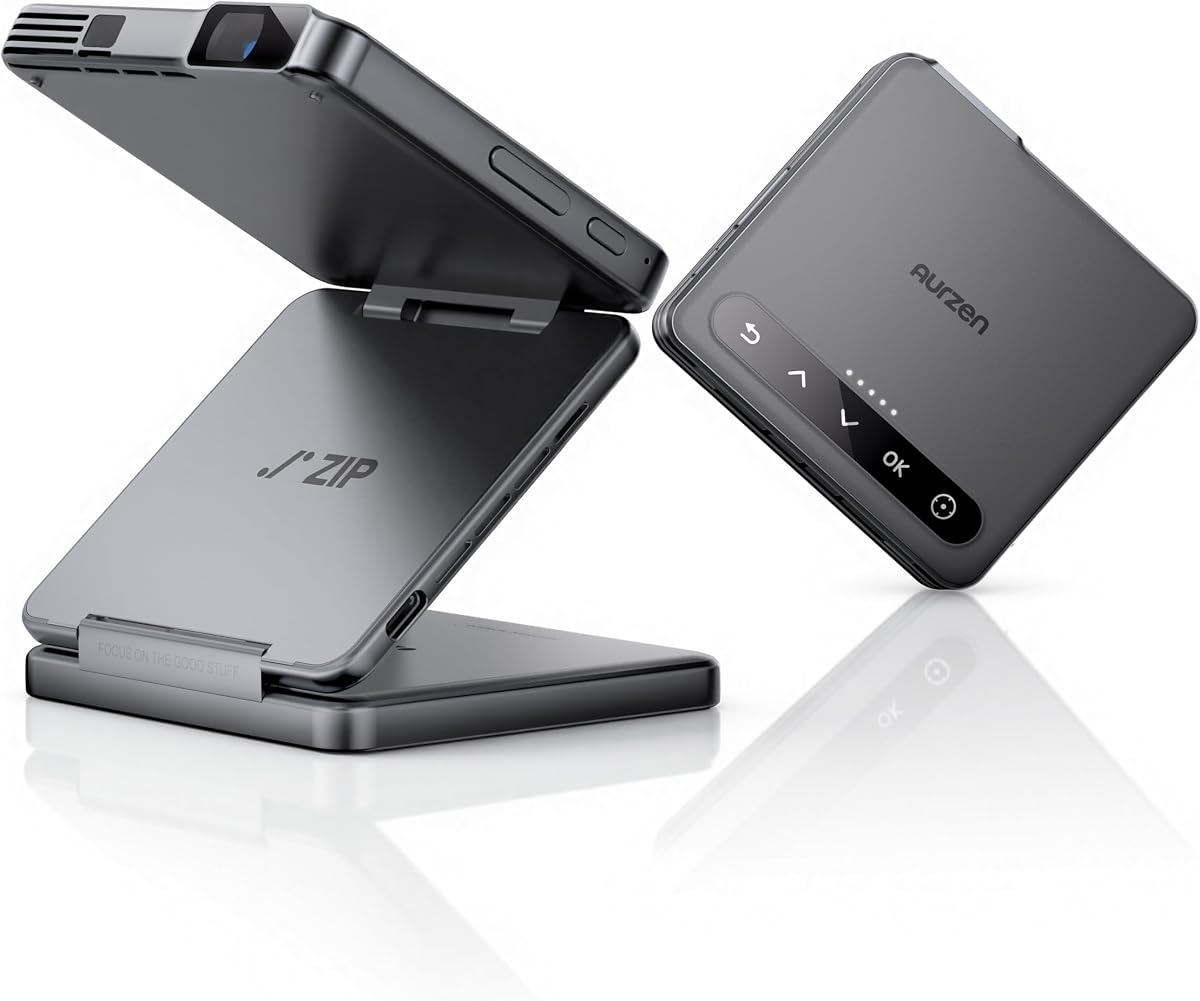
The Aurzen ZIP Tri-Fold is designed around portability, with a folding 0.62-pound body and built-in Z-shaped stand. Its 3.8 rating reflects mixed customer feedback, but the listed construction and controls clearly target creative tasks such as tracing, drawing, cookie decorating, and sewing. It offers native 720P resolution with 1080P support and 100 ANSI lumens, placing it among the more purpose-conscious compact choices in this list.
We may earn a commission when you buy through this link, at no additional cost to you.
For sewing-pattern projection, the projector supports one-click screen mirroring from iOS, Android, and Windows devices without requiring a WiFi network. That is useful in studios where wireless service is inconsistent or where the user does not want to rely on an external connection. A ToF system measures distance 30 times per second for automatic focus, while automatic keystone correction helps maintain alignment as the folded unit changes angle.
The tri-fold format and vertical full-screen mode make it easy to switch between horizontal reference work and portrait-oriented images. Its built-in 5000mAh battery provides up to 1.5 hours in eco mode, enough for a focused tracing session but not an all-day installation. It can also operate while plugged in with a compatible 24W-or-higher adapter. Bluetooth 5.4 supports audio only, while the USB-C port is part of its creative and charging workflow.
The principal limitation is brightness. At 100 ANSI lumens, it is best used in a dim, controlled workspace rather than a room filled with daylight. Another limitation is that DRM-protected content cannot be viewed through its built-in mirroring, although the manufacturer describes an optional CastPlay Pro dongle route with qualifying source devices. For mobile sewists needing a highly compact, quickly focusing projector, the ZIP offers a distinctive balance of portability and pattern-ready features.
Automatic focus and keystone reduce the fine adjustments normally required when a projector is moved or tilted. Network-free one-click mirroring further reduces setup steps for quick tracing sessions.
The foldable body, integrated stand, and rechargeable battery let a sewist carry the complete projection setup between rooms or work areas. Battery operation is most practical for shorter sessions, however, so extended pattern work may call for continuous power.
We may earn a commission when you buy through this link, at no additional cost to you.
The Magcubic HY300Pro combines 4K support, 200 ANSI lumens, and a 180-degree rotatable design in a projector weighing 350 grams. Its 4.1 rating indicates generally favorable customer feedback, while the rotation feature gives it useful positioning flexibility for tracing onto a table, wall, or ceiling. It is primarily positioned as a smart entertainment and portable video projector rather than a specialized art system.
We may earn a commission when you buy through this link, at no additional cost to you.
Dual-band WiFi 6 is intended to improve responsiveness and reduce latency compared with a single-band connection. Bluetooth 5.4 can pair wireless headphones, speakers, or soundbars, and a built-in speaker avoids the need for separate equipment when presenting or following video references. Although pattern work rarely depends on projector audio, these additions make the unit practical as a multi-purpose creative and entertainment device.
The 180-degree rotation lets users alter the angle of projection without relocating the unit to a completely different surface. This can help position a sewing image over a cutting mat, though there are no listed dedicated controls for grid overlays, line extraction, or art-specific image treatment. Users would therefore need to prepare and align the source image within their phone, tablet, or computer software.
The product information also states that the light source can reach a listed lifespan of 50,000 hours. Its built-in applications should be manually updated for compatibility, according to the manufacturer. Overall, the HY300Pro is attractive for users who want a bright, compact projector with broad entertainment functions and flexible orientation, while sewists who require built-in tracing aids may prefer one of the dedicated art-projector models.
The listed 200 ANSI lumens provide more headroom than many pocket projectors in the group. That makes the HY300Pro practical for a sewing room where controlling daylight may be more realistic than eliminating it entirely.
A broad rotation range supports placement on several work surfaces. WiFi 6 and Bluetooth 5.4 modernize the entertainment side of the device, although creative alignment still depends on the source software.
We may earn a commission when you buy through this link, at no additional cost to you.
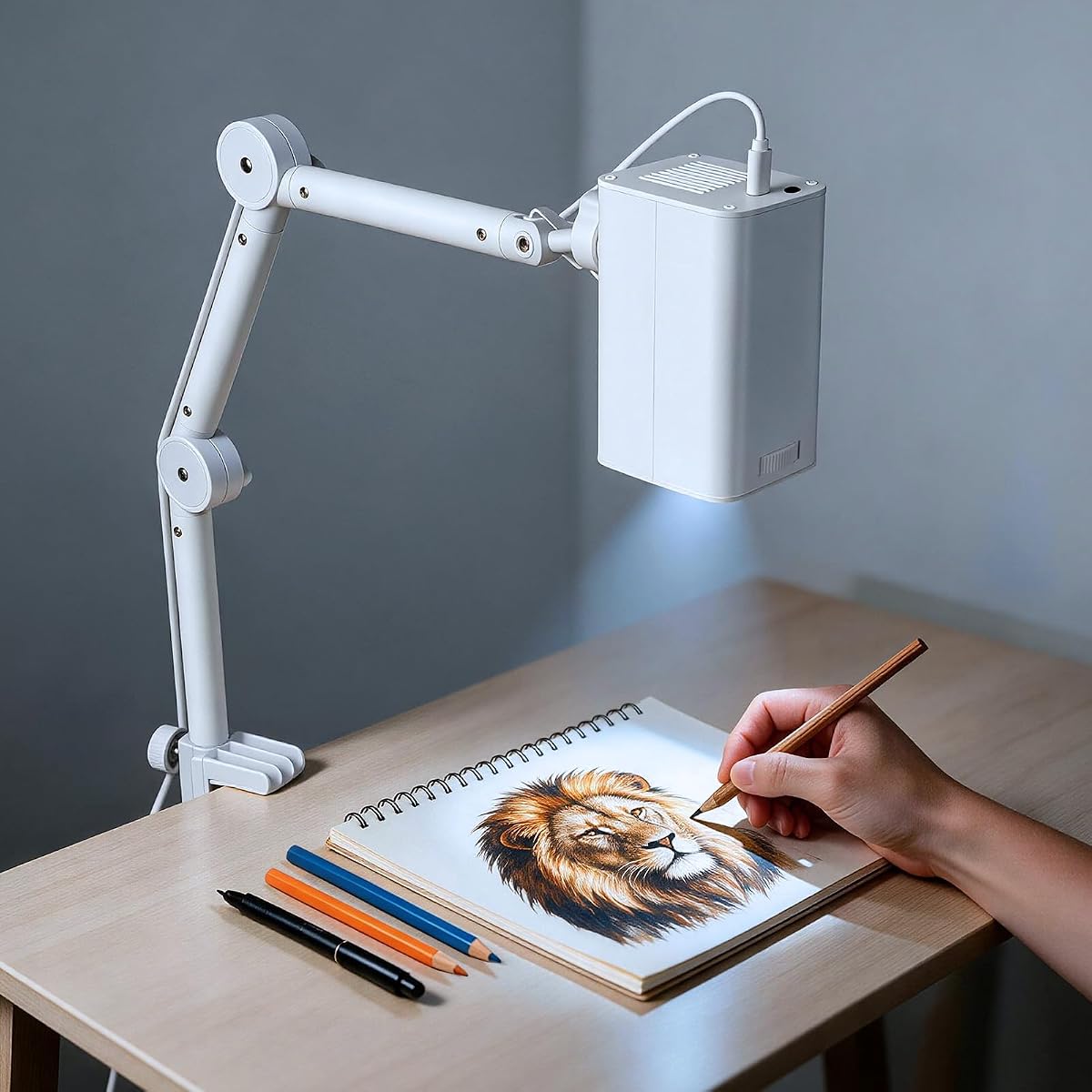
The Art Projector for Tracing, Drawing & Painting is explicitly listed as suitable for sewing patterns, making it one of the most purpose-driven choices in the guide. Its 3.7 rating is the lowest among the ten products in the supplied information, but the feature set closely addresses tracing work: 1280 by 720 resolution, 4K video playback, image rotation, zoom, line-art extraction, right-angle marking, and adjustable projection size.
We may earn a commission when you buy through this link, at no additional cost to you.
The included image-processing tool is the main distinction from general entertainment projectors. A sewist can reduce visible distractions in a photographed pattern, establish a right-angle reference, rotate the source, and scale it to the intended fabric area. These controls save time compared with manually cropping and arranging every file in a separate application, although they do not guarantee perfect automated alignment.
Connection options include phone-to-projector upload, HDMI, USB plug-and-play, wireless phone mirroring, and use of the included USB drive. That mix supports both live mobile workflows and offline files, which is useful when a studio or classroom has unreliable internet. The four-section telescopic stand extends from 15 to 40 inches, giving this unit a tall, narrow footprint that can reach a desktop, canvas, banner, or wall.
The stand requires a tabletop edge no more than 2.4 inches thick or protruding so the clamp can grip securely. That limitation matters because many kitchen tables have overhanging edges. Overall, this projector earns the budget designation not because of its rating, but because it offers more pattern-specific functionality than many higher-rated general projectors and includes the tools needed to move from a digital reference to a traceable image.
Line extraction, right-angle marking, rotation, and zoom address common problems encountered when a photographed or digital pattern is not ready for projection. These functions are more useful for sewing than generic streaming features.
The four-section stand can rise to 40 inches, allowing the image to be placed over a cutting table or fabric without a separate tall shelf. Users should confirm the clamp can safely attach to the intended table edge.
We may earn a commission when you buy through this link, at no additional cost to you.
The KODAK Luma 150 Mini Projector Kit has a 5.0 rating in the supplied data, making it the highest-rated product in the group. It is packaged for creative positioning with an adjustable tripod and an articulating arm clamp, two accessories that can materially improve the accuracy of a sewing-pattern projection. The kit also supports HDMI, USB, and microSD inputs.
We may earn a commission when you buy through this link, at no additional cost to you.
The included mounting options distinguish it from basic pocket projectors. A tripod provides a stable center point when projecting onto a worktable, while the articulating arm clamp can suspend or brace the projector where a conventional stand cannot reach. Precise positioning matters because even a small vertical or horizontal error can shift notches, darts, grain lines, and labels across a large projected image.
Wireless streaming compatibility with Android, iOS, and Windows allows users to choose among phones, tablets, and computers. The RGB LED light source is listed with a 30,000-hour lifespan, and the built-in 1-watt speaker provides basic audio without requiring an external speaker. These entertainment features broaden the unit’s use beyond sewing and presentations.
The product information does not list dedicated art-assistance software, grid overlays, or line extraction, and it does not identify a rechargeable battery. Consequently, its strongest advantage is the physical kit and positioning flexibility rather than built-in pattern editing. It is best recommended for sewists who value precise mounting and straightforward media connections, and who already have a reliable app or computer workflow for preparing pattern images.
A tripod and articulating arm clamp provide two ways to establish a repeatable projection position. That can reduce repeated table adjustments and help keep the image aligned with a long piece of fabric.
HDMI, USB, and microSD inputs cover computers, flash storage, and compatible media. The kit is particularly convenient for users who prefer a stable wired source over live wireless mirroring.
We may earn a commission when you buy through this link, at no additional cost to you.
The BESGEER Tufting Projector is tailored to tracing intricate designs onto rug cloth, carpet, and upholstery. Its 4.1 rating, 1280 by 720 resolution, and 120 ANSI lumens support a focused creative use, while the stated four-to-14-foot adjustment range is especially relevant when a large textile must be filled with a repeated image.
We may earn a commission when you buy through this link, at no additional cost to you.
A 50-percent zoom function helps users scale a pattern without immediately moving the projector. The projector also includes adjustable focus and keystone correction, which are essential when combining a large work area with a limited desktop footprint. USB connectivity supports phones, tablets, computers, and laptops, while WiFi provides screen mirroring and Bluetooth 5.2 supports wireless audio.
Its stated 20-decibel cooling system is a meaningful feature for quiet work environments. The compact 4.1 by 5.7 by 5.5-inch body and listed 1.63-pound weight are manageable for an art studio or mobile craft setup. The projector also supports streaming platforms and home-theater use, making it a broader creative tool rather than a tracing-only device.
The title uses 1080p terminology, while the detailed feature description specifies 1280 by 720 resolution. Buyers should therefore judge the actual pattern detail from the stated 720P output and 120 ANSI lumens rather than assume full native 1080P. The projector is best for sewists and textile artists who need to cover broad fabric or carpet surfaces and value quiet operation, zoom, and a generous distance range.
The four-to-14-foot working range gives the projector more reach than a compact desktop model. It is a better match for broad rug cloth, carpet, or upholstery than for tracing only a small page-sized reference.
The listed low-noise cooling system is useful when the projector runs beside a work surface for an extended session. Users can focus on the outline rather than persistent fan noise.
We may earn a commission when you buy through this link, at no additional cost to you.
The App-Free White Art Projector for Tracing and Drawing emphasizes simple access through a web browser instead of a dedicated mobile application. With a 4.0 rating, it offers a practical alternative for users who do not want to download software, create accounts, or manage app storage before tracing a reference.
We may earn a commission when you buy through this link, at no additional cost to you.
After the projector starts, a phone, tablet, or laptop joins the WiFi network generated by the device. A browser session then provides controls for dragging, zooming, and rotating the reference image by as much as 360 degrees. The dual-band 2.4G and 5G chip is listed as supporting a stable connection, while the adjustable stand helps position the projected image over canvases, sketch paper, desktops, walls, or cake surfaces.
The image controls are more relevant to sewing than a basic screen-mirroring projector because rotation and scaling are part of every pattern setup. A user can compensate for the orientation of a phone photograph and resize the pattern without leaving the browser-based control page. The white finish is also presented as practical for a studio, with a surface designed to resist fingerprints and wipe clean.
A clear limitation is that the projector requires a plugged-in power source, so it is intended for a stationary workspace rather than portable tracing. The product information also does not state a native resolution or brightness figure. Users who need specific numeric performance should verify those details, but the app-free setup, flexible stand, and browser controls make this a approachable dedicated art projector for continuous craft work.
Browser-based control removes the need to install creative software on every connected device. This is convenient when a sewing room has a shared computer or when a guest needs to project a reference quickly.
Dragging, zooming, and rotating the source are the essential controls for aligning a pattern with fabric. Their availability directly in the browser shortens the path from opening an image to beginning a trace.
We may earn a commission when you buy through this link, at no additional cost to you.
The 5G WiFi Art Projector for Tracing and Drawing is built around fast, app-free control. Its 3.8 rating places it in the middle of the group, but its dual-band 2.4G and 5G module, web-based interface, and support for both online and offline connections make it relevant to sewists working in studios, classrooms, or locations without dependable internet.
We may earn a commission when you buy through this link, at no additional cost to you.
Users scan a QR code and use a phone or tablet browser to adjust image rotation, scaling, and projection settings. A dedicated focus-adjustment button provides manual control over the focal length, which is useful when moving between different surfaces. The advertised workflow is intended to mirror intricate lines and complex sketches with real-time accuracy, although actual results depend on lighting, distance, focus, and source quality.
The sturdy adjustable mount changes height and tilt for horizontal canvases, small crafts, and vertical walls. That flexibility is especially helpful when the pattern must be aligned to a cutting mat, fabric panel, or drafting surface. The projector can function online or locally, preserving an offline workflow when a studio connection is unavailable.
The supplied details do not include a native resolution, brightness value, or included image-processing functions beyond rotation, scaling, settings, and focus. Those omissions make the specification list less complete than those of some art-focused alternatives. Even so, the combination of browser control, offline capability, manual focus, and adjustable positioning creates a compelling package for tracing users who prioritize low-friction setup.
Dual-band WiFi supports live, low-latency control when a network is available, while offline operation keeps the projector useful in remote or poorly connected settings. This makes the workflow less dependent on the surrounding environment.
A physical focus control lets the user fine-tune the image after changing the projector’s distance or target surface. That is useful for preserving the clarity of small pattern marks and labels.
We may earn a commission when you buy through this link, at no additional cost to you.
The Caydo M1C Art Projector for Artists is the most complete dedicated creative package in this guide. Its 4.2 rating, built-in drawing app, 110 ANSI lumens, adjustable image sizes from 10 to 100 inches, and rechargeable 8000mAh battery collectively cover the main requirements of a flexible sewing-pattern workflow.
We may earn a commission when you buy through this link, at no additional cost to you.
Its exclusive art software includes zoom, rotation, a 3-by-3 grid, three background colors, and four drawing modes: Gridify, Sketchify, Comicize, and Monochromize. For pattern work, the grid and sketch-style processing are especially relevant. They can simplify a photographed image or establish a reference structure before the outline is transferred to fabric. The manufacturer recommends updating the app to version 1.8 for the best experience.
Images can be transferred by scanning a QR code or through a USB drive, which allows the user to prepare the pattern file before sitting down to trace. The projector also supports EShare, AirPlay, and Miracast for screen mirroring. Its 110-ANSI-lumen LED lamp is listed for a service life of up to 30,000 hours, while the rechargeable battery supports up to 2.5 hours of cordless playback.
The package includes a tripod, adaptor, HDMI cable, remote, and user manual, giving buyers a more complete setup than several competitors. Protected entertainment from services such as Netflix and Hulu cannot be mirrored through the listed wireless or HDMI routes, a limitation unrelated to personal sewing files. Overall, the M1C combines intuitive creative preparation, flexible projection size, cordless convenience, and strong accessories, making it the most balanced overall recommendation for sewists.
The drawing app processes the reference before it reaches the fabric. Grid, sketch, monochrome, and comic-style options make it easier to isolate the most useful visual information from a busy photograph.
The 8000mAh battery allows up to 2.5 hours of cordless operation. A sewist can therefore move the projector to a different cutting surface without making the pattern workflow dependent on one permanent station.
We may earn a commission when you buy through this link, at no additional cost to you.
The App-Free Tracing Projector offers a direct approach to pattern projection through browser-based controls rather than a dedicated application. Its 4.0 rating reflects solid customer feedback, while the listed features focus on the essentials: accurate tracing from a phone or tablet, rotation, scaling, manual focus, and flexible placement.
We may earn a commission when you buy through this link, at no additional cost to you.
After scanning a QR code, users can manage projection settings, rotate the image, and adjust its scale through a web browser. The dual-band chip is certified with an FCC ID and is intended to provide a high-speed, low-latency connection when mirroring intricate lines and complex sketches. A manual focus button allows the image to be sharpened after changing the distance or surface.
Online and offline functionality makes the projector useful in a professional studio, a home workspace, or a remote area without WiFi. The adjustable stand supports horizontal canvases, vertical walls, and small DIY crafts by altering height and tilt. Although the description does not explicitly mention sewing, its image controls and surface positioning apply directly to enlarging and tracing garment patterns.
The product information lacks native resolution, brightness, and battery specifications, so buyers who require exact technical values should confirm them before purchase. It is also a wired creative tool unless an unstated power method is used, making it best suited to a permanent workstation. For a user who values an app-free interface and clear basic controls more than advanced creative modes, it remains a practical tracing option.
Rotation and scaling are available through the browser without a separate creative application. This keeps the setup approachable and allows the same workflow across iOS and Android devices.
Local operation prevents a weak internet connection from interrupting pattern preparation. That is valuable for sewists whose creative references are already stored on a phone or tablet.
We may earn a commission when you buy through this link, at no additional cost to you.
The right projector depends on the size of your fabric, the complexity of your patterns, the darkness of your workspace, and how often you move between cutting surfaces. These factors help separate a dedicated tracing system from a general-purpose mini projector.
A sewing-pattern projector should make a source image easy to position at the required scale. Look for controls for zooming, rotating, dragging, and maintaining straight edges. Dedicated art tools such as grid overlays, right-angle markers, line-art extraction, sketch processing, or background removal can make a photographed pattern more legible. These features do not replace careful checking, but they reduce the preparation needed before the image reaches the work surface.
Prioritize clear image adjustment over features intended only for streaming.
Resolution determines how much information can be retained when an image is enlarged. A native 1280 by 720 projection is the minimum listed among several dedicated art projectors in this guide, while some general models support 1080P or 4K playback. Playback support and native resolution are not always the same, so distinguish the two when reading specifications. Fine text, seam allowances, and notches still require a crisp source image and careful focus.
Choose the resolution that supports your typical pattern scale without excessive enlargement.
ANSI brightness provides a more useful indication than vague terms such as high brightness, although room conditions still matter. Listed outputs range from 100 ANSI lumens on the Aurzen ZIP to 200 ANSI lumens on the AKIYO and Magcubic models. A dim sewing room generally produces a clearer image, but a brighter model offers more flexibility if the workspace cannot be darkened. Dark fabric and pale fabric may require different exposure and source-image adjustments.
Match brightness to the room, and plan to control direct light when possible.
The largest garment pattern may require more than the image size available from a compact desktop projector. The BESGEER model lists a four-to-14-foot adjustment range, while the Caydo M1C supports images from 10 to 100 inches. Consider the width of the cutting table, the length of the fabric, and the space available for the projector itself. Zoom and digital scaling help, but they cannot replace enough physical distance for a large pattern.
Map the projected dimensions to your work area before choosing a model.
A pattern that looks sharp but is slightly trapezoidal can still be difficult to follow accurately. Automatic focus, manual focus, and keystone correction help maintain clarity and rectangular geometry. The Aurzen ZIP uses ToF autofocus, while several art projectors include manual focus controls. If the device will be moved often, automatic focus saves time; if it remains in one position, manual focus can provide more deliberate control.
Test both focus and keystone controls before starting a full garment.
The projector must sit high enough to project over the sewing machine, cutting mat, or fabric roll. An adjustable table stand works for flat work, while a tripod, articulating arm clamp, ceiling projection, or rotating body may be necessary for larger layouts. Check clamp thickness limits and the stability of the surface. A narrow, flexible stand may be easier to store but more sensitive to accidental movement.
Choose mounting support that can reach the target without blocking the image.
Decide whether you will work from a computer, tablet, phone, USB drive, or streaming device. Wired HDMI and USB connections can be more stable, while WiFi and direct mirroring offer convenience. App-free browser control is helpful when you do not want to install software or when several people share the projector. Direct, no-network mirroring is valuable in studios with unreliable wireless service. Ensure the chosen method works with your usual file format and device.
Prioritize a connection method that matches your existing pattern library.
If the projector stays beside a cutting table, continuous power and a stable stand may matter more than battery life. Portable patterns benefit from a compact body, folding stand, and rechargeable battery. The Aurzen ZIP is listed for up to 1.5 hours in eco mode, while the Caydo M1C is listed for up to 2.5 hours of cordless playback. Larger work sessions may require charging or continuous power, depending on the model.
Balance battery convenience with the length of your typical tracing session.
Begin by choosing a large, flat work surface and protecting it from heat, dust, and accidental paint or adhesive. Place the projector on a stable support, connect the appropriate power cable, and position the unit above the center of the intended pattern area. Turn on the projector, select the source device, and adjust the focus and keystone before opening the pattern file. This prevents a large image from appearing crisp at the center but becoming distorted at the edges.
Prepare the pattern in a phone, tablet, or computer by removing unnecessary borders, correcting its orientation, and checking that small labels and notches remain legible. Open the projector’s art controls or browser interface, rotate the image to match the grain line, and scale it until the pattern is the intended size. Use a ruler to verify the printed dimensions rather than relying entirely on the on-screen scale. Once aligned, secure the source and avoid moving the projector or fabric.
Trace with a light, erasable marking tool and test the mark on a scrap of the actual fabric first. Keep the projector’s ventilation openings clear, and do not cover the unit with fabric or fabric-handling tools. Clean the lens only with a safe soft cloth and follow the manufacturer’s cleaning guidance. When finished, power down properly, remove the pattern, disconnect the source, and store the projector in a dry area with adequate space around its vents.
Yes, provided the source image can be displayed and the projected image is large enough for the pattern. A general mini projector can work, but a dedicated art projector is more convenient because it offers image rotation, scaling, grids, or simplified line-art controls. Brightness, focus, and a stable elevated position are more important than entertainment features.
The Caydo M1C offers the broadest dedicated creative workflow in this group, including a drawing app, multiple display modes, grid assistance, and flexible image sizing. The KODAK Luma 150 is also strong for users who prioritize included positioning accessories. The right choice ultimately depends on whether app-assisted preparation or precise physical mounting matters more to your sewing setup.
A brighter projector makes a room with daylight easier to use, but controlled lighting remains important for faint or fine pattern lines. Models listed with 200 ANSI lumens offer more flexibility, while 100- and 120-ANSI-lumen options work best in dim rooms. For dark fabric, adjusting the source image can also improve the contrast of the projected outline.
Several products in the guide offer direct or network-free mirroring. The AKIYO includes P2P direct connection, and the Aurzen ZIP supports one-click mirroring without WiFi. Compatibility can vary by operating system and device, so check the current product information and test the connection before beginning a long tracing session.
4K support means the projector can accept or play 4K-compatible media, while native resolution describes the resolution it actually renders. Several listings use both terms, and one product describes 720P native output with 1080P support. For pattern tracing, native resolution, focus, source quality, and projected size should all be considered rather than relying on a single headline number.
The image should match the actual dimensions of the pattern piece once scaled for the intended fabric. A larger projection can help with visibility, but excessive enlargement may reveal pixelation and make small markings harder to read. Verify the scale with a physical ruler and make sure the entire pattern fits within the projected area.
Yes. The two app-free art projectors and the 5G WiFi model provide browser-based control after connecting to the generated WiFi network. The Aurzen ZIP also supports one-click mirroring without WiFi. These approaches can be especially useful in shared studios, classrooms, or locations where installing additional software is inconvenient.
You can trace the projected pattern and then cut along the transferred marks, but cutting directly over a live projection can be risky if the image shifts. Align and verify the projection, mark the fabric with an appropriate temporary tool, confirm the scale, and remove the fabric before cutting whenever possible.
The Caydo M1C stands out as the most complete all-around choice because its dedicated drawing app, multiple creative modes, QR and USB transfers, flexible image size, and rechargeable battery cover nearly every stage of a modern tracing workflow. The KODAK Luma 150 is an attractive premium option for sewists who want precise mounting hardware and dependable media inputs, while the dedicated Art Projector for Tracing, Drawing & Painting offers the strongest budget-oriented feature set.
Your priority should match your actual work. Choose a dedicated art projector when pattern preparation and image controls are central, a brighter general projector when you need more entertainment flexibility, and a compact battery-powered model when portability is essential. Before purchasing, measure the cutting area, check the projector’s focus and correction tools, verify source compatibility, and make sure the stand can hold the unit securely above the fabric.
Customer ratings and product specifications can evolve, while prices and promotions change frequently. Check the current Amazon listing for updated details, package contents, compatibility notes, and current feedback before ordering. Taking a few minutes to prepare the pattern file and test the projector on a small section can prevent avoidable scaling, focus, and alignment problems later.